
Privacy-first, local-only oral history transcription.
Verified details
These details have been verified by PyPIProject links
GitHub Statistics
Maintainers

Project description






Lore 🎙️
Privacy-First, Local-Only Oral History Transcription & Archiving
Lore is a desktop application designed for historians, archivists, and researchers. It provides state-of-the-art AI transcription, speaker diarization, named entity recognition, and translation—100% offline, on your own hardware.
No data leaves your computer. No cloud subscriptions. Just powerful, open-source AI packaged into a clean, intuitive PyQt6 interface.

✨ Features
- 🎧 Offline Transcription: Powered by
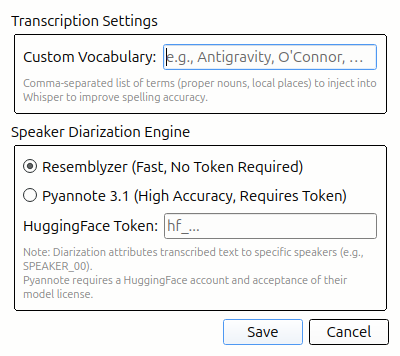
faster-whisper, optimized for CPU inference with low memory overhead (< 8GB RAM). - 🗣️ Speaker Diarization: Automatically identifies and labels different speakers using
pyannote.audio. - 🔍 Word-Level Confidence: Low-confidence words are visually highlighted so you can quickly spot potential hallucinations.
- 🌍 Local Translation: Translate transcripts to over 200 languages completely offline using Meta's
NLLB-200model. - 📖 Custom Vocabulary: Provide local jargon, proper nouns, and historical terms to guide Whisper's decoding graph for maximum accuracy.
- 🏷️ Named Entity Recognition: Uses
GLiNERto automatically extract people, organizations, dates, and locations. - 📦 Archival Exporting: Export your work to the OHMS XML format or create an RFC 8493 BagIt archival package with SHA-256 checksum verification.
- 🔎 Global Archive Search: A unified SQLite database (
FTS5+sqlite-vec) lets you instantly search across all your past projects using keyword or semantic/conceptual search.
🚀 Installation
Option 1: Pre-built Installers (Recommended)
Download the installer for your platform from the latest release:
| Platform | Installer |
|---|---|
| 🪟 Windows | lore-windows-x86_64.zip — Extract and run lore.exe |
| 🍎 macOS | lore-macos-arm64.tar.gz — Extract and run lore |
| 🐧 Linux | lore-linux-x86_64.tar.gz — Extract and run lore |
Option 2: Install from PyPI
pip install lore-ai
lore
Option 3: Install from Source
Lore requires Python 3.12+ and is cross-platform (Windows, macOS, Linux).
-
Clone the repository:
git clone https://github.com/mabo-du/lore.git
cd lore
-
Set up a virtual environment:
python -m venv .venv
source .venv/bin/activate  # On Windows: .venv\Scripts\activate
-
Install the application:
pip install -e .
🎮 Usage
Start the Lore application:
lore
Or launch from your system's application menu if installed via the pre-built installer.
-
Select an Audio File: Click "Browse" to select any standard audio format (WAV, MP3, M4A, OGG, FLAC).
-
Configure Settings: Click the ⚙️ Settings icon to set your Custom Vocabulary and speaker diarization preferences.
-
Transcribe & Diarize: Click "Transcribe" on the toolbar. If recording has multiple speakers, check the "Enable Speaker Diarization" box.
-
Edit & Review: Play the audio, click on segments to edit them, and review any low-confidence words highlighted in red.
-
Translate: Select a target language from the dropdown and click "Translate" for fully offline translation.
-
Export: Fill out the Metadata panel and export to OHMS XML or an Archival BagIt Package.
For detailed instructions, see the User Guide.
🏗️ Architecture
Lore is designed with strict sequential memory management to run on older hardware.
- Models are loaded into memory one at a time (e.g., Whisper loads, transcribes, unloads → NLLB loads, translates, unloads).
- Heavy use of CTranslate2 (INT8 quantization) ensures models run blazingly fast without needing a dedicated GPU.
- The UI runs asynchronously using PyQt6's
QThreadand Signals, keeping the interface completely responsive during heavy AI workloads.
🤝 Contributing
Lore is an open-source project. We welcome pull requests, bug reports, and feature requests. Please see our User Guide for more detailed workflows and documentation on the codebase.
📜 License
This project is licensed under the MIT License - see the LICENSE file for details.
Project details
Verified details
These details have been verified by PyPIProject links
GitHub Statistics
Maintainers
Release history Release notifications | RSS feed

Download files
Download the file for your platform. If you're not sure which to choose, learn more about installing packages.
Source Distribution
Built Distribution
Filter files by name, interpreter, ABI, and platform.
If you're not sure about the file name format, learn more about wheel file names.
Copy a direct link to the current filters
File details
Details for the file lore_ai-0.1.2.tar.gz.
File metadata
- Download URL: lore_ai-0.1.2.tar.gz
- Upload date:
- Size: 37.1 kB
- Tags: Source
- Uploaded using Trusted Publishing? Yes
- Uploaded via: twine/6.1.0 CPython/3.13.12
File hashes
| Algorithm | Hash digest | |
|---|---|---|
| SHA256 |
f55c9d8656b92956e693c81b7a9efb9dd515cf7e307ab1e15054620e2fb3e95b
|
|
| MD5 |
249f9b8ce6e5befd633719821d877f2e
|
|
| BLAKE2b-256 |
a101a167acad4e9a72bb4aa027d630e5325b4731eb5c9b170a117039a2c6886c
|
Provenance
The following attestation bundles were made for lore_ai-0.1.2.tar.gz:
Publisher:
release.yml on mabo-du/lore
-
Statement:
-
Statement type:
https://in-toto.io/Statement/v1 -
Predicate type:
https://docs.pypi.org/attestations/publish/v1 -
Subject name:
lore_ai-0.1.2.tar.gz -
Subject digest:
f55c9d8656b92956e693c81b7a9efb9dd515cf7e307ab1e15054620e2fb3e95b - Sigstore transparency entry: 1794798046
- Sigstore integration time:
-
Permalink:
mabo-du/lore@0cc1825be43803f6d68d8bcc2e03c1570993f66b -
Branch / Tag:
refs/tags/v0.1.2 - Owner: https://github.com/mabo-du
-
Access:
public
-
Token Issuer:
https://token.actions.githubusercontent.com -
Runner Environment:
github-hosted -
Publication workflow:
release.yml@0cc1825be43803f6d68d8bcc2e03c1570993f66b -
Trigger Event:
push
-
Statement type:
File details
Details for the file lore_ai-0.1.2-py3-none-any.whl.
File metadata
- Download URL: lore_ai-0.1.2-py3-none-any.whl
- Upload date:
- Size: 43.6 kB
- Tags: Python 3
- Uploaded using Trusted Publishing? Yes
- Uploaded via: twine/6.1.0 CPython/3.13.12
File hashes
| Algorithm | Hash digest | |
|---|---|---|
| SHA256 |
30e8cd7581657beeb0c8917143882e0e1a985be12f907e6dc6f5ac9117bead19
|
|
| MD5 |
f6b745bddc31a47bdf3adc6628deff72
|
|
| BLAKE2b-256 |
e661c4b1861028d0ac6d1daa73e0f587e17161241c2d8b082c99987ff1cc75a9
|
Provenance
The following attestation bundles were made for lore_ai-0.1.2-py3-none-any.whl:
Publisher:
release.yml on mabo-du/lore
-
Statement:
-
Statement type:
https://in-toto.io/Statement/v1 -
Predicate type:
https://docs.pypi.org/attestations/publish/v1 -
Subject name:
lore_ai-0.1.2-py3-none-any.whl -
Subject digest:
30e8cd7581657beeb0c8917143882e0e1a985be12f907e6dc6f5ac9117bead19 - Sigstore transparency entry: 1794798722
- Sigstore integration time:
-
Permalink:
mabo-du/lore@0cc1825be43803f6d68d8bcc2e03c1570993f66b -
Branch / Tag:
refs/tags/v0.1.2 - Owner: https://github.com/mabo-du
-
Access:
public
-
Token Issuer:
https://token.actions.githubusercontent.com -
Runner Environment:
github-hosted -
Publication workflow:
release.yml@0cc1825be43803f6d68d8bcc2e03c1570993f66b -
Trigger Event:
push
-
Statement type:






