







lswifi is a CLI-centric Wi-Fi scanning tool for Windows and macOS that provides more information about nearby Wi-Fi networks than built-in tools (e.g. netsh wlan show networks). Examples include Received Signal Strength Indicator (RSSI), showing security AKMs and ciphers, decoding 802.11 IEs, revealing 6 GHz Reduced Neighbor Reports, and more. With capable Wi-Fi adapters, lswifi can detect and show networks in 2.4 GHz, 5 GHz, and 6 GHz bands.
Note: Recent versions of Windows add OFDM rates, RSSI, AKMs and ciphers, QBSS, and limited RNR information to netsh wlan output. lswifi still offers additional information, parsing, filtering, and output options.
Installation
Note: The Python Scripts directory must be added to the PATH environment variable.
> python -m pip install lswifi

macOS (preview): same install, python3 -m pip install lswifi; the CoreWLAN bindings come with it. macOS hides SSIDs, BSSIDs, and information elements unless Python has a Location Services grant, so use a signed Python such as the python.org installer (3.13 or newer) and allow it in System Settings > Privacy & Security > Location Services. Unsigned or ad-hoc builds (for example, uv-managed Pythons) get redacted results.
Usage
Output nearby Wi-Fi networks:
> lswifi
Output nearby Wi-Fi networks that have a detected signal of -60 dBm or stronger:
> lswifi -t -60
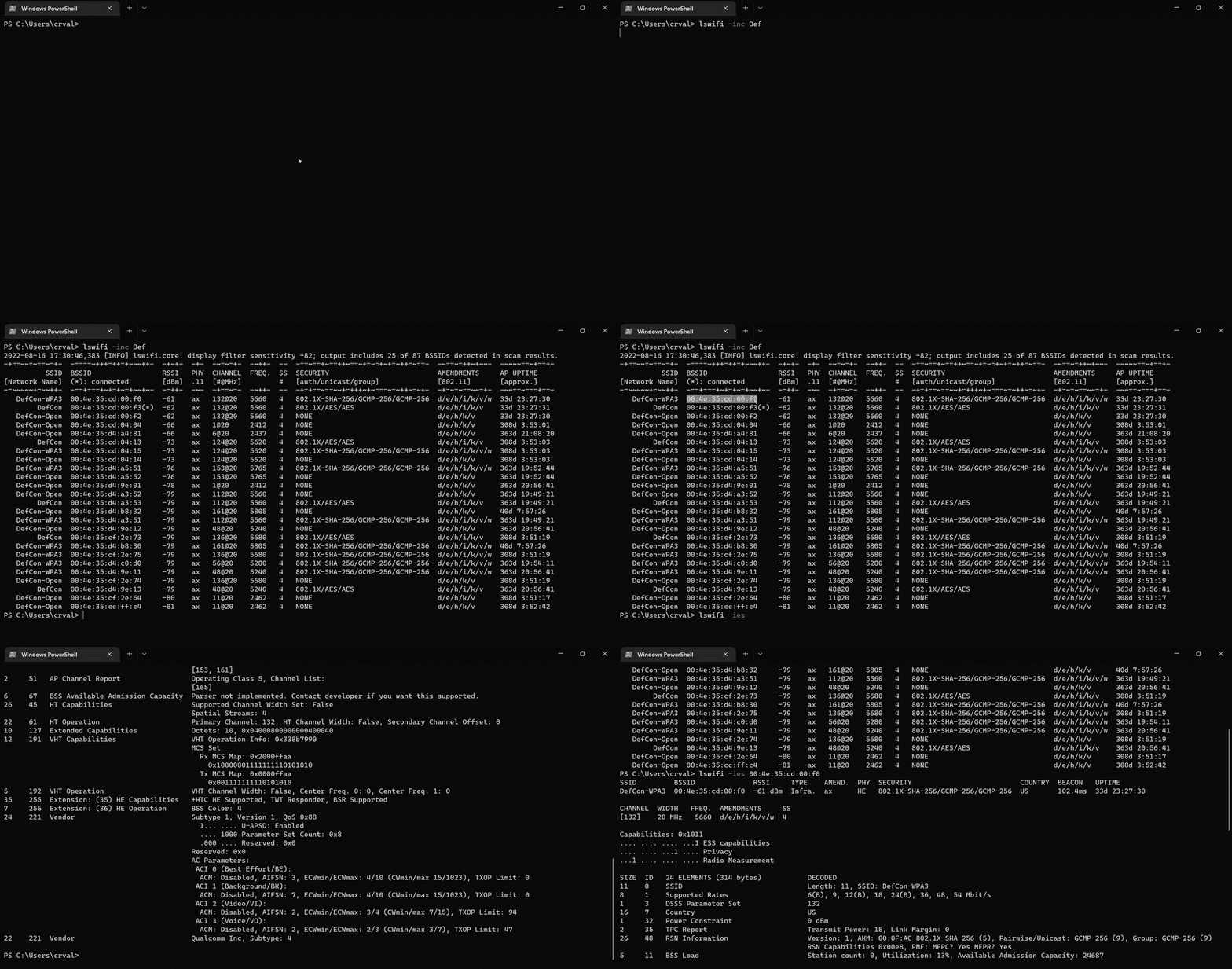
Output only networks that match SegaGenesis (partial match support):
> lswifi -include SegaGenesis
Output verbose information (including Information Elements) for BSSID 00:00:00:00:00:00 (exact match):
> lswifi -ies 00:00:00:00:00:00
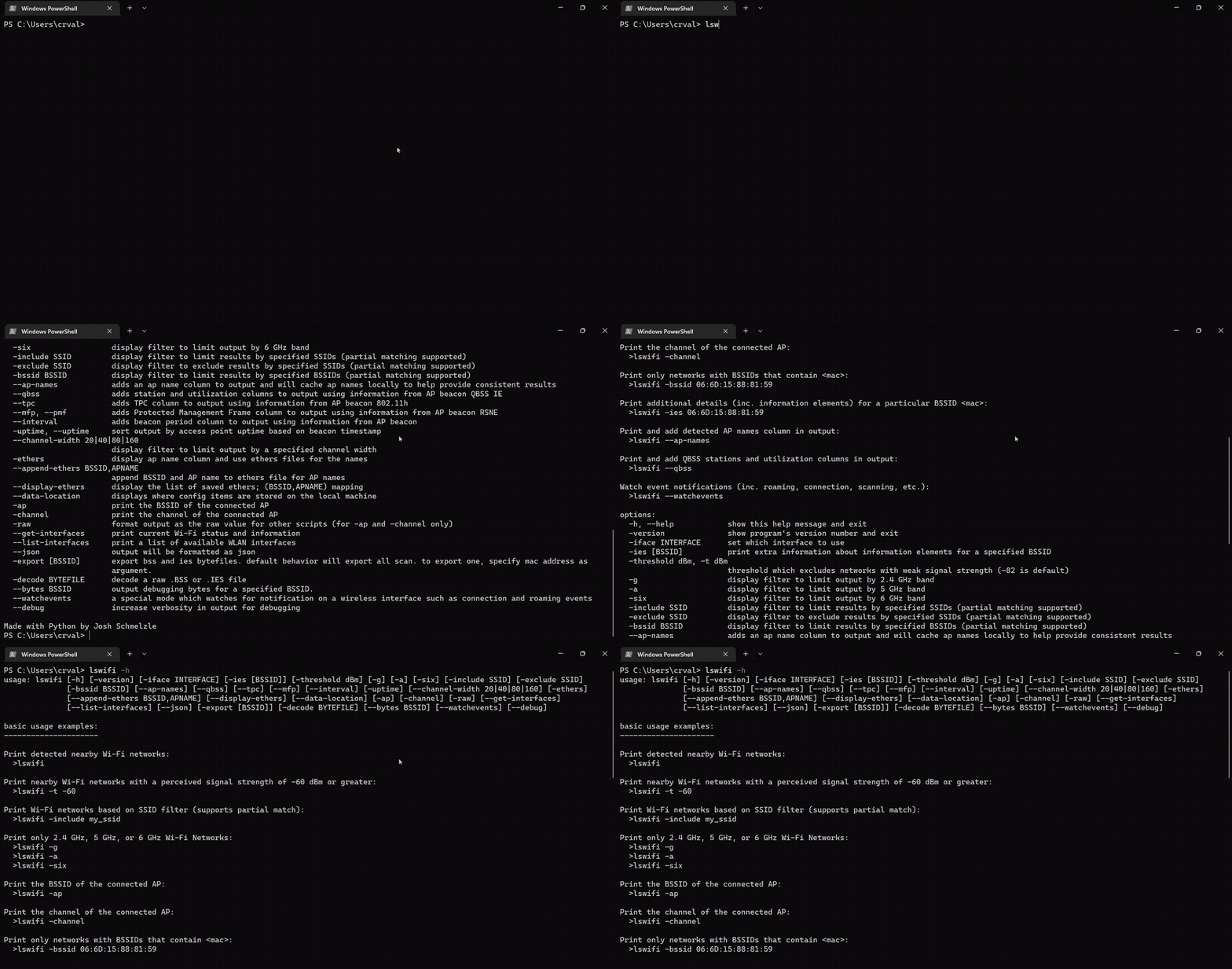
Print help information:
> lswifi -h
Print and add detected AP names column in output:
> lswifi --ap-names
Print and add detected AP names and QBSS column in output (try adding --mfp or --tpc too!):
> lswifi --ap-names --qbss
Print an alternative table for BSSes which may contain 6 GHz Reduced Neighbor Reports:
> lswifi -rnr
Watch event notifications (inc. roaming, connection, scanning, etc.):
> lswifi --watchevents
Export scan results to pcap:
> lswifi -export
PowerShell Tab Completion
To enable PowerShell tab completion for lswifi, run the following command in PowerShell:
lswifi completion powershell | Out-String | Invoke-Expression
To make this permanent, add the above command to your PowerShell profile. To find and edit your profile:
# View your profile location
$PROFILE

# Add the completion script to your profile
lswifi completion powershell | Out-String | Invoke-Expression >> $PROFILE

# Or edit manually
notepad $PROFILE
Then restart PowerShell or reload your profile:
. $PROFILE
CLI options
positional arguments:
  {completion}          commands
    completion          Generate shell completion script

CLI options
-----------

```ascii
positional arguments:
  {completion}          commands
    completion          Generate shell completion script

options:
  -h, --help            show this help message and exit
  -version, --version, -V
                        show program's version number and exit
  -n, --scans #         set how many scans to do before exiting
  --time #              set test in seconds to perform scans for
  -i, --interval #      seconds between scans
  -ies [BSSID]          print extra information about information elements for a specified BSSID
  -threshold, -t -82    threshold which excludes networks with weak signal strength from results (-82 is default)
  -all                  remove threshold filtering which excludes results with weaker signal
  -g                    display filter to limit output by 2.4 GHz band
  -a                    display filter to limit output by 5 GHz band
  -six                  display filter to limit output by 6 GHz band
  -include, -inc SSID   display filter to limit results by specified SSIDs (partial matching supported)
  -exclude, -exc SSID   display filter to exclude results by specified SSIDs (partial matching supported)
  -bssid, -bss BSSID    display filter to limit results by specified BSSIDs (partial matching supported)
  --ap-names            adds an ap name column to output and will cache ap names locally to help provide consistent results
  --qbss                adds station and utilization columns to output using information from AP beacon QBSS IE
  --tpc                 adds TPC column to output using information from AP beacon 802.11h
  --period              adds beacon period column to output using information from AP beacon
  --uptime, -uptime     sort output by access point uptime based on beacon timestamp
  -rnr, --rnr           special mode to create an alternate table based on RNR results
  --channel-width 20|40|80|160|320
                        display filter to limit output by a specified channel width
  -ethers               adds an ap name column to output and use an ethers file for the ap names
  --append-ethers BSSID,APNAME
                        append BSSID and AP name to ethers file for AP names
  --display-ethers      display the list of saved ethers; (BSSID,APNAME) mapping
  --data-location       displays where config items are stored on the local machine
  -ap                   print the BSSID of the connected AP
  -channel              print the channel of the connected AP
  -raw                  format output as the raw value for other scripts (for -ap and -channel only)
  --get-interfaces      print current Wi-Fi status and information
  --list-interfaces     print a list of available WLAN interfaces
  --json [JSON]         output will be formatted as json
  --indent 4            JSON output will be formatted with pretty print with provided indent level
  --csv [CSV]           output will be formatted as csv
  -exportraw, -expraw [BSSID]
                        export raw bss and ies bytefiles. default behavior will export all from a scan. to export only one, provide full mac address of the BSSID as argument.
  -export, -exp [BSSID]
                        export scan results to pcapng file. default behavior will export all from a scan. to export only one, provide full mac address of the BSSID as argument.
  -path EXPORT_PATH     specify output path for pcapng export (defaults to app data directory)
  -decoderaw BYTE_FILE  decode a raw .BSS or .IES file
  -decode PCAP_FILE     parse scan results from pcap/pcapng file. by default shows all networks in the file, can be combined with filtering options.
  --bytes BSSID         output debugging bytes for a specified BSSID found in scan results.
  --watchevents         a special mode which watches for notification on a wireless interface such as connection and roaming events
  --syslog <server IP>  syslogs events from --watchevents to a remote syslog server
  --debug               increase verbosity for debugging
1 maintainer

Metadata
1 maintainer
Release files for lswifi 0.2.1
For a detailed explanation of source distributions (sdists) and built distributions (wheels), please see the package formats documentation.
Source distribution (sdist)
| File | Size | Uploaded | Provenance | |
|---|---|---|---|---|
| lswifi-0.2.1.tar.gz | 157.2 kB | With provenance | Details |
Built distribution (wheel)
| File | Interpreter | ABI | Platform | Reset |
|---|---|---|---|---|
| lswifi-0.2.1-py3-none-any.whl | Python 3 | none | any | Details |
Total release size: 289.2 kB
Release files / lswifi-0.2.1.tar.gz
| Download URL | lswifi-0.2.1.tar.gz |
|---|---|
| Size | 157.2 kB |
| Tags | Source |
|
SHA-256 checksum How to use checksums |
2b080b095b7cbda933dc9c42bfe7064c1e5b53862d2526948e94e1a08c7d27f6
|
|
BLAKE2b-256 checksum How to use checksums |
fe0f2fcfaed3cb7810c076eb479831b23615267d6a83956bfe5369c4aa892de7
|
| Upload date | |
|
Uploaded using Trusted Publishing? What is trusted publishing? |
Yes |
| Uploaded via |
twine/7.0.0 CPython/3.13.16
|
Provenance
Provenance describes where a file came from. On PyPI, provenance is shared via attestations, which provide a verifiable record of the build or publishing details. View details, limitations and caveats.


PyPI Publish Attestation
PyPI verified that this artifact, at this checksum, originated from the publisher listed below.
Signed by GitHub Actions, verified by PyPI on Oct 23, 2026.
Transparency logRelease files / lswifi-0.2.1-py3-none-any.whl
| Download URL | lswifi-0.2.1-py3-none-any.whl |
|---|---|
| Size | 132.0 kB |
| Tags | Python 3 |
|
SHA-256 checksum How to use checksums |
165b7d5bfc1e80b1840d4d1664563b4d4c25092975feedfe69b1d7b9d9259a9e
|
|
BLAKE2b-256 checksum How to use checksums |
2fa186ac6ccbd2a0ce4fcb4bc9d86236a41a53af09eb67914f1372dfe4cc8085
|
| Upload date | |
|
Uploaded using Trusted Publishing? What is trusted publishing? |
Yes |
| Uploaded via |
twine/7.0.0 CPython/3.13.16
|
Provenance
Provenance describes where a file came from. On PyPI, provenance is shared via attestations, which provide a verifiable record of the build or publishing details. View details, limitations and caveats.
PyPI Publish Attestation
PyPI verified that this artifact, at this checksum, originated from the publisher listed below.
Signed by GitHub Actions, verified by PyPI on Oct 23, 2026.
Transparency logSecurity for lswifi 0.2.1
Provenance
Provenance describes where a file came from. On PyPI, provenance is shared via attestations, which provide a verifiable record of the build or publishing details. View details, limitations and caveats.
Full provenance
All 2 files in this release have been uploaded with provenance metadata.
Attestation for lswifi-0.2.1.tar.gz
PyPI Publish Attestation
PyPI verified that this artifact, at this checksum, originated from the publisher listed below.
Signed by GitHub Actions, verified by PyPI on Oct 23, 2026.
Transparency logA note on package security
PyPI is a repository for distributing packages, not a service for auditing them. While third-party security researchers and our staff do their best to detect and remove malicious packages, PyPI cannot guarantee the quality, security or suitability of any given package.
To learn more about protecting yourself from malicious actors, visit our package security documentation.














