
Lattice AI local MLX/cloud LLM workspace server

Project description

Your personal AI workspace server — local & cloud, one stack.







What is Lattice AI?
Lattice AI is a self-hosted AI server that unifies local and cloud LLMs into one workspace — web chat, VS Code extension, Telegram bot, and MCP tools, all from a single pip install.
- 🖥️ Web UI — chat, file upload, admin dashboard, data graph
- 🧩 VS Code / Cursor extension — edit, explain, generate commands inline
- 📱 Telegram bot — access your AI from anywhere
- 🔌 MCP server — use Lattice tools inside Claude Desktop / Cursor
- 🔒 Zero telemetry — all data stays in
~/.ltcai/on your machine
📸 Screenshots
Chat UI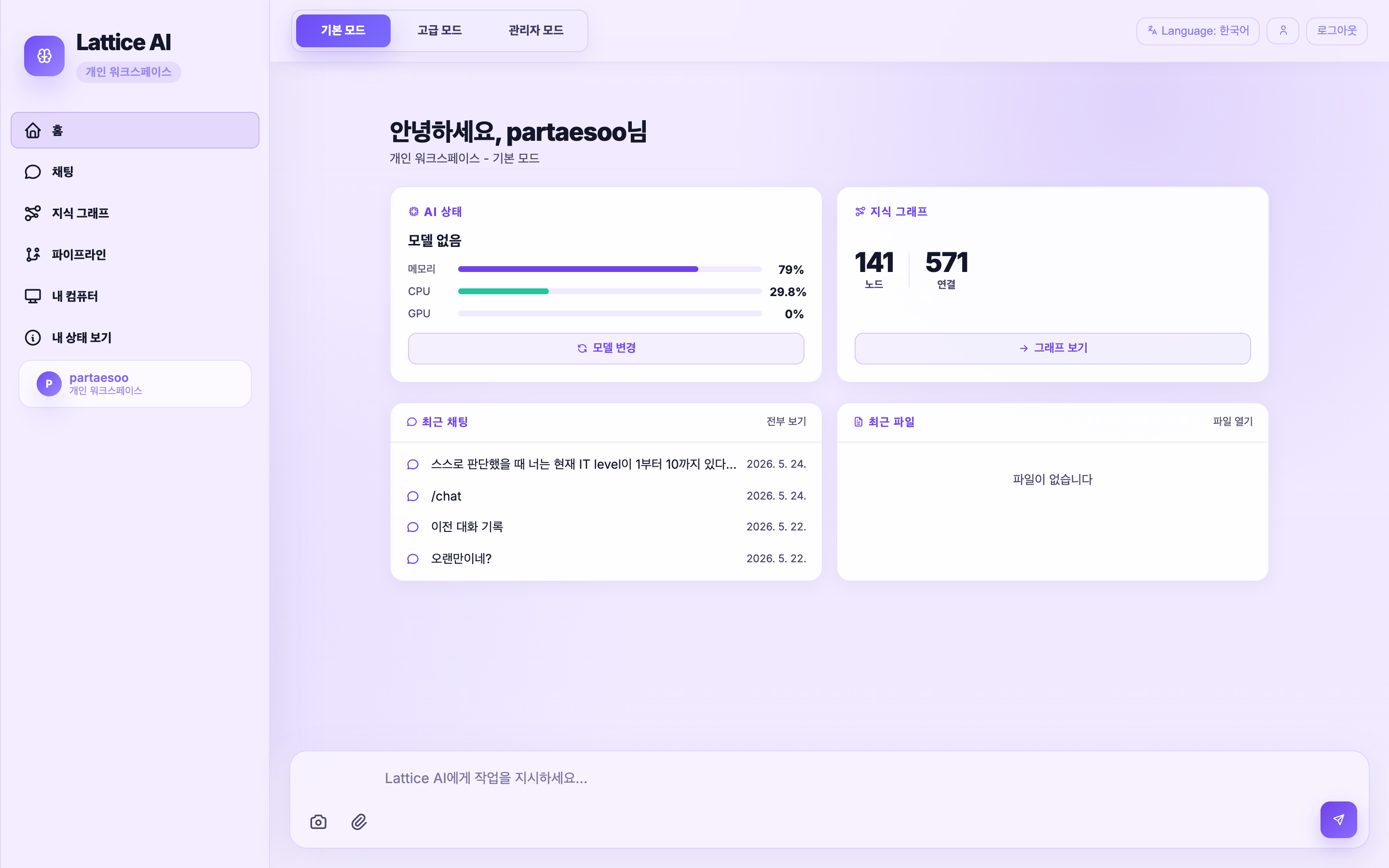 |
Admin Dashboard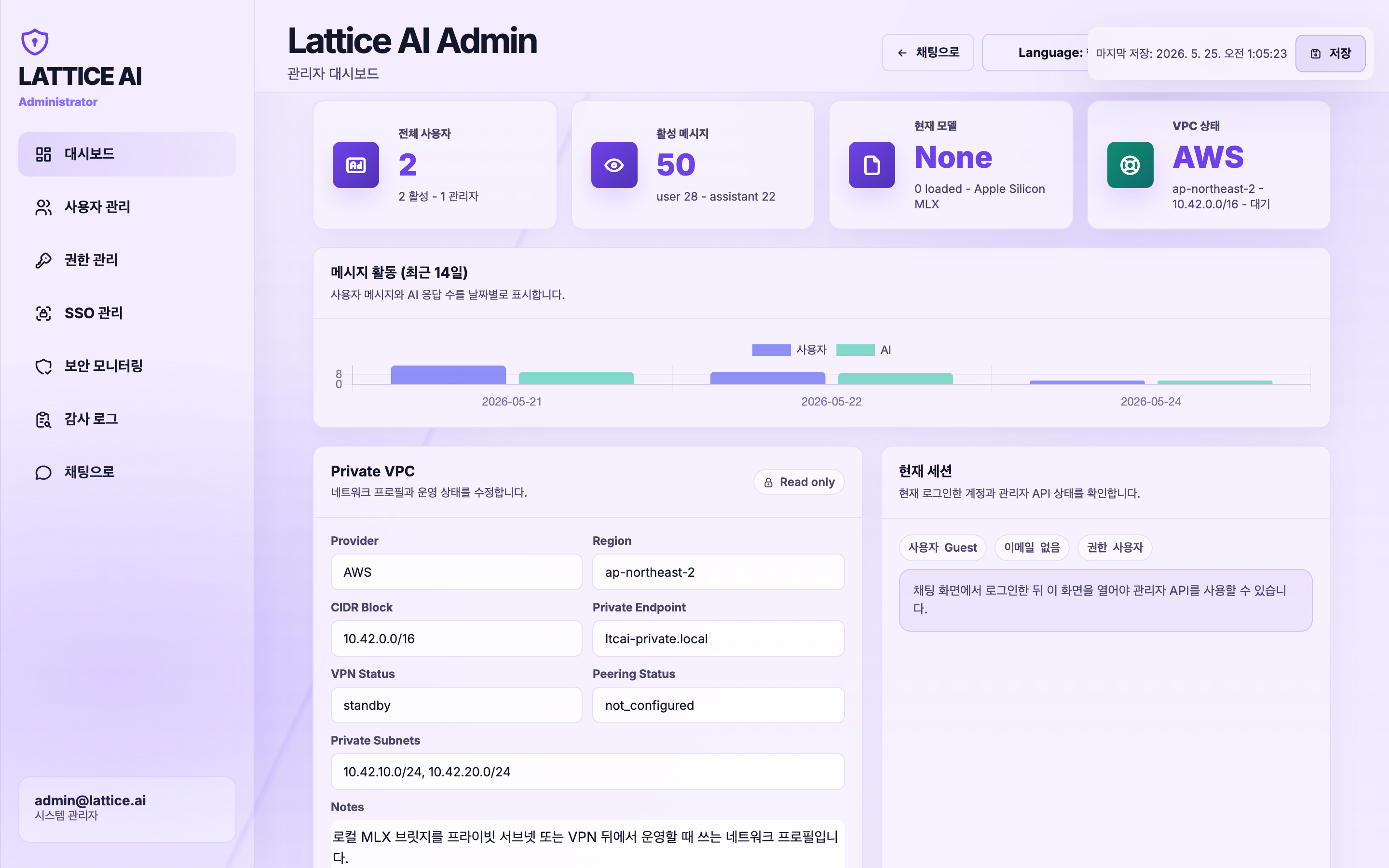 |
Data Graph (Graph RAG)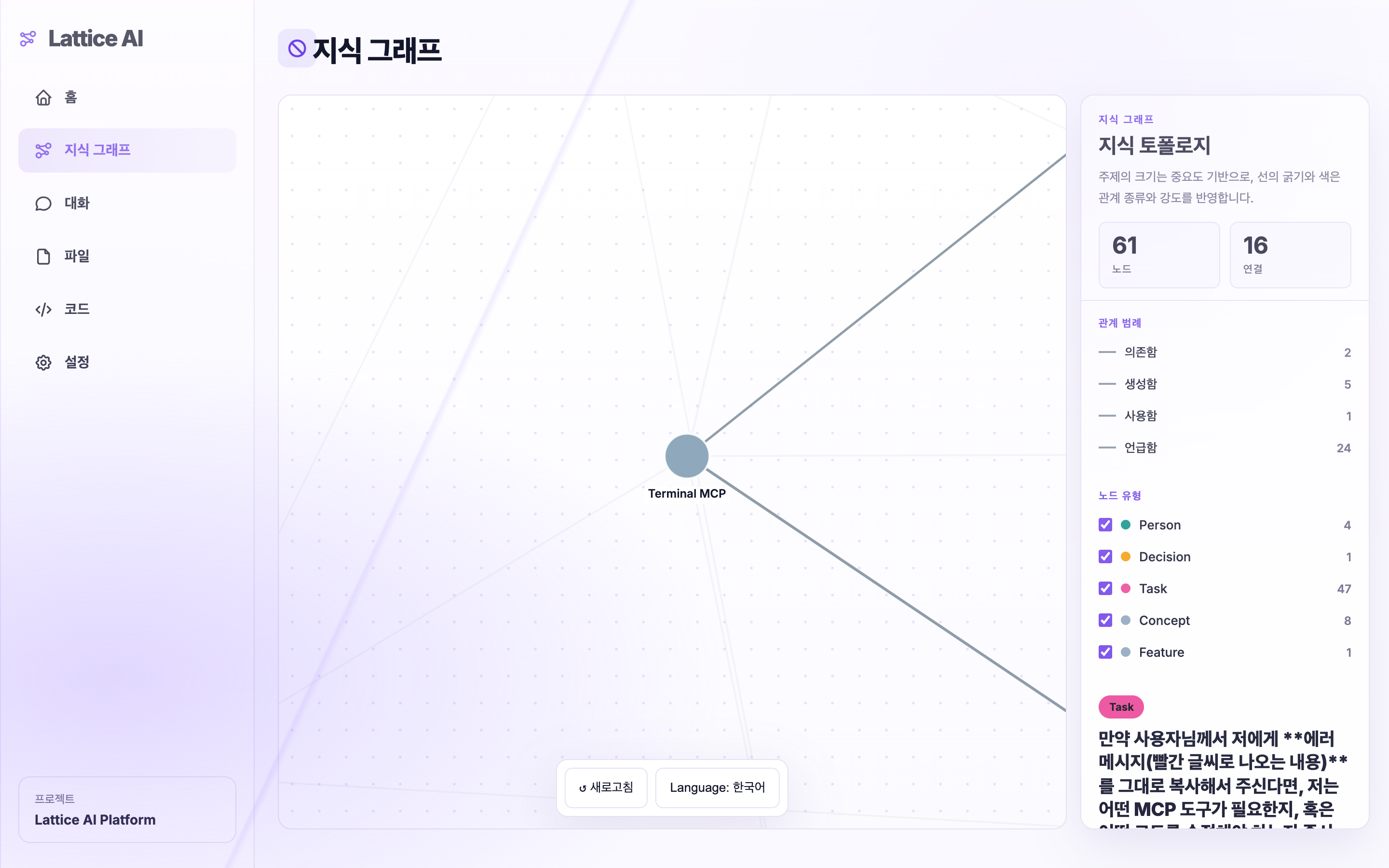 |
⚡ Quick Start (30 seconds)
Python / PyPI
# Install (cloud models)
pip install ltcai

# Install (+ Apple Silicon local models)
pip install "ltcai[local]"

# Verify environment
LTCAI doctor

# Start server
LTCAI
# → http://localhost:4825
Node / npm
npm install -g ltcai
LTCAI doctor
LTCAI
VS Code / Cursor
- Install Lattice AI from VS Code Marketplace or Open VSX
- Start the local server with
LTCAI - Run
Lattice AI: Open Chat(Cmd+Shift+A) in your editor
First run: open http://localhost:4825 → sign up → first account auto-becomes admin → pick a model → start chatting.
Public HTTPS tunnel (Cloudflare, no account needed):
LTCAI --tunnel
# → https://xxxx.trycloudflare.com
🆚 Why Lattice AI?
Comparison is based on public product behavior as of 2026-05.
| Lattice AI | Open WebUI | Continue.dev | GitHub Copilot | |
|---|---|---|---|---|
| Local model (offline, Apple Silicon) | ✅ | ✅ | ✅ | ❌ |
| Cloud models (OpenAI, Groq…) | ✅ | ✅ | ✅ | ✅ |
| VS Code extension | ✅ | ❌ | ✅ | ✅ |
| Telegram bot | ✅ | ❌ | ❌ | ❌ |
| Graph RAG (auto knowledge graph) | ✅ | ❌ | ❌ | ❌ |
| MCP registry & install | ✅ | ❌ | ✅ | ❌ |
| Admin dashboard + audit log | ✅ | ✅ | ❌ | ❌ |
| Self-hosted, zero telemetry | ✅ | ✅ | ✅ | ❌ |
| One-command public tunnel | ✅ | ❌ | ❌ | ❌ |
| Free | ✅ | ✅ | ✅ | ❌ |
🧠 Supported Models
Local — Apple Silicon only (MLX):
| Model | Best for | Size |
|---|---|---|
mlx-community/gemma-4-26b-a4b-it-4bit |
General / coding | ~14 GB |
mlx-community/Qwen2.5-Coder-32B-Instruct-4bit |
Coding | ~18 GB |
mlx-community/DeepSeek-R1-0528-4bit |
Reasoning | ~38 GB |
mlx-community/Phi-4-4bit |
Coding (fast) | ~8 GB |
Cloud (any platform): OpenAI · Groq · Together · OpenRouter · any OpenAI-compatible endpoint
✨ Features
| Feature | Description |
|---|---|
| Web UI | Responsive chat + admin panel + graph visualisation |
| Auto Setup Wizard | Detects → downloads → installs → verifies → repairs dependencies |
| VS Code / Cursor | Chat panel, Edit Selection, Explain, Generate command |
| Telegram bot | Local AI mirror + cloud Codex bot |
| MCP server | Use Lattice tools in Claude Desktop / Cursor |
| MCP registry | One-click install from registry.modelcontextprotocol.io |
| Skills marketplace | 77 official skills (Anthropic + Adobe · Airtable · Auth0 · Pydantic) |
| Plugin directory | Browse 149 open-source plugins |
| Graph RAG | Chat & docs auto-indexed as SQLite knowledge graph |
| Multi-step agent | File edit/create, grep, todo, terminal (25 steps) |
| Multi-LLM pipeline | Plan → Execute → Review with different models |
| Human-in-the-loop | Approve agent plan before execution |
| Audit dashboard | Per-user AI usage, sensitive data detection, event log |
| PWA | Install on iPad / Android home screen |
| SSO | Entra ID / Okta OIDC |
🖥️ Platform Support
| Feature | macOS Apple Silicon | macOS Intel / Windows / Linux |
|---|---|---|
| Web UI + cloud models | ✅ | ✅ |
| VS Code / Cursor extension | ✅ | ✅ |
| Telegram bot | ✅ | ✅ |
| MLX local models | ✅ | ❌ |
| Ollama / LM Studio / vLLM | ✅ | ✅ |
🛠️ Setup & Usage
Install & run
# Verify everything is ready
LTCAI doctor

# Run with cloud API key
OPENAI_API_KEY=sk-... LTCAI

# Run with local MLX model (Apple Silicon)
LATTICEAI_MODE=local \
LATTICEAI_LOCAL_MODEL=mlx-community/gemma-4-26b-a4b-it-4bit \
LTCAI
VS Code extension
- VS Code → Extensions → search
ltcai→ Install Cmd+Shift+A— open chat panel (auto-connects tolocalhost:4825)
| Shortcut | Action |
|---|---|
Cmd+Shift+A |
Open chat |
Cmd+Shift+E |
Edit selected code |
Cmd+Shift+M |
Load / switch model |
| Right-click | Explain / Save to Knowledge Garden |
Telegram bot
LATTICEAI_TELEGRAM_BOT_TOKEN=your-token LTCAI
Public server (Render / Fly.io / Docker)
LATTICEAI_MODE=public \
LATTICEAI_PUBLIC_MODEL=openai:gpt-4o-mini \
OPENAI_API_KEY=sk-... \
LATTICEAI_INVITE_CODE=my-secret \
LTCAI
# Docker
docker build -t lattice-ai .
docker run --rm -p 4825:4825 \
  -e OPENAI_API_KEY="$OPENAI_API_KEY" \
  -e LATTICEAI_INVITE_CODE="my-secret" \
  -v "$PWD/.data:/data" \
  lattice-ai
🔒 Security
| Property | Detail |
|---|---|
| Binding | Default 127.0.0.1:4825 — local only |
| Auth | Session required when network-exposed or public mode |
| Cookies | HttpOnly + SameSite=Lax — no localStorage token |
| Local file access | Approval-token gated (path + user + action scope) |
| CORS | Localhost only by default; add origins via LATTICEAI_CORS_ALLOWED_ORIGINS |
| File upload | Magic-number signature check (blocks extension spoofing) |
| Rate limits | /chat 30/min · /agent 6/min · /upload 12/min per user |
| Telemetry | None — all data in ~/.ltcai/ |
Report vulnerabilities: SECURITY.md
🗂️ API Reference
| Method | Path | Description |
|---|---|---|
| GET | /health |
Server status & current model |
| GET | /models |
Model list + load state |
| POST | /models/load |
Load a model |
| POST | /chat |
Chat (stream=true/false) |
| POST | /agent |
Multi-step file agent |
| GET | /mcp/installed |
Installed MCP servers |
| POST | /mcp/install |
Install MCP server |
| GET | /skills/marketplace |
Skills marketplace |
| POST | /skills/install |
Install a skill |
| GET | /plugins/directory |
Plugin directory |
| GET | /permissions/pending |
Pending file-access approvals (admin) |
| POST | /permissions/approve/{token} |
Approve file access (admin) |
Full reference: docs/mcp-tools.md
🔧 Troubleshooting
| Symptom | Cause | Fix |
|---|---|---|
| Port 4825 in use | Previous process | lsof -i :4825 → kill <PID> or --port 4826 |
ModuleNotFoundError: mlx |
MLX not installed | pip install "ltcai[local]" (Apple Silicon only) |
| Python < 3.11 | Version mismatch | Upgrade: python3 --version |
LTCAI doctor OPTIONAL |
Optional dep missing | Safe to ignore if feature not needed |
| No API key warning | Cloud model not set | OPENAI_API_KEY=sk-... LTCAI or set in admin panel |
| Can't reach from iPad | Default bind 127.0.0.1 | LATTICEAI_HOST=0.0.0.0 LTCAI or use --tunnel |
🚀 Auto-start (Mac)
cat > ~/Library/LaunchAgents/com.ltcai.plist << 'EOF'
<?xml version="1.0" encoding="UTF-8"?>
<!DOCTYPE plist PUBLIC "-//Apple//DTD PLIST 1.0//EN" "http://www.apple.com/DTDs/PropertyList-1.0.dtd">
<plist version="1.0">
<dict>
  <key>Label</key><string>com.ltcai</string>
  <key>ProgramArguments</key><array><string>/usr/local/bin/LTCAI</string></array>
  <key>RunAtLoad</key><true/>
  <key>KeepAlive</key><true/>
  <key>StandardOutPath</key><string>/tmp/ltcai.log</string>
  <key>StandardErrorPath</key><string>/tmp/ltcai.err</string>
</dict>
</plist>
EOF
launchctl load ~/Library/LaunchAgents/com.ltcai.plist
Or: ./start_ai.sh (auto-restart + caffeinate)
📦 Distribution
| Channel | Link |
|---|---|
| PyPI | pypi.org/project/ltcai |
| npm | npmjs.com/package/ltcai |
| VS Code Marketplace | marketplace.visualstudio.com |
| Open VSX | open-vsx.org |
Current version: 0.1.26 — Changelog
🤝 Contributing
See CONTRIBUTING.md. All PRs welcome.
📄 License
MIT — TaeSoo Park
한국어 안내 (Korean)
한국어 안내
Lattice AI는 로컬/클라우드 LLM을 웹 UI · VS Code 확장 · Telegram 봇 · MCP 도구로 하나의 서버에서 운영하는 개인 AI 워크스페이스입니다.
설치
pip install ltcai                    # 클라우드 모델
pip install "ltcai[local]"           # + Apple Silicon MLX 로컬 모델
LTCAI                                # 서버 실행 → http://localhost:4825
LTCAI --tunnel                       # + Cloudflare 공개 URL 자동 발급
주요 기능
- 웹 UI 채팅 + 어드민 대시보드 + Data Graph 시각화
- VS Code / Cursor 확장 (
Cmd+Shift+A) - Telegram 봇 연동
- MCP 레지스트리 & Skills 마켓플레이스
- Graph RAG — 채팅·문서를 SQLite 지식 그래프로 자동 구조화
- 멀티 LLM 파이프라인 (Plan → Execute → Review)
- Human-in-the-loop 에이전트 승인
- 감사 로그 & 데이터 거버넌스 대시보드
- 텔레메트리 없음 — 모든 데이터 로컬 저장
추천 로컬 모델 (M-series Mac)
| 모델 | 용도 | 크기 |
|---|---|---|
mlx-community/gemma-4-26b-a4b-it-4bit |
범용 | ~14GB |
mlx-community/Qwen2.5-Coder-32B-Instruct-4bit |
코딩 | ~18GB |
mlx-community/DeepSeek-R1-0528-4bit |
추론 | ~38GB |
자세한 내용: docs/CHANGELOG.md · 보안 · 기여
Release history Release notifications | RSS feed


Download files
Download the file for your platform. If you're not sure which to choose, learn more about installing packages.
Source Distribution
Built Distribution
Filter files by name, interpreter, ABI, and platform.
If you're not sure about the file name format, learn more about wheel file names.
Copy a direct link to the current filters
File details
Details for the file ltcai-0.1.26.tar.gz.
File metadata
- Download URL: ltcai-0.1.26.tar.gz
- Upload date:
- Size: 289.1 kB
- Tags: Source
- Uploaded using Trusted Publishing? No
- Uploaded via: twine/6.2.0 CPython/3.14.5
File hashes
| Algorithm | Hash digest | |
|---|---|---|
| SHA256 |
6bc7929c4c69e3e56eef0d0fdf064f81e09ec58d61263ddce5705658e4ad41f5
|
|
| MD5 |
134345188379bf76ed4c03e3ae5847c9
|
|
| BLAKE2b-256 |
60a7de36ae73a3a595e875d52dcacc838bf8e44f0bfd16eae2a275ad62c0a7bf
|
File details
Details for the file ltcai-0.1.26-py3-none-any.whl.
File metadata
- Download URL: ltcai-0.1.26-py3-none-any.whl
- Upload date:
- Size: 253.7 kB
- Tags: Python 3
- Uploaded using Trusted Publishing? No
- Uploaded via: twine/6.2.0 CPython/3.14.5
File hashes
| Algorithm | Hash digest | |
|---|---|---|
| SHA256 |
4f4d674901ef6460daec94420dd39e18fc71c77c215c599c732419b138cfa542
|
|
| MD5 |
61323261fdc694583193fec6abe9ed22
|
|
| BLAKE2b-256 |
f69c0ea59de45470e034cf163dd3707504b200aa920ba40c354bdf02739b96f8
|






