
This release is a pre-release and may not be stable for production use.
Lumen 
Illuminate your data
| Build Status |  |
| Coverage |  |
| Latest dev release |   |
| Latest release |      |
| Docs |   |
| Support |  |
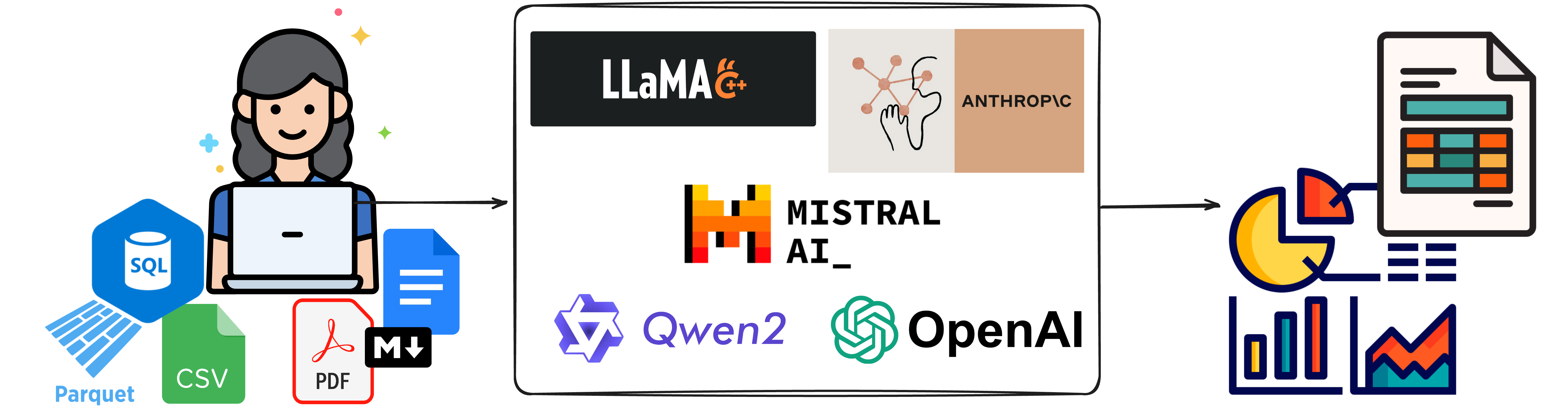
Lumen is a fully open-source and extensible agent based framework for chatting with data and for retrieval augmented generation (RAG). The declarative nature of Lumen's data model make it possible for LLMs to easily generate entire data transformation pipelines, visualizations and other many other types of output. Once generated the data pipelines and visual output can be easily serialized, making it possible to share them, to continue the analysis in a notebook and/or build entire dashboards.
- Generate SQL: Generate data pipelines on top of local or remote files, SQL databases or your data lake.
- Provide context and embeddings: Give Lumen access to your documents to give the LLM the context it needs.
- Visualize your data: Generate everything from charts to powerful data tables or entire dashboards using natural language.
- Inspect, validate and edit results: All LLM outputs can easily be inspected for mistakes, refined, and manually edited if needed.
- Summarize results and key insights: Have the LLM summarize key results and extract important insights.
- Custom analyses, agents and tools: Extend Lumen custom agents, tools, and analyses to generate deep insights tailored to your domain.
Lumen sets itself apart from other agent based frameworks in that it focuses on being fully open and extensible. With powerful internal primitives for expressing complex data transformations the LLM can gain insights into your datasets out-of-the box and can be further tailored with custom agents, analyses and tools to empower even non-programmers to perform complex analyses without having to code. The customization makes it possible to generate any type of output, allow the user and the LLM to perform analyses tailored to your domain and look up additional information and context easily. Since Lumen is built on Panel it can render almost any type of output with little to no effort, ensuring that even the most esoteric usecase is easily possible.
The declarative Lumen data model further sets it apart from other tools, making it easy for LLMs to populate custom components and making it easy for the user to share the results. Entire multi-step data transformation pipelines be they in SQL or Python can easily be captured and used to drive custom visualizations, interactive tables and more. Once generated the declarative nature of the Lumen specification allows them to be shared, reproducing them in a notebook or composing them through a drag-and-drop interface into a dashboard.
Getting started
Lumen works with Python 3 and above on Linux, Windows, or Mac. The recommended way to install Lumen is using the conda command provided by Anaconda or Miniconda:
conda install -c pyviz lumen
or using PyPI:
pip install 'lumen[ai]'
Once installed you will be able to start a Lumen Explorer server by running (replace data.csv with your data):
lumen-ai serve data.csv
Check out the docs for more details!
1 maintainer

Release files for lumen 1.4.0rc2
For a detailed explanation of source distributions (sdists) and built distributions (wheels), please see the package formats documentation.
Source distribution (sdist)
| File | Size | Uploaded | |
|---|---|---|---|
| lumen-1.4.0rc2.tar.gz | 1.0 MB | Details |
Built distribution (wheel)
| File | Interpreter | ABI | Platform | Reset |
|---|---|---|---|---|
| lumen-1.4.0rc2-py3-none-any.whl | Python 3 | none | any | Details |
Total release size: 2.1 MB
Release files / lumen-1.4.0rc2.tar.gz
| Download URL | lumen-1.4.0rc2.tar.gz |
|---|---|
| Size | 1.0 MB |
| Tags | Source |
|
SHA-256 checksum How to use checksums |
4ae0c3ca7f893e8dc55dea984029849394d4dd2cc14f7cca538b20088c6ff1db
|
|
BLAKE2b-256 checksum How to use checksums |
d16d6fcd31a2193fbfcc6ad579f36e4535183d4b693b1bb05efa8756a7e64215
|
| Upload date | |
|
Uploaded using Trusted Publishing? What is trusted publishing? |
Yes |
| Uploaded via |
twine/7.0.0 CPython/3.13.14
|
Provenance
Provenance describes where a file came from. On PyPI, provenance is shared via attestations, which provide a verifiable record of the build or publishing details. View details, limitations and caveats.


PyPI Publish Attestation
PyPI verified that this artifact, at this checksum, originated from the publisher listed below.
Signed by GitHub Actions, verified by PyPI on Sep 25, 2026.
Transparency logRelease files / lumen-1.4.0rc2-py3-none-any.whl
| Download URL | lumen-1.4.0rc2-py3-none-any.whl |
|---|---|
| Size | 1.1 MB |
| Tags | Python 3 |
|
SHA-256 checksum How to use checksums |
f480414d05be273a68cdce96952930af31d3c532b6d2042ae6cfc8863bb5d72a
|
|
BLAKE2b-256 checksum How to use checksums |
58241a2a43bdfb91d810fb2c93400de38fa371b4dafc72d5aa467f8bfc4d473d
|
| Upload date | |
|
Uploaded using Trusted Publishing? What is trusted publishing? |
Yes |
| Uploaded via |
twine/7.0.0 CPython/3.13.14
|
Provenance
Provenance describes where a file came from. On PyPI, provenance is shared via attestations, which provide a verifiable record of the build or publishing details. View details, limitations and caveats.
PyPI Publish Attestation
PyPI verified that this artifact, at this checksum, originated from the publisher listed below.
Signed by GitHub Actions, verified by PyPI on Sep 25, 2026.
Transparency log













