
Convert your Python functions into REST API without any extra effort 🔥

Project description
Lumi 💧 

Lumi is a nano framework to convert your python functions into a REST API without any extra headache.
- This library is created by taking the concept of RPC and blended with REST API specs.
- We need to just register the function and it will be available as a REST API.
- Web-server written with Gunicorn
- Local development server provided for rapid development and prototyping.
Installation
pip install lumi
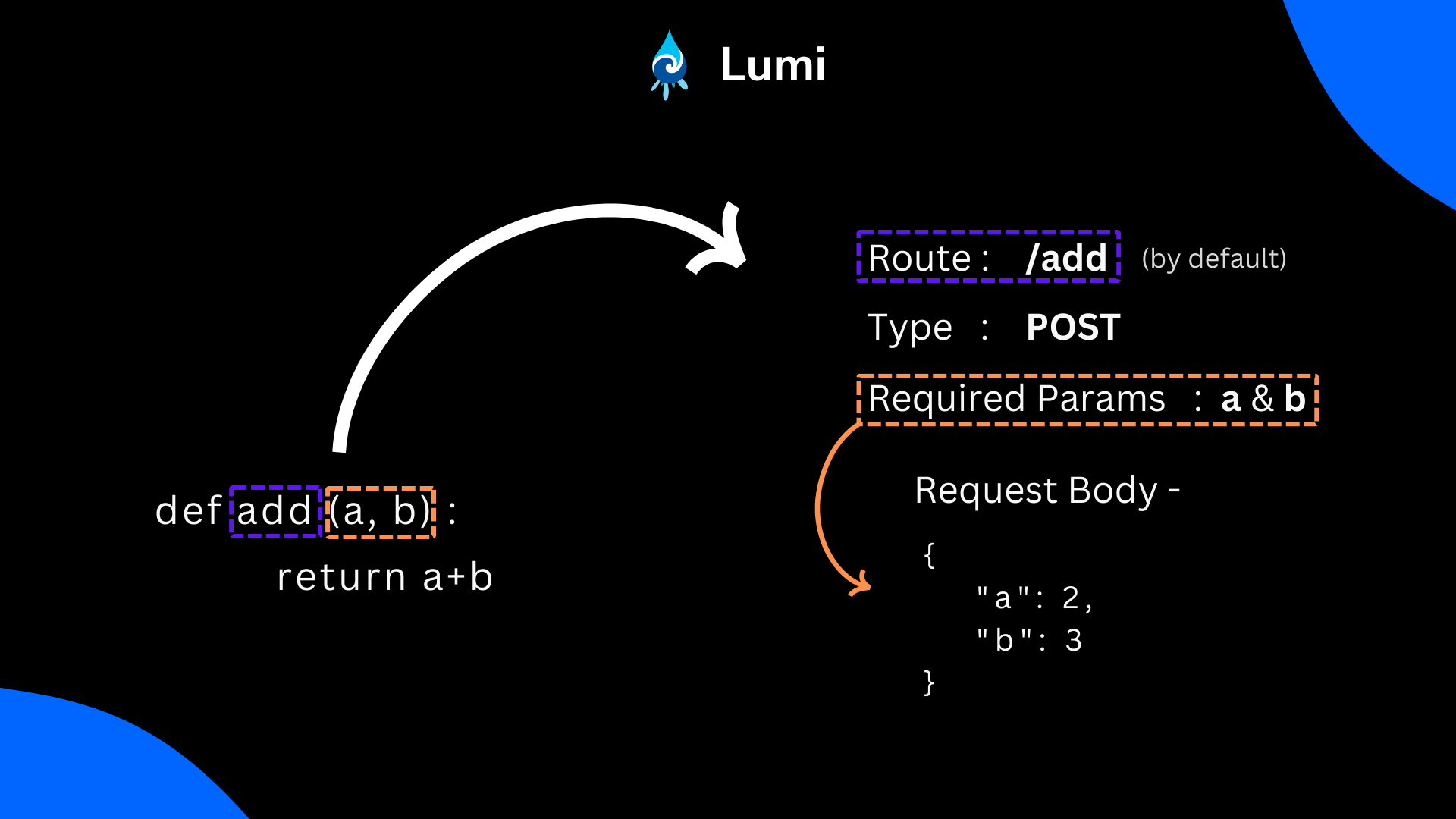
Function <--> API mapping
How to use 🤔
Let's create a simple function to add two numbers.
def add(a, b):
    return a + b

def subtract(a, b):
    return a - b
Now, we want to expose this function as a REST API. We can do this by registering the function with Lumi.
# app.py

from lumi import Lumi

app = Lumi()

app.register(add) # Registering the function
app.register(subtract)

app.runServer(host="127.0.0.1", port=8080)
Noice 🎉🎉 API has been generated
Run the sever by
python app.py
You are going to see this in your terminal
[2022-11-24 17:32:08 +0530] [10490] [INFO] Starting gunicorn 20.1.0
[2022-11-24 17:32:08 +0530] [10490] [INFO] Listening at: http://127.0.0.1:8080 (10490)
[2022-11-24 17:32:08 +0530] [10490] [INFO] Using worker: sync
[2022-11-24 17:32:08 +0530] [10492] [INFO] Booting worker with pid: 10492
...
...
[2022-11-24 17:32:08 +0530] [10500] [INFO] Booting worker with pid: 10500
Congratulations 👏. Our Server is online.
The above code will generate a REST API with the following details.
- Endpoint :
127.0.0.1:8080 - Route :
/add - Method :
POST - Sample Request Body :
{"a": 1, "b": 2}
Let's run the API and test it.
curl -X POST -H "Content-Type: application/json" -d '{"a": 1, "b": 2}' http://127.0.0.1:8080/add
Output
{
    "exit_code": 0,
    "status_code": 200,
    "result": 3,
    "error": ""
}
Custom Routing
Now you may think, the function name will be always same as the route. But, you can change the route by passing the route parameter.
app.register(add, route="/addition")
Custom Request Method
By default, the request method is POST. But, you can change it by passing the method parameter. Currently, it supports POST, PUT and PATCH methods.
from lumi import Lumi, RequestMethod

app = Lumi()

def add(a, b):
    return a+b


app.register(add, request_method=RequestMethod.PUT) # Register function for PUT method
app.register(add, request_method=RequestMethod.PATCH) # Register function for PATCH method

app.runServer()
Status Codes
| Status Code | Description |
|---|---|
| 200 | Request successfully executed and No Error happened during function execution |
| 500 | Request was received but there was an error during function execution |
| 400 | Bad Request (Possible Reason - The required parameters for the function has not provided) |
| 405 | Method Not Allowed (Lumi only supports POST request) |
| 404 | The route has no function associated with that |
Exit Codes
| Exit Code | Description |
|---|---|
| 0 | No Error |
| 1 | Error |
Note : If the function has some error , you can expect the exit code to be 1 and the error message in the response.
Task Lists
- Base System
- Add support for default parameters that is provided in the function
- Make available GET request for the function
- Provide option to override POST with PUT if the user wants
- Add support to send file directly to user
- Add support to serve files through a public folder [Customizable]
- Add suport for middleware integration
- Support nested routing of urls
- For local development, create an file observer that can automatically reload the server when the file is changed.
- Add support for object serialization and deserialization based on argument types of function
Contributing
Contributions are always welcome!
Our community

Tanmoy Sarkar |

Amir M. Ghanem |

Matheus Felipe |

0xflotus |
Support

Release history Release notifications | RSS feed


Download files
Download the file for your platform. If you're not sure which to choose, learn more about installing packages.
Source Distribution
Built Distribution
Filter files by name, interpreter, ABI, and platform.
If you're not sure about the file name format, learn more about wheel file names.
Copy a direct link to the current filters
File details
Details for the file lumi-1.0.8.tar.gz.
File metadata
- Download URL: lumi-1.0.8.tar.gz
- Upload date:
- Size: 7.6 kB
- Tags: Source
- Uploaded using Trusted Publishing? No
- Uploaded via: twine/4.0.1 CPython/3.8.10
File hashes
| Algorithm | Hash digest | |
|---|---|---|
| SHA256 |
9c25cae2dea4bccee59a97d99b91b13155ca7ef6456f1cd2cb98173fdc47cdb0
|
|
| MD5 |
fb727626fd5e49f9ff298f9af83b9bda
|
|
| BLAKE2b-256 |
9186fbf326c14ff04fde2dd2bf5e563a6475af0f5b5e6e22e56859c498b61533
|
File details
Details for the file lumi-1.0.8-py2.py3-none-any.whl.
File metadata
- Download URL: lumi-1.0.8-py2.py3-none-any.whl
- Upload date:
- Size: 7.7 kB
- Tags: Python 2, Python 3
- Uploaded using Trusted Publishing? No
- Uploaded via: twine/4.0.1 CPython/3.8.10
File hashes
| Algorithm | Hash digest | |
|---|---|---|
| SHA256 |
9de9aa4e801b73588c8824540899695de75ba35f3bd2c980da004441b1d06846
|
|
| MD5 |
d93ad19a870e802baeadae1df9c28925
|
|
| BLAKE2b-256 |
eab7cc90b8f87daed5349121815815498a246b63f07c8722c04d9f5262c44865
|






