
Python framework for algorithmic trading: backtesting and live deployment for stocks, options, crypto, futures, and forex. Same code for backtest and live trading.

Project description





Lumibot: Backtestable AI Trading Agents for Algorithmic Trading
Build deterministic trading strategies, multi-agent LLM trading systems, and hybrid strategies that backtest, paper trade, and execute through real brokers. Lumibot is an open-source algorithmic trading framework for stocks, options, crypto, futures, forex, indexes, SEC fundamentals, macro data, technical indicators, and AI agents that can actually place orders.
Full docs: lumibot.lumiwealth.com · No-code cloud: BotSpot.trade
Build, backtest, and deploy an AI trading bot on BotSpot
Describe a strategy in plain English. BotSpot generates Lumibot code, runs the backtest, and deploys it in the cloud.

What You Can Build
- Deterministic strategies: normal Python logic, indicators, if statements, scheduled rules, position sizing, and risk controls.
- AI-agent strategies: one or more agents that reason through evidence, call tools, write memory, and optionally place orders.
- Backtests: replay historical data and simulated orders with artifacts you can inspect.
- Paper or live trading: reuse the same strategy code with real broker state and real order routing.
Backtestable AI Trading Agents
Lumibot now includes a built-in AI agent runtime for financial research, reasoning, debate, risk review, and trade execution. Agents can inspect market data, read filings, query indicators, search memory, compare macro context, and submit orders through the same Lumibot strategy loop used by normal backtests and live trading.
Classic Python strategies are still first-class. The point is not to replace deterministic trading logic. The point is that Lumibot lets you choose the right level of intelligence: fixed rules, AI agents, or a hybrid where Python handles the hard gates and agents reason through evidence.
An investment committee is one example pattern:

In that pattern, read-only research agents gather evidence and a trading-enabled portfolio manager decides whether to place Lumibot orders. It is one pattern, not the only pattern. You can build a single-agent strategy, a specialist research flow, bull/bear/neutral committees, model-vs-model debates, deterministic execution gates, or agent reviewers layered on top of normal Python logic.
Built-in AI agent tools include market/account state, order inspection, DuckDB queries, documentation search, Alpaca news when credentials exist, technical indicators, SEC fundamentals and filings, FRED macro data, local memory, and Telegram notifications.

Build Without Code on BotSpot
BotSpot is the managed cloud product built on Lumibot. Use it when you want to describe a strategy in plain English, have AI generate Lumibot code, backtest it, and deploy it without managing servers.
- Build strategies using natural language -- the AI writes production-ready Lumibot code for you
- Backtest against years of historical data with a single click
- Deploy to live trading with real brokers including Alpaca, Interactive Brokers, Tradier, Schwab, Tradovate, TopstepX via ProjectX, Bitunix, Coinbase, Kraken, WEEX, KuCoin, Binance, BitMEX, Bybit, and OKX
- Browse a marketplace of proven, community-built strategies you can run immediately
Start on BotSpot: Build, backtest, and deploy AI trading bots

Quick Start
pip install lumibot
from datetime import datetime
from lumibot.strategies import Strategy
from lumibot.backtesting import YahooDataBacktesting

class MyStrategy(Strategy):
    def on_trading_iteration(self):
        if self.first_iteration:
            aapl = self.create_order("AAPL", 10, "buy")
            self.submit_order(aapl)

MyStrategy.backtest(
    YahooDataBacktesting,
    datetime(2023, 1, 1),
    datetime(2024, 1, 1),
)
python my_strategy.py
That same strategy code works with live brokers. Just swap the broker class.
For full setup guides, broker tutorials, AI-agent docs, examples, and deployment notes, use the Lumibot documentation.
Why Lumibot?
| Feature | Lumibot | Backtrader | Freqtrade | Zipline | Backtesting.py | Jesse |
|---|---|---|---|---|---|---|
| Same code: backtest + live | Yes | Yes | Yes (crypto) | No | No | Yes (paid) |
| Stocks | Yes | Yes | No | Yes | Yes | No |
| Options | Yes | No | No | No | No | No |
| Crypto | Yes | Limited | Yes | No | Yes | Yes |
| Futures | Yes | Limited | Crypto only | Partial | Yes | Crypto only |
| Forex | Yes | Outdated | No | No | Yes | No |
| AI agent runtime | Built-in | No | FreqAI (ML) | No | No | ML pipeline |
| Brokers | Alpaca, IBKR, Tradier, Schwab, Tradovate, TopstepX (via ProjectX), Bitunix, plus selected CCXT crypto paths | IB only (outdated) | 10+ crypto exchanges | None | None | 8+ crypto (paid) |
| Actively maintained | Yes (2026) | No (since 2023) | Yes | Minimal | Moderate | Yes |
| License | MIT | GPL-3.0 | GPL-3.0 | Apache-2.0 | AGPL-3.0 | MIT |
Switching from Backtrader? See our migration guide for a side-by-side comparison with code examples.
Deploy Live
Option A: BotSpot (managed cloud)
BotSpot runs your Lumibot strategies on hosted infrastructure with scheduling, monitoring, and live execution. Build strategies with AI, no coding required.
- Create trading bots using natural language
- Backtest with historical data
- Deploy to trade automatically 24/7
- Join a community of algorithmic traders

Option B: Self-hosted (full control)
Run Lumibot on your own machine with any supported broker:
from lumibot.brokers import Alpaca
from lumibot.traders import Trader

ALPACA_CONFIG = {
    "API_KEY": "your-key",
    "API_SECRET": "your-secret",
    "PAPER": True,
}

broker = Alpaca(ALPACA_CONFIG)
strategy = MyStrategy(broker=broker)

trader = Trader()
trader.add_strategy(strategy)
trader.run_all()
Supported Brokers
Lumibot supports stocks, options, crypto, futures, forex, and indexes across several broker integrations:

- Alpaca
- Interactive Brokers and Interactive Brokers REST
- Tradier
- Schwab
- Tradovate
- TopstepX futures (via ProjectX)
- Bitunix
- Selected CCXT crypto paths. Coinbase, Kraken, and WEEX have auto-detected credential paths; KuCoin, Binance, and BitMEX have documented manual CCXT setup paths; Kraken, Binance, KuCoin, BitMEX, Bybit, and OKX have documented backtesting examples. Lumibot does not claim blanket support for every CCXT exchange.
Select Backtesting Data Sources
Lumibot can backtest from free daily data, broker data, premium market data, and your own files:
- Yahoo Finance
- Alpaca
- Interactive Brokers REST
- ThetaData
- Polygon/Massive
- DataBento
- Tradier
- Schwab
- CCXT backtesting examples: Kraken, Binance, KuCoin, BitMEX, Bybit, and OKX
- Pandas/CSV dataframes
Recommended Data Provider
For the deepest historical coverage (stocks, options, futures, indexes), we recommend ThetaData. Use promo code BotSpot10 for 10% off your first order.
AI Trading Agents
Lumibot includes a built-in AI trading agent runtime. Build agents that run identically in backtests and live trading.
- Create agents with
self.agents.create(...) - Use a different model per agent with
model="openai/gpt-5.5"or any LiteLLM/ADK-supported provider string - Make research agents read-only with
allow_trading=False - Give agents built-in SEC fundamentals, filings, FRED macro data, indicators, memory, and notifications
- Use DuckDB for time-series analysis instead of dumping raw bars into prompts
- Mount external MCP servers for news, macro data, filings, or any domain-specific tools
- Replay identical agent decisions in backtests without paying for another model call

Start here:
- Agent Documentation
- Agent Flow Design
- AI Investment Committee Example
- Standalone AI Committee Demo
- Stock Agent Example
- Options Agent Example
- Full Guide
Memory and Traceability
AI strategies can record decisions, lessons, open theses, tool calls, and run artifacts as local files. This makes an AI backtest reviewable instead of a black box: you can inspect why the agent traded, which tools it used, and what it remembered for later iterations.

Community Strategies
Browse and contribute trading strategies: lumibot-strategies (fork, backtest, and share your own)
Example Strategies
Lumibot includes 25+ example strategies covering stocks, options, crypto, futures, and forex:
# Run a simple buy-and-hold backtest
python -m lumibot.example_strategies.stock_buy_and_hold

# Or explore all examples
ls lumibot/example_strategies/
Browse all examples: example_strategies/
External example repo: stock_example_algo (deployable to Render or Repl.it)

Backtesting Data Sources
Select a data source via environment variable (overrides code):
export BACKTESTING_DATA_SOURCE=thetadata # or yahoo, ibkr, polygon
Multi-provider routing by asset type:
export BACKTESTING_DATA_SOURCE='{"default":"thetadata","crypto":"coinbase"}'
Data source comparison
| Data Source | OHLCV | Split Adjusted | Dividends | Dividend Adjusted Returns |
|---|---|---|---|---|
| Yahoo | Yes | Yes | Yes | Yes |
| Alpaca | Yes | Yes | No | No |
| Polygon | Yes | Yes | No | No |
| Tradier | Yes | Yes | No | No |
| Pandas* | Yes | Yes | Yes | Yes |
*Pandas loads CSV files in Yahoo dataframe format, which can contain dividends.
Learn More
- Documentation: lumibot.lumiwealth.com
- Blog: lumiwealth.com/blog
- AI Strategy Builder: BotSpot.trade
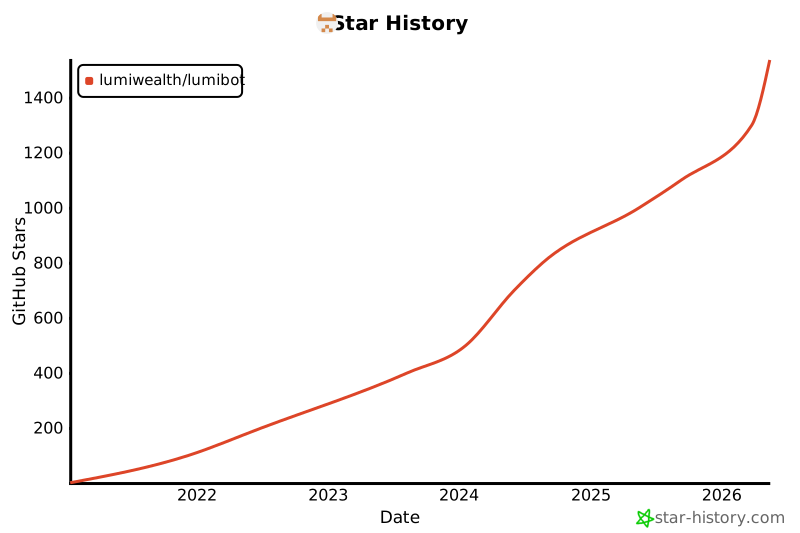
Project Growth
AI Bootcamp
Learn to build, backtest, and deploy trading strategies using AI. Join 2,400+ traders.
Learn more about the AI Bootcamp
Contributing
We welcome contributions! Here's a video to help you get started: Watch The Video
Steps:
- Clone the repository
- Create a new branch:
git switch -c my-feature - Install dev dependencies:
pip install -r requirements_dev.txt && pip install -e . - Make your changes
- Run tests:
pytest - Create a pull request
Running Tests
pytest                          # Run all tests
pytest tests/test_asset.py      # Run a specific test file
coverage run; coverage report   # Show code coverage
Remote Cache Configuration
Lumibot can mirror its local parquet caches to AWS S3. See docs/remote_cache.md for configuration.
Architecture Documentation
- Backtesting Architecture - Data flow diagrams for Yahoo, ThetaData, Polygon
- Acceptance Backtests - End-to-end acceptance suite
- Environment Variables - All configurable env vars
- Changelog - Release notes
- AI Assistant Guide - Instructions for AI coding assistants
- Production Safety - ThetaData and production rules
Disclaimer
This software is provided for educational and informational purposes only. It is not financial advice and does not constitute a recommendation to buy or sell any security. Lumibot and BotSpot are not registered broker-dealers or financial advisors. Algorithmic trading involves substantial risk of loss, including the possibility of losses greater than your initial investment. Software bugs and errors can lead to rapid financial losses. Past backtest performance does not guarantee future results. Use this software at your own risk. You are solely responsible for compliance with all applicable laws and regulations regarding the assets you choose to trade.
Affiliate disclosure: some provider links or promo codes, including ThetaData, may support continued Lumibot development.
License
MIT License - View License
Release history Release notifications | RSS feed


Download files
Download the file for your platform. If you're not sure which to choose, learn more about installing packages.
Source Distribution
Built Distribution
Filter files by name, interpreter, ABI, and platform.
If you're not sure about the file name format, learn more about wheel file names.
Copy a direct link to the current filters
File details
Details for the file lumibot-4.5.14.tar.gz.
File metadata
- Download URL: lumibot-4.5.14.tar.gz
- Upload date:
- Size: 37.9 MB
- Tags: Source
- Uploaded using Trusted Publishing? No
- Uploaded via: twine/6.1.0 CPython/3.13.12
File hashes
| Algorithm | Hash digest | |
|---|---|---|
| SHA256 |
2aed2e5b46c0a2eb76f3863ddab87a1da71f3cb1706e949f49ea6f896fb39295
|
|
| MD5 |
9177a3381ec2d98622a59ecd88b86f45
|
|
| BLAKE2b-256 |
0c9f7fc4be4c9d0293bfbc60c25383eb64de19380f6d41b8c9b818e794903735
|
File details
Details for the file lumibot-4.5.14-py3-none-any.whl.
File metadata
- Download URL: lumibot-4.5.14-py3-none-any.whl
- Upload date:
- Size: 37.6 MB
- Tags: Python 3
- Uploaded using Trusted Publishing? No
- Uploaded via: twine/6.1.0 CPython/3.13.12
File hashes
| Algorithm | Hash digest | |
|---|---|---|
| SHA256 |
e5480b12ae2c7a011c679200118065e3637297e45d02978297ca60725d1de071
|
|
| MD5 |
857457d63cc5d06ca5de2fb1135c196f
|
|
| BLAKE2b-256 |
5bf79a69a99ff5edf61214160436fc86cdf3010cae0b392bf02f1a1237eaeb52
|






