
Lynx
LynxMCP is a 100% local MCP server for the code questions grep can't answer: what calls this, what breaks if I change it, where is the code that does X, how does the library version I actually use behave. AST-aware chunking, hybrid BM25 + dense retrieval, an optional code knowledge graph, and your library docs and PDFs indexed next to your code. Works with any MCP client (Claude Code, Cursor, Windsurf, Antigravity, ...).




Grep is the right tool when you know the identifier, and your agent already has it. Lynx is for the questions grep cannot answer. Behaviour: "where do we clamp the camera zoom?" matches nothing literal. Structure: who calls this, what inherits from it, what breaks if it changes; polymorphic dispatch leaves no textual trace. Knowledge past the model's training cutoff: the docs of the framework version you run, indexed as a source. Nothing leaves your machine.
What grep can't answer
Each row is measured; the numbers come from the benchmarks below.
| Question | Agentic grep | Lynx |
|---|---|---|
"What inherits from Field?" (Django, 100 classes over 4 levels) |
101 grep rounds, one per discovered class | 4 graph_query calls, file:line on every edge |
"What breaks if I change ApplyDamage?" |
the textual mentions of the name | impact: every transitive caller with its hop distance, plus the tests to re-run |
| "Where do we validate session tokens?" on C# (Json.NET) | hit@1 33% | hit@1 47% |
| "How does this API behave in the version we ship?" | the model's memory | the docs you indexed, cited with the page they came from |
Where grep is better, this page says so. On Guava, whose class names document themselves (BloomFilter, RateLimiter), grep ranks higher: hit@1 73% against 60%. On a repository that fits in the agent's context, the built-in tools are fine. Lynx pays off on large codebases, on framework docs your model has gone stale on, and on repeated sessions where re-exploring from scratch is waste.
Quickstart
# 1. Install the CLI (isolated, no venv ritual). About 460 MB on disk, no PyTorch.
pipx install lynx-mcp
#    or: uv tool install lynx-mcp

# 2. Create a config and point it at your project
lynx manager init
lynx source add myproject --type codebase --path /path/to/your/repo

# 3. Build the index (downloads the 130 MB embedding model on first run)
lynx build
lynx manager init also offers to open the web UI, where the same source can be added through a guided form with a folder picker. Everything below works either way.
Every tool your AI gets is also a command, with the same name and the same output: lynx find-definition ApplyDamage, lynx impact ApplyDamage, lynx graph query --op callers --symbol ApplyDamage. Add --json to any of them for scripts.
Then register Lynx in your MCP client. Claude Code is shown; the full guide covers Cursor, Antigravity, and generic stdio clients, or let lynx manager ui generate the snippet for you:
{
  "mcpServers": {
    "lynx": {
      "command": "lynx",
      "args": ["serve", "--config", "/absolute/path/to/config.json"]
    }
  }
}
The server answers the MCP handshake in about a second and opens the indexes in the background; a call that arrives earlier gets the loading state back and is retried. If you would rather skip the terminal, there are double-click installers for macOS and Windows.
The tools your AI gets
The tool set is fixed: it does not grow with the number of sources. It is also layered, because every tool definition rides in your client's context on every turn. Three profiles: core (5 tools, about 1,200 tokens of definitions), standard (10 tools, about 2,700 tokens, the default) and full (17 tools, about 3,800 tokens). Set tools.profile in config.json or pass lynx serve --profile full; tools.include adds a single tool to a profile. Tools take a source argument where relevant.
| Tool | Profile | What it answers |
|---|---|---|
search(query, source?, outline?) |
core | Primary hybrid search. Omit source to search every source at once (RRF-fused). outline=true returns signatures only, for cheap triage. |
deep_search(queries, source?) |
standard | Escalation: tries multiple query phrasings until one passes a quality threshold. |
graph_query(operation, symbol?) |
standard | callers, callees, subclasses, superclasses, imports, neighbors, shortest_path, overview, surprising_connections, status. |
find_definition(symbol) |
standard | Where is X defined? (AST-precise when the graph is on, BM25 fallback otherwise.) |
find_usages(symbol) |
core | Every use of X: calls and non-call references (generics, decorators, docs). |
find_tests_for(symbol) |
full | Are there tests for X? |
find_similar(snippet) |
full | Does code like this already exist? |
describe_symbol(symbol) |
core | One-shot context for X: definition, who calls it, what it calls, its tests, in a single call. |
impact(symbol) |
core | Blast radius: everything that reaches X transitively through the call graph (with hop distance), plus the tests to re-run. |
module_summary(file) |
full | A file as a unit: the symbols it defines, what it imports, and which files depend on it. (graph) |
repo_overview() |
standard | "What is this and where do I start": detected languages, frameworks, entry points, and build/test/run commands. |
export_graph(target, mode?) |
full | Render a shareable, offline graph view (a symbol's blast radius or a file hub) as a single self-contained file. (graph) |
search_diff(query, base?) |
standard | Search only the files changed vs a base branch. Built for code review. |
feedback(trying_to_do, tried, stuck) |
core | The agent files a report when the index couldn't answer. Stored 100% locally, your signal for tuning sources. |
list_sources / get_rag_status / update_source_index |
full | Introspection and maintenance. |
Retrieval tools carry MCP readOnlyHint annotations, so clients can auto-approve them. The only write is export_graph, which saves a graph view file. The server ships its usage playbook in the MCP handshake (instructions plus a lynx://guide resource), so your agent knows how to query well without any rules-file setup.
(graph) tools need the optional code knowledge graph enabled for the source. The tool set is per-capability, never per-source.
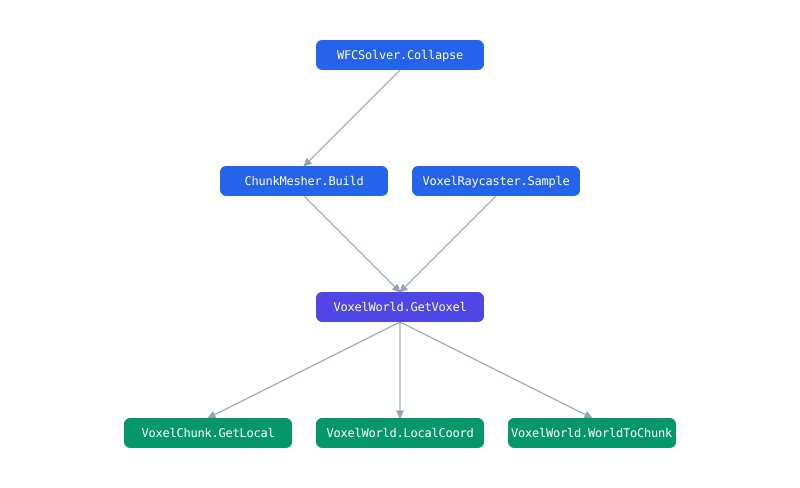
Shareable graph views: lynx graph export --symbol GetVoxel writes one self-contained, offline file (no server, no CDN) with the symbol's blast radius, who calls it (above) and what it calls (below). Attach it to a PR or archive it for an audit.
How it works
flowchart LR
    A["Your code + docs + PDFs"] --> B["Tree-sitter<br/>AST chunker"]
    B --> C["bge-small<br/>dense embeddings"]
    B --> D["code-tokenized<br/>BM25"]
    B --> G["Code knowledge graph<br/>(opt-in)"]
    C --> R{{"RRF fusion"}}
    D --> R
    Q(["Your query"]) --> R
    R --> RR["Optional<br/>reranker"]
    RR --> RES["Ranked code<br/>file : line : symbol"]
    G --> GT["Graph tools<br/>callers · subclasses · usages"]

    classDef store fill:#fff3e6,stroke:#e8742c,color:#24292f;
    classDef out fill:#e8742c,stroke:#e8742c,color:#fff;
    class C,D,G store;
    class RES,GT out;
- Tree-sitter parses 18+ languages (19 grammars, counting TSX) and indexes whole functions and classes, not arbitrary text windows.
- Retrieval is hybrid: dense embeddings plus code-tokenized BM25, fused with RRF, with an optional cross-encoder reranker.
- The code knowledge graph (opt-in) records who calls what, inheritance and imports, and answers "what breaks if I change this?" with the actual blast radius.
- Sources can be codebases, public docs sites (fetched once, on demand; JS-rendered SPAs via optional headless Chromium) and PDFs, searched side by side.
- A file watcher re-indexes a saved file in about 2 seconds. No manual rebuild ritual.
- Search and the graph are also served as rows over a local HTTP API, so SQL engines can join your code with tickets, PRs or logs (see Integrations).
lynx manager uigives you guided setup, a query playground, diagnostics and client config snippets in the browser.
Everything runs locally: HuggingFace models are downloaded once, then Lynx switches to offline mode. No telemetry, no cloud index, no code upload. The only network access is the model download and the explicit webdoc fetch step you trigger yourself.
The models run on ONNX Runtime, so there is no PyTorch in the install: about 460 MB on disk, and a 165 MB download on Linux where the torch wheel alone used to bring 4 GB of CUDA libraries. Same model, same vectors, so an index built by an earlier version keeps working.
Open as many sessions on one index as you like: two editor windows, an editor plus the web UI, a CLI query while the server runs. They all search the same index. Only indexing is exclusive, and the process doing it hands over automatically if you close it.
Behind a firewall or on an air-gapped machine? The model can come from a mirror, from this repo's GitHub Releases (the automatic fallback), or from an archive you carry over; see Restricted networks in the guide.
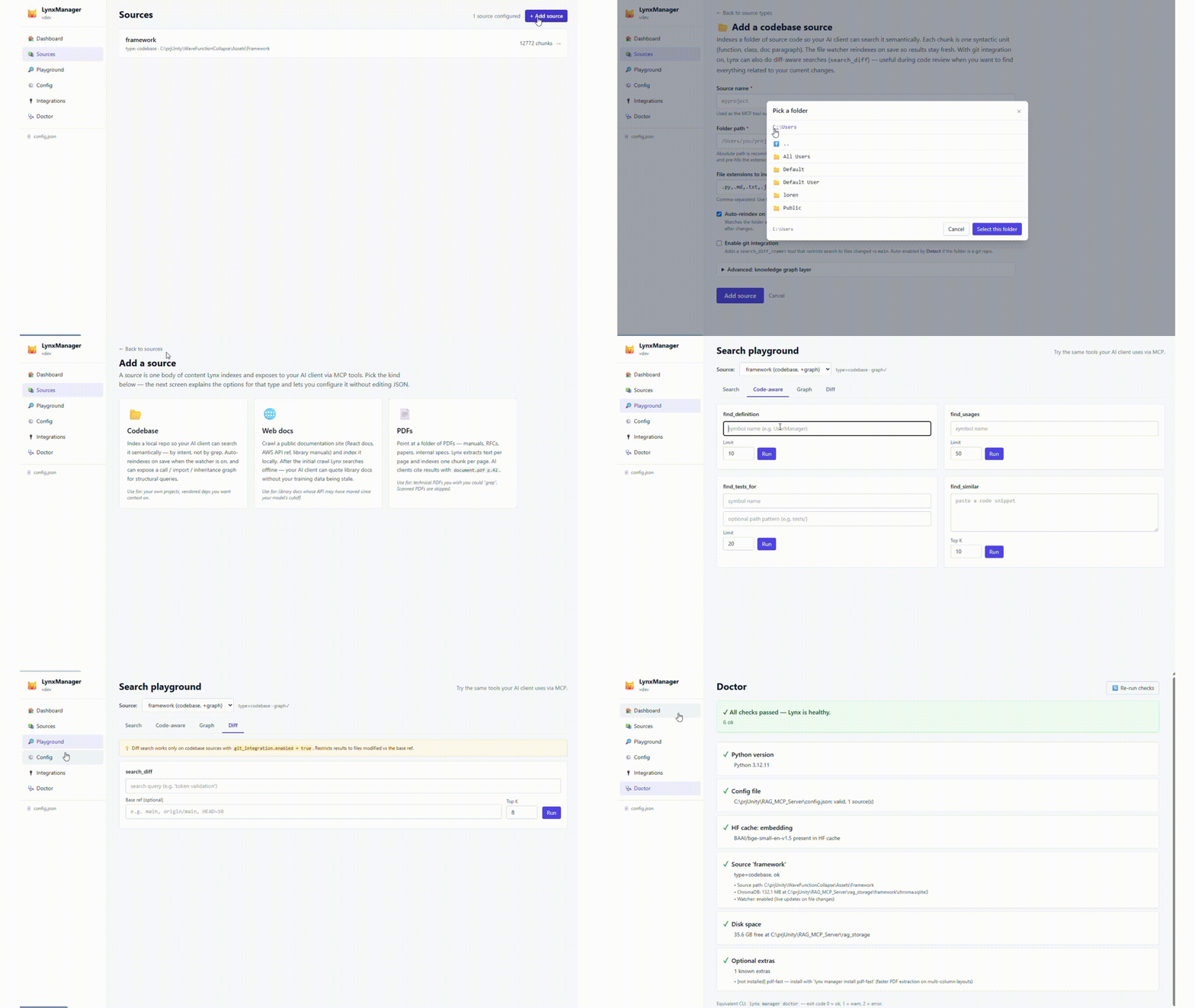
LynxManager: guided setup, query playground & diagnostics, all in the browser. Full walkthrough
Benchmarks (reproducible)
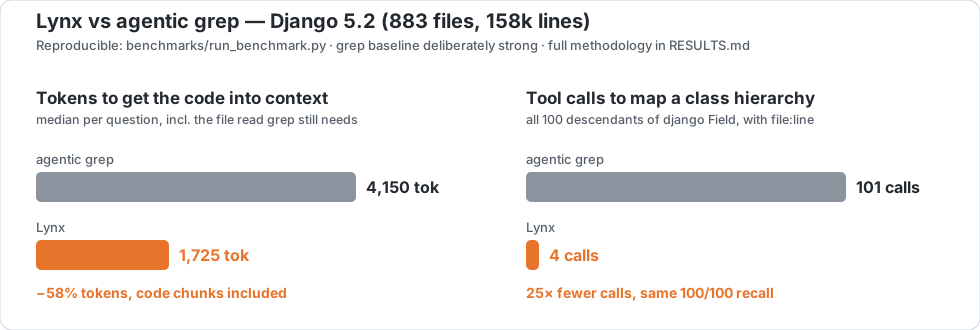
Three codebases, three languages, behavioural questions with known ground-truth files, and a grep baseline built to be strong (IDF-weighted multi-keyword ranking with ideal stopword removal, closer to BM25 than to an agent's first rg). Methodology and per-task results: Django, Json.NET, Guava.
| grep / Lynx | Django 5.2 (Python) | Json.NET (C#) | Guava (Java) |
|---|---|---|---|
| corpus | 883 files, 158k lines, 20 questions | 240 files, 69k lines, 15 questions | 606 files, 181k lines, 15 questions |
| hit@5 | 95% / 85% | 67% / 73% | 93% / 80% |
| hit@1 | 45% / 55% | 33% / 47% | 73% / 60% |
| MRR | 0.64 / 0.67 | 0.47 / 0.58 | 0.81 / 0.70 |
| median tokens to answer | 4,150 / 1,725 | 6,590 / 1,540 | 5,892 / 807 |
| tool round-trips before the code is in context | 2+ / 1 | 2+ / 1 | 2+ / 1 |
Ranking swings with how self-documenting the code is: Lynx ahead on C#, where PascalCase identifiers and sparse comments starve a lexical baseline; mixed on Python, ahead at hit@1 and behind at hit@5 in Django's docstring-rich code; behind on Guava. The token cost does not swing. It drops 58% to 86% every time, because Lynx hands back the whole function with file:line, symbol and score in one call, where grep returns match lines and then needs a read.
The structural gap is of a different kind. "What inherits from Field?" over Django's 100-class hierarchy takes grep 101 rounds, one per discovered class, each a full model inference over the growing context; graph_query answers it in 4 calls from resolved inheritance edges, same recall, file:line on every edge.
# reproduce: Python (Django)
git clone --depth 1 --branch 5.2 https://github.com/django/django.git benchmarks/_target/django
python benchmarks/run_benchmark.py && python benchmarks/structural_demo.py

# reproduce: C# (Json.NET)
git clone --depth 1 https://github.com/JamesNK/Newtonsoft.Json.git benchmarks/_target/jsonnet
python benchmarks/run_benchmark.py --tasks benchmarks/tasks_jsonnet.json \
  --target-dir benchmarks/_target/jsonnet --storage-dir benchmarks/_storage_csharp \
  --results-json benchmarks/results_csharp.json --results-md benchmarks/RESULTS_csharp.md

# reproduce: Java (Guava)
git clone --depth 1 https://github.com/google/guava.git benchmarks/_target/guava
python benchmarks/run_benchmark.py --tasks benchmarks/tasks_guava.json \
  --target-dir benchmarks/_target/guava --storage-dir benchmarks/_storage_java \
  --results-json benchmarks/results_java.json --results-md benchmarks/RESULTS_java.md
What it costs, in tokens and in money
Per retrieval, the saving is the measured delta above: 2,400 to 5,100 fewer tokens to get the answer into context. Per session, the tool definitions cost 1,200 tokens (core), 2,700 (standard) or 3,800 (full), so a session has paid for its tool list after the first or second retrieval. outline triage cuts the search step by another 2.4x on broad queries (measured).
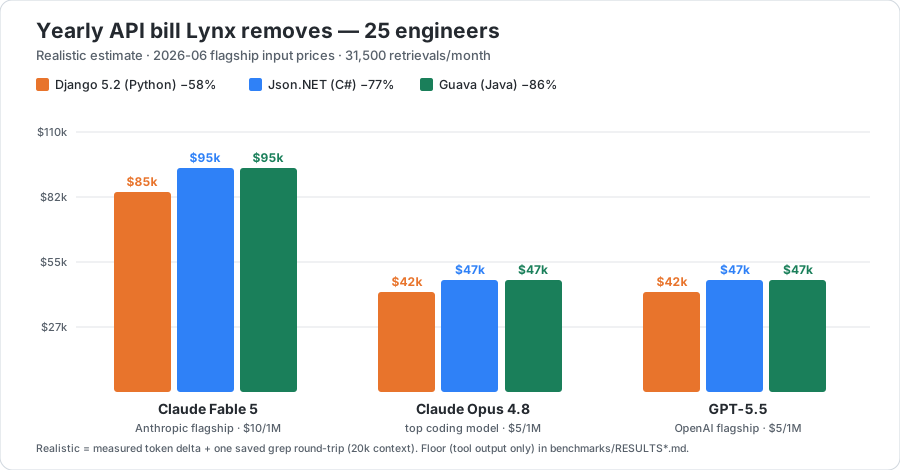
In money, for 25 engineers making 60 retrievals a day (31,500 a month), the yearly API bill Lynx removes, as a range across the three codebases:
| Flagship model (input $/1M) | Measured floor | With the saved round trip |
|---|---|---|
| Claude Fable 5 ($10) | $9,200 to $19,200 | $16,700 to $26,800 |
| GPT-5.5, Claude Opus 4.8 ($5) | $4,600 to $9,600 | $8,400 to $13,400 |
The floor counts only the smaller tool output, no assumptions. The second column adds the one grep round trip Lynx removes, whose 20k-token context is re-read from the prompt cache at a tenth of the input price; that discount is the single modelled assumption, and it is a knob. Run it for your own team, prices and codebase: python benchmarks/savings_calculator.py --devs N, or the interactive savings calculator (presets in pricing.json and measured.json, yours to edit).
Read less: outline mode
Every search ranks the same way. search(query, outline=true) (or ?view=outline over HTTP) returns the same ranked hits without their bodies: a one-line signature plus the first line of the docstring, so the agent scans the candidates and reads the single body it needs, by its cited file:line. On a public repo (psf/requests) it cut the search step to 2.4x fewer tokens. When to use which, the measured data and the chart: docs/OUTLINE.md.
Integrations
Search and the code graph are served as NDJSON over a local HTTP API (/api/v1), and the MCP tools compose with any other MCP server your agent has. Everything below stays on your machine; only the other side of a join (GitHub, Jira, Sentry) touches an API.
- Coral: Lynx is a community source in Coral's registry,
lynx.searchplus six graph functions, so a behavioural question becomes a SQL table you join with live GitHub or Sentry data. - DuckDB:
read_ndjson_auto('http://127.0.0.1:8765/api/v1/search?...')is a table, no plugin and no daemon; join code relevance with git churn, error logs or ticket exports. - Steampipe: a plugin with
lynx_source,lynx_searchandlynx_graphtables that join per row, one search per row of another table; prebuilt macOS and Linux binaries on the releases page. - GitHub Action: on every PR, a comment with the downstream callers and the semantically related code, indexed locally on the runner.
- MCP recipes: agent patterns combining Lynx with GitHub, Sentry and Jira MCP servers (triage, PR impact, ticket to code).
Documentation
| Full guide | Configuration, all source types (codebase / webdoc / PDF), retrieval internals, tool profiles, troubleshooting |
| Manager UI | Guided setup, playground, diagnostics |
| Outline mode | Signatures instead of bodies: when to use it, measured data, chart |
| Coral / DuckDB / Steampipe | Code search and the code graph as SQL tables |
| MCP recipes | Combining Lynx with GitHub / Sentry / Jira MCP servers |
| PR impact analysis (GitHub Action) | Downstream callers and related code, commented on every PR |
| config.example.json | Annotated example configuration |
Status
Developed by one author; APIs may still move before 1.x stabilizes. Issues and PRs are welcome. The test suite runs with pytest and CI must stay green. See ROADMAP.md for what's under consideration (and what is explicitly not planned).
License
1 maintainer

Download files
Download the file for your platform. If you're not sure which to choose, learn more about installing packages.
Source Distribution
Built Distribution
Filter files by name, interpreter, ABI, and platform.
If you're not sure about the file name format, learn more about wheel file names.
Copy a direct link to the current filters
File details
Details for the file lynx_mcp-1.9.0.tar.gz.
File metadata
- Download URL: lynx_mcp-1.9.0.tar.gz
- Upload date:
- Size: 623.0 kB
- Tags: Source
- Uploaded using Trusted Publishing? No
- Uploaded via:
twine/6.2.0 CPython/3.14.3
File hashes
| Algorithm | Hash digest | |
|---|---|---|
| SHA256 |
1b928b839e854e481a5ffef34475d644e40946fae9667c7977c4930e71724cfa
|
|
| MD5 |
6af226ebe4cac4267bbf616aad57da57
|
|
| BLAKE2b-256 |
3e922d25815c98576a0072773e1e32867aa531b9855dc65971d1b7d2ba3315aa
|
File details
Details for the file lynx_mcp-1.9.0-py3-none-any.whl.
File metadata
- Download URL: lynx_mcp-1.9.0-py3-none-any.whl
- Upload date:
- Size: 487.8 kB
- Tags: Python 3
- Uploaded using Trusted Publishing? No
- Uploaded via:
twine/6.2.0 CPython/3.14.3
File hashes
| Algorithm | Hash digest | |
|---|---|---|
| SHA256 |
9b0e7dd3eda916e52bc239030d3824a6db2101b0499845ba4031aa6dd65a2aa4
|
|
| MD5 |
5e2b3f371c667f6166cfb190656ff013
|
|
| BLAKE2b-256 |
107c9d810d2d99df19b6b4263b7fc03151a76166171773a8a6bbe6f95bcb9a4a
|














