
100% local MCP server for semantic + lexical code search: AST-aware chunking (tree-sitter), hybrid BM25+dense retrieval, optional code knowledge graph.

Project description
Lynx
A 100% local MCP server for semantic code search — AST-aware chunking, hybrid BM25 + dense retrieval, and an optional code knowledge graph. Works with any MCP client (Claude Code, Cursor, Windsurf, Antigravity, ...).




Your AI assistant greps file names and guesses. Lynx gives it real retrieval over your code, your library docs, and your PDFs — without a single byte leaving your machine.
💸 What it saves you — every wrong file your AI opens is billed tokens
Agentic coding burns tokens re-reading files the assistant grepped into the wrong place. Lynx hands it the right code in one tool call, with file:line and symbol — measured on real codebases:
| Tokens to get the answer into context | Agentic grep | Lynx | |
|---|---|---|---|
| Django 5.2 — Python, 158k lines | 4,150 | 1,725 | −58% |
| Json.NET — C#, 69k lines | 6,590 | 1,540 | −77% |
| Guava — Java, 181k lines | 5,892 | 807 | −86% |
Plus: outline triage is 2.4× fewer tokens, and the code arrives in 1 tool call instead of 2+ (chunks included, with symbol + file:line + score). The token cut holds across languages — even where grep ranks results just as well, because Lynx returns the whole function in one call instead of match-lines plus a follow-up read.
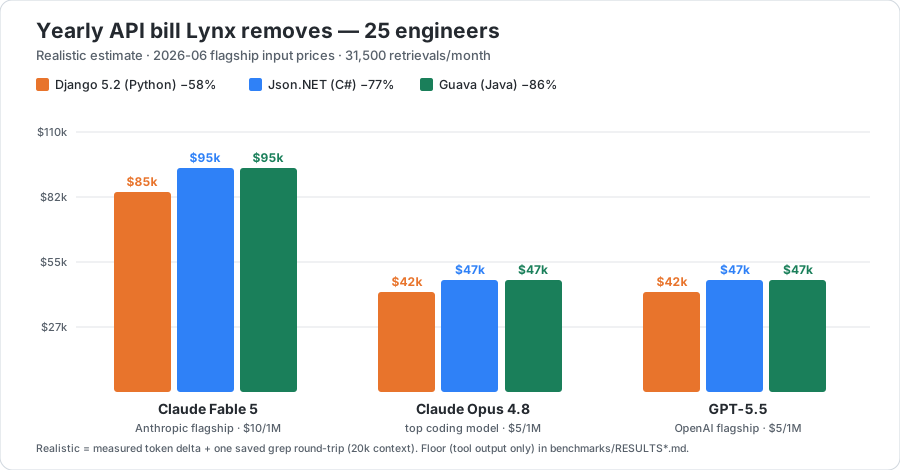
That's real money at today's frontier API prices. For 25 engineers (≈31,500 retrievals/month), the yearly API bill Lynx removes:
| Flagship model (input $/1M) | Django (Python) | Json.NET (C#) | Guava (Java) |
|---|---|---|---|
| Claude Fable 5 — Anthropic flagship ($10) | ≈ $85,000 | ≈ $95,000 | ≈ $95,000 |
| GPT‑5.5 — OpenAI flagship ($5) | ≈ $42,000 | ≈ $47,000 | ≈ $47,000 |
| Claude Opus 4.8 — top coding model ($5) | ≈ $42,000 | ≈ $47,000 | ≈ $47,000 |
Token deltas are measured (Django · Json.NET · Guava). The yearly figures add one eliminated grep round‑trip re‑billing a 20k‑token context; the conservative floor (tool output only, zero assumptions) is $0.4k–1.6k/mo depending on model and codebase. Run it for your own team, prices and codebase: CLI python benchmarks/savings_calculator.py --devs N, or the interactive savings calculator — pick the codebase and model from drop‑downs and edit the $/1M price live (presets in benchmarks/pricing.json + measured.json, yours to change).
- AST-aware indexing — tree-sitter parses 18+ languages and indexes whole functions/classes, not arbitrary text windows.
- Hybrid retrieval — dense embeddings + code-tokenized BM25, fused with RRF; optional cross-encoder reranker.
- Token-efficient triage —
view=outlinereturns signatures instead of bodies, so an agent scans the candidates for ~2.4× fewer tokens and reads only the code it picks (measured). - Code knowledge graph (opt-in) — who-calls-what, inheritance, imports: ask "what breaks if I change this?" and get the actual blast radius.
- Joinable as SQL — search and the graph are also served as rows over a local HTTP API, so you can correlate your code with tickets, PRs, or logs in DuckDB or Coral — no data leaves your machine.
- Multi-source — index codebases, public docs sites (fetched once, on demand; JS-rendered SPAs supported via optional headless Chromium), and PDFs side by side.
- Live index — a file watcher re-indexes saves in ~2s. No manual rebuild ritual.
- Web manager UI —
lynx manager uigives you guided setup, a query playground, diagnostics, and client config snippets.
(Named after Lynceus, the Argonaut whose sharp eyes could find anything hidden.)
Quickstart
# 1. Install the CLI (isolated, no venv ritual)
pipx install lynx-mcp
#    or: uv tool install lynx-mcp

# 2. Create a config pointing at your project
lynx manager init

# 3. Build the index (downloads the ~130MB embedding model on first run)
lynx build
Then register Lynx in your MCP client (Claude Code shown; see the full guide for Cursor, Antigravity, and generic stdio clients — or let lynx manager ui generate the snippet for you):
{
  "mcpServers": {
    "lynx": {
      "command": "lynx",
      "args": ["serve", "--config", "/absolute/path/to/config.json"]
    }
  }
}
Prefer zero terminal? There are double-click installers for macOS and Windows.
The tools your AI gets
The tool set is fixed — it does not grow with the number of sources, so your client's tool list (and context window) stays small. Tools take a source argument where relevant.
| Tool | What it answers |
|---|---|
search(query, source?, outline?) |
Primary hybrid search. Omit source to search every source at once (RRF-fused). outline=true returns signatures-only for cheap triage (see below). |
deep_search(queries, source?) |
Escalation: tries multiple query phrasings until one passes a quality threshold. |
graph_query(operation, symbol?) |
callers, callees, subclasses, superclasses, imports, neighbors, shortest_path, overview, surprising_connections, status. |
find_definition(symbol) |
Where is X defined? (AST-precise when the graph is on, BM25 fallback otherwise.) |
find_usages(symbol) |
Every use of X — calls and non-call references (generics, decorators, docs). |
find_tests_for(symbol) |
Are there tests for X? |
find_similar(snippet) |
Does code like this already exist? |
search_diff(query, base?) |
Search only the files changed vs a base branch — built for code review. |
feedback(trying_to_do, tried, stuck) |
The agent files a report when the index couldn't answer — stored 100% locally, your signal for tuning sources. |
list_sources / get_rag_status / update_source_index |
Introspection and maintenance. |
All retrieval tools carry MCP readOnlyHint annotations (clients can auto-approve them), and the server ships its usage playbook in the MCP handshake (instructions + a lynx://guide resource) — your agent knows how to query well without any rules-file setup.
How it works
flowchart LR
    A["Your code + docs + PDFs"] --> B["Tree-sitter<br/>AST chunker"]
    B --> C["bge-small<br/>dense embeddings"]
    B --> D["code-tokenized<br/>BM25"]
    B --> G["Code knowledge graph<br/>(opt-in)"]
    C --> R{{"RRF fusion"}}
    D --> R
    Q(["Your query"]) --> R
    R --> RR["Optional<br/>reranker"]
    RR --> RES["Ranked code<br/>file : line : symbol"]
    G --> GT["Graph tools<br/>callers · subclasses · usages"]

    classDef store fill:#fff3e6,stroke:#e8742c,color:#24292f;
    classDef out fill:#e8742c,stroke:#e8742c,color:#fff;
    class C,D,G store;
    class RES,GT out;
Everything runs locally: HuggingFace models are downloaded once, then Lynx switches to offline mode. No telemetry, no cloud index, no code upload. The only network access is the model download and the explicit webdoc fetch step you trigger yourself.
Why not just let the agent grep?
Grep is great when you know the identifier. It fails when you (or the agent) know the behavior: "where do we clamp the camera zoom?" matches nothing literal. Agentic grep also burns tokens — every wrong file the agent opens is context spent. Lynx answers behavioral queries in one tool call with file + line + symbol citations, and the graph layer answers structural questions (callers, inheritance) that grep fundamentally cannot — polymorphic dispatch leaves no textual trace.
Honest counterpoint: on a small repo that fits in the agent's context, built-in tools are fine. Lynx pays off on large codebases, on framework docs your model's training data has gone stale on, and on repeated sessions where re-exploring from scratch is waste.
Benchmarks (reproducible)
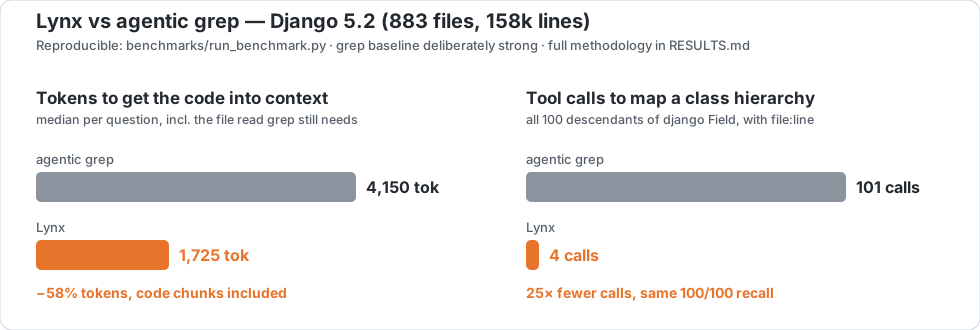
On the django/ package of Django 5.2 (883 files, ~158k lines), 20 behavioral questions with known ground-truth files — full methodology, per-task results, and an intentionally strong grep baseline in benchmarks/RESULTS.md:
| Agentic grep | Lynx | |
|---|---|---|
| median tokens to answer (tool output + required follow-up read) | 4,150 | 1,725 |
| tool round-trips before the code is in context | 2+ | 1 (chunks included, with symbol + file:line + score) |
| hit@1 / MRR | 45% / 0.64 | 55% / 0.67 |
"what inherits from Field?" — full descendant tree (100 classes) |
101 grep rounds | 4 graph calls, same recall, file:line per edge |
The ranking quality is comparable (Django's docstring-rich code is grep's best case — we say so in the report). The structural difference is not: every tool round-trip is a full model inference over the growing context, and class-relation questions force grep into one round per discovered class while graph_query reads resolved inheritance edges.
Second language, sparser docs — the gap widens. The same test on Json.NET (C#) — Src/Newtonsoft.Json/, 240 files, 69k lines, 15 behavioral questions (RESULTS_csharp.md). With C#'s PascalCase identifiers and fewer narrative comments, Lynx wins every metric, ranking included:
| Agentic grep | Lynx | |
|---|---|---|
| median tokens to answer | 6,590 | 1,540 (−77%) |
| hit@1 / MRR | 33% / 0.47 | 47% / 0.58 |
This is the counter-example the Django report predicts: move off grep's best case and the lexical baseline drops, while semantic retrieval holds.
Third language, grep's best case — the token gap holds anyway. Guava (Java) — com/google/common/, 606 files, 181k lines, 15 questions (RESULTS_java.md). Guava's self-documenting class names (BloomFilter, RateLimiter, Splitter) are ideal for lexical search — so here grep actually out-ranks Lynx. The metric you pay for still collapses:
| Agentic grep | Lynx | |
|---|---|---|
| median tokens to answer | 5,892 | 807 (−86%) |
| hit@1 / MRR | 73% / 0.81 | 60% / 0.70 |
The honest takeaway across all three. Ranking parity swings with how self-documenting the code is — Lynx ahead on C#, level on Python, behind on Guava. But the token cost — the line on your invoice — drops 58–86% every time, because Lynx hands back the whole function in one call instead of match-lines plus a follow-up read. That's the number that scales to a team's monthly bill.
# reproduce — Python (Django)
git clone --depth 1 --branch 5.2 https://github.com/django/django.git benchmarks/_target/django
python benchmarks/run_benchmark.py && python benchmarks/structural_demo.py

# reproduce — C# (Json.NET)
git clone --depth 1 https://github.com/JamesNK/Newtonsoft.Json.git benchmarks/_target/jsonnet
python benchmarks/run_benchmark.py --tasks benchmarks/tasks_jsonnet.json \
  --target-dir benchmarks/_target/jsonnet --storage-dir benchmarks/_storage_csharp \
  --results-json benchmarks/results_csharp.json --results-md benchmarks/RESULTS_csharp.md

# reproduce — Java (Guava)
git clone --depth 1 https://github.com/google/guava.git benchmarks/_target/guava
python benchmarks/run_benchmark.py --tasks benchmarks/tasks_guava.json \
  --target-dir benchmarks/_target/guava --storage-dir benchmarks/_storage_java \
  --results-json benchmarks/results_java.json --results-md benchmarks/RESULTS_java.md
Two ways to read a result: full vs outline
Every Lynx search ranks the same way (hybrid dense + BM25 over whole functions). What differs is how much of each hit you pull into the model's context:
- Full search (default) returns the matching functions with their bodies —
file,symbol, line range,score, and the realcontent. The model has the code immediately: one tool call and it can explain, review, or edit. - Outline search (
search(query, outline=true)from an MCP agent, or?view=outlineover HTTP) returns the same ranked hits but drops the bodies — just a one-linesignatureplus the first line of the docstring. The model scans the candidates to decide which one it needs, then reads that single body on demand (every row still carriesfile_path+start_line/end_line). The agent is told when to reach for it in the tool description and the MCP handshake instructions.
It's progressive disclosure: triage cheap, fetch deep only where it pays. Most of the bodies in a result set are ones the model will never use — outline stops paying for them up front. On a public repo (psf/requests) it cut the search step to ~2.4× fewer tokens — measured, with the chart.
// full          →  { …, "content": "<the whole 64-line iter_content method>" }
// view=outline  →  { …, "signature": "def iter_content(self, chunk_size=1, decode_unicode=False)",
//                        "doc": "Iterates over the response data." }
When to use which — there's no silver bullet:
| Use full (default) when… | Use outline when… |
|---|---|
| You'll use the code now — explain, review, or edit a specific area | You're navigating: "where is X / which function does Y" |
| Few, precise results; you already know roughly what you want | Broad or exploratory queries, or a large top_k |
| The body is the answer (a one-shot question) | Building a mental map, or chaining many searches |
| Context budget is tight (large repos, long sessions) |
Rule of thumb for an agent: triage with outline, then pull the one body you need — a follow-up full search or a direct read of the cited line range. (view is opt-in; the default is unchanged, so Coral / DuckDB are unaffected.)
Lynx + Coral: your code, joined with everything else
Coral turns your live tools — GitHub, Sentry, Jira, Linear — into one local SQL interface. Plug in Lynx (source spec) and your codebase becomes a queryable source too: ask in plain language, get ranked code locations back, and correlate them with the tools your team already lives in — without a byte leaving your machine.
You register Lynx as a Coral source yourself today —
coral source add --file integrations/coral/manifest.yaml(full steps in docs/CORAL.md). A community-source PR to ship it in Coral's registry is approved and awaiting merge.
What that unlocks:
- 🔎 Find logic by behavior, not keywords. "Where do we validate session tokens?" returns the actual functions — file, symbol, line, score — even when nothing matches literally.
- 🔁 Refactor without surprises. Locate the code behind a feature and line it up against the repo's open PRs in one query — see who's already in there before you touch it.
- 🚨 Triage crashes to code. Take the behavior from a Sentry alert and get the ranked code locations; when your source exposes a file column, correlate them with the live issues.
- 🎫 Turn a backlog into a map. Pull your open tickets from Coral and — with the included Python helper — batch-search Lynx to surface the likely code area for each.
- 🔒 100% local. Repo and embeddings never leave your machine; only the live-data side hits an API.
Once the idea clicks, the syntax is just SQL:
-- ranked code for a behavioral question (C# only)
SELECT file, symbol, score
FROM lynx.search(q => 'where the camera zoom is clamped')
WHERE language = 'c_sharp'
ORDER BY score DESC
LIMIT 5;
-- top code matches for a question, next to the repo's open PRs
SELECT s.file, s.symbol, s.score, p.html_url
FROM lynx.search(q => 'retry logic for payment webhooks') s
CROSS JOIN github.pulls p
WHERE p.owner = 'your-org' AND p.repo = 'your-repo' AND p.state = 'open'
ORDER BY s.score DESC;
The search string is a literal you pass (Coral resolves table-function arguments at plan time) — so it's code search as a joinable source, not a per-row enrichment. For one search per row of another table, use the batch endpoint + the Python helper. lynx.sources lists your indexed sources; lynx.search(q => '…') is the ranked search function (source => '…', top_k => N to narrow it). Full setup in docs/CORAL.md.
Lynx + DuckDB: code search as a local SQL table
Lynx serves its search and its code graph as NDJSON over a local HTTP API, and DuckDB reads that URL straight into a table. So you can JOIN your code with anything DuckDB reads — Parquet, CSV, SQLite, Postgres, a git log, a JSON log — in one engine, on your machine, with no plugin and no service to run.
- 🦆 Zero setup.
read_ndjson_auto('http://127.0.0.1:8765/api/v1/search?…')is a table. No connector, no daemon. - 🔗 Join with any local data. Cross code relevance with git churn, error logs, ownership, ticket exports — whatever you can read.
- 🧪 Total flexibility. Shape and filter in SQL, then hand a tiny, hyper-targeted context to an LLM or a notebook.
-- code search as a table
SELECT file, symbol, score
FROM read_ndjson_auto(
  'http://127.0.0.1:8765/api/v1/search?q=where%20we%20validate%20session%20tokens&format=ndjson')
ORDER BY score DESC;
-- regression hunting: code related to login that is ALSO churning in git
WITH churn AS (
  SELECT path, count(*) AS commits, max(date) AS last_modified
  FROM read_csv('churn.csv', header = false,
                columns = {'path': 'VARCHAR', 'date': 'DATE'})   -- from a one-line git log
  GROUP BY path
)
SELECT c.path, c.commits, h.symbol, h.score
FROM read_ndjson_auto(
       'http://127.0.0.1:8765/api/v1/search?q=user%20login%20and%20token%20validation&format=ndjson') h
JOIN churn c ON h.file = regexp_replace(c.path, '.*/', '')
WHERE c.commits >= 2
ORDER BY c.last_modified DESC, h.score DESC;
The code graph is one URL away too (…/api/v1/graph?operation=callers&symbol=…), so you can pivot a hit to its blast radius and join that with your data. Recipes for git freshness, error-log triage, and per-row batch search in docs/DUCKDB.md.
Documentation
| Full guide | Configuration, all source types (codebase / webdoc / PDF), retrieval internals, troubleshooting |
| Manager UI | Guided setup, playground, diagnostics |
| Use Lynx from Coral | SQL over your code search: SELECT ... FROM lynx.search joined with live GitHub/Sentry data |
| Use Lynx from DuckDB | read_ndjson_auto('…/api/v1/search?format=ndjson') — join code search + the code graph with any local data |
| Outline mode (token-efficient triage) | view=outline — signatures instead of bodies; ~2.4× fewer tokens, with the measured data + chart |
| MCP recipes | Agent patterns combining Lynx with GitHub/Sentry/Jira MCP servers (triage, PR impact, ticket→code) |
| PR impact analysis (GitHub Action) | On every PR, comment with the downstream callers + semantically related code, indexed locally on the runner |
| Steampipe plugin (design spec) | Spec for a SQL plugin exposing lynx_source/lynx_search/lynx_graph, joinable with Steampipe's connectors — implementation TBD |
| config.example.json | Annotated example configuration |
Status
Actively developed by one author; APIs may still move before 1.x stabilizes. Issues and PRs welcome — the test suite runs with pytest and CI must stay green. See ROADMAP.md for what's under consideration (and what's explicitly not planned).
License
Release history Release notifications | RSS feed


Download files
Download the file for your platform. If you're not sure which to choose, learn more about installing packages.
Source Distribution
Built Distribution
Filter files by name, interpreter, ABI, and platform.
If you're not sure about the file name format, learn more about wheel file names.
Copy a direct link to the current filters
File details
Details for the file lynx_mcp-1.7.1.tar.gz.
File metadata
- Download URL: lynx_mcp-1.7.1.tar.gz
- Upload date:
- Size: 448.6 kB
- Tags: Source
- Uploaded using Trusted Publishing? No
- Uploaded via: twine/6.2.0 CPython/3.14.3
File hashes
| Algorithm | Hash digest | |
|---|---|---|
| SHA256 |
1095e6bbfced03e3f93653caac4985e98f8e268662f3ac0d65b7b2bf1ea4b92c
|
|
| MD5 |
be75ec7e8f1871de690f1a1c3e865011
|
|
| BLAKE2b-256 |
d78dc5b8ac729dad20f756a8083d8a392fbf9bc9c24b11e550e071547930ac82
|
File details
Details for the file lynx_mcp-1.7.1-py3-none-any.whl.
File metadata
- Download URL: lynx_mcp-1.7.1-py3-none-any.whl
- Upload date:
- Size: 379.3 kB
- Tags: Python 3
- Uploaded using Trusted Publishing? No
- Uploaded via: twine/6.2.0 CPython/3.14.3
File hashes
| Algorithm | Hash digest | |
|---|---|---|
| SHA256 |
476b135d50628e8024a60af71f1e00e84b47084402a54bfea454f891b9929ade
|
|
| MD5 |
8a376723cec0b21f2872b7c4104c348c
|
|
| BLAKE2b-256 |
d4920225f5dbbf992903af585177b5b8c20544b908877905fbd22106cc5455ca
|






