
Translate natural language commands into Linux bash commands.
Verified details
These details have been verified by PyPIProject links
GitHub Statistics
Maintainers

Project description
🐧 Lzy – Natural Language to Bash CLI
Lzy is a command-line tool that uses AI to translate natural language into Linux bash commands, explains what the command does, and lets you choose whether to run, edit, or abort the execution.
✨ Features
- 🔁 Translates natural language into valid Bash commands.
- 📘 Explains each command in natural language.
- 🛠️ Lets you review or edit the command before execution.
- 🔐 Works with multiple AI providers, including local Ollama models.
- 🧙 First-run interactive setup wizard — no env vars required.
- 🎨 Fancy terminal output with
rich.
🎥 Demo
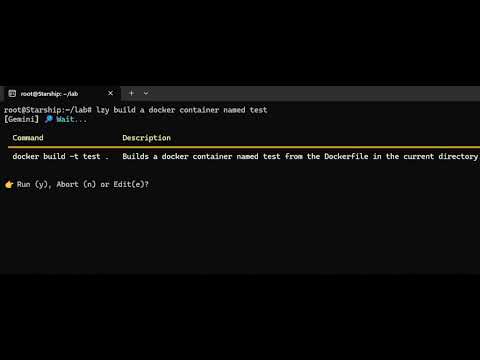
Click the image above or watch on YouTube.
🚀 Installation
pip install lzycli
🔧 Configuration
The first time you run lzy, an interactive wizard will guide you through:
- Choosing an AI provider.
- Entering your API key (typed characters are masked with
*for shoulder-surfing safety). - For Ollama, picking the host (default
http://localhost:11434) and selecting one of the locally installed models — no API key needed.
Your selection is saved to ~/.lzy/config.json (chmod 600 on Unix) and used on every subsequent run.
To reconfigure at any time:
lzy --setup
Example ~/.lzy/config.json
For a cloud provider (API key based):
{
  "provider": "openai",
  "api_key": "sk-your-api-key-here"
}
For Ollama (local, no API key):
{
  "provider": "ollama",
  "host": "http://localhost:11434",
  "model": "llama3.2"
}
Supported Providers
| Provider | Type |
|---|---|
openai |
API key |
anthropic |
API key |
gemini |
API key |
groq |
API key |
mistral |
API key |
together |
API key |
nvidia |
API key |
ollama |
local (no API key) |
Ollama: make sure
ollama serveis running and you have pulled at least one model (e.g.ollama pull llama3.2) before running the setup.
🧪 Usage
lzy find all PDF files in the current directory
If no provider is configured yet, the setup wizard runs automatically.
You’ll get a result like this:
┏━━━━━━━━━━━━━━━━━━━━━━━━━━━━━━━━━━━━━┳━━━━━━━━━━━━━━━━━━━━━━━━━━━━━━━━━━━━━━━━━━━━━━┓
┃ Command                             ┃ Description                                  ┃
┡━━━━━━━━━━━━━━━━━━━━━━━━━━━━━━━━━━━━━╇━━━━━━━━━━━━━━━━━━━━━━━━━━━━━━━━━━━━━━━━━━━━━━┩
│ find . -name '*.pdf'                │ Searches for all PDF files in the current    │
│                                     │ directory and its subdirectories.            │
└─────────────────────────────────────┴──────────────────────────────────────────────┘
Then you're prompted to choose:
y: run the commande: edit it firstn: cancel
🧩 Dev Tip
You can also run directly via Python for debugging:
python lzy/cli.py delete all .DS_Store files in this folder
📦 Publishing
This repository is configured to publish distributions through GitHub Actions using PyPI Trusted Publishing.
One-time setup
- Create the GitHub environments
testpypiandpypiin the repository settings. - Require manual approval for the
pypienvironment. - In TestPyPI, add a trusted publisher with:
- Owner:
ricardoborges - Repository:
lzy-cli - Workflow file:
publish-to-pypi.yml - Environment:
testpypi - Project name:
lzycli
- In PyPI, add the same trusted publisher, but use environment
pypi.
Release flow
- Package versions now come from Git tags via
setuptools-scm. - Create and push the release tag you want to publish, such as
v1.0.1. - Pushes to
mainpublish the current build to TestPyPI. - Tags matching
v*publish the tagged build to PyPI.
If this repository does not yet have a Git tag for the already published 1.0.0 release, create one on the matching commit before relying on automatic versioning. Otherwise, setuptools-scm will derive a development version from repository history instead.
Example release:
git tag v1.0.1
git push origin main --tags
📜 License
MIT License
Project details
Verified details
These details have been verified by PyPIProject links
GitHub Statistics
Maintainers
Release history Release notifications | RSS feed


Download files
Download the file for your platform. If you're not sure which to choose, learn more about installing packages.
Source Distribution
Built Distribution
Filter files by name, interpreter, ABI, and platform.
If you're not sure about the file name format, learn more about wheel file names.
Copy a direct link to the current filters
File details
Details for the file lzycli-1.2.1.tar.gz.
File metadata
- Download URL: lzycli-1.2.1.tar.gz
- Upload date:
- Size: 70.3 kB
- Tags: Source
- Uploaded using Trusted Publishing? Yes
- Uploaded via: twine/6.1.0 CPython/3.13.12
File hashes
| Algorithm | Hash digest | |
|---|---|---|
| SHA256 |
603df4f9031ec51382b46f9adc4835279f6abcb7aab52c918829e68961d03dc6
|
|
| MD5 |
bbc915708ee92681d5ee72144888eea2
|
|
| BLAKE2b-256 |
f7212da427c8aaa0131d96db329e1e74b721573da62a4311d999bbb7fdf5b8eb
|
Provenance
The following attestation bundles were made for lzycli-1.2.1.tar.gz:
Publisher:
publish-to-pypi.yml on ricardoborges/lzy-cli
-
Statement:
-
Statement type:
https://in-toto.io/Statement/v1 -
Predicate type:
https://docs.pypi.org/attestations/publish/v1 -
Subject name:
lzycli-1.2.1.tar.gz -
Subject digest:
603df4f9031ec51382b46f9adc4835279f6abcb7aab52c918829e68961d03dc6 - Sigstore transparency entry: 1508883735
- Sigstore integration time:
-
Permalink:
ricardoborges/lzy-cli@d9613801e1e654fbdf52ef85b3c58666fa1fdc09 -
Branch / Tag:
refs/tags/v1.2.1 - Owner: https://github.com/ricardoborges
-
Access:
public
-
Token Issuer:
https://token.actions.githubusercontent.com -
Runner Environment:
github-hosted -
Publication workflow:
publish-to-pypi.yml@d9613801e1e654fbdf52ef85b3c58666fa1fdc09 -
Trigger Event:
push
-
Statement type:
File details
Details for the file lzycli-1.2.1-py3-none-any.whl.
File metadata
- Download URL: lzycli-1.2.1-py3-none-any.whl
- Upload date:
- Size: 9.8 kB
- Tags: Python 3
- Uploaded using Trusted Publishing? Yes
- Uploaded via: twine/6.1.0 CPython/3.13.12
File hashes
| Algorithm | Hash digest | |
|---|---|---|
| SHA256 |
4ac1ff7c3024a25a710f883b0910f1e279acfe5a74d1878ce35894f0579e81cc
|
|
| MD5 |
eaa95d6dd8d03c30715b12083fa1d378
|
|
| BLAKE2b-256 |
d687df0327d1af73d873cef00b803f98ebb5cb3a5c37311526fafaf41077ae19
|
Provenance
The following attestation bundles were made for lzycli-1.2.1-py3-none-any.whl:
Publisher:
publish-to-pypi.yml on ricardoborges/lzy-cli
-
Statement:
-
Statement type:
https://in-toto.io/Statement/v1 -
Predicate type:
https://docs.pypi.org/attestations/publish/v1 -
Subject name:
lzycli-1.2.1-py3-none-any.whl -
Subject digest:
4ac1ff7c3024a25a710f883b0910f1e279acfe5a74d1878ce35894f0579e81cc - Sigstore transparency entry: 1508883773
- Sigstore integration time:
-
Permalink:
ricardoborges/lzy-cli@d9613801e1e654fbdf52ef85b3c58666fa1fdc09 -
Branch / Tag:
refs/tags/v1.2.1 - Owner: https://github.com/ricardoborges
-
Access:
public
-
Token Issuer:
https://token.actions.githubusercontent.com -
Runner Environment:
github-hosted -
Publication workflow:
publish-to-pypi.yml@d9613801e1e654fbdf52ef85b3c58666fa1fdc09 -
Trigger Event:
push
-
Statement type:






