
Translate natural language commands into Linux bash commands.

Project description
🐧 Lzy – Natural Language to Bash CLI
Lzy is a command-line tool that uses AI to translate natural language into Linux bash commands, explains what the command does, and lets you choose whether to run, edit, or abort the execution.
✨ Features
- 🔁 Translates natural language into valid Bash commands.
- 📘 Explains each command in natural language.
- 🛠️ Lets you review or edit the command before execution.
- 🔐 Works with multiple AI providers.
- 🎨 Fancy terminal output with
rich.
🎥 Demo
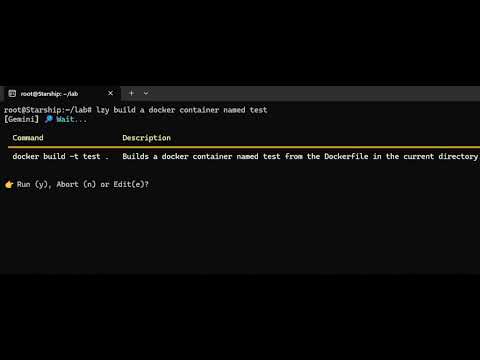
Click the image above or watch on YouTube.
🚀 Installation
pip install lzy
🔧 Environment Variables
Lzy uses environment variables to configure the AI provider and its corresponding API key.
Required
| Variable | Description |
|---|---|
CLI_PROVIDER |
Which provider to use: gemini, openai, together,... |
*_API_KEY |
The API key for the chosen provider (see below) |
Supported Providers
| CLI_PROVIDER | Required Variable |
|---|---|
gemini |
GEMINI_API_KEY |
openai |
OPENAI_API_KEY |
together |
TOGETHER_API_KEY |
nvidia |
NVIDIA_API_KEY |
anthropic |
ANTHROPIC_API_KEY |
groq |
GROQ_API_KEY |
mistral |
MISTRAL_API_KEY |
Optional
| Variable | Description |
|---|---|
.env file |
You can use a .env file to load variables automatically (via python-dotenv) |
Example .env file:
CLI_PROVIDER=gemini
GEMINI_API_KEY=your_google_api_key_here
🧪 Usage
lzy "find all PDF files in the current directory"
You’ll get a result like this:
┏━━━━━━━━━━━━━━━━━━━━━━━━━━━━━━━━━━━━━┳━━━━━━━━━━━━━━━━━━━━━━━━━━━━━━━━━━━━━━━━━━━━━━┓
┃ Command                             ┃ Description                                  ┃
┡━━━━━━━━━━━━━━━━━━━━━━━━━━━━━━━━━━━━━╇━━━━━━━━━━━━━━━━━━━━━━━━━━━━━━━━━━━━━━━━━━━━━━┩
│ find . -name '*.pdf'                │ Searches for all PDF files in the current    │
│                                     │ directory and its subdirectories.            │
└─────────────────────────────────────┴──────────────────────────────────────────────┘
Then you're prompted to choose:
y: run the commande: edit it firstn: cancel
🧩 Dev Tip
You can also run directly via Python for debugging:
python lzy/cli.py "delete all .DS_Store files in this folder"
📜 License
MIT License
Release history Release notifications | RSS feed


Download files
Download the file for your platform. If you're not sure which to choose, learn more about installing packages.
Source Distribution
Built Distribution
Filter files by name, interpreter, ABI, and platform.
If you're not sure about the file name format, learn more about wheel file names.
Copy a direct link to the current filters
File details
Details for the file lzycli-1.0.0.tar.gz.
File metadata
- Download URL: lzycli-1.0.0.tar.gz
- Upload date:
- Size: 6.1 kB
- Tags: Source
- Uploaded using Trusted Publishing? No
- Uploaded via: twine/6.1.0 CPython/3.10.12
File hashes
| Algorithm | Hash digest | |
|---|---|---|
| SHA256 |
425f77ae82bd449a1edf070e250174fa56945a06c459650a86e0c18f611d072b
|
|
| MD5 |
409f91c3bf2829ce5f3ee60e4623d7bb
|
|
| BLAKE2b-256 |
9fa7898961f65932f72869852cb1f5bd0b874dd0bd8f0977f9d403937ccedeb0
|
File details
Details for the file lzycli-1.0.0-py3-none-any.whl.
File metadata
- Download URL: lzycli-1.0.0-py3-none-any.whl
- Upload date:
- Size: 6.8 kB
- Tags: Python 3
- Uploaded using Trusted Publishing? No
- Uploaded via: twine/6.1.0 CPython/3.10.12
File hashes
| Algorithm | Hash digest | |
|---|---|---|
| SHA256 |
185fc9d30b45426998515f4e22880804e6cd54d2e8cbcb4761d007dd3b7218ba
|
|
| MD5 |
99c44b8820fdef09a8e7faf7101bd86f
|
|
| BLAKE2b-256 |
fe6321a5308874a8872ed6a8b1f198af9b1375688fb0abc3cd45cd35251685a6
|






