
Give your AI agent a memory — local-first, private, easy to install. Guided setup wizard; works out of the box on your own machine, no cloud. For everyday agent users, homelabs, and developers alike · 99.2% LongMemEval-S retrieval @ k=10 · Works with Claude · Gemini · Antigravity · OpenCode · OpenClaw · Hermes · any MCP agent (native + one-command plugins) · Hybrid search (FTS5 + vector + MMR) · GDPR · FIPS 140-3 deployment-ready · 100% local (fully offline) or cloud capable
Verified details
These details have been verified by PyPIProject links
GitHub Statistics
Maintainers

Project description
🧠 M3 Memory
A memory layer that outlives your agents. You switch from Claude Code to Cursor, upgrade your model, start fresh next week — and everything your tools learned about your project is gone. You re-explain the same decisions, the same preferences, the same hard-won context, over and over.
M3 fixes that. It's a private, local-first memory your agents share and build on — so your project's knowledge accumulates instead of resetting every time the agent does. One memory store, on your machine, that your tools and agents read from and write to — whether that's Claude Code, Cursor, Gemini CLI, or any MCP-compatible agent.
Under the hood, M3 treats agent memory as a distributed-systems infrastructure problem, not a simple retrieval feature — a shared, evolving, bitemporal, contradiction-aware knowledge base that multiple heterogeneous agents and machines read and write, built to stay consistent over months and years.
⚡ Quickstart
pip install m3-memory
m3 setup            # detects your agents, wires the MCP server, provisions the local embedder
m3 doctor           # verify: health, memory count, embedder, and which agents got wired
That's the whole install. No cloud account, no API key, no external embedding service.
What it does, in four lines
Save a decision — from any agent, or straight from the shell:
$ m3 memory memory_write --type decision --title "auth-jwt-algorithm" \
    --content "The auth service uses RS256 JWTs. HS256 was rejected because we need asymmetric verification at the edge."
"Created: 84a944fb-ef3e-403b-9240-f53ab3c015f7"
Next week, in a different agent, on a different model — ask in your own words:
$ m3 memory memory_search --query "which signing algorithm did we pick for tokens?" --k 3
Top 1 results:
----------------------------------------
1. [84a944fb-ef3e-403b-9240-f53ab3c015f7] score=0.7501  type: decision  title: auth-jwt-algorithm
Content:
The auth service uses RS256 JWTs. HS256 was rejected because we need asymmetric verification at the edge.
----------------------------------------
The query shares no keywords with the stored text — no "RS256", no "JWT" — and still finds it. That's the hybrid engine: BM25 for exact terms, local BGE-M3 vectors for meaning, MMR for diversity. Your agent calls the same tools over MCP, so it recalls this automatically instead of asking you again.
New here? The 5-Minute Getting Started Guide walks the same path with more context, and Core Tools lists the five you'll use most.
🧩 Beyond the core
The Quickstart above is the whole product for most people: shared memory, wired into your agents, working offline. Everything below is optional surface you can ignore until you want it — each row says what it costs to turn on.
| 🤖 | Coding agents · included in the base installm3 setup auto-detects and wires m3 into Claude Code, Cursor, Cline, Gemini CLI, Google Antigravity, Aider, OpenCode, OpenClaw, Hermes — one shared memory across every agent, and any agent you add later is picked up automatically. (See MCP Client Install) |
| 🖥️ | Web dashboard, open to all users — not just developers · needs m3-memory[dashboard]a built-in, backend-agnostic control panel (default http://127.0.0.1:8088): browse memory, read your auto-generated Memory Wiki, explore the interactive knowledge graph, and watch system health / load. pip install m3-memory[dashboard] then m3 dashboard. (See Dashboard Guide) |
| 📖 | Auto-generated wiki + Obsidian export · core feature — in the base install, nothing extra to enablem3 wiki generate compiles your canonical memories (pinned, high-confidence, beliefs, procedures) and indexed files into a browsable, interlinked Markdown vault — one page per topic, real hyperlinks for every relationship, and provenance links down to the source document each fact came from. Renders on GitHub, in a self-contained offline HTML viewer, or as an Obsidian vault (--obsidian for graph view + backlinks). (See Wiki Guide) |
| 🐘 | PostgreSQL · needs m3-memory[postgres]; SQLite is the default and needs nothingrun M3 on a first-class PostgreSQL primary backend ( M3_DB_BACKEND=postgres) for a shared, server-hosted store, with cross-device sync to a PostgreSQL warehouse. SQLite stays the zero-infrastructure default. (See Architecture · Sync) |
Also a drop-in memory backend for LangChain / LangGraph, CrewAI, and PydanticAI — see the framework guides.
Every path gains automatic contradiction supersession, bitemporal historical queries, local sovereign embedding, and the full 100+ MCP tool set.
⚖️ How M3 Compares
A full, feature-by-feature comparison table — M3 vs Mem0, Letta, Zep, Graphiti, LangChain Memory / LangMem, agentmemory, Chronos, Hindsight, Mastra OM, Memento, and more — with sourced benchmarks and honest "when to choose the other tool" guidance, lives in COMPARISON.md.
Short version: M3 is the local-first, MCP-native option that stays yours and works across every agent — where cloud services (Mem0), full agent runtimes (Letta), and graph-database systems (Zep, Graphiti) each ask you to adopt their infrastructure. See the comparison guide for the row-by-row detail.
🚀 Quick Links & Badges











💡 Get Started Quickly:
- 🚀 5-Minute "Human-First" Guide
- 🖥️ OS Installation: Windows Setup · macOS Setup · Linux Setup
📑 Table of Contents
- Quickstart
- Beyond the Core (optional surface)
- Overview & At a Glance
- Memory Model
- Installation & Onboarding
- Domain Gating (Token Optimization)
- Sovereign & Air-Gapped Deployments
- Interactive Features & Capabilities
- Documentation Index
- Target Audience & Fit
- Quality Assurance & Compliance
- Benchmarks & Performance
- Core Tools Reference
- Agent Integration Prompts
- Interactive Demos
⚡ M3 at a Glance
| Feature | Details |
|---|---|
| Works With | Claude Code · Cursor · Cline · Gemini CLI · Aider · Google Antigravity · OpenCode · OpenClaw · Hermes · LangChain/LangGraph · CrewAI · PydanticAI · Any MCP Agent |
| M3 Is | A persistent memory layer · An MCP server · A hybrid retrieval engine · A bitemporal knowledge base |
| M3 Is Not | An LLM · A chatbot · A plain vector database · A RAG framework · An IDE |
| Core Promise | Private, offline-capable, locally owned memory shared securely across all your developer tools — with FIPS 140-3-ready crypto and atomic multi-agent writes for regulated and multi-agent environments. |
| Retrieval Accuracy | State-of-the-art for a local-first substrate — 99.2% session-hit-rate @ k=10, 100% @ k=20 on LongMemEval-S (no oracle routing), with a gold session as the #1 result for 91.8% of questions. See Benchmarks. |
| Context Efficiency | Exposes 100+ tools but occupies just ~1.8% of a 200K context window at startup — lazy domain-gating loads the rest on demand. |
| Maturity | Stable, battle-tested core engine (2,400+ tests) that's safe to build on today; new features and integrations are added actively. SQLite by default; PostgreSQL as a first-class primary backend (M3_DB_BACKEND=postgres) via a pluggable SQL storage seam. (See features.json) |
🧠 Memory Model at a Glance
M3 is a typed, bitemporal, confidence-scored, self-maintaining knowledge base. Every feature listed below is implemented natively (see Memory Model Details):
- Structured Metadata: Every memory contains a
type,source,confidence,scope, provenance (change_agent), and salience (importance,decay_rate). - Verbatim, Non-Destructive Storage: Memory content is stored exactly as written and never altered in place — the raw text is always retrievable byte-for-byte. Corrections don't overwrite: a superseded fact is closed (its validity interval ends) and the new fact is linked to it, so both the original wording and its full edit history stay queryable. You get true verbatim recall and an audit trail, not one or the other.
- Bitemporal History: Distinguishes valid-time from transaction-time. Because superseded facts are closed rather than deleted, you can query what the agent believed at any specific point in time.
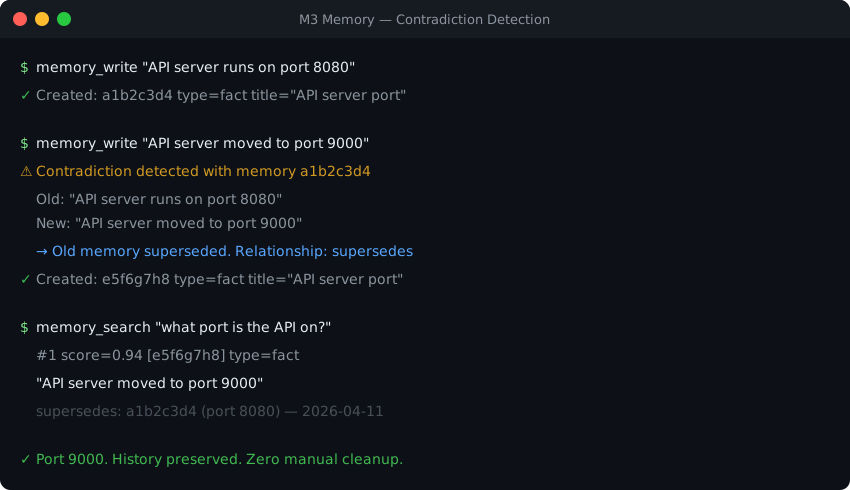
- Contradiction Management: Conflicting facts are resolved automatically on write. The stale fact is marked as superseded, and confidence values are updated dynamically via Bayesian confidence posteriors. Supersession fires above a deliberately conservative cosine bar (
CONTRADICTION_THRESHOLD, default 0.92), so near-restatements of a claim close the old fact while genuinely different-but-related facts are both kept — usememory_supersedeto close one explicitly. (See Technical Details.) - Self-Maintaining Lifecycle: Implements memory decay, deduplication, automatic consolidation into higher-order beliefs, TTL expiry, and GDPR erasure.
- Procedural Memory: A first-class
proceduretype (skill / runbook / how-to / checklist) that is auto-distilled from successful task runs — the background loop rolls up a completed task and its step/result memories into a reusable, step-by-step procedure, preserved withdistills_fromprovenance back to its sources. A "how do I…" query surfaces it via a procedural retrieval boost. - Write-Gating & Content Safety: Filters out low-signal noise via an enrichment queue and content safety guardrails before storage.
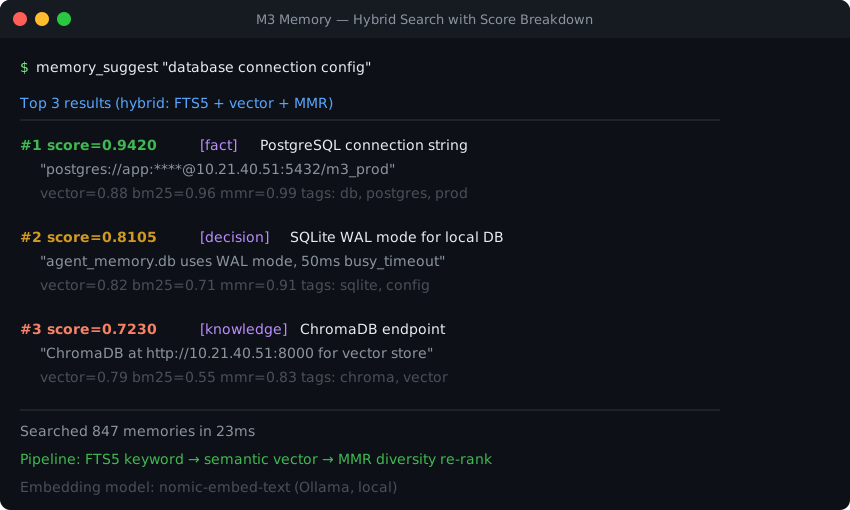
- Explainable Retrieval: Hybrid engine combining vector similarity, BM25 (FTS5), MMR diversity, and reranking.
memory_suggestreturns the exact score breakdown per result. (See Confidence and Trust Guide). - Proven Accuracy: On LongMemEval-S, M3 delivers state-of-the-art retrieval for a local-first substrate — 99.2% session-hit-rate @ k=10 and 100% @ k=20 (no oracle routing), with a gold session as the #1 result for 91.8% of questions. End-to-end QA accuracy is 92.0% with no oracle metadata (see Benchmarking Report).
📦 Installation
The Quickstart above covers the common path (pip install m3-memory → m3 setup). This section adds the alternatives: the shell installer, per-agent wiring, and manual MCP configuration.
The One-Liner (macOS & Linux)
curl -fsSL https://raw.githubusercontent.com/skynetcmd/m3-memory/main/install.sh | bash
- For Windows, please follow the Windows Manual Installation Guide.
- To install manually on any platform, refer to the OS-Specific Install Instructions or examine the installer script.
Developer Setup Wizard
If you are developing inside python environments:
pip install m3-memory
m3 setup
The m3 setup wizard automatically detects your installed agents — Claude Code, Cursor, Cline, Gemini CLI, OpenCode, Antigravity, OpenClaw, Hermes — and wires the m3 memory MCP server into each, installs settings files/hooks, provisions the sovereign CPU embedder, and performs a system diagnostic. Detection and wiring re-run on every m3 update/m3 setup, and m3 doctor --fix repoints any config whose paths have moved — so an agent you install later gets picked up automatically the next time you run setup or update.
Integrating with AI Coding Tools
🤖 Claude Code
Install as a plugin to unlock /m3:* slash commands, curation subagents, and automatic hooks:
/plugin marketplace add skynetcmd/m3-memory
/plugin install m3@skynetcmd
See Claude Code Plugin Reference and Claude.ai Connector Guide.
▷ Cursor
Auto-detected and wired by the setup wizard — it writes the m3 memory MCP server into ~/.cursor/mcp.json:
m3 setup
Re-run after installing Cursor and it's picked up automatically; m3 doctor --fix repoints the entry if paths move. See MCP Client Install Guide.
◧ Cline (VS Code)
Auto-detected and wired by the setup wizard — it writes the m3 memory MCP server into Cline's cline_mcp_settings.json:
m3 setup
Also available from Cline's MCP marketplace (see llms-install.md). See MCP Client Install Guide.
🪐 Google Antigravity
Install the plugin directly:
agy plugin install https://github.com/skynetcmd/m3-memory
See Antigravity Plugin Reference.
🦊 Hermes Agent
Run the wizard to automatically wire up optimal memory providers:
m3 setup
See Hermes Plugin Integration Guide.
🐍 Python / LangChain & LangGraph
Use M3 as a drop-in Mem0 replacement or LangMem backend:
pip install m3-memory[langchain]
See LangChain Integration Guide.
👥 CrewAI (v1.x)
A drop-in StorageBackend for CrewAI's unified memory:
pip install m3-memory[crewai] # crewai>=1.10,<2 · Python 3.10–3.13 (a 3.14 escape hatch is documented)
🧩 PydanticAI
m3 tools + auto-recall, or a formal M3MemoryToolset. Built on Pydantic v2 — runs natively on Python 3.14:
pip install m3-memory[pydantic-ai] # pydantic-ai-slim>=2,<3
See PydanticAI Integration Guide.
Manual MCP Server Configuration
To expose M3 to any Model Context Protocol host, add it to your configuration file:
{
  "mcpServers": {
    "memory": {
      "command": "m3"
    }
  }
}
🎚️ Domain Gating: the Full Catalog Without the Context Cost
M3 gives you the full 100+ tool surface while occupying just 1.8% of a 200K context window at startup — most MCP servers make you pay for every tool in every prompt. Tools are grouped into 9 domains (memory, chatlog, files, entity, agent, tasks, conversations, diagnostics, admin) and loaded lazily.
Only the essential core set (~18, ~3,540 tokens) registers at startup. When your agent needs advanced functionality, it calls tools_load_domain(domain="...") to fetch the rest on demand — so a large catalog costs near-zero context until you actually use a domain.
| Gating Mode | Registered Tools | Tokens in Schema | % of 200K Window |
|---|---|---|---|
| Lazy (Default) | ~18 | ~3,540 | 1.8% |
| Typical Active Session | 64 | ~17,975 | 9.0% |
Eager Mode (M3_TOOLS_LAZY=0) |
110 | ~24,918 | 12.5% |
🛠️ Note: If your client does not support dynamic tool registration, set the environment variable
M3_TOOLS_LAZY=0to register all tools eagerly.
🛡️ Sovereign & Air-Gapped Deployments
M3 operates completely offline by default.
Sovereign Local Embedder
A high-performance BGE-M3 embedder runs locally after installation.
- Default: in-process via the
m3-core-rsnative module (llama.cpp linked in-process, zero IPC — not a separate service you have to run or monitor). CPU execution using GGUF format (_assets/models/bge-m3-Q4_K_M.gguf). A local HTTP embed server on127.0.0.1:8082exists only as an automatic fallback if the in-process path can't load. - Hardware Acceleration (GPU): Execute
m3 embedder install-gputo compile with CUDA, Vulkan, or Metal. - External Provider Fallback: Set
EMBED_BASE_URLto route requests to Ollama, LM Studio, or vLLM.
Rust-Oxidized Performance Core
M3 includes an optional Rust performance module (m3_core_rs) that speeds up MMR re-ranking, batch cosine distance calculations, and FTS compilations by 90× to 800×. If absent, M3 falls back to pure Python execution automatically. Disable with M3_CORE_RS_DISABLE=1. (See Oxidation Benchmarks).
Enterprise Security & Compliance
-
FIPS 140-3 Ready: Standardized encryption pathways allow routing through validated cryptographic modules (e.g., wolfSSL via
M3_FIPS_MODE=1). -
Air-Gapped Install: Supports installation without internet access via pre-compiled python wheels. (See Sovereign Deployment Guide & FIPS Boundary Reference).
-
Storage Location: State lives under three roots, so databases and configuration can be relocated and secured independently:
Root Default Holds M3_ENGINE_ROOT~/.m3/engineDatabases + runtime state ( agent_memory.db,agent_chatlog.db,files_database.db)M3_CONFIG_ROOT~/.m3/configConfiguration (chatlog config, salt) M3_MEMORY_ROOT~/.m3-memoryPayload / repo clone All three are overridable. Set any of them to relocate that root.
M3_MEMORY_ROOTalso acts as a master override — if set and the other two are unset, engine and config derive from it as<root>/engineand<root>/config. Precedence isM3_ENGINE_ROOT/M3_CONFIG_ROOT→M3_MEMORY_ROOT/…→ the~/.m3/…default, so a specific root always wins over the master. (See Architecture.)
🔮 What M3 Does
- Memory Persistence: Saves system architecture, project decisions, and preferences across tool boundaries using a local SQLite database.
- Autonomous Cognitive Loop: Background worker (
m3_cognitive_loop.py) that periodically sweeps chat logs to extract facts, reconcile contradictions, and construct an entity relationship graph. - Hybrid Vector & Keyword Search: Seamlessly merges vector space, Full-Text Search (FTS5 BM25), and MMR diversity.
- Hierarchical File Ingestion: A dedicated 26-tool files domain reads directories, chunks files, extracts facts, and reviews staleness — with ~4× faster incremental re-ingest (unchanged sections reuse cached embeddings).
- Verbatim Chatlog Capture: A dedicated 10-tool chatlog domain records conversation turns before compaction, so prior Claude/Gemini sessions stay searchable and nothing is lost to context-window truncation.
- Pluggable Storage Backend: SQLite by default; select PostgreSQL as a first-class primary store with
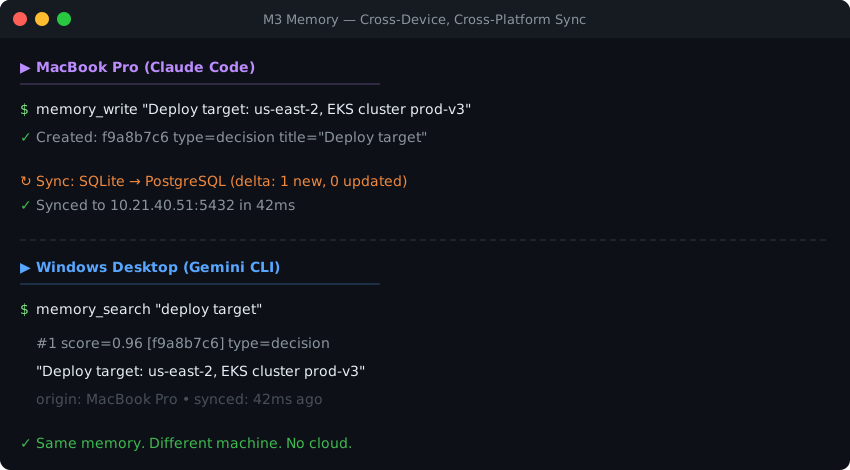
M3_DB_BACKEND=postgres. Same semantics on either backend — the choice doesn't change behavior. - Cross-Device Sync: Optionally sync/federate to a PostgreSQL warehouse tier. Access the same memories on your laptop, desktop, or cloud environments.
📚 Documentation Index
Start here, in this order: Getting Started → Memory Model (what a memory is, and how supersession works) → Agent Instructions (how to make your agent use it well). Everything else below is reference — reach for it when you hit the specific thing it covers.
| Quick & Core | Advanced & Architecture | Integrations & Compliance |
|---|---|---|
| 🚀 Getting Started Guide | 🏗️ System Architecture | 🧩 LangChain/LangGraph |
| ✨ Core Features | 🔧 Technical Implementation | 🧩 Hermes Agent |
| ⚙️ Environment Variables | 🧠 Memory Model Guide | 🛡️ Compliance Guide (GDPR, FISMA) |
| 🛠️ Operations Playbook | ⚡ Rust Oxidation benchmarks | 🛡️ FIPS Cryptographic Boundary |
| 🤖 Agent Instructions & Rules | 🔍 Myths & Facts Guide | 🏠 Homelab Patterns |
| 🧩 Tool Capability Matrix | 🤖 AI Context Injection Profile | 🔢 Machine-Readable Features |
More Documentation
| Guide | Guide | Guide |
|---|---|---|
| 🗺️ Roadmap | 🔄 Cross-Device Sync | 👥 Multi-Agent Orchestration |
| ⚖️ Comparison vs Alternatives | ❓ FAQ | 🔐 Security Policy |
| 🩹 Troubleshooting | ⌨️ CLI Reference | 📖 API Reference |
| 📁 Files Memory | 💬 Chat Log Subsystem | ✨ Enrichment Guide |
| ⬆️ Upgrade Guide | 🩺 Health FAQ | 🧬 Dual Embedding |
| 📜 Changelog | 🤝 Code of Conduct | 🏗️ Build Wheels |
🎯 Who This Is For
M3 is a great fit if...
- You want the freedom to switch or add agents without losing what they know: change tools on the fly or down the road — Claude Code, Gemini, OpenClaw, Hermes, whatever comes next — and your project's knowledge carries over instead of disappearing with the switch.
- You build with LangChain/LangGraph: An advanced replacement for standard memory models, adding bitemporal queries, contradiction management, and local embeddings.
- You build with CrewAI (v1.10–1.x): A drop-in
StorageBackend(Memory(storage=M3StorageBackend(user_id="crew-alpha"))) that gives CrewAI bitemporal recall, contradiction-aware supersession, and local embeddings — plus the thing single-vector stores can't do: a CrewAI-written memory can also be searchable by every other m3 agent (Claude Code, Gemini, LangChain) if you want.pip install m3-memory[crewai]. See the CrewAI integration guide. - You build with PydanticAI: m3-backed memory as either drop-in tools + auto-recall (
register_m3_tools,m3_recall_processor) or a formalM3MemoryToolset(a real PydanticAIAbstractToolset). Built on Pydantic v2, so it runs on Python 3.14 with a plainpip install m3-memory[pydantic-ai]. See the PydanticAI integration guide. - You need security and compliance: Built-in
gdpr_forgetandgdpr_exporttools, air-gapped support, and audit logs. - You value privacy: Zero external cloud requests or subscriptions required.
M3 is NOT a fit if...
- You need a hosted SaaS dashboard with managed infrastructure (use Letta).
- You don't want persistent memory: you want each session to start fresh, with no ability to retrieve prior sessions' knowledge — M3 exists to do the opposite, so your agent's built-in defaults are the simpler fit.
🛡️ Why Trust This
- Benchmarked Retrieval: State-of-the-art for a local-first substrate — 99.2% session-hit-rate @ k=10, 100% @ k=20 on LongMemEval-S — with a published, reproducible methodology and no oracle routing. See Benchmarks.
- Robust Coverage: Over 2,400 tests guarding correct behavior across search, sync, GDPR lifecycle, and files ingestion — run with warnings-as-errors, so a new warning fails the suite.
- Audit Reports: Regular vulnerability reports (Bandit, secrets scans, pip-audit) published directly under
docs/audits/. - Explainable Retrieval: No black-box queries; retrieval math is open, readable, and scoring parameters are outputted directly.
- Open Source: Apache 2.0 licensed, free, with no SaaS walls or usage limits.
📊 Benchmarks
Retrieval Recall (Session Hit-Rate @ k)
Evaluated on the 500-question LongMemEval-S dataset under default server configurations:
| Retrieve Depth (k) | Session Hit-Rate (SHR) ⁂ | Success Count | vs. Prior Version |
|---|---|---|---|
| 1 | 91.8% | 459 / 500 | First Report † |
| 5 | 98.2% | 491 / 500 | +2.0pp |
| 10 (Default) | 99.2% | 496 / 500 | +2.4pp |
| 20 | 100.0% | 500 / 500 | First Report ‡ |
† SHR@1 is the strictest cut — a gold session as the single top-ranked result. M3 operates at k=10 (its default), where a gold session is present for 99.2% of questions; k=1 is reported here for completeness, not as the headline. Cross-system SHR/recall figures are usually quoted at k=5, k=10, k=20, or k=50, so comparing another system's k=10+ number against this k=1 figure is not a like-for-like comparison.
⁂ Which aggregation. These are binary per-question
recall_any@kvalues — the convention adjacent LongMemEval submissions report. The benchmarking report's per-question-type table aggregates slightly differently and reads marginally higher at shallow depth (98.8% at k=5, 99.4% at k=10); k=20 is 100.0% either way. The table above quotes the more conservative figures.
‡ v3 improvement — the v3 engine reaches 100% SHR at k=20, exceeding the prior version's 97.8% measured at the deeper k=30 (LongMemEval issue #43) — higher recall at shallower depth. Both figures are retrieval-only SHR (no answerer). The "vs. Prior Version" deltas at k=5/k=10 compare v3 against the prior version's 96.2% / 96.8% at the same k.
End-to-End QA Accuracy
92.0% accuracy (460/500 correct responses) with zero oracle metadata routing:
| Question Domain | Count (n) | Accuracy |
|---|---|---|
| single-session-user | 70 | 94.3% |
| single-session-assistant | 56 | 96.4% |
| single-session-preference | 30 | 80.0% |
| multi-session | 133 | 87.2% |
| temporal-reasoning | 133 | 95.5% |
| knowledge-update | 78 | 93.6% |
| Overall Summary | 500 | 92.0% |
Methodology and reproducibility details are located in the LongMemEval-S Benchmarking Report.
🧰 Core Tools
While M3 features 100+ tools, these five serve as your primary interface:
| Tool Name | Operation Description |
|---|---|
memory_write |
Save a specific fact, project preference, or technical configuration. |
memory_search |
Run hybrid keyword (BM25) and semantic vector search. |
memory_update |
Edit existing facts to keep memory accurate. |
memory_suggest |
Query memories alongside a mathematically explicit score breakdown. |
memory_get |
Fetch details of a single memory using its unique ID. |
Refer to the Agent Instructions Guide and Full MCP Tool Catalog for complete parameter definitions.
🤖 For AI Agents
You can drop the agent ruleset file examples/AGENT_RULES.md into your workspace to teach your agent best practices (e.g., query before writing, update existing records instead of duplicating).
Command Installation Prompts
Copy and paste these prompts into your terminal client to let your agent set up M3 for you:
Claude Code Prompt
Install m3-memory for persistent memory. Run: pip install m3-memory
Then run: m3 setup
That wires the m3 "memory" MCP server into my agents and provisions the
local BGE-M3 embedder — no external embedding service is needed. If it
doesn't detect Claude Code, add {"mcpServers":{"memory":{"command":"m3"}}}
to my ~/.claude/settings.json under "mcpServers". Then use /mcp to verify
the memory server loaded.
Gemini CLI Prompt
Install m3-memory for persistent memory. Run: pip install m3-memory
Then run: m3 setup
That wires the m3 "memory" MCP server into my agents and provisions the
local BGE-M3 embedder — no external embedding service is needed. If it
doesn't detect Gemini CLI, add {"mcpServers":{"memory":{"command":"m3"}}}
to my ~/.gemini/settings.json under "mcpServers".
Active Chatlog Capture Plugin
To configure instant conversation logging and backup, tell your active coding agent:
Install the m3-memory chat log subsystem.
The agent executes bin/chatlog_init.py and configures execution triggers (see Chat Log Architecture Guide).
🎬 See it in action
Contradiction Detection & Automatic Resolution
Hybrid Search Scoring Details
Multi-Device Database Sync
💬 Community


How to Contribute · FAQ for Developers · Good First Issues
📜 License & Attributions
This project is licensed under the Apache License 2.0. See LICENSE for details.
Built with
M3 Memory is authored and maintained by skynetCMD. It was built with the help of AI coding assistants — Gemini CLI, Claude Code, and Google Antigravity — which contributed code under the author's direction. (They are tools that assisted; they are not maintainers, sponsors, or co-owners of the project.)
Asset & Icon Credits
The provider badges under docs/badges/ embed small logo glyphs:
- OpenClaw & OpenCode icons are from the MIT-licensed LobeHub icon set (
lobe-icons). - The Hermes badge uses a generic caduceus glyph.
See NOTICE for the full third-party attribution list.
PyPI downloads are the pepy.tech total. Badges are regenerated on a schedule by star-history.yml.
Python: m3 core runs on 3.11+ (including 3.14). The optional framework extras follow their own caps — PydanticAI is 3.14-native (plain pip install); CrewAI requires 3.10–3.13 (a 3.14 escape hatch is documented).
---
⭐ Star History
⭐ View star history → (click to expand the chart)
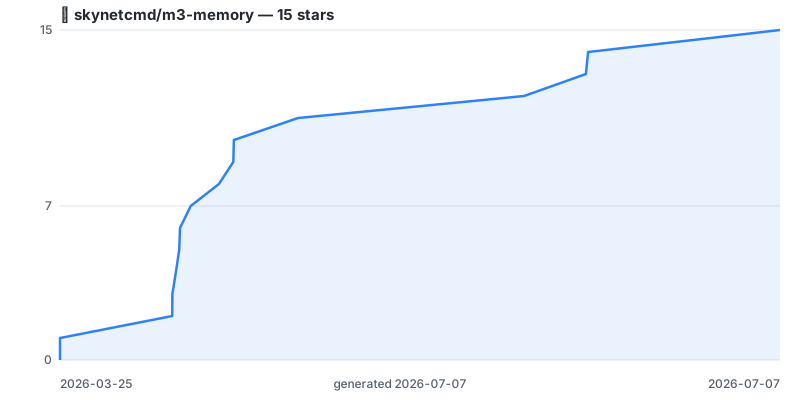
Chart regenerated on a schedule by .github/workflows/star-history.yml using the repo's own token — no third-party embed. Click through for the live interactive version.
Project details
Verified details
These details have been verified by PyPIProject links
GitHub Statistics
Maintainers
Release history Release notifications | RSS feed


Download files
Download the file for your platform. If you're not sure which to choose, learn more about installing packages.
Source Distribution
Built Distribution
Filter files by name, interpreter, ABI, and platform.
If you're not sure about the file name format, learn more about wheel file names.
Copy a direct link to the current filters
File details
Details for the file m3_memory-2026.7.25.0.tar.gz.
File metadata
- Download URL: m3_memory-2026.7.25.0.tar.gz
- Upload date:
- Size: 3.8 MB
- Tags: Source
- Uploaded using Trusted Publishing? Yes
- Uploaded via: twine/6.1.0 CPython/3.13.14
File hashes
| Algorithm | Hash digest | |
|---|---|---|
| SHA256 |
defe865e54fd754b639d34620b6631a8a43a6af52ad3d7d09335f5a3e7424c19
|
|
| MD5 |
2784f74632571e095f0244ee067bdf44
|
|
| BLAKE2b-256 |
f5063b5630e4cfd3d8dfc9bed7257c445f88419a4f60f5e550ea50f1005efb8a
|
Provenance
The following attestation bundles were made for m3_memory-2026.7.25.0.tar.gz:
Publisher:
publish.yml on skynetcmd/m3-memory
-
Statement:
-
Statement type:
https://in-toto.io/Statement/v1 -
Predicate type:
https://docs.pypi.org/attestations/publish/v1 -
Subject name:
m3_memory-2026.7.25.0.tar.gz -
Subject digest:
defe865e54fd754b639d34620b6631a8a43a6af52ad3d7d09335f5a3e7424c19 - Sigstore transparency entry: 2251668844
- Sigstore integration time:
-
Permalink:
skynetcmd/m3-memory@dd7b07dd5d586a959b1ad41a54450c54a8e4c7c9 -
Branch / Tag:
refs/tags/v2026.7.25.0 - Owner: https://github.com/skynetcmd
-
Access:
public
-
Token Issuer:
https://token.actions.githubusercontent.com -
Runner Environment:
github-hosted -
Publication workflow:
publish.yml@dd7b07dd5d586a959b1ad41a54450c54a8e4c7c9 -
Trigger Event:
push
-
Statement type:
File details
Details for the file m3_memory-2026.7.25.0-py3-none-any.whl.
File metadata
- Download URL: m3_memory-2026.7.25.0-py3-none-any.whl
- Upload date:
- Size: 4.3 MB
- Tags: Python 3
- Uploaded using Trusted Publishing? Yes
- Uploaded via: twine/6.1.0 CPython/3.13.14
File hashes
| Algorithm | Hash digest | |
|---|---|---|
| SHA256 |
cee92108922a0e5a1ce5cef9d94a74eae3c5079a557e1aab3b2706db6a7b8dec
|
|
| MD5 |
afb379a685f931178e40883d6702e7cc
|
|
| BLAKE2b-256 |
cf99ebe369be6037b6e8b516e6dee77092a994e9baae2149cadd0ee652c94bea
|
Provenance
The following attestation bundles were made for m3_memory-2026.7.25.0-py3-none-any.whl:
Publisher:
publish.yml on skynetcmd/m3-memory
-
Statement:
-
Statement type:
https://in-toto.io/Statement/v1 -
Predicate type:
https://docs.pypi.org/attestations/publish/v1 -
Subject name:
m3_memory-2026.7.25.0-py3-none-any.whl -
Subject digest:
cee92108922a0e5a1ce5cef9d94a74eae3c5079a557e1aab3b2706db6a7b8dec - Sigstore transparency entry: 2251669482
- Sigstore integration time:
-
Permalink:
skynetcmd/m3-memory@dd7b07dd5d586a959b1ad41a54450c54a8e4c7c9 -
Branch / Tag:
refs/tags/v2026.7.25.0 - Owner: https://github.com/skynetcmd
-
Access:
public
-
Token Issuer:
https://token.actions.githubusercontent.com -
Runner Environment:
github-hosted -
Publication workflow:
publish.yml@dd7b07dd5d586a959b1ad41a54450c54a8e4c7c9 -
Trigger Event:
push
-
Statement type:






