
A python and jupyter API for the MaBoSS software


Project description
pyMaBoSS

pyMaBoSS is a python API for the MaBoSS software. It can be used inside the Colomoto docker. The API is loaded by running the following line in Python:
import maboss
Once loaded, it allows you to quickly load a MaBoSS model:
sim = maboss.load("metastasis.bnd", "metastasis.cfg")
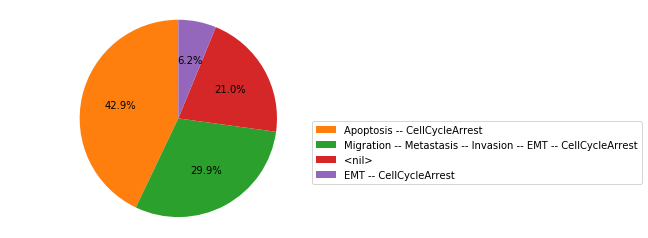
And then to simulate the model and plot the simulation results:
res = sim.run()
res.plot_piechart()
Installation instructions
pyMaBoSS can be installed either via Conda, PyPi or GitHub.
Installation with Conda
This is the recommended option, as it also allows the simple installation of all the dependencies.
conda -c colomoto install pymaboss
This will install the library, which will already be ready to use.
Installation with PyPi
This is not the recommended option as it cannot yet package the MaBoSS binaries, but if you already have then install you can just install pyMaBoSS using
pip install maboss
To download the MaBoSS binaries, if you have conda and if you are using linux or macosx, you can run :
python -m maboss_setup
If you are using Windows, or if the command above did not work, you can try to run :
python -m maboss_setup_experimental
Otherwise, you can download them using the following links, for Linux, MacOSX arm64, MacOSX X86_64 or Windows. Once downloaded, you need to extract them and make them accessible by putting them in a folder configured in your PATH.
Installation with GitHub
Finally, you can also install pyMaBoSS directly from the official GitHub repository :
git clone https://github.com/colomoto/pyMaBoSS
cd pyMaBoSS
python setup.py install
Note that this also comes without the MaBoSS binaries, so to install them you’ll have to follow the steps described above.
Release history Release notifications | RSS feed


Download files
Download the file for your platform. If you're not sure which to choose, learn more about installing packages.
Source Distribution
Built Distribution
Filter files by name, interpreter, ABI, and platform.
If you're not sure about the file name format, learn more about wheel file names.
Copy a direct link to the current filters
File details
Details for the file maboss-0.8.14.tar.gz.
File metadata
- Download URL: maboss-0.8.14.tar.gz
- Upload date:
- Size: 106.7 kB
- Tags: Source
- Uploaded using Trusted Publishing? No
- Uploaded via: twine/6.2.0 CPython/3.12.3
File hashes
| Algorithm | Hash digest | |
|---|---|---|
| SHA256 |
56958ab69858a81da284acd7b1f568df219789dd4befcdc553c10b3590ecf374
|
|
| MD5 |
1d7c5e12da5f0a6817e4637f057c4472
|
|
| BLAKE2b-256 |
19c187a1aff1e0e32e5e3961984b714a0ba7808900da4620ae9f62b221f4be65
|
File details
Details for the file maboss-0.8.14-py3-none-any.whl.
File metadata
- Download URL: maboss-0.8.14-py3-none-any.whl
- Upload date:
- Size: 107.7 kB
- Tags: Python 3
- Uploaded using Trusted Publishing? No
- Uploaded via: twine/6.2.0 CPython/3.12.3
File hashes
| Algorithm | Hash digest | |
|---|---|---|
| SHA256 |
45e1ebd3fa40055a0595aa4a75aa03d5caabe12fb93b42d5da82e34f4d8582fb
|
|
| MD5 |
9cc9da7c4fa7c1e13907a55c8abe1fb9
|
|
| BLAKE2b-256 |
667c3c2634c7689fc289eb7d7de84e550ffbda810cc900a058a514a60f0736e6
|






