
Use your Mac hardware like a modular synth!
A suite of commands like accelerometer, microphone, bandpass, keyboard-brightness, screen-brightness, and more that can be linked together using UNIX pipes.
All tools input and output a standardized mono audio signal that represents their sensor input/output values.
Quickstart
git clone https://github.com/pirate/mac-hardware-toys
cd mac-hardware-toys

uv sync
source .venv/bin/activate

### Examples

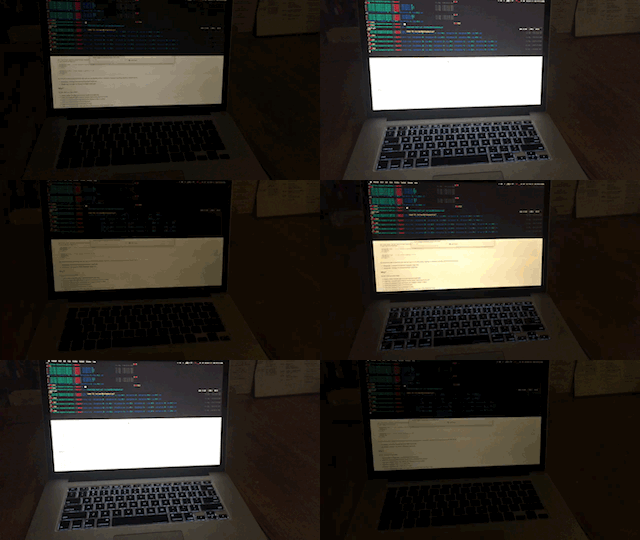
# flash your screen according to your microphone input
microphone | screen-brightness

# play a sine wave tone based on your screen lid-angle
lid-angle | speaker

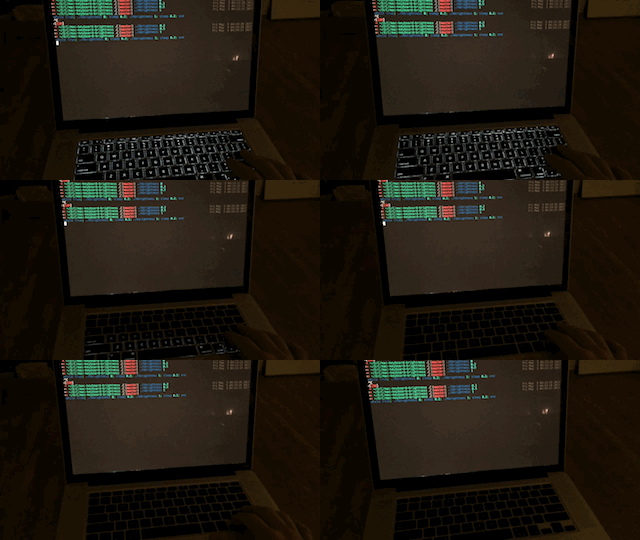
# flash the keyboard according to your heartbeat (keep your wrists on palm rests)
accelerometer | metronome | keyboard-brightness

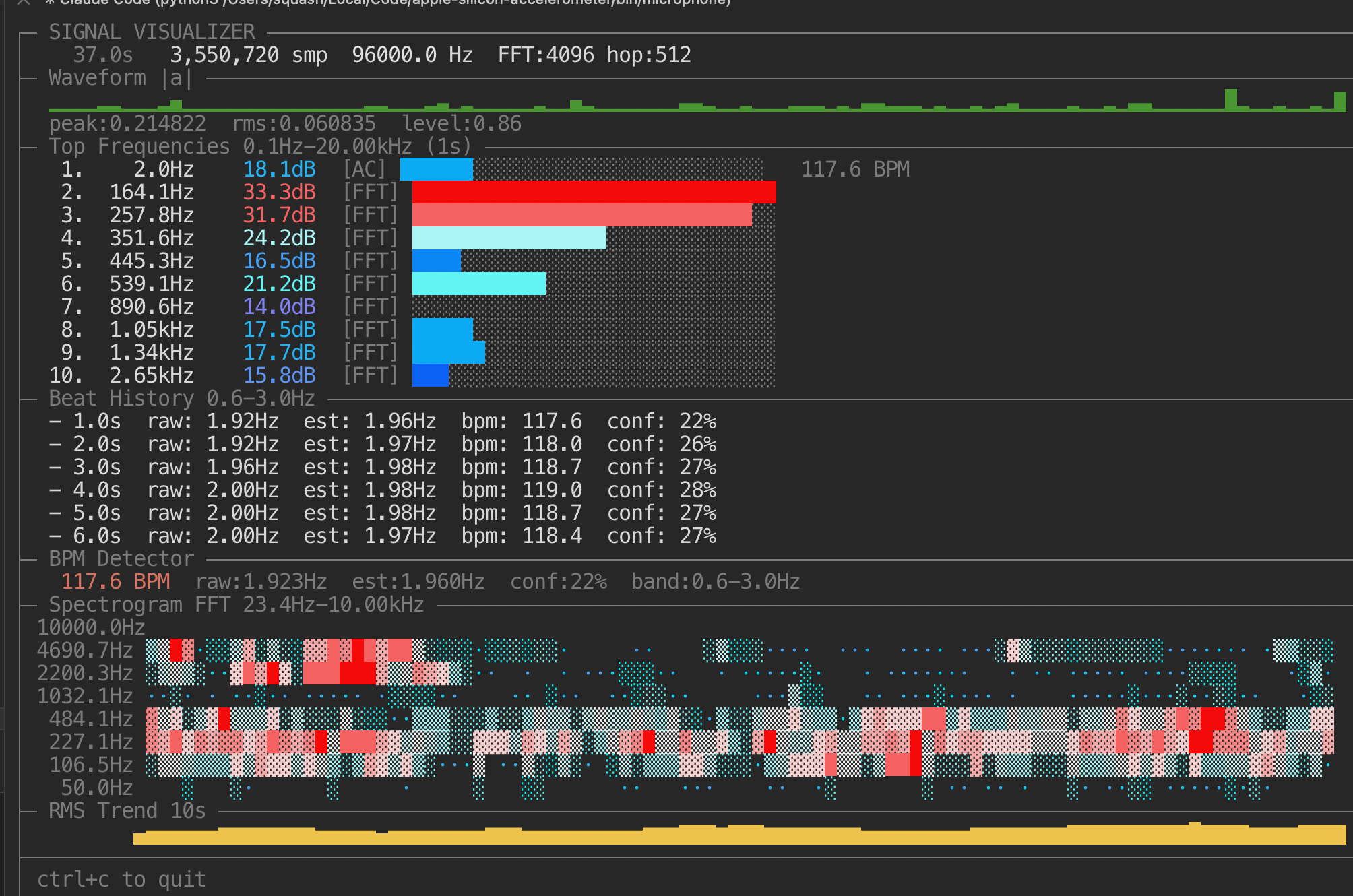
# see more detail about any given signal by piping it into visualizer
microphone | visualizer
sine 1000 | visualizer
gyroscope | tee >(speaker) | visualizer
Tools
accelerometer
- Purpose: read Apple SPU accelerometer and emit mono signal.
- Args:
--rate <hz>(<= 800),--axis x|y|z|mag,--raw. - Notes: requires root; when run from a terminal it auto-prompts via
sudo.
ambient-light
- Purpose: read ambient light sensor and emit tone mapped from low light to high light.
- Default mapping:
500 Hz -> 5000 Hzand low volume -> high volume as light goes0% -> 100%. - Args:
--rate,--low-hz,--high-hz,--low-volume,--high-volume,--json. - Notes: requires root; when run from a terminal it auto-prompts via
sudo.
lid-angle
- Purpose: read lid angle sensor and emit tone mapped from lid closed to open.
- Default mapping:
500 Hz -> 5000 Hzand low volume -> high volume as angle goes--angle-min -> --angle-max. - Args:
--rate,--low-hz,--high-hz,--low-volume,--high-volume,--angle-min,--angle-max,--json. - Notes: requires root; when run from a terminal it auto-prompts via
sudo.
gyroscope
- Purpose: read fused orientation (accel+gyro, Mahony AHRS) and emit tone mapped from the selected orientation axis.
- Default mapping:
500 Hz -> 5000 Hzand low volume -> high volume as selected axis angle maps to0..360. - Args:
--rate,--low-hz,--high-hz,--low-volume,--high-volume,--json,--axis roll|pitch|yaw,--decimate. - Notes: requires root; when run from a terminal it auto-prompts via
sudo.roll/pitchare absolute to gravity;yawis relative and can drift without magnetometer.
microphone
- Purpose: capture mono mic signal and emit stream.
- Args:
--rate <hz>,--block-size <frames>.
metronome [bpm]
- Purpose: emit metronome pulses; with piped stdin it auto-detects/follows BPM.
- Args: optional
bpm,--rate(fixed mode),--pulse-ms,--tone-hz,--level,--accent-every,--accent-gain,--block-size,--count,--min-bpm,--max-bpm,--detect-low-hz,--detect-high-hz,--self-echo-ms,--follow,--debug,--raw.
bandpass <low_hz> <high_hz>
- Purpose: realtime cascaded high/low-pass filter.
- Args: positional cutoffs or
--low/--high,--chunk-bytes,--raw --rate.
frequency-shift <factor>
- Purpose: best-effort realtime frequency scaling, takes a scalar multiplier like 0.1~1000.
- Args:
factor,--chunk-bytes,--raw --rate.
volume-shift <gain>
- Purpose: scalar amplitude gain.
- Args:
gain,--chunk-bytes,--raw --rate.
heartbeat
- Purpose: emit BPM/confidence JSON lines from incoming signal (typically bandpassed). When piped onward, it passes the signal through on stdout and writes JSON to stderr.
- Args:
--interval,--window-seconds,--emit-final,--chunk-bytes,--raw --rate.
speaker
- Purpose: play incoming stream on default output device.
- Args:
--device-rate,--block-size.
visualizer
- Purpose: terminal waveform + level monitor.
- Args:
--fps,--window-seconds,--chunk-bytes,--raw --rate.
keyboard-brightness
- Purpose: beat-follow keyboard backlight control.
- Args:
--send-hz,--fade-ms,--gain,--attack-ms,--release-ms,--baseline-ms,--decay-per-s,--debug,--as-root,--pulse,--on-time,--off-time,--set. - Notes:
--set=<0..100>without--pulsesets brightness and exits immediately (ignores stdin).--pulse=<N>ignores stdin and pulses N times;--setcontrols pulse max brightness.
screen-brightness
- Purpose: beat-follow display brightness control.
- Args:
--send-hz,--min-level,--max-level,--gain,--attack-ms,--release-ms,--baseline-ms,--decay-per-s,--debug,--no-restore,--pulse,--on-time,--off-time,--set. - Notes:
--set=<0..100>without--pulsesets display brightness and exits immediately (ignores stdin).--pulse=<N>ignores stdin and pulses N times;--setcontrols pulse max brightness.
fan-speed
- Purpose: signal-follow fan RPM control (both fans in sync by default; beat-alternating optional).
- Args:
--send-hz,--min-rpm,--max-rpm,--min-frac,--max-frac,--pulse-depth,--couple,--alternate,--input-map,--beat-threshold,--beat-hold-ms,--gain,--attack-ms,--release-ms,--baseline-ms,--decay-per-s,--debug,--no-restore.
Example Usage
Heartbeat from accelerometer:
accelerometer | bandpass 0.8 3 | heartbeat
Ambient light as signal source:
ambient-light | visualizer
Lid angle as JSONL:
lid-angle --json
Gyroscope fused orientation as JSONL:
gyroscope --axis roll --json
Music-reactive keyboard + speakers:
microphone --rate 44100 \
  | tee >(keyboard-brightness --send-hz 30 --fade-ms 20) \
  | volume-shift 0.8 \
  | speaker
Metronome to speakers:
metronome 120 | speaker
Auto-follow metronome from mic input, emits a metronome tone in sync with the beat of whatever audio is playing:
microphone | metronome | speaker
Auto-follow metronome from accelerometer, driving keyboard pulses:
accelerometer | metronome | keyboard-brightness
Metronome driving keyboard pulses:
metronome 120 | keyboard-brightness
Heartbeat telemetry while still driving keyboard brightness:
accelerometer | heartbeat | keyboard-brightness
Set keyboard backlight to 100% and exit:
keyboard-brightness --set=100
Pulse keyboard 5 times (1.2s on / 5.5s off) at 100%:
keyboard-brightness --pulse=5 --on-time=1.2 --off-time=5.5 --set=100
Set screen brightness to 40% and exit:
screen-brightness --set=40
Pulse screen brightness 3 times:
screen-brightness --pulse=3 --on-time=1.2 --off-time=5.5 --set=100
Metronome driving fan pulses:
metronome 120 | fan-speed --send-hz 4 --alternate --input-map beat --min-frac 0.30 --max-frac 0.70
Slow sine fan sweep (sync L/R):
sine 0.1 | fan-speed
One source, multiple sinks:
accelerometer \
  | bandpass 0.8 3 \
  | tee >(keyboard-brightness) \
  | frequency-shift 1000 \
  | volume-shift 0.8 \
  | tee >(speaker) \
  | visualizer
Notes
accelerometerrequires root (AppleSPU HID access) and will auto-reexec throughsudoby default.ambient-light,lid-angle, andgyroscopedo the same for AppleSPU HID access.- Set
MSIG_AUTO_SUDO=0to disable auto-reexec and only print rerun guidance on stderr. microphone/speakerdepend onsounddevice+ PortAudio runtime.- Keyboard/display brightness tools need supported hardware/permissions.
keyboard-brightnessuses the bundled Apple Silicon KBPulse binary atlib/KBPulse(arm64).fan-speeduses AppleSMC private IOKit APIs on Apple Silicon; writing fan targets typically requiressudo.frequency-shiftis intentionally lightweight and artifact-prone at extreme factors.
Stdio Audio Format
All stream tools read/write:
- header:
MSIG1 <sample_rate_hz>\n - payload: little-endian
float32mono samples
Most processors also support raw float32 input via --raw --rate <hz>.
Why?
It's fun. Here are some ideas to get started:
- make your keyboard lights flash for security alerts using Security Growler
- make your keyboard flash right before your display is about to sleep
- make your keyboard flash on incoming email
- make your keyboard flash to the beat of music
- make your keyboard flash when your boss's iPhone comes within bluetooth range
Related Projects
- https://github.com/olvvier/apple-silicon-accelerometer IOReg accelerometer reading code
- https://github.com/EthanRDoesMC/KBPulse/ keyboard brightness code for M1, M2, M3, etc. macs
- https://github.com/maxmouchet/LightKit
- https://github.com/tcr/macbook-brightness
- http://stackoverflow.com/questions/3239749/programmatically-change-mac-display-brightness
- https://web.archive.org/web/20110828210316/http://mattdanger.net:80/2008/12/adjust-mac-os-x-display-brightness-from-the-terminal/
- http://osxbook.com/book/bonus/chapter10/light/
- https://github.com/samnung/maclight/blob/master/lights_handle.cpp
- http://www.keindesign.de/stefan/Web/Sites/iWeb/Site/iSpazz.html the OG
- https://github.com/bhoeting/DiscoKeyboard
1 maintainer

Release files for mac-hardware-toys 0.2.6
For a detailed explanation of source distributions (sdists) and built distributions (wheels), please see the package formats documentation.
Source distribution (sdist)
| File | Size | Uploaded | |
|---|---|---|---|
| mac_hardware_toys-0.2.6.tar.gz | 75.7 kB | Details |
Built distribution (wheel)
| File | Interpreter | ABI | Platform | Reset |
|---|---|---|---|---|
| mac_hardware_toys-0.2.6-py3-none-any.whl | Python 3 | none | any | Details |
Total release size: 159.3 kB
Release files / mac_hardware_toys-0.2.6.tar.gz
| Download URL | mac_hardware_toys-0.2.6.tar.gz |
|---|---|
| Size | 75.7 kB |
| Tags | Source |
|
SHA-256 checksum How to use checksums |
c7607e0cc5477879ebf6541e4171c8782219115446c0282c541083b9ad1d972c
|
|
BLAKE2b-256 checksum How to use checksums |
7e8da0b5a178ccd5c52b6e19ed85d6b2225aecee95f21ffe19f160f92bd8ae63
|
| Upload date | |
|
Uploaded using Trusted Publishing? What is trusted publishing? |
No |
| Uploaded via |
uv/0.9.10 {"installer":{"name":"uv","version":"0.9.10"},"python":null,"implementation":{"name":null,"version":null},"distro":{"name":"macOS","version":null,"id":null,"libc":null},"system":{"name":null,"release":null},"cpu":null,"openssl_version":null,"setuptools_version":null,"rustc_version":null,"ci":null}
|
Release files / mac_hardware_toys-0.2.6-py3-none-any.whl
| Download URL | mac_hardware_toys-0.2.6-py3-none-any.whl |
|---|---|
| Size | 83.6 kB |
| Tags | Python 3 |
|
SHA-256 checksum How to use checksums |
d7029aa646ca3f1efa924185ed592bc357f31f482019b20e02766b5d0514220c
|
|
BLAKE2b-256 checksum How to use checksums |
e47a91b730ebb0efef1454389ab6d33df65ef764868d534f497693cf2160fa5f
|
| Upload date | |
|
Uploaded using Trusted Publishing? What is trusted publishing? |
No |
| Uploaded via |
uv/0.9.10 {"installer":{"name":"uv","version":"0.9.10"},"python":null,"implementation":{"name":null,"version":null},"distro":{"name":"macOS","version":null,"id":null,"libc":null},"system":{"name":null,"release":null},"cpu":null,"openssl_version":null,"setuptools_version":null,"rustc_version":null,"ci":null}
|














