
A bridge for interacting with macOS Messages app through MCP

Project description
Mac Messages MCP
A Python bridge for interacting with the macOS Messages app using MCP (Multiple Context Protocol).



Features
- Read recent messages from the macOS Messages app
- Filter messages by contact
- Send new messages through iMessage
- Access messages via an API
Prerequisites
- macOS (tested on macOS 11+)
- Python 3.10+
- uv package manager
Installing uv
If you're on Mac, install uv using Homebrew:
brew install uv
Otherwise, follow the installation instructions on the uv website.
⚠️ Do not proceed before installing uv
Installation
Full Disk Access Permission
⚠️ This application requires Full Disk Access permission for your terminal or application to access the Messages database.
To grant Full Disk Access:
- Open System Preferences/Settings > Security & Privacy/Privacy > Full Disk Access
- Click the lock icon to make changes
- Add your terminal app (Terminal, iTerm2, etc.) or Claude Desktop/Cursor to the list
- Restart your terminal or application after granting permission
Integration
Claude Desktop Integration
- Go to Claude > Settings > Developer > Edit Config > claude_desktop_config.json
- Add the following configuration:
{
    "mcpServers": {
        "messages": {
            "command": "uvx",
            "args": [
                "mac-messages-mcp"
            ]
        }
    }
}
Cursor Integration
Go to Cursor Settings > MCP and paste this as a command:
uvx mac-messages-mcp
⚠️ Only run one instance of the MCP server (either on Cursor or Claude Desktop), not both
Option 1: Install from PyPI
uv pip install mac-messages-mcp
Option 2: Install from source
# Clone the repository
git clone https://github.com/carterlasalle/mac_messages_mcp.git
cd mac_messages_mcp

# Install dependencies
uv install -e .
Usage
As a Module
from mac_messages_mcp import get_recent_messages, send_message

# Get recent messages
messages = get_recent_messages(hours=48)
print(messages)

# Send a message
result = send_message(recipient="+1234567890", message="Hello from Mac Messages MCP!")
print(result)
As a Command-Line Tool
# Run the MCP server directly
mac-messages-mcp
Development
Versioning
This project uses semantic versioning. See VERSIONING.md for details on how the versioning system works and how to release new versions.
To bump the version:
python scripts/bump_version.py [patch|minor|major]
Security Notes
This application accesses the Messages database directly, which contains personal communications. Please use it responsibly and ensure you have appropriate permissions.
License
MIT
Contributing
Contributions are welcome! Please feel free to submit a Pull Request.
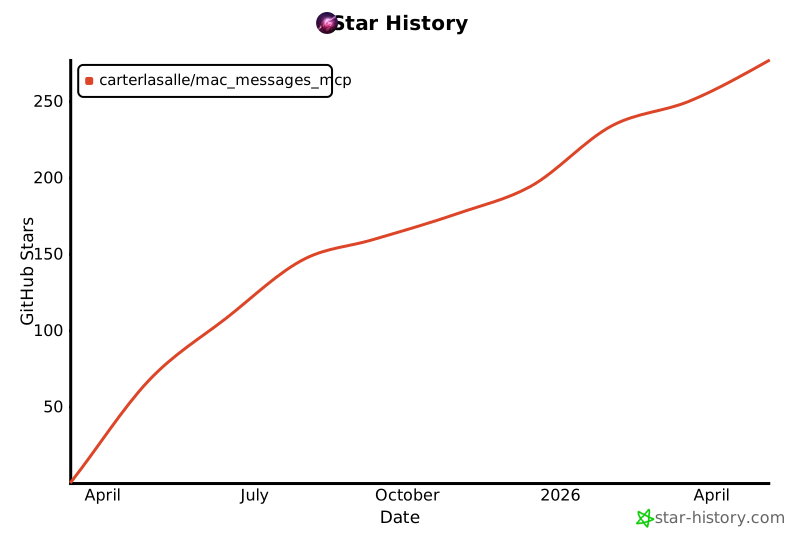
Star History
Release history Release notifications | RSS feed


Download files
Download the file for your platform. If you're not sure which to choose, learn more about installing packages.
Source Distribution
Built Distribution
Filter files by name, interpreter, ABI, and platform.
If you're not sure about the file name format, learn more about wheel file names.
Copy a direct link to the current filters
File details
Details for the file mac_messages_mcp-0.6.6.tar.gz.
File metadata
- Download URL: mac_messages_mcp-0.6.6.tar.gz
- Upload date:
- Size: 19.5 kB
- Tags: Source
- Uploaded using Trusted Publishing? No
- Uploaded via: uv/0.7.3
File hashes
| Algorithm | Hash digest | |
|---|---|---|
| SHA256 |
5ef954a3f066cd2b26777b9fa496254666d92f14eba409aa118a2b7ac6c7dd8c
|
|
| MD5 |
2959858de3f9f2ff324ca97eede60526
|
|
| BLAKE2b-256 |
9c3157279563d66e91a2064cebdc56afd6cb84d8d47629e8f02582cb03aca5ea
|
File details
Details for the file mac_messages_mcp-0.6.6-py3-none-any.whl.
File metadata
- Download URL: mac_messages_mcp-0.6.6-py3-none-any.whl
- Upload date:
- Size: 18.0 kB
- Tags: Python 3
- Uploaded using Trusted Publishing? No
- Uploaded via: uv/0.7.3
File hashes
| Algorithm | Hash digest | |
|---|---|---|
| SHA256 |
3d8ac2093b9bacac6d623860a72c6f36eee6ce0df78e147a4ed94beea1bf63b4
|
|
| MD5 |
7598db05ef399440a5570a1d75e5b6c0
|
|
| BLAKE2b-256 |
393431a79b8a672c517d49c40a908e4b371183c0e9914ec2770bda93ef86201d
|






