
read the undocumented mems accelerometer + gyroscope on apple silicon macs via iokit hid

Project description
apple-silicon-accelerometer
more information: read the article on Medium
it turns out modern macbook pros have an undocumented mems accelerometer + gyroscope managed by the sensor processing unit (spu). this project reads both via iokit hid, along with lid angle and ambient light sensors from the same interface
install
pip install macimu
if you get externally-managed-environment (homebrew python), use a venv:
python3 -m venv .venv && source .venv/bin/activate && pip install macimu
from macimu import IMU

with IMU() as imu:
    accel = imu.latest_accel()       # Sample(x, y, z) in g
    gyro = imu.latest_gyro()         # Sample(x, y, z) in deg/s

    for s in imu.read_accel():       # all new samples since last call
        print(s.x, s.y, s.z)
requires root (sudo) because iokit hid device access needs elevated privileges
check if sensor exists (no root needed)
from macimu import IMU
print(IMU.available())   # True on macbook pro m2+
real-time orientation (roll / pitch / yaw)
fuses accel + gyro with a mahony quaternion filter, no math needed on your side
with IMU(orientation=True) as imu:
    o = imu.orientation()
    print(f"{o.roll:.1f}° {o.pitch:.1f}° {o.yaw:.1f}°")
    print(o.qw, o.qx, o.qy, o.qz)  # raw quaternion
timestamped samples for logging / replay
with IMU() as imu:
    for s in imu.read_accel_timed():
        print(f"t={s.t:.4f}  x={s.x:.3f}  y={s.y:.3f}  z={s.z:.3f}")
streaming with callback
def on_sample(s):
    print(s.x, s.y, s.z)

with IMU() as imu:
    stop = imu.on_accel(on_sample)  # background thread
    time.sleep(10)
    stop()                          # unregister
sample rate control
IMU(decimation=1)   # ~800 hz (full native rate)
IMU(decimation=8)   # ~100 hz (default)
IMU(decimation=16)  # ~50 hz
api reference
constructor
IMU(accel=True, gyro=True, als=False, lid=False, orientation=False, decimation=8)
class methods (no root needed)
| method | returns | description |
|---|---|---|
IMU.available() |
bool |
check if sensor exists |
IMU.device_info() |
dict |
sensors list, serial, product name |
reading data
| method | returns | description |
|---|---|---|
imu.read_accel() |
list[Sample] |
new samples since last call (x, y, z in g) |
imu.read_gyro() |
list[Sample] |
new samples since last call (x, y, z in deg/s) |
imu.read_accel_timed() |
list[TimedSample] |
same with monotonic timestamp (t, x, y, z) |
imu.read_gyro_timed() |
list[TimedSample] |
same for gyro |
imu.latest_accel() |
Sample | None |
most recent sample |
imu.latest_gyro() |
Sample | None |
most recent sample |
orientation & sensors
| method | returns | description |
|---|---|---|
imu.orientation() |
Orientation | None |
roll, pitch, yaw (deg) + quaternion |
imu.read_lid() |
float | None |
lid angle in degrees |
imu.read_als() |
ALSReading | None |
lux + 4 spectral channels |
streaming
| method | returns | description |
|---|---|---|
imu.stream_accel() |
generator | blocking, yields Sample |
imu.stream_gyro() |
generator | blocking, yields Sample |
imu.on_accel(callback) |
stop_fn |
background thread, call stop() to end |
imu.on_gyro(callback) |
stop_fn |
background thread, call stop() to end |
lifecycle: imu.start() / imu.stop() or use with IMU() as imu:
exceptions: macimu.SensorNotFound if no SPU device, PermissionError if not root
what is this
apple silicon chips (M2/M3/M4/M5) have a hard to find mems IMU (accelerometer + gyroscope) managed by the sensor processing unit (SPU). it's not exposed through any public api or framework. this project reads raw 3-axis acceleration and angular velocity data at ~800hz via iokit hid callbacks.
only tested on macbook pro m3 pro so far - might work on other apple silicon macs but no guarantees
how it works
the sensor lives under AppleSPUHIDDevice in the iokit registry, on vendor usage page 0xFF00. usage 3 is the accelerometer, usage 9 is the gyroscope (same physical IMU, believed to be Bosch BMI286 based on teardowns). the driver is AppleSPUHIDDriver which is part of the sensor processing unit. we open it with IOHIDDeviceCreate and register an asynchronous callback via IOHIDDeviceRegisterInputReportCallback. data comes as 22-byte hid reports with x/y/z as int32 little-endian at byte offsets 6, 10, 14. divide by 65536 to get the value in g (accel) or deg/s (gyro). callback rate is ~100hz (decimated from ~800hz native)
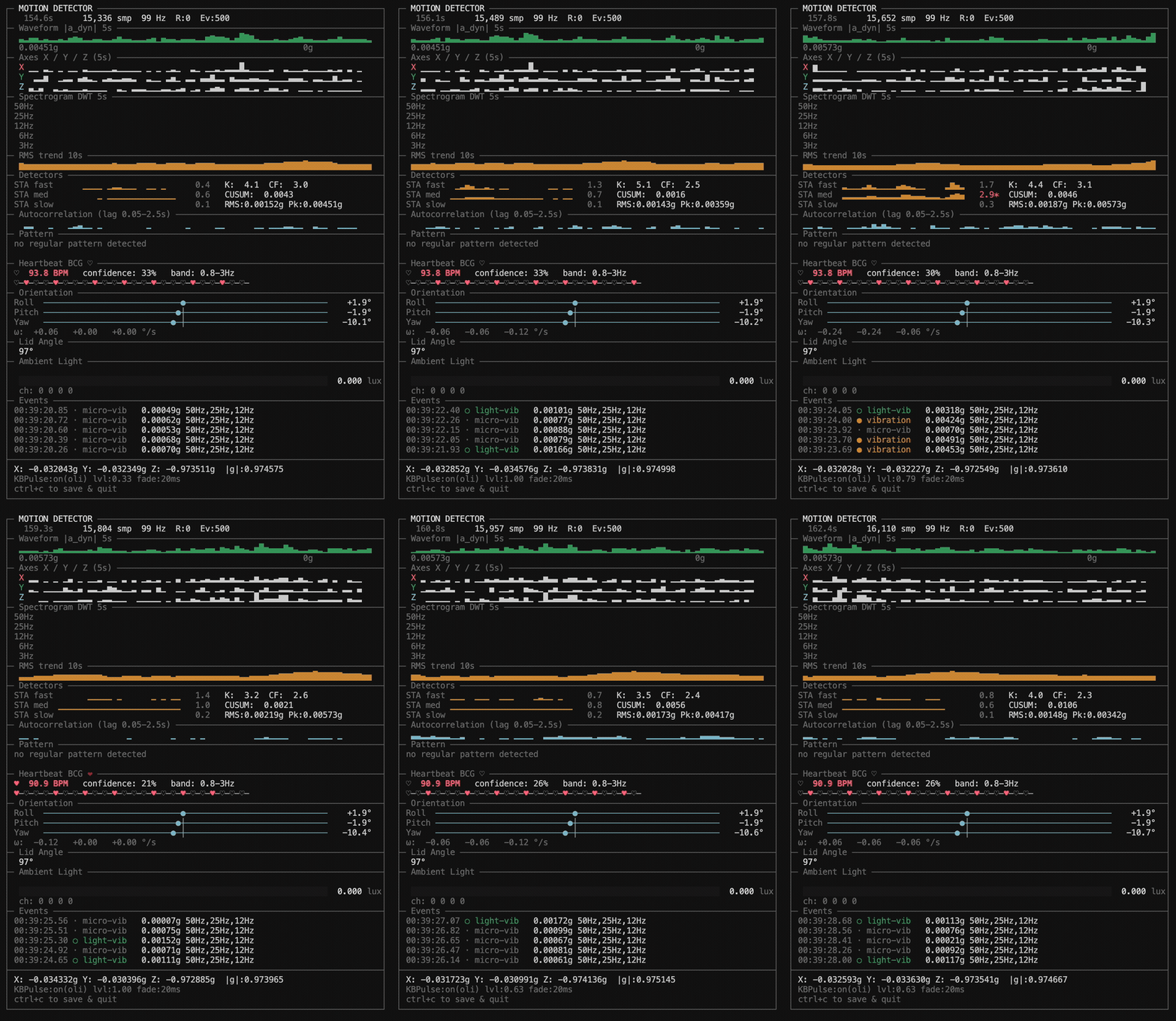
orientation is computed by fusing accel + gyro with a Mahony AHRS quaternion filter and displayed as roll/pitch/yaw gauges
you can verify the device exists on your machine with:
ioreg -l -w0 | grep -A5 AppleSPUHIDDevice
demo dashboard
git clone https://github.com/olvvier/apple-silicon-accelerometer
cd apple-silicon-accelerometer
python3 -m venv .venv && source .venv/bin/activate
pip install -e .[demo]
sudo .venv/bin/python3 motion_live.py
the demo includes vibration detection, orientation gauges, experimental heartbeat (bcg), lid angle, ambient light, and optional keyboard flash
keyboard flash mode (bundled KBPulse)
motion_live.py can flash the keyboard backlight from vibration intensity in near realtime.
the repo now vendors KBPulse, including a prebuilt apple silicon binary at KBPulse/bin/KBPulse.
run as usual:
sudo python3 motion_live.py
optional overrides:
sudo python3 motion_live.py --no-kbpulse
sudo python3 motion_live.py --kbpulse-bin /path/to/KBPulse
with uv
If you have uv/uvx installed, you can also just
sudo uvx git+https://github.com/olvvier/apple-silicon-accelerometer.git
code structure
- macimu/ - python package (
pip install macimu): high-level IMU class + low-level iokit bindings, shared memory ring buffers - motion_live.py - demo app: vibration detection, heartbeat bcg, terminal ui
- KBPulse/ - vendored keyboard backlight driver code + binary (
KBPulse/bin/KBPulse)
heartbeat demo
place your wrists on the laptop near the trackpad and wait 10-20 seconds for the signal to stabilize. this uses ballistocardiography - the mechanical vibrations from your heartbeat transmitted through your arms into the chassis. experimental, not reliable, just a fun use-case to show what the sensor can pick up. the bcg bandpass is 0.8-3hz and bpm is estimated via autocorrelation on the filtered signal
notes
- experimental / undocumented AppleSPU hid path
- requires sudo
- may break on future macos updates
- use at your own risk
- not for medical use
tested on
- macbook pro m3 pro, macos 15.6.1
- python 3.14
known incompatible
- intel macs (no spu)
- m1 macbook pro (2020)
- mac studio m4 max
license
MIT
not affiliated with Apple or any employer
Release history Release notifications | RSS feed


Download files
Download the file for your platform. If you're not sure which to choose, learn more about installing packages.
Source Distribution
Built Distribution
Filter files by name, interpreter, ABI, and platform.
If you're not sure about the file name format, learn more about wheel file names.
Copy a direct link to the current filters
File details
Details for the file macimu-0.1.1.tar.gz.
File metadata
- Download URL: macimu-0.1.1.tar.gz
- Upload date:
- Size: 15.8 kB
- Tags: Source
- Uploaded using Trusted Publishing? No
- Uploaded via: twine/6.2.0 CPython/3.14.3
File hashes
| Algorithm | Hash digest | |
|---|---|---|
| SHA256 |
d969a6b1d0ffb6247a4678f70338ec9c52e58759327ca97b0a78f5db5a4cd44c
|
|
| MD5 |
2f296de0b811e6a8920bebc3dfe10055
|
|
| BLAKE2b-256 |
9bb6aafac1ede2bef7ae82adc9daeab5c96c99d63b9c16f9361d7000bddaef48
|
File details
Details for the file macimu-0.1.1-py3-none-any.whl.
File metadata
- Download URL: macimu-0.1.1-py3-none-any.whl
- Upload date:
- Size: 13.9 kB
- Tags: Python 3
- Uploaded using Trusted Publishing? No
- Uploaded via: twine/6.2.0 CPython/3.14.3
File hashes
| Algorithm | Hash digest | |
|---|---|---|
| SHA256 |
aa6646978e79bef0dfdb304e691b27b952c35d1c02708ce5260d8d87e9a5dc89
|
|
| MD5 |
e22f426523a350730f721fd14cce40a8
|
|
| BLAKE2b-256 |
77c54eec2ffe02a5e3fd01555eb9f947219002d6eccf3e4c5e01b53b4d4cd56e
|






