
Memory-intelligent local LLM orchestration for 16GB Apple Silicon Macs

Project description
MacSmart LLM
Memory-intelligent local LLM orchestration for 16GB Apple Silicon Macs.
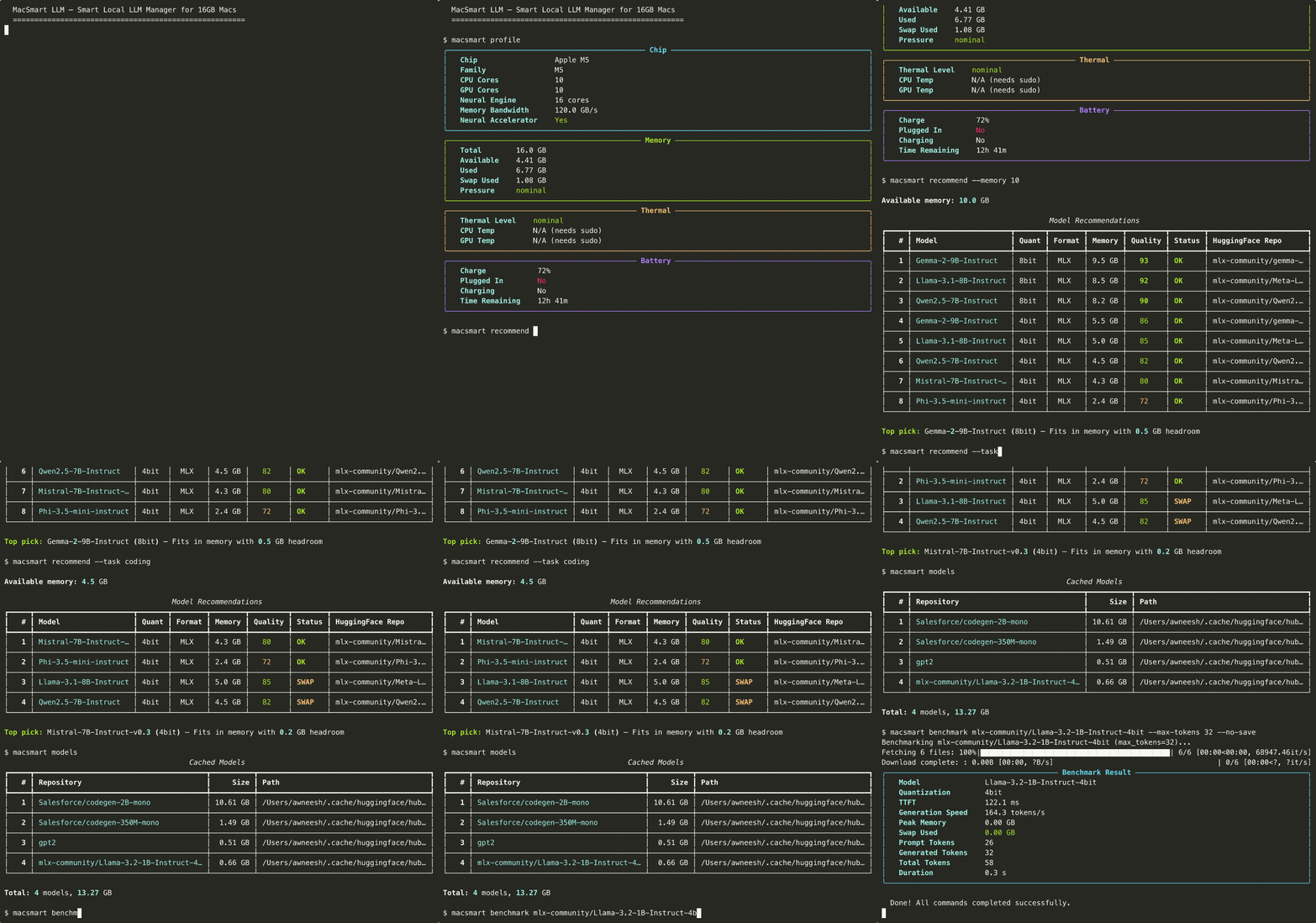
Unlike LM Studio or Ollama which treat all Macs the same, MacSmart actively monitors available memory, thermal state, and battery level to recommend and manage the best model + quantization for your current system state.
Why?
- 16GB is the most common MacBook config but completely ignored by benchmarking research
- Existing tools let users download models that crash or swap-thrash on 16GB
- No tool auto-selects the best model/quantization based on actual available memory
- Apple Silicon Neural Accelerators (via MLX) are untapped on 16GB configs
Features
- System Profiler — Detect chip (M1–M5), GPU cores, memory bandwidth, thermal state, battery
- Model Recommender — Auto-select the best model + quantization for your available memory
- Benchmark Runner — Measure TTFT, tokens/sec, peak memory, swap usage, energy
- Batch & Compare — Run multiple models head-to-head with side-by-side results
- Energy Comparison — Compare energy efficiency across prompt lengths
- Memory Watchdog — Real-time memory pressure monitoring with live Rich UI
- Download Manager — Download, list, and manage models from HuggingFace Hub
- Dashboard — Interactive web UI for exploring benchmark results
Installation
# Install from PyPI
pip install macsmart

# Or install from source (for development)
git clone https://github.com/awneesht/m5-llm-benchmark.git
cd m5-llm-benchmark
pip install -e ".[dev]"
Usage
# Show system profile (chip, memory, thermal, battery)
macsmart profile

# Get model recommendations for your current memory
macsmart recommend

# Recommend for a specific task with custom memory budget
macsmart recommend --task coding --memory 10

# Run inference on a model
macsmart run mlx-community/Qwen2.5-7B-Instruct-4bit --prompt "Hello, world!"

# Download a model
macsmart download mlx-community/Qwen2.5-7B-Instruct-4bit

# List cached models
macsmart models

# Benchmark a model
macsmart benchmark mlx-community/Qwen2.5-7B-Instruct-4bit

# Batch benchmark multiple models
macsmart batch model1 model2 model3

# Compare models side-by-side
macsmart compare model1 model2

# Compare energy efficiency across prompt lengths
macsmart energy-compare model1 model2

# Launch the results dashboard
macsmart dashboard

# Watch memory pressure in real-time
macsmart watch

# Delete a cached model
macsmart delete mlx-community/Qwen2.5-7B-Instruct-4bit

# All commands support --json-output for scripting
macsmart profile --json-output
macsmart recommend --json-output
16GB Memory Budget
| Component | Memory |
|---|---|
| macOS + system | ~3–4 GB |
| Typical user apps | ~1–2 GB |
| Available for LLM | ~10–12 GB |
| Safe model size (no swap) | ~8–9 GB |
| Max model size (some swap OK) | ~12–14 GB |
Requirements
- macOS with Apple Silicon (M1/M2/M3/M4/M5)
- Python 3.11+
- 16GB RAM (optimized for this config, works on others too)
Development
# Install dev dependencies
pip install -e ".[dev]"

# Run tests
pytest

# Run with coverage
pytest --cov=macsmart

# Run a single test file
pytest tests/test_benchmark.py -v
License
MIT


Download files
Download the file for your platform. If you're not sure which to choose, learn more about installing packages.
Source Distribution
Built Distribution
Filter files by name, interpreter, ABI, and platform.
If you're not sure about the file name format, learn more about wheel file names.
Copy a direct link to the current filters
File details
Details for the file macsmart-0.1.0.tar.gz.
File metadata
- Download URL: macsmart-0.1.0.tar.gz
- Upload date:
- Size: 59.5 kB
- Tags: Source
- Uploaded using Trusted Publishing? No
- Uploaded via: twine/6.2.0 CPython/3.14.3
File hashes
| Algorithm | Hash digest | |
|---|---|---|
| SHA256 |
c9e296721633c27319303423dd0923eb8758ce6a3dfcef102875d44937a7b225
|
|
| MD5 |
28402d82d8be8ba852eec90f7db60d40
|
|
| BLAKE2b-256 |
93db4c9f1d02adc3f8aefda2e8f5fd34fdd17690f94dfbb5c67e341b7a2df775
|
File details
Details for the file macsmart-0.1.0-py3-none-any.whl.
File metadata
- Download URL: macsmart-0.1.0-py3-none-any.whl
- Upload date:
- Size: 48.5 kB
- Tags: Python 3
- Uploaded using Trusted Publishing? No
- Uploaded via: twine/6.2.0 CPython/3.14.3
File hashes
| Algorithm | Hash digest | |
|---|---|---|
| SHA256 |
ced392f80a08bf805766d9db113324c18523342e01715116ddc411b8812ddd15
|
|
| MD5 |
e8d0a6d875ebd7211c003496293304a1
|
|
| BLAKE2b-256 |
81611a679d6e7062d1a71e068dce29a55462882760e951d09a5675f2ec70b2a0
|






