
py-maestro-reporter




py-maestro-reporter is a lightweight tool that helps you:
- Run Maestro test seamlessly
- Parse Maestro JUnit reports
- Send summarized test results to a Lark/Slack respective group
It can be used either as a CLI tool or a python package into your own test pipelines
Prerequisites
- Python 3.10 or above
- Maestro framework installed on your system (version 2.0.0 or above)
- Device/emulator with the app under test installed
- Lark/Slack webhook URL (optional)
Installation
For the installation, you can either install the package from PyPI or from source. If you'd like to install from PyPI, you can install it with:
pip install maestro-reporter
Or, using uv:
uv pip install maestro-reporter
Or, if you'd prefer to install from source, you'll need to clone this repository and install it in editable mode:
pip install -e .
Usage
Using as a CLI argument
This package expose a CLI via the reporter module
All you need to do is, ensure you have Maestro installed on your device, example flows which is going to be tested, physical device / emulator and Webhook URL from Lark. Once you have all of these, you can run with :
python -m reporter \
    -c "maestro test examples/facebook-sign-up-flow.yaml --format junit --output tests/report.xml" \
    -r "tests/report.xml" \
    -w "https://webhook.url.com"
Parsing an existing report
Or, if you only want to run and parse the report without testing, you can use --no-run flag
python -m reporter \
    --no-run \
    -r "tests/report.xml" \
    -w "https://webhook.url.com"
You can also overrides the Webhook URL by setting the
LARK_URLorSLACK_URLenvironment variable in your.envfile, depending on the provider you choose.
Using the reporter package
Otherwise, if you'd like to run the tests without using the CLI arguments and you need to run the tests with the reporter package, you can follow the example below:
# this will test the Facebook sign-up flow
import os
from dotenv import load_dotenv
from reporter import parse_xml_report, send_report_to_lark, run_maestro_command


load_dotenv()


command = "maestro test examples/facebook-sign-up-flow.yaml --format junit --output build/maestro-results/report.xml"
report_path = run_maestro_command(command=command, cwd="tests")
parsed_result = parse_xml_report(file_path=str(report_path))
report = send_report_to_lark(
    summary=parsed_result,
    title="Maestro Reporter Test",
    color_template="Green",
    webhook_url=os.getenv("LARK_URL"),
)
The parameters of
color_templateandtitleare mandatory, if you don't provide them, the default values will be used
Note (v0.8.0):
run_maestro_commandreads the--outputargument from your command, creates the report's parent directory automatically, and returns the resolved report path. When Maestro exits with a non-zero code, the report is still returned if it exists, so failed-test results can be reported.RuntimeErroris raised only when no report file is found.run_maestro_commandandparse_xml_reportraise an exception on failure instead of silently returningNone.
All successful tests will be displayed in the log stream handler, for example:
27-11-2025 : 10:51:46 : main : [WARNING] : No color template provided, using default color template or you can set it with `--color` flag
27-11-2025 : 10:51:46 : main : [WARNING] : No title provided, using default title or you can set it with `--title` flag
27-11-2025 : 10:51:46 : main : [INFO] : --no-run flag is set, skipping Maestro tests
27-11-2025 : 10:51:46 : main : [INFO] : Parsing Maestro report file: tests/report.xml
27-11-2025 : 10:51:46 : main : [INFO] : Sending Maestro report to Lark...
27-11-2025 : 10:51:46 : reporter.sender : [INFO] : Lark message sent successfully
27-11-2025 : 10:51:46 : main : [INFO] : Maestro report sent successfully
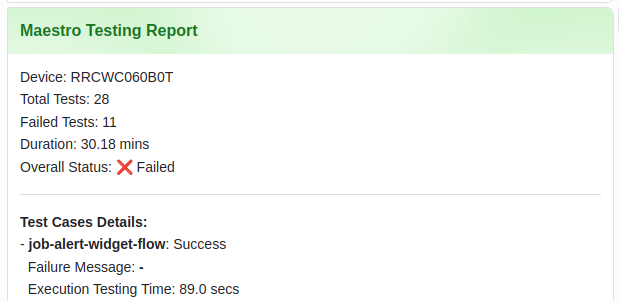
Once the report is sent successfully, you should be able to see the interactive card message in your Lark group like the following image
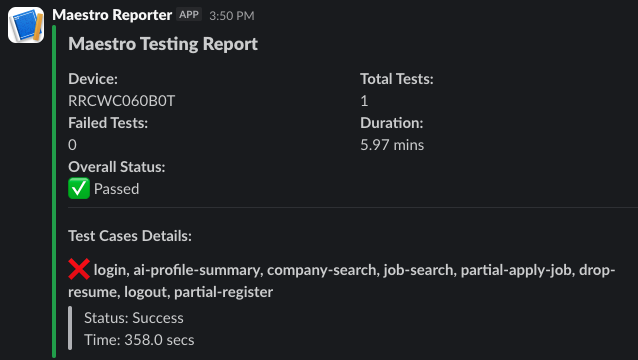
Otherwise, if you want to use Slack as a reporting platform, the card message will be displayed as follows
CLI arguments
List of available CLI arguments that you can use with this package:
| arguments | description |
|---|---|
-h / --help |
show this help message and exit |
-c / --command |
Maestro command to run |
-r / --report |
Path to Maestro report, by default it's report.xml but you can configure it by yourself |
-w / --webhook |
Specify a webhook URL to send the report to Lark |
-n / --no-run |
No need to run Maestro tests, just parse the report and send the result to Lark |
-t / --title |
Set a custom title for the interactive card Lark message |
-ct / --color |
Set a custom color template for the interactive card Lark message |
-p / --provider |
Specify the reporting platform (lark or slack). Default is lark |
Notes
- At the moment, this package only supports the parsing of the
junitformat as follows for the Maestro report - In addition, the webhook integration currently supports Lark and Slack
- The interactive card message is built using the
msg_actioncardmessage type for Lark andBlock Kitfor Slack
Further references
1 maintainer

Release files for maestro-reporter 0.8.0
For a detailed explanation of source distributions (sdists) and built distributions (wheels), please see the package formats documentation.
Source distribution (sdist)
| File | Size | Uploaded | |
|---|---|---|---|
| maestro_reporter-0.8.0.tar.gz | 13.8 kB | Details |
Built distribution (wheel)
| File | Interpreter | ABI | Platform | Reset |
|---|---|---|---|---|
| maestro_reporter-0.8.0-py3-none-any.whl | Python 3 | none | any | Details |
Total release size: 30.7 kB
Release files / maestro_reporter-0.8.0.tar.gz
| Download URL | maestro_reporter-0.8.0.tar.gz |
|---|---|
| Size | 13.8 kB |
| Tags | Source |
|
SHA-256 checksum How to use checksums |
a2d360deb64d9009cbbcf163ffc0dc27346dde53b4b0354985f4837c106af422
|
|
BLAKE2b-256 checksum How to use checksums |
b54ad47516b346e9f398c7281345c6fd27fe667e666ecb54bf0a949c6e2224c3
|
| Upload date | |
|
Uploaded using Trusted Publishing? What is trusted publishing? |
No |
| Uploaded via |
twine/6.2.0 CPython/3.12.3
|
Release files / maestro_reporter-0.8.0-py3-none-any.whl
| Download URL | maestro_reporter-0.8.0-py3-none-any.whl |
|---|---|
| Size | 16.9 kB |
| Tags | Python 3 |
|
SHA-256 checksum How to use checksums |
95ead3d8c27d62a221c67ed0ea8e4242666b6eef2410e52cc3ab4f6b67d4a578
|
|
BLAKE2b-256 checksum How to use checksums |
2e0bfe6010341470048f9981340125694975c83733b083efdced79fbd6c78377
|
| Upload date | |
|
Uploaded using Trusted Publishing? What is trusted publishing? |
No |
| Uploaded via |
twine/6.2.0 CPython/3.12.3
|














