







Markov Affinity-based Graph Imputation of Cells (MAGIC) is an algorithm for denoising high-dimensional data most commonly applied to single-cell RNA sequencing data. MAGIC learns the manifold data, using the resultant graph to smooth the features and restore the structure of the data.
To see how MAGIC can be applied to single-cell RNA-seq, elucidating the epithelial-to-mesenchymal transition, read our publication in Cell.
For R and MATLAB implementations of MAGIC, see https://github.com/KrishnaswamyLab/MAGIC.
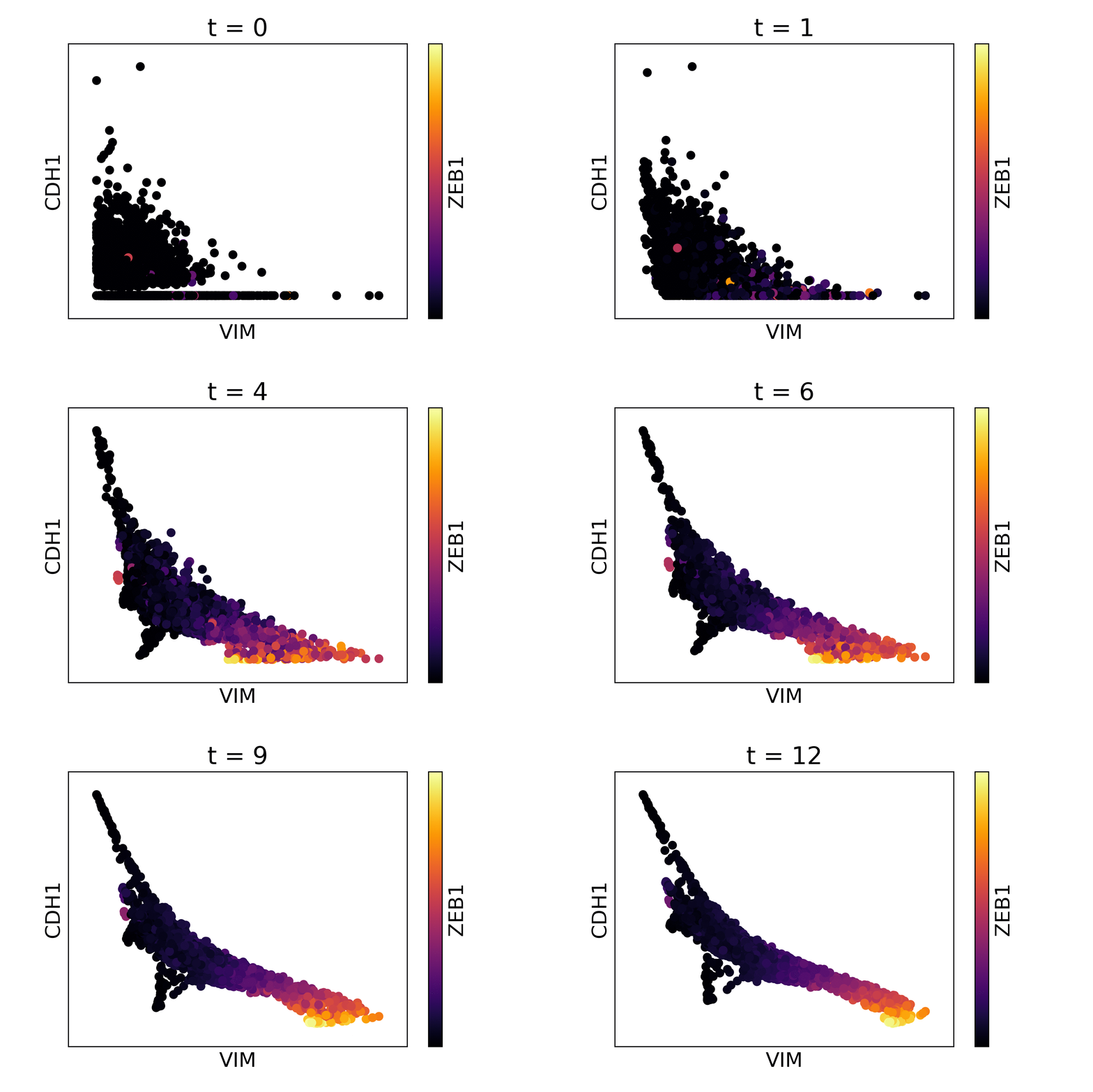
Magic reveals the interaction between Vimentin (VIM), Cadherin-1 (CDH1), and Zinc finger E-box-binding homeobox 1 (ZEB1, encoded by colors).
Installation
Installation with pip
To install with pip, run the following from a terminal:
pip install --user magic-impute
Installation from GitHub
To clone the repository and install manually, run the following from a terminal:
git clone git://github.com/KrishnaswamyLab/MAGIC.git
cd MAGIC/python
python setup.py install --user
Usage
Example data
The following code runs MAGIC on test data located in the MAGIC repository:
import magic
import pandas as pd
import matplotlib.pyplot as plt
X = pd.read_csv("MAGIC/data/test_data.csv")
magic_operator = magic.MAGIC()
X_magic = magic_operator.fit_transform(X, genes=['VIM', 'CDH1', 'ZEB1'])
plt.scatter(X_magic['VIM'], X_magic['CDH1'], c=X_magic['ZEB1'], s=1, cmap='inferno')
plt.show()
magic.plot.animate_magic(X, gene_x='VIM', gene_y='CDH1', gene_color='ZEB1', operator=magic_operator)
Interactive command line
We have included two tutorial notebooks on MAGIC usage and results visualization for single cell RNA-seq data.
EMT data notebook: http://nbviewer.jupyter.org/github/KrishnaswamyLab/magic/blob/master/python/tutorial_notebooks/emt_tutorial.ipynb
Bone Marrow data notebook: http://nbviewer.jupyter.org/github/KrishnaswamyLab/magic/blob/master/python/tutorial_notebooks/bonemarrow_tutorial.ipynb
Help
If you have any questions or require assistance using MAGIC, please contact us at https://krishnaswamylab.org/get-help.
4 maintainers


Metadata
4 maintainers
Release files for magic-impute 3.0.0
For a detailed explanation of source distributions (sdists) and built distributions (wheels), please see the package formats documentation.
Source distribution (sdist)
| File | Size | Uploaded | Provenance | Actions |
|---|---|---|---|---|
| magic-impute-3.0.0.tar.gz | 17.1 kB | Without provenance | Details for magic-impute-3.0.0.tar.gz |
Built distribution (wheel)
| File | Interpreter | ABI | Platform | Actions Reset |
|---|---|---|---|---|
| magic_impute-3.0.0-py3-none-any.whl | Python 3 | none | any | Details for magic_impute-3.0.0-py3-none-any.whl |
Total release size: 32.8 kB
Release files / magic-impute-3.0.0.tar.gz
| Download URL | magic-impute-3.0.0.tar.gz |
|---|---|
| Size | 17.1 kB |
| Tags | Source |
|
SHA-256 checksum How to use checksums |
0c3f6d17baf586c412c174709a19164f04e693fd1933a8c0399ae5c5bf1cfd7a
|
|
BLAKE2b-256 checksum How to use checksums |
f8ba2b7c79ad9a2adedd09337ed10ad3bea8915d160e8039137f197a080949fb
|
| Upload date | |
|
Uploaded using Trusted Publishing? What is trusted publishing? |
No |
| Uploaded via |
twine/3.3.0 pkginfo/1.7.0 requests/2.25.1 setuptools/53.0.0 requests-toolbelt/0.9.1 tqdm/4.59.0 CPython/3.9.2
|
Release files / magic_impute-3.0.0-py3-none-any.whl
| Download URL | magic_impute-3.0.0-py3-none-any.whl |
|---|---|
| Size | 15.7 kB |
| Tags | Python 3 |
|
SHA-256 checksum How to use checksums |
9682a23ec970174bd9c0583c1c3fc7a5ed94898f03682a839c4c2f58eb332698
|
|
BLAKE2b-256 checksum How to use checksums |
7503aa7f512ec227f333a1c3d0e57b375cf3e93ff7f14b1f8b117870c7f4c842
|
| Upload date | |
|
Uploaded using Trusted Publishing? What is trusted publishing? |
No |
| Uploaded via |
twine/3.3.0 pkginfo/1.7.0 requests/2.25.1 setuptools/53.0.0 requests-toolbelt/0.9.1 tqdm/4.59.0 CPython/3.9.2
|
Security for magic-impute 3.0.0
Provenance
Provenance describes where a file came from. On PyPI, provenance is shared via attestations, which provide a verifiable record of the build or publishing details. View details, limitations and caveats.
No provenance found
None of the files in this release were uploaded with provenance metadata.
A note on package security
PyPI is a repository for distributing packages, not a service for auditing them. While third-party security researchers and our staff do their best to detect and remove malicious packages, PyPI cannot guarantee the quality, security or suitability of any given package.
To learn more about protecting yourself from malicious actors, visit our package security documentation.














