







What is Mail Deduplicate?
Provides the mdedup CLI, an utility to deduplicate mails from a set of boxes.
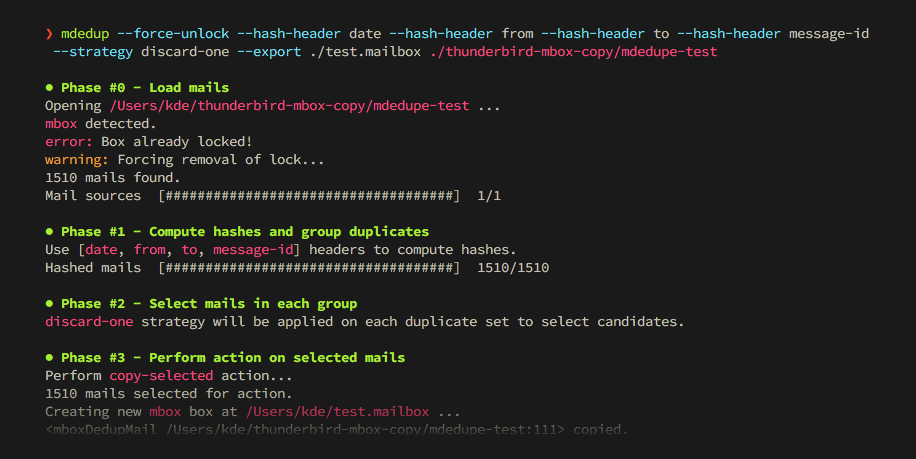
Features
- Duplicate detection based on cherry-picked and normalized mail headers.
- Fetch mails from multiple sources.
- Reads and writes to
mbox,maildir,babyl,mh,mmdfandemlformats. - Deduplication strategies based on size, timestamp, file path or random choice, chainable as fallbacks.
- Copy, move, delete or hardlink the resulting set of duplicates.
- Dry-run mode.
- Protection against false-positives with safety checks on size and content differences.
- Optional cache reusing the hashes computed by previous runs.
- Parallel hashing and selection over several processes.
- Supports macOS, Linux and Windows.
- Standalone executables for Linux, macOS and Windows.
- Shell auto-completion for Bash, Zsh and Fish.
Installation
All installation methods are available in the documentation. Below are the most popular ones:
Try it now
uv is the fastest way to run mdedup on any platform, thanks to its uvx command:
$ uvx --from mail-deduplicate -- mdedup
macOS
mdedup is part of the official Homebrew default tap, so you can install it with:
$ brew install mail-deduplicate
Executables
Standalone binaries of mdedup's latest version are available as direct downloads for several platforms and architectures:
| Platform | arm64 |
x86_64 |
|---|---|---|
| Linux | Download mdedup-linux-arm64.bin |
Download mdedup-linux-x64.bin |
| macOS | Download mdedup-macos-arm64.bin |
Download mdedup-macos-x64.bin |
| Windows | Download mdedup-windows-arm64.exe |
Download mdedup-windows-x64.exe |
Quickstart
Duplicate mails pile up whenever boxes get copied around: backups of the same account taken at different times, per-folder exports where a mail tagged with several labels lands in several boxes, archives consolidated from multiple clients, or IMAP synchronizations gone wrong.
mdedup cleans this up. Point it at your boxes: it groups copies of the same mail by hashing a curated set of headers, applies a --strategy to pick which copy to keep in each group, then performs an --action on the result. The default action is the safest one: sources are only read, and the deduplicated selection is written to a brand new box.
So to merge two overlapping archives into a single clean box:
$ mdedup --strategy select-one --export merged.mbox archive-2024.mbox archive-2025.mbox
Mails found in both archives are copied once into merged.mbox, along with all the mails that were unique to each source.
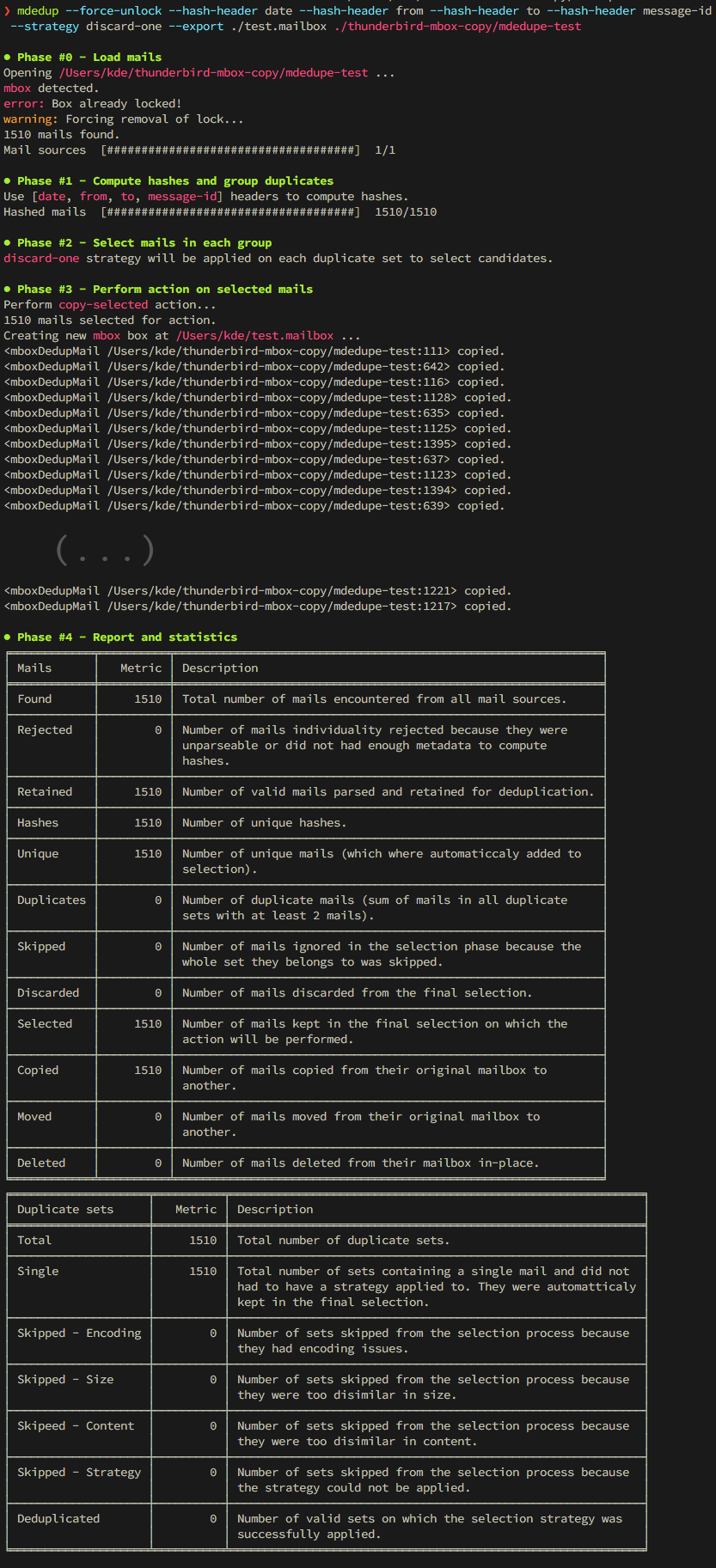
To remove duplicates in place instead, switch to a destructive action, and rehearse with --dry-run:
$ mdedup --strategy select-one --action delete-discarded --dry-run ~/Maildir
The hands-on tutorial builds a small playground of duplicated mails, then walks through strategies, actions and safeguards on it. The design page explains how duplicates are detected.
You can support this project with pull requests, business support 🤝 and sponsorship 🫶.
1 maintainer

Release files for mail-deduplicate 9.3.2
For a detailed explanation of source distributions (sdists) and built distributions (wheels), please see the package formats documentation.
Source distribution (sdist)
| File | Size | Uploaded | |
|---|---|---|---|
| mail_deduplicate-9.3.2.tar.gz | 67.6 kB | Details |
Built distribution (wheel)
| File | Interpreter | ABI | Platform | Reset |
|---|---|---|---|---|
| mail_deduplicate-9.3.2-py3-none-any.whl | Python 3 | none | any | Details |
Total release size: 135.8 kB
Release files / mail_deduplicate-9.3.2.tar.gz
| Download URL | mail_deduplicate-9.3.2.tar.gz |
|---|---|
| Size | 67.6 kB |
| Tags | Source |
|
SHA-256 checksum How to use checksums |
f362531b11e99cb5a51c7806b960e22bff7607dace1a713511baf9653af966e5
|
|
BLAKE2b-256 checksum How to use checksums |
594b0d3d5ee73a939c242551aeb4ef6fab754646f697d481594bd69e0433e819
|
| Upload date | |
|
Uploaded using Trusted Publishing? What is trusted publishing? |
Yes |
| Uploaded via |
uv/0.12.4 {"installer":{"name":"uv","version":"0.12.4","subcommand":["publish"]},"python":null,"implementation":{"name":null,"version":null},"distro":{"name":"Ubuntu","version":"26.04","id":"resolute","libc":null},"system":{"name":null,"release":null},"cpu":null,"openssl_version":null,"setuptools_version":null,"rustc_version":null,"ci":true}
|
Provenance
Provenance describes where a file came from. On PyPI, provenance is shared via attestations, which provide a verifiable record of the build or publishing details. View details, limitations and caveats.


PyPI Publish Attestation
PyPI verified that this artifact, at this checksum, originated from the publisher listed below.
Signed by GitHub Actions, verified by PyPI on Sep 18, 2026.
Transparency logRelease files / mail_deduplicate-9.3.2-py3-none-any.whl
| Download URL | mail_deduplicate-9.3.2-py3-none-any.whl |
|---|---|
| Size | 68.2 kB |
| Tags | Python 3 |
|
SHA-256 checksum How to use checksums |
b761e94045ab4f20cfe7efc701a8ecf19f194427b187c20309a41ed285fb18e5
|
|
BLAKE2b-256 checksum How to use checksums |
577a87d990f256144034998151d076f66b642b499fc544b1a0c5d66a9fbe9fee
|
| Upload date | |
|
Uploaded using Trusted Publishing? What is trusted publishing? |
Yes |
| Uploaded via |
uv/0.12.4 {"installer":{"name":"uv","version":"0.12.4","subcommand":["publish"]},"python":null,"implementation":{"name":null,"version":null},"distro":{"name":"Ubuntu","version":"26.04","id":"resolute","libc":null},"system":{"name":null,"release":null},"cpu":null,"openssl_version":null,"setuptools_version":null,"rustc_version":null,"ci":true}
|
Provenance
Provenance describes where a file came from. On PyPI, provenance is shared via attestations, which provide a verifiable record of the build or publishing details. View details, limitations and caveats.
PyPI Publish Attestation
PyPI verified that this artifact, at this checksum, originated from the publisher listed below.
Signed by GitHub Actions, verified by PyPI on Sep 18, 2026.
Transparency log













