
This release is a pre-release and may not be stable for production use.

Realistic textile assets generator for Physical AI.


Maillage generates towels, tea towels, napkins, tablecloths, bed sheets, cleaning cloths, bandanas, silk and knitted scarves and flags with real sizes, fabrics, masses and patterns, meshed for cloth simulation and exported to OpenUSD. Every piece is checked in Blender by a drape test: it imports, simulates without exploding, stretches little, does not go through obstacles and comes to rest.
It is built for Physical AI: robots that fold laundry, lay a table or hand over a towel are trained and tested in simulation, and they need many different cloths, not one subdivided square; perception models need synthetic images of crumpled and draped fabric with exact ground truth. Everything can run on CPU. Maillage is the sister project of Granulaire (granular assets) and follows the same approach: distributions instead of one shape, measured outputs, honest limits.
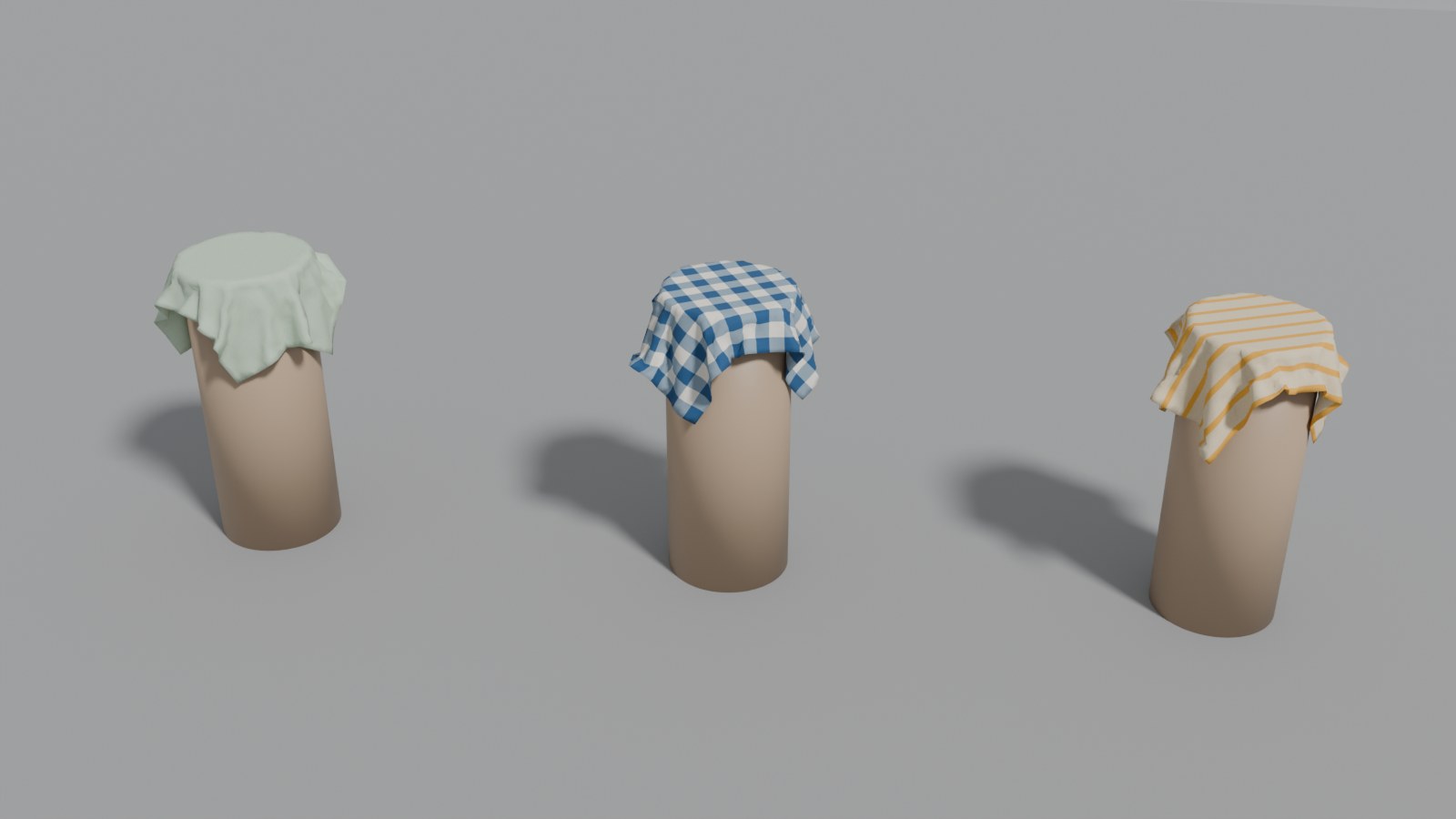
Waffle-cotton tea towels generated by Maillage (solid, gingham, striped),
imported into Blender and draped by the drape test. Render:
maillage drop-test output/tea_towel --render.
What it does
- Generates N distinct pieces of a preset (12 by default): format drawn from real retail sizes, size tolerance, corner rounding, an imperfect cut (wavy edges, slight skew), fabric and pattern.
- Meshes each piece for cloth solvers: near-equilateral triangles for any outline (rounded corners, round tablecloths), or a structured quad grid for rectangles (the topology of a woven fabric).
- Draws a procedural pattern (solid, end bands, stripes along or across, gingham, border, flag bands) as a PNG texture that follows the fabric, not the cut.
- Measures every mesh (area, perimeter, edge lengths, minimum angles) and derives the mass from the fabric's areal density.
- Exports an OpenUSD scene: meshes with UVs, a textured UsdPreviewSurface
material,
hemandpinprimvars, and the fabric's physical properties as custom attributes. - Tests every piece in Blender (
maillage drop-test): import, cloth simulation, automatic checks, Cusick drape coefficient, the draped meshes exported back to OpenUSD and an optional Cycles render.
Installation
From PyPI:
pip install "maillage[render]"
From a clone, for development:
python -m venv .venv && source .venv/bin/activate
pip install -e ".[render]"        # add ",dev" for tests and linting
Requires Python 3.10+. For the Blender drape test, either put Blender on the
PATH, or install Blender as a Python module (pip install -e ".[blender]",
Python 3.13 only, as the bpy wheels exist for one Python version). Tested
with Blender 5.2; Blender 4.2 or later should work.
Usage
maillage list
maillage generate --preset tea_towel                     # 12 pieces, triangles
maillage generate --preset tablecloth --count 20 --seed 3
maillage generate --preset bath_towel --topology grid --vertices 2500
maillage generate --preset napkin --fabric silk --no-cut --no-color
maillage generate --preset tablecloth --format "140x180@2,round:150,oval:140x220"
maillage preview output/tea_towel                        # flat sheet (matplotlib)
maillage drop-test output/tea_towel --pieces 4 --render  # Blender drape test
maillage drop-test output/tea_towel --gif                # + animated GIF (Pillow)
maillage drop-test output/flag --wind 4 --render         # flags hang from a pole
python -m maillage ... works too. Without the bpy module or blender on
the PATH, maillage drop-test prints the command to run with your Blender:
blender -b -P "$(maillage blender-script)" -- output/tea_towel --render
The script does not import Maillage, so Blender's own Python needs nothing installed. From Python:
from maillage import Variations, generate_scene, write_outputs

towels = generate_scene("tea_towel", count=12, seed=1)
write_outputs(towels, "output")  # -> output/tea_towel/

# 40 cm linen squares with a perfect cut, 2,000 vertices each, quad grid
napkins = generate_scene(
    "napkin",
    count=6,
    fabric="linen",
    topology="grid",
    vertices=2000,
    variations=Variations(cut=False),
)
write_outputs(napkins, "output")

# tablecloths in your own sizes: a 140×180 rectangle twice as often as the rest
tablecloths = generate_scene("tablecloth", count=12, formats="140x180@2, round:150, oval:140x220")
write_outputs(tablecloths, "output")
Presets
| Category | Preset | Formats (cm) | Fabrics |
|---|---|---|---|
| Bath | bath_towel |
70×140, 90×150 | cotton terry |
hand_towel |
50×100, 40×60 | cotton terry | |
washcloth |
30×30 | cotton terry | |
| Kitchen | tea_towel |
50×70, 45×65 | waffle cotton, linen, plain cotton |
| Table | napkin |
40×40, 50×50 | linen, plain cotton |
tablecloth |
140×180, 140×240, round ⌀150, oval 140×200 | plain cotton, linen | |
| Bedding | bed_sheet |
180×290, 240×300, 270×310 | percale, linen |
| Cleaning | microfiber_cloth |
40×40, 30×30 | microfiber |
| Accessories | bandana |
55×55 | plain cotton |
silk_scarf |
90×90, 50×160 | silk | |
scarf |
25×160, 30×180, 20×140 (knitted winter scarf) | wool knit | |
| Outdoor | flag |
100×150, 60×90 (hung by the hoist) | polyester knit |
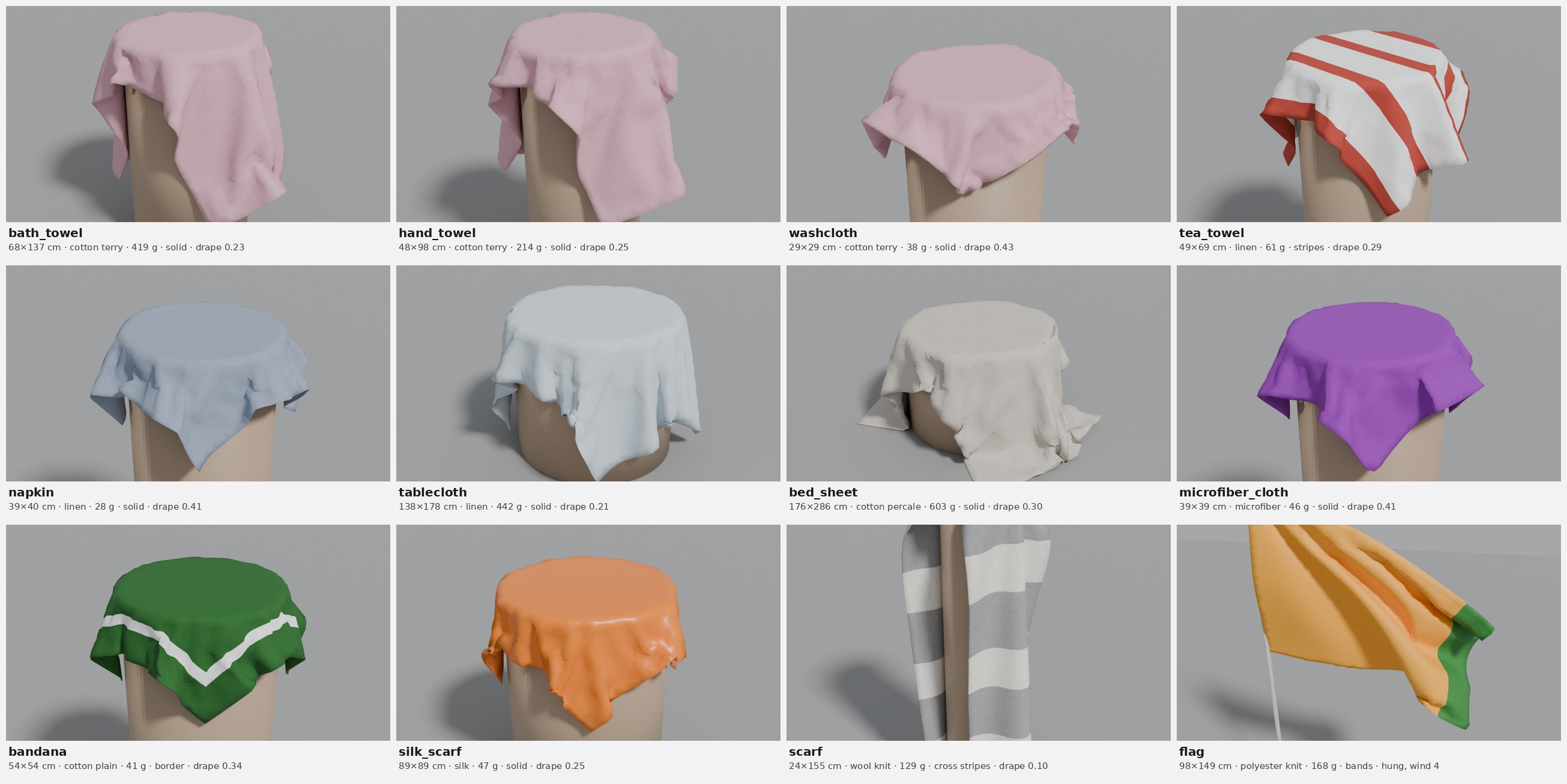
One piece of each preset (seed 2), simulated 5 s by the Blender drape test and rendered with Cycles; each image is framed on its own piece, so scales differ (30 cm washcloth to 3 m sheet). Same colours for the three terry presets: they share a palette and, with one seed, the same colour draw.
Sizes are common retail formats; values are realistic orders of magnitude, not measurements of a specific product. Flags use generic two or three band designs with random colours on unequal, asymmetric bands, so that real national flags (equal or symmetric bands) are unlikely.
Fabrics
| Fabric | Areal density | Thickness | Friction |
|---|---|---|---|
cotton_terry |
450 g/m² | 4 mm | 0.8 |
cotton_waffle |
220 g/m² | 1.5 mm | 0.6 |
cotton_plain |
140 g/m² | 0.3 mm | 0.5 |
cotton_percale |
120 g/m² | 0.25 mm | 0.5 |
linen |
180 g/m² | 0.35 mm | 0.55 |
denim |
400 g/m² | 0.7 mm | 0.6 |
fleece |
250 g/m² | 3 mm | 0.8 |
microfiber |
300 g/m² | 2 mm | 0.9 |
polyester_knit |
115 g/m² | 0.2 mm | 0.4 |
silk |
60 g/m² | 0.1 mm | 0.3 |
wool_knit |
350 g/m² | 3 mm | 0.7 |
--fabric gives every piece the same fabric, whatever the preset's mix.
Formats
Each preset draws from its own retail formats (table above). --format
(Python: formats=) replaces them with your sizes and shapes, in cm, as a
comma-separated list:
| Format | Shape |
|---|---|
50x70 (or rect:50x70, 50×70) |
rectangle, 50 × 70 cm |
oval:140x200 (or ellipse:140x200) |
ellipse, 140 × 200 cm |
round:150 |
circle, 150 cm in diameter |
50x70@3 |
any of the above with a weight (here 3; 1 when there is no @) |
Weights. Each piece draws one format at random, with a probability
proportional to its weight: weight / sum of the weights. With
--format "140x180@2,round:150,oval:140x220" the weights are 2, 1 and 1
(sum 4), so each tablecloth has a 50 % chance of being 140×180, 25 % of being
round and 25 % of being oval: about 6, 3 and 3 out of 12 on average, the exact
counts depending on the seed. Only the ratios matter (@2, @1, @1 is the
same as @50, @25, @25), and without any @ all formats are equally
likely. With --no-size, nothing is drawn: every piece takes the first format
of the list, at its exact size. The presets' own formats use the same weights
(a bath_towel is 70×140 with weight 0.7, 90×150 with weight 0.3).
The longer side is always the length, so 70x50 is the same as 50x70. The
preset's size tolerance, cut, corners, fabric and patterns still apply. In
Python, a format can also be a dict ({"width": 50, "length": 70, "shape": "rect", "weight": 1}) or a tuple ((50, 70), (150, 150, "round")). With
--topology grid, round and oval formats are skipped (at least one rectangle
is needed). summary.json counts the pieces of each format drawn.
Variations
Each aspect has its own random stream: turning one off leaves the others unchanged (same shapes with plain colours, same colours with a perfect cut…).
Option (CLI / Python Variations) |
On (default) | Off |
|---|---|---|
--no-size / size=False |
format drawn, size within the preset's tolerance | first format, exact size |
--no-cut / cut=False |
wavy edges (0.3–6 mm) and skew (up to 1.5°) | perfect cut |
--no-corners / corners=False |
corner radius drawn | middle of the range |
--no-color / color=False |
pattern and colours drawn | first pattern, first colours |
--fabric NAME / fabric="linen" (Variations(fabric=False): first fabric) |
fabric drawn from the preset's mix | one fabric for every piece |
Mesh
| Option | Default | Effect |
|---|---|---|
--topology tri |
✓ | near-equilateral triangles (Delaunay on a jittered hexagonal lattice, outline sampled at the same spacing); any outline; minimum angles above ~20° |
--topology grid |
structured quads stretched over the four cut edges (Coons patch); rectangles only, sharp corners; round formats are skipped | |
--vertices N |
1500 | target vertices per piece, whatever its size |
--count N, --seed S |
12, 1 | number of pieces, random seed; same options and seed give the same pieces |
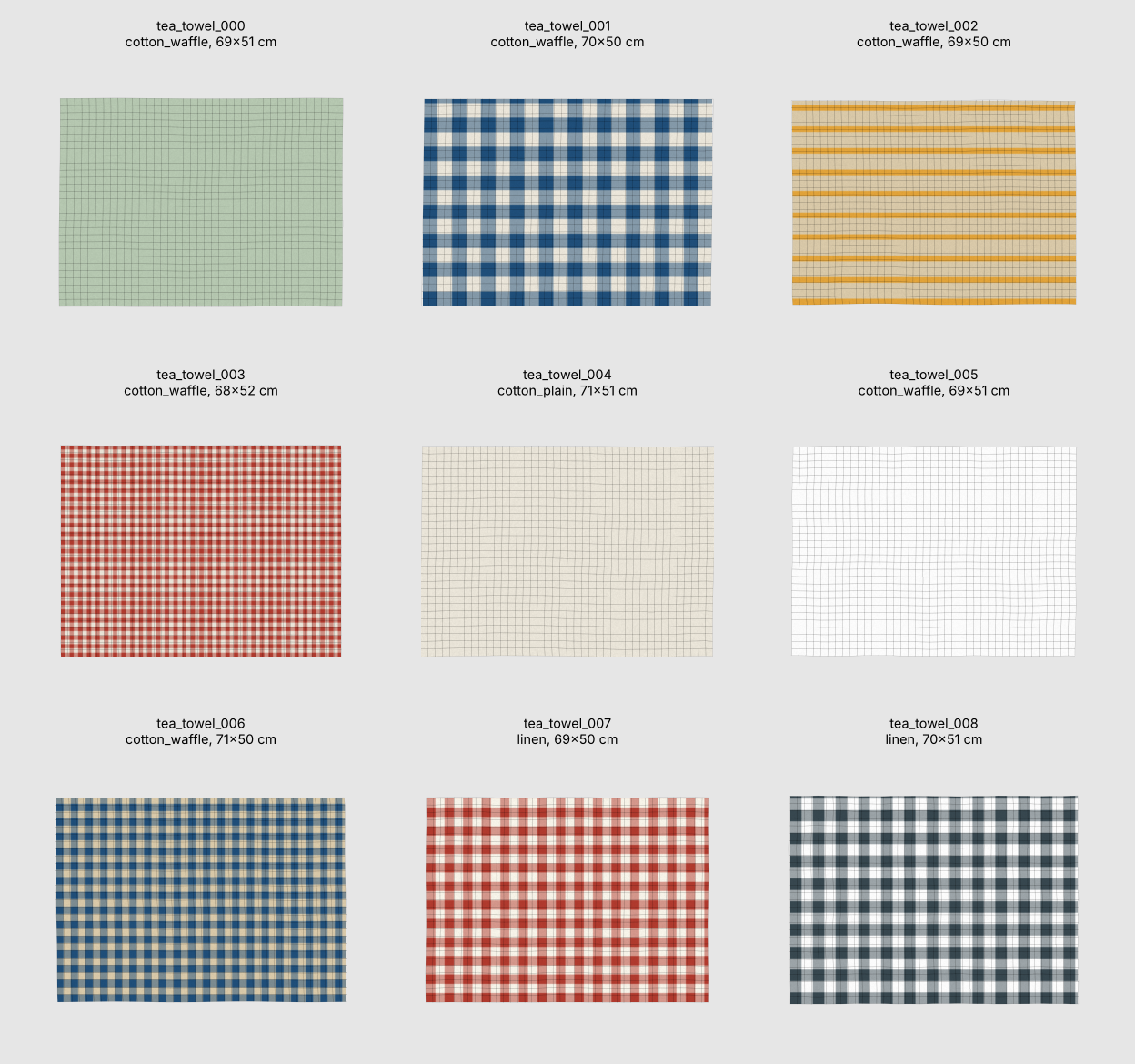
maillage preview output/tea_towel on a grid-topology set: the texture is
drawn over each piece and the mesh shown on top; the wavy grid lines are the
imperfect cut, spread across the piece.
Outputs (per preset, under output/<preset>/)
| File | Content |
|---|---|
maillage_<preset>.usdc |
OpenUSD scene (Blender: File > Import > USD) |
textures/<piece>.png |
pattern texture of each piece |
pieces.csv |
per piece: fabric, shape, pattern, size, corner radius, mass, mesh metrics |
summary.json |
counts by fabric, pattern, shape and format; mass and mesh statistics |
sheet.png |
flat preview (maillage preview) |
drop_test/ |
drop_test.json, draped.usdc, drop_test.png, drop_test.gif and frames/ (maillage drop-test) |
OpenUSD layout
Z up, metres, kilograms. /World is the default prim.
/World
  /Looks/<piece>      UsdPreviewSurface + UsdUVTexture (textures/<piece>.png)
  /Cloths/<piece>     UsdGeom.Mesh, flat on the ground, laid out in rows
  /Ground             collision ground (UsdPhysics.CollisionAPI)
Each cloth mesh has subdivisionScheme = none, is double sided, and carries:
| Property | Content |
|---|---|
primvars:st |
texture coordinates (vertex) |
primvars:hem |
1 on the hemmed band along the edges, 0 elsewhere (vertex) |
primvars:pin |
1 on pinned vertices: the hoist corners of a flag (vertex) |
primvars:displayColor |
mean colour of the texture |
maillage:fabric, maillage:pattern, maillage:shape |
what the piece is |
maillage:arealDensity, maillage:mass, maillage:thickness, maillage:friction |
physical properties (SI units) |
maillage:nominalSize, maillage:size, maillage:cornerRadius |
retail and actual size (m) |
maillage:hemBendingFactor |
how much stiffer the hem is in bending |
maillage:blender:* |
stiffness for Blender's cloth solver, for 1 cm edges (see Blender values) |
OpenUSD has no standard schema for cloth simulation (UsdPhysics covers
rigid bodies and joints), so these properties are custom attributes. Blender's
USD importer reads the geometry, UVs, material, texture and the hem and
pin primvars (as mesh attributes); the drape test reads the maillage:*
attributes with the OpenUSD bindings shipped with Blender.
Blender drape test
maillage drop-test imports the scene into Blender and, for each tested
piece:
- sets up Blender's cloth solver from the
maillage:*attributes: stiffness rescaled to the mesh and the piece's real mass, stiffer bending on the hem, collisions and self-collisions; - drape: lays the piece flat on a round pedestal (diameter 60 % of the shorter side), its centre clamped as between the two discs of a Cusick drape tester, and lets the rest fall; hang: a flag hangs from its two hoist corners on a pole, optionally in the wind;
- simulates 5 s (120 frames at 24 fps);
- checks the result and writes
drop_test.json:
| Check | Pass when |
|---|---|
| finite | no invalid coordinate |
| stretch | 99 % of the edges stretched by less than 10 %, none by more than 60 % |
| penetration | less than 0.5 % of the vertices inside the pedestal or under the floor |
| at rest | (drape) fastest vertex below 10 cm/s at the end |
It also measures the drape coefficient of each draped piece, as in the
Cusick test: (projected area − pedestal area) / (flat area − pedestal area),
from 1 (stays flat) to 0 (hangs straight down). The draped meshes are exported
to draped.usdc with their maillage:* attributes copied back: ready-to-use
draped assets.
Results
Indicative results of maillage drop-test on three pieces of each preset
(seed 1, ~1,500 vertices per piece, 120 frames, Blender 5.2):
| Preset | Mass (g) | Vertices | Scenario | Drape coefficient | Stretch (p99) | Result |
|---|---|---|---|---|---|---|
bath_towel |
429–450 | 1563–1582 | drape | 0.22–0.23 | 3.1–3.7 % | 3/3 pass |
hand_towel |
219–229 | 1563–1585 | drape | 0.22–0.26 | 2.6–3.6 % | 3/3 pass |
washcloth |
39–41 | 1562–1572 | drape | 0.40–0.49 | 4.2–5.1 % | 3/3 pass |
tea_towel |
75–78 | 1549–1570 | drape | 0.28 | 2.8–2.9 % | 3/3 pass |
napkin |
28–29 | 1559–1578 | drape | 0.36–0.38 | 2.2–2.6 % | 3/3 pass |
tablecloth |
356–470 | 1564–1572 | drape | 0.20–0.25 | 3.1–4.0 % | 3/3 pass |
bed_sheet |
636–863 | 1553–1573 | drape | 0.28–0.37 | 3.0–3.1 % | 3/3 pass |
microfiber_cloth |
47–49 | 1554–1575 | drape | 0.37–0.41 | 2.2–2.4 % | 3/3 pass |
bandana |
42–43 | 1558–1576 | drape | 0.30–0.33 | 2.5–3.1 % | 3/3 pass |
silk_scarf |
48–49 | 1560–1579 | drape | 0.25–0.27 | 3.1–3.4 % | 3/3 pass |
scarf |
134–189 | 1608–1621 | drape | 0.10–0.13 | 2.6–2.8 % | 3/3 pass |
flag |
170–174 | 1551–1567 | hang | — | 1.9–2.4 % | 3/3 pass |
No piece went through the pedestal or the floor. The drape coefficient
depends on the shape of the piece as much as on the fabric (a long towel
hangs further past a pedestal sized on its short side), so it compares
pieces of one preset, not presets with each other. To compare fabrics, the
same 40 cm square was draped in each (maillage generate --preset napkin --no-size --no-cut --fabric silk,polyester_knit,cotton_plain,linen,cotton_terry,denim):
| Fabric | silk | polyester knit | plain cotton | linen | cotton terry | denim |
|---|---|---|---|---|---|---|
| Mass of the square | 10 g | 18 g | 22 g | 29 g | 72 g | 64 g |
| Drape coefficient | 0.37 | 0.35 | 0.42 | 0.40 | 0.38 | 0.42 |
In this version the fabrics differ in mass, thickness, friction and look much more than in drape: the drape coefficients stay within 0.35–0.42, where real silk and denim are far apart (see the roadmap).
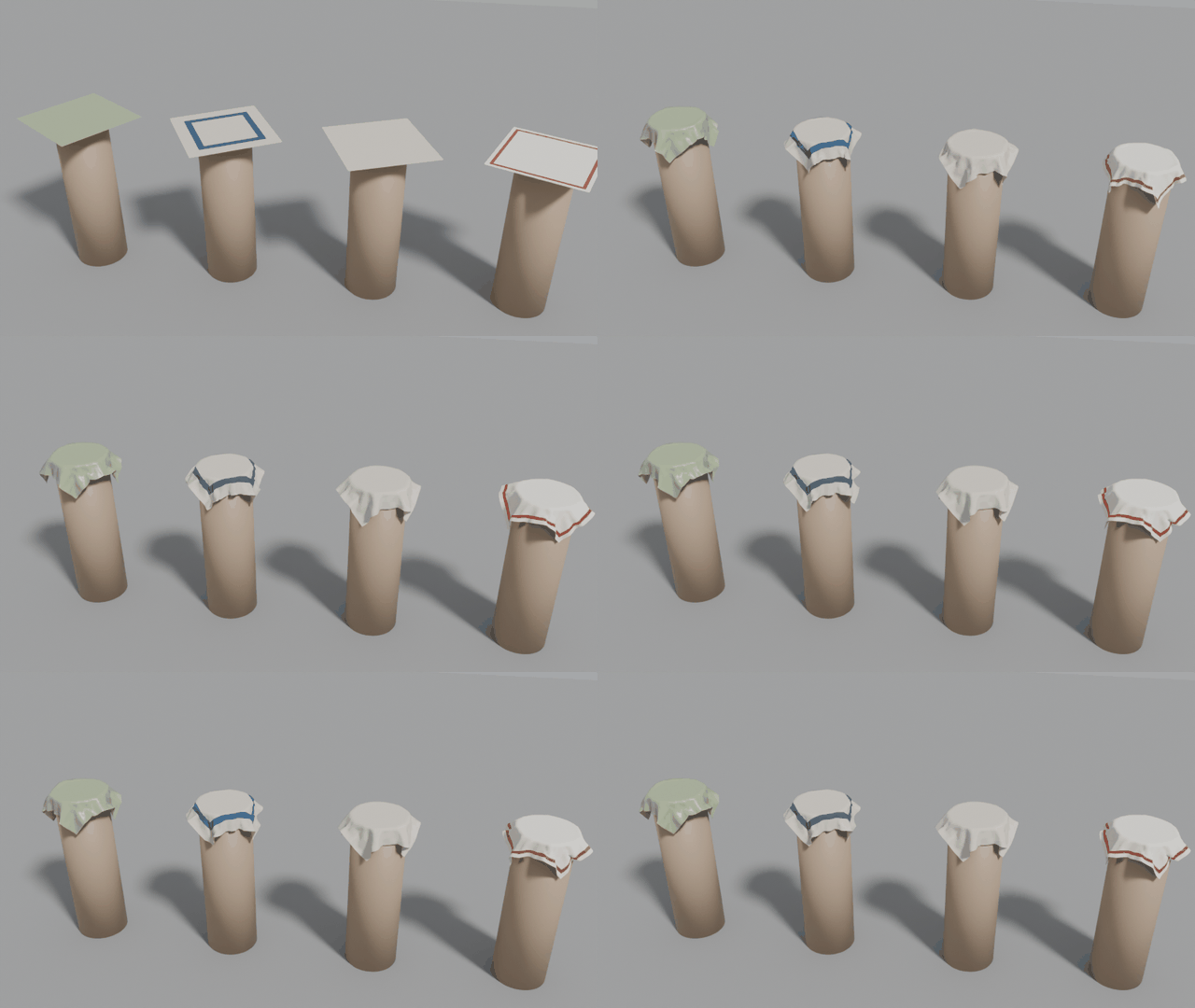
Silk, plain cotton, linen and denim squares falling onto the clamped
pedestals, slowed down twice: maillage generate --preset napkin --count 4 --fabric silk,cotton_plain,linen,denim then maillage drop-test output/napkin --frames 40 --gif --gif-step 1.
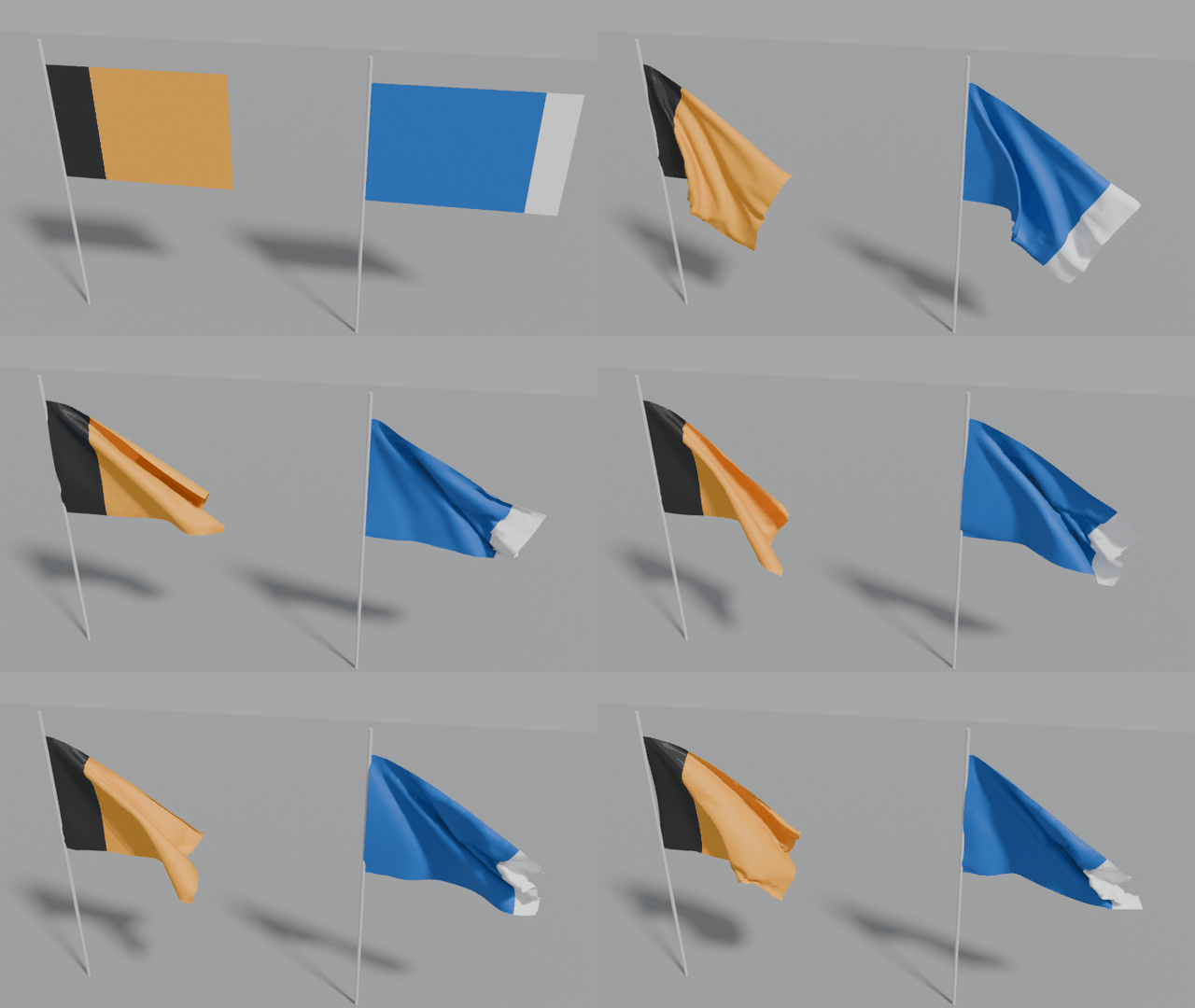
Flags hung by their hoist corners in the wind: maillage drop-test output/flag --wind 4 --gif.
Blender values
Blender's cloth stiffness acts per edge and is not divided by the vertex mass, so the same numbers make a fabric stiffer or softer depending on the mesh resolution. Maillage stores the stiffness for a reference mesh with 1 cm edges and the real mass, and the drape test rescales it: tension and shear with the edge length, bending unchanged, air damping with the area per vertex. The solver itself runs with Blender's usual 0.3 kg vertex mass and every stiffness and damping multiplied by the same factor, which leaves the motion unchanged and keeps Blender's solver in the range its tolerances are tuned for.
Tension gives about 3 % stretch when a piece drapes; bending is smaller for softer fabrics, and kept low for all of them (see the roadmap). The values are not calibrated against measured fabric properties.
Method in brief
- Outline. A rectangle with rounded corners or an ellipse, parametrised by arc length. The cut adds a smooth normal displacement (sum of a few sines along the perimeter: long gentle deviations plus a small wobble) and a slight shear.
- Mesh. tri: the outline is sampled at the target edge length (sharp corners kept, roundings below the resolution merged into one vertex), the inside filled with a jittered hexagonal lattice kept at least half an edge away from the outline, then a Delaunay triangulation clipped to the outline. grid: transfinite (Coons) interpolation of the four cut edges.
- Fabric and mass. The fabric is drawn from the preset's mix; the mass is the measured area times the areal density.
- Hem and pins. Vertices within the hem width of the outline get
hem = 1; for flags, vertices near the two hoist corners getpin = 1. - Pattern. Parameters drawn per piece (colours from the preset's palettes, periods, band widths), rendered on the nominal rectangle with a faint weave noise; texture coordinates follow the fabric, so a skewed or wavy cut shows as a pattern not quite parallel to the edge, as on real pieces.
Limits
- Blender only, so far. The drape test validates the assets in Blender's cloth solver. Nothing is exported yet for NVIDIA OmniPhysics deformables (Isaac Sim) or MuJoCo flex; the geometry and physical attributes are there, the engine-specific schemas are not.
- Fabrics drape alike. Bending stiffness is kept low for every fabric (see the roadmap), and no value is calibrated against measurements (no Kawabata or Cusick data behind them).
- Flat pieces only. No garments (sewn panels), no holes or grommets (a flag is pinned at its hoist corners instead), no folded or crumpled starting states, no wet cloth.
- Textures are procedural. Patterns are clean and regular; no prints, logos, stains or wear.
Roadmap
- Stiff fabrics that drape like real ones. Blender's angular bending model (the only one that works on triangle meshes) becomes unstable when the bending stiffness is high relative to the vertex mass, as with stiff fabrics on fine meshes: instead of settling, the cloth keeps vibrating, and adding damping makes it worse. Every fabric's bending stiffness is therefore kept below this limit (about 0.015 × areal density for 1 cm edges, measured), so a 40 cm square drapes with a coefficient of 0.35–0.42 whether it is silk or denim. Next steps: more solver steps or a coarser simulation mesh for stiff fabrics, quad-grid meshes with Blender's linear bending model, and other engines.
- Pre-draped and crumpled states as OpenUSD variants (the drape test already exports draped meshes), and folded states for laundry-folding tasks.
- Engine-neutral physical stiffness (tensile and bending rigidity in SI units) with per-engine mappings, starting with OmniPhysics surface deformables.
- Calibration against published fabric measurements.
- Simple garments from sewing patterns.
Development
The project follows GitHub Flow:
mainis always releasable and protected: changes reach it only through pull requests, nobody pushes to it directly.- Every change starts on a short-lived branch from
main, named after its type:feat/<name>,fix/<name>,docs/<name>,ci/<name>, … - Push the branch and open a pull request into
main; CI runs on it. - Merge when CI is green, then delete the branch.
Releasing is a change like any other: on a chore/release-X.Y.Z branch, bump
version in pyproject.toml and move the Unreleased entries of
CHANGELOG.md under the new version; merge the pull request, then tag
vX.Y.Z on main (or create the release on the GitHub web page with that new
tag). The release workflow builds the packages and attaches them.
A versioned pre-push hook refuses direct pushes to main. Enable it once per
clone with git config core.hooksPath .githooks (emergency override:
ALLOW_MAIN_PUSH=1 git push).
Continuous integration
GitHub Actions runs these workflows (.github/workflows/):
| Workflow | When | What |
|---|---|---|
ci.yml |
every push to main, every pull request |
ruff check and ruff format --check; pytest on Python 3.10–3.13 (Linux) and 3.12 (macOS, Windows); a command-line smoke test; the Blender drape test of every preset with the bpy module (Python 3.13, Linux), reports kept as a run artifact; build the wheel and sdist, twine check, install the wheel in a clean environment. |
release.yml |
a pushed tag v* |
checks the tag matches the version in pyproject.toml, tests, builds, then creates the GitHub release with the packages attached and the notes taken from CHANGELOG.md. Versions with a, b or rc are marked as pre-releases. |
| Dependabot | monthly | pull requests to update the GitHub Actions and the Python dependencies. |
Ruff is pinned in CI so that a new ruff release cannot fail the build on
unchanged code; update the pin and run ruff format . together.
License
MIT © 2026 Daniel Régis Sarmento Caon
The logo is set in IBM Plex Sans (SIL Open Font License 1.1), outlined into paths, so it displays without the font installed.
Maillage is part of Primvaria, physics-ready variability for Physical AI, in OpenUSD: pip install primvaria installs the whole suite.
1 maintainer

Metadata
1 maintainer
Release files for maillage 0.1.0b2
For a detailed explanation of source distributions (sdists) and built distributions (wheels), please see the package formats documentation.
Source distribution (sdist)
| File | Size | Uploaded | Provenance | Actions |
|---|---|---|---|---|
| maillage-0.1.0b2.tar.gz | 59.4 kB | With provenance | Details for maillage-0.1.0b2.tar.gz |
Built distribution (wheel)
| File | Interpreter | ABI | Platform | Actions Reset |
|---|---|---|---|---|
| maillage-0.1.0b2-py3-none-any.whl | Python 3 | none | any | Details for maillage-0.1.0b2-py3-none-any.whl |
Total release size: 108.0 kB
Release files / maillage-0.1.0b2.tar.gz
| Download URL | maillage-0.1.0b2.tar.gz |
|---|---|
| Size | 59.4 kB |
| Tags | Source |
|
SHA-256 checksum How to use checksums |
e39fbf299012f21efe9912cadaf80fb0f271b59879c9ad0d575940833853f227
|
|
BLAKE2b-256 checksum How to use checksums |
282fd382d2635ce38e73d821e4ecdaf823e1872415126ddcb61325c329759c90
|
| Upload date | |
|
Uploaded using Trusted Publishing? What is trusted publishing? |
Yes |
| Uploaded via |
twine/7.0.0 CPython/3.13.16
|
Provenance
Provenance describes where a file came from. On PyPI, provenance is shared via attestations, which provide a verifiable record of the build or publishing details. View details, limitations and caveats.


PyPI Publish Attestation
PyPI verified that this artifact, at this checksum, originated from the publisher listed below.
Signed by GitHub Actions, verified by PyPI on Oct 29, 2026.
Transparency logRelease files / maillage-0.1.0b2-py3-none-any.whl
| Download URL | maillage-0.1.0b2-py3-none-any.whl |
|---|---|
| Size | 48.6 kB |
| Tags | Python 3 |
|
SHA-256 checksum How to use checksums |
0803c7c0bac43348ccb584fe093f284c7b81790274ad6be310beea2562af6293
|
|
BLAKE2b-256 checksum How to use checksums |
47abfdcf0ef1baeef7666c6bc0c16003f5c15e04234d92c6d0884c976b155da9
|
| Upload date | |
|
Uploaded using Trusted Publishing? What is trusted publishing? |
Yes |
| Uploaded via |
twine/7.0.0 CPython/3.13.16
|
Provenance
Provenance describes where a file came from. On PyPI, provenance is shared via attestations, which provide a verifiable record of the build or publishing details. View details, limitations and caveats.
PyPI Publish Attestation
PyPI verified that this artifact, at this checksum, originated from the publisher listed below.
Signed by GitHub Actions, verified by PyPI on Oct 29, 2026.
Transparency logSecurity for maillage 0.1.0b2
Provenance
Provenance describes where a file came from. On PyPI, provenance is shared via attestations, which provide a verifiable record of the build or publishing details. View details, limitations and caveats.
Full provenance
All 2 files in this release have been uploaded with provenance metadata.
Attestation for maillage-0.1.0b2.tar.gz
PyPI Publish Attestation
PyPI verified that this artifact, at this checksum, originated from the publisher listed below.
Signed by GitHub Actions, verified by PyPI on Oct 29, 2026.
Transparency logA note on package security
PyPI is a repository for distributing packages, not a service for auditing them. While third-party security researchers and our staff do their best to detect and remove malicious packages, PyPI cannot guarantee the quality, security or suitability of any given package.
To learn more about protecting yourself from malicious actors, visit our package security documentation.













