
make-drawio-png




日本語版 README はこちら → README.ja.md
A Python library that implements the .drawio.png file format — the
re-editable PNG format used by draw.io / diagrams.net.
With this library you can generate .drawio.png files programmatically,
without opening draw.io at all. The generated files are indistinguishable
from those exported by draw.io itself.
What is the .drawio.png format?
A .drawio.png file is simultaneously:
- a standard PNG image — viewable in any image viewer, browser, or AI agent
- a fully editable draw.io source — open it in draw.io to restore and edit the diagram
This is achieved by embedding the diagram XML inside a PNG tEXt chunk
(keyword=mxfile, value=URL-encoded UTF-8 XML), following the
draw.io open-source specification.
draw.io reads that chunk to restore the diagram; image viewers see only the PNG pixel data.
Use cases
- AI agents / Bob: generate diagrams as code, embed them in Markdown docs, preview as PNG
- CI/CD pipelines: produce architecture diagrams from
.drawioXML without a GUI - Documentation automation: keep diagrams as re-editable sources alongside rendered images
Install
pip install make-drawio-png
Note for Windows users — read the PATH section below before installing.
Usage
CLI
# embed only — re-editable but 1×1 placeholder image (no draw.io needed)
python -m make_drawio_png architecture.drawio

# render + embed — visually rendered AND re-editable (requires draw.io desktop)
python -m make_drawio_png --render architecture.drawio

# explicit output path
python -m make_drawio_png --render flow.drawio docs/images/flow.drawio.png
Windows / Bob shell users: Use
python -m make_drawio_pnginstead of themake-drawio-pngcommand — it works without any PATH changes. See the PATH guide below.
Python API
from make_drawio_png import drawio_export, drawio_to_png

# Recommended: render + embed (requires draw.io desktop)
drawio_export("architecture.drawio")
# → architecture.drawio.png  (rendered + re-editable)

# Zero dependencies: embed only (re-editable, 1×1 placeholder image)
drawio_to_png("architecture.drawio")
# → architecture.drawio.png  (re-editable, no visual content)
draw.io desktop (required for --render / drawio_export)
winget install JGraph.Draw   # Windows
brew install --cask drawio   # macOS
snap install drawio          # Linux
The CLI is auto-detected after installation.
Set DRAWIO_PATH to override the location.
Windows — Python PATH guide
On Windows, pip install places the make-drawio-png CLI script in a
Scripts directory that is not always in PATH by default.
The table below shows where scripts land depending on how you install:
| Install command | Scripts directory | In PATH by default? |
|---|---|---|
pip install make-drawio-png (system-wide) |
%LOCALAPPDATA%\Python\pythoncore-X.Y-64\Scripts |
❌ usually not |
pip install --user make-drawio-png |
%APPDATA%\Python\PythonXYZ\Scripts |
❌ usually not |
pip install make-drawio-png (venv active) |
<venv>\Scripts |
✅ while venv is active |
Checking your Scripts path
python -c "import sysconfig; print(sysconfig.get_path('scripts'))"
# e.g. C:\Users\you\AppData\Local\Python\pythoncore-3.14-64\Scripts

python -c "import sysconfig; print(sysconfig.get_path('scripts','nt_user'))"
# e.g. C:\Users\you\AppData\Roaming\Python\Python314\Scripts
Adding Scripts to PATH (one-time setup)
# Append to your user PATH permanently
$scripts = python -c "import sysconfig; print(sysconfig.get_path('scripts'))"
[System.Environment]::SetEnvironmentVariable(
    "PATH",
    "$([System.Environment]::GetEnvironmentVariable('PATH','User'));$scripts",
    "User"
)
# → restart your terminal / shell after this
Workaround: use python -m instead of the CLI
If you don't want to touch PATH at all, call the module directly:
python -m make_drawio_png architecture.drawio
This always works regardless of PATH because Python itself is on PATH.
Bob / Claude Code shell
When using IBM Bob or Claude Code on Windows, the shell inherits the same PATH as the process that launched Bob/Claude — there is no separate Python environment.
| Scenario | python3 resolves to |
make-drawio-png CLI available? |
|---|---|---|
| Launched from a terminal where Python Scripts is in PATH | your Python installation | ✅ |
| Launched from Windows start menu / system tray | system PATH (Scripts likely missing) | ❌ use python -m |
| Launched inside an active venv | venv Python + Scripts | ✅ |
Recommended practice for Bob/Claude Code users:
Always invoke via python -m so the PATH question is irrelevant:
# In Bob's execute_command tool
python3 -m make_drawio_png "<path>.drawio"
Or reference the script by its absolute path after installation:
import subprocess, sysconfig, pathlib
scripts = pathlib.Path(sysconfig.get_path("scripts"))
subprocess.run([scripts / "make-drawio-png", "architecture.drawio"])
How it works
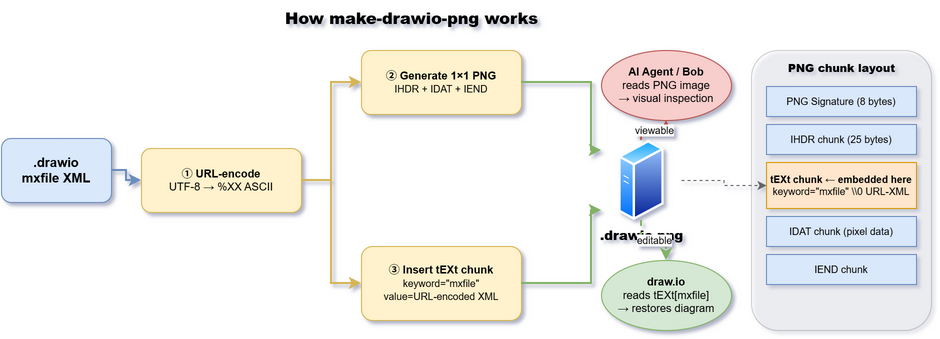
The .drawio.png file is both a valid PNG image and a re-editable draw.io
source. draw.io reads the embedded tEXt[mxfile] chunk to restore the full
diagram; image viewers and AI agents see only the PNG pixel data.
PNG chunk layout
PNG Signature  (8 bytes)
IHDR chunk     (25 bytes)
tEXt chunk     (keyword="mxfile" \x00 URL-encoded-XML)   ← diagram XML here
IDAT chunk     (compressed pixel data)
IEND chunk
Requirements
- Python ≥ 3.9
- No external dependencies (uses only
struct,zlib,urllib.parsefrom stdlib)
License
MIT © 2026 Shoichiro Sakaigawa
1 maintainer

Metadata
1 maintainer
Release files for make-drawio-png 0.1.0
For a detailed explanation of source distributions (sdists) and built distributions (wheels), please see the package formats documentation.
Source distribution (sdist)
| File | Size | Uploaded | |
|---|---|---|---|
| make_drawio_png-0.1.0.tar.gz | 10.4 kB | Details |
Built distribution (wheel)
| File | Interpreter | ABI | Platform | Reset |
|---|---|---|---|---|
| make_drawio_png-0.1.0-py3-none-any.whl | Python 3 | none | any | Details |
Total release size: 20.9 kB
Release files / make_drawio_png-0.1.0.tar.gz
| Download URL | make_drawio_png-0.1.0.tar.gz |
|---|---|
| Size | 10.4 kB |
| Tags | Source |
|
SHA-256 checksum How to use checksums |
381db00376e686507319505331e3d6ac7b5cf5fbff2e4de16e1dc6f4adccecc6
|
|
BLAKE2b-256 checksum How to use checksums |
dfaf24b8b5308f162e77b1580afb0d0799d6fbcbe8f585af291ca4094e6e49e0
|
| Upload date | |
|
Uploaded using Trusted Publishing? What is trusted publishing? |
No |
| Uploaded via |
twine/7.0.0 CPython/3.14.3
|
Release files / make_drawio_png-0.1.0-py3-none-any.whl
| Download URL | make_drawio_png-0.1.0-py3-none-any.whl |
|---|---|
| Size | 10.6 kB |
| Tags | Python 3 |
|
SHA-256 checksum How to use checksums |
ebad2cad63e6e1f1dd4e6807b64365950633a0f7e0a1b1a43d3df38160c7d11a
|
|
BLAKE2b-256 checksum How to use checksums |
a6b2d38d2dbd94dc098f8a33845c281e1674dc3748e2e04b7ebba404f4d46546
|
| Upload date | |
|
Uploaded using Trusted Publishing? What is trusted publishing? |
No |
| Uploaded via |
twine/7.0.0 CPython/3.14.3
|













