
A CLI tool for automatically translating manga pages from Japanese to English. Detects speech bubbles, extracts Japanese text using OCR, translates to English, and renders the translated text back onto images with proper alignment.

Project description
Manga Translation CLI
Fully automated and offline manga translation pipeline. Intelligently detects speech bubbles, extracts Japanese text with OCR, translates to English, and seamlessly renders translated text back onto pages with proper alignment and customizable fonts. Supports both single images and batch folder processing with GPU acceleration.
Showcase
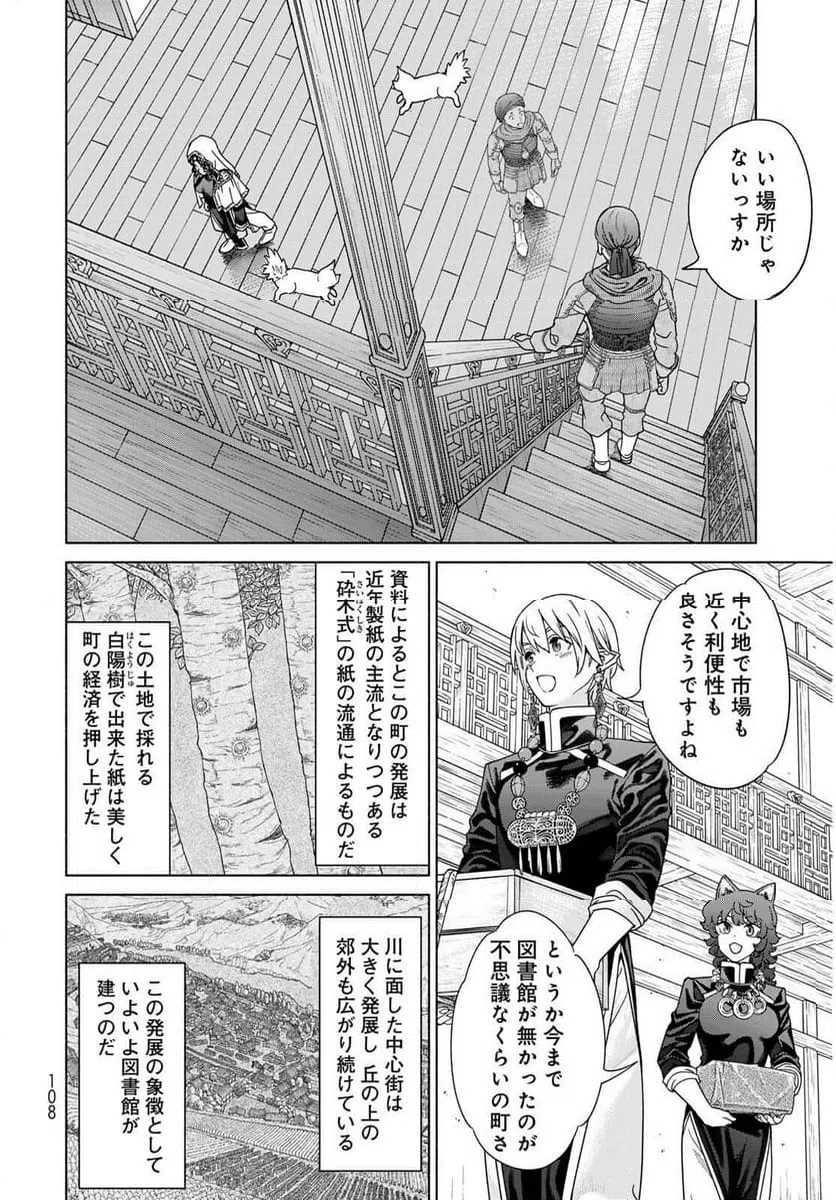
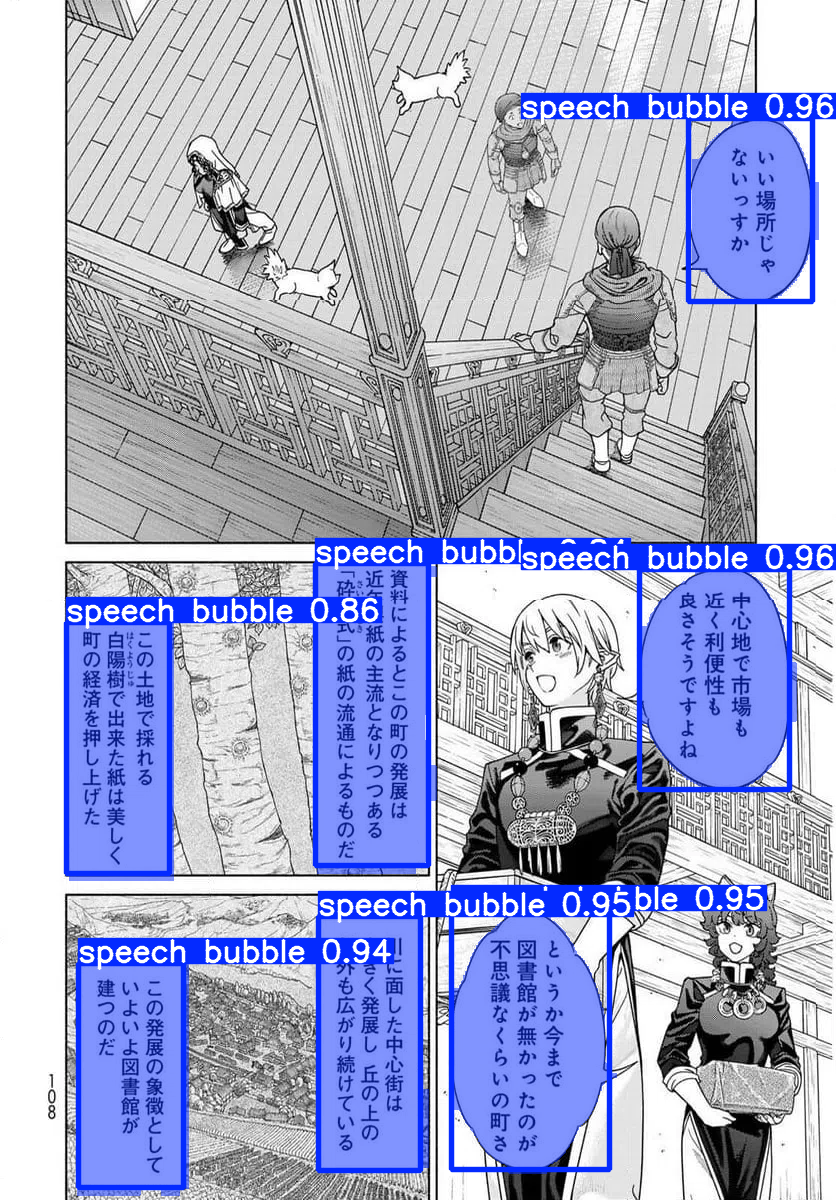
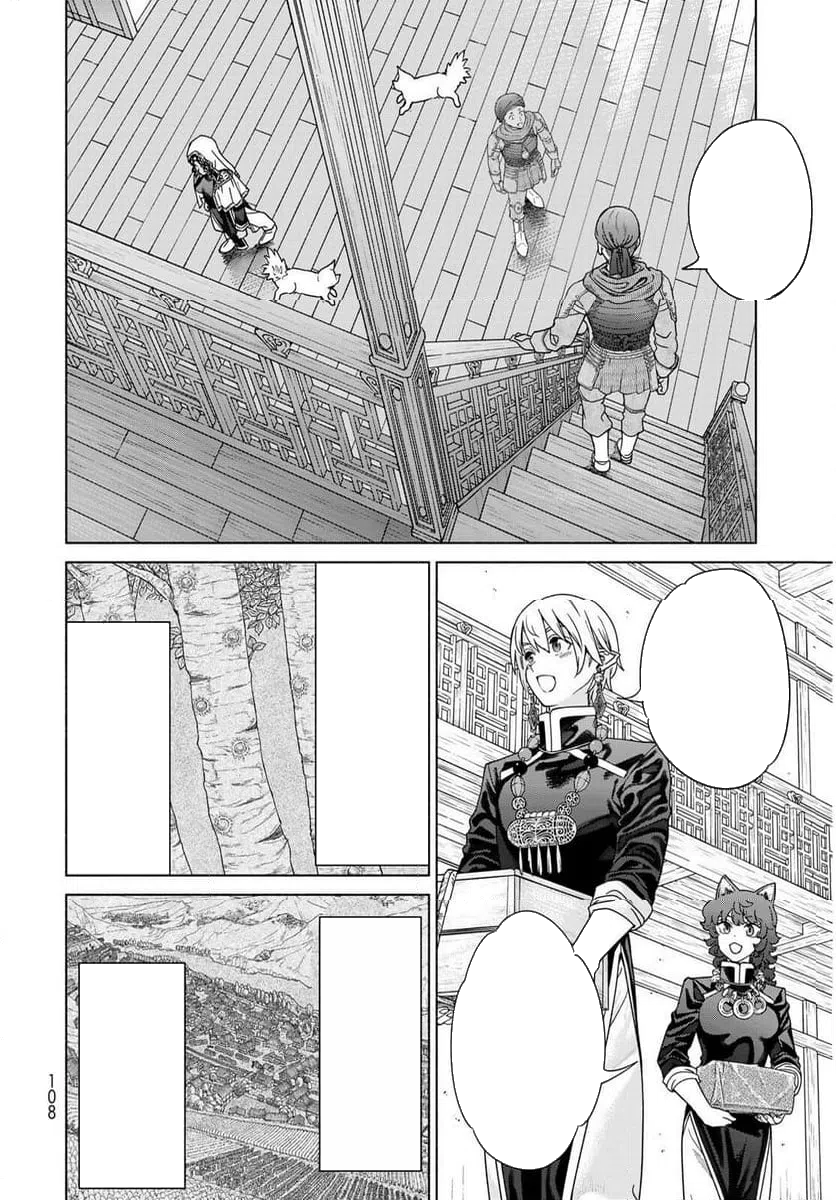
Example 1: Complete Pipeline
| Original | Detection | Cleaned | Translated |
|---|---|---|---|
 |
 |
 |
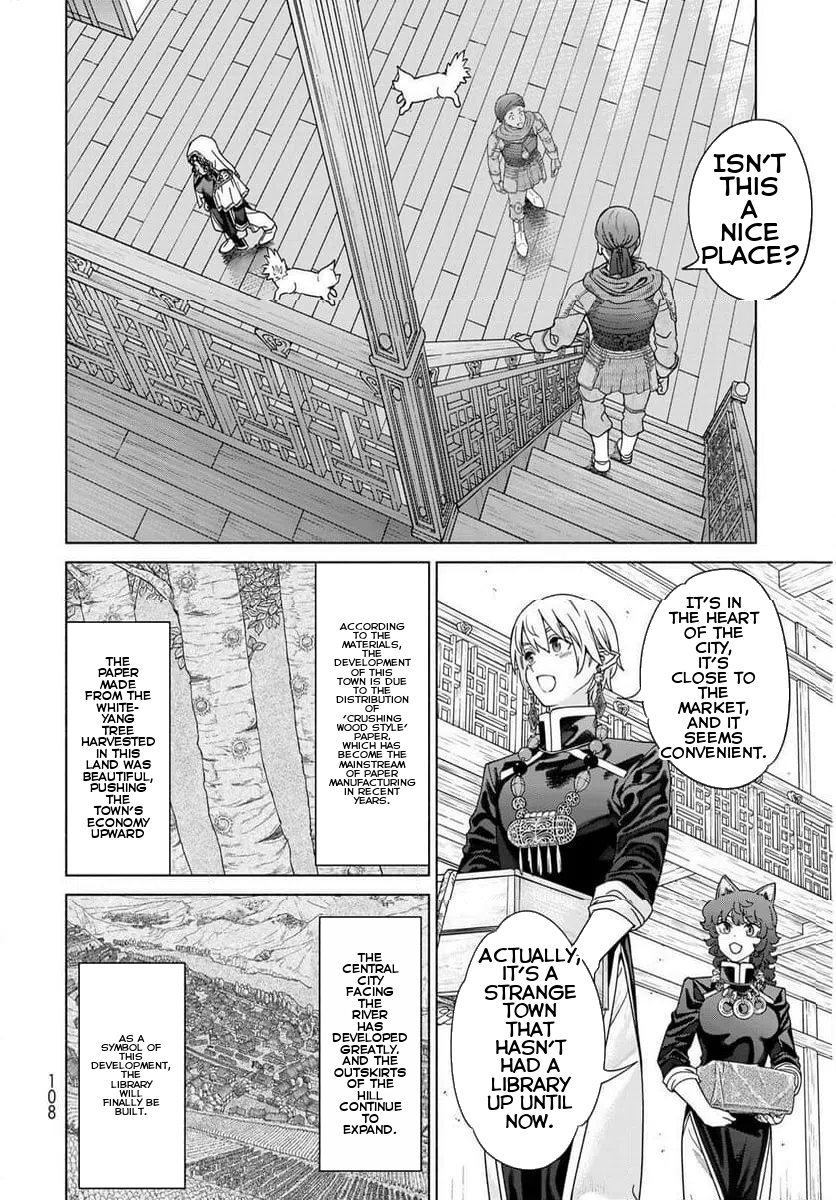 |
Source: Magus of the Library
Example 2: Translation Result
| Original | Translated |
|---|---|
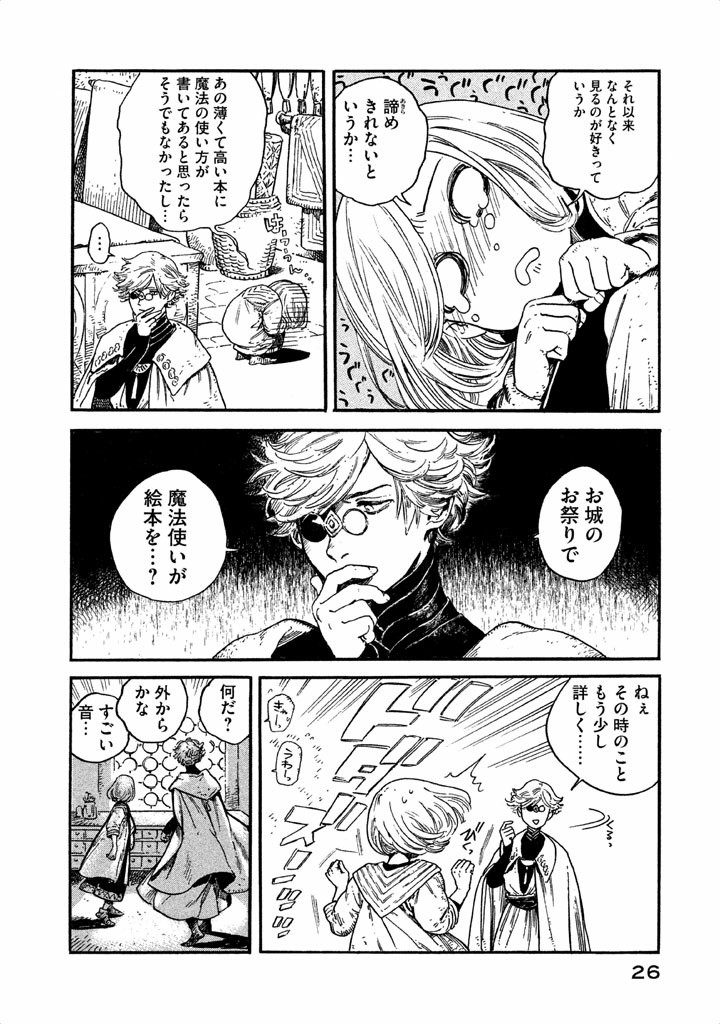 |
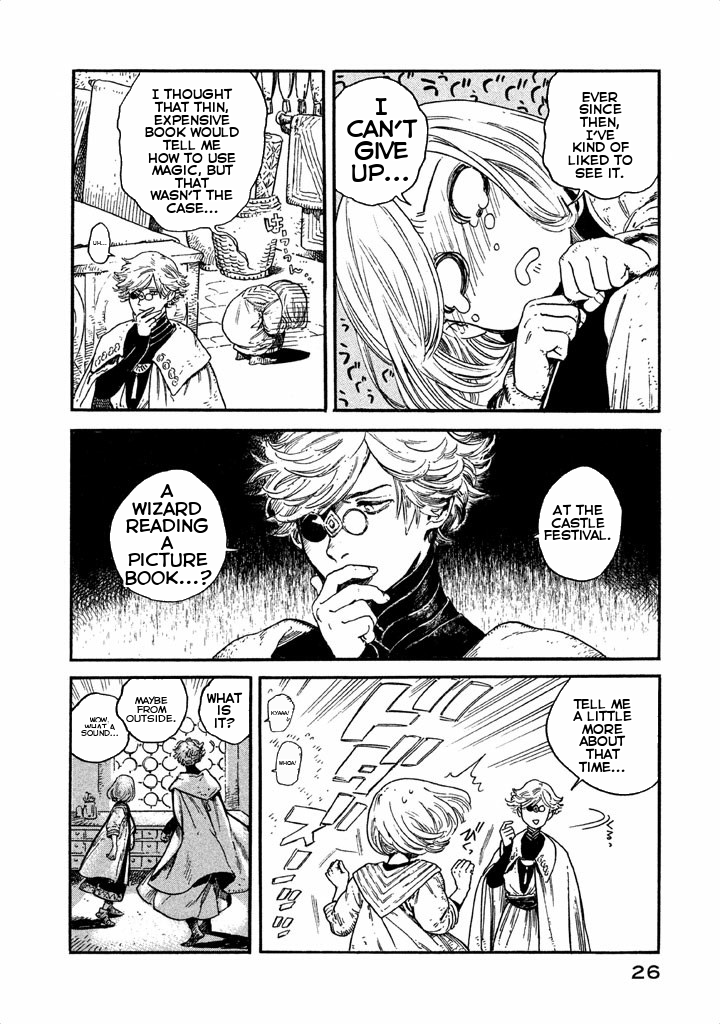 |
Source: Witch Hat Atelier
| Original | Translated |
|---|---|
 |
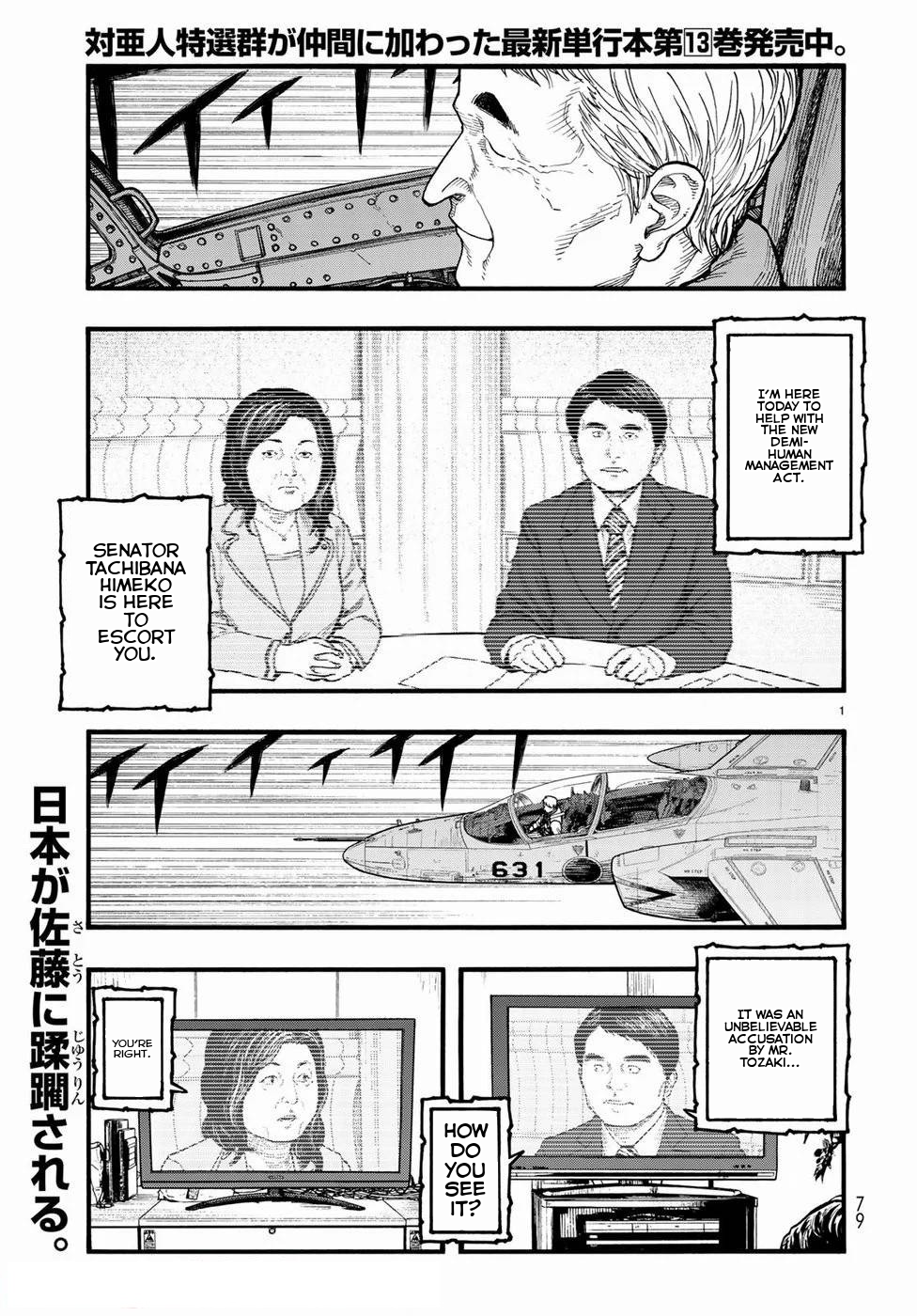 |
Source: Ajin: Demi-Human
| Original | Translated |
|---|---|
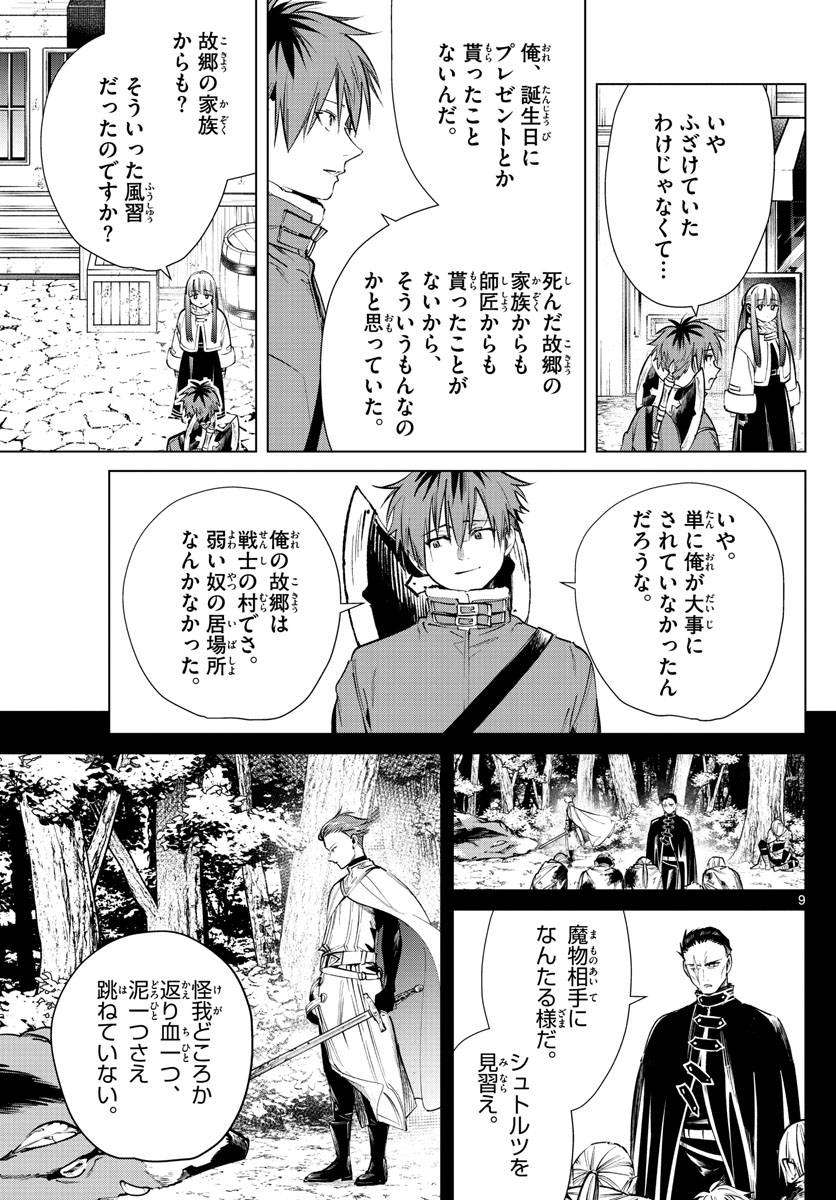 |
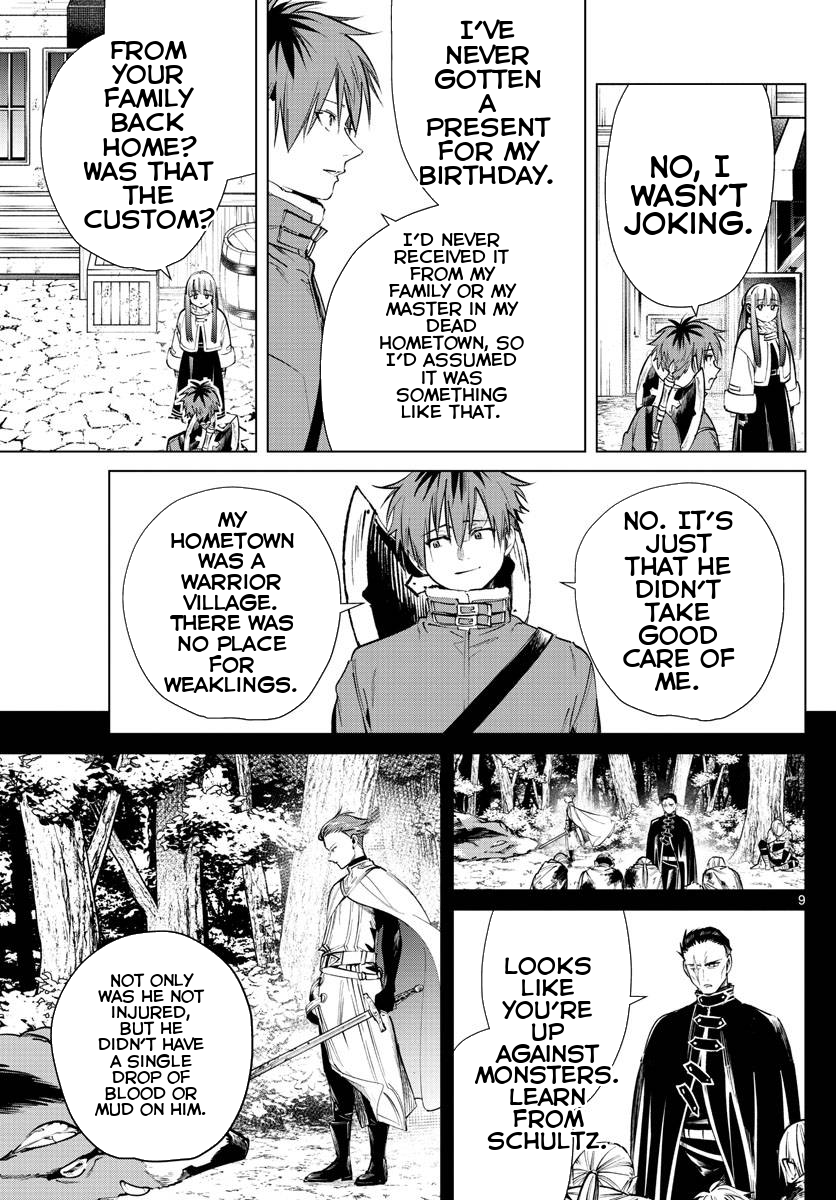 |
Source: Frieren: Beyond Journey's End
Pipeline stages:
- Original: Input manga page with Japanese text
- Detection: YOLO model identifies speech bubble locations (green boxes)
- Cleaned: Bubble interiors filled with base color, text removed
- Translated: English text rendered within bubble shapes
Disclaimer: Example images are from published manga and used for demonstration purposes only. All rights belong to their respective copyright holders. This tool is intended for personal use with legally obtained content.
Table of Contents
- Showcase
- Features
- Installation
- Usage
- Output Structure
- Dependencies
- How It Works
- Limitations
- Known Issues
- Contributing
- Credits
- Changelog
- Notes
Features
- Automatic speech bubble detection using YOLO (YOLOv8m)
- Japanese text extraction using PaddleOCR-VL transformer model
- High-quality translation using Sugoi-v4 (specialized for Japanese→English)
- Smart text rendering with automatic font sizing and alignment within bubble shapes
- Custom font support for personalized text styling
- Batch processing for entire folders with optimized GPU utilization
- GPU acceleration with CUDA support for faster processing
- Configurable detection with adjustable confidence and IoU thresholds
- Intermediate outputs for debugging (bubble masks, cleaned images, detections)
Installation
Requirements
- Python 3.13 or higher
- UV package manager (recommended) or pip (currently untested)
For uv installation, visit: https://github.com/astral-sh/uv
Install from PyPI
GPU Installation (CUDA 12.8)
Installs with CUDA support for GPU acceleration. Requires CUDA-compatible NVIDIA GPU.
Using uv (recommended):
uv tool install manga-translator-cli[cuda] --index https://download.pytorch.org/whl/cu128 --index-strategy unsafe-best-match
Using pip:
pip install manga-translator-cli[cuda] --extra-index-url https://download.pytorch.org/whl/cu128
CPU-Only Installation
For systems without a GPU or to save disk space.
Using uv (recommended):
uv tool install manga-translator-cli[cpu] --index https://download.pytorch.org/whl/cpu --index-strategy unsafe-best-match
Using pip:
pip install manga-translator-cli[cpu] --extra-index-url https://download.pytorch.org/whl/cpu
Install from Source
For development or to use the latest unreleased changes.
- Clone the repository:
git clone https://github.com/zanbowie138/manga-translator-cli.git
cd manga-translator-cli
- Install with your preferred backend:
GPU (CUDA 12.8):
uv sync --extra cuda
CPU-only:
uv sync --extra cpu
Models
Models will be automatically downloaded on first use:
- YOLO model for bubble detection
- PaddleOCR-VL model for text extraction
- Sugoi-v4 model for translation
Usage
Single Image Translation
manga-translate input/page1.png
Folder Translation (batch mode recommended)
manga-translate input/ --batch
Common Options
Change output folder:
manga-translate input/page1.png --output folder --save-all
Save all intermediate outputs:
manga-translate input/page1.png --save-all
Use custom font:
manga-translate input/page1.png --font "fonts/CC Astro City Int Regular.ttf"
Adjust detection sensitivity:
manga-translate input/page1.png --conf-threshold 0.3 --iou-threshold 0.5
Force CPU mode (GPU is used by default if available):
manga-translate input/page1.png --device cpu
Quiet mode:
manga-translate input/page1.png --quiet
Available Options
--output, -o: Output folder path (default: output)--folder, -f: Process entire folder instead of single file--conf-threshold: Confidence threshold for bubble detection (0-1, default: 0.25)--iou-threshold: IoU threshold for NMS (0-1, default: 0.45)--font: Path to font file for translated text--device: Device for OCR and translation (cpu or cuda, default: auto-detect, uses cuda if available). Controls which device is used for both text extraction and translation.--save-all: Save all intermediate outputs--save-speech-bubbles: Save annotated detection images--save-bubble-interiors: Save bubble interior visualizations--save-cleaned: Save cleaned images before text drawing--quiet, -q: Suppress progress messages--stop-on-error: Stop processing on first error (folder mode)
For complete list of options:
manga-translate --help
Output Structure
When processing files, outputs are organized in subdirectories:
translated/: Final translated images (always saved)speech_bubbles/: Annotated images with detected bubbles (enabled with--save-speech-bubbles)bubble_interiors/: Visualization of bubble interiors (enabled with--save-bubble-interiors)cleaned/: Images with bubbles filled before text rendering (enabled with--save-cleaned)
Use --save-all to enable all intermediate outputs at once.
Example output structure:
output/
├── translated/
│   ├── page1.png
│   └── page2.png
├── speech_bubbles/      # if --save-speech-bubbles or --save-all
│   ├── page1.png
│   └── page2.png
├── bubble_interiors/    # if --save-bubble-interiors or --save-all
│   ├── page1.png
│   └── page2.png
└── cleaned/             # if --save-cleaned or --save-all
    ├── page1.png
    └── page2.png
Dependencies
- ultralytics: YOLO model for bubble detection
- transformers: PaddleOCR-VL for text extraction
- ctranslate2: Fast translation inference
- sentencepiece: Text tokenization
- torch: Deep learning framework
- opencv-python: Image processing
- pillow: Image manipulation
How It Works
- Loads a YOLO model to detect speech bubbles in the image
- Filters out parent boxes that contain smaller child boxes
- For each bubble, extracts Japanese text using PaddleOCR-VL
- Detects if text contains Japanese characters
- Translates Japanese text to English using Sugoi-v4
- Cleans bubble interiors by filling with base color
- Renders translated text within bubble shapes using binary search for optimal font size
- Saves the final translated image
Limitations
- Dense panels with overlapping bubbles have detection issues
- Text outside of bubbles won't be translated
- Complex bubble backgrounds may not fill cleanly
- Currently Japanese→English only; other languages not supported
Known Issues
- Bubble detection can sometimes break on compound bubbles, causing them to not be processed properly.
- Translation on text outside of bubbles is not currently supported
Please open an issue if you encounter problems.
Contributing
Contributions welcome! To contribute:
- Fork the repository
- Create a feature branch (
git checkout -b feature/improvement) - Make your changes
- Run tests if applicable
- Commit with clear messages (
git commit -m "Add feature") - Push to your fork (
git push origin feature/improvement) - Open a Pull Request
Development setup:
git clone <your-fork>
cd manga-translator-cli
uv sync --extra cuda  # GPU (or use --extra cpu for CPU-only)
uv tool install .[cuda] # GPU
Areas for contribution:
- Improved bubble detection algorithms
- Fix bubble detection for compound bubbles
- Improved translation accuracy
- Translation for text outside of bubbles
- Support for additional languages
- UI/web interface
- Performance optimizations
- Documentation improvements
Credits
Models:
- YOLOv8m Manga Bubbles by Oguzhan61 - Speech bubble detection
- PaddleOCR-VL For Manga by jzhang533 - Japanese text extraction
- Sugoi-v4 JA-EN by entai2965 - Japanese to English translation
Libraries:
- Ultralytics - YOLO implementation
- Transformers - HuggingFace transformers library
- CTranslate2 - Fast inference engine
- PyTorch - Deep learning framework
- UV - Fast Python package manager
Notes
- First run downloads models (can take several minutes)
- Translation quality depends on text clarity and font style
- GPU requires CUDA-compatible NVIDIA GPU + drivers
--devicecontrols both OCR and translation device- Supported formats: PNG, JPG, JPEG, WEBP
- To switch PyTorch backend, reinstall with
[cuda]or[cpu]extra as shown in Installation section


Download files
Download the file for your platform. If you're not sure which to choose, learn more about installing packages.
Source Distribution
Built Distribution
Filter files by name, interpreter, ABI, and platform.
If you're not sure about the file name format, learn more about wheel file names.
Copy a direct link to the current filters
File details
Details for the file manga_translator_cli-1.1.1.tar.gz.
File metadata
- Download URL: manga_translator_cli-1.1.1.tar.gz
- Upload date:
- Size: 8.8 MB
- Tags: Source
- Uploaded using Trusted Publishing? Yes
- Uploaded via: uv/0.9.28 {"installer":{"name":"uv","version":"0.9.28","subcommand":["publish"]},"python":null,"implementation":{"name":null,"version":null},"distro":{"name":"Ubuntu","version":"24.04","id":"noble","libc":null},"system":{"name":null,"release":null},"cpu":null,"openssl_version":null,"setuptools_version":null,"rustc_version":null,"ci":true}
File hashes
| Algorithm | Hash digest | |
|---|---|---|
| SHA256 |
7e37ab04302417c0c790fe95cf3ea420c7b3cdc8774c9fdf5f5fb7fe44a32a21
|
|
| MD5 |
7899d48f76cff06b50030db6d032ce3a
|
|
| BLAKE2b-256 |
9b18099218dfd28193aec8d0df7650a74d6d748db4032da3ba528ea4ca998183
|
File details
Details for the file manga_translator_cli-1.1.1-py3-none-any.whl.
File metadata
- Download URL: manga_translator_cli-1.1.1-py3-none-any.whl
- Upload date:
- Size: 84.0 kB
- Tags: Python 3
- Uploaded using Trusted Publishing? Yes
- Uploaded via: uv/0.9.28 {"installer":{"name":"uv","version":"0.9.28","subcommand":["publish"]},"python":null,"implementation":{"name":null,"version":null},"distro":{"name":"Ubuntu","version":"24.04","id":"noble","libc":null},"system":{"name":null,"release":null},"cpu":null,"openssl_version":null,"setuptools_version":null,"rustc_version":null,"ci":true}
File hashes
| Algorithm | Hash digest | |
|---|---|---|
| SHA256 |
8720e5e1ad160c339e8592c2eeca4a97fc10f932cd185461c89d3b43781c9df2
|
|
| MD5 |
4f364ca5ae5e82625c64dbb05be14593
|
|
| BLAKE2b-256 |
ae3cf7876d36b875add65f87ee58e385c87ebc7c753ef5968b4242eb69685d29
|






