
marimo-studio
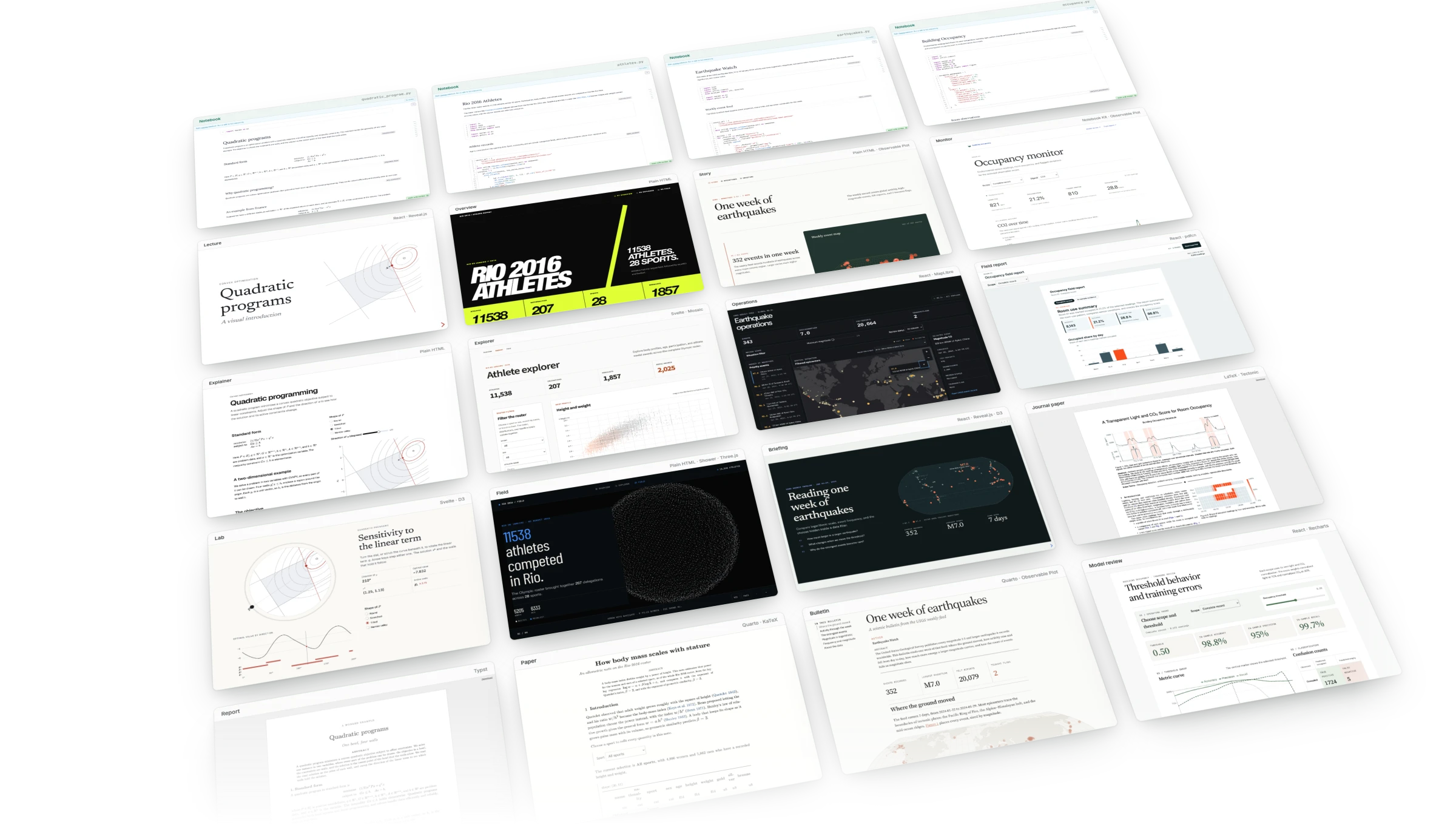
marimo-studio turns one marimo notebook into reports,
apps, and presentations. Keep data, computation, and controls in Python.
Shape each view for its audience, by hand or with a coding agent.
Studio is experimental. Pin marimo-studio and third-party view providers in
saved projects.
Start with a coding agent
Paste this request into Claude Code, Codex, or another terminal agent:
Run `uvx --with marimo-studio agent-plugins read marimo-studio` and create
a scrollytelling report and a slide deck explaining calculus basics.
The agent reads the instructions Studio ships for coding agents, starts a
notebook with Studio in your browser, and writes the calculus in Python cells.
It then builds both views and shows them beside the notebook. Change the topic,
or name a notebook you already have. uv supplies
uvx. Follow the agent guide
for pairing with a running notebook and pointing at results with
Lens.
Start by hand
uvx --with marimo-studio marimo edit analysis.py --sandbox
Add a cell that displays a result, then click Add view in the Studio toolbar. Save the notebook if prompted and choose a name and starter. Notebook and Preview open side by side. Saving view source rebuilds Preview, and a failed build keeps the last successful view. Follow the quickstart for a complete first view.
Run or export a view
Serve a live Python app, run Python in the Browser with Pyodide, or publish Prepared results as a static site. Browser delivery includes notebook source. Prepared delivery includes the exported results and finite input states.
Run or export a view explains the delivery choice and what visitors receive.
Documentation
Guide · Examples · Reference · Compatibility · Troubleshooting
Report bugs through GitHub Issues. See the security policy for private reports.
License


Release files for marimo-studio 0.2.1
For a detailed explanation of source distributions (sdists) and built distributions (wheels), please see the package formats documentation.
Source distribution (sdist)
| File | Size | Uploaded | |
|---|---|---|---|
| marimo_studio-0.2.1.tar.gz | 12.3 MB | Details |
Built distribution (wheel)
| File | Interpreter | ABI | Platform | Reset |
|---|---|---|---|---|
| marimo_studio-0.2.1-py3-none-any.whl | Python 3 | none | any | Details |
Total release size: 25.0 MB
Release files / marimo_studio-0.2.1.tar.gz
| Download URL | marimo_studio-0.2.1.tar.gz |
|---|---|
| Size | 12.3 MB |
| Tags | Source |
|
SHA-256 checksum How to use checksums |
4e4cc11288bc18bbe21f024be733904b4f0f10099b5bc37707cf54b48fef57b6
|
|
BLAKE2b-256 checksum How to use checksums |
8f2b73000b7f54844383199be3a189f98a4c1a3b5a55024f8144ae6a780d06d6
|
| Upload date | |
|
Uploaded using Trusted Publishing? What is trusted publishing? |
Yes |
| Uploaded via |
uv/0.12.7 {"installer":{"name":"uv","version":"0.12.7","subcommand":["publish"]},"python":null,"implementation":{"name":null,"version":null},"distro":{"name":"Ubuntu","version":"24.04","id":"noble","libc":null},"system":{"name":null,"release":null},"cpu":null,"openssl_version":null,"setuptools_version":null,"rustc_version":null,"ci":true}
|
Release files / marimo_studio-0.2.1-py3-none-any.whl
| Download URL | marimo_studio-0.2.1-py3-none-any.whl |
|---|---|
| Size | 12.7 MB |
| Tags | Python 3 |
|
SHA-256 checksum How to use checksums |
c34309054a5d701c049142949f7cbf547ab688d5586ce96a08d59f51013c3eed
|
|
BLAKE2b-256 checksum How to use checksums |
19c401ce272e4e4f4a7ef5242014bc4aad3a854019024419e798601ec04d7b6b
|
| Upload date | |
|
Uploaded using Trusted Publishing? What is trusted publishing? |
Yes |
| Uploaded via |
uv/0.12.7 {"installer":{"name":"uv","version":"0.12.7","subcommand":["publish"]},"python":null,"implementation":{"name":null,"version":null},"distro":{"name":"Ubuntu","version":"24.04","id":"noble","libc":null},"system":{"name":null,"release":null},"cpu":null,"openssl_version":null,"setuptools_version":null,"rustc_version":null,"ci":true}
|














