
Autogenerated Table of Contents for Github Markdown or Bear Notes

Project description
Autogenerated Table of Contents for Github Markdown or Bear Notes
Generated by the script ;)
Table of Contents
Overview
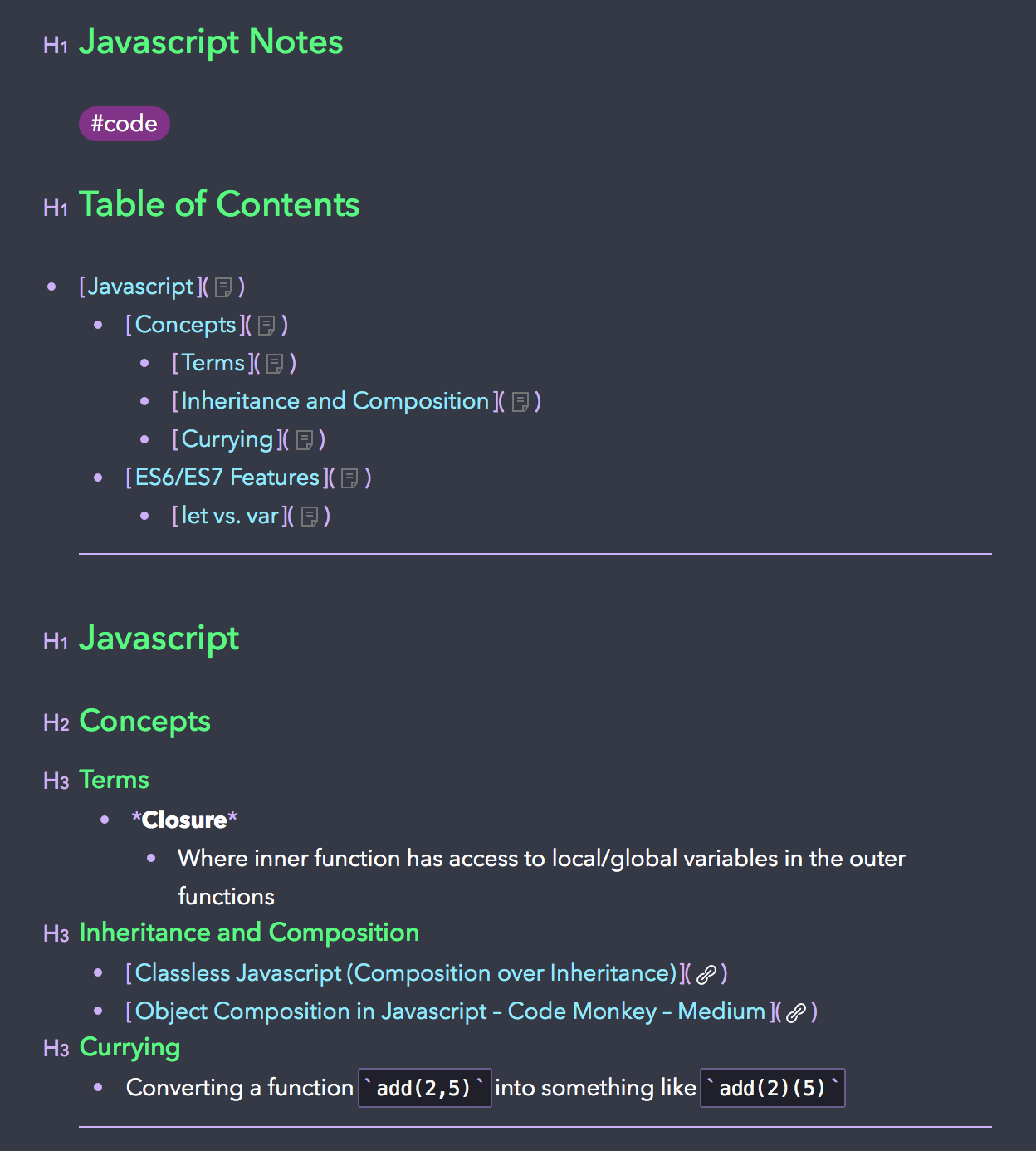
I love using Bear Notes for note taking of all sorts. Recently, Bear released a feature that allowed headers to be linked with x-callback-urls. And thus, I created a script to autogenerate a Table of Contents for your notes based on the headers.
Installation
NOTE: This program is only compatible with Python 3.x
PyPi (Preferred)
$ pip3 install markdown-toc --upgrade
Manually
$ git clone https://github.com/alexander-lee/markdown-github-bear-toc.git

$ cd markdown-github-bear-toc
$ python3 setup.py install
Usage
Flags
-hor--header-priorityis the Limiting Header Priority/Strength (whether you limit your Table of Contents to h3s or h4s)-tor--typeis the type of anchor you want to use (Github or Bear x-callback-url)--no-writeis a flag on whether you want to disable the feature that automatically injects the ToC into your Markdown file or Bear Note-tocor--table-of-contents-styleis the Markdown style for your Table of Contents header
With Bear
- Add a Table of Contents to a Bear Note with the title "Bear Note Title"
$ markdown-toc -h <default: 3> -t bear [--no-write] "Bear Note Title"
- Add a Table of Contents to a Bear Note with the UUID
20703126-FA33-400A-B98E-F55F57E3EF48-47683-000143B2335758CA
$ markdown-toc -h <default: 3> -t bear [--no-write] "20703126-FA33-400A-B98E-F55F57E3EF48-47683-000143B2335758CA"
- Add a Table of Contents to two Bear Notes with titles "Bear Note Title 1" and "Bear Note Title 2"
$ markdown-toc -h <default: 3> -t bear [--no-write] "Bear Note Title 1" "Bear Note Title 2"
- Add a Table of Contents to all Bear Notes that contain the tag
#bearOR tag#beet
$ markdown-toc -h <default: 3> -t bear [--no-write] "#bear" "#beet"
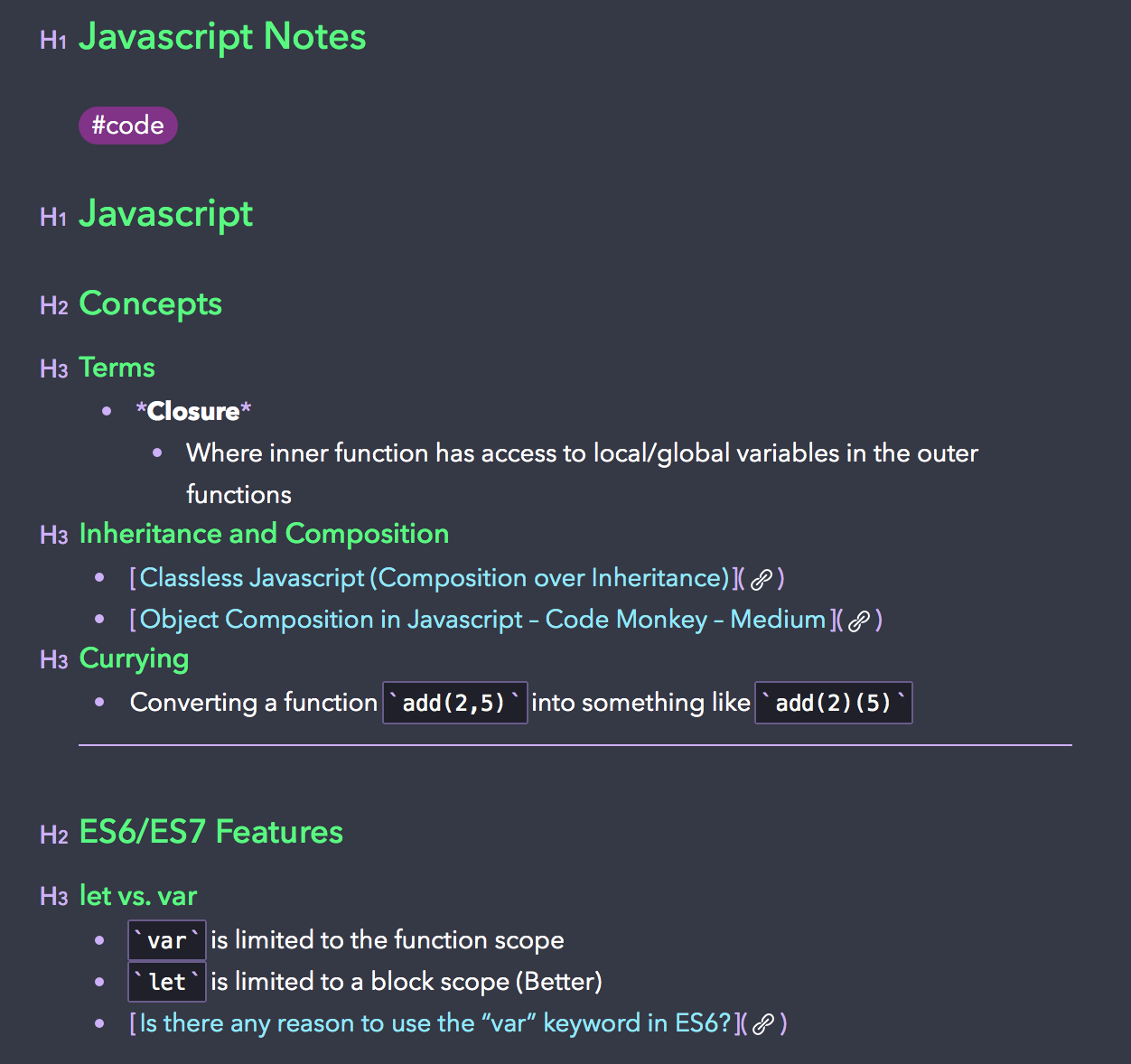
- This allows you to take input a list of Bear Note titles, tags, or UUIDs and will inject the ToC into your note whether or not you submit the
--no-writeflag. - If you have
#tagsat the top of your note (cause I use them to categorize my notes), it will inject the ToC right after any tags.
| Original Note | Note with ToC |
|---|---|
 |
 |
With Markdown Files
- Add of a Table of Contents to README.md (Using Github Anchors)
$ markdown-toc -h <default: 3> -t github [--no-write] README.md
- Add of a Table of Contents to README.md and Folder/README2.md (Using Github Anchors)
$ markdown-toc -h <default: 3> -t github [--no-write] README.md Folder/README2.md
Release history Release notifications | RSS feed


Download files
Download the file for your platform. If you're not sure which to choose, learn more about installing packages.
Source Distribution
Built Distributions
Filter files by name, interpreter, ABI, and platform.
If you're not sure about the file name format, learn more about wheel file names.
Copy a direct link to the current filters
File details
Details for the file markdown-toc-1.2.4.tar.gz.
File metadata
- Download URL: markdown-toc-1.2.4.tar.gz
- Upload date:
- Size: 6.7 kB
- Tags: Source
- Uploaded using Trusted Publishing? No
- Uploaded via: twine/1.12.1 pkginfo/1.4.2 requests/2.20.1 setuptools/40.6.2 requests-toolbelt/0.8.0 tqdm/4.28.1 CPython/3.6.5
File hashes
| Algorithm | Hash digest | |
|---|---|---|
| SHA256 |
1612ec6907b66be79be136f707f749a0a5d0e957dffedc186d8099ed76eaf534
|
|
| MD5 |
0929e4d288eb2671ad017ff15e5db17c
|
|
| BLAKE2b-256 |
f489714c2a2222042152661f69fa4b6748ebf9a3368dfc1c4fe6111c49824d39
|
File details
Details for the file markdown_toc-1.2.4-py3.6.egg.
File metadata
- Download URL: markdown_toc-1.2.4-py3.6.egg
- Upload date:
- Size: 12.6 kB
- Tags: Egg
- Uploaded using Trusted Publishing? No
- Uploaded via: twine/1.12.1 pkginfo/1.4.2 requests/2.20.1 setuptools/40.6.2 requests-toolbelt/0.8.0 tqdm/4.28.1 CPython/3.6.5
File hashes
| Algorithm | Hash digest | |
|---|---|---|
| SHA256 |
ba8c38f4d2bac34549d583a3d3dfd8f9948445c7c013330815b6f7abe897ad0b
|
|
| MD5 |
4b78d9a2b6eba0f10ed888b0252c2020
|
|
| BLAKE2b-256 |
9e4cdad08202225879b423c78e3f5ff472a94d42a520b423bc5db425648e3fce
|
File details
Details for the file markdown_toc-1.2.4-py3-none-any.whl.
File metadata
- Download URL: markdown_toc-1.2.4-py3-none-any.whl
- Upload date:
- Size: 8.1 kB
- Tags: Python 3
- Uploaded using Trusted Publishing? No
- Uploaded via: twine/1.12.1 pkginfo/1.4.2 requests/2.20.1 setuptools/40.6.2 requests-toolbelt/0.8.0 tqdm/4.28.1 CPython/3.6.5
File hashes
| Algorithm | Hash digest | |
|---|---|---|
| SHA256 |
65f30f11dfe238de7f8f8e4e1e3f87e5e9ddd42fc0cd5a95880bdb98f2592c1e
|
|
| MD5 |
cf7979869a33e3d47a5c0be1e417977e
|
|
| BLAKE2b-256 |
1b10a2ed5b2ac46bebbc104dc879c477ef6f50d34529d654ed5e58b2dee35483
|






