
MARM-Systems is a complete protocol and platform—combining an advanced memory backend, modular semantic search, and agent-to-agent coordination with a scientifically structured, community-vetted methodology for reasoning, session recall, and collaborative AI workflows. More then just a set of tools, it's a complete AI memory ecosystem
Verified details
These details have been verified by PyPIProject links
GitHub Statistics
Maintainers

Project description
mcp-name: io.github.Lyellr88/marm-mcp-server

MARM: Local-First Persistent Multi-Agent Memory Layer for MCP Clients v2.15.1











Contributions welcome! Browse open issues to contribute, or join the MARM Discord to share workflows, get setup help, and connect with other builders.
Table of Contents
- Why MARM MCP
- Quick Start
- Complete MCP Tool Suite
- MARM Dashboard
- Performance & Scaling Benchmarks
- Contributing
- Project Documentation
Why MARM MCP: The Problem & Solution
Your AI forgets everything. MARM MCP doesn't.
MARM MCP is a local memory infrastructure layer for AI agents. It gives Claude, Codex, Gemini, Qwen, IDE agents, and other MCP clients one persistent place to store decisions, retrieve context, reuse notebooks, and keep long-running work from drifting.
The point is not "more tools." MARM exposes 7 focused MCP tools and moves the heavy work behind the server: session routing, protocol delivery, hybrid recall, serialized writes, rate-limit presets, write-time consolidation, and agent-assisted compaction. Because the tool surface stays small, re-ranking filters results before they reach the model, and consolidation catches duplicates at write time, token spend stays low and predictable as workloads grow.
How It Works
| Layer | What it does | Why it matters |
|---|---|---|
| Memory model | Sessions, structured logs, notebooks, summaries, and semantic memories | Keeps project history searchable instead of trapped in one chat |
| Scale layer | SQLite WAL mode, connection pooling, serialized write queue, and HTTP rate-limit presets | Lets one server support solo use, multi-agent work, and swarm-style bursts |
| Intelligence layer | FTS filter, semantic re-rank, bounded semantic fallback, auto-classification, write-time consolidation, and compaction candidates | Keeps recall useful as memory grows instead of letting duplicates pile up |
| Token layer | Lightweight 7-tool surface, semantic re-rank before retrieval, and write-time deduplication | Reduces tokens sent to the model on every recall and cost stays predictable as memory scales |
| Deployment layer | Pip, Docker, STDIO, HTTP, --swarm, --swarm-max, and --trusted |
Lets you run private local memory or shared multi-agent memory with the same MCP surface |
See Performance & Scaling Benchmarks for retrieval latency, concurrency, and write-cost numbers.
MARM Demo
https://github.com/user-attachments/assets/dabfe44f-689d-404f-a2c7-dcf8fa4ef0c1
MARM gives AI agents persistent local memory, shared context, write-queue safety, swarm presets, and hybrid recall so commands, config keys, and project meaning all stay reachable.
Start Now
Recommended: guided setup with marm-init
The easiest way to install MARM is to let your agent do the setup with you. marm-init turns the usual MCP setup mess into one guided conversation: Python or Docker, HTTP or STDIO, local or remote server, API keys, config paths, dashboard startup, and multi-agent linking for Claude, Codex, Gemini, Qwen, Cursor, VS Code, and other MCP clients. No hunting through install docs, no guessing which config file your client uses, and no rewriting the same connection by hand for every agent.
npx degit Lyellr88/MARM-Systems/skills
Then tell your agent: "Use the marm-init skill to set up MARM."
Manual pip install
pip install marm-mcp-server
| If you are... | Start the server | Connect your MCP client |
|---|---|---|
| Solo developer / researcher | python -m marm_mcp_server |
"agent" mcp add --transport http marm-memory http://localhost:8001/mcp |
| Private local STDIO user | marm-mcp-stdio |
"agent" mcp add --transport stdio marm-memory-stdio marm-mcp-stdio |
| Multiple agents sharing memory | python -m marm_mcp_server --swarm |
"agent" mcp add --transport http marm-memory http://localhost:8001/mcp |
| Private high-throughput swarm | python -m marm_mcp_server --swarm-max |
"agent" mcp add --transport http marm-memory http://localhost:8001/mcp |
| Trusted private lab/server | python -m marm_mcp_server --trusted |
"agent" mcp add --transport http marm-memory http://localhost:8001/mcp |
🚀 Quick Start for MCP (HTTP & STDIO)
Use this quick rule of thumb to choose your setup
- Local HTTP/STDIO = fastest single-machine setup.
- Docker HTTP = shared/always-on server (key required).
- Docker STDIO = private containerized local use (no HTTP key).
Swarm / multi-agent note: The write queue is enabled by default to serialize memory writes through one worker. For shared HTTP deployments, use --swarm (200 RPM) or --swarm-max (600 RPM) when starting the server. --trusted disables rate limiting entirely for private deployments. STDIO is still best for private single-agent/local use. See MCP-HANDBOOK.md for more info.
Local pip HTTP (zero config)
"agent" refers to claude, gemini, grok, qwen, or any MCP client. Codex uses --url instead of --transport to add MCP tools.
pip install marm-mcp-server
python -m marm_mcp_server
# Stuck on client setup? Open a Q&A thread: https://github.com/Lyellr88/MARM-Systems/discussions
# most agents use this --transport command
"agent" mcp add --transport http marm-memory http://localhost:8001/mcp
codex mcp add marm-memory --url http://localhost:8001/mcp

</details>

<details>
<summary><strong>Local pip STDIO</strong></summary>

#### Local pip STDIO

```bash
pip install marm-mcp-server
python -m marm_mcp_server.server_stdio
# most agents use this --transport command
"agent" mcp add --transport stdio marm-memory-stdio marm-mcp-stdio
codex mcp add marm-memory-stdio -- marm-mcp-stdio
Local Python swarm modes (HTTP & STDIO)
Use HTTP when multiple agents need to share one live MARM server. STDIO is still best for private single-agent use because each client owns its own local process.
# HTTP shared server, normal multi-agent use
python -m marm_mcp_server --swarm

# HTTP shared server, heavier private swarm
python -m marm_mcp_server --swarm-max

# HTTP trusted private lab/server, rate limiting disabled
python -m marm_mcp_server --trusted

# STDIO remains keyless/private and does not use swarm flags
marm-mcp-stdio
Docker HTTP (key required)
Docker HTTP requires an API key because it exposes MARM as a network server; STDIO stays local to the client process and does not need one.
# Step 1: generate key (do not add < > around the key)
docker run --rm lyellr88/marm-mcp-server:latest --generate-key

# Step 2: run server
docker pull lyellr88/marm-mcp-server:latest
docker run -d --name marm-mcp-server \
  -p 127.0.0.1:8001:8001 \
  -e SERVER_HOST=0.0.0.0 \
  -e MARM_API_KEY=your-generated-key \
  -v ~/.marm:/home/marm/.marm \
  lyellr88/marm-mcp-server:latest

# Step 3: connect client
"agent" mcp add --transport http marm-memory http://localhost:8001/mcp --header "Authorization: Bearer your-generated-key"
codex mcp add marm-memory --url http://localhost:8001/mcp --bearer-token-env-var MARM_API_KEY
Docker HTTP swarm mode
# --swarm: write queue on, 200 RPM - recommended for multi-agent shared servers
docker run -d --name marm-mcp-server \
  -p 127.0.0.1:8001:8001 \
  -e SERVER_HOST=0.0.0.0 \
  -e MARM_API_KEY=your-generated-key \
  -v ~/.marm:/home/marm/.marm \
  lyellr88/marm-mcp-server:latest --swarm
Docker STDIO (no HTTP key)
docker run --rm -i \
  -v ~/.marm:/home/marm/.marm \
  --entrypoint python \
  lyellr88/marm-mcp-server:latest \
  -m marm_mcp_server.server_stdio
Support notes
- Docker HTTP requires a key; Docker STDIO does not.
- If you get
401, verify key match and client restart after env var changes. - For full key setup, rotation, and troubleshooting: INSTALL-DOCKER.md
Connect your client fast
Claude Code remains the recommended first setup path, but MARM also works with other MCP clients and IDE agents.
CLI clients - Claude Code · Codex · Gemini CLI · Qwen CLI · Linux variants · Docker/key
IDE agents - VS Code / Copilot Agent · Cursor · Docker/key IDE setup
Remote/API platforms - xAI / Grok Remote MCP · Platform integration
Using a client that isn't listed? Open an issue and let us know; client adapters are a first-class feature request.
MARM Dashboard
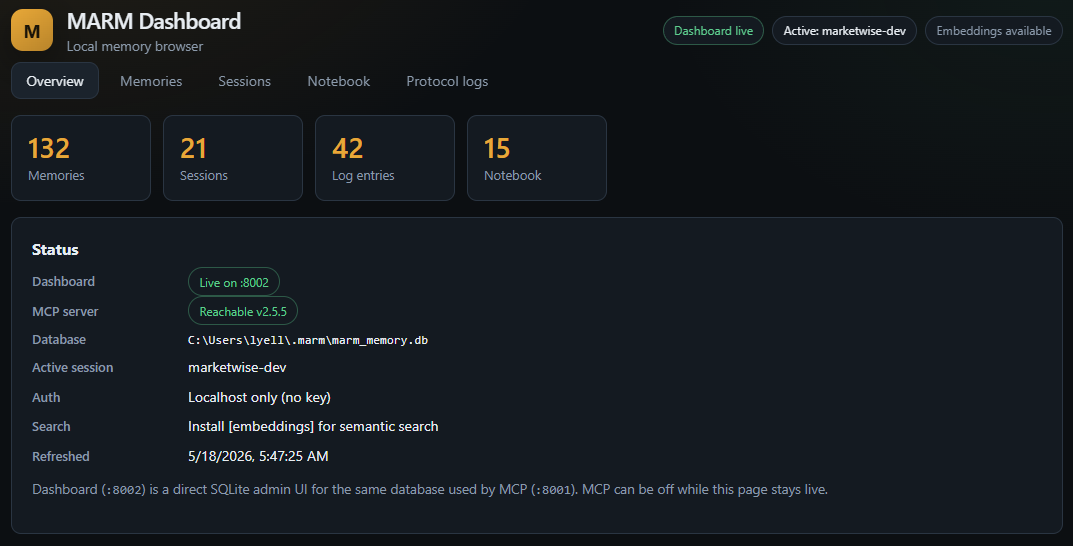
A local web UI for browsing and managing your MARM memory; separate from the MCP server, reads and writes the same ~/.marm/marm_memory.db.
| What it gives you | How it works |
|---|---|
| Browse/search/edit all memories | Direct SQLite, no MCP required |
| Manage sessions and protocol logs | Runs on port :8002 alongside MCP on :8001 |
| Notebook CRUD with inline editor | Same auth model (MARM_API_KEY) as the MCP server |
| Delete-all with count confirmation | Docker image included; WAL mode handles concurrent access |
| View the write queue in real time | Pulls live data from the write queue |
# Quick start (pip)
cd marm-dashboard
pip install -e .
python -m marm_dashboard --open
# Docker (same key and volume as MCP)
docker build -t marm-dashboard:local ./marm-dashboard
docker run --rm -p 127.0.0.1:8002:8002 \
  -e MARM_API_KEY=your-key \
  -v ~/.marm:/home/marm/.marm \
  marm-dashboard:local
See marm-dashboard/README.md for the full guide.
Complete MCP Tool Suite (7 Tools)
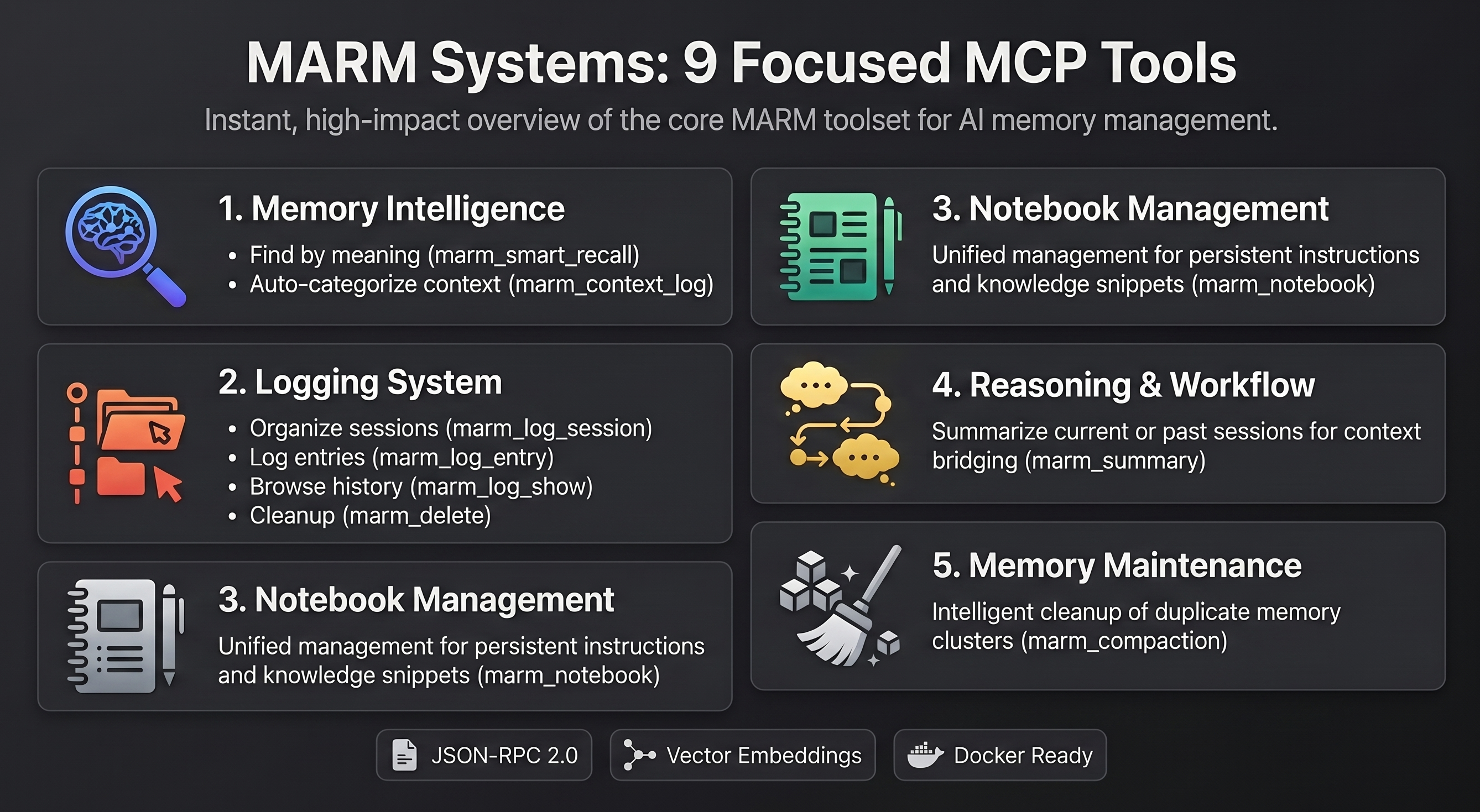
💡 Pro Tip: You don't need to manually call these tools! Just tell your AI agent what you want in natural language:
- "Claude, log this session as 'Project Alpha' and add this conversation as 'database design discussion'"
- "Remember this code snippet in your notebook for later"
- "Search for what we discussed about authentication yesterday"
The AI agent will automatically use the appropriate tools. Manual tool access is available for power users who want direct control.
| Category | Tool | Description |
|---|---|---|
| Memory Intelligence | marm_smart_recall |
Hybrid recall with automatic exact-query detection for config keys, commands, API names, and file paths; semantic reranking; bounded fallback search; and chunk-aware scoring for long memories. Supports search_all=True, project/platform filters, exact_mode="auto"|"exact"|"semantic", and detail=1/2/3 depth controls |
| Logging System | marm_log_entry |
Add structured session log entries. Session/topic routing, summary-cache invalidation, and context summary preparation are handled by the server |
marm_log_show |
Display all entries and sessions (filterable) | |
marm_delete |
Delete a log session, log entry, or notebook entry (type="log"|"notebook") |
|
| Reasoning & Workflow | marm_summary |
Generate cached session summaries with intelligent truncation for LLM conversations |
| Notebook Management | marm_notebook |
Unified notebook tool: add, use, show, status, or clear entries with action="add"|"use"|"show"|"status"|"clear" |
| Memory Maintenance | marm_compaction |
Unified compaction workflow with action="status"|"candidates"|"review"|"stage"|"apply"|"discard" for agent-assisted memory cleanup |
A Deeper Look
MARM keeps MCP discovery lean with 7 tools by grouping domain operations behind explicit parameters like marm_notebook(action=...), marm_delete(type=...), and marm_compaction(action=...). Behind those tools, the server handles lifecycle setup, protocol refresh, docs indexing, date context, summary-cache maintenance, write queue handling, project/platform attribution, and health checks.
Under the hood, MARM uses SQLite WAL mode, connection pooling, serialized writes, HTTP swarm presets, safe local defaults, exact-query routing for syntax-heavy lookups, FTS→semantic reranking, bounded fallback search, chunk-aware long-memory recall, and summary/context/full recall depths to keep memory fast, stable, and token-efficient as projects grow.
For a deeper look into the MCP behavior, tool parameters, automation, and workflows, see MCP-HANDBOOK.md and FAQ.md.
Performance & Scaling Benchmarks
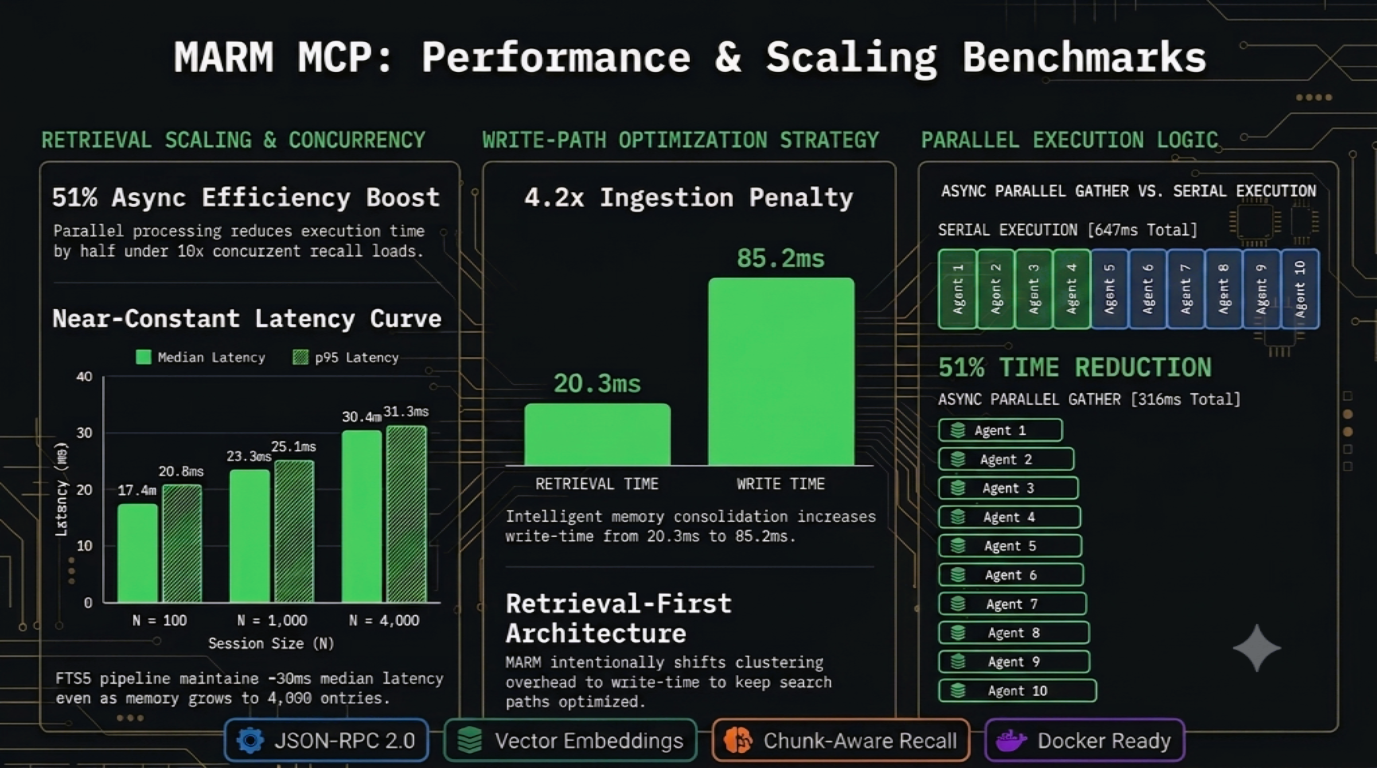
MARM is tuned for fast recall first, even as memory grows and multiple agents hit the same server.
1. Retrieval Latency Scaling
| Session Size ($N$) | Min Latency | Median Latency | p95 Latency |
|---|---|---|---|
| N = 100 | 12.0 ms | 17.4 ms | 20.8 ms |
| N = 500 | 12.4 ms | 20.5 ms | 22.6 ms |
| N = 1,000 | 15.9 ms | 23.3 ms | 25.1 ms |
| N = 4,000 | 23.1 ms | 30.4 ms | 31.3 ms |
2. Multi-Agent Concurrency
- Parallel recall wins: 10 concurrent recalls completed in
316.3msvs647.0msserial, a51%time reduction.
3. Write-Time Ingestion Cost
- Write-time tradeoff: consolidation raises median ingest from
20.3msto85.2ms(4.2x) so dedupe/clustering cost stays off the hot recall path.
Benchmarks used a real SQLite database and the live all-MiniLM-L6-v2 encoder on local hardware. Reproduce them: marm-mcp-server/scripts/bench_hotpath.py
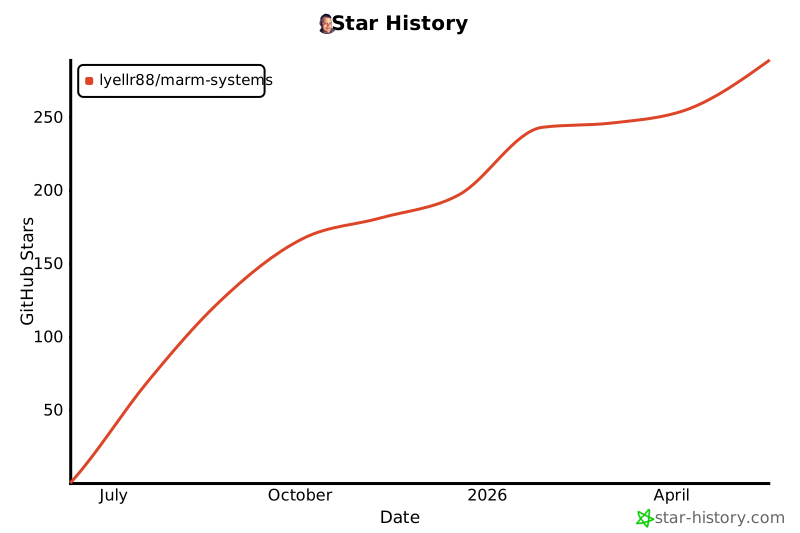
⭐ Star the Project
If MARM helps with your AI memory needs, please star the repository to support development!
Contributing
MARM welcomes contributors at every level. Code helps, but so do docs, setup notes, client testing, bug reports, benchmarks, and real workflow feedback from people using AI tools every day.
Good places to help:
- Test MARM with more MCP clients, IDE agents, and operating systems
- Improve docs, screenshots, examples, and platform-specific setup notes
- Report bugs or confusing install steps with clear reproduction details
- Share memory workflows, agent habits, and tool ideas from real use
- Check out open issues
💡 Want to get your name on this list? Check out our CONTRIBUTING.md guide to get started!
Join the MARM Community
Help build the future of AI memory - no coding required!
Connect: MARM Discord | GitHub Discussions
License & Usage Notice
MARM is released under the Apache 2.0 License, and forks, experiments, and integrations are welcome. If you build on it, please make unofficial versions easy to distinguish from releases published by the official MARM repository so users know what they are installing.
Project Documentation
Usage Guides
- MCP-HANDBOOK.md - Complete MCP server usage guide with commands, workflows, and examples
- PROTOCOL.md - MCP operating protocol
- FAQ.md - Answers to common questions about using MARM
MCP Server Installation
- INSTALL-DOCKER.md - Docker deployment (recommended)
- INSTALL-WINDOWS.md - Windows installation guide
- INSTALL-LINUX.md - Linux installation guide
- INSTALL-PLATFORMS.md - Platform installation guide
Project Information
- README.md - This file - ecosystem overview and MCP server guide
- CONTRIBUTING.md - How to contribute to MARM
- CHANGELOG.md - Version history and updates
- ACKNOWLEDGMENTS.md - Contributors and acknowledgments
- ROADMAP.md - Planned features and development roadmap
- LICENSE - Apache 2.0 license terms
Project details
Verified details
These details have been verified by PyPIProject links
GitHub Statistics
Maintainers
Release history Release notifications | RSS feed


Download files
Download the file for your platform. If you're not sure which to choose, learn more about installing packages.
Source Distribution
Built Distribution
Filter files by name, interpreter, ABI, and platform.
If you're not sure about the file name format, learn more about wheel file names.
Copy a direct link to the current filters
File details
Details for the file marm_mcp_server-2.15.1.tar.gz.
File metadata
- Download URL: marm_mcp_server-2.15.1.tar.gz
- Upload date:
- Size: 145.6 kB
- Tags: Source
- Uploaded using Trusted Publishing? Yes
- Uploaded via: twine/6.1.0 CPython/3.13.12
File hashes
| Algorithm | Hash digest | |
|---|---|---|
| SHA256 |
59d982ae1042bd8693693982bc52c9c22321ac8d4e37fe1ebb889168892ef91b
|
|
| MD5 |
12b807fdd43505060b142d8459295953
|
|
| BLAKE2b-256 |
89142c0e27e3b734a697a7c841225590d35ee263d3d282acf2445d09a880f9fa
|
Provenance
The following attestation bundles were made for marm_mcp_server-2.15.1.tar.gz:
Publisher:
publish-mcp.yml on Lyellr88/MARM-Systems
-
Statement:
-
Statement type:
https://in-toto.io/Statement/v1 -
Predicate type:
https://docs.pypi.org/attestations/publish/v1 -
Subject name:
marm_mcp_server-2.15.1.tar.gz -
Subject digest:
59d982ae1042bd8693693982bc52c9c22321ac8d4e37fe1ebb889168892ef91b - Sigstore transparency entry: 2044627905
- Sigstore integration time:
-
Permalink:
Lyellr88/MARM-Systems@86789a3b92e16cec8cb74ebce34e57ed4d7688e1 -
Branch / Tag:
refs/tags/v2.15.1 - Owner: https://github.com/Lyellr88
-
Access:
public
-
Token Issuer:
https://token.actions.githubusercontent.com -
Runner Environment:
github-hosted -
Publication workflow:
publish-mcp.yml@86789a3b92e16cec8cb74ebce34e57ed4d7688e1 -
Trigger Event:
push
-
Statement type:
File details
Details for the file marm_mcp_server-2.15.1-py3-none-any.whl.
File metadata
- Download URL: marm_mcp_server-2.15.1-py3-none-any.whl
- Upload date:
- Size: 91.5 kB
- Tags: Python 3
- Uploaded using Trusted Publishing? Yes
- Uploaded via: twine/6.1.0 CPython/3.13.12
File hashes
| Algorithm | Hash digest | |
|---|---|---|
| SHA256 |
3ad89b116bfbe4a9d5292a38e05ee8c32b63a453a66f6b83ef6873448f0b4701
|
|
| MD5 |
de5f1e7db2257fca0b0dabd072e7d06f
|
|
| BLAKE2b-256 |
4525f0e5605cf498e11cca70e25d8408adc6716ba617a81c6c16c173c95fb1dc
|
Provenance
The following attestation bundles were made for marm_mcp_server-2.15.1-py3-none-any.whl:
Publisher:
publish-mcp.yml on Lyellr88/MARM-Systems
-
Statement:
-
Statement type:
https://in-toto.io/Statement/v1 -
Predicate type:
https://docs.pypi.org/attestations/publish/v1 -
Subject name:
marm_mcp_server-2.15.1-py3-none-any.whl -
Subject digest:
3ad89b116bfbe4a9d5292a38e05ee8c32b63a453a66f6b83ef6873448f0b4701 - Sigstore transparency entry: 2044627949
- Sigstore integration time:
-
Permalink:
Lyellr88/MARM-Systems@86789a3b92e16cec8cb74ebce34e57ed4d7688e1 -
Branch / Tag:
refs/tags/v2.15.1 - Owner: https://github.com/Lyellr88
-
Access:
public
-
Token Issuer:
https://token.actions.githubusercontent.com -
Runner Environment:
github-hosted -
Publication workflow:
publish-mcp.yml@86789a3b92e16cec8cb74ebce34e57ed4d7688e1 -
Trigger Event:
push
-
Statement type:






