
mawshor
Arabic OCR pipeline powered by OnnxTR with fine-tuned ONNX models.
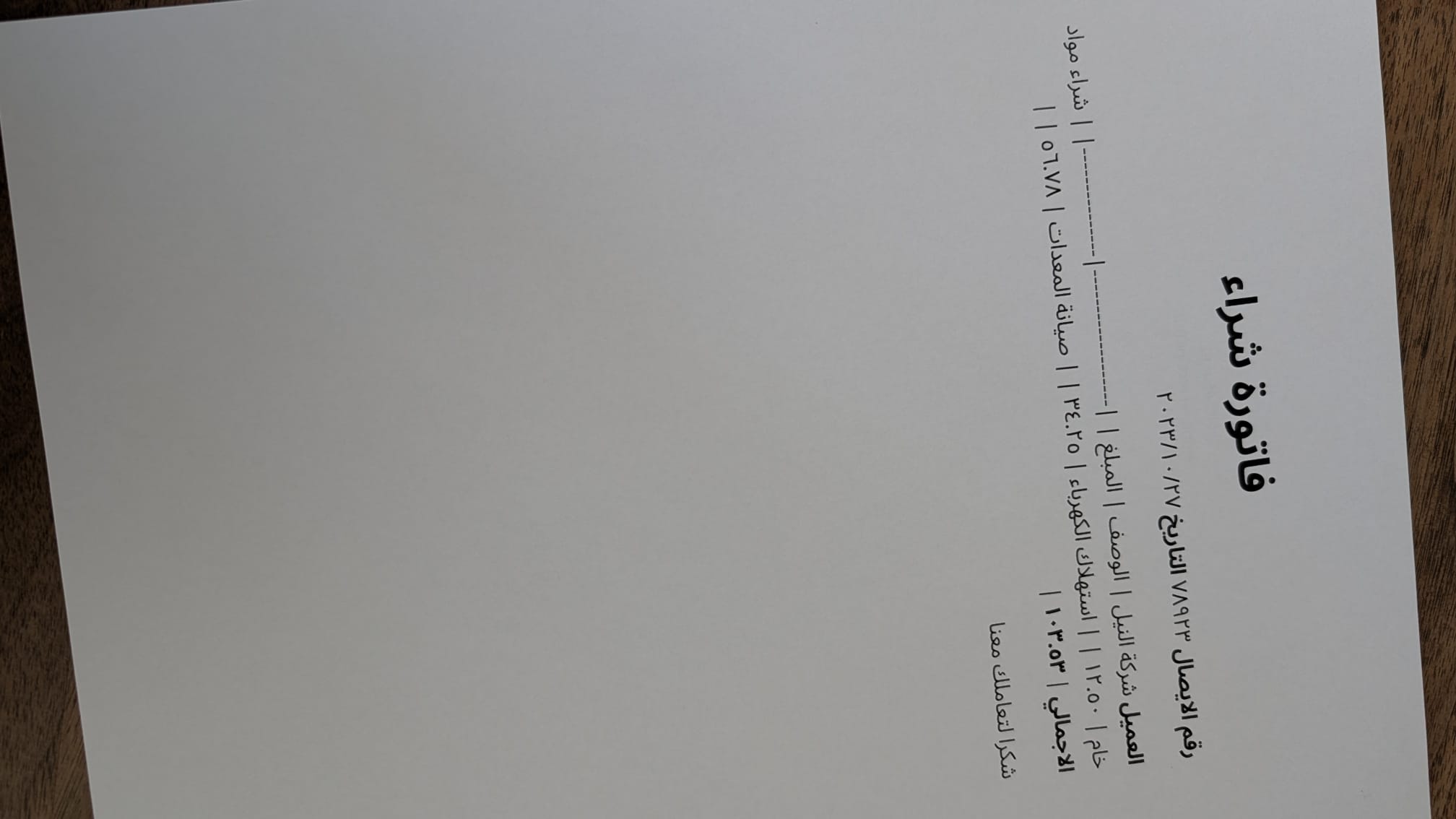 Sample Input Image |
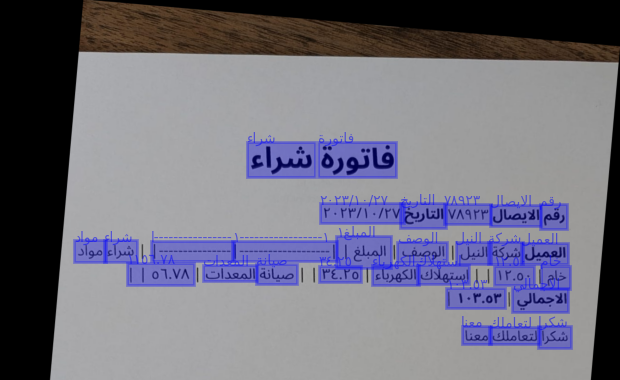 Model Prediction Output (cropped for space) |
Features
- Arabic document STR: detection and recognition models fine-tuned on Arabic script for document STR tasks (images taken by phone cameras) and scanned documents.
- Orientation correction: detects and corrects both page-level rotation and crop-level skew before inference (
--straighten-pages) - LLM postprocessing: low-confidence OCR words are sent to any OpenAI-compatible LLM for context-aware correction (
--postprocess) - GPU-accelerated: runs on CUDA via ONNX Runtime; CPU fallback available
Models
Four fine-turned Arabic models are loaded from HuggingFace (madskills/):
| Model | Architecture | Task |
|---|---|---|
onnxtr-fast_base-arabic |
FAST | Text detection |
onnxtr-parseq-arabic |
PARSeq | Text recognition |
onnxtr-mobilenet_v3_small-crop-orientation-arabic |
MobileNet V3 Small | Crop orientation correction |
onnxtr-mobilenet_v3_small-page-orientation-arabic |
MobileNet V3 Small | Page orientation correction |
Models were fine-tuned on synthetic Arabic datasets using DocTR models as a base.
Installation
- Python 3.10+
- CUDA-capable GPU (CPU fallback available but not the primary target)
pip install mawshor            # CPU
pip install "mawshor[gpu]"     # CUDA
Usage
CLI
mawshor <path> [options]
<path> can be a single image/PDF or a directory. Supported image formats: PNG, JPG, JPEG, BMP, TIFF.
| Flag | Short | Description |
|---|---|---|
--straighten-pages |
-s |
Detect and correct page/crop orientation before OCR |
--postprocess |
-p |
Send low-confidence words to an LLM for correction |
--save |
Save output to a .txt file next to each input file |
|
--raw-output |
-r |
Print the raw predictor output |
--llm-endpoint |
OpenAI-compatible API base URL (default: http://localhost:11434/v1) |
|
--llm-model |
Model name for postprocessing (default: qwen3.5:4b) |
|
--llm-api-key |
API key (default: ollama) |
|
--verbose |
-v |
Show progress information |
# Basic OCR on a single image
mawshor document.jpg

# OCR a directory and save results
mawshor ./scans/ --save

# OCR with page straightening and LLM postprocessing via local Ollama
mawshor document.jpg --straighten-pages --postprocess

# Use a different model or remote endpoint
mawshor document.jpg --postprocess \
  --llm-endpoint https://api.openai.com/v1 \
  --llm-model gpt-4o \
  --llm-api-key sk-...
Python API
import mawshor

# One-shot
results = mawshor.ocr("document.jpg")
print(results[0].text)

# With orientation correction and LLM postprocessing
results = mawshor.ocr("document.jpg", straighten_pages=True, postprocess=True)

# Reuse the predictor across multiple documents (avoids reloading models)
predictor = mawshor.load_predictor(straighten_pages=True)
results = mawshor.ocr("./scans/", predictor=predictor)
for r in results:
    print(r.source, r.text)
Postprocessing
When --postprocess is enabled, OCR output is filtered by confidence and sent to an LLM:
- Words with confidence ≥ 0.8 are passed as-is
- Words with confidence between 0.75–0.8 are passed and flagged as low-confidence
- Words with confidence < 0.75 are dropped before sending
The LLM is prompted as an Arabic copyeditor to fix likely OCR errors, merge/split words, and clean up spacing — without changing meaning or adding content.
Any OpenAI-compatible endpoint works. Ollama runs out of the box with the defaults.
1 maintainer

Metadata
1 maintainer
Release files for mawshor 0.1.1
For a detailed explanation of source distributions (sdists) and built distributions (wheels), please see the package formats documentation.
Source distribution (sdist)
| File | Size | Uploaded | |
|---|---|---|---|
| mawshor-0.1.1.tar.gz | 230.7 kB | Details |
Built distribution (wheel)
| File | Interpreter | ABI | Platform | Reset |
|---|---|---|---|---|
| mawshor-0.1.1-py3-none-any.whl | Python 3 | none | any | Details |
Total release size: 243.0 kB
Release files / mawshor-0.1.1.tar.gz
| Download URL | mawshor-0.1.1.tar.gz |
|---|---|
| Size | 230.7 kB |
| Tags | Source |
|
SHA-256 checksum How to use checksums |
3ca885bd13593d61607524989dc6efaac9bf83c247a3ab565cb8457297215693
|
|
BLAKE2b-256 checksum How to use checksums |
5fd0caba02011b216f0119bfce98c1a153c0bcd780cdc8315b8939ff2e06fce9
|
| Upload date | |
|
Uploaded using Trusted Publishing? What is trusted publishing? |
Yes |
| Uploaded via |
twine/6.1.0 CPython/3.13.12
|
Provenance
Provenance describes where a file came from. On PyPI, provenance is shared via attestations, which provide a verifiable record of the build or publishing details. View details, limitations and caveats.


PyPI Publish Attestation
PyPI verified that this artifact, at this checksum, originated from the publisher listed below.
Signed by GitHub Actions, verified by PyPI on May 12, 2026.
Transparency logRelease files / mawshor-0.1.1-py3-none-any.whl
| Download URL | mawshor-0.1.1-py3-none-any.whl |
|---|---|
| Size | 12.3 kB |
| Tags | Python 3 |
|
SHA-256 checksum How to use checksums |
1b00fbe02503390afd3259d890f8fc3abfc9bba18d286f6b6bc6d0f6cc473d97
|
|
BLAKE2b-256 checksum How to use checksums |
5ea81c24448db8c4d155372fb9a88404afb1a4bfab4cd6d216a6e45f4e80a428
|
| Upload date | |
|
Uploaded using Trusted Publishing? What is trusted publishing? |
Yes |
| Uploaded via |
twine/6.1.0 CPython/3.13.12
|
Provenance
Provenance describes where a file came from. On PyPI, provenance is shared via attestations, which provide a verifiable record of the build or publishing details. View details, limitations and caveats.
PyPI Publish Attestation
PyPI verified that this artifact, at this checksum, originated from the publisher listed below.
Signed by GitHub Actions, verified by PyPI on May 12, 2026.
Transparency log













