
Arabic OCR pipeline built on OnnxTR with fine-tuned Arabic models
Verified details
These details have been verified by PyPIProject links
GitHub Statistics
Maintainers

Project description
mawshor
Arabic OCR pipeline powered by OnnxTR with fine-tuned ONNX models.
 Sample Input Image |
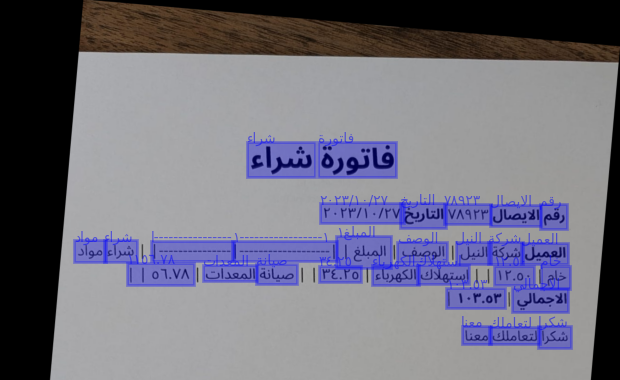 Model Prediction Output (cropped for space) |
Features
- Arabic document STR: detection and recognition models fine-tuned on Arabic script for document STR tasks (images taken by phone cameras) and scanned documents.
- Orientation correction: detects and corrects both page-level rotation and crop-level skew before inference (
--straighten-pages) - LLM postprocessing: low-confidence OCR words are sent to any OpenAI-compatible LLM for context-aware correction (
--postprocess) - GPU-accelerated: runs on CUDA via ONNX Runtime; CPU fallback available
Models
Four fine-turned Arabic models are loaded from HuggingFace (madskills/):
| Model | Architecture | Task |
|---|---|---|
onnxtr-fast_base-arabic |
FAST | Text detection |
onnxtr-parseq-arabic |
PARSeq | Text recognition |
onnxtr-mobilenet_v3_small-crop-orientation-arabic |
MobileNet V3 Small | Crop orientation correction |
onnxtr-mobilenet_v3_small-page-orientation-arabic |
MobileNet V3 Small | Page orientation correction |
Models were fine-tuned on synthetic Arabic datasets using DocTR models as a base.
Installation
- Python 3.10+
- CUDA-capable GPU (CPU fallback available but not the primary target)
pip install mawshor            # CPU
pip install "mawshor[gpu]"     # CUDA
Usage
CLI
mawshor <path> [options]
<path> can be a single image/PDF or a directory. Supported image formats: PNG, JPG, JPEG, BMP, TIFF.
| Flag | Short | Description |
|---|---|---|
--straighten-pages |
-s |
Detect and correct page/crop orientation before OCR |
--postprocess |
-p |
Send low-confidence words to an LLM for correction |
--save |
Save output to a .txt file next to each input file |
|
--raw-output |
-r |
Print the raw predictor output |
--llm-endpoint |
OpenAI-compatible API base URL (default: http://localhost:11434/v1) |
|
--llm-model |
Model name for postprocessing (default: qwen3.5:4b) |
|
--llm-api-key |
API key (default: ollama) |
|
--verbose |
-v |
Show progress information |
# Basic OCR on a single image
mawshor document.jpg

# OCR a directory and save results
mawshor ./scans/ --save

# OCR with page straightening and LLM postprocessing via local Ollama
mawshor document.jpg --straighten-pages --postprocess

# Use a different model or remote endpoint
mawshor document.jpg --postprocess \
  --llm-endpoint https://api.openai.com/v1 \
  --llm-model gpt-4o \
  --llm-api-key sk-...
Python API
import mawshor

# One-shot
results = mawshor.ocr("document.jpg")
print(results[0].text)

# With orientation correction and LLM postprocessing
results = mawshor.ocr("document.jpg", straighten_pages=True, postprocess=True)

# Reuse the predictor across multiple documents (avoids reloading models)
predictor = mawshor.load_predictor(straighten_pages=True)
results = mawshor.ocr("./scans/", predictor=predictor)
for r in results:
    print(r.source, r.text)
Postprocessing
When --postprocess is enabled, OCR output is filtered by confidence and sent to an LLM:
- Words with confidence ≥ 0.8 are passed as-is
- Words with confidence between 0.75–0.8 are passed and flagged as low-confidence
- Words with confidence < 0.75 are dropped before sending
The LLM is prompted as an Arabic copyeditor to fix likely OCR errors, merge/split words, and clean up spacing — without changing meaning or adding content.
Any OpenAI-compatible endpoint works. Ollama runs out of the box with the defaults.
Project details
Verified details
These details have been verified by PyPIProject links
GitHub Statistics
Maintainers
Release history Release notifications | RSS feed


Download files
Download the file for your platform. If you're not sure which to choose, learn more about installing packages.
Source Distribution
Built Distribution
Filter files by name, interpreter, ABI, and platform.
If you're not sure about the file name format, learn more about wheel file names.
Copy a direct link to the current filters
File details
Details for the file mawshor-0.1.1.tar.gz.
File metadata
- Download URL: mawshor-0.1.1.tar.gz
- Upload date:
- Size: 230.7 kB
- Tags: Source
- Uploaded using Trusted Publishing? Yes
- Uploaded via: twine/6.1.0 CPython/3.13.12
File hashes
| Algorithm | Hash digest | |
|---|---|---|
| SHA256 |
3ca885bd13593d61607524989dc6efaac9bf83c247a3ab565cb8457297215693
|
|
| MD5 |
ab09e9cba18b05bd25b9c963233fcbb6
|
|
| BLAKE2b-256 |
5fd0caba02011b216f0119bfce98c1a153c0bcd780cdc8315b8939ff2e06fce9
|
Provenance
The following attestation bundles were made for mawshor-0.1.1.tar.gz:
Publisher:
publish.yml on tarekio/mawshor
-
Statement:
-
Statement type:
https://in-toto.io/Statement/v1 -
Predicate type:
https://docs.pypi.org/attestations/publish/v1 -
Subject name:
mawshor-0.1.1.tar.gz -
Subject digest:
3ca885bd13593d61607524989dc6efaac9bf83c247a3ab565cb8457297215693 - Sigstore transparency entry: 1519429165
- Sigstore integration time:
-
Permalink:
tarekio/mawshor@04a1a9f6da9d8fe9212a959079b07912040567f6 -
Branch / Tag:
refs/tags/v0.1.1 - Owner: https://github.com/tarekio
-
Access:
public
-
Token Issuer:
https://token.actions.githubusercontent.com -
Runner Environment:
github-hosted -
Publication workflow:
publish.yml@04a1a9f6da9d8fe9212a959079b07912040567f6 -
Trigger Event:
release
-
Statement type:
File details
Details for the file mawshor-0.1.1-py3-none-any.whl.
File metadata
- Download URL: mawshor-0.1.1-py3-none-any.whl
- Upload date:
- Size: 12.3 kB
- Tags: Python 3
- Uploaded using Trusted Publishing? Yes
- Uploaded via: twine/6.1.0 CPython/3.13.12
File hashes
| Algorithm | Hash digest | |
|---|---|---|
| SHA256 |
1b00fbe02503390afd3259d890f8fc3abfc9bba18d286f6b6bc6d0f6cc473d97
|
|
| MD5 |
c688eedc9dd40c95a7b38a801a11c863
|
|
| BLAKE2b-256 |
5ea81c24448db8c4d155372fb9a88404afb1a4bfab4cd6d216a6e45f4e80a428
|
Provenance
The following attestation bundles were made for mawshor-0.1.1-py3-none-any.whl:
Publisher:
publish.yml on tarekio/mawshor
-
Statement:
-
Statement type:
https://in-toto.io/Statement/v1 -
Predicate type:
https://docs.pypi.org/attestations/publish/v1 -
Subject name:
mawshor-0.1.1-py3-none-any.whl -
Subject digest:
1b00fbe02503390afd3259d890f8fc3abfc9bba18d286f6b6bc6d0f6cc473d97 - Sigstore transparency entry: 1519429202
- Sigstore integration time:
-
Permalink:
tarekio/mawshor@04a1a9f6da9d8fe9212a959079b07912040567f6 -
Branch / Tag:
refs/tags/v0.1.1 - Owner: https://github.com/tarekio
-
Access:
public
-
Token Issuer:
https://token.actions.githubusercontent.com -
Runner Environment:
github-hosted -
Publication workflow:
publish.yml@04a1a9f6da9d8fe9212a959079b07912040567f6 -
Trigger Event:
release
-
Statement type:






