

mcgram
Notification bridge for Claude Code — Telegram, ntfy.sh and Discord. Claude can ping you, ask you, and remind you on your phone or in a Discord channel.




What it does
Walk away from a long-running task. mcgram lets Claude tap you on the shoulder through Telegram, ntfy.sh, or Discord — and lets you tap back (Telegram only).
| 📣 Notify | "Build passed in 3m12s ✅" / send the failing log as attachment |
| ❓ Ask & wait | Inline buttons (Approve / Cancel) with a timeout — Telegram only |
| ⏰ Remind | "nhắc tôi sau 30 phút check container logs" |
| 🎥 Send video | Demo recordings play right in-chat |
| 🛰 Multi-channel | Route messages to named destinations across all three transports |
| 🌐 No-token mode | Use ntfy.sh or a Discord webhook on machines where api.telegram.org is blocked |
No daemon, no VPS, no webhook setup. Lives inside the MCP server while Claude Code is open — and runs in every session at once, not just the first.
How it fits together
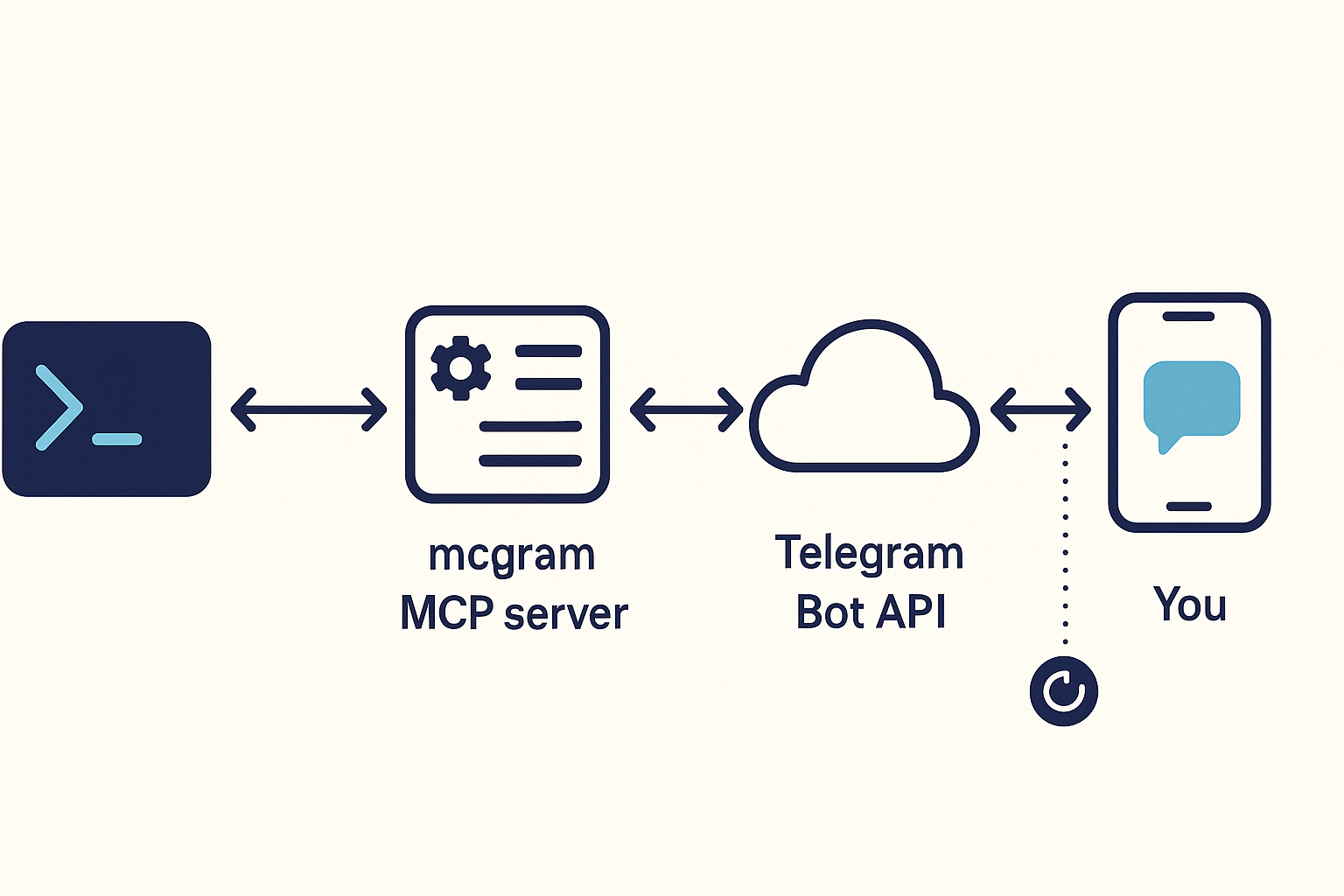
Claude Code spawns mcgram over stdio. mcgram opens a long-poll to the Telegram Bot API. When you tap a button or type a reply, the update lands on your phone-out / mcgram-in side, the operator allowlist filters non-you traffic, and the answer flows back to Claude as the tool result.
Quickstart
Prereqs: Python 3.11+,
uvorpipx. Pick ONE transport below (or set up both).
Option A — ntfy.sh (fastest, no token, ~30 seconds)
Best for: machines where api.telegram.org is blocked, or you just want 1-way pings to your phone.
# 1) Install + scaffold (generates a random ntfy topic for you)
uv tool install git+https://github.com/tvtdev94/mcgram     # or: pipx install ...
mcgram init                                                # writes ~/.mcgram/config.yaml with a unique topic

# 2) Install the ntfy mobile app: https://ntfy.sh/  (iOS / Android / Web)
#    In the app, subscribe to the topic printed by `mcgram init` (e.g. mcgram-a1b2c3d4...)

# 3) Verify
mcgram doctor    # ✅ ntfy health, ✅ test message delivered

# 4) Restart Claude Code → /mcp → mcgram appears → done
That's it. No bot, no token, no chat ID. Now in Claude Code: "báo cho tôi qua ntfy khi xong" or "push log to my phone" — Claude knows what to do.
⚠️ ntfy.sh topics are URL-addressable. Anyone who knows the topic name can subscribe and read your messages. Topics generated by
mcgram inituse 64-bit entropy (16 hex chars), which is fine for casual notifications but don't send secrets / PII unless you self-host ntfy.
Option B — Telegram (required for 2-way ask)
Best for: you want Claude to wait for your Approve/Cancel button before deploying.
# 1) Install + scaffold
uv tool install git+https://github.com/tvtdev94/mcgram
mcgram init

# 2) Create a bot with @BotFather → /newbot → copy token
#    Find your chat ID:  /start the bot, then visit
#    https://api.telegram.org/bot<TOKEN>/getUpdates  → copy chat.id

# 3) Paste credentials and uncomment the bot section
#    Edit ~/.mcgram/.env       → MCGRAM_BOT_TOKEN=...
#    Edit ~/.mcgram/config.yaml → uncomment `bot:` block, set operator_chat_id

# 4) Verify
mcgram doctor    # ✅ get_me OK, ✅ test message delivered

# 5) Restart Claude Code → /mcp → mcgram appears → done
Both transports
Declare both ntfy: and bot: in config — each named channel picks its own transport.
The 7 tools
| Tool | Telegram | ntfy.sh | Discord | When to use |
|---|---|---|---|---|
send_message |
✅ | ✅ | ✅ | Notify on completion / send a status update |
send_file |
✅ | ✅ | ✅ | Send logs, screenshots, generated artifacts |
send_video |
✅ | ✅ | ✅ | Send a video that plays in-chat (mp4/mov/mkv/webm/m4v) |
ask |
✅ | ❌ | ❌ | Question with inline buttons OR freetext, blocks until reply. Telegram-only, and only in the polling session |
set_reminder |
✅ | ✅ | ✅ | Schedule an in-process reminder (per-session; lost on restart) |
cancel_reminder |
— | — | — | Cancel a pending reminder |
list_reminders |
— | — | — | List currently pending reminders |
ntfy.sh and Discord have no 2-way input, so ask returns transport_unsupported on those channels — and polling_not_owned in a Telegram session that isn't the one polling (why). The companion Claude Code skill (installed by mcgram init) teaches Claude when to call which tool — both English and Vietnamese trigger phrases are recognized.
Discord send_message / send_file / send_video accept an optional thread_id to post into an existing thread. Discord has no default channel — always name it: send_message(text="…", channel="eve").
They also accept an optional mention=["alice"] to @ping registered users — e.g. send_message(text="deploy done", channel="eve", mention=["alice"]). Names are registered with mcgram discord mention add. Only listed users are pinged; @everyone/@here/roles are always suppressed. Keep Discord messages short and direct — the content cap is 2000 characters.
Channels
Route messages to different destinations across all transports:
mcgram channel add oncall -1001234567890 -d "Pager rotation"        # Telegram
mcgram channel add-ntfy alerts -d "Build alerts"                     # ntfy.sh — auto-generates topic
mcgram channel add-ntfy alerts --topic mcgram-myalerts -d "..."      # explicit topic
mcgram channel add-discord eve -d "Eve product log"                 # Discord — prompts for webhook URL
mcgram channel list
#   alerts   ntfy      topic=mcgram-a1b2c3d4e5f6g7h8   Build alerts
#   default  ntfy      topic=mcgram-xxxxxxxxxxxxxxxx   Auto-created from ntfy.default_topic
#   eve      discord   env=MCGRAM_DISCORD_WEBHOOK_EVE   Eve product log
#   oncall   telegram  chat_id=-1001234567890           Pager rotation
Then in Claude Code: "send the failing log to the alerts channel" → send_file(path="…", channel="alerts").
CLI
mcgram                          # MCP stdio server (Claude Code calls this)
mcgram init [--force]           # scaffold ~/.mcgram/ + skill + auto-register MCP (generates ntfy topic)
mcgram doctor                   # config + connectivity check (per-transport)
mcgram audit [opts]             # analyze audit.jsonl: --since 1h, --tool ask, --rejected, --tail
mcgram channel <action>         # list | add NAME CHAT_ID | add-ntfy NAME [--topic T] | add-discord NAME [--webhook U] | remove NAME
mcgram discord mention <action> # list | add NAME USER_ID | remove NAME   (Discord @mention registry)
mcgram install-skill [--force]  # reinstall ~/.claude/skills/mcgram/SKILL.md
Config example
~/.mcgram/config.yaml — declare at least one of ntfy / bot:
ntfy:                              # Transport A — fast, no token
  server: https://ntfy.sh
  default_topic: mcgram-a1b2c3d4e5f6g7h8     # generated by `mcgram init`
  # access_token_env: NTFY_TOKEN   # optional, for paid/self-hosted

bot:                               # Transport B — required for `ask`
  token_env: MCGRAM_BOT_TOKEN      # token loaded from ~/.mcgram/.env
  operator_chat_id: 123456789      # your personal chat ID

defaults:
  parse_mode: plain                # plain | markdown_v2
  ask_timeout_s: 120
  rate_limit_per_min: 20

limits:
  ask_timeout_max_s: 600
  reminder_max_delay_s: 86400      # 24h
  reminder_max_pending: 10
  file_max_bytes: 52428800         # 50 MB
  ask_options_max: 6

discord:                           # optional — Discord display identity + @mention registry
  username: mcgram
  mentions:                        # name -> user id; register via `mcgram discord mention add`
    alice: "123456789012345678"

channels:                          # optional named destinations
  oncall:                          # Telegram channel
    transport: telegram
    chat_id: -1001234567890
    description: Pager rotation
  alerts:                          # ntfy.sh channel
    transport: ntfy
    ntfy_topic: mcgram-alerts-x9k2
    description: Build alerts
  eve:                             # Discord channel (webhook URL lives in ~/.mcgram/.env)
    transport: discord
    discord_webhook_env: MCGRAM_DISCORD_WEBHOOK_EVE
    description: Eve product log

audit:
  path: ~/.mcgram/audit.jsonl
  rotate_mb: 25
  redact_text: false               # true → outbound `text` masked in audit
  retention_days: null             # e.g. 14
  timezone: UTC

allow_outside_cwd: false           # send_file restricted to CWD by default
Security model
| Layer | Mitigation |
|---|---|
| 🔐 Token | Loaded from env var; never logged; masked in mcgram doctor |
| 🚪 Operator filter | Non-operator_chat_id updates rejected at dispatcher entry — never reach tool handlers |
🛡 send_file traversal |
Path resolved + checked against CWD; size capped at file_max_bytes |
| ⚡ Rate limit | Per-tool token bucket (default 20/min) |
| 🔒 Single poller | PID-file lock at ~/.mcgram/.lock scoped to Telegram polling; extra instances run send-only instead of exiting |
| 📜 Audit trail | Every call logged JSONL with fsync; survives kill -9 |
| 🛌 Reminder spam | Max 10 pending, 24h delay cap, 1000-char text cap |
⏱ ask DoS |
Hard timeout cap (600s) so a forgetful user can't freeze Claude forever |
| 🔁 Polling conflict | Telegram 409 caught with clean error — no crash loop |
Full STRIDE analysis: docs/security-threat-model.md.
Audit
mcgram audit                     # summary: counts by status + by tool
mcgram audit --since 1h          # last hour only
mcgram audit --tool send_file    # filter by tool
mcgram audit --rejected          # group rejections by reason
mcgram audit --tail              # follow new entries (Ctrl-C to stop)
Sample lines:
{"ts":"2026-05-21T10:00:00+00:00","tool":"send_message","status":"ok","chat_id":123,"channel":"default","text":"build passed","text_len":12,"ms":150}
{"ts":"2026-05-21T10:00:05+00:00","tool":"ask","status":"ok","channel":"oncall","question_id":"q_a1","source":"button","ms":3200}
{"ts":"2026-05-21T10:00:10+00:00","tool":"send_file","status":"rejected","reason":"file_too_large","bytes":62914560}
Multiple Claude Code sessions
Run as many sessions as you like — each spawns its own mcgram, and all of them
work. One caveat, and it's a Telegram rule, not a mcgram one: getUpdates
accepts a single client per bot token. So exactly one instance polls (first to
start wins) and the rest run send-only:
| Polling instance | Other instances | |
|---|---|---|
send_message / send_file / send_video |
✅ | ✅ |
set_reminder / cancel_reminder / list_reminders |
✅ | ✅ |
ask |
✅ | ❌ polling_not_owned |
ask fails immediately in a send-only instance (with the polling pid, so
you know which session to ask from) — it never blocks on a timeout it can't win.
Ownership moves on its own: close the polling session and another picks it up within ~30s, no restart needed. Same after a crash — the stale lock is reclaimed.
To bypass the lock entirely, set MCGRAM_SKIP_LOCK=1 — both instances then
poll and Telegram returns 409 to one of them (backed off, not crash-looped).
Rarely what you want.
Known limitations
- Reminders are per-session — each instance keeps its own in-memory
schedule.
list_remindersin one session won't show reminders set in another, and closing that session drops them. Restart = lost. askblocks the MCP call — keep timeouts short or Claude waits idle.askis Telegram-only — ntfy.sh has no 2-way input. On ntfy channels,askreturnstransport_unsupportedwithout contacting the network.- ntfy.sh public topics are URL-discoverable — anyone with the topic name can subscribe. mcgram generates 64-bit-entropy topics, but don't send secrets / PII unless you self-host ntfy with auth.
- ntfy.sh file size cap — public free tier ~15 MB (vs Telegram's 50 MB). Self-hosted ntfy can raise the cap.
- No remote control — Claude can send, but the bot doesn't accept arbitrary commands FROM Telegram. (Future v0.2.)
- No webhook / VPS support — Telegram uses long-poll only.
- Same Telegram token on 2 machines → 409 Conflict (only one poller per bot). The
~/.mcgram/.lockcoordination is per-machine, so two hosts can't see each other's lock; mcgram backs off cleanly, but use different bots for different machines. (Several sessions on ONE machine are fine — see Multiple Claude Code sessions.)
Architecture
Full module map, lifecycle diagram, and data flow: docs/architecture.md.
src/mcgram/
├── cli.py · cli_init · cli_doctor · cli_audit · cli_channel · skill_installer
├── config · errors · audit · lock · rate_limiter
├── tg_client · ntfy_client · dispatch · update_dispatcher · polling · server · runtime
├── poll_ownership · ask_registry · reminders
└── tools/  send_message · send_file · send_video · ask · set_reminder · cancel_reminder · list_reminders
Small focused modules (most <200 LOC, largest ~400), 361 tests, ruff clean, py3.11/3.12 × ubuntu/windows in CI.
Update / uninstall
uv tool upgrade mcgram          # or: pipx upgrade mcgram
mcgram install-skill --force    # refresh bundled Claude skill if changed
claude mcp remove mcgram        # unregister from Claude Code
uv tool uninstall mcgram        # remove binary
rm -rf ~/.mcgram ~/.claude/skills/mcgram   # remove config + skill
Develop
git clone https://github.com/tvtdev94/mcgram && cd mcgram
uv sync --extra dev
uv run pytest -q
uv run ruff check src/ tests/
Publishing a new version: docs/release.md.
Credits
- Patterns mirrored from sister project dbread (read-only DB MCP).
- Built around the Model Context Protocol and the Telegram Bot API.
License
MIT — see LICENSE.
1 maintainer

Metadata
1 maintainer
Release files for mcgram 0.5.1
For a detailed explanation of source distributions (sdists) and built distributions (wheels), please see the package formats documentation.
Source distribution (sdist)
| File | Size | Uploaded | |
|---|---|---|---|
| mcgram-0.5.1.tar.gz | 5.4 MB | Details |
Built distribution (wheel)
| File | Interpreter | ABI | Platform | Reset |
|---|---|---|---|---|
| mcgram-0.5.1-py3-none-any.whl | Python 3 | none | any | Details |
Total release size: 5.5 MB
Release files / mcgram-0.5.1.tar.gz
| Download URL | mcgram-0.5.1.tar.gz |
|---|---|
| Size | 5.4 MB |
| Tags | Source |
|
SHA-256 checksum How to use checksums |
e9ae9c47c7ccdd6c464aa29a8b0a150047d85f68d577a56a5112cf635e486aa2
|
|
BLAKE2b-256 checksum How to use checksums |
576dac899ee308465389c70358dbbf690f90266a5c430689fa0d6f28e465fcdb
|
| Upload date | |
|
Uploaded using Trusted Publishing? What is trusted publishing? |
No |
| Uploaded via |
twine/7.0.0 CPython/3.11.14
|
Release files / mcgram-0.5.1-py3-none-any.whl
| Download URL | mcgram-0.5.1-py3-none-any.whl |
|---|---|
| Size | 81.6 kB |
| Tags | Python 3 |
|
SHA-256 checksum How to use checksums |
a79bf6f16ddbc464bfba5c8b29c7720590d525b5f89a756767306449a2a51151
|
|
BLAKE2b-256 checksum How to use checksums |
1663a2f4d0f31210fc741487f009648a3661459762d12ec7a4b5e5cc61f2d9c4
|
| Upload date | |
|
Uploaded using Trusted Publishing? What is trusted publishing? |
No |
| Uploaded via |
twine/7.0.0 CPython/3.11.14
|














