
Notification bridge for Claude Code (Telegram + ntfy.sh) — send notifications, ask short questions, set reminders via Telegram bot or ntfy.sh topic.

Project description

mcgram
Notification bridge for Claude Code — Telegram and ntfy.sh. Claude can ping you, ask you, and remind you on your phone.





What it does
Walk away from a long-running task. mcgram lets Claude tap you on the shoulder through Telegram or ntfy.sh — and lets you tap back (Telegram only).
| 📣 Notify | "Build passed in 3m12s ✅" / send the failing log as attachment |
| ❓ Ask & wait | Inline buttons (Approve / Cancel) with a timeout — Telegram only |
| ⏰ Remind | "nhắc tôi sau 30 phút check container logs" |
| 🎥 Send video | Demo recordings play right in-chat |
| 🛰 Multi-channel | Route messages to named destinations across both transports |
| 🌐 No-token mode | Use ntfy.sh on machines where api.telegram.org is blocked |
Single process, no daemon, no VPS, no webhook setup. Lives inside the MCP server while Claude Code is open.
How it fits together
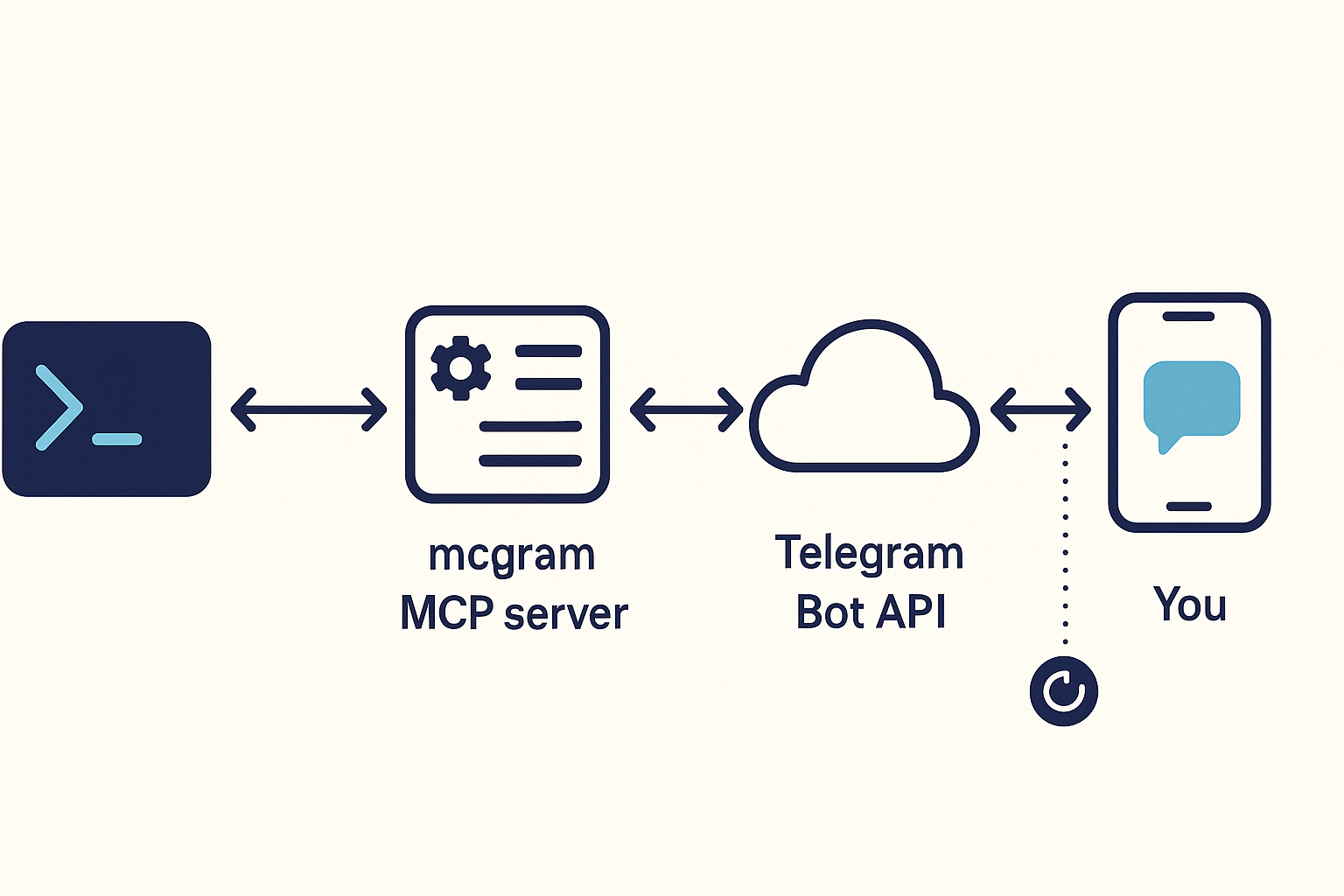
Claude Code spawns mcgram over stdio. mcgram opens a long-poll to the Telegram Bot API. When you tap a button or type a reply, the update lands on your phone-out / mcgram-in side, the operator allowlist filters non-you traffic, and the answer flows back to Claude as the tool result.
Quickstart
Prereqs: Python 3.11+,
uvorpipx. Pick ONE transport below (or set up both).
Option A — ntfy.sh (fastest, no token, ~30 seconds)
Best for: machines where api.telegram.org is blocked, or you just want 1-way pings to your phone.
# 1) Install + scaffold (generates a random ntfy topic for you)
uv tool install git+https://github.com/tvtdev94/mcgram     # or: pipx install ...
mcgram init                                                # writes ~/.mcgram/config.yaml with a unique topic

# 2) Install the ntfy mobile app: https://ntfy.sh/  (iOS / Android / Web)
#    In the app, subscribe to the topic printed by `mcgram init` (e.g. mcgram-a1b2c3d4...)

# 3) Verify
mcgram doctor    # ✅ ntfy health, ✅ test message delivered

# 4) Restart Claude Code → /mcp → mcgram appears → done
That's it. No bot, no token, no chat ID. Now in Claude Code: "báo cho tôi qua ntfy khi xong" or "push log to my phone" — Claude knows what to do.
⚠️ ntfy.sh topics are URL-addressable. Anyone who knows the topic name can subscribe and read your messages. Topics generated by
mcgram inituse 64-bit entropy (16 hex chars), which is fine for casual notifications but don't send secrets / PII unless you self-host ntfy.
Option B — Telegram (required for 2-way ask)
Best for: you want Claude to wait for your Approve/Cancel button before deploying.
# 1) Install + scaffold
uv tool install git+https://github.com/tvtdev94/mcgram
mcgram init

# 2) Create a bot with @BotFather → /newbot → copy token
#    Find your chat ID:  /start the bot, then visit
#    https://api.telegram.org/bot<TOKEN>/getUpdates  → copy chat.id

# 3) Paste credentials and uncomment the bot section
#    Edit ~/.mcgram/.env       → MCGRAM_BOT_TOKEN=...
#    Edit ~/.mcgram/config.yaml → uncomment `bot:` block, set operator_chat_id

# 4) Verify
mcgram doctor    # ✅ get_me OK, ✅ test message delivered

# 5) Restart Claude Code → /mcp → mcgram appears → done
Both transports
Declare both ntfy: and bot: in config — each named channel picks its own transport.
The 7 tools
| Tool | Telegram | ntfy.sh | When to use |
|---|---|---|---|
send_message |
✅ | ✅ | Notify on completion / send a status update |
send_file |
✅ | ✅ | Send logs, screenshots, generated artifacts |
send_video |
✅ | ✅ | Send a video that plays in-chat (mp4/mov/mkv/webm/m4v) |
ask |
✅ | ❌ | Question with inline buttons OR freetext, blocks until reply. Telegram-only |
set_reminder |
✅ | ✅ | Schedule an in-process reminder (lost on restart) |
cancel_reminder |
— | — | Cancel a pending reminder |
list_reminders |
— | — | List currently pending reminders |
ntfy.sh has no 2-way input, so ask returns transport_unsupported on ntfy channels. The companion Claude Code skill (installed by mcgram init) teaches Claude when to call which tool — both English and Vietnamese trigger phrases are recognized.
Channels
Route messages to different destinations across both transports:
mcgram channel add oncall -1001234567890 -d "Pager rotation"        # Telegram
mcgram channel add-ntfy alerts -d "Build alerts"                     # ntfy.sh — auto-generates topic
mcgram channel add-ntfy alerts --topic mcgram-myalerts -d "..."      # explicit topic
mcgram channel list
#   alerts   ntfy      topic=mcgram-a1b2c3d4e5f6g7h8   Build alerts
#   default  ntfy      topic=mcgram-xxxxxxxxxxxxxxxx   Auto-created from ntfy.default_topic
#   oncall   telegram  chat_id=-1001234567890           Pager rotation
Then in Claude Code: "send the failing log to the alerts channel" → send_file(path="…", channel="alerts").
CLI
mcgram                          # MCP stdio server (Claude Code calls this)
mcgram init [--force]           # scaffold ~/.mcgram/ + skill + auto-register MCP (generates ntfy topic)
mcgram doctor                   # config + connectivity check (per-transport)
mcgram audit [opts]             # analyze audit.jsonl: --since 1h, --tool ask, --rejected, --tail
mcgram channel <action>         # list | add NAME CHAT_ID | add-ntfy NAME [--topic T] | remove NAME
mcgram install-skill [--force]  # reinstall ~/.claude/skills/mcgram/SKILL.md
Config example
~/.mcgram/config.yaml — declare at least one of ntfy / bot:
ntfy:                              # Transport A — fast, no token
  server: https://ntfy.sh
  default_topic: mcgram-a1b2c3d4e5f6g7h8     # generated by `mcgram init`
  # access_token_env: NTFY_TOKEN   # optional, for paid/self-hosted

bot:                               # Transport B — required for `ask`
  token_env: MCGRAM_BOT_TOKEN      # token loaded from ~/.mcgram/.env
  operator_chat_id: 123456789      # your personal chat ID

defaults:
  parse_mode: plain                # plain | markdown_v2
  ask_timeout_s: 120
  rate_limit_per_min: 20

limits:
  ask_timeout_max_s: 600
  reminder_max_delay_s: 86400      # 24h
  reminder_max_pending: 10
  file_max_bytes: 52428800         # 50 MB
  ask_options_max: 6

channels:                          # optional named destinations
  oncall:                          # Telegram channel
    transport: telegram
    chat_id: -1001234567890
    description: Pager rotation
  alerts:                          # ntfy.sh channel
    transport: ntfy
    ntfy_topic: mcgram-alerts-x9k2
    description: Build alerts

audit:
  path: ~/.mcgram/audit.jsonl
  rotate_mb: 25
  redact_text: false               # true → outbound `text` masked in audit
  retention_days: null             # e.g. 14
  timezone: UTC

allow_outside_cwd: false           # send_file restricted to CWD by default
Security model
| Layer | Mitigation |
|---|---|
| 🔐 Token | Loaded from env var; never logged; masked in mcgram doctor |
| 🚪 Operator filter | Non-operator_chat_id updates rejected at dispatcher entry — never reach tool handlers |
🛡 send_file traversal |
Path resolved + checked against CWD; size capped at file_max_bytes |
| ⚡ Rate limit | Per-tool token bucket (default 20/min) |
| 🔒 Single instance | PID-file lock at ~/.mcgram/.lock; second mcgram exits with LockHeldError |
| 📜 Audit trail | Every call logged JSONL with fsync; survives kill -9 |
| 🛌 Reminder spam | Max 10 pending, 24h delay cap, 1000-char text cap |
⏱ ask DoS |
Hard timeout cap (600s) so a forgetful user can't freeze Claude forever |
| 🔁 Polling conflict | Telegram 409 caught with clean error — no crash loop |
Full STRIDE analysis: docs/security-threat-model.md.
Audit
mcgram audit                     # summary: counts by status + by tool
mcgram audit --since 1h          # last hour only
mcgram audit --tool send_file    # filter by tool
mcgram audit --rejected          # group rejections by reason
mcgram audit --tail              # follow new entries (Ctrl-C to stop)
Sample lines:
{"ts":"2026-05-21T10:00:00+00:00","tool":"send_message","status":"ok","chat_id":123,"channel":"default","text":"build passed","text_len":12,"ms":150}
{"ts":"2026-05-21T10:00:05+00:00","tool":"ask","status":"ok","channel":"oncall","question_id":"q_a1","source":"button","ms":3200}
{"ts":"2026-05-21T10:00:10+00:00","tool":"send_file","status":"rejected","reason":"file_too_large","bytes":62914560}
Known limitations
- No persistent reminders — schedules live in process memory. Restart = lost.
askblocks the MCP call — keep timeouts short or Claude waits idle.askis Telegram-only — ntfy.sh has no 2-way input. On ntfy channels,askreturnstransport_unsupportedwithout contacting the network.- ntfy.sh public topics are URL-discoverable — anyone with the topic name can subscribe. mcgram generates 64-bit-entropy topics, but don't send secrets / PII unless you self-host ntfy with auth.
- ntfy.sh file size cap — public free tier ~15 MB (vs Telegram's 50 MB). Self-hosted ntfy can raise the cap.
- No remote control — Claude can send, but the bot doesn't accept arbitrary commands FROM Telegram. (Future v0.2.)
- No webhook / VPS support — Telegram uses long-poll only.
- Same Telegram token on 2 machines → 409 Conflict (only one poller per bot). mcgram backs off cleanly; use different bots for different machines. (When
bot:is omitted, Telegram polling is fully disabled — no 409, no log spam.)
Architecture
Full module map, lifecycle diagram, and data flow: docs/architecture.md.
src/mcgram/
├── cli.py · cli_init · cli_doctor · cli_audit · cli_channel · skill_installer
├── config · errors · audit · lock · rate_limiter
├── tg_client · ntfy_client · dispatch · update_dispatcher · polling · server · runtime
├── ask_registry · reminders
└── tools/  send_message · send_file · send_video · ask · set_reminder · cancel_reminder · list_reminders
All modules <200 LOC, 153 tests, ruff clean, py3.11/3.12 × ubuntu/windows in CI.
Update / uninstall
uv tool upgrade mcgram          # or: pipx upgrade mcgram
mcgram install-skill --force    # refresh bundled Claude skill if changed
claude mcp remove mcgram        # unregister from Claude Code
uv tool uninstall mcgram        # remove binary
rm -rf ~/.mcgram ~/.claude/skills/mcgram   # remove config + skill
Develop
git clone https://github.com/tvtdev94/mcgram && cd mcgram
uv sync --extra dev
uv run pytest -q
uv run ruff check src/ tests/
Credits
- Patterns mirrored from sister project dbread (read-only DB MCP).
- Built around the Model Context Protocol and the Telegram Bot API.
License
MIT — see LICENSE.
Release history Release notifications | RSS feed


Download files
Download the file for your platform. If you're not sure which to choose, learn more about installing packages.
Source Distribution
Built Distribution
Filter files by name, interpreter, ABI, and platform.
If you're not sure about the file name format, learn more about wheel file names.
Copy a direct link to the current filters
File details
Details for the file mcgram-0.2.1.tar.gz.
File metadata
- Download URL: mcgram-0.2.1.tar.gz
- Upload date:
- Size: 5.4 MB
- Tags: Source
- Uploaded using Trusted Publishing? No
- Uploaded via: twine/6.2.0 CPython/3.12.0
File hashes
| Algorithm | Hash digest | |
|---|---|---|
| SHA256 |
b8ab00433d125f6ca05b052d8794ffa27dbe8ec670ed7115424dd94dba755be5
|
|
| MD5 |
2a46402fb02ccd7b91ac2c82716667f0
|
|
| BLAKE2b-256 |
ca32613240d2fb7ff951152f7cc2385605d3572520ad0bc354137a41a2f9a49b
|
File details
Details for the file mcgram-0.2.1-py3-none-any.whl.
File metadata
- Download URL: mcgram-0.2.1-py3-none-any.whl
- Upload date:
- Size: 55.4 kB
- Tags: Python 3
- Uploaded using Trusted Publishing? No
- Uploaded via: twine/6.2.0 CPython/3.12.0
File hashes
| Algorithm | Hash digest | |
|---|---|---|
| SHA256 |
3958b071b10dc6ccde88383d3ecfa5ece19400a1e4e8e1e4238d7cf8ad37b0c3
|
|
| MD5 |
134de752087d8e3603997dd0e9dc663b
|
|
| BLAKE2b-256 |
6f8166af56d4e3ac8f9277bdf78f4c1a9ad1c985e7429a7687b4de20fe33bcb0
|






