
mcm-label
A command line utility to create scannable labels for McMaster parts.
| Order Line Item | Label |
|---|---|
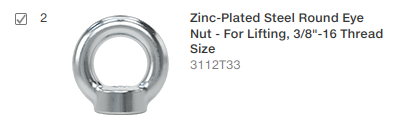 |
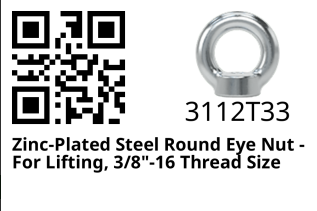 |
Installation
pip install mcm-label
Usage
- From McMaster's website, navigate to your "Order History", then left click on the order you'd like to create labels for. The address should look something like:
https://www.mcmaster.com/order-history/order/<a bunch of random numbers and letters>/ - Right click anywhere on the page and click "Save Page As..." - confirm the "file type" says something like "Web Page, complete" - then save
- Run
mcm-labelwith the argument of wherever you saved the order webpage; specifically this must be either the html file directly, or the folder it's contained within. - The output will be a
label_###.pngfile for each part number in the order. These files are located next to the order html file.
Details
$ mcm-label -h
usage: mcm-label [-h] [-d] [FILE]

positional arguments:
  FILE         Path to a McMaster order html file, or the folder containing one

options:
  -h, --help   show this help message and exit
  -d, --debug  Enables outputting raw html and pdfs of labels
1 maintainer

Metadata
1 maintainer
Release files for mcm-label 0.0.2
For a detailed explanation of source distributions (sdists) and built distributions (wheels), please see the package formats documentation.
Source distribution (sdist)
| File | Size | Uploaded | |
|---|---|---|---|
| mcm_label-0.0.2.tar.gz | 5.3 kB | Details |
Built distribution (wheel)
| File | Interpreter | ABI | Platform | Reset |
|---|---|---|---|---|
| mcm_label-0.0.2-py3-none-any.whl | Python 3 | none | any | Details |
Total release size: 12.3 kB
Release files / mcm_label-0.0.2.tar.gz
| Download URL | mcm_label-0.0.2.tar.gz |
|---|---|
| Size | 5.3 kB |
| Tags | Source |
|
SHA-256 checksum How to use checksums |
bacb92c528a0bf8378b41e9d1301d7e745e8b90348f9beda97ae5897f4a9a736
|
|
BLAKE2b-256 checksum How to use checksums |
2f035ea9bf1bf7e883188575203f400dd94ad00b577b42f8ed634307c90d80d3
|
| Upload date | |
|
Uploaded using Trusted Publishing? What is trusted publishing? |
No |
| Uploaded via |
twine/6.1.0 CPython/3.12.3
|
Release files / mcm_label-0.0.2-py3-none-any.whl
| Download URL | mcm_label-0.0.2-py3-none-any.whl |
|---|---|
| Size | 7.1 kB |
| Tags | Python 3 |
|
SHA-256 checksum How to use checksums |
41909c797d390c6f17f6fef1d00f7539db1fd7ba7e11782e35c1ad34c097288c
|
|
BLAKE2b-256 checksum How to use checksums |
95392ca83561a049353ae4ea702968735ea72c5b72924f83d623fbc5f5a4dacc
|
| Upload date | |
|
Uploaded using Trusted Publishing? What is trusted publishing? |
No |
| Uploaded via |
twine/6.1.0 CPython/3.12.3
|














