
A command line utility to create scannable labels for McMaster parts

Project description
mcm-label
A command line utility to create scannable labels for McMaster parts.
| Order Line Item | Label |
|---|---|
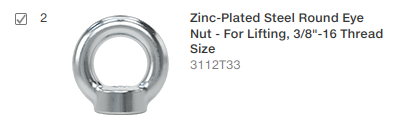 |
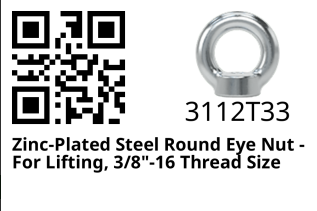 |
Installation
pip install mcm-label
Usage
- From McMaster's website, navigate to your "Order History", then left click on the order you'd like to create labels for. The address should look something like:
https://www.mcmaster.com/order-history/order/<a bunch of random numbers and letters>/ - Right click anywhere on the page and click "Save Page As..." - confirm the "file type" says something like "Web Page, complete" - then save
- Run
mcm-labelwith the argument of wherever you saved the order webpage; specifically this must be either the html file directly, or the folder it's contained within. - The output will be a
label_###.pngfile for each part number in the order. These files are located next to the order html file.
Details
$ mcm-label -h
usage: mcm-label [-h] [-d] [FILE]

positional arguments:
  FILE         Path to a McMaster order html file, or the folder containing one

options:
  -h, --help   show this help message and exit
  -d, --debug  Enables outputting raw html and pdfs of labels
Release history Release notifications | RSS feed


Download files
Download the file for your platform. If you're not sure which to choose, learn more about installing packages.
Source Distribution
mcm_label-0.0.1.tar.gz
(5.2 kB
view details)
Built Distribution
Filter files by name, interpreter, ABI, and platform.
If you're not sure about the file name format, learn more about wheel file names.
Copy a direct link to the current filters
File details
Details for the file mcm_label-0.0.1.tar.gz.
File metadata
- Download URL: mcm_label-0.0.1.tar.gz
- Upload date:
- Size: 5.2 kB
- Tags: Source
- Uploaded using Trusted Publishing? No
- Uploaded via: twine/6.1.0 CPython/3.12.3
File hashes
| Algorithm | Hash digest | |
|---|---|---|
| SHA256 |
6e58bc1982302e95a0e1fce5e5ad6b42d37a376df16bdc0d1dbff78473e65d71
|
|
| MD5 |
03c9153f42fa17c01f4bf5c5088b80b6
|
|
| BLAKE2b-256 |
59fcb794f597d1c5345bb156806f1d3c0af1176403fd2334cc89291a35a0c01e
|
File details
Details for the file mcm_label-0.0.1-py3-none-any.whl.
File metadata
- Download URL: mcm_label-0.0.1-py3-none-any.whl
- Upload date:
- Size: 7.0 kB
- Tags: Python 3
- Uploaded using Trusted Publishing? No
- Uploaded via: twine/6.1.0 CPython/3.12.3
File hashes
| Algorithm | Hash digest | |
|---|---|---|
| SHA256 |
290ac610bd6a8623ed19371b846b8bbae247e6c0d19294df33d02d29b0ef22fd
|
|
| MD5 |
e938fcfff358882b7587bc536bf24a34
|
|
| BLAKE2b-256 |
f1104c80a0f90e4569288ef922a75810d38f31463a50739ff5e88de79c9637f0
|






