
An MCP server for bringing Anthropic's Agent Skills to any MCP-compatible agent.

Project description
 AgentSkills MCP: Bringing Anthropic's Agent Skills to Any MCP-compatible Agent




简体中文 | English
📖 Project Overview
Agent Skills is a new function recently introduced by Anthropic. By packaging specialized skills into modular resources, it allows Claude to transform on demand into a “tailored expert” suited to any scenario. AgentSkills MCP, built on the FlowLLM framework, unlocks Claude’s proprietary Agent Skills for any MCP-compatible agent. It implements the Progressive Disclosure architecture proposed in Anthropic’s official Agent Skills engineering blog, enabling agents to load necessary skills as needed, thereby efficiently utilizing limited context windows.
💡 Why Choose AgentSkills MCP?
- ✅ Zero-Code Configuration: one-command install (
pip install mcp-agentskills) - ✅ Out-of-the-Box: uses official Skill format and fully compatible with Anthropic’s Agent Skills
- ✅ MCP Support: multiple transports (stdio/SSE/HTTP), works with any MCP-compatible agent
- ✅ Flexible Skill Path: custom skill directories with automatic detection, parsing, and loading
🔥 Latest Updates
- [2025-12] 🎉 Released mcp-agentskills v0.1.1
🚀 Quick Start
Installation
Install AgentSkills MCP with pip:
pip install mcp-agentskills
Or with uv:
uv pip install mcp-agentskills
For Development (if you want to modify the code):
git clone https://github.com/zouyingcao/agentskills-mcp.git
cd agentskills-mcp

conda create -n agentskills-mcp python==3.10
conda activate agentskills-mcp
pip install -e .
Load Skills
- Create a directory to store Skills, like:
mkdir skills
- Clone from open-source GitHub repositories, e.g.,
https://github.com/anthropics/skills
https://github.com/ComposioHQ/awesome-claude-skills
- Add the collected Skills into the directory created in step 1. Each Skill is a folder containing a SKILL.md file.
Run
Local process communication (stdio)
This mode runs AgentSkills MCP via uvx and communicates through stdin/stdout, suitable for local MCP clients.
{
  "mcpServers": {
    "agentskills-mcp": {
      "command": "uvx",
      "args": [
        "agentskills-mcp",
        "config=default",
        "mcp.transport=stdio",
        "metadata.skill_dir=\"./skills\""
      ],
      "env": {
        "FLOW_LLM_API_KEY": "xxx",
        "FLOW_LLM_BASE_URL": "https://dashscope.aliyuncs.com/compatible-mode/v1"
      }
    }
  }
}
Remote communication (SSE/HTTP Server)
This mode runs AgentSkills MCP as a standalone SSE/HTTP server that can be accessed remotely.
- Step 1: Configure Environment Variables
Copy example.env to .env and fill in your API key:
cp example.env .env
# Edit the .env file and fill in your API key
- Step 2: Start the Server
Start the AgentSkills MCP server with SSE transport:
agentskills-mcp \
  config=default \
  mcp.transport=sse \
  mcp.host=0.0.0.0 \
  mcp.port=8001 \
  metadata.skill_dir="./skills"
The service will be available at: http://0.0.0.0:8001/sse
- Step 3: Connect from MCP Client
- Add this configuration to your MCP client (Cursor, Gemini Code, Cline, etc.) to connect to the remote SSE server:
{
  "mcpServers": {
    "agentskills-mcp": {
      "type": "sse",
      "url": "http://0.0.0.0:8001/sse"
    }
  }
}
- You can also use the FastMCP Python client to directly access the server:
import asyncio
from fastmcp import Client


async def main():
    async with Client("http://0.0.0.0:8001/sse") as client:
        tools = await client.list_tools()
        for tool in tools:
            print(tool)

        result = await client.call_tool(
            name="load_skill",
            arguments={
              "skill_name"="pdf"
            }
        )
        print(result)


asyncio.run(main())
One-Command Test
This command will start the server, connect via FastMCP client, and test all available tools automatically.
python tests/run_project_sse.py <path/to/skills>
or
python tests/run_project_http.py <path/to/skills>
Demo
After starting the AgentSkills MCP server with the SSE transport, you can run the demo:
# Enable Agent Skills for the Qwen model.
# Since Qwen supports function calling, you can implement Agent Skills by passing the MCP tools registered by the AgentSkills MCP service to the tools parameter.
cd tests
python run_skill_agent.py
🔧 MCP Tools
This service provides four tools to support Agent Skills:
- load_skill_metadata_op — Loads the names and descriptions of all Skills into the agent context at startup (always called)
- load_skill_op — When a specific skill is needed, loads the SKILL.md content by skill name (invoked when triggering the Skill)
- read_reference_file_op — Reads specific files from a skill, such as scripts or reference documents (on demand)
- run_shell_command_op — Executes shell commands to run executable scripts included in the skill (on demand)
For detailed parameters and usage examples, see the documentation.
⚙️ Server Configuration Parameters
| Parameter | Description | Example |
|---|---|---|
config |
Configuration files to load (comma-separated). Default: default (core workflow) |
config=default |
mcp.transport |
Transport mode: stdio (stdin/stdout, good for local), sse (Server-Sent Events, good for online apps), http (RESTful, good for lightweight remote calls) |
mcp.transport=stdio |
mcp.host |
Host address (for sse/http transport only) | mcp.host=0.0.0.0 |
mcp.port |
Port number (for sse/http transport only) | mcp.port=8001 |
metadata.skill_dir |
Skills Directory (required) | metadata.dir=./skills |
For the full set of available options and defaults, refer to default.yaml.
Environment Variables
| Variable Name | Required | Description |
|---|---|---|
FLOW_LLM_API_KEY |
✅ Yes | API key for OpenAI-compatible LLM Service |
FLOW_LLM_BASE_URL |
✅ Yes | Base URL for OpenAI-compatible LLM Service |
🤝 Contributing
We welcome community contributions! To get started:
- Install the package in development mode:
pip install -e .
- Install pre-commit hooks:
pip install pre-commit
pre-commit run --all-files
- Submit a pull request with your changes.
📚 Learn More
- Anthropic Agent Skills Documentation
- Anthropic Engineering Blog
- Claude Agent Skills: A First Principles Deep Dive
- FlowLLM Documentation
- MCP Documentation
⚖️ License
This project is licensed under the Apache License 2.0 — see LICENSE for details.
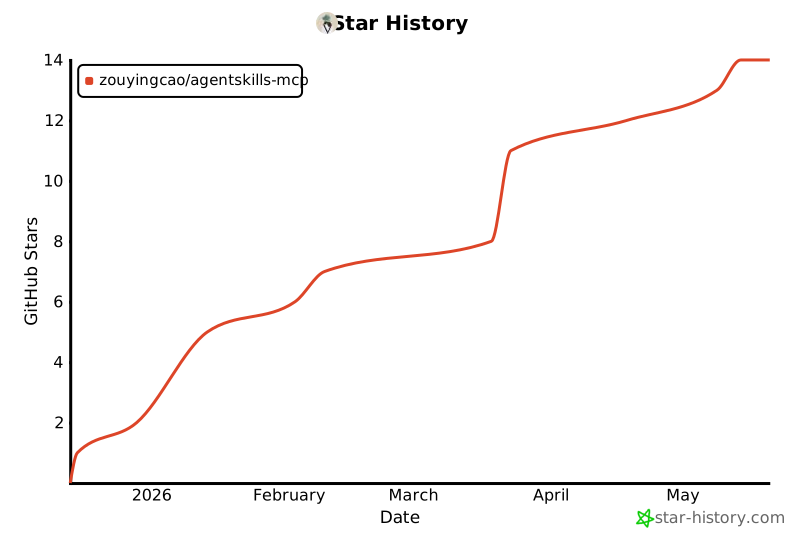
📈 Star History
Release history Release notifications | RSS feed


Download files
Download the file for your platform. If you're not sure which to choose, learn more about installing packages.
Source Distribution
Built Distribution
Filter files by name, interpreter, ABI, and platform.
If you're not sure about the file name format, learn more about wheel file names.
Copy a direct link to the current filters
File details
Details for the file mcp_agentskills-0.1.1.tar.gz.
File metadata
- Download URL: mcp_agentskills-0.1.1.tar.gz
- Upload date:
- Size: 29.3 kB
- Tags: Source
- Uploaded using Trusted Publishing? No
- Uploaded via: twine/6.2.0 CPython/3.10.0
File hashes
| Algorithm | Hash digest | |
|---|---|---|
| SHA256 |
9f68fb5098bc673daeceda013070eb6c19ef72b7e402467d8058d1d7289835da
|
|
| MD5 |
b9c510c12e42e3e5e2d288238709340e
|
|
| BLAKE2b-256 |
b8b975993b4583c7f156edcaa46118003199b5f81fbaf74015e26513e63354e7
|
File details
Details for the file mcp_agentskills-0.1.1-py3-none-any.whl.
File metadata
- Download URL: mcp_agentskills-0.1.1-py3-none-any.whl
- Upload date:
- Size: 29.0 kB
- Tags: Python 3
- Uploaded using Trusted Publishing? No
- Uploaded via: twine/6.2.0 CPython/3.10.0
File hashes
| Algorithm | Hash digest | |
|---|---|---|
| SHA256 |
ef4904e08984182430e380562530306b070a11a048ed5b5503e8d8ac36255a20
|
|
| MD5 |
0b170b306e4d5faa3a20bc7ac03230cd
|
|
| BLAKE2b-256 |
b15f17d5ded7259ebd2c9fb1e3541c2d52ae0242cd7b5a877dcbee5600e18b0f
|






