
MCP GitHub Learning Assistant


An MCP (Model Context Protocol) server that helps developers discover and learn from open-source projects on GitHub, based on their skill level and goals.
Features
8 tools to support every stage of open-source learning:
| Tool | Description |
|---|---|
analyze_repo_for_learning |
Score a repo: stars, doc quality, difficulty, prerequisites, suggested learning path |
recommend_learning_repos |
Curated recommendations per tech stack (Spring Boot, FastAPI, Vue, React, Electron, HarmonyOS) |
get_repo_roadmap |
Generate a step-by-step learning roadmap from a repo's directory structure |
find_similar_repos |
Find thematically similar repos (same language/topic) for comparison |
find_good_first_issues |
Find beginner-friendly open issues (good first issue / help wanted) |
compare_learning_repos |
Compare 2+ candidate repos and suggest which to learn first |
get_trending_repos_for_learning |
Find breakout repos created recently by language/topic |
get_server_info |
Verify the MCP server connection |
Screenshots
| MCP Inspector - Tools list | MCP Inspector - analyze_repo_for_learning result |
|---|---|
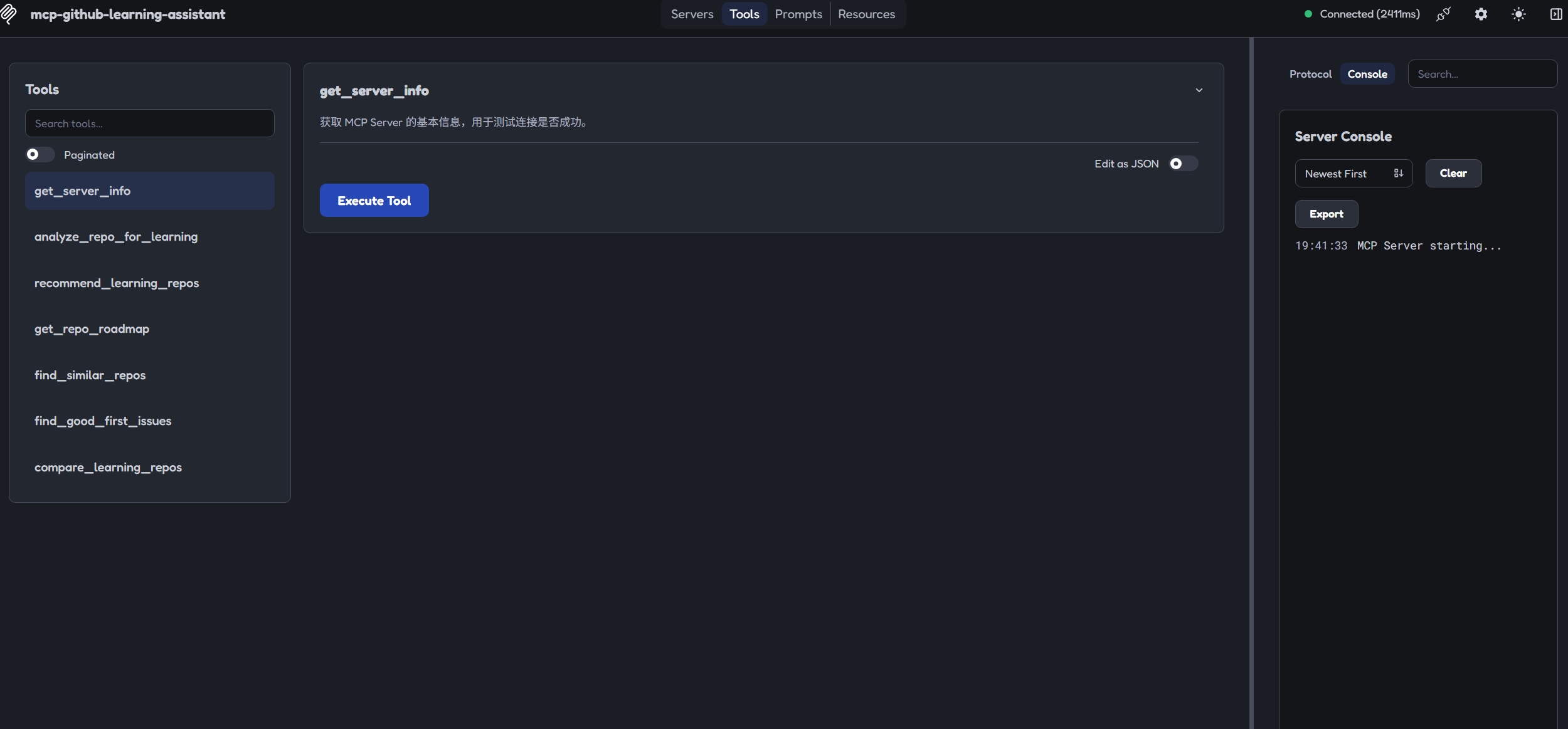 |
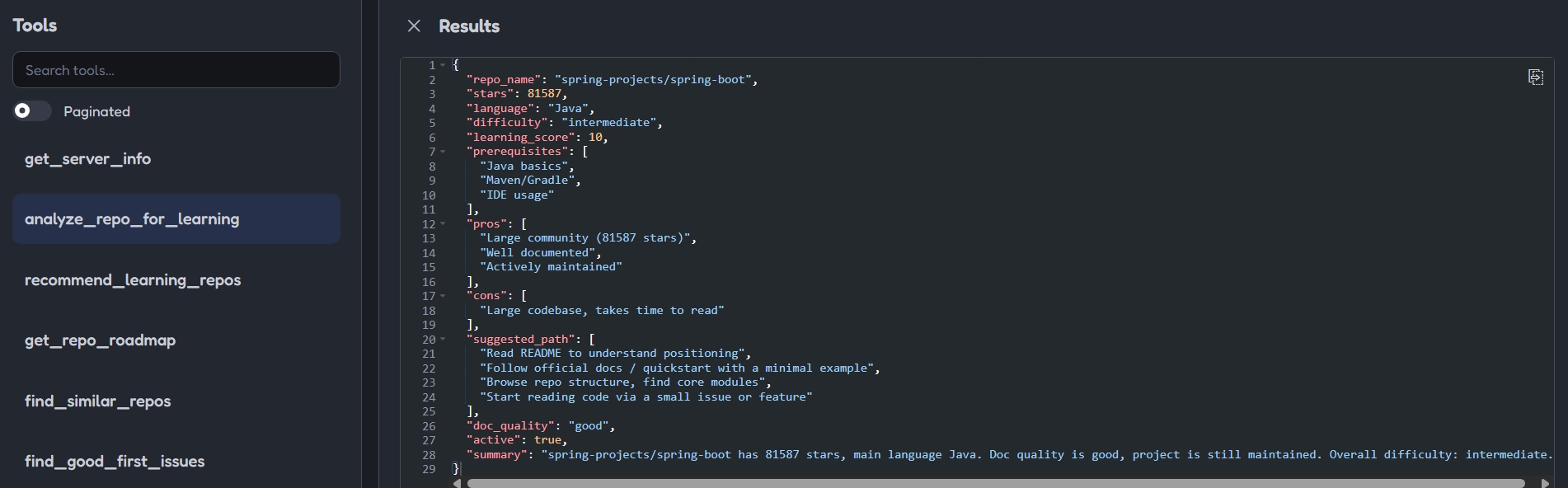 |
Screenshots use dark-mode crops under 500KB each.
Installation
pip install mcp-github-learning-assistant
Requires Python 3.10+ and mcp>=2.3.0.
Configuration
Set your GitHub Personal Access Token:
# Windows PowerShell
$env:GITHUB_TOKEN = "your_github_token"
# Linux / macOS
export GITHUB_TOKEN=your_github_token
Token scope: fine-grained PAT with no special permissions (public repo read-only) is enough.
Entry Point
After pip install mcp-github-learning-assistant, the console command mcp-github-learning is available:
mcp-github-learning
This is equivalent to python -m mcp_github_learning_assistant.
Usage in MCP Clients
MCP Inspector (development)
npx @modelcontextprotocol/inspector mcp-github-learning
Cherry Studio
- Open Cherry Studio, go to Settings -> MCP
- Add an MCP server with the command
mcp-github-learning - Set the environment variable
GITHUB_TOKEN
Claude Desktop
Edit claude_desktop_config.json:
{
  "mcpServers": {
    "mcp-github-learning": {
      "command": "mcp-github-learning",
      "env": {
        "GITHUB_TOKEN": "your_github_token"
      }
    }
  }
}
On Windows, if the command is not found, use the full path or fall back to
python -m mcp_github_learning_assistant.
DSH / Dify
Add an MCP server of type stdio:
name: mcp-github-learning
transport: stdio
command: mcp-github-learning
env:
  GITHUB_TOKEN: your_github_token
If the client does not support custom env, set GITHUB_TOKEN at the system level before launching the client.
Current limitations
These are known and intentional, not bugs. They are listed so the tool's output is not over-trusted.
- No AI/LLM layer. Scoring is deterministic: star thresholds, README byte length, and directory-name keyword matching. There are no embeddings and no model calls.
recommend_learning_reposuses a curated seed list, currently covering Spring Boot, FastAPI, Vue, React, Electron and HarmonyOS. Any other stack returns an empty list rather than a bad guess.- Only
get_trending_repos_for_learningderives its ranking from data — it computesstars / age_in_daysand re-sorts, since GitHub has no public trending API. - No HTTP caching, retry, backoff, or pagination. Unauthenticated GitHub allows 60 requests/hour, and
one
recommend_learning_reposcall can spend several of them. Always setGITHUB_TOKEN. - Some parameters are accepted but not yet used (
depthinget_repo_roadmap,user_levelcomparison weighting incompare_learning_repos). They are reserved for the next iteration. - Test coverage is partial. 9 tests cover
analyze,roadmap,trendingandinfo; therecommender,comparer,similarandissuefindmodules have none.
Development
git clone https://github.com/iyiook333/mcp-github-learning-assistant.git
cd mcp-github-learning-assistant
pip install -e .[dev]
pytest
License
MIT
1 maintainer

Metadata
1 maintainer
Release files for mcp-github-learning-assistant 0.1.1
For a detailed explanation of source distributions (sdists) and built distributions (wheels), please see the package formats documentation.
Source distribution (sdist)
| File | Size | Uploaded | |
|---|---|---|---|
| mcp_github_learning_assistant-0.1.1.tar.gz | 364.9 kB | Details |
Built distribution (wheel)
| File | Interpreter | ABI | Platform | Reset |
|---|---|---|---|---|
| mcp_github_learning_assistant-0.1.1-py3-none-any.whl | Python 3 | none | any | Details |
Total release size: 388.8 kB
Release files / mcp_github_learning_assistant-0.1.1.tar.gz
| Download URL | mcp_github_learning_assistant-0.1.1.tar.gz |
|---|---|
| Size | 364.9 kB |
| Tags | Source |
|
SHA-256 checksum How to use checksums |
719f1c2c245ec36d65b18f827628d4dec99e920cffbcd2e00a92f66139fecb12
|
|
BLAKE2b-256 checksum How to use checksums |
f7b467b3e5252b2652d84bdef8ce00b1f6df40e3be0dc9af6732ada8baf916ef
|
| Upload date | |
|
Uploaded using Trusted Publishing? What is trusted publishing? |
No |
| Uploaded via |
twine/7.0.0 CPython/3.12.10
|
Release files / mcp_github_learning_assistant-0.1.1-py3-none-any.whl
| Download URL | mcp_github_learning_assistant-0.1.1-py3-none-any.whl |
|---|---|
| Size | 23.8 kB |
| Tags | Python 3 |
|
SHA-256 checksum How to use checksums |
4ab472354bdbd2db9b184fc63e9c807b10524e744f045cdca6a921847812d9de
|
|
BLAKE2b-256 checksum How to use checksums |
8c6c4c0268fbce3db1ef1bc11abf699002d16a9cdd70d59833d361d37241419d
|
| Upload date | |
|
Uploaded using Trusted Publishing? What is trusted publishing? |
No |
| Uploaded via |
twine/7.0.0 CPython/3.12.10
|














