
MCP server for querying FRINK SPARKQL endpoints, a project by the NSF Prototype Open Knowledge Network (Proto-OKN) program.

Project description
MCP Proto-OKN Server




A Model Context Protocol (MCP) server providing seamless access to SPARQL endpoints with specialized support for the NSF-funded Proto-OKN Project (Prototype Open Knowledge Network). This server enables querying the scientific knowledge graphs hosted on the FRINK platform. In addition, third-party SPARQL endpoints can be queried.
Features
- 🔗 FRINK Integration: Automatic detection and documentation linking for FRINK-hosted knowledge graphs
- 🧬 Proto-OKN Ecosystem: Optimized support for biomedical and scientific knowledge graphs, including:
- SPOKE - Scalable Precision Medicine Open Knowledge Engine
- BioBricks ICE - Chemical safety and cheminformatics data
- SAWGraph - Safe Agricultural Products and Water monitoring
- Additional Proto-OKN knowledge graphs - Expanding ecosystem of scientific data
- ⚙️ Flexible Configuration: Support for both FRINK and custom SPARQL endpoints
- 📚 Automatic Documentation: Registry links and metadata for Proto-OKN knowledge graphs
- 🔗 Federated Query: Prompts can query multiple endpoints
Architecture
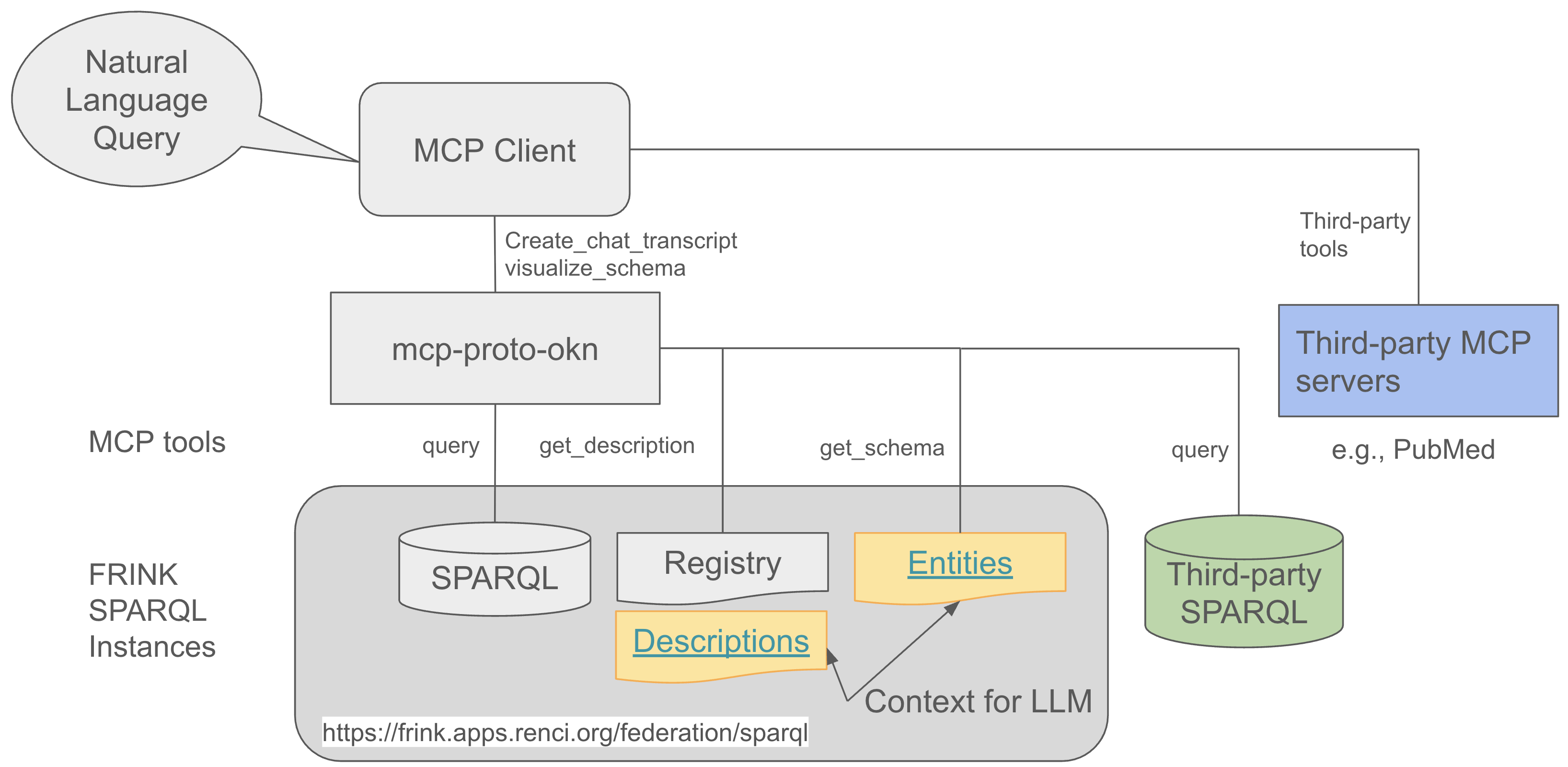
The MCP Server Proto-OKN acts as a bridge between AI assistants (like Claude) and SPARQL knowledge graphs, enabling natural language queries to be converted into structured SPARQL queries and executed against scientific databases.
Prerequisites
Before installing the MCP Server Proto-OKN, ensure you have:
- Operating System: macOS, Linux, or Windows
- Client Application: One of the following:
- Claude Desktop with Pro or Max subscription
- VS Code Insiders with GitHub Copilot subscription
Installation
Installation instructions for Claude Desktop and VS Code Insiders
Quick Start
Once configured, you can start querying knowledge graphs through natural language prompts in Claude Desktop or VS Code chat interface.
Select and Configure MCP Tools
From the top menu bar:
1. Select: Claude->Settings->Connectors
2. Click: Configure for the MCP endpoints you want to use
3. Select Tool permissions: Always allow
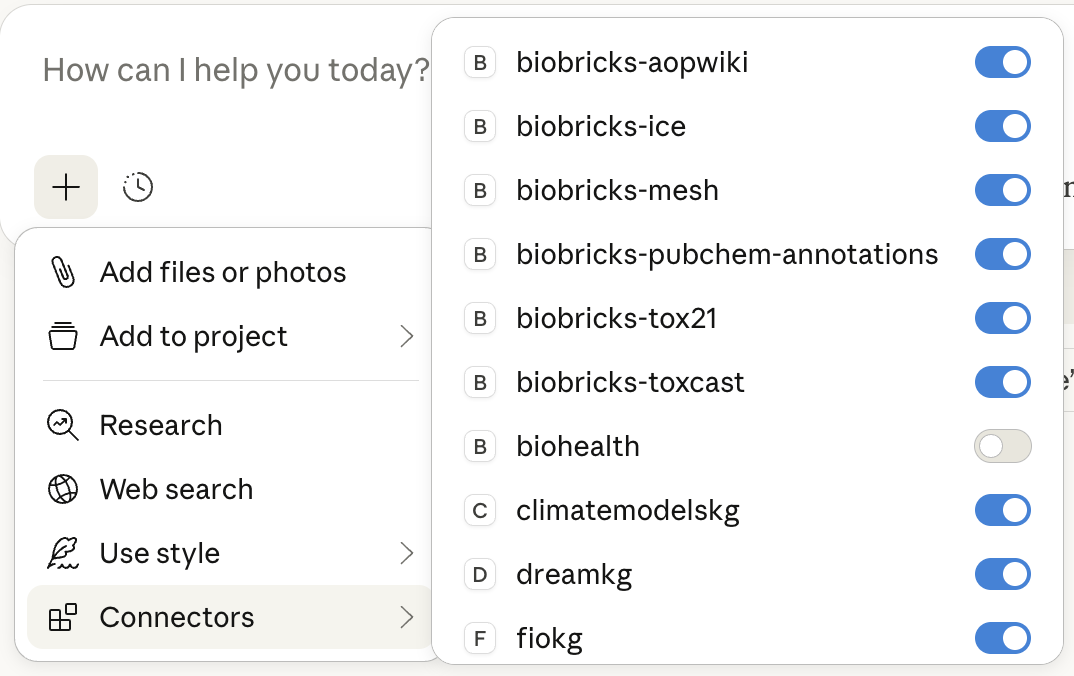
In the prompt dialog box, click the + button:
1. Turn off Web search
2. Toggle MCP services on/off as needed
To create a transcript of a chat (see examples below), use the following prompt:
Create a chat transcript.
The transcript can then be downloaded in .md format.
Example Queries
-
Knowledge Graph Overview and Class Diagram (spoke-genelab, spoke-okn, biobricks-toxcast, sawgraph)
Use
@kg_nameto refer to a specific KG, e.g.,@spoke-genelabin a chat. The examples below create an overview and a class diagram for each KG. -
Spaceflight Gene Expression Analysis (spoke-genelab, spoke-okn)
-
PFOA in Drinking Water (spoke-genelab)
-
Disease Prevalence in the US (spoke-okn)
-
Disease Prevalence - Socio-Economic Factors Correlation (spoke-okn)
-
Data about PFOA (spoke-okn, biobricks-toxcast)
-
Biological Targets for PFOA (biobricks-toxcast)
-
Criminal Justice Patterns (scales)
-
Michigan Flooding Event (ufokn)
-
Chemical Identifiers (Proto-OKN KGs)
Building and Publishing (maintainers only)
# Increment version number (major|minor|patch)
uv version --bump minor

# Remove distributions for previous versions
rm -rf dist

# Build the package
uv build

# Publish to TestPyPI first (recommended)
uv publish --publish-url https://test.pypi.org/legacy/ --token pypi-YOUR_TEST_PYPI_TOKEN_HERE

# Test the deployment
For testing, add the following parameters to the `args` option in the claude_desktop_config.json.
  "args": [
    "--index-url",
    "https://test.pypi.org/simple/",
    "--extra-index-url",
    "https://pypi.org/simple/",
    "mcp-proto-okn"
  ]

# Publish to PyPI (production release)
uv publish --token pypi-YOUR_PYPI_TOKEN_HERE

# Clear uv cache (optional, if there are problems)
uv cache clean

# Remove cached tool installation (optional, if problems persist)
rm -rf ~/.local/share/uv/tools/mcp-proto-okn
API Reference
Available Tools
get_description
Retrieves endpoint metadata and documentation.
Parameters:
- None
Returns:
- String containing either:
- Registry page content prefixed with a header line identifying the registry source (for FRINK endpoints)
- The static/server-provided description when no registry URL applies
get_schema
Retrieves the schema (classes, relationships, properties) for the knowledge graph endpoint.
Important: Always call this tool FIRST before making any queries to understand what data is available in the knowledge graph.
Parameters:
compact(boolean, optional): Iftrue(default), returns compact URI:label mappings. Iffalse, returns full metadata with descriptions.
Returns:
- JSON object containing the endpoint's schema information in the specified format, including:
- Available classes
- Relationships/predicates
- Properties with labels and descriptions (when available)
query
Executes SPARQL queries against the configured endpoint.
Important: You MUST call
get_schema()first before using this query tool to understand the available classes and predicates in the knowledge graph.
Parameters:
query_string(string, required): A valid SPARQL query stringformat(string, optional): Output format. Options:'compact'(default): Columns + data arrays, no repeated keys'simplified': JSON with dict rows'full': Complete SPARQL JSON response'values': List of dictionaries'csv': CSV string format
Returns:
- Query results in the specified format
clean_mermaid_diagram
Cleans Mermaid class diagrams by removing unwanted elements.
Parameters:
mermaid_content(string, required): The raw Mermaid class diagram content
Returns:
- Cleaned Mermaid content with the following elements removed:
- All note statements that would render as unreadable yellow boxes
- Empty curly braces from class definitions
Command Line Interface
Required Parameters:
--endpoint: SPARQL endpoint URL (e.g.,https://frink.apps.renci.org/spoke/sparql)
Optional Parameters:
--description: Custom description for the SPARQL endpoint (auto-generated for FRINK endpoints)
Example Usage:
uvx mcp-proto-okn --endpoint https://frink.apps.renci.org/spoke/sparql
Troubleshooting
Common Issues
MCP server not appearing in Claude Desktop:
- Ensure you've completely quit and restarted Claude Desktop (not just closed the window)
- Check that your JSON configuration is valid (use a JSON validator)
- Verify that
uvxis installed and accessible in your PATH
Connection errors:
- Check your internet connection
- Verify the SPARQL endpoint URL is correct and accessible
- Some endpoints may have rate limits or temporary downtime
Performance issues:
- Complex SPARQL queries may take time to execute
- Consider breaking down complex queries into smaller parts
- Check the endpoint's documentation for query best practices
License
This project is licensed under the BSD 3-Clause License. See the LICENSE file for details.
Citation
If you use MCP Server Proto-OKN in your research, please cite the following works:
@software{rose2025mcp-proto-okn,
  title={MCP Server Proto-OKN},
  author={Rose, P.W. and Nelson, C.A. and Shi, Y. and Baranzini, S.E.},
  year={2025},
  url={https://github.com/sbl-sdsc/mcp-proto-okn}
}

@software{rose2025spoke-genelab,
  title={NASA SPOKE-GeneLab Knowledge Graph},
  author={Rose, P.W. and Nelson, C.A. and Gebre, S.G. and Saravia-Butler AM, and Soman, K. and Grigorev, K.A. and Sanders, L.M. and Costes, S.V. and Baranzini, S.E.},
  year={2025},
  url={https://github.com/BaranziniLab/spoke_genelab}
}
Related Publications
-
Nelson, C.A., Rose, P.W., Soman, K., Sanders, L.M., Gebre, S.G., Costes, S.V., Baranzini, S.E. (2025). "Nasa Genelab-Knowledge Graph Fabric Enables Deep Biomedical Analysis of Multi-Omics Datasets." NASA Technical Reports, 20250000723. Link
-
Sanders, L., Costes, S., Soman, K., Rose, P., Nelson, C., Sawyer, A., Gebre, S., Baranzini, S. (2024). "Biomedical Knowledge Graph Capability for Space Biology Knowledge Gain." 45th COSPAR Scientific Assembly, July 13-21, 2024. Link
Acknowledgments
Funding
This work is in part supported by:
- National Science Foundation Award #2333819: "Proto-OKN Theme 1: Connecting Biomedical information on Earth and in Space via the SPOKE knowledge graph"
Related Projects
- Proto-OKN Project - Prototype Open Knowledge Network initiative
- FRINK Platform - Knowledge graph hosting infrastructure
- Knowledge Graph Registry - Catalog of available knowledge graphs
- Model Context Protocol - AI assistant integration standard
- Original MCP Server SPARQL - Base implementation reference
For questions, issues, or contributions, please visit our GitHub repository.
Release history Release notifications | RSS feed


Download files
Download the file for your platform. If you're not sure which to choose, learn more about installing packages.
Source Distribution
Built Distribution
Filter files by name, interpreter, ABI, and platform.
If you're not sure about the file name format, learn more about wheel file names.
Copy a direct link to the current filters
File details
Details for the file mcp_proto_okn-0.4.0.tar.gz.
File metadata
- Download URL: mcp_proto_okn-0.4.0.tar.gz
- Upload date:
- Size: 906.0 kB
- Tags: Source
- Uploaded using Trusted Publishing? No
- Uploaded via: uv/0.7.3
File hashes
| Algorithm | Hash digest | |
|---|---|---|
| SHA256 |
98fce07c53576061efff4f903985064ca62db1defa9238142dfb200f8ca96825
|
|
| MD5 |
a22be181fd7d565e3855233431f20e1a
|
|
| BLAKE2b-256 |
31b64cf4d21e0005557caeab1234c884e92fe3d3727d81139fb6ffa6c2b19e2b
|
File details
Details for the file mcp_proto_okn-0.4.0-py3-none-any.whl.
File metadata
- Download URL: mcp_proto_okn-0.4.0-py3-none-any.whl
- Upload date:
- Size: 33.9 kB
- Tags: Python 3
- Uploaded using Trusted Publishing? No
- Uploaded via: uv/0.7.3
File hashes
| Algorithm | Hash digest | |
|---|---|---|
| SHA256 |
94db19b5eba393b81951eafa8dbed90e910f964a49ff39d14b4ed71cd07bf3d2
|
|
| MD5 |
d5034d44e91529ee8ce7481777e25a74
|
|
| BLAKE2b-256 |
9bf43bfb177a6b7779d2fc55bed2aa62fabb3a370773b8a9f9a8af0c25a07482
|






