
A generic multi-tool MCP Agent with Time, Weather, Dictionary, Calculator, etc.

Project description
MCPAgentAI 🚀


MCPAgentAI is a standardized tool wrapping framework for implementing and managing diverse tools in a unified way. It is designed to help developers quickly integrate and launch tool-based use cases.
Key Features
- 🔧 Standardized Wrapping: Provides an abstraction layer for building tools using the MCP protocol.
- 🚀 Flexible Use Cases: Easily add or remove tools to fit your specific requirements.
- ✨ Out-of-the-Box Tools: Includes pre-built tools for common scenarios:
- 🕑 Time utilities
- ☁️ Weather information
- 📚 Dictionary lookups
- 🧮 Calculator for mathematical expressions
Tech Stack 🛠️
- Python: Core programming language
- MCP Framework: Communication protocol
- Docker: Containerization
🤔 What is MCP?
The Model Context Protocol (MCP) is a cutting-edge standard for context sharing and management across AI models and systems. Think of it as the language AI agents use to interact seamlessly. 🧠✨
Here’s why MCP matters:
- 🧩 Standardization: MCP defines how context can be shared across models, enabling interoperability.
- ⚡ Scalability: It’s built to handle large-scale AI systems with high throughput.
- 🔒 Security: Robust authentication and fine-grained access control.
- 🌐 Flexibility: Works across diverse systems and AI architectures.
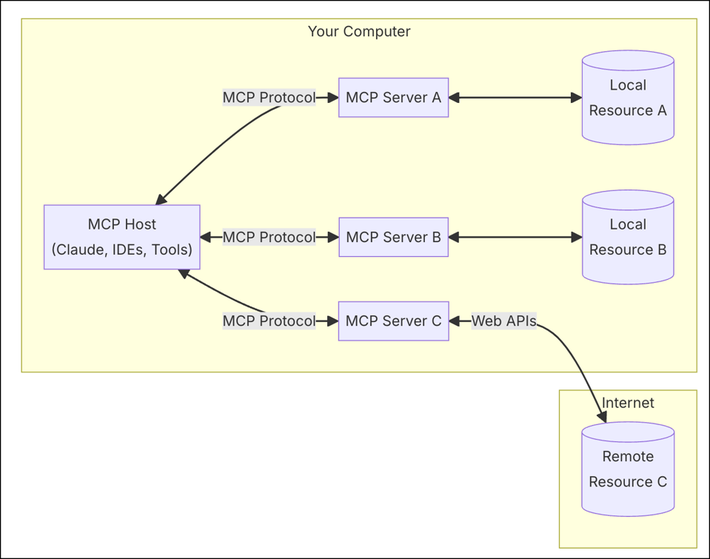 source
Installation 📦
Install via PyPI
pip install mcpagentai
Usage 💻
Run Locally
mcpagentai --local-timezone "America/New_York"
Run in Docker
-
Build the Docker image:
docker build -t mcpagentai .
-
Run the container:
docker run -i --rm mcpagentai
Tutorial: Selecting Specific Tools
You can configure MCPAgentAI to run only certain tools by modifying the agent configuration in your server or by updating the server.py file to only load desired agents. For example:
from mcpagentai.tools.time_agent import TimeAgent
from mcpagentai.tools.weather_agent import WeatherAgent
from mcpagentai.core.multi_tool_agent import MultiToolAgent

multi_tool_agent = MultiToolAgent([
    TimeAgent(),
    WeatherAgent()
])
This setup will only enable Time and Weather tools.
Integration Example: Claude Desktop Configuration
You can integrate MCPAgentAI with Claude Desktop using the following configuration:
claude_desktop_config.json
{
    "mcpServers": {
        "mcpagentai": {
            "command": "docker",
            "args": ["run", "-i", "--rm", "mcpagentai"]
        }
    }
}
Development 🛠️
-
Clone this repository:
git clone https://github.com/mcpagent/mcpagentai.git
cd mcpagentai
-
(Optional) Create a virtual environment:
python3 -m venv .venv
source .venv/bin/activate
-
Install dependencies:
pip install -e .
-
Build the package:
python -m build
-
Run tests:
pytest
Contributing 🤝
We welcome contributions! Please open an issue or pull request.
License: MIT
Enjoy! 🎉
Release history Release notifications | RSS feed


Download files
Download the file for your platform. If you're not sure which to choose, learn more about installing packages.
Source Distribution
Built Distribution
Filter files by name, interpreter, ABI, and platform.
If you're not sure about the file name format, learn more about wheel file names.
Copy a direct link to the current filters
File details
Details for the file mcpagentai-0.1.1.tar.gz.
File metadata
- Download URL: mcpagentai-0.1.1.tar.gz
- Upload date:
- Size: 7.9 kB
- Tags: Source
- Uploaded using Trusted Publishing? No
- Uploaded via: twine/6.0.1 CPython/3.13.1
File hashes
| Algorithm | Hash digest | |
|---|---|---|
| SHA256 |
c24b1cde2839cc2e72a570837fd3d9f3416657970bf04a84deac8ebc152c793a
|
|
| MD5 |
f68860f814224cf7a86a6918bd391588
|
|
| BLAKE2b-256 |
4817b7f3df9e547754b92288d220b1fe75a7e8afa1921402502bd239d4605cc5
|
File details
Details for the file mcpagentai-0.1.1-py3-none-any.whl.
File metadata
- Download URL: mcpagentai-0.1.1-py3-none-any.whl
- Upload date:
- Size: 12.6 kB
- Tags: Python 3
- Uploaded using Trusted Publishing? No
- Uploaded via: twine/6.0.1 CPython/3.13.1
File hashes
| Algorithm | Hash digest | |
|---|---|---|
| SHA256 |
733ab66b3b9b27ee2fb460bbfec6b88c7431e8910ac2a652da120ce6d629d0b9
|
|
| MD5 |
46df569ca76ab297975c6e5bb8272775
|
|
| BLAKE2b-256 |
0b9dfcbbb9eac348714b3e38d037271de867f741749d32aac3e8db455d771cc9
|






