
md2doc - Markdown to DOCX MCP Server



A Model Context Protocol (MCP) server that converts Markdown text to DOCX format using an external conversion service.
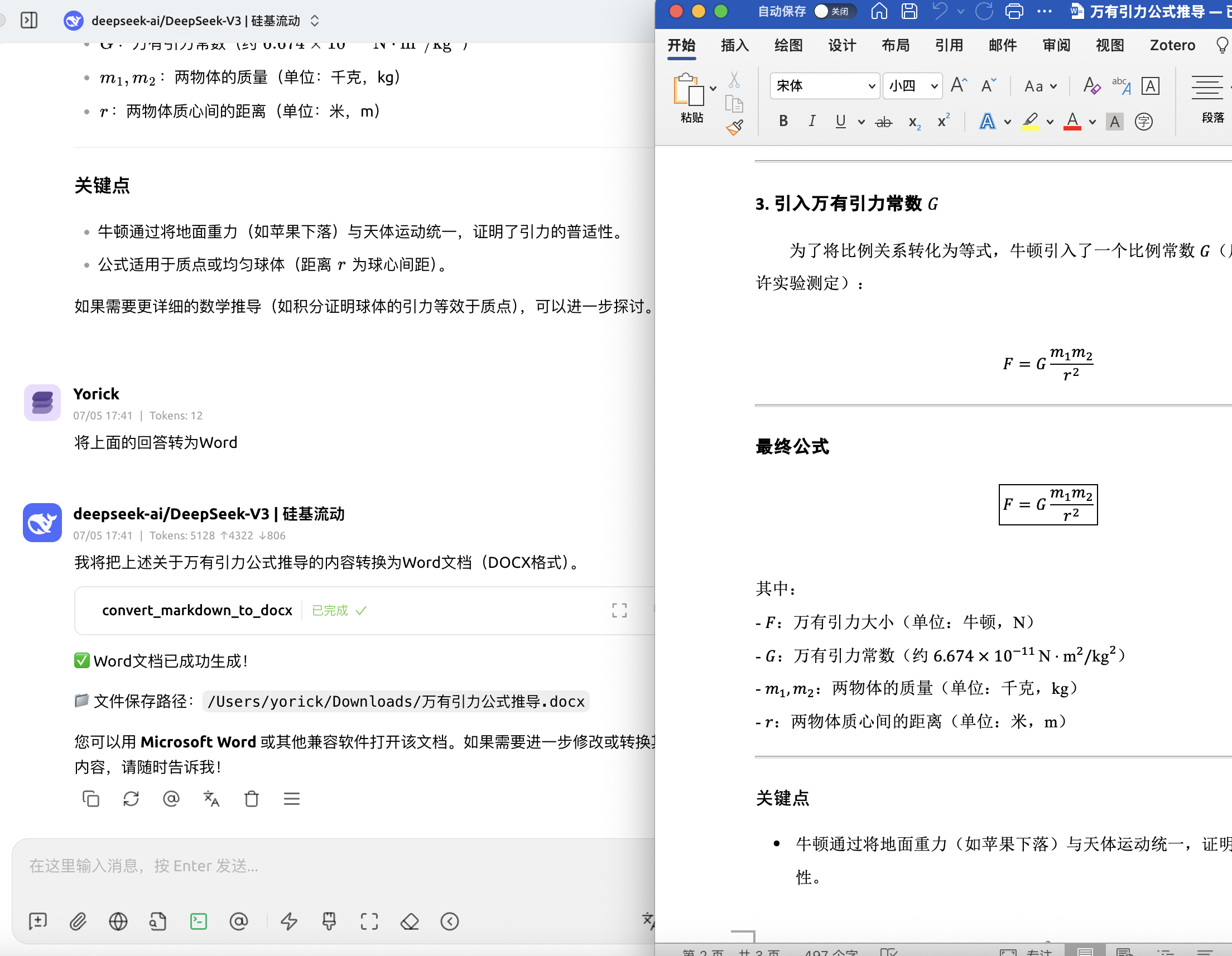
Features
- Convert Markdown text to DOCX format
- Support for custom templates
- Multi-language support (English, Chinese, etc.)
- Automatic file download to user's Downloads directory
- Template listing and management
Usage
Cherry Studio
- Open Cherry Studio
- Go to Settings → MCP
- Add the server configuration:
{
  "mcpServers": {
    "md2doc": {
      "command": "uvx",
      "args": ["md2doc"],
      "env": {
        "DEEP_SHARE_API_KEY": "your-api-key-here"
      }
    }
  }
}
Claude Desktop
-
Open your Claude Desktop configuration file:
- macOS:
~/Library/Application Support/Claude/claude_desktop_config.json - Windows:
%APPDATA%\Claude\claude_desktop_config.json
- macOS:
-
Add the md2doc server:
{
  "mcpServers": {
    "md2doc": {
      "command": "uvx",
      "args": ["md2doc"],
      "env": {
        "DEEP_SHARE_API_KEY": "your-api-key-here"
      }
    }
  }
}
-
Restart Claude Desktop
Command Line (Quick Start)
For immediate use without any client setup:
# Install and run the server
uvx md2doc

# Or with environment variable
DEEP_SHARE_API_KEY="your-api-key-here" uvx md2doc
Python Integration
You can also use md2doc directly in your Python projects:
import asyncio
from md2doc.api_client import ConversionAPIClient
from md2doc.models import ConvertTextRequest

async def convert_markdown():
    client = ConversionAPIClient()

    request = ConvertTextRequest(
        content="# Hello World\n\nThis is **markdown** content.",
        filename="example",
        language="zh",
        template_name="templates",
        remove_hr=False,
        compat_mode=True
    )

    response = await client.convert_text(request)
    if response.success:
        print(f"File saved to: {response.file_path}")

# Run the conversion
asyncio.run(convert_markdown())
Other MCP Clients
The server works with any MCP-compatible client. Configure it to run:
uvx md2doc
With environment variables:
DEEP_SHARE_API_KEY="your-api-key-here" uvx md2doc
Cloud Deployment (Remote Server)
When deploying this MCP server on a cloud server (VPS/Docker), set MCP_SAVE_REMOTE=true to return a temporary download link instead of saving to a local directory:
# In your cloud environment
export DEEP_SHARE_API_KEY="your-api-key-here"
export MCP_SAVE_REMOTE=true

uvx md2doc
The server will provide a download link for the converted document.
API Key
Free Trial API Key
Use this key for testing:
f4e8fe6f-e39e-486f-b7e7-e037d2ec216f
Purchase API Key - Super Low Price!
Available Tools
convert_markdown_to_docx: Convert markdown text to DOCXlist_templates: Get available templates by language
License
MIT
1 maintainer

Download files
Download the file for your platform. If you're not sure which to choose, learn more about installing packages.
Source Distribution
Built Distribution
Filter files by name, interpreter, ABI, and platform.
If you're not sure about the file name format, learn more about wheel file names.
Copy a direct link to the current filters
File details
Details for the file md2doc-0.1.3.tar.gz.
File metadata
- Download URL: md2doc-0.1.3.tar.gz
- Upload date:
- Size: 778.1 kB
- Tags: Source
- Uploaded using Trusted Publishing? No
- Uploaded via:
uv/0.7.19
File hashes
| Algorithm | Hash digest | |
|---|---|---|
| SHA256 |
ccafe6e9812a408bb32dd92c1208f714cd3c8a2f759ea8650578a1c6ae9be9c4
|
|
| MD5 |
8a6a2baa51aee601cf3705bf218c3f49
|
|
| BLAKE2b-256 |
5ecb574d4a3821c6773b261d4ea3561069d47594d81f38bb4d673ff9832dcf23
|
File details
Details for the file md2doc-0.1.3-py3-none-any.whl.
File metadata
- Download URL: md2doc-0.1.3-py3-none-any.whl
- Upload date:
- Size: 7.1 kB
- Tags: Python 3
- Uploaded using Trusted Publishing? No
- Uploaded via:
uv/0.7.19
File hashes
| Algorithm | Hash digest | |
|---|---|---|
| SHA256 |
c4d22f62f6367ecb1289514ce0c716d237ea5db105aff67e5e23797dac75e907
|
|
| MD5 |
c7fd6f7b272c5d58ecca11c5d7fd5c3f
|
|
| BLAKE2b-256 |
b28826e84db050f8d3bc785779ce960268defcd89675c83ca3f8782aecbb5717
|














