
Markdown to DOCX conversion MCP Server

Project description
md2doc - Markdown to DOCX MCP Server


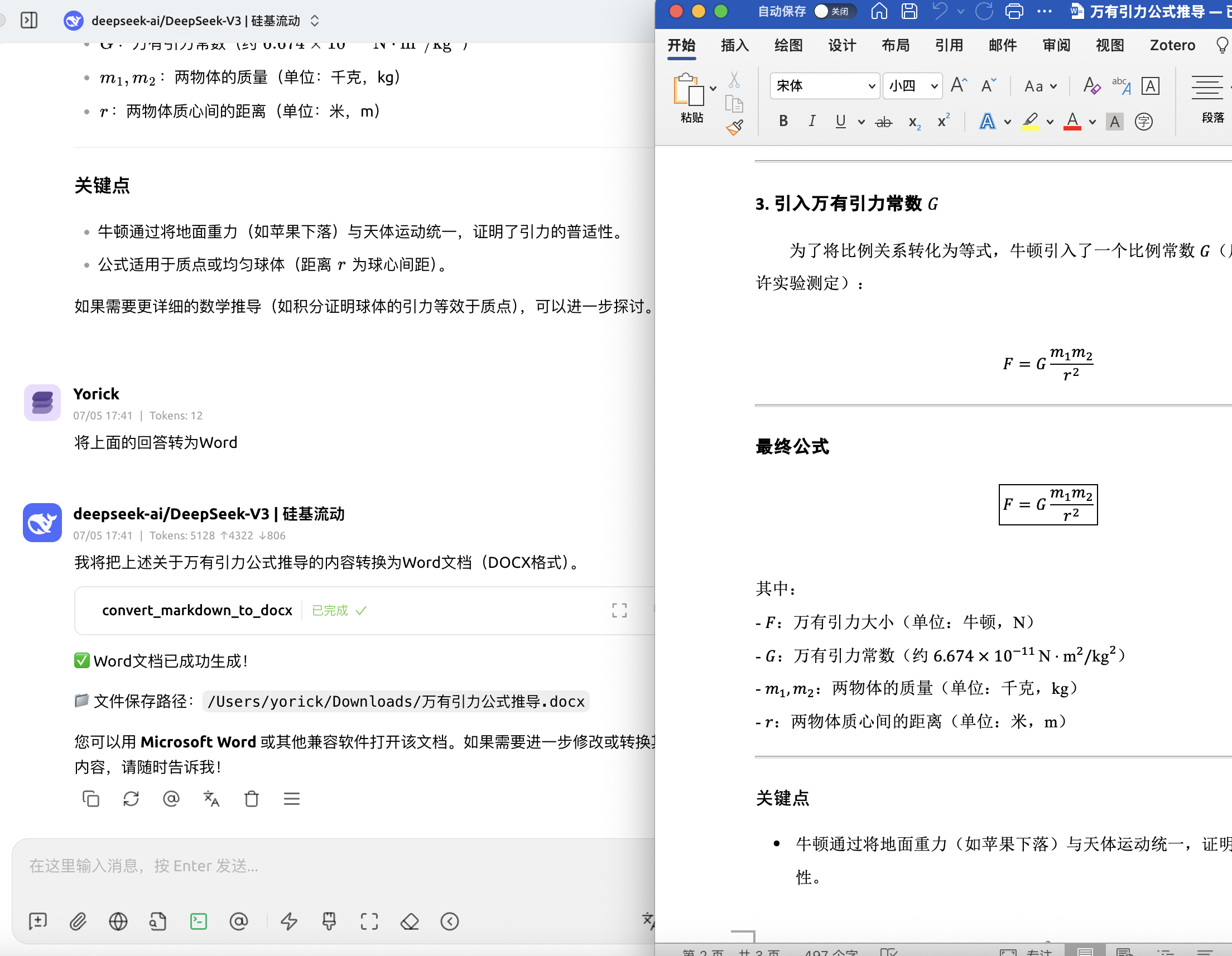
A Model Context Protocol (MCP) server that converts Markdown text to DOCX format using an external conversion service.
Features
- Convert Markdown text to DOCX format
- Support for custom templates
- Multi-language support (English, Chinese, etc.)
- Automatic file download to user's Downloads directory
- Template listing and management
Installation
Prerequisites
-
Install uv (recommended):
curl -LsSf https://astral.sh/uv/install.sh | sh
source $HOME/.local/bin/env
Or install via Homebrew (Only Mac):
brew install uv
Install from PyPI (Recommended)
The easiest way to install and use md2doc:
uvx md2doc
This will automatically install the package and run the MCP server.
Install from Source
-
Clone this repository
-
Install dependencies using uv (recommended):
uv pip install -e .
Or using traditional pip:
pip install -e .
Environment Variables
Setting Environment Variables
macOS/Linux
# Temporary (current session only)
export DEEP_SHARE_API_KEY="your-api-key-here"

# Permanent - add to ~/.zshrc or ~/.bashrc
echo 'export DEEP_SHARE_API_KEY="your-api-key-here"' >> ~/.zshrc
source ~/.zshrc
Windows (Command Prompt)
# Temporary (current session only)
set DEEP_SHARE_API_KEY=your-api-key-here

# Permanent
setx DEEP_SHARE_API_KEY "your-api-key-here"
Windows (PowerShell)
# Temporary (current session only)
$env:DEEP_SHARE_API_KEY="your-api-key-here"

# Permanent
[Environment]::SetEnvironmentVariable("DEEP_SHARE_API_KEY", "your-api-key-here", "User")
API Key
Free Trial API Key
Use this key for testing:
f4e8fe6f-e39e-486f-b7e7-e037d2ec216f
Purchase API Key - Super Low Price!
Usage
As an MCP Server
Add this to your MCP client configuration:
{
  "mcpServers": {
    "md2doc": {
      "command": "uv",
      "args": [
        "--directory",
        "/PATH/TO/md2doc-mcp",
        "run",
        "python",
        "-m",
        "md2doc.server"
      ],
      "env": {
        "DEEP_SHARE_API_KEY": "your-api-key-here"
      }
    }
  }
}
Available Tools
convert_markdown_to_docx: Convert markdown text to DOCXlist_templates: Get available templates by language
Development
Publishing to PyPI
To publish updates to PyPI:
-
Set environment variables:
export UV_PUBLISH_TOKEN="your-pypi-token-here"
export UV_PUBLISH_URL="https://upload.pypi.org/legacy/"
-
Build and publish:
uv build
uv publish
-
Or use the automated script:
./publish.sh
For detailed publishing instructions, see PUBLISHING.md.
License
MIT
Release history Release notifications | RSS feed


Download files
Download the file for your platform. If you're not sure which to choose, learn more about installing packages.
Source Distribution
Built Distribution
Filter files by name, interpreter, ABI, and platform.
If you're not sure about the file name format, learn more about wheel file names.
Copy a direct link to the current filters
File details
Details for the file md2doc-0.1.1.tar.gz.
File metadata
- Download URL: md2doc-0.1.1.tar.gz
- Upload date:
- Size: 6.8 kB
- Tags: Source
- Uploaded using Trusted Publishing? No
- Uploaded via: uv/0.7.19
File hashes
| Algorithm | Hash digest | |
|---|---|---|
| SHA256 |
c49c470f07decfbf3c719f9a0c786f437ccadb12f8c322306d6b0c971f60ab41
|
|
| MD5 |
e66710fae54a05bcf0b0f54d4caf4f84
|
|
| BLAKE2b-256 |
f9035c8831103419b2b9fcd86b98ac33ef8fdc2afc37fe71389b92e859269616
|
File details
Details for the file md2doc-0.1.1-py3-none-any.whl.
File metadata
- Download URL: md2doc-0.1.1-py3-none-any.whl
- Upload date:
- Size: 6.7 kB
- Tags: Python 3
- Uploaded using Trusted Publishing? No
- Uploaded via: uv/0.7.19
File hashes
| Algorithm | Hash digest | |
|---|---|---|
| SHA256 |
cb8a8c1e323415555c7e82d468541f7b7766e0f5dffbc6e36b353a2881f335e8
|
|
| MD5 |
6bb28bfdf21ba39d092fa55ed71d239a
|
|
| BLAKE2b-256 |
1cf9ea08b29465561033722c25ae1a10f5f066647c48943ed9f1b014b1109e90
|






