
md2p
Markdown to Print (md2p)
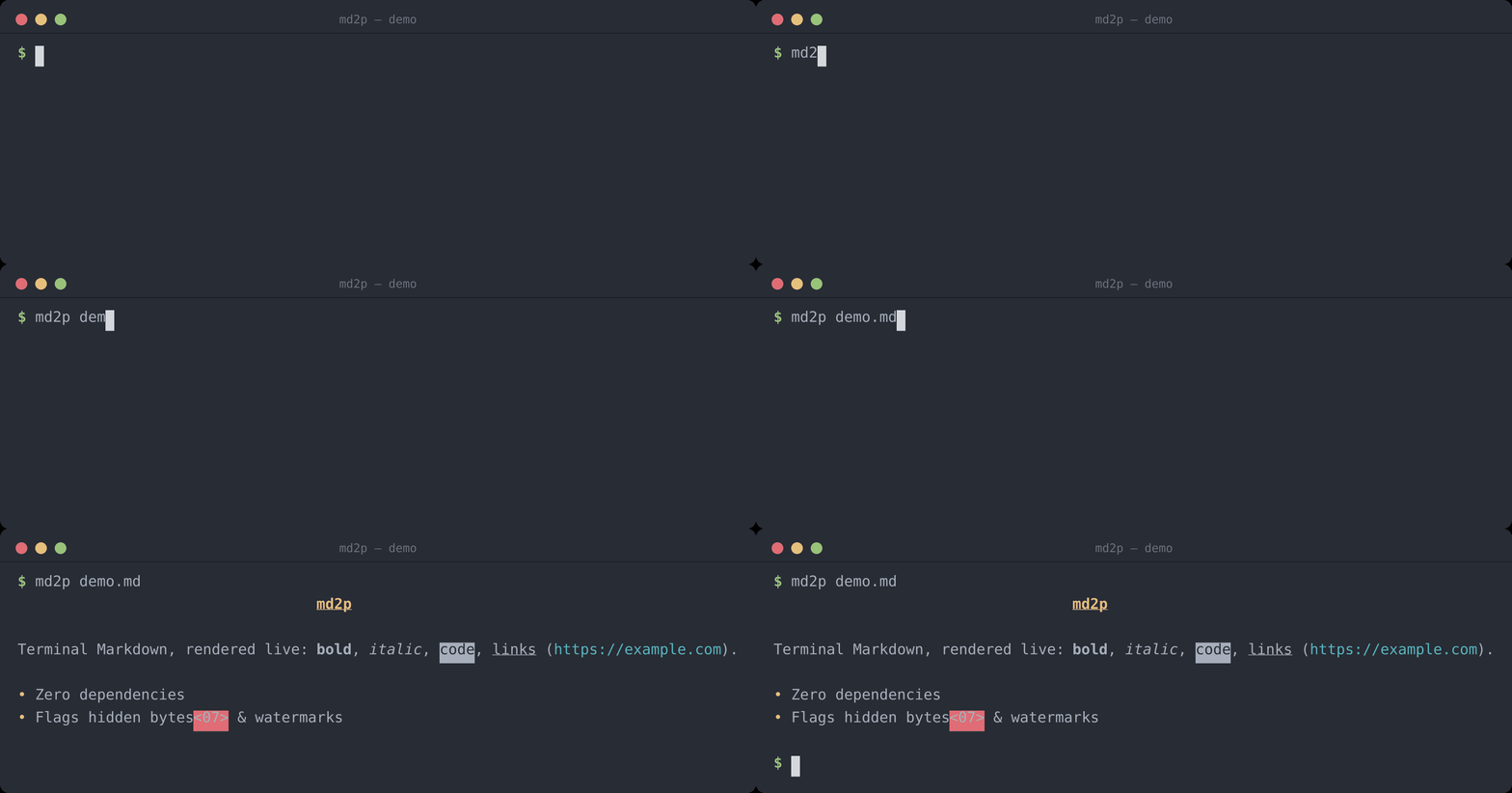
md2p is a small command-line utility for rendering Markdown files to the terminal, using ANSI (or nroff) escape sequences for styling. It is intended as a lightweight helper to preview Markdown content without leaving the terminal.
Version
Current version: 1.0.2
Features
- Renders to stdout with ANSI colour/style escapes, or nroff overstrike sequences via
--nroff - Simple CLI usage with a Markdown file path, or via stdin
- Supported Markdown elements:
- ATX headers
#–######(each level styled distinctly) and setext headers (===/---) - Horizontal rules, blockquotes, fenced code blocks (
```/~~~) - Ordered and unordered lists, including nested indentation
- Tables, rendered as bordered ASCII grids
- Inline formatting: bold, italic, bold+italic, inline code, links, images
- ATX headers
- Non-printable bytes and hidden Unicode variation selectors (a common vector for invisible watermarks/payloads) are never passed through silently — each is replaced with a visible hex marker (see example below)
- Input is capped at 50 MB and raw ANSI escapes in the source file are stripped before rendering, so a malicious Markdown file can't inject terminal escape sequences
Installation
- Ensure you have Python 3.8+ installed.
- (Optional) Create and activate a virtual environment:
python3 -m venv .venv
source .venv/bin/activate
There are no external dependencies required by default.
From PyPI
pip install md2p
# or, without installing into an environment:
uvx md2p README.md
Linux (user install)
To install md2p for your user on Linux, use the included install.sh to copy the script to ~/.local/bin (or your XDG_BIN_HOME):
chmod +x install.sh
./install.sh
# or specify destination explicitly
./install.sh --dest "$HOME/.local/bin"
Uninstall with:
./install.sh --uninstall
Ensure your user bin directory is in PATH, for example add to your shell profile:
export PATH="$HOME/.local/bin:$PATH"
Usage
Run the script with a Markdown file path:
python3 md2p.py path/to/file.md
This prints the processed Markdown to stdout. Redirect output to a file if desired:
python3 md2p.py README.md > out.txt
You can also pipe Markdown in on stdin:
cat README.md | md2p
Options
-v,--version— print the version and exit.-n,--nroff— emit nroff overstrike sequences (X⌫Xfor bold,_⌫Xfor underline) instead of ANSI colour escapes. This is for viewers that interpret the classic nroff bold/underline convention but not ANSI SGR colours — most notably Midnight Commander's internal file viewer innroffmode. Colours, dim and italic are mapped onto the two available styles (bold / underline).
Midnight Commander integration
To preview Markdown with formatting inside mc's internal viewer (F3), add the
following to ~/.config/mc/mc.ext.ini:
[markdown]
Regex=\.(md|mkd|mdown|markdown)$
RegexIgnoreCase=true
View=%view{nroff} md2p --nroff %f
%view{nroff} tells the internal viewer to interpret the overstrike sequences
produced by md2p --nroff. For full ANSI colour instead, drop %view and pipe
through a colour-capable pager: View=md2p %f | less -R.
Example: Headers
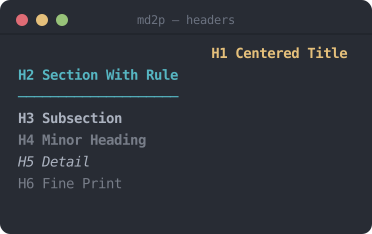
Each ATX header level (# through ######) gets distinct styling — H1 is centred, bold, underlined; H2 gets an underline rule; H3–H6 step down through bold, dim, italic, and plain dim text.
Source Markdown:
# H1 Centered Title
## H2 Section With Rule
### H3 Subsection
#### H4 Minor Heading
##### H5 Detail
###### H6 Fine Print
Terminal output:
Example: Inline Formatting
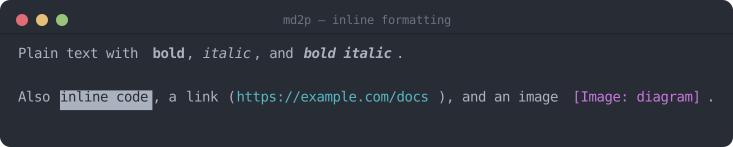
Bold, italic, bold+italic, inline code, links, and images are all styled distinctly.
Source Markdown:
Plain text with **bold**, *italic*, and ***bold italic***.
Also `inline code`, a [link](https://example.com/docs), and an image .
Terminal output:
Example: Lists, Blockquotes & Code Blocks
Source Markdown:
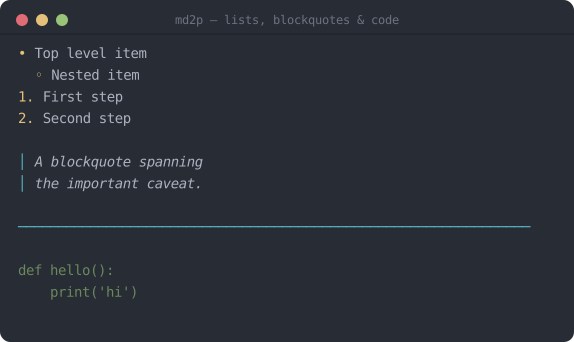
- Top level item
  - Nested item
1. First step
2. Second step

> A blockquote spanning
> the important caveat.

---

```
def hello():
    print('hi')
```
Terminal output:
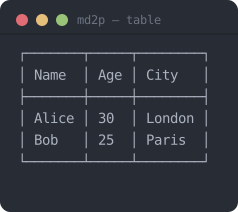
Example: Markdown Table
Tables are rendered as bordered ASCII grids with aligned columns.
Source Markdown:
| Name  | Age | City   |
|-------|-----|--------|
| Alice | 30  | London |
| Bob   | 25  | Paris  |
Terminal output:
Example: Non-printable Characters & Hidden Watermarks
Non-printable characters (anything that is not a printable Unicode character, newline, carriage return, tab, or space) are never passed through silently. Each such character is replaced inline with a red-background hex marker so it is immediately visible. Single-byte characters are shown as <HH>, and multi-byte UTF-8 sequences as <H0,H1,...>.
Source Markdown (paragraph contains a raw BEL U+0007 and a NULL U+0000):
This line has a bell \x07 and a null \x00 byte inside.
Terminal output:
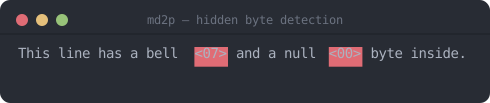
The surrounding text is printed normally; only the offending bytes are highlighted, making it easy to spot encoding errors or accidental binary content in Markdown source files.
This also catches Unicode variation selectors (U+FE00–U+FE0F and U+E0100–U+E01EF). Python's str.isprintable() reports these as printable even though they render with zero visible width, and they are the block most commonly used today to smuggle hidden bytes — watermarks or payloads — onto an otherwise ordinary-looking character. md2p checks for them explicitly and flags each one with the same red-background hex marker, so text carrying a hidden variation-selector payload is not silently invisible in the rendered output.
Development & Tests
Run the existing tests with pytest:
pytest -q
Contributing
Contributions and bug reports are welcome. Open an issue or submit a pull request.
License
This project is licensed under the MIT License — see the LICENSE file for details.
1 maintainer

Metadata
1 maintainer
Release files for md2p 1.0.2
For a detailed explanation of source distributions (sdists) and built distributions (wheels), please see the package formats documentation.
Source distribution (sdist)
| File | Size | Uploaded | |
|---|---|---|---|
| md2p-1.0.2.tar.gz | 69.4 kB | Details |
Built distribution (wheel)
| File | Interpreter | ABI | Platform | Reset |
|---|---|---|---|---|
| md2p-1.0.2-py3-none-any.whl | Python 3 | none | any | Details |
Total release size: 79.9 kB
Release files / md2p-1.0.2.tar.gz
| Download URL | md2p-1.0.2.tar.gz |
|---|---|
| Size | 69.4 kB |
| Tags | Source |
|
SHA-256 checksum How to use checksums |
9f77ecd9ffa7df46944382014e03cd643aff4b76f15a25a408c874f7f592b9e0
|
|
BLAKE2b-256 checksum How to use checksums |
486d7bfee611de66106a90b2f3063d1a2bf1d8a536c2d17a7ff21aa4b6b688c3
|
| Upload date | |
|
Uploaded using Trusted Publishing? What is trusted publishing? |
Yes |
| Uploaded via |
twine/7.0.0 CPython/3.13.14
|
Provenance
Provenance describes where a file came from. On PyPI, provenance is shared via attestations, which provide a verifiable record of the build or publishing details. View details, limitations and caveats.


PyPI Publish Attestation
PyPI verified that this artifact, at this checksum, originated from the publisher listed below.
Signed by GitHub Actions, verified by PyPI on Aug 15, 2026.
Transparency logRelease files / md2p-1.0.2-py3-none-any.whl
| Download URL | md2p-1.0.2-py3-none-any.whl |
|---|---|
| Size | 10.5 kB |
| Tags | Python 3 |
|
SHA-256 checksum How to use checksums |
4875971b1502475099b22fae276e0a8bc089c98fcd86a0a40491df07251c52df
|
|
BLAKE2b-256 checksum How to use checksums |
a31b19d9cdec01a91037b41ccc845f722ac6d5965651355d22cebda7b16c8c04
|
| Upload date | |
|
Uploaded using Trusted Publishing? What is trusted publishing? |
Yes |
| Uploaded via |
twine/7.0.0 CPython/3.13.14
|
Provenance
Provenance describes where a file came from. On PyPI, provenance is shared via attestations, which provide a verifiable record of the build or publishing details. View details, limitations and caveats.
PyPI Publish Attestation
PyPI verified that this artifact, at this checksum, originated from the publisher listed below.
Signed by GitHub Actions, verified by PyPI on Aug 15, 2026.
Transparency log













