
md2p



Last changed: 2026-11-19 · Source: https://github.com/raulkivi/md2p
md2p (Markdown to Print) renders Markdown in the terminal with ANSI styling, so you can read a Markdown file without leaving the shell.

Quick start
uvx md2p README.md                    # run without installing
pip install md2p && md2p README.md    # or install it
Features
- Renders a file or stdin to stdout with ANSI color, or with nroff overstrike sequences (
--nroff) - Supported Markdown:
- ATX headers
#–######(each level styled distinctly) and setext headers (===/---) - Horizontal rules, blockquotes, fenced code blocks (
```/~~~) - Ordered and unordered lists, including nested lists
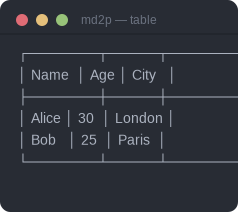
- Tables, rendered as bordered ASCII grids
- Bold, italic, bold+italic, inline code, links, images
- ATX headers
- Shows hidden characters: non-printable bytes and Unicode variation selectors (used to hide watermarks or payloads in text) appear as visible hex markers
- Strips raw ANSI escapes from the input, so a malicious Markdown file can't send escape sequences to your terminal
Installation
Requires Python 3.8+. There are no runtime dependencies.
From PyPI
pip install md2p
Or run it without installing: uvx md2p README.md.
From a Git clone
install.sh copies md2p.py to ~/.local/bin/md2p (or $XDG_BIN_HOME/md2p):
git clone https://github.com/raulkivi/md2p.git
cd md2p
./install.sh                          # or: ./install.sh --dest "$HOME/bin"
./install.sh --uninstall removes it from the default location.
Make sure the install directory is on your PATH, for example in your shell profile:
export PATH="$HOME/.local/bin:$PATH"
Usage
md2p path/to/file.md           # render a file
cat path/to/file.md | md2p     # render stdin
md2p path/to/file.md | less -R # page through a long file

- Output width follows the terminal width (H1 headers are centered, rules span the width).
- Output always contains ANSI escapes, even when redirected:
md2p file.md > out.txtsaves escape codes, not plain text. - Exit status is 0 on success and 1 when the input is missing, unreadable, not UTF-8, or larger than 50 MB.
Options
-h,--help— show usage and exit.-v,--version— print the version and exit.-n,--nroff— emit nroff overstrike sequences (X⌫Xfor bold,_⌫Xfor underline) instead of ANSI escapes. Use this for viewers that understand nroff bold/underline but not ANSI color, such as Midnight Commander's internal viewer. Colors, dim and italic map onto bold or underline.
Midnight Commander integration
To preview Markdown with formatting in mc's internal viewer (F3), add a
viewer rule to your extension file. ~/.config/mc/mc.ext.ini replaces the
system file rather than extending it, so start from a copy of the system file
(for example /etc/mc/mc.ext.ini):
mkdir -p ~/.config/mc
cp /etc/mc/mc.ext.ini ~/.config/mc/mc.ext.ini
Then replace its [markdown] section with:
[markdown]
Regex=\\.(md|mkd|mdown|markdown)$
RegexIgnoreCase=true
View=%view{nroff} md2p --nroff %f
- Keep the double backslash: mc unescapes the value, and with a single one the rule never matches.
%view{nroff}makes the viewer interpret the overstrike sequences.- For full ANSI color instead, use a color-capable pager:
View=md2p %f | less -R.

Examples
Headers
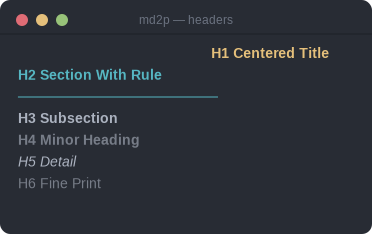
Each header level gets distinct styling: H1 is centered, bold and underlined; H2 gets an underline rule; H3–H6 step down through bold, dim, italic and plain dim text.
# H1 Centered Title
## H2 Section With Rule
### H3 Subsection
#### H4 Minor Heading
##### H5 Detail
###### H6 Fine Print
Inline formatting
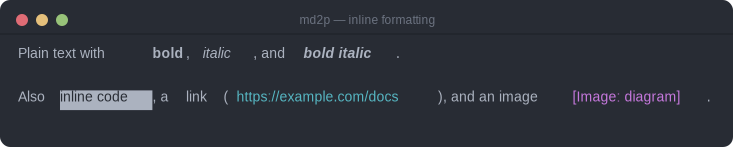
Plain text with **bold**, *italic*, and ***bold italic***.
Also `inline code`, a [link](https://example.com/docs), and an image .
Lists, blockquotes and code blocks
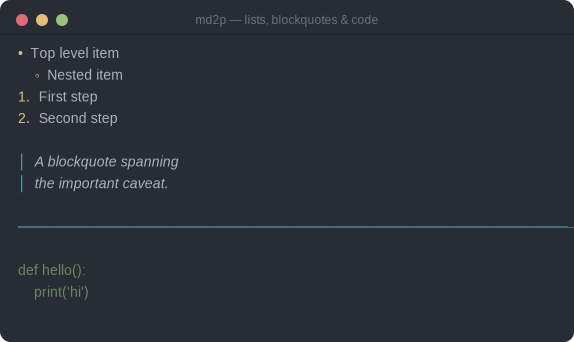
- Top level item
  - Nested item
1. First step
2. Second step

> A blockquote spanning
> the important caveat.

---

```
def hello():
    print('hi')
```
Tables
| Name  | Age | City   |
|-------|-----|--------|
| Alice | 30  | London |
| Bob   | 25  | Paris  |
Hidden and non-printable characters
Any character that is not printable (other than newline, tab and space) is replaced with a red hex marker: <HH> for a single byte, <H0,H1,...> for a multi-byte UTF-8 sequence. The surrounding text prints normally.
In this example cat shows a payment note for 95 EUR. md2p shows the variation selectors hidden after "Friday." and the carriage return that hid the real total:

Try it with a bell (\a) and a null byte (\0):
printf 'This line has a bell \a and a null \0 byte inside.\n' | md2p
Unicode variation selectors (U+FE00–U+FE0F and U+E0100–U+E01EF) get the same marker. They have zero visible width and are the most common way to attach hidden watermarks or payloads to ordinary-looking text, yet Python's str.isprintable() reports them as printable, so md2p checks for them explicitly.
Windows CRLF line endings are converted to LF. A lone carriage return, which could overwrite text already on screen, is shown as <0D>.
Limitations
- These are passed through as plain text, not rendered:
- strikethrough (
~~text~~) - task-list checkboxes (
- [ ] itemshows[ ]after the bullet) - inline and block HTML
- strikethrough (
- Input larger than 50 MB is rejected.
- There is no built-in pager; pipe to
less -R.
Development
pip install -r requirements-dev.txt
pytest -q
Recording the demo GIFs
The GIFs in img/ are real takes in xterm on a private Xvfb display, recorded by:
python3 scripts/demo/record_demo.py [quick-start|hidden-characters|pager|midnight-commander ...]
- Requires Xvfb,
xterm,xdotool,ffmpeg,less,mcand the DejaVu Sans Mono font. - Each take runs with a throwaway
HOME, so nothing from your shell setup appears in the frames. - Review every frame before committing a GIF.
Contributing
Bug reports and pull requests are welcome.
License
MIT — see LICENSE.
1 maintainer

Metadata
1 maintainer
Release files for md2p 1.1.0
For a detailed explanation of source distributions (sdists) and built distributions (wheels), please see the package formats documentation.
Source distribution (sdist)
| File | Size | Uploaded | Provenance | Actions |
|---|---|---|---|---|
| md2p-1.1.0.tar.gz | 4.7 MB | With provenance | Details for md2p-1.1.0.tar.gz |
Built distribution (wheel)
| File | Interpreter | ABI | Platform | Actions Reset |
|---|---|---|---|---|
| md2p-1.1.0-py3-none-any.whl | Python 3 | none | any | Details for md2p-1.1.0-py3-none-any.whl |
Total release size: 4.7 MB
Release files / md2p-1.1.0.tar.gz
| Download URL | md2p-1.1.0.tar.gz |
|---|---|
| Size | 4.7 MB |
| Tags | Source |
|
SHA-256 checksum How to use checksums |
a8954ff48543a87cd3f705caef3301783e14974839c3d0ecd654ef8ac28be2ca
|
|
BLAKE2b-256 checksum How to use checksums |
be2fa453d4eaa84bc5d6388ca47f02126806103220886c3d991b4ce80f840c87
|
| Upload date | |
|
Uploaded using Trusted Publishing? What is trusted publishing? |
Yes |
| Uploaded via |
twine/7.0.0 CPython/3.13.16
|
Provenance
Provenance describes where a file came from. On PyPI, provenance is shared via attestations, which provide a verifiable record of the build or publishing details. View details, limitations and caveats.


PyPI Publish Attestation
PyPI verified that this artifact, at this checksum, originated from the publisher listed below.
Signed by GitHub Actions, verified by PyPI on Nov 19, 2026.
Transparency logRelease files / md2p-1.1.0-py3-none-any.whl
| Download URL | md2p-1.1.0-py3-none-any.whl |
|---|---|
| Size | 11.8 kB |
| Tags | Python 3 |
|
SHA-256 checksum How to use checksums |
74a0bb59db25459a3a7fa5974baa8c18f6fd08634d271e5eeb5436f433285d95
|
|
BLAKE2b-256 checksum How to use checksums |
1be83199a47c62755703739c776ef28f6cfc3616699c715291ad89961956d7f1
|
| Upload date | |
|
Uploaded using Trusted Publishing? What is trusted publishing? |
Yes |
| Uploaded via |
twine/7.0.0 CPython/3.13.16
|
Provenance
Provenance describes where a file came from. On PyPI, provenance is shared via attestations, which provide a verifiable record of the build or publishing details. View details, limitations and caveats.
PyPI Publish Attestation
PyPI verified that this artifact, at this checksum, originated from the publisher listed below.
Signed by GitHub Actions, verified by PyPI on Nov 19, 2026.
Transparency logSecurity for md2p 1.1.0
Provenance
Provenance describes where a file came from. On PyPI, provenance is shared via attestations, which provide a verifiable record of the build or publishing details. View details, limitations and caveats.
Full provenance
Both files in this release have been uploaded with provenance metadata.
Attestation for md2p-1.1.0.tar.gz
PyPI Publish Attestation
PyPI verified that this artifact, at this checksum, originated from the publisher listed below.
Signed by GitHub Actions, verified by PyPI on Nov 19, 2026.
Transparency logA note on package security
PyPI is a repository for distributing packages, not a service for auditing them. While third-party security researchers and our staff do their best to detect and remove malicious packages, PyPI cannot guarantee the quality, security or suitability of any given package.
To learn more about protecting yourself from malicious actors, visit our package security documentation.














