

Mechvane
You and your agent on the same model.
Where Mechvane is heading: Mechvane's engineering knowledge is moving into SolidCraft's own app. First, Mechvane connects to the SolidCraft app you have open, so design checks with their sources, bolted connections and your agent work on the design in SolidCraft's window. Later, the same checks and assistants become SolidCraft plugins: a ribbon entry for you and a tool for your agent. The browser workspace stays available as a local preview.
The mechanical engineering layer for SolidCraft, for individual engineers, makers and small and medium-sized companies: design checks with cited sources, bolted connections, standard parts and assemblies whose joints stay where you put them. Model by hand in SolidCraft, hand a step to an AI agent, or both: you work on the same parts and get the same design checks either way. The core stays small; domain modules (sheet metal, frames, drawings …) load only when a document or the user needs them.
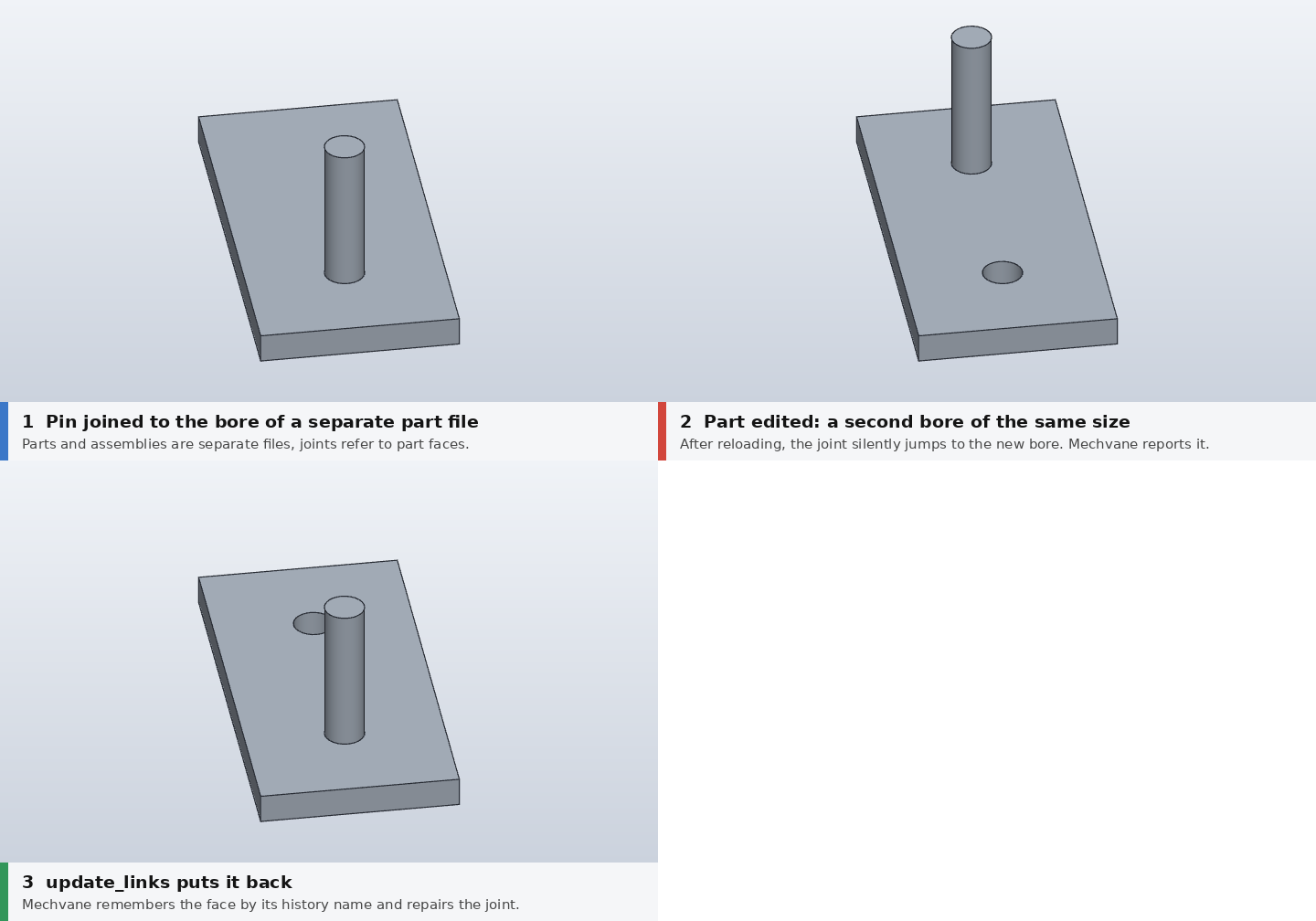
Change a part, and update_links notices that a joint jumped to a different bore and
repairs it (regenerate with python3 tools/demo_update_links.py).
Guiding principles
- One model, many hands. Every action is a typed command. You in the GUI, your scripts, plugins and AI agents (MCP) share one interface, with undo, batch rollback and precise error messages, so you can pick up where your agent left off and the other way round.
- Engineering knowledge for you and your agent. An open, sourced knowledge catalog: standard
values from freely accessible sources, best practice from public handbooks and design
guides, our own measurement series on the printer. Every rule carries its source,
rationale, exceptions and severity (error or hint), so
check_designdoes not guess and an agent proposes what an experienced engineer would. - No dead weight. What monolithic CAD suites carry around (piping, cable harness, BIM, rendering studio …) is a plugin here or left out.
- Proven workflows where they work. Design accelerators (bolted connections, shafts, gears), frame generator, standard parts, ISO drawings with parts list, rule-based configuration.
- Text- and git-friendly file format.
Foundation
Mechvane builds on SolidCraft (Rust, Apache-2.0), an open CAD kernel and app where "everything is a command", with a built-in MCP server. SolidCraft stays unchanged as a dependency; Mechvane adds its own layer on top (ADR 0001).
Quick start
Requirements: Python ≥ 3.11. Everything else comes with mechvane setup: it downloads the
pinned solidcraft-cli and SolidCraft web app (v0.43.0) from the
SolidCraft release for your platform
(Linux x86_64/aarch64, Windows x64/arm64, macOS) and checks their SHA256. No build needed;
rendering works headless too.
pip install mechvane
mechvane setup        # SolidCraft CLI and web app, about 170 MB, once
mechvane mcp          # MCP server for your agent (see below)
Everything runs locally and offline after mechvane setup. The browser workspace stays available as a
preview (mechvane ui my-project/); development now goes into working inside SolidCraft's own window.
Tested on Linux and Windows 11 (x64); macOS is expected to work but not yet tested.
If mechvane is not found after a user install on Windows, use python -m mechvane setup (and
ui, mcp) instead.
An existing solidcraft-cli is used when you set SOLIDCRAFT_CLI or skip mechvane setup
and have it on your PATH.
As an MCP server for an agent (e.g. Claude Code), .mcp.json in your project:
{
  "mcpServers": {
    "mechvane": {
      "command": "mechvane",
      "args": ["mcp", "--workspace", "./workspace"]
    }
  }
}
To work in the SolidCraft window you have open, switch on Settings > Assistant > Agents through MCP > Let AI agents connect in
SolidCraft (or start the app with --control PORT) and ask your agent to connect_window. It reads and builds in your window,
and you save in the app as usual. From the terminal, mechvane check runs the design checks on the design in that window
(or on a file: mechvane check part.solidcraft --profile cnc_alu), every finding with its rule, value and source.
For development, clone the repo and run the checks:
git clone https://github.com/mechvane/mechvane && cd mechvane
pip install -e .
python3 tests/mechvane/check.py      # over 800 checks, a few minutes
python3 tests/reference/check.py     # reference parts with expected values
Then ask, for example: "Build an 80×40×8 plate with four M5 clearance holes, bolt it to a
bracket and check the design." The agent uses new_part, run, bolted_connection,
add_joint and check_design. When a part changes, update_links finds joints that
jumped to a different face and repairs them.
Step by step for Windows and Linux: docs/installation.md (German).
Status
Version 0.1: Mechvane runs as a Python layer on top of SolidCraft and as an MCP server for your agent, and it connects to the SolidCraft app you have open (see the note at the top and the roadmap).
- Parts and assemblies as separate files, joints across files that
update_linkschecks and repairs. - Your open SolidCraft window: your agent and you work on the same design, and
mechvane checkruns the design checks there. - Standard parts (screws, nuts, washers, ball bearings) and a bolted connection assistant that creates a connection in one call and takes it back in one call.
- Design check with sourced rules, ISO 286 fits and an open knowledge catalog; every finding shows its source and quoted passage.
- MCP server for your agent with clear error messages, a short report after every step and
verify_viewto check its work against a picture. - Browser preview (
mechvane ui): parameters, measuring, section view and the design check on your files.
Contents
- CHANGELOG.md: what changed in each release
- mechvane.dev: the project website
- Roadmap at a glance: what is available, what comes next
- ROADMAP.md and mechvane.dev/roadmap: what works today, what comes next and what is planned
- docs/adr/: architecture decisions
- MCP server (
mechvane/): tools, data model, test reports - tests/: layer checks and reference parts
- docs/research/: research notes and practice tests, dated. Notes
marked as drafts (e.g.
-flash,-gemini) are unverified unless a check note says otherwise.
Most project documentation is in German for now; code and comments are in English.
License
MIT OR Apache-2.0, at your option (LICENSE-MIT, LICENSE-APACHE), like SolidCraft, so
code can move in both directions. Contributions are under the same terms. AGPL slicers
such as CuraEngine only run as separate processes and are not part of Mechvane
(NOTICE). See CONTRIBUTING.md.
Mechvane is an independent project and is not affiliated with Autodesk or any other CAD vendor. Product names only describe workflows.
1 maintainer

Metadata
1 maintainer
Release files for mechvane 0.1.0
For a detailed explanation of source distributions (sdists) and built distributions (wheels), please see the package formats documentation.
Source distribution (sdist)
| File | Size | Uploaded | Provenance | Actions |
|---|---|---|---|---|
| mechvane-0.1.0.tar.gz | 791.5 kB | With provenance | Details for mechvane-0.1.0.tar.gz |
Built distribution (wheel)
| File | Interpreter | ABI | Platform | Actions Reset |
|---|---|---|---|---|
| mechvane-0.1.0-py3-none-any.whl | Python 3 | none | any | Details for mechvane-0.1.0-py3-none-any.whl |
Total release size: 1.7 MB
Release files / mechvane-0.1.0.tar.gz
| Download URL | mechvane-0.1.0.tar.gz |
|---|---|
| Size | 791.5 kB |
| Tags | Source |
|
SHA-256 checksum How to use checksums |
8ad0f4b1a5e3e71893202cce5e90f64533fc56589571e795a92c2065c28e8807
|
|
BLAKE2b-256 checksum How to use checksums |
2ef3d1470fcbc9a2f6eacc307d9ba59c8e22143aa6048fddbd36f31132816289
|
| Upload date | |
|
Uploaded using Trusted Publishing? What is trusted publishing? |
Yes |
| Uploaded via |
twine/7.0.0 CPython/3.13.16
|
Provenance
Provenance describes where a file came from. On PyPI, provenance is shared via attestations, which provide a verifiable record of the build or publishing details. View details, limitations and caveats.


PyPI Publish Attestation
PyPI verified that this artifact, at this checksum, originated from the publisher listed below.
Signed by GitHub Actions, verified by PyPI on Nov 27, 2026.
Transparency logRelease files / mechvane-0.1.0-py3-none-any.whl
| Download URL | mechvane-0.1.0-py3-none-any.whl |
|---|---|
| Size | 912.5 kB |
| Tags | Python 3 |
|
SHA-256 checksum How to use checksums |
ee4ba13b46643b2d0d772ed4f479e9bb51f37e60c88f79afea1fad04c0a6c578
|
|
BLAKE2b-256 checksum How to use checksums |
391cd9905fe3753136161711b8d1ff09c2f41b98bb2871482266a0f01eb48886
|
| Upload date | |
|
Uploaded using Trusted Publishing? What is trusted publishing? |
Yes |
| Uploaded via |
twine/7.0.0 CPython/3.13.16
|
Provenance
Provenance describes where a file came from. On PyPI, provenance is shared via attestations, which provide a verifiable record of the build or publishing details. View details, limitations and caveats.
PyPI Publish Attestation
PyPI verified that this artifact, at this checksum, originated from the publisher listed below.
Signed by GitHub Actions, verified by PyPI on Nov 27, 2026.
Transparency logSecurity for mechvane 0.1.0
Provenance
Provenance describes where a file came from. On PyPI, provenance is shared via attestations, which provide a verifiable record of the build or publishing details. View details, limitations and caveats.
Full provenance
Both files in this release have been uploaded with provenance metadata.
Attestation for mechvane-0.1.0.tar.gz
PyPI Publish Attestation
PyPI verified that this artifact, at this checksum, originated from the publisher listed below.
Signed by GitHub Actions, verified by PyPI on Nov 27, 2026.
Transparency logA note on package security
PyPI is a repository for distributing packages, not a service for auditing them. While third-party security researchers and our staff do their best to detect and remove malicious packages, PyPI cannot guarantee the quality, security or suitability of any given package.
To learn more about protecting yourself from malicious actors, visit our package security documentation.














