
MedMLX
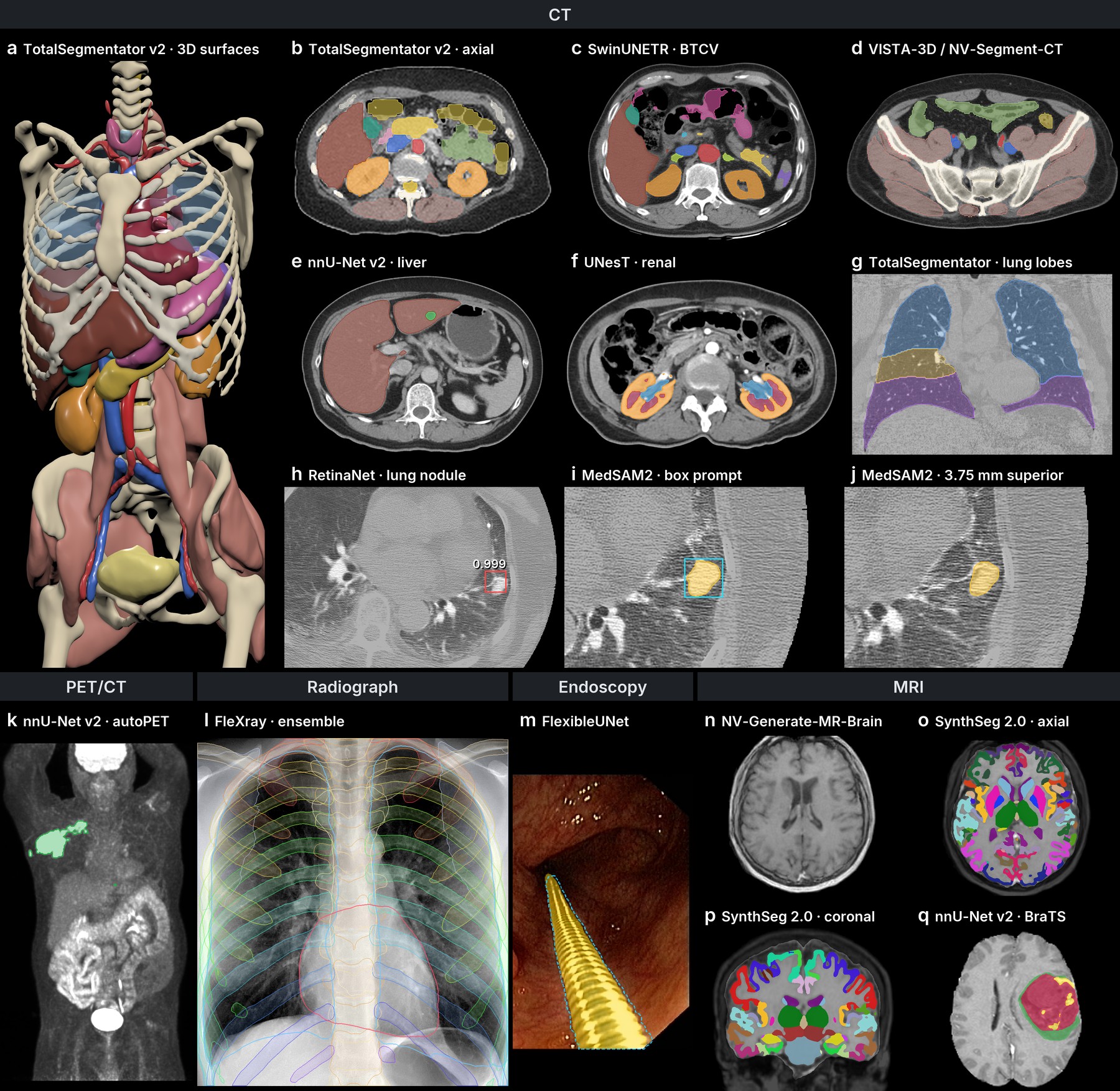
One Python API, command line and MCP server for native medical imaging on Apple Silicon. Run TotalSegmentator, nnU-Net, MedSAM2, SynthSeg and more through their independent MLX runtimes.






Models · Setup guide · MCP guide · Website
Apple Silicon · Metal · Python 3.13 · uv
Install
uv tool install --python 3.13 "medmlx[all,mcp]"
For a Python project, use uv add "medmlx[all,mcp]". Run uv tool upgrade medmlx to
update MedMLX and its models. Model weights download on first use and keep their own
terms. For a smaller install, replace all with one group:
| Extra | Installs |
|---|---|
all |
Every model runtime, with Reason-CT tools |
segment |
Segmentation runtimes, including SAM 3 video |
generate |
Reason-CT, NV-Generate, LesionDiffusion and FDG PET synthesis |
vision |
Lung nodule detection, RadImageNet features and radiomics |
mcp |
The MCP server |
Quickstart
medmlx models lists the installed models. To segment a CT scan, put it in a
working folder and run from there:
mkdir -p ~/medmlx-work && cd ~/medmlx-work
cp /path/to/ct.nii.gz .
Then show the model's arguments, check that it can run, and run it:
medmlx describe mlx-segment-ct
medmlx check mlx-segment-ct image_path=ct.nii.gz output_dir=segment-ct
medmlx run mlx-segment-ct image_path=ct.nii.gz output_dir=segment-ct
KEY=VALUEpairs take the argument namesdescribelists. Values are converted to the declared types; give lists and other JSON values asKEY:=JSON, for examplepoints:='[[120, 140, 60]]'.--arguments FILEreads them from a JSON file.- Relative paths resolve against the current folder, or against
--root. checkchecks Metal, the arguments and the input paths without downloading anything.- The first run downloads the
MedMLX/vista3d-ct-mlxweights; later runs reuse the cache. - The mask is written to
segment-ct/mask.nii.gz. medmlx setup --all --progressdownloads every model's weights for offline use. See automatic weights and readiness.
Models
Model IDs are what medmlx run and medmlx describe take.
| Model ID | Task | Input | Extra |
|---|---|---|---|
musclemap |
113 muscle and bone structures | MRI, CT | segment |
totalsegmentator |
Whole-body CT segmentation | CT | segment |
mlx-segment-ct, mlx-segment-ctmr |
Automatic and point-prompted segmentation (VISTA-3D) | CT, MRI | segment |
nnunet-liver, nnunet-pancreas, nnunet-autopet, nnunet-brats2021 |
Organ and tumor segmentation (nnU-Net v2) | CT, PET/CT, brain MRI | segment |
mrsegmentator |
Multi-organ MRI segmentation | MRI | segment |
siam |
Whole-head segmentation from any MRI contrast or CT | Head MRI, CT | segment |
synthseg |
Brain segmentation and parcellation | Brain MRI, CT | segment |
medsam2 |
Box-, point- or mask-prompted masks with propagation | NIfTI slices or volumes, frames | segment |
sam3 |
Text-, box- or point-prompted image segmentation | 2D images, video frames | segment |
biomedparse-v2 |
Text-prompted segmentation | 3D volumes, 2D images | segment |
swin-unetr |
13 abdominal organs | Contrast CT | segment |
segresnet-renal-cect |
Renal arteries, veins, ureters, tumors and parenchyma | Multiphase CT | segment |
unest |
Kidney cortex, medulla and collecting system | CT | segment |
flexray |
Radiograph anatomy | Radiographs | segment |
flexible-unet |
Surgical tools | Endoscopy frames | segment |
lung-nodule |
Lung nodule detection | Chest CT | vision |
radimagenet-* |
Radiology image features | 2D images | vision |
mlx-reason-ct |
CT reports and question answering | CT | generate |
reason-ct-tools |
Reason-CT with nodule detection and MedSAM2 masks | Chest CT | reason-tools |
mlx-generate-ctmr-ct, -mr, -mr-brain |
Synthetic CT and MRI | Label maps or anatomy | generate |
lesiondiffusion |
Synthetic CT lesions | CT and organ mask | generate |
fdg-pet-ct |
Synthetic FDG PET (weight-free) | CT and labels | generate |
medgemma |
Image-to-text through a separate environment | 2D images | bridge |
Each model has its own repository in the MedMLX organization.
medgemma and mrsegmentator require local weights.
Memory
MedMLX runs one model at a time by default. It never refuses a run for memory: readiness reports a model's peak next to the memory available, and the run starts either way, so a Mac with too little memory may swap or fail. Declared peaks:
| Model | Peak MLX memory |
|---|---|
siam |
16.0 GB |
nnunet-pancreas |
14.5 GB |
mlx-reason-ct |
12.5 GB |
synthseg |
11.6 GB |
mlx-generate-ctmr-ct |
11.1 GB |
mlx-segment-ctmr |
11.0 GB |
mlx-generate-ctmr-mr, mlx-generate-ctmr-mr-brain |
10.2 GB |
nnunet-brats2021, swin-unetr |
7.5 GB |
unest |
7.3 GB |
lung-nodule, mlx-segment-ct |
6.0 GB |
nnunet-liver |
5.6 GB |
sam3 |
5.4 GB |
lesiondiffusion |
5.2 GB |
totalsegmentator |
5.0 GB |
nnunet-autopet |
4.8 GB |
segresnet-renal-cect |
4.1 GB |
biomedparse-v2 |
3.9 GB |
fdg-pet-ct |
2.8 GB |
medsam2 |
1.3 GB |
flexray |
1.2 GB |
radimagenet-inceptionresnetv2 |
0.5 GB |
flexible-unet |
0.3 GB |
mlxradiomics, radimagenet-densenet121, radimagenet-inceptionv3, radimagenet-resnet50 |
0.2 GB |
Models without a declared peak (medgemma, mrsegmentator, musclemap, reason-ct-tools) record their measured peak after each run, and medmlx describe reports it.
medgemma runs in its own interpreter, outside this check. Describing a chest
radiograph peaks at 4.4 GB with MedGemma 1.5 4B and 17.9 GB with MedGemma 27B.
MCP
medmlx serve --root /path/to/work runs a stdio MCP server that lets an
assistant list models, check inputs and run jobs in that folder. For Claude Code:
mkdir -p ~/medmlx-work
claude mcp add --scope user medmlx -- "$(uv tool dir --bin)/medmlx" serve --root "$HOME/medmlx-work"
For clients configured with JSON, use absolute paths:
{
  "mcpServers": {
    "medmlx": {
      "command": "/absolute/path/to/medmlx",
      "args": ["serve", "--root", "/absolute/path/to/medmlx-work"]
    }
  }
}
Disconnecting the client cancels its running jobs. The MCP guide covers Codex, other clients, tools and a complete job workflow.
Python
import medmlx

result = medmlx.run(
    "mlx-segment-ct",
    image_path="ct.nii.gz",
    output_dir="segment-ct",
    root="/path/to/medmlx-work",
)
result.outputs["mask"]    # path by role
result.artifacts["mask"]  # kind, coordinate space and labels of that file
result.summarize("mask")  # each label's name, voxel count and volume in mL
result.job holds the full job record, including log_tail.
For a model whose package exports load_model, queue up to 256 cases with one
loaded model:
with medmlx.start_cohort(
    "nnunet-liver",
    preparation={"weights_path": "liver-model"},
    cases=[
        {"image_path": "ct-a.nii.gz", "output_dir": "out-a"},
        {"image_path": "ct-b.nii.gz", "output_dir": "out-b"},
    ],
) as cohort:
    for case in cohort.wait().cases:
        print(case.index, case.outputs if case.ok else case.error)
Cases run in order and report individual results or errors. Weights and model configuration stay fixed until the cohort closes automatically after its final case. Leaving the context early cancels the worker and its child processes.
More
- Reason-CT with nodule tools: detect and segment nodules, then browse masks and measurements in a local CT viewer.
- MedGemma bridge: run MedGemma in a managed environment with local weights.
- Development: declaring models, checkpoint conversion and the shared core runtime.
License
Apache-2.0. See third-party notices. Runtimes and model weights retain their own terms.
Metadata
Release files for medmlx 0.11.0
For a detailed explanation of source distributions (sdists) and built distributions (wheels), please see the package formats documentation.
Source distribution (sdist)
| File | Size | Uploaded | Provenance | Actions |
|---|---|---|---|---|
| medmlx-0.11.0.tar.gz | 85.1 kB | Without provenance | Details for medmlx-0.11.0.tar.gz |
Built distribution (wheel)
| File | Interpreter | ABI | Platform | Actions Reset |
|---|---|---|---|---|
| medmlx-0.11.0-py3-none-any.whl | Python 3 | none | any | Details for medmlx-0.11.0-py3-none-any.whl |
Total release size: 185.6 kB
Release files / medmlx-0.11.0.tar.gz
| Download URL | medmlx-0.11.0.tar.gz |
|---|---|
| Size | 85.1 kB |
| Tags | Source |
|
SHA-256 checksum How to use checksums |
faa55db9c7a25f0fcaf2fb220d2346846ab97c395ad684e772ca8faaf0f9e47a
|
|
BLAKE2b-256 checksum How to use checksums |
580bc4a571dc6ef926e4c4798f7d9b049f746e9133d86a2eaa0bed34479b2b54
|
| Upload date | |
|
Uploaded using Trusted Publishing? What is trusted publishing? |
No |
| Uploaded via |
uv/0.13.7 {"installer":{"name":"uv","version":"0.13.7","subcommand":["publish"]},"python":null,"implementation":{"name":null,"version":null},"distro":{"name":"macOS","version":null,"id":null,"libc":null},"system":{"name":null,"release":null},"cpu":null,"openssl_version":null,"setuptools_version":null,"rustc_version":null,"ci":null}
|
Release files / medmlx-0.11.0-py3-none-any.whl
| Download URL | medmlx-0.11.0-py3-none-any.whl |
|---|---|
| Size | 100.5 kB |
| Tags | Python 3 |
|
SHA-256 checksum How to use checksums |
0e237de9976d246e7a5f269b4a6997b780376dd02a480b7d5edbf4251ee768f2
|
|
BLAKE2b-256 checksum How to use checksums |
3a921b2bfe8ad8f7630dde09ca91a67cd8d1ae66d1e5570dc530ee262a04b324
|
| Upload date | |
|
Uploaded using Trusted Publishing? What is trusted publishing? |
No |
| Uploaded via |
uv/0.13.7 {"installer":{"name":"uv","version":"0.13.7","subcommand":["publish"]},"python":null,"implementation":{"name":null,"version":null},"distro":{"name":"macOS","version":null,"id":null,"libc":null},"system":{"name":null,"release":null},"cpu":null,"openssl_version":null,"setuptools_version":null,"rustc_version":null,"ci":null}
|
Security for medmlx 0.11.0
Provenance
Provenance describes where a file came from. On PyPI, provenance is shared via attestations, which provide a verifiable record of the build or publishing details. View details, limitations and caveats.
No provenance found
None of the files in this release were uploaded with provenance metadata.
A note on package security
PyPI is a repository for distributing packages, not a service for auditing them. While third-party security researchers and our staff do their best to detect and remove malicious packages, PyPI cannot guarantee the quality, security or suitability of any given package.
To learn more about protecting yourself from malicious actors, visit our package security documentation.














