
This release has been yanked by its maintainers, and will be ignored by installers, except when explicitly specified.
Consider using release 0.3.5 instead.
Reason given by maintainers: Superseded. Install the latest meetstream-agent-kit.
MeetStream Agent Kit
Bring your own agent into your meetings.
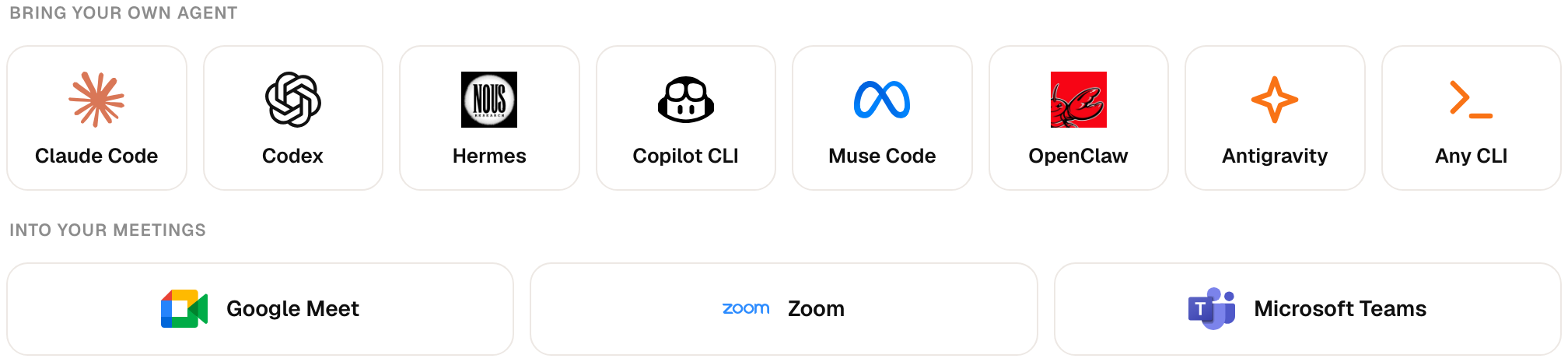
Claude Code, Codex, Hermes, Copilot CLI and more answer out loud in Google Meet, Zoom and Microsoft Teams,
with your own login, your own model and your own files.




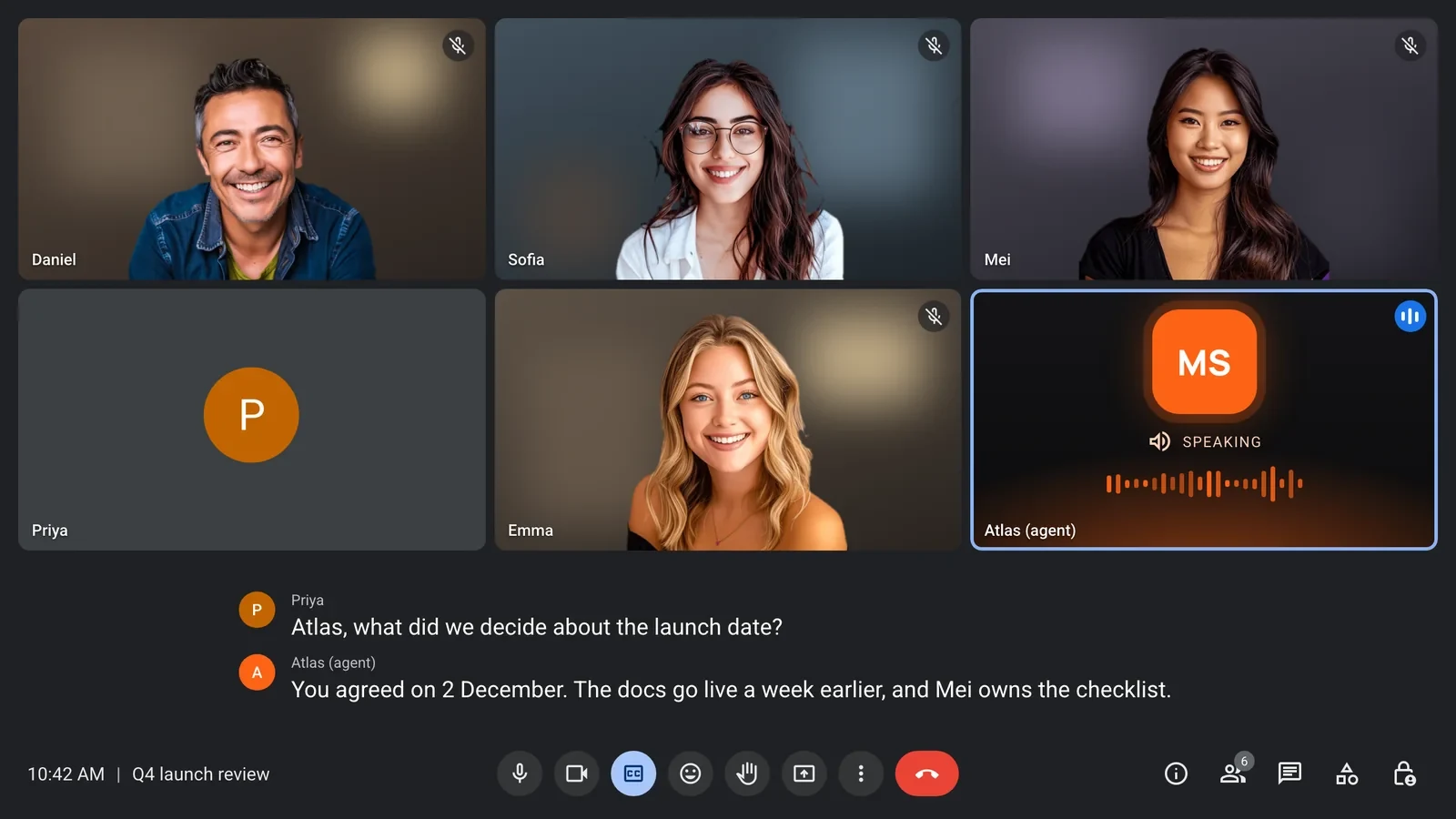
MIA, MeetStream's meeting agent, joins the call, listens, and speaks. The Agent Kit bridge runs on your computer and lets your own agent CLI write what MIA says. Your agent keeps its model, its prompts, its tools and your files. MIA keeps the meeting side: joining the call, speech-to-text and voice. MeetStream never sees your agent's login and charges no model tokens.
Contents
- How it works
- Quick start
- Install
- Supported agents
- Access levels
- Activation code
- Security
- Troubleshooting
- Commands
- Development
How it works
flowchart LR
  P([People in the meeting]) <-->|voice| MIA[MIA<br/>joins the call, hears, speaks]
  MIA -->|each turn, over HTTPS| T[Your tunnel]
  T --> B[Agent Kit bridge<br/>127.0.0.1 on your computer]
  B <-->|one warm session per meeting| A[Your agent CLI<br/>Claude Code, Codex, Hermes...]
- When MIA joins a call, the bridge starts one long-lived session of your agent for that meeting, so no one waits for it to start up later.
- When someone talks to MIA, the words go to your agent as text. Its answer streams back, and MIA speaks the first sentence while your agent is still writing the rest.
- When someone interrupts, the bridge stops your agent at once and keeps the conversation, so the next question still has the context.
Your agent can also use the meeting itself through MCP tools: post in the chat, share its screen, and more, whatever your MIA agent allows.
Quick start
You need macOS or Linux, Python 3.10 or newer, one supported agent installed and signed in, and a MeetStream account.
1. Install it and run it.
uv tool install meetstream-agent-kit
meetstream-agent-kit
It asks a few questions: which agent should answer (it lists the ones it finds on your computer and checks they are signed in), the folder it works in, the most access this computer allows, and how MeetStream reaches your computer:
- Cloudflare quick tunnel: no account needed. The address changes each time it starts.
- ngrok: needs a free ngrok account. A free static domain keeps one address.
- An address you already have, for example a named Cloudflare tunnel.
It then runs one short test turn with your agent and asks Start now? On yes, it starts the bridge and the tunnel and prints the two things to paste:
Paste these in the MeetStream dashboard:
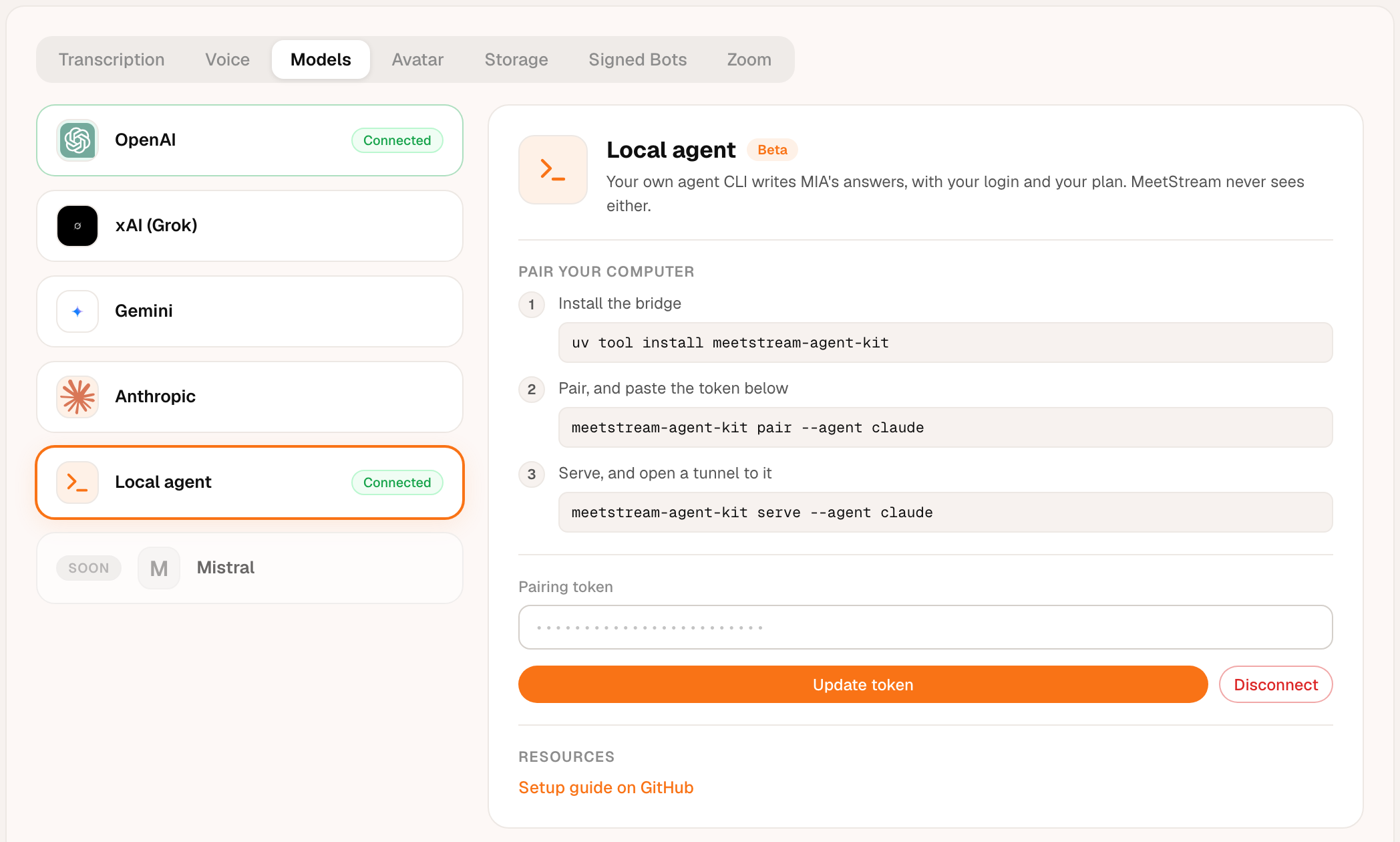
  Pairing token  (Integrations > Models > Local agent, shown once):  msak_…
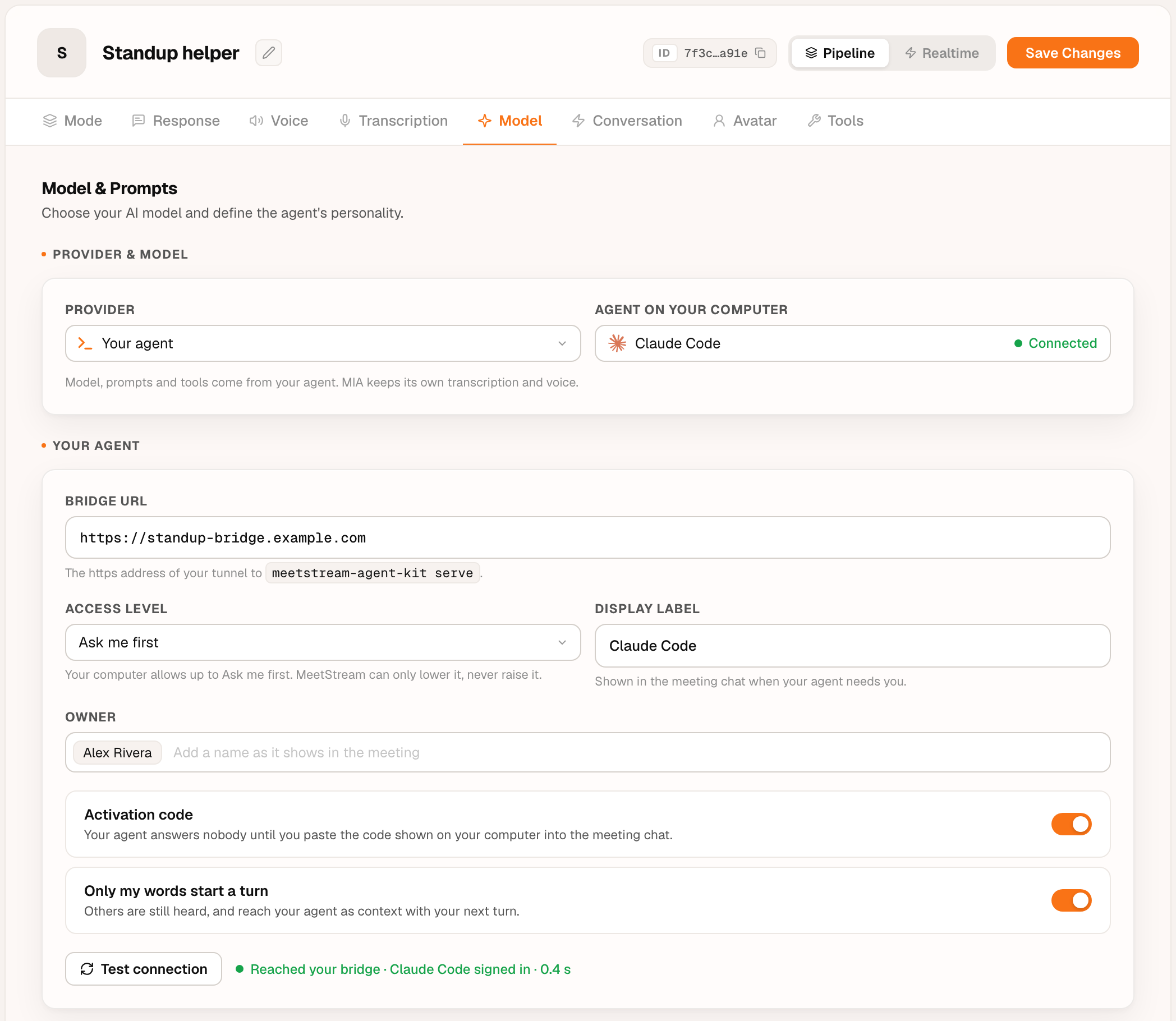
  Bridge URL     (Agents > your agent > Model > Your agent):          https://….trycloudflare.com
Next time, run meetstream-agent-kit and press Enter to start with the same answers.
2. Save the token in MeetStream. In the dashboard, open Integrations > Models > Local agent, paste the token and save it.
3. Point your MIA agent at it. Open the agent in the dashboard, go to Model, choose Your agent as the provider, and paste the Bridge URL.
That's it. Leave that window open. Every meeting this MIA agent
joins now talks to your agent. Not sure everything is ready? Run
meetstream-agent-kit doctor.
Install
With uv (recommended):
uv tool install meetstream-agent-kit
Upgrade with uv tool upgrade meetstream-agent-kit. Or run it without
installing: put uvx in front of any command, for example
uvx meetstream-agent-kit doctor.
With pipx: pipx install meetstream-agent-kit.
As a single file, with nothing but Python: each
release has a
meetstream-agent-kit.pyz, its SHA-256 checksum and build provenance.
curl -fsSLO https://github.com/meetstream-ai/agent-kit/releases/latest/download/meetstream-agent-kit.pyz
curl -fsSLO https://github.com/meetstream-ai/agent-kit/releases/latest/download/SHA256SUMS
shasum -a 256 --check --ignore-missing SHA256SUMS
python3 meetstream-agent-kit.pyz --help
The bridge uses the Python standard library only. There are no dependencies to audit, and nothing else is installed.
Supported agents
| Agent | --agent |
Warm session | Meeting tools | Sign in again with |
|---|---|---|---|---|
| Claude Code | claude |
yes | yes | claude auth login |
| Codex CLI | codex |
yes (codex app-server) |
yes | codex login |
| Hermes Agent | hermes |
yes (ACP) | yes | hermes setup |
| GitHub Copilot CLI | copilot |
yes (ACP) | yes | copilot login |
| Muse Code | muse |
yes (ACP) | yes | sign in when muse asks |
| OpenClaw | openclaw |
yes (ACP) | text only | openclaw models auth login |
| Antigravity CLI | agy |
yes | text only | agy acp --login |
| Any other CLI | --command '...' |
one run per turn | text only |
A warm session keeps one agent process for the whole meeting, so answers start
in about a second instead of paying the agent's start-up time on every turn.
For any other CLI, --command 'mytool --flag {prompt}' puts the question in
place of {prompt}, or on stdin when {prompt} is missing.
Access levels
What your agent may do on your computer during a meeting. The levels mean the same for every agent; the bridge maps each one to that agent's own controls.
| Level | Your agent may | Claude Code | Codex | ACP agents |
|---|---|---|---|---|
| Read-only (default) | read and search the work folder | Read, Grep, Glob only | read-only sandbox | permission requests denied |
Ask me first (confirm) |
act after you answer y/N in the bridge terminal; no answer in 20 s means no | asks per tool | on-request approvals | permission requests asked |
| Full | act without asking | edits and shell | workspace-write sandbox | permission requests allowed |
Your computer has the final say. serve --max-access sets the highest
level this computer allows. The setting in the MeetStream dashboard can lower
it for an agent, never raise it, so a leaked MeetStream key or a dashboard
change can never give anyone more access than you allowed here.
Full runs only when MIA guarantees that just you can talk to your agent
(the activation code below, or a verified id); otherwise it drops to
Ask me first. Antigravity and custom commands cannot ask before acting, so
Ask me first runs them read-only. A custom --command always has your own
permissions.
Activation code
Turn on Activation code in the dashboard and your agent answers nobody until you prove you are there. At the start of each meeting the bridge shows a 6-digit code on your computer, in the terminal and as a desktop notification. Paste it in the meeting chat, and from then on only you can talk to your agent.
- MeetStream never sees the code before it is pasted, so nobody can claim your agent for you.
- A new code appears after 5 minutes or 3 wrong tries; 12 wrong codes lock the meeting.
- When you leave the call, your agent locks again.
Security
- The bridge listens on 127.0.0.1 only. Your tunnel is the only way in.
- Every request from MIA needs your pairing token. The token is shown once and
only its SHA-256 hash is stored, in
~/.config/meetstream-agent-kit(mode 0600).meetstream-agent-kit revoke <id>makes it fail at once. - Meeting tools are served to your agent on a separate secret for each meeting, which never appears on a command line.
- Everything said or typed in the meeting reaches your agent as untrusted text, with rules not to follow instructions from other participants.
- Tokens, secrets and request headers are never logged.
Found a problem? See SECURITY.md.
Troubleshooting
meetstream-agent-kit doctor checks this computer and prints the fix for every problem:
$ meetstream-agent-kit doctor --agent claude
MeetStream Agent Kit 0.3.0 doctor
  ✓ python: Python 3.12.8
  ✓ config: /Users/you/.config/meetstream-agent-kit
  ✓ workdir: /Users/you/code/my-project
  ✓ agent: Claude Code: /Users/you/.local/bin/claude
  ✓ login: Claude Code ok
  ✓ pairing: 1 pairing(s)
  ✗ port: port 8787 is used by another program
      fix: Start the bridge with another --port (and point your tunnel at it), or free port 8787.
1 problem(s) to fix.
| You see | Fix |
|---|---|
port 8787 is used by another program |
serve --port 8788, and point your tunnel at that port |
the bridge is already running on port 8787 |
use that one, or stop it first |
Claude Code not found |
install it (npm install -g @anthropic-ai/claude-code), or pass --binary |
login: expired |
run the sign-in command from Supported agents; MIA picks it up within 30 seconds |
| MIA says your agent is not reachable | check that serve and the tunnel are both running, and that MIA has the tunnel's current address |
Commands
| Command | What it does |
|---|---|
(no command) or setup |
guided setup: a few questions, a test turn, then start the bridge and tunnel and print the token and Bridge URL |
pair [--agent NAME] [--label TEXT] |
create a pairing token (shown once) and check your agent's login |
list |
list pairings |
revoke ID |
revoke a pairing; its token stops working at once |
serve [options] |
run the bridge for MIA |
doctor [options] |
check this computer and explain each fix |
bench [options] |
time cold and warm turns for your agent |
serve, doctor and bench take --agent, --command, --binary,
--workdir, --owner, --model, --effort and --timeout. serve also
takes --port, --max-access (readonly, confirm or full), --no-prime,
and --tunnel (cloudflare, ngrok, url or none) with --tunnel-url for
an ngrok static domain or your own address. MEETSTREAM_AGENT_KIT_HOME moves the config folder. Every
command has --help.
The HTTP protocol between MIA and the bridge is in docs/protocol.md.
Development
git clone https://github.com/meetstream-ai/agent-kit.git && cd agent-kit
uv sync                     # Python and dev tools, pinned by uv.lock
uv run pytest               # tests; a stub agent stands in, no model or login needed
uv run ruff check . && uv run ruff format --check . && uv run mypy
uv build                    # wheel and sdist in dist/
uv run python scripts/build_pyz.py   # the single-file build
Releases are cut from a v* tag: CI tests, builds, attests and publishes to
PyPI with trusted publishing (no stored token), then attaches the files to the
GitHub release.
License
Apache-2.0. MeetStream and MIA are trademarks of MeetStream. Other product names and logos belong to their owners and are shown only to name the agents and platforms this bridge works with.
1 maintainer

Metadata
1 maintainer
Release files for meetstream-agent-kit 0.3.0
For a detailed explanation of source distributions (sdists) and built distributions (wheels), please see the package formats documentation.
Source distribution (sdist)
| File | Size | Uploaded | Provenance | Actions |
|---|---|---|---|---|
| meetstream_agent_kit-0.3.0.tar.gz | 71.8 kB | Without provenance | Details for meetstream_agent_kit-0.3.0.tar.gz |
Built distribution (wheel)
| File | Interpreter | ABI | Platform | Actions Reset |
|---|---|---|---|---|
| meetstream_agent_kit-0.3.0-py3-none-any.whl | Python 3 | none | any | Details for meetstream_agent_kit-0.3.0-py3-none-any.whl |
Total release size: 135.1 kB
Release files / meetstream_agent_kit-0.3.0.tar.gz
| Download URL | meetstream_agent_kit-0.3.0.tar.gz |
|---|---|
| Size | 71.8 kB |
| Tags | Source |
|
SHA-256 checksum How to use checksums |
bf284a3552962993c5b2a7b535ee133a89f45f54a2355844beb848b612023135
|
|
BLAKE2b-256 checksum How to use checksums |
666a88ca7749cd9d469e08c3230dd8a0be0f6745805143b36b302f3942709779
|
| Upload date | |
|
Uploaded using Trusted Publishing? What is trusted publishing? |
No |
| Uploaded via |
uv/0.9.30 {"installer":{"name":"uv","version":"0.9.30","subcommand":["publish"]},"python":null,"implementation":{"name":null,"version":null},"distro":{"name":"macOS","version":null,"id":null,"libc":null},"system":{"name":null,"release":null},"cpu":null,"openssl_version":null,"setuptools_version":null,"rustc_version":null,"ci":null}
|
Release files / meetstream_agent_kit-0.3.0-py3-none-any.whl
| Download URL | meetstream_agent_kit-0.3.0-py3-none-any.whl |
|---|---|
| Size | 63.3 kB |
| Tags | Python 3 |
|
SHA-256 checksum How to use checksums |
ed7777aa005a4da5380fdbdbcb7a5128554047d2ba42810ab6f57c46e3530ea5
|
|
BLAKE2b-256 checksum How to use checksums |
ba332d42fe9e7b1239a6199b2b5957a910c8386735fd3d90072e8babc8d6116d
|
| Upload date | |
|
Uploaded using Trusted Publishing? What is trusted publishing? |
No |
| Uploaded via |
uv/0.9.30 {"installer":{"name":"uv","version":"0.9.30","subcommand":["publish"]},"python":null,"implementation":{"name":null,"version":null},"distro":{"name":"macOS","version":null,"id":null,"libc":null},"system":{"name":null,"release":null},"cpu":null,"openssl_version":null,"setuptools_version":null,"rustc_version":null,"ci":null}
|
Security for meetstream-agent-kit 0.3.0
Provenance
Provenance describes where a file came from. On PyPI, provenance is shared via attestations, which provide a verifiable record of the build or publishing details. View details, limitations and caveats.
No provenance found
None of the files in this release were uploaded with provenance metadata.
A note on package security
PyPI is a repository for distributing packages, not a service for auditing them. While third-party security researchers and our staff do their best to detect and remove malicious packages, PyPI cannot guarantee the quality, security or suitability of any given package.
To learn more about protecting yourself from malicious actors, visit our package security documentation.














