

megabrain
Ask a codebase a question. Get the exact code back.





Point megabrain at a repo and ask "how does auth work" in plain English. It finds
all the related code in ~200 ms with no LLM — just math on embeddings, all stored
in one SQLite file (no vector DB, no containers, no services). Want it explained?
ask adds a single LLM call that narrates a walkthrough with the real code spliced in
from disk, line for line — but the model is optional: search and graph never need one.
- Retrieval that cannot hallucinate. The search path has no LLM at all: dense chunk
vectors fused with a file-skeleton signal and the import/call graph. The narrator only
ever cites spans — the engine splices the verbatim bytes, so no line is ever invented.
An optional LLM rerank rides on top (
search --rerank; on by default over MCP) to drop vocabulary-only matches — fail-open, never inside the core path. - A knowledge graph, for free. The same index doubles as a navigable graph: communities,
god nodes, and the real call-path between any two files — built from AST edges + embedding
similarity, numpy-only.
megabrain graph . - It learns from itself. On by default: every
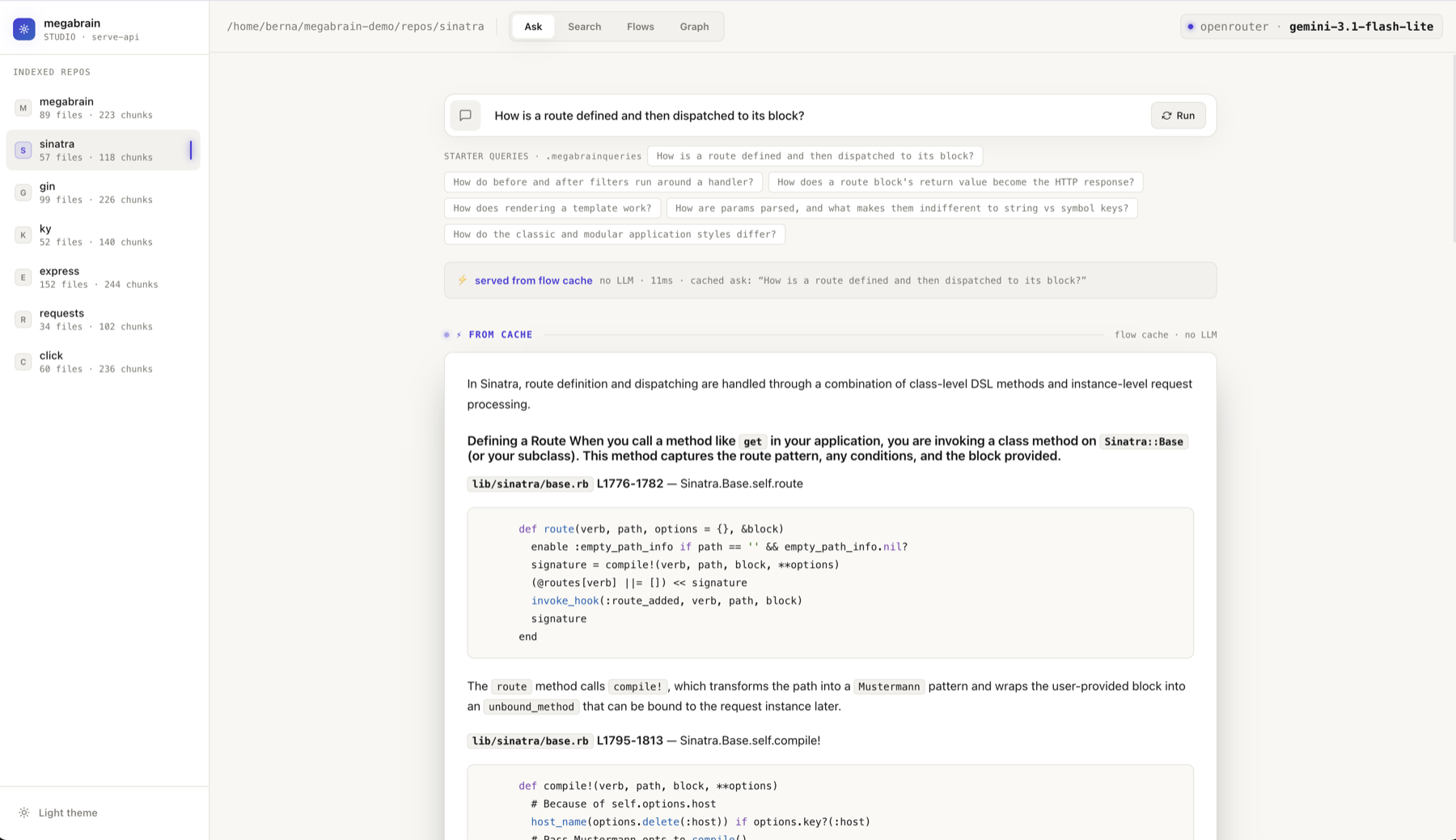
askremembers its walkthrough — ask the same thing again, even reworded, and the answer serves in ~0 ms with zero LLM (measured: 27.8 s → 0.19 s), guarded by a byte-level sha recheck so it can never describe code that changed. Cached in the same SQLite file; opt out per repo withmegabrain flows --disable, or kill globally withMEGABRAIN_FLOW_CACHE=0. - Everywhere you work. A terminal CLI, an MCP server inside Claude Code / Codex / Cursor / Gemini CLI (+more), a Python library, and a full local web studio.

Act one — search: no-LLM retrieval ranks the signal, then the rerank strikes the
vocabulary-only look-alikes. Act two — a broad ask fans out into parallel sub-agents,
one per subsystem; one synthesis merges their cited answers, the engine splices the verbatim code,
and the finished workflow lands in the flow cache. Act three — graph traces how two
files really relate: it reports that they never call each other, names the file that bridges
them, and labels every hop with the function that carries it.
Get started (no keys needed — narrate on your Claude Code plan, embed locally):
pip install 'megabrain[claude]'
megabrain index ~/repo
megabrain ask   ~/repo "how does auth work end to end"
🖥️ megabrain studio — the whole engine, in your browser
One command turns megabrain into a local studio — nothing canned, every pixel driven by the live engine:
megabrain studio              #  every repo you've indexed → open http://localhost:2134
megabrain studio ~/repo       #  …or boot straight into one
The Search tab on sinatra: what the engine read (left, with the code) beside what
it ignored (right) — 23 kept, 19 pruned, 3 ms. Every repo you've indexed sits in the rail.
Light or dark follows your GitHub theme, and the studio's.
Three tabs, each one a view into a different half of the engine:
- Search — the money shot:
SIGNAL · KEPTandNOISE · PRUNEDside by side, so you see exactly what the engine read and what it threw away. Chunks scanned, retrieval ms, and a kept/pruned badge on top. Flip on ✨ LLM rerank and the header tells you which model ran, how many tangential chunks it dropped and what it cost — or says "rerank failed open — deterministic list shown" when the model misbehaves. - Ask — watch a broad question fan out into parallel sub-agents, their tool calls and prose streaming into per-agent cards, then a synthesis with the real code spliced in as it types.
- Graph — the repo as a force-directed knowledge graph, in four modes: an
overview of community bubbles (click one to open it), a community expanded, a
search subgraph (real retrieval drawn as a graph), and a path between two
concepts with
▶ Run the connection— a step-through of the call→definition chain, hop by hop. - The code navigator (opens over any view) — a read-only IDE over the index. Click any
file — a search chunk, an ask agent's file pill, a graph node, a path step — and the
whole file opens: real bytes, syntax-highlighted, scrolled to the exact line. Every
identifier with a resolvable definition is a link (receiver-aware and import-anchored,
so
Path(x).resolve()links to nothing because it's stdlib, whilestore.stats()jumps to store.py), plus a back stack and a symbols rail. - Providers, live — Claude SDK · OpenRouter · Ollama, auto-detected. Switch the
narrator without leaving the page, pick the model, and start
ollama servein one click to go fully local. - Add a repo → it scans first — you SEE exactly what will index and what's skipped and
why (
.gitignore· vendored · generated · too-big), edit the.megabrainignore, then a live progress bar indexes it file by file. The rail also lists every repo indexed on this machine (the global registry) — studio pre-loads every one of them into the rail, so every indexed repo is selectable and searchable immediately. - Embeddings you can see — which model each index used, and re-index with another (cloud pplx or a local, code-tuned jina) behind the same bar — the query embedding switches to match, so search keeps working.
Keyboard-driven, dark/light, zero build step, no CDN. Want the JSON API without the UI?
megabrain serve-api ~/repo mounts the exact same endpoints, no studio.
See it in action
Once the index is built you query it instead of reading files. Real, verbatim output from this very repo:
$ megabrain graph . --path scoring rerank
# graph path — retrieval/scoring.py → retrieval/rerank.py · 285ms
⚠ NOT a call chain — the endpoints never call each other;
  app.py calls BOTH sides (the shared orchestrator)
  retrieval/scoring.py
  └─ call → graph.py        · via _is_test_path, under_path
  └─ call → app.py          · via graph_root, get
  └─ call → retrieval/rerank.py  · via llm_rerank, get
That's the whole idea: the graph tells you the truth about how two files relate — here,
that they don't call each other directly, and it names the file that bridges them
(app.py) plus the exact functions on each hop. --node opens one file's neighbors + real
code; --path traces the route; the studio's Graph tab does it on a live canvas with a
▶ Run the connection walkthrough. Every carrier is a resolved call site, never a
bare-name guess — re.search(...) can't masquerade as your repo's own search().
And retrieval never hallucinates a line:
$ megabrain search . "how does the rerank drop tangential matches" --prune
# megabrain search · 19 signal chunks (31 pruned as noise) · 2ms · no LLM
### 1. [1552] retrieval/rerank.py L1-101 · rerank_model, _hint, llm_rerank · 1.06
### 2. [1772] retrieval/bundle.py  L1-121 · search_with_state              · 0.95
...
Quickstart — the easy path, no API keys
Everything runs on your machine: ask narrates on your Claude Code subscription,
embeddings run locally on Ollama. No cloud keys.
pip install 'megabrain[claude]'                      # engine + Claude Code narration

ollama pull unclemusclez/jina-embeddings-v2-base-code # local, code-tuned embeddings, one time
export MEGABRAIN_EMBED_BASE_URL=http://localhost:11434/v1
export MEGABRAIN_EMBED_MODEL=unclemusclez/jina-embeddings-v2-base-code

megabrain index ~/your/repo                           # once — incremental after
megabrain ask   ~/your/repo "how does auth work end to end"
ask uses your logged-in claude CLI (free on your plan); embeddings never leave your
machine. No OpenRouter, no Anthropic key.
Which model? On Claude Code, ask narrates with Haiku by default (fast + cheap
on your plan). Bump it with a Claude alias — export MEGABRAIN_ASK_MODEL=sonnet (or
opus). ⚠️ On the claude provider this must be a Claude model (haiku/sonnet/
opus/a claude-* id), not an OpenRouter slug like google/….
Built for coding agents — one call instead of thirty turns
Watch any coding agent meet an unfamiliar repo: grep a keyword, open a file, follow an import, open another file, grep again… 10–30 tool turns before it writes a line of code. Every turn burns context window, latency, and tokens — and the understanding it assembles at the end is its own guess about how the pieces connect. megabrain collapses that whole walk into one MCP call:
| exploring by hand (grep + Read chains) | one megabrain call | |
|---|---|---|
| tool turns | 10–30 | 1 |
| what lands in context | whole files, mostly irrelevant | exactly the signal chunks — noise pruned before the agent sees it |
| the cross-file story | reconstructed by the agent, unverified | narrated with the real code spliced in from disk (ask) |
| asking again later | the full re-exploration, every time | ~0 ms — served from the flow cache |
Two ways to hand your agent the repo — both grounded, pick by who does the reasoning:
megabrain_search+ LLM rerank (rerank on by default over MCP) — for a strong agent (Claude Code) that wants to reason over the raw code itself. ~200 ms of pure no-LLM retrieval returns the exact chunks worth reading; then the rerank — one cheap, fail-open LLM pass (~1–2 s) — drops the vocabulary-only matches (tests, eval scripts, tangential files) that embeddings alone can't tell from the real thing. The agent gets signal, not a haystack.megabrain_ask— the repo explained, not just retrieved: a senior-engineer walkthrough tracing the whole cross-file flow, with the verbatim code spliced in by the engine (the narrator only ever points — it cannot rewrite a line). This is relevance curation for whatever model reads it: an agent on a smaller, cheaper LLM that could never navigate the repo on its own gets handed the connected story, already assembled and grounded. It's also the tool that learns:
Every ask makes the next one cheaper. The walkthrough it writes lands in the flow
cache (on by default) — the next related question, from the same agent or a teammate's,
retrieves the whole workflow at once, and a near-exact repeat is served with no LLM at
all — measured: 27.8 s → 0.19 s — sha-guarded byte-for-byte so changed code is
never described stale. A team of agents working a repo makes megabrain smarter about
that repo with every question — and all of it lives in one SQLite file inside the
repo: fully local, no vector DB, no embedding service, nothing to host.
And on a broad question, ask becomes its own multi-agent system — it fans out into
parallel sub-agents, one per subsystem, then synthesizes their cited answers into a single
grounded walkthrough (diagram above).
Wire it up
megabrain speaks MCP, and MCP is portable — the same stdio server runs in every assistant. One command wires up whichever ones you have installed:
megabrain install # detects + registers; --list to preview, --remove to undo
Registered megabrain in 3 platform(s):
  ✓ Claude Code  registered   ~/.claude.json
  ✓ Codex        registered   ~/.codex/config.toml
  ✓ Antigravity  registered   ~/.gemini/antigravity/mcp_config.json
  · Cursor       skipped (not installed)
Supported: Claude Code · Codex · Antigravity · Cursor · Windsurf · Gemini CLI
(--platform <name> for just one). It only ever writes the megabrain key — your other
MCP servers are left alone — and it pins the entry to the interpreter megabrain is
installed in, so re-running it repairs a config that drifted to an old checkout. Prefer
to do it by hand? claude mcp add megabrain -- python3 -m megabrain.mcp_server, or copy
the equivalent entry into your assistant's MCP config.
The tools are deliberately lean — megabrain exposes only what it alone can do (your agent already has Read/Grep for single files):
| tool | what it returns | key params (besides repo_path) |
|---|---|---|
megabrain_ask |
The primary tool. A narrated senior-engineer walkthrough of the whole relevant flow with the real code spliced in (verbatim, true line numbers — the model narrates, never rewrites). No LLM in retrieval; one chat call writes it. Broad questions auto fan out into parallel sub-agents. ~6–19 s (fan-out up to ~40 s). | question (req) · scope_path (limit to a folder) · docs (explain markdown instead of code) · include_docs (code and docs) · agents (true/false forces/disables fan-out; omit = AUTO) |
megabrain_search |
The same retrieval, no LLM in the core (~200 ms): a flat, relevance-ranked list of exactly the chunks worth reading ([id] file:lines · score + the code), noise dropped. Every related file still appears. This is the prune — the signal list an agent should read. |
task (req) · scope_path · compact (signatures only, drop bodies) · rerank (default true) — a cheap LLM pass drops vocabulary-only matches and reorders (~1–2 s), fail-open to the deterministic list; false = pure retrieval |
megabrain_graph |
The repo as a navigable knowledge graph (AST import/call edges + embedding-similarity edges; the only LLM touch is cached community labels). | mode (map default = communities + god nodes + surprising links · node = one file/concept in depth · path = route between two) · node (for node) · source+target (for path) · scope_path |
megabrain_index |
Index / incrementally update a repo before querying a new one (only changed files re-embed). | repo_path (omit + list: true → return the registry of every indexed repo on this machine) |
megabrain_forge |
Teach megabrain a file type it can't index yet (an LLM writes + validates a chunking strategy, installed only if it partitions every matching file cleanly). | ext (one extension, e.g. .toml) · list_only (free census) · dry_run (generate without installing) · specialize (census of poorly-chunked covered files) |
megabrain_flows |
Manage the workflow cache (on by default): each ask caches its walkthrough, related questions retrieve the whole flow at once, and a near-exact repeat is served with no LLM (~0 ms, sha-guarded). |
action (list · warm · refresh · disable to opt the repo out · enable) · n (for warm: how many workflows to pre-cache) |
Every tool auto-detects the repo root from any sub-path, and ask/search auto-refresh a
stale index — no manual re-index step. megabrain_query stays as a deprecated dispatch
alias for megabrain_search.
Commands
megabrain install                                # register the MCP server with your assistants
megabrain index  ~/repo                          # build / update the index
megabrain scan   ~/repo                          # census: what WOULD index + what's skipped & why
megabrain ask    ~/repo "how does X work"        # narrated walkthrough + real code
megabrain search  ~/repo "retry logic"            # raw code map, no LLM (~200 ms)
megabrain search  ~/repo "retry logic" --prune    # flat signal-only chunks, no LLM (drops the noise)
megabrain search  ~/repo "retry logic" --rerank   # + one cheap LLM pass to drop vocabulary-only hits
megabrain graph  ~/repo                          # the repo as a knowledge graph (communities + core nodes)
megabrain graph  ~/repo --node scoring.py        # one file: neighbours, semantic twins, real chunks
megabrain graph  ~/repo --path "auth" "billing"  # BFS route between two concepts (resolved by embedding)
megabrain repos                                  # every repo indexed on this machine (the registry)
megabrain flows  ~/repo                          # cached ask-flows (on by default) · --warm N · --refresh · --disable
megabrain get    ~/repo src/x.py --symbol Foo    # one file or symbol
megabrain forge  ~/repo                          # teach it your repo's file types (below)
megabrain studio                                 # studio web UI + JSON API — loads every indexed repo
megabrain serve-api ~/repo                       # the JSON API only, no UI
Scope to a sub-folder (~/repo/src/auth), search several repos at once
(~/a,~/b), and the index auto-refreshes when files change on disk.
megabrain studio serves megabrain studio
(the web UI, above) at /, and megabrain serve-api ~/repo exposes the same JSON API
with no UI mounted. And megabrain scan is the studio's add-repo census on the
CLI — what would index and everything skipped with a reason (.gitignore · vendored ·
generated · too-big): --write applies the proposed .megabrainignore, and
megabrain index --scan indexes with those smart filters on (a plain index stays
byte-identical).
Rather use the cloud?
No Claude Code or Ollama? One key runs everything through OpenRouter — embeddings and narration — with sensible defaults:
export OPENROUTER_API_KEY=...
megabrain ask ~/repo "how does X work"
megabrain auto-picks the narrator: Claude when its SDK is installed, otherwise OpenRouter. Embeddings always go through OpenRouter or a local endpoint (Anthropic has no embeddings API).
Pin the provider and models with env vars (any OpenRouter slug):
export MEGABRAIN_CHAT_PROVIDER=openrouter                          # pin openrouter (skip claude auto-pick)
export MEGABRAIN_ASK_MODEL=google/gemini-3.1-flash-lite-preview    # the `ask` narration model
export MEGABRAIN_EMBED_MODEL=perplexity/pplx-embed-v1-0.6b         # the embedding model
The full provider matrix — native APIs, hybrid, fully-local GPU, per-provider defaults — is in ARCHITECTURE.md.
100% open-source stack (measured, no closed-weight anything)
Every default above uses a proprietary model somewhere (pplx embeddings, Gemini/Claude narration). If you want zero closed weights — private code, an air-gapped box, or just principle — this combo is measured, not a guess, and holds up:
# 1. embeddings — Apache 2.0, code-tuned, runs on your machine, $0
ollama serve
ollama pull unclemusclez/jina-embeddings-v2-base-code    # 322 MB, one time
export MEGABRAIN_EMBED_BASE_URL=http://localhost:11434/v1
export MEGABRAIN_EMBED_MODEL=unclemusclez/jina-embeddings-v2-base-code

# 2. narration — Apache 2.0 (Qwen), via OpenRouter (or self-host on the same Ollama)
export MEGABRAIN_CHAT_PROVIDER=openrouter
export MEGABRAIN_ASK_MODEL=qwen/qwen3-coder

megabrain index ~/your/repo --force
megabrain ask   ~/your/repo "how does X work"
Retrieval recall (R@1 on a 22-question golden set, sdk-server — does the right file land #1):
| stack | R@1 | weights | cost |
|---|---|---|---|
| pplx + closed narrator (the cloud default above) | 0.591 | closed | ~$0.01/ask |
| jina-code (local) + qwen3-coder (this section) | 0.455 | all open | $0 embed + ~$0.01/ask on OpenRouter, or $0 fully self-hosted |
Does ask actually still work? Ran the same two real questions against
sdk-server with this exact stack:
- "where is barge-in handled when the user interrupts mid-speech" → correctly
narrated from
turn_controller.py, citing 4 files total (event_bus.py,bot_handler.py,webhooks.pytoo) — broader than the closed-default run. - "how does an inbound websocket client get authenticated" → correctly
narrated from
transports/client/handler.py, the same file the closed stack found.
Both answers were grounded (every code block spliced verbatim, nothing invented) and
landed on the right file — the open stack is a real, usable alternative, not a
token gesture. The one real cost: qwen/qwen3-coder narrates in ~20-25 s per ask
vs ~6 s for Gemini Flash — output-bound, not retrieval-bound, so it's the same
trade-off as the cloud cheap-vs-fast pick. qwen3-coder also runs on the same
local Ollama for a fully air-gapped setup (no OpenRouter call at all) — just slower
without a GPU. Full comparison + a weaker general-purpose local embedder (e5-large,
0.364 R@1) in docs/GUIDE.md §2b.
Compared to claude-context (measured, not vibes)
claude-context (Zilliz) is the closest open-source peer: an MCP server that also does AST-chunked, no-LLM semantic retrieval over a repo. We actually ran it — same repo, same questions, both at their best.
Setup: pinecall/sdk-server (173 source files) · 22 natural-language questions with
hand-labelled ground-truth files (barge-in, VAD, turn control, billing…) · R@1 = the
right file ranked #1, R@5 = a right file in the top 5 unique files.
| megabrain | claude-context | |
|---|---|---|
| R@1 | 0.864 | 0.818 |
| R@5 | 1.000 | 0.909 |
| Search latency | ~22 ms warm · ~370 ms cold | ~1400 ms |
| Vector store | SQLite file (zero infra) | Milvus + etcd + MinIO (3 containers) |
| Chunks for the repo | 575 | 1400 |
| LLM in the retrieval path | no | no |
Narrated answer (ask) |
yes — real code spliced in | no (returns chunks; your agent synthesizes) |
Both were given their own default embedder (megabrain: pplx-embed-v1-0.6b;
claude-context: text-embedding-3-small). To check the gap wasn't just the embedder, we
re-ran claude-context on megabrain's exact embedder — it scored 0.727 R@1, i.e.
lower. So the difference comes from the retrieval design (tiered CORE/RELATED, import-graph
expansion, 4000-char AST merge), not from which embedding model was picked. Fine-grained
chunking (2.4× more chunks) also means its top-1 is a fragment, where megabrain's is a
whole file with its symbol index.
Caveats, honestly: one repo, 22 questions — this is an indicative result, not a
benchmark suite. More importantly, the golden set is ours, on a corpus megabrain has
been tuned against, so treat the absolute numbers as home-field. The reproducible parts are
the qualitative ones: claude-context needs a Milvus stack, returns chunks rather than a
grounded walkthrough, mixes README.md/PROTOCOL.md into code answers (it doesn't separate
docs from code), and its get_indexing_status reported ✅ fully indexed while the index was
still growing in the background (200 → 1400 chunks), so an agent that trusts it will silently
search a partial index. Run it yourself before believing either of us.
How it works
| stage | what happens |
|---|---|
| index | code is split over its syntax tree (whole functions / classes, never arbitrary line windows), embedded once, stored in SQLite. Incremental by hash. |
| query | no LLM — your question is embedded and matched by vector similarity. Returns every related file in ~200 ms; nothing is dropped. An optional LLM rerank (--rerank; on by default over MCP) then prunes vocabulary-only matches — fail-open to the deterministic list. |
| ask | one LLM call narrates the answer and cites code as [[k]]; the engine replaces each citation with the verbatim block from disk. The model can only point at code, never rewrite it — so nothing is hallucinated. Broad questions fan out into parallel sub-agents, then a parent synthesizes. |
| forge | for a file type the engine doesn't index yet (.toml, .astro, a private DSL), an LLM writes a chunking strategy — accepted only after it partitions every matching file exactly. One-time, at your command, off the query path. |
| flows (on by default) | every ask caches its cross-file walkthrough; the next related question retrieves the whole workflow at once, and a near-exact repeat is served with no LLM (~0 ms), sha-guarded against changed code. megabrain flows --disable / MEGABRAIN_FLOW_CACHE=0 to turn off. |
Languages: Python · JS/TS · Markdown built in; Ruby · Go · Rust · PHP with
pip install 'megabrain[languages]'; anything else via megabrain forge (below).
forge — megabrain writes its own chunkers
Repos carry more than code: .toml, .yaml, .astro, .proto, private DSLs…
Anything outside the registry is invisible to retrieval. megabrain forge fixes
that per repo:
megabrain forge ~/repo --list        # census: which text file types aren't indexed (free)
megabrain forge ~/repo               # LLM-write a chunking strategy per type, validate, install
megabrain forge ~/repo --dry-run     # show the generated code without installing
For each uncovered extension, an LLM (same provider stack as ask) writes a
ChunkStrategy from the contract source + real sample files, and it is only
accepted after chunking every matching file in the repo with a clean
exact-line partition (validate_partition — failures feed a repair loop, and
nothing unvetted ever installs). The vetted module lands in
.megabrain/strategies/<ext>.py, sha-recorded in a user-level trust store
(~/.megabrain/trust.json), and from then on every index — including the 60 s
auto-refresh — loads it automatically. Hand-written strategies work the same
way: drop the file in .megabrain/strategies/ and approve it with
megabrain trust ~/repo.
Real run on pallets/click: forge detected
.toml (11 files) and .yaml (8 workflows), generated both strategies on the
first attempt (~28 s total), and "which workflow runs the test suite?" went
from missing entirely to ranking .github/workflows/tests.yaml #1.
--specialize — measure a hand-written chunker (no LLM)
For a file type the engine ALREADY reads but chunks poorly (a giant lookup table blobs; a class of many tiny methods merges), you can hand-write a better strategy and have the engine measure it before it installs:
megabrain forge ~/repo --specialize          # census: covered files the built-in chunks poorly
# write a ChunkStrategy into .megabrain/strategies/<ext>.py, then gate it:
python -c "from megabrain.forge.specialize import gate_strategy; \
           print(gate_strategy('~/repo', open('strat.py').read(), '.py'))"
gate_strategy indexes the built-in vs your candidate for real, scores span-IoU
- hit@1 on neutral probes over every file the candidate changes, and installs (trust-gated) only if it beats a literature-tuned baseline — never on a whisper of improvement.
We tried letting an LLM write these and removed it. Across four repos the generated chunkers lost to a five-line deterministic recipe. And the deeper, measured finding: on a real query set (the sdk-server golden) tighter chunks LOWER retrieval ranking — the 4000-char merge concentrates a file's evidence and that is what wins R@1 (4000 → 0.86, 2000 → 0.82, blob-split → 0.77). Tighter chunks help navigation (fewer lines to read) but not retrieval. The built-in default is a genuine optimum; leave it alone unless you measure a win. Specialization is for the rare pathological file, gated hard.
flows — it learns from itself (on by default)
Every ask synthesizes a cross-file workflow ("VAD detects speech →
TurnController.on_vad_start → cancel TTS") that the engine used to discard.
The flow cache keeps them — on by default, in the same SQLite file as the
index, zero infrastructure — so megabrain accumulates your repo's workflows
from use. The next related question — even worded completely differently —
retrieves the whole workflow at once, and a near-exact repeat skips the LLM
entirely:
| ask | time | LLM |
|---|---|---|
| first time | 27.8 s | pays once, caches |
| repeated (even reworded) | 0.19 s | none — served from cache |
| after the cited file changed | 21.9 s | sha recheck refuses the stale answer, narrates fresh, re-caches |
(measured on this repo — the exact run is reproducible with any question)
megabrain ask ~/repo "how does X work"       # caches its flow automatically
megabrain flows ~/repo                        # list what's cached · --clear to reset
megabrain index ~/repo --warm-flows 12       # pre-fill: discover the repo's 12 top workflows now
megabrain flows ~/repo --disable             # opt this repo out (--enable to return)
export MEGABRAIN_FLOW_CACHE=0                # kill switch: off everywhere, beats everything
- It can never lie about changed code. A flow records the sha256 of every
file it cites; serving re-checks each one byte-for-byte at that instant
and falls back to a fresh narrate on any mismatch. The next
indexprunes stale flows automatically, andflows --refreshre-asks their original questions to update them instead. - Rules intact: the LLM + the one embed happen at ask time (write path); the read path is pure cosine. Flows only add their source files to the bundle when missing (never displace real files → completeness only rises), and the narrator gets the cached flow as non-citable context — it still splices real code from disk regardless.
Validated on sdk-server: --warm-flows 5 discovered and cached the system's
main workflows; a paraphrase ("how does the bot stop talking when the user cuts
in") retrieved the barge-in flow cached from a differently-worded question.
See it live
bernardocastro.dev/megabrain — search 7
popular open-source repos and watch the engine rank the files and pick the exact code
chunks, live. Or run it locally: python examples/webui/server.py.
Learn more
- docs/GUIDE.md — step-by-step: providers, indexing, the 2000-vs-4000 budget choice, custom chunkers, and the flow cache
- docs/STUDIO.md — the studio web app: every view, the JSON API, and the deploy recipes
- docs/GRAPH.md — the knowledge graph in plain language: what the map means, real output, and what it's actually good for
- ARCHITECTURE.md — the full design, the locked rules, and the measurements behind them
- examples/ — programmatic API · a custom
.sqlchunker · the web demo - CONTRIBUTING.md — the best first PR is a new language
MIT · github.com/bernatch22/megabrain
1 maintainer

Download files
Download the file for your platform. If you're not sure which to choose, learn more about installing packages.
Source Distribution
Built Distribution
Filter files by name, interpreter, ABI, and platform.
If you're not sure about the file name format, learn more about wheel file names.
Copy a direct link to the current filters
File details
Details for the file megabrain-0.12.1.tar.gz.
File metadata
- Download URL: megabrain-0.12.1.tar.gz
- Upload date:
- Size: 698.0 kB
- Tags: Source
- Uploaded using Trusted Publishing? Yes
- Uploaded via: twine/6.1.0 CPython/3.13.12
File hashes
| Algorithm | Hash digest | |
|---|---|---|
| SHA256 |
1bc982eb902c8b775def255d9bc4df72b153071bf4ec21bd92600c205a5153ed
|
|
| MD5 |
1fd9c57fdede4244092d2099391c17a7
|
|
| BLAKE2b-256 |
090fa5fe297d8ded61fea113058796edd9751c7da2c08bcb311d97fd6497236b
|
Provenance
The following attestation bundles were made for megabrain-0.12.1.tar.gz:
Publisher:
release.yml on bernatch22/megabrain
-
Statement:
-
Statement type:
https://in-toto.io/Statement/v1 -
Predicate type:
https://docs.pypi.org/attestations/publish/v1 -
Subject name:
megabrain-0.12.1.tar.gz -
Subject digest:
1bc982eb902c8b775def255d9bc4df72b153071bf4ec21bd92600c205a5153ed - Sigstore transparency entry: 2194693239
- Sigstore integration time:
-
Permalink:
bernatch22/megabrain@5e12b5583465cd2af77aecf24150581f3b9ecd54 -
Branch / Tag:
refs/tags/v0.12.1 - Owner: https://github.com/bernatch22
-
Access:
public
-
Token Issuer:
https://token.actions.githubusercontent.com -
Runner Environment:
github-hosted -
Publication workflow:
release.yml@5e12b5583465cd2af77aecf24150581f3b9ecd54 -
Trigger Event:
push
-
Statement type:
File details
Details for the file megabrain-0.12.1-py3-none-any.whl.
File metadata
- Download URL: megabrain-0.12.1-py3-none-any.whl
- Upload date:
- Size: 644.8 kB
- Tags: Python 3
- Uploaded using Trusted Publishing? Yes
- Uploaded via: twine/6.1.0 CPython/3.13.12
File hashes
| Algorithm | Hash digest | |
|---|---|---|
| SHA256 |
eb7cd5fceb30f3a2b3122f28ea9d781b9248715e3ebea9af6950df2321e65832
|
|
| MD5 |
7bf128eea410f5316fd7a7c0be356b28
|
|
| BLAKE2b-256 |
622df85833e9682d20771b93751a515e7e361dbe1f7faba06e2fcd74064b7194
|
Provenance
The following attestation bundles were made for megabrain-0.12.1-py3-none-any.whl:
Publisher:
release.yml on bernatch22/megabrain
-
Statement:
-
Statement type:
https://in-toto.io/Statement/v1 -
Predicate type:
https://docs.pypi.org/attestations/publish/v1 -
Subject name:
megabrain-0.12.1-py3-none-any.whl -
Subject digest:
eb7cd5fceb30f3a2b3122f28ea9d781b9248715e3ebea9af6950df2321e65832 - Sigstore transparency entry: 2194693250
- Sigstore integration time:
-
Permalink:
bernatch22/megabrain@5e12b5583465cd2af77aecf24150581f3b9ecd54 -
Branch / Tag:
refs/tags/v0.12.1 - Owner: https://github.com/bernatch22
-
Access:
public
-
Token Issuer:
https://token.actions.githubusercontent.com -
Runner Environment:
github-hosted -
Publication workflow:
release.yml@5e12b5583465cd2af77aecf24150581f3b9ecd54 -
Trigger Event:
push
-
Statement type:







