
Local code-intelligence engine: one call returns all the code related to a question, explained with the real code spliced in.
Verified details
These details have been verified by PyPIProject links
GitHub Statistics
Maintainers

Project description

megabrain
Ask a codebase a question. Get the exact code back.
The repo walk your coding agent does in 10–30 grep-and-open turns — in one call.




Point megabrain at a repo and ask "how does auth work" in plain English. It finds all the related code in ~200 ms with no LLM — just math on embeddings, in one SQLite file. No vector DB, no containers, no services.
Want it explained? ask adds one LLM call that narrates a walkthrough with the real
code spliced in from disk, line for line. The model only ever points at code — it
cannot rewrite a line, so nothing is invented.
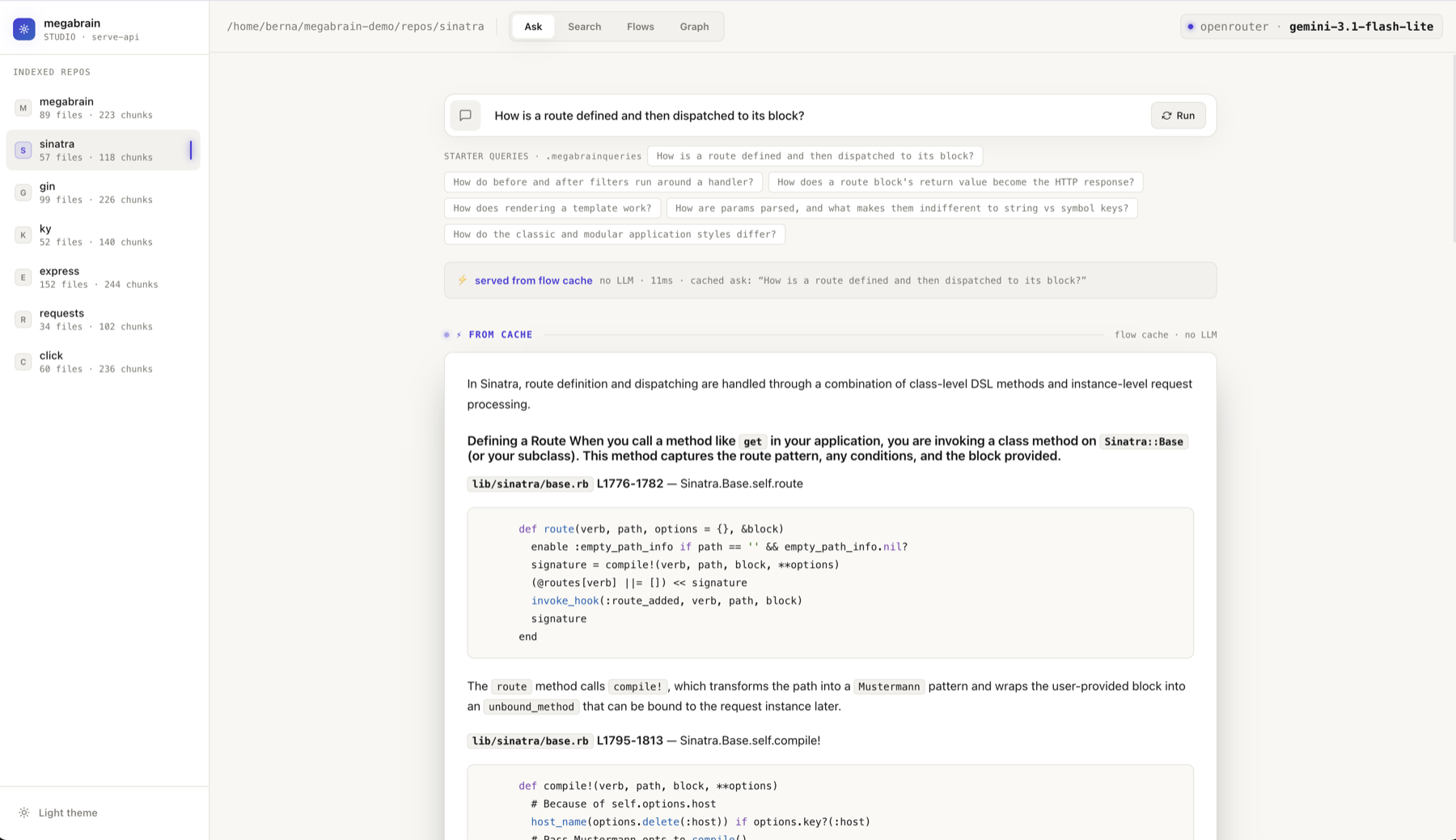
megabrain studio — the whole engine in your browser
Try it live →
Quickstart
Best quality — one key, nothing to configure
pip install megabrain
export OPENROUTER_API_KEY=sk-or-...

megabrain index ~/repo                            # once — incremental after
megabrain ask   ~/repo "how does auth work end to end"
That single key gets you both halves of the validated stack, and they're already the defaults:
perplexity/pplx-embed-v1-0.6bfor retrieval — the measured best for code recall. It beat pplx-4b, codestral-embed, openai-3-large and bge-m3 in a head-to-head bakeoff (R@1 0.864, bundle_full 0.955).google/gemini-3.1-flash-lite-previewfor narration — the fastest and cheapest tier, at the quality of models costing several times more. A full walkthrough in seconds, for fractions of a cent.
No keys — your Claude plan + local embeddings
Narration runs on the Claude Code subscription you already pay for, embeddings run on your machine, and your code never leaves it:
pip install 'megabrain[claude]'                   # narrates on your Claude Code login

ollama pull bge-m3                                # local embeddings, one time
export MEGABRAIN_EMBED_BASE_URL=http://localhost:11434/v1
export MEGABRAIN_EMBED_MODEL=bge-m3

megabrain index ~/repo
megabrain ask   ~/repo "how does auth work end to end"
bge-m3 is the local embedder to use. It matches the cloud one on the measure that
decides whether ask gets the right code at all, and trails it on ranking the single best
file first — a real trade, and a small one.
Fully local — Ollama for both halves, zero cloud
Air-gapped, $0, open weights end to end:
pip install 'megabrain[languages]'
ollama pull bge-m3 && ollama pull qwen3-coder:30b

export MEGABRAIN_EMBED_BASE_URL=http://localhost:11434/v1
export MEGABRAIN_EMBED_MODEL=bge-m3
export MEGABRAIN_CHAT_BASE_URL=http://localhost:11434/v1
export MEGABRAIN_ASK_MODEL=qwen3-coder:30b

export MEGABRAIN_ASK_CTX_CHARS=105000     # ← required: see below
export OLLAMA_CONTEXT_LENGTH=40960

megabrain index ~/repo --force            # --force re-embeds with the new model
megabrain ask   ~/repo "how does auth work end to end"
Use a real coder model. qwen3-coder is the one that holds up — the small dense models
are not a cheaper trade-off, they cite less and run slower, and a general-purpose model of
the same size does markedly worse on code.
MEGABRAIN_ASK_CTX_CHARS is not optional. ask's budget is sized for cloud context
windows, so a local model silently gets a truncated prompt — no error, just quietly worse
answers. Compared to the cloud you lose some secondary citations, never correctness: the
code you're shown is still spliced verbatim from disk.
The numbers, and the extra knob thinking models need →
Other languages need one extra install: pip install 'megabrain[languages]' adds
Ruby · Go · Rust · PHP. Python, JS/TS and Markdown work out of the box.
Every setup, with its cost: Guide.
What you get
Retrieval that cannot hallucinate. The search path has no LLM at all — dense chunk vectors fused with a file-skeleton signal and the import/call graph. The narrator only ever cites spans and the engine splices the verbatim bytes, so no line is ever invented. An optional LLM rerank rides on top to drop vocabulary-only matches — fail-open, never inside the core path.
ask — the repo, explained. One call returns a senior-engineer walkthrough of the
whole cross-file flow, with the real code spliced in at each step. Broad questions
fan out into parallel sub-agents, one per subsystem,
and a synthesizer merges their cited answers.
It learns from itself. Every ask caches its walkthrough. Ask again — even reworded —
and it serves in ~0 ms with zero LLM (measured 27.8 s → 0.19 s), guarded by a
byte-level sha recheck so it can never describe code that changed.
How it works →
A knowledge graph, for free. The same index doubles as a navigable map: communities, the core "god node" files, and the real call-path between any two files — built from AST edges plus embedding similarity, numpy only, no networkx. What it's actually good for →
A local studio. megabrain studio opens the whole engine in your browser: search,
ask, the flow cache and the graph on a live canvas, plus a read-only code navigator where
every identifier is a go-to-definition link. Take the tour →
Everywhere you work. A terminal CLI, an MCP server inside Claude Code / Codex / Cursor / Gemini CLI, a Python library, and the studio.
For coding agents
This is what megabrain is for. Dropped into an unfamiliar repo, an agent burns 10–30 tool turns — grep, open a file, follow an import, grep again — before it writes a line, and the picture it assembles is still its own guess.
megabrain install # detects Claude Code · Codex · Cursor · Windsurf · Gemini CLI · Antigravity
| by hand | one megabrain call | |
|---|---|---|
| tool turns | 10–30 | 1 |
| what lands in context | whole files, mostly irrelevant | exactly the signal chunks |
| the cross-file story | reconstructed, unverified | narrated, real code spliced in |
| asking it again later | the full re-exploration | ~0 ms, from the cache |
Your agent gets six tools, deliberately lean — it already has Read and Grep for single
files: megabrain_ask (the default) · megabrain_search · megabrain_graph ·
megabrain_index · megabrain_forge · megabrain_flows.
Put this in your agent's rules: for any question about how the code works, call
megabrain_askfirst, before grepping. One call returns the whole flow with the real code — that single instruction is the difference between 15 turns and 1.
Every parameter → · Wiring recipes →
Commands
megabrain index  ~/repo                       # build / update the index (incremental)
megabrain ask    ~/repo "how does X work"     # narrated walkthrough + real code
megabrain search ~/repo "retry logic"         # the code map, no LLM (~200 ms)
megabrain graph  ~/repo                       # the repo as a knowledge graph
megabrain studio                              # the web UI + JSON API
megabrain install                             # register the MCP server
Measured, not vibes
Against claude-context (Zilliz), the closest open-source peer — same repo, same 22 hand-labelled questions, both at their best:
| megabrain | claude-context | |
|---|---|---|
| R@1 | 0.864 | 0.818 |
| R@5 | 1.000 | 0.909 |
| search latency | ~22 ms warm | ~1400 ms |
| vector store | one SQLite file | Milvus + etcd + MinIO |
| narrated answer | yes — real code spliced in | no (returns chunks) |
The golden set is ours, on a corpus megabrain was tuned against — treat the absolute numbers as home-field and run it yourself. Full method, caveats and the embedding bakeoff →
Docs
- Guide — the tour, front to back: setup → search vs ask → the studio → the graph → the flow cache → MCP → new file types → tuning
- Recipes — "I want to ___": private repos, team knowledge bases, public demos, custom file types, cost and speed
- Reference — every CLI flag, MCP tool, HTTP route and env var
- Architecture — how it's built and why: the locked design rules and the experiments behind them
- Contributing — the best first PR is a new language
- Changelog — what changed, and why
MIT · github.com/bernatch22/megabrain
Project details
Verified details
These details have been verified by PyPIProject links
GitHub Statistics
Maintainers
Release history Release notifications | RSS feed


Download files
Download the file for your platform. If you're not sure which to choose, learn more about installing packages.
Source Distribution
Built Distribution
Filter files by name, interpreter, ABI, and platform.
If you're not sure about the file name format, learn more about wheel file names.
Copy a direct link to the current filters
File details
Details for the file megabrain-0.17.2.tar.gz.
File metadata
- Download URL: megabrain-0.17.2.tar.gz
- Upload date:
- Size: 692.9 kB
- Tags: Source
- Uploaded using Trusted Publishing? Yes
- Uploaded via: twine/6.1.0 CPython/3.13.14
File hashes
| Algorithm | Hash digest | |
|---|---|---|
| SHA256 |
00a193ff0554fdd393052f74acffd8b9ecbc8825eed11d4b2d09b3cb6942171f
|
|
| MD5 |
94f71c22eb4d889c1eb235fb78336abd
|
|
| BLAKE2b-256 |
51d20959767290a773f1c25449ad6e83a7d84a02f77e398fed37297a7bacf1bc
|
Provenance
The following attestation bundles were made for megabrain-0.17.2.tar.gz:
Publisher:
release.yml on bernatch22/megabrain
-
Statement:
-
Statement type:
https://in-toto.io/Statement/v1 -
Predicate type:
https://docs.pypi.org/attestations/publish/v1 -
Subject name:
megabrain-0.17.2.tar.gz -
Subject digest:
00a193ff0554fdd393052f74acffd8b9ecbc8825eed11d4b2d09b3cb6942171f - Sigstore transparency entry: 2208032360
- Sigstore integration time:
-
Permalink:
bernatch22/megabrain@df857079daa27427eaf1e69569199dd5cd090b69 -
Branch / Tag:
refs/tags/v0.17.2 - Owner: https://github.com/bernatch22
-
Access:
public
-
Token Issuer:
https://token.actions.githubusercontent.com -
Runner Environment:
github-hosted -
Publication workflow:
release.yml@df857079daa27427eaf1e69569199dd5cd090b69 -
Trigger Event:
push
-
Statement type:
File details
Details for the file megabrain-0.17.2-py3-none-any.whl.
File metadata
- Download URL: megabrain-0.17.2-py3-none-any.whl
- Upload date:
- Size: 652.6 kB
- Tags: Python 3
- Uploaded using Trusted Publishing? Yes
- Uploaded via: twine/6.1.0 CPython/3.13.14
File hashes
| Algorithm | Hash digest | |
|---|---|---|
| SHA256 |
b807a877253a9df99e91c8fd67a03cb4b745d01ae48d16fe4aa5ff53d1fd5888
|
|
| MD5 |
4917c2ffa7530cdc51a1644ac4c12e35
|
|
| BLAKE2b-256 |
d90ac28ed8c9057cf7b0185353d36ee58016a96de1f15d24d6cbe8d5114e95a3
|
Provenance
The following attestation bundles were made for megabrain-0.17.2-py3-none-any.whl:
Publisher:
release.yml on bernatch22/megabrain
-
Statement:
-
Statement type:
https://in-toto.io/Statement/v1 -
Predicate type:
https://docs.pypi.org/attestations/publish/v1 -
Subject name:
megabrain-0.17.2-py3-none-any.whl -
Subject digest:
b807a877253a9df99e91c8fd67a03cb4b745d01ae48d16fe4aa5ff53d1fd5888 - Sigstore transparency entry: 2208032860
- Sigstore integration time:
-
Permalink:
bernatch22/megabrain@df857079daa27427eaf1e69569199dd5cd090b69 -
Branch / Tag:
refs/tags/v0.17.2 - Owner: https://github.com/bernatch22
-
Access:
public
-
Token Issuer:
https://token.actions.githubusercontent.com -
Runner Environment:
github-hosted -
Publication workflow:
release.yml@df857079daa27427eaf1e69569199dd5cd090b69 -
Trigger Event:
push
-
Statement type:






