

membase-ai
One memory. Every AI.
Drop-in memory infrastructure for AI agents and apps — the Membase SDK.


Website · Docs · Web app · Discord · X
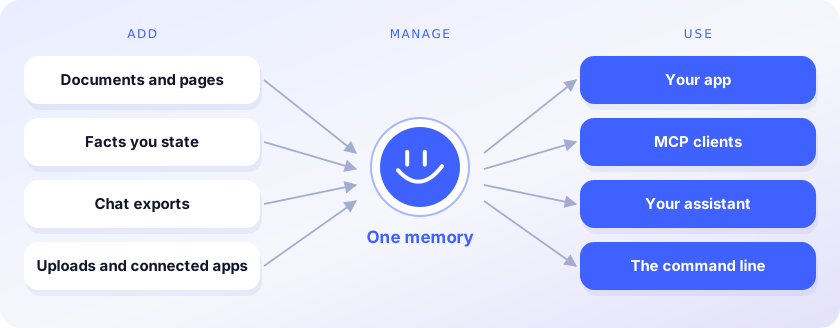
Membase gives agents and apps context that persists, built for production. This repository is its
SDK for developers: the Python client, the membase command line, an MCP server and the
TypeScript client, for memory hosted in your Membase account or kept on your machine.
Unibase Memory, the product for people (the
Chrome extension
(video guide), the web app and the desktop app), is
powered by Membase.
How it works

- Install the SDK:
pip install membase-aiornpm install membase-ai. - Integrate: connect any MCP-compatible agent with one command (see MCP), or call the client from your code.
- Manage: search, edit and organise what the memory holds from the
web app, or with
membaseon the command line. - Retrieve: your agent pulls the relevant context for every request (
search), or asks the memory for an answer (ask).
See it in action
 From your code: memories.add() writes, search() returns passages,
each naming the memory it came from. Watch the recording (57 s)
|
 From any AI: one claude mcp add connects Claude Code to the same memory.
Watch the recording (1 min 33 s)
|
The outputs shown are illustrative.
Benchmarks
Accuracy and context efficiency of the engine, measured end to end with membase-bench:

Install
pip install membase-ai |
pip install 'membase-ai[local]' |
|
|---|---|---|
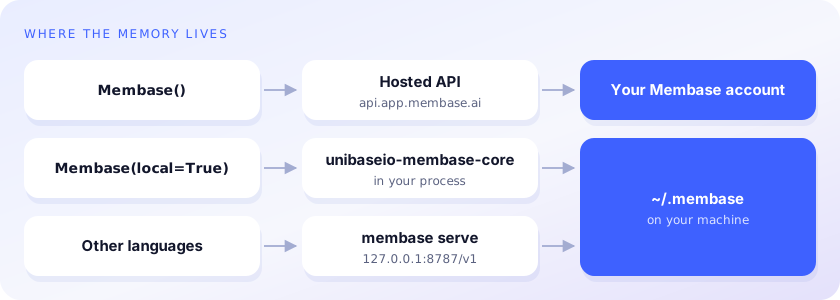
| Memory lives | in your Membase account (hosted) | on this machine, under ~/.membase |
| You need | an API key (MEMBASE_API_KEY) |
OPENAI_API_KEY (see Local settings) |
| In code | Membase() |
Membase(local=True) |
| Command line | membase … |
membase --local …, membase --local serve, membase --local mcp |
| Install size, Python | small (httpx), 3.10+ | the engine (torch, faiss), Python 3.12 or 3.13 |
The methods and response shapes are the same either way; code moves between hosted and local
memory by changing the constructor. TypeScript: npm install membase-ai
(typescript/). Install membase-ai, not membase: that is an unrelated package
with the same import name.
from membase import Membase

m = Membase()                    # hosted: MEMBASE_API_KEY (Connect › Developer keys)
# m = Membase(local=True)        # or local: ~/.membase

m.memories.add("We picked Postgres for the ledger service.", container="Engineering")
m.search("what database is the ledger on?")
m.add("Design notes …", container="Engineering", custom_id="design-1")   # a document
m.profile()
m.ask("Which database did we choose for the ledger?")   # hosted, this needs an agent-endpoint key

Every method is one operation of the Membase agent protocol. Hosted, the service enforces each
key's reach and access level. Local, the same operations run on the
membase-core engine, and search is its multi-round
retrieval. Removing a document or forgetting a memory needs confirm=True in both.
Command line
membase --local add "We picked Postgres for the ledger" --container Engineering
membase --local search "what did we pick for the ledger?"
membase --local ask "Which database is the ledger on?"
membase --local import ~/Downloads/claude-export.json     # Claude / ChatGPT / markdown / JSON chats
membase --local import ~/chats/ --dry-run                 # a directory, scanned; --dry-run only reports
membase --local documents add notes.md --container Engineering
membase --local profile
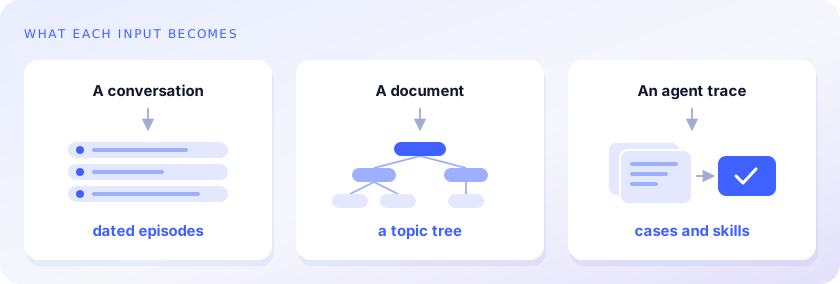
membase --local agent ingest trace.json --agent coder     # agent memory: traces -> cases and skills
membase --local agent search "fix flaky deploy" --agent coder
--local and --store DIR go before the command. Without them the commands use the hosted API
(MEMBASE_API_KEY), except agent and serve, which are local only; import needs
membase-ai[local] either way to read the exports, and hosted it stores each chat as a document.
MEMBASE_LOCAL=1 (or a directory) makes local the default when MEMBASE_API_KEY is not set.
MCP
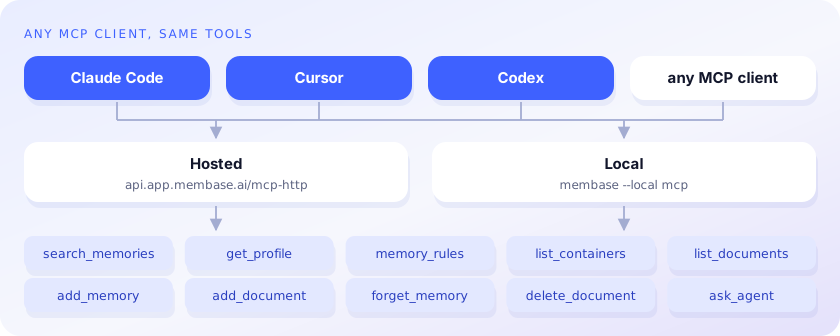
claude mcp add membase -- membase --local mcp       # local memory
claude mcp add --transport http membase https://api.app.membase.io/mcp-http \
  --header "Authorization: Bearer $MEMBASE_API_KEY"  # hosted, at the key's access level
Hosted without the header, the client signs in and the connection is read-only. The local server
offers the hosted endpoint's agent-protocol tools: list_containers, search_memories,
get_profile, list_documents, memory_rules, add_memory, add_document,
delete_document, forget_memory, ask_agent.
Local memory over HTTP
membase --local serve # http://127.0.0.1:8787/v1
membase serve answers the agent-protocol routes of the hosted API (containers, search, profile,
rules, documents, memories, ask) from the local engine, so the TypeScript client, or anything else
that speaks the API, can use local memory by pointing its base URL at it. With
MEMBASE_LOCAL_TOKEN set, every request must carry that token as its bearer.
Local settings
Local stores: the default container is ~/.membase/memory.db, others are
~/.membase/containers/<id>/, and standing (static) profile facts are in
~/.membase/profile/. The engine reads its settings from the environment, and from a .env file
in the current directory or a parent without overriding what is already set:
| Setting | Default | |
|---|---|---|
OPENAI_API_KEY |
chat (the default provider) and embeddings | |
MEMBASE_LLM_PROVIDER |
openai when OPENAI_API_KEY is set |
anthropic (with ANTHROPIC_API_KEY), ollama or openai-compat (with MEMBASE_LLM_ENDPOINT) for chat; then set the model names below to that provider's models |
MEMBASE_EMBED_PROVIDER |
openai |
openai-compat sends embeddings to MEMBASE_LLM_ENDPOINT instead |
MEMBASE_EMBED_MODEL |
text-embedding-3-small |
embeddings |
MEMBASE_EPISODE_MODEL |
gpt-4.1-mini |
turns conversations into episodes |
MEMBASE_DECIDER_MODEL |
gpt-4o-mini |
picks the episodes a search returns |
MEMBASE_READER_MODEL |
gpt-4o |
writes ask answers |
MEMBASE_KNOWLEDGE_MODEL |
gpt-4o-mini |
reads documents into topic trees |
MEMBASE_AGENT_MODEL |
gpt-4o-mini |
membase agent ingest |
MEMBASE_LANG |
en |
zh for Chinese extraction prompts |
Where things live
membase/client.py |
the client (hosted, or local through membase/local) |
membase/local/ |
the agent protocol over membase-core: backend, routes, membase serve |
membase/mcp/ |
membase mcp |
membase/cli.py |
membase |
typescript/ |
the npm package |
membase-sdk (PyPI and npm) is the earlier name of this package and is kept as an alias.
License
MIT, for this repository: the client, command line, MCP server and TypeScript package.
membase-ai[local] also installs the compiled membase-core engine, which is under Unibase's
proprietary license.
1 maintainer

Metadata
1 maintainer
Release files for membase-ai 0.2.12
For a detailed explanation of source distributions (sdists) and built distributions (wheels), please see the package formats documentation.
Source distribution (sdist)
| File | Size | Uploaded | |
|---|---|---|---|
| membase_ai-0.2.12.tar.gz | 26.7 kB | Details |
Built distribution (wheel)
| File | Interpreter | ABI | Platform | Reset |
|---|---|---|---|---|
| membase_ai-0.2.12-py3-none-any.whl | Python 3 | none | any | Details |
Total release size: 58.7 kB
Release files / membase_ai-0.2.12.tar.gz
| Download URL | membase_ai-0.2.12.tar.gz |
|---|---|
| Size | 26.7 kB |
| Tags | Source |
|
SHA-256 checksum How to use checksums |
1d73c48e981a0ca8b73957978cf50d599d550a6ffc8218c18f2e752c037755e6
|
|
BLAKE2b-256 checksum How to use checksums |
736fe5f20ea4dc8961587c670efae7b7508b8c87cefc4e642d2a434f07244574
|
| Upload date | |
|
Uploaded using Trusted Publishing? What is trusted publishing? |
No |
| Uploaded via |
twine/7.0.0 CPython/3.13.12
|
Release files / membase_ai-0.2.12-py3-none-any.whl
| Download URL | membase_ai-0.2.12-py3-none-any.whl |
|---|---|
| Size | 31.9 kB |
| Tags | Python 3 |
|
SHA-256 checksum How to use checksums |
18ea6e74acc91b0e66c9ac0cd8b2d855afa24f13b6c79433e89a0d2a59529b40
|
|
BLAKE2b-256 checksum How to use checksums |
9ae81104a37883e1e21bf3ee1445098eaa0f437c6591a3e64306e8f4ec39e7ea
|
| Upload date | |
|
Uploaded using Trusted Publishing? What is trusted publishing? |
No |
| Uploaded via |
twine/7.0.0 CPython/3.13.12
|














