

membase-ai
One memory. Every AI.
Drop-in memory infrastructure for AI agents and apps — the Membase SDK.


Website · Docs · Web app · Discord · X
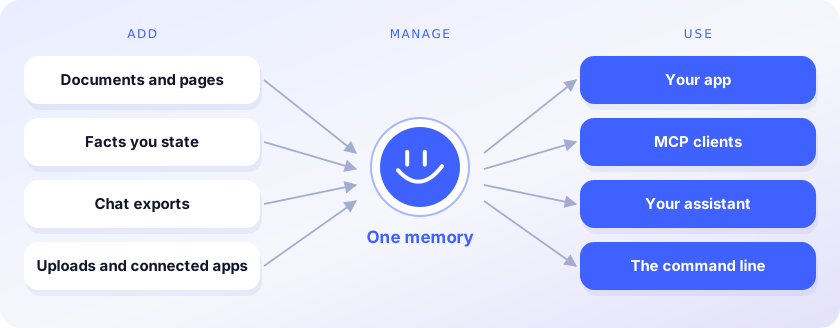
The Membase SDK: a Python client, the membase command line, an MCP server and a TypeScript
client. The memory lives in your Membase account or on your machine, behind the same API.
Write once, read from any AI
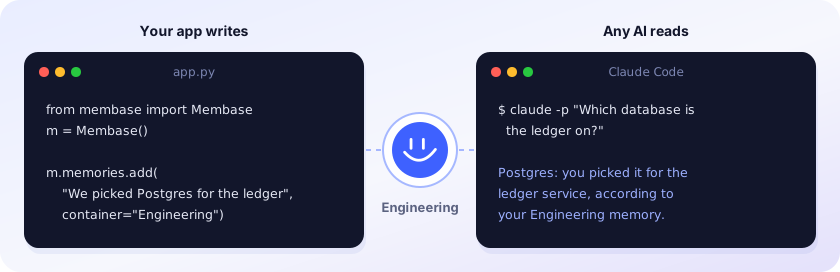
Recordings: Python SDK (57 s) · Claude Code (1 min 33 s). The answer above is illustrative.
Benchmarks

Install
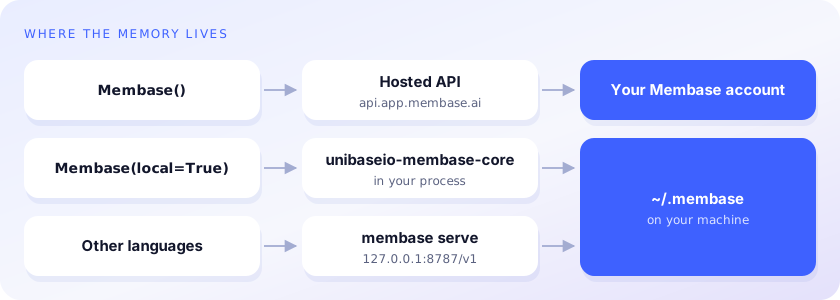
pip install membase-ai              # hosted · Python 3.10+ · needs MEMBASE_API_KEY
pip install 'membase-ai[local]'     # local  · Python 3.12 or 3.13 · needs OPENAI_API_KEY
npm install membase-ai              # TypeScript · Node 18+
The package is membase-ai; membase on PyPI is unrelated.
from membase import Membase

m = Membase()                    # hosted
# m = Membase(local=True)        # local, in ~/.membase

m.memories.add("We picked Postgres for the ledger service.", container="Engineering")
m.search("what database is the ledger on?")
m.add("Design notes …", container="Engineering", custom_id="design-1")   # a document
m.profile()
m.ask("Which database did we choose for the ledger?")

- Deleting a document or forgetting a memory needs
confirm=True; without it you get what would be removed. - Hosted,
askneeds an agent-endpoint key, and each key is limited to its containers and access level.
Command line
membase --local add "We picked Postgres for the ledger" --container Engineering
membase --local search "what did we pick for the ledger?"
membase --local ask "Which database is the ledger on?"
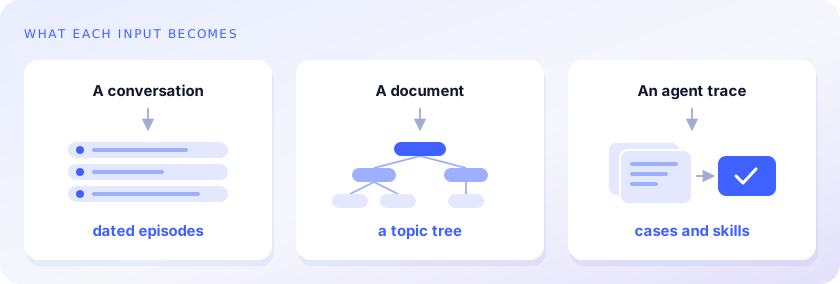
membase --local import ~/Downloads/claude-export.json     # Claude, ChatGPT, markdown or JSON chats
membase --local import ~/chats/ --dry-run                 # a directory; --dry-run only reports
membase --local documents add notes.md --container Engineering
membase --local agent ingest trace.json --agent coder
membase --local agent search "fix flaky deploy" --agent coder
--localand--store DIRgo before the command. Without them, commands use the hosted API.agentandserveare local only.importneedsmembase-ai[local]to read the exports.MEMBASE_LOCAL=1makes local the default whenMEMBASE_API_KEYis not set.
MCP
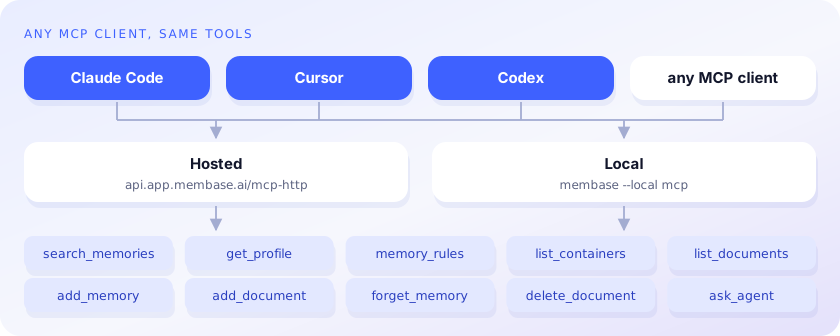
claude mcp add membase -- membase --local mcp                                   # local
claude mcp add --transport http membase https://api.app.membase.io/mcp-http \
  --header "Authorization: Bearer $MEMBASE_API_KEY"                             # hosted
Hosted without the header, the connection signs you in and is read-only.
Local memory over HTTP
membase --local serve # http://127.0.0.1:8787/v1
The hosted API's agent-protocol routes, answered by the local engine: point any client's base URL at it. Set
MEMBASE_LOCAL_TOKEN to require it as a bearer token.
Local settings
Stores: ~/.membase/memory.db (default container), ~/.membase/containers/<id>/ (others),
~/.membase/profile/ (static facts). Settings come from the environment, or from a .env file in
the current directory or a parent.
| Setting | Default | |
|---|---|---|
OPENAI_API_KEY |
chat and embeddings | |
MEMBASE_LLM_PROVIDER |
from your keys | openai, anthropic, ollama or openai-compat for chat; set the models below to match |
MEMBASE_LLM_ENDPOINT |
base URL for ollama or openai-compat |
|
MEMBASE_EMBED_PROVIDER |
openai |
openai-compat uses MEMBASE_LLM_ENDPOINT |
MEMBASE_EMBED_MODEL |
text-embedding-3-small |
embeddings |
MEMBASE_EPISODE_MODEL |
gpt-4.1-mini |
conversations into episodes |
MEMBASE_DECIDER_MODEL |
gpt-4o-mini |
picks the episodes a search returns |
MEMBASE_READER_MODEL |
gpt-4o |
ask answers |
MEMBASE_KNOWLEDGE_MODEL |
gpt-4o-mini |
documents into topic trees |
MEMBASE_AGENT_MODEL |
gpt-4o-mini |
agent traces |
MEMBASE_LANG |
en |
zh for Chinese extraction prompts |
Repository
membase/ is the Python package (client.py, cli.py, local/ for local memory and membase serve,
mcp/ for membase mcp); typescript/ is the npm package. membase-sdk (PyPI and npm) is the
earlier name, kept as an alias.
License
MIT. membase-ai[local] also installs membase-core, the compiled engine, under Unibase's
proprietary license.
1 maintainer

Metadata
1 maintainer
Release files for membase-ai 0.2.18
For a detailed explanation of source distributions (sdists) and built distributions (wheels), please see the package formats documentation.
Source distribution (sdist)
| File | Size | Uploaded | |
|---|---|---|---|
| membase_ai-0.2.18.tar.gz | 25.5 kB | Details |
Built distribution (wheel)
| File | Interpreter | ABI | Platform | Reset |
|---|---|---|---|---|
| membase_ai-0.2.18-py3-none-any.whl | Python 3 | none | any | Details |
Total release size: 56.2 kB
Release files / membase_ai-0.2.18.tar.gz
| Download URL | membase_ai-0.2.18.tar.gz |
|---|---|
| Size | 25.5 kB |
| Tags | Source |
|
SHA-256 checksum How to use checksums |
a57fa3e20d10168635330b4f76d2227bf7b9e66a078299d5dc9f4a0fbc8899c6
|
|
BLAKE2b-256 checksum How to use checksums |
6cdcde2bcb4481498a4669170a6f68ac4d8525bc8de22fb664d36418e9d28f11
|
| Upload date | |
|
Uploaded using Trusted Publishing? What is trusted publishing? |
No |
| Uploaded via |
twine/7.0.0 CPython/3.13.12
|
Release files / membase_ai-0.2.18-py3-none-any.whl
| Download URL | membase_ai-0.2.18-py3-none-any.whl |
|---|---|
| Size | 30.7 kB |
| Tags | Python 3 |
|
SHA-256 checksum How to use checksums |
5db75c4d1e8ab2bdf7a5d6026da131f5fb28f64247ddfb7aeba29548d6489138
|
|
BLAKE2b-256 checksum How to use checksums |
8bee260b0f54ce629e21d68987ee18f98c3154d974dd7ff428f524bfe2f7b3c8
|
| Upload date | |
|
Uploaded using Trusted Publishing? What is trusted publishing? |
No |
| Uploaded via |
twine/7.0.0 CPython/3.13.12
|














