
memesuite-lite


The tools in the MEME suite are foundational for many sequence-based analyses; MEME itself for discovering repeating patterns in sequences, FIMO for scanning these patterns against long sequences, and Tomtom for scoring these patterns against each other. As we enter an age of large-scale and machine learning-based analyses, these tools can continue to be critical components because they answer fundamental questions but can be challenging to use in practice. Specifically, these tools require the use of intermediary text files (MEME-formatted for PWMs and FASTA formatted for sequences) followed by either using a command-line tool or a web portal.
memesuite-lite is a re-implementation of some of the algorithms in the MEME suite as Python functions that can be easily plugged into existing notebooks and code-bases. These implementations are well documented, multi-threaded, fast, and simple to use because they are implemented using numba. As an example of the speed, tomtom-lite can be thousands of times faster than the MEME suite command-line tool due to severe inefficiencies in the code.
The goal of memesuite-lite is twofold: (1) to scale these algorithms to millions of examples on modest consumer hardware, and (2) to make doing so extremely easy for a user. Accordingly, our implementations are meant to be scaled up and our focus is on finding new approximations or algorithmic tricks to accelerate these algorithms without losing too much precision (though losing some is not a problem).
Installation
pip install memelite
Tomtom
[tutorial]
Tomtom is an algorithm for calculating similarity scores between two sets of PWMs. Importantly, Tomtom is not a similarity score itself, but rather the procedure for faithfully calculating p-values given a similarity score. Accordingly, it has two steps. First, consider all possible alignments between each query motif and the target motif and record the best score across all alignments. Second, convert this score to a p-value using the appropriate background distribution. This algorithm will be immensely useful in annotating the genome because these PWMs do not have to be frequency-based matrices like those we see in JASPAR. Rather, they can even be one-hot encoded sequences, allowing you to compare seqlets identified using a machine learning model against a database of known motifs and annotate them automatically. Or, they can be the attribution scores themselves at these seqlets being compared against a database of CWMs identified via a method like TF-MoDISco.
See the tutorial for more details, but here is an example of using the code to map a one-hot encoded sequence against the JASPAR motif database.
from memelite import tomtom
from memelite.io import read_meme
from memelite.utils import one_hot_encode

q = [one_hot_encode("ACGTGT")]

targets = read_meme("../../../common/JASPAR2024_CORE_non-redundant_pfms_meme.txt")
target_pwms = [pwm for pwm in targets.values()]

p, scores, offsets, overlaps, strands = tomtom(q, target_pwms)
By default, Tomtom returns matrices with shape n_queries x n_targets. When these numbers are large, as in our goal of processing 1M queries by 1M targets in 1 minute, the full similarity matrix might not actually fit in memory. Fortunately, in these large-scale cases we usually do not actually care about the scores between all queries and all targets. Rather, we care about the scores between all queries and some number of the closest matches. Usually, this number can actually be quite small, such as in the case where we simply want to annotate each query with the closest (or closest five) targets.
If you want to only get these results for some number of nearest neighbors you can pass in the n_neighbors parameter and get a n_queries x n_neighbors matrix, saving a significant amount of memory.
p, scores, offsets, overlaps, strands, idxs = tomtom(target_pwms, target_pwms, n_nearest=100)
Note that, in addition to the matrices of alignment statistics as before, this will also return a matrix of indexes showing which target indexes gave rise to these statistics. These are ordered such that the first index of idxs is the best hit and the second index is the second best hit, etc.
ttl command-line tool
tomtom-lite comes with a command-line tool that makes running Tomtom without writing any code simple.
usage: ttl [-h] [-t TARGETS] [-p THRESH] [-q QUERY] [-f FASTA] [-b BED] [-n N_NEAREST] [-s N_SCORE_BINS] [-m N_MEDIAN_BINS] [-a N_TARGET_BINS] [-c N_CACHE] [-r] [-j N_JOBS]

tomtom is a method for determining whether the similarity between two two PWMs is statistically significant and tomtom-lite is a re-implementation of this algorithm to significantly speed it up. A common usage of
Tomtom is to map a discrete sequence to a motif database to determine which motif it most resembles. This tool allows users to easily annotate individual discrete sequences from the command-line, or to bulk-annotate
coordinates.

options:
  -h, --help            show this help message and exit
  -t TARGETS, --targets TARGETS
                        The filename of a MEME file. By default, will download and use the JASPAR2024 Core non-redundant MEME file.
  -p THRESH, --thresh THRESH
                        The p-value threshold for returning matches.
  -q QUERY, --query QUERY
                        Either the filename of a MEME file ending in `.meme` or the string of a single motif.
  -f FASTA, --fasta FASTA
                        A filename of the FASTA file corresponding to the BED file.
  -b BED, --bed BED     A BED file of coordinates whose sequences should be extracted and annotated.
  -n N_NEAREST, --n_nearest N_NEAREST
                        The number of nearest targets to return for each query.
  -s N_SCORE_BINS, --n_score_bins N_SCORE_BINS
                        The number of query-target score bins to use. `t` in the paper.
  -m N_MEDIAN_BINS, --n_median_bins N_MEDIAN_BINS
                        The number of bins to use for approximate median calculations.
  -a N_TARGET_BINS, --n_target_bins N_TARGET_BINS
                        The number of bins to use for approximate target hashing.
  -c N_CACHE, --n_cache N_CACHE
                        The amount of cache to provide for calculations.
  -r, --norc            Whether to not score reverse complements.
  -j N_JOBS, --n_jobs N_JOBS
                        The number of threads to use for processing queries.
There are three ways that one can use this tool.
A single query
Personally, the most common way for me to interact with Tomtom is to have a single query whose binding I am curious about. These queries usually are short spans of high-attribution characters (sometimes called 'seqlets') that are highlighted by machine learning models. After seeing these seqlets, I will usually go to the Tomtom web portal, search the discrete sequence against a motif database, and wait for the results. This is sufficiently fast for any single query, but over times gets burdensome because each submission involves going to the Tomtom web portal (remember to search for "tomtom genomics" and not just "tomtom" or you get TomTom Maps and Location Technology), typing in the sequence, having a cluster job launched that needs to be scheduled and accepted, then run, then the results sent back to the user.
In just the time it takes to go to the Tomtom website, one can use the ttl command to query a discrete motif against the database locally and get the results (usually less than 1 second).
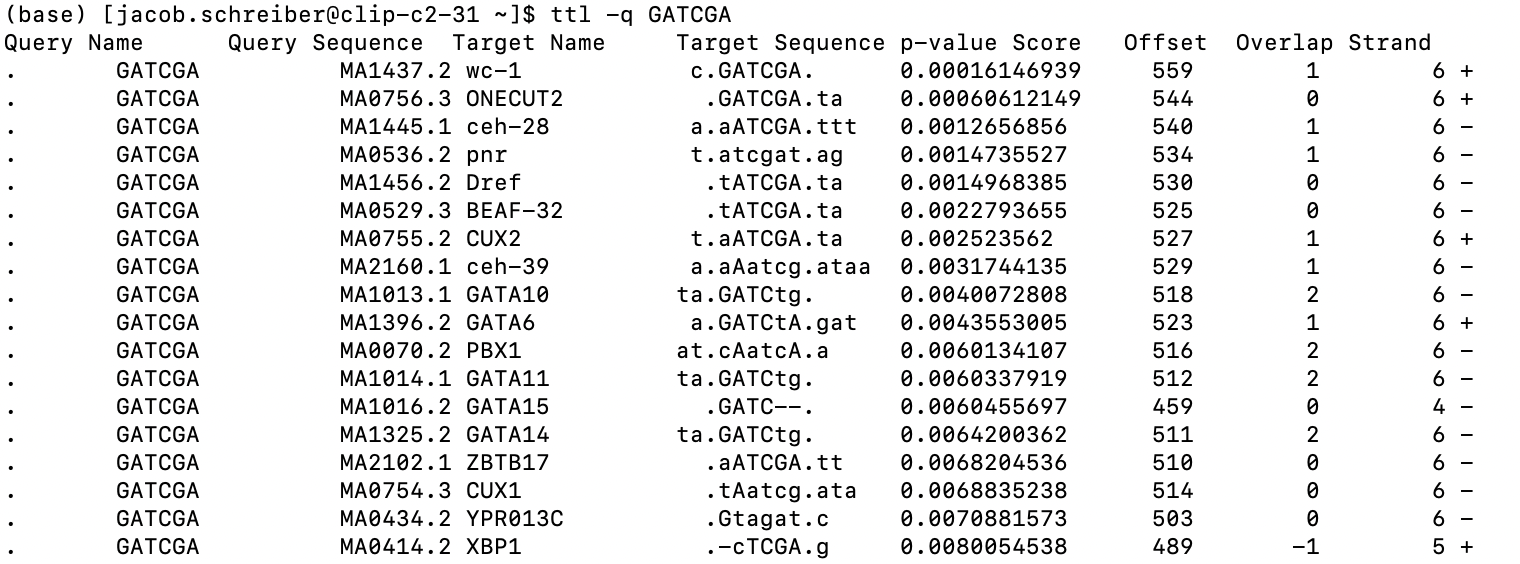
In addition to the basic statistics, I also spent too much time on a little utility that will show the alignment between the query and the target consensus motif, with upper-case characters showing alignments and lower-case ones showing mismatches and the two dots showing the left and right ends of where the alignment is happening.
By default, this will use (or download and then use) the JASPAR 2024 database, but one can specify any MEME file to be the target database. Additionally, all parameters for the Tomtom algorithm can be controlled, if desired.
An entire file of queries
The standard way that the original tomtom tool from the memesuite is run involves comparing a query MEME file against a target MEME file and the output contains hits from all queries. This can be reproduced using ttl exactly.
ttl -q query.meme -t targets.meme
The results will be sent to stdout in the exact same format except for the inclusion of this additional alignment column.
BED + FASTA file
Potentially, instead of having PWMs that you would like to compare, you would like to annotate spans of the genome using a motif database. This can happen if, for example, you are using a machine learning model to identify seqlets driving model predictions (e.g. with bpnet-lite) and would like to now annotate what each of these seqlets are.
Instead of passing in a query MEME file, you can now pass in a BED file of coordinate and a FASTA file containing the raw sequence. Just like in the other settings, you can also pass in a target database if you would like, but otherwise the default is JASPAR2024.
ttl -f hg38.fa -b seqlets.bed
and the following results get sent to stdout
chr27	442981	443001	MA0656.2 JDP2	13.667399661390139
chr12	2721780	2721797	MA0656.2 JDP2	13.992039152807623
chr2	3705341	3705356	MA0382.3 SKO1	11.513058052401062
chr15	1711531	1711551	MA1963.2 SATB1	10.237243287826054
chr12	3460665	3460676	MA1580.1 ZBTB32	11.007907085541985
These results now contain the same three columns are the original BED file (additional columns past those three are ignored) but also contain the motif name of the best single match to the target database and the -log2 p-value of that match.
FIMO
[tutorial]
FIMO is an algorithm for scanning a set of PWMs against one or more one-hot encoded sequences and finding the statistically significant hits. The algorithm is composed of two steps: scanning the PWMs just like one would apply a convolution, and converting these scores to p-values using a background distribution calculated exactly from the PWM. Although FIMO and TOMTOM both involve comparing a PWM against some other entity, they differ in the assumptions that they make about this second entity. TOMTOM assumes that the entity is short and that overhangs are not only likely but critically important to score correctly. FIMO assumes that the entity is long and so overhangs do not matter and, accordingly, does not care too much about scoring them correctly. See the TOMTOM tutorial for a more in-depth description of the two algorithms.
See the tutorial above for more details but here is an example of applying FIMO using a set of motifs written out in a MEME file against a set of sequences written out in a FASTA file.
from memelite import fimo

hits = fimo("../tests/data/test.meme", "../tests/data/test.fa")
In this case, hits will be a list of 12 pandas DataFrames with one DataFrame for each motif in the MEME file.
Although we passed in filepaths above, the function signature is flexible. You can also pass in a dictionary for the motifs where the keys are motif names and the values are either numpy arrays or PyTorch tensors encoding the PWMs, and you can pass in a numpy array or PyTorch tensor for the sequences that will be scanned.
1 maintainer

Metadata
1 maintainer
Release files for memelite 0.5.0
For a detailed explanation of source distributions (sdists) and built distributions (wheels), please see the package formats documentation.
Source distribution (sdist)
| File | Size | Uploaded | |
|---|---|---|---|
| memelite-0.5.0.tar.gz | 65.8 kB | Details |
Built distribution (wheel)
| File | Interpreter | ABI | Platform | Reset |
|---|---|---|---|---|
| memelite-0.5.0-py3-none-any.whl | Python 3 | none | any | Details |
Total release size: 135.9 kB
Release files / memelite-0.5.0.tar.gz
| Download URL | memelite-0.5.0.tar.gz |
|---|---|
| Size | 65.8 kB |
| Tags | Source |
|
SHA-256 checksum How to use checksums |
42f3e141c566b713d4caadadd8e9f4ca88c0993177b79eaca37782d91a036f60
|
|
BLAKE2b-256 checksum How to use checksums |
a24075dbe4eadf37fb17e12cd7a5912841b4a0fb8a61c0cf22b7b11c8395ecc6
|
| Upload date | |
|
Uploaded using Trusted Publishing? What is trusted publishing? |
No |
| Uploaded via |
twine/7.0.0 CPython/3.13.5
|
Release files / memelite-0.5.0-py3-none-any.whl
| Download URL | memelite-0.5.0-py3-none-any.whl |
|---|---|
| Size | 70.0 kB |
| Tags | Python 3 |
|
SHA-256 checksum How to use checksums |
ab99dbb2eac3579be587c4d83741a027d176a8e6626c65704f008a87c5aa8bb2
|
|
BLAKE2b-256 checksum How to use checksums |
cb8fc02b047d221341dd38bcc81b92d38fb852a506f7cc844ae7778a4a9677b1
|
| Upload date | |
|
Uploaded using Trusted Publishing? What is trusted publishing? |
No |
| Uploaded via |
twine/7.0.0 CPython/3.13.5
|














