
MemMachine
The open-source memory layer for AI agents.
Stop building stateless agents. Give your AI persistent memory with just 5 lines of code.








What is MemMachine?
MemMachine is an open-source long-term memory layer for AI agents and LLM-powered applications. It enables your AI to learn, store, and recall information from past sessions—transforming stateless chatbots into personalized, context-aware assistants.
Key Capabilities
- Episodic Memory: Graph-based conversational context that persists across sessions
- Profile Memory: Long-term user facts and preferences stored in SQL
- Working Memory: Short-term context for the current session
- Agent Memory Persistence: Memory that survives restarts, sessions, and even model changes
Quick Start
Get up and running in under 5 minutes:
Prerequisites: This code requires a running MemMachine Server. Start a server locally or create a free account on the MemMachine Platform.
pip install memmachine-client
from memmachine_client import import MemMachineClient

# Initialize the client
client = MemMachineClient(base_url="http://localhost:8080")

# Get or create a project
project = client.get_or_create_project(org_id="my_org", project_id="my_project")

# Create a memory instance for a user session
memory = project.memory(
    group_id="default",
    agent_id="travel_agent",
    user_id="alice",
    session_id="session_001"
)

# Add a memory
memory.add("I prefer aisle seats on flights", metadata={"category": "travel"})
# => [AddMemoryResult(uid='...')]

# Search memories
results = memory.search("What are my flight preferences?")
print(results.content.episodic_memory.long_term_memory.episodes[0].content)
# => "I prefer aisle seats on flights"
For full installation options (Docker, self-hosted, cloud), visit the Quick Start Guide.
Integrations
MemMachine works seamlessly with your favorite AI frameworks:
| Framework | Description |
|---|---|
| LangChain | Memory provider for LangChain agents |
| LangGraph | Stateful memory for LangGraph workflows |
| CrewAI | Persistent memory for CrewAI multi-agent systems |
| LlamaIndex | Memory integration for LlamaIndex applications |
| AWS Strands | Memory for AWS Strands Agent SDK |
| n8n | No-code workflow automation integration |
| Dify | Memory backend for Dify AI applications |
| FastGPT | Integration with FastGPT platform |
MCP Server Support
MemMachine includes a native Model Context Protocol (MCP) server for seamless integration with Claude Desktop, Cursor, and other MCP-compatible clients:
# Stdio mode (for Claude Desktop)
memmachine-mcp-stdio

# HTTP mode (for web clients)
memmachine-mcp-http
See the MCP documentation for setup instructions.
Who Is MemMachine For?
- Developers building AI agents, assistants, or autonomous workflows
- Researchers experimenting with agent architectures and cognitive models
- Teams who need persistent, cross-session memory for their LLM applications
Key Features
- Multiple Memory Types: Working (short-term), Episodic (long-term conversational), and Profile (user facts) memory
- Developer-Friendly APIs: Python SDK, RESTful API, TypeScript SDK, and MCP server interfaces
- Flexible Storage: Graph database (Neo4j) for episodic memory, SQL for profiles
- LLM Agnostic: Works with OpenAI, Anthropic, Bedrock, Ollama, and any LLM provider
- Self-Hosted or Cloud: Run locally, in Docker, or use our managed service
For more information, refer to the API Reference Guide.
Architecture
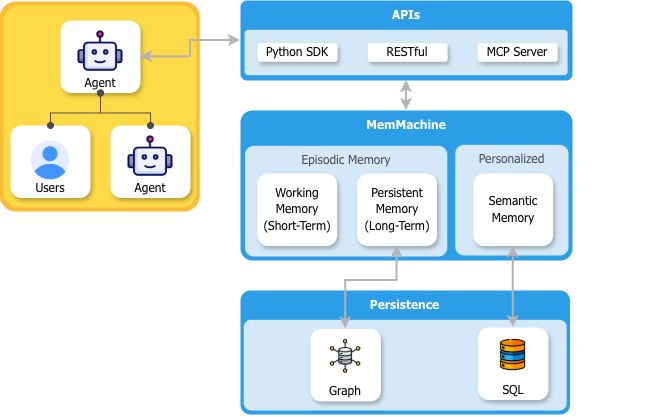
- Agents interact via the API Layer: Users interact with an agent, which connects to MemMachine through a RESTful API, Python SDK, or MCP Server.
- MemMachine manages memory: Processes interactions and stores them as Episodic Memory (conversational context) and Profile Memory (long-term user facts).
- Data is persisted: Episodic memory is stored in a graph database; profile memory is stored in SQL.
Use Cases & Example Agents
MemMachine's versatile memory architecture can be applied across any domain. Explore our examples to see memory-powered agents in action:
| Agent | Description |
|---|---|
| CRM Agent | Recalls client history and deal stages to help sales teams close faster |
| Healthcare Navigator | Remembers medical history and tracks treatment progress |
| Personal Finance Advisor | Stores portfolio preferences and risk tolerance for personalized insights |
| Writing Assistant | Learns your style guide and terminology for consistent content |
Built with MemMachine
Are you using MemMachine in your project? We'd love to feature you!
- Share your project in GitHub Discussions → Showcase
- Drop a message in our Discord #showcase channel
Growing Community
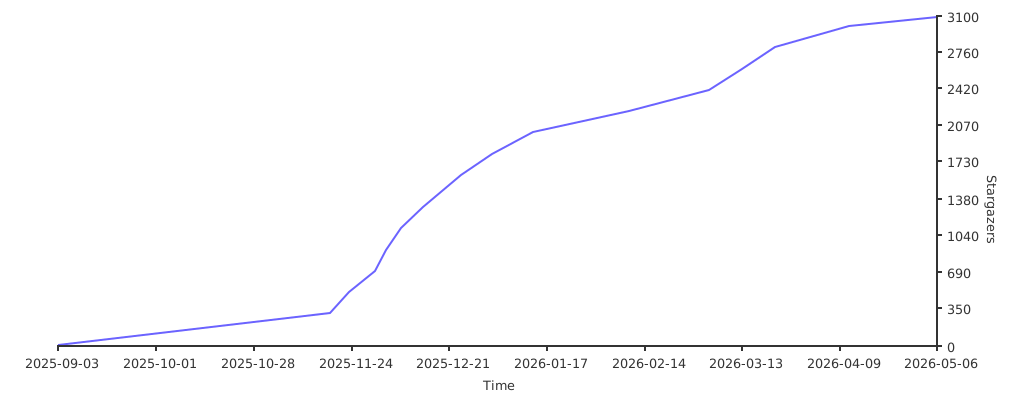
MemMachine is a growing community of builders and developers. Help us grow by clicking the ⭐ Star button above!
Documentation
- Main Website – Learn about MemMachine
- Docs & API Reference – Full documentation
- Quick Start Guide – Get started in minutes
Community & Support
- Discord: Join our community for support, updates, and discussions: https://discord.gg/usydANvKqD
- Issues & Feature Requests: Use GitHub Issues
Contributing
We welcome contributions! Please see our CONTRIBUTING.md for guidelines.
References
@misc{luo2025agentlightningtrainai,
  title={Agent Lightning: Train ANY AI Agents with Reinforcement Learning},
  author={Xufang Luo and Yuge Zhang and Zhiyuan He and Zilong Wang and Siyun Zhao and Dongsheng Li and Luna K. Qiu and Yuqing Yang},
  year={2025},
  eprint={2508.03680},
  archivePrefix={arXiv},
  primaryClass={cs.AI},
  url={https://arxiv.org/abs/2508.03680},
}
License
MemMachine is released under the Apache 2.0 License.
1 maintainer

Release files for memmachine-server 0.3.9
For a detailed explanation of source distributions (sdists) and built distributions (wheels), please see the package formats documentation.
Source distribution (sdist)
| File | Size | Uploaded | |
|---|---|---|---|
| memmachine_server-0.3.9.tar.gz | 558.2 kB | Details |
Built distribution (wheel)
| File | Interpreter | ABI | Platform | Reset |
|---|---|---|---|---|
| memmachine_server-0.3.9-py3-none-any.whl | Python 3 | none | any | Details |
Total release size: 982.0 kB
Release files / memmachine_server-0.3.9.tar.gz
| Download URL | memmachine_server-0.3.9.tar.gz |
|---|---|
| Size | 558.2 kB |
| Tags | Source |
|
SHA-256 checksum How to use checksums |
1a0b7cc8de45c885212c7e7948f670d45ab35f90f62c1131d69e60b6e802a93b
|
|
BLAKE2b-256 checksum How to use checksums |
f4461e3f1ae41739e8e65719aab2c363ba624504a57d1d70d61bae9fcfa8d38d
|
| Upload date | |
|
Uploaded using Trusted Publishing? What is trusted publishing? |
Yes |
| Uploaded via |
twine/6.1.0 CPython/3.13.12
|
Provenance
Provenance describes where a file came from. On PyPI, provenance is shared via attestations, which provide a verifiable record of the build or publishing details. View details, limitations and caveats.


PyPI Publish Attestation
PyPI verified that this artifact, at this checksum, originated from the publisher listed below.
Signed by GitHub Actions, verified by PyPI on May 18, 2026.
Transparency logRelease files / memmachine_server-0.3.9-py3-none-any.whl
| Download URL | memmachine_server-0.3.9-py3-none-any.whl |
|---|---|
| Size | 423.8 kB |
| Tags | Python 3 |
|
SHA-256 checksum How to use checksums |
deb045cbaf973d7c194b951d6606ea8216d6a5918a7982717d9f2be17e5a6693
|
|
BLAKE2b-256 checksum How to use checksums |
0a621bb47dc7d627e16d29ee863a8c80747652b3443713ee0f03ef7246fb65d6
|
| Upload date | |
|
Uploaded using Trusted Publishing? What is trusted publishing? |
Yes |
| Uploaded via |
twine/6.1.0 CPython/3.13.12
|
Provenance
Provenance describes where a file came from. On PyPI, provenance is shared via attestations, which provide a verifiable record of the build or publishing details. View details, limitations and caveats.
PyPI Publish Attestation
PyPI verified that this artifact, at this checksum, originated from the publisher listed below.
Signed by GitHub Actions, verified by PyPI on May 18, 2026.
Transparency log













