

I/O for mesh files.





















There are various mesh formats available for representing unstructured meshes. meshio++ can read and write all of the following and smoothly converts between them:
Abaqus (
.inp), ANSYS msh (.msh), Ansys/APDL coded database (.cdb,.inp), AVS-UCD (.avs), CGNS (.cgns), DOLFIN XML (.xml), COMSOL (.mphtxt), Exodus (.e,.exo), EnSight Gold (geometry,.case/.geo), FLAC3D (.f3grid), FLUX (mesh.pf3, field.dex), FreeFem++ (.msh), GiD postprocess (.post.msh/.post.res,.post.bin,.post.h5; writing via a vendored gidpost, reading is meshio++'s own code), H5M (.h5m), HMF (.hmf, experimental, meshio++-specific), I-deas Universal / UNV (.unv), ANSYS Fluent interpolation (.ip), Kratos/MDPA (.mdpa), Medit (.mesh,.meshb), MED/Salome (.med), Modulef (mesh.mfm, field.mff), Nastran (bulk data,.bdf,.fem,.nas), Netgen (.vol,.vol.gz), Neuroglancer precomputed format, Gmsh (format versions 2.2, 4.0, and 4.1,.msh), OBJ (.obj), OFF (.off), OpenFOAM polyMesh (.foam), PERMAS (.post,.post.gz,.dato,.dato.gz), PLY (.ply), STL (.stl), Tecplot .dat, TetGen .node/.ele, Triangle .node/.ele/.poly, SVG (output only; 2D direct, 3D via skin projection) (.svg), TikZ (LaTeX output only; 2D direct, 3D via skin projection) (.tikz), SU2 (.su2), UGRID (.ugrid), VTI (VTK XML ImageData; a regular lattice) (.vti), VTK (.vtk), VTP (.vtp), VTU (.vtu), WKT (TIN) (.wkt), XDMF (.xdmf,.xmf).
meshio++ ships a C++20 core (built with pybind11 + scikit-build-core) that reads and writes most formats with zero-copy numpy at the I/O boundary, plus optional HDF5/netCDF acceleration and a selectable parallel backend (AUTO by default — prefers OpenMP, then STL+TBB, then sequential; override with -DMESHIOPLUSPLUS_PARALLEL_BACKEND=..., including a bring-your-own Kokkos host backend). Every format has a pure-Python fallback, so behaviour and file compatibility are identical whether or not the native libraries are present. For a standalone C++ build use build/configure.sh (Linux/macOS) or build/configure.bat (Windows). Full docs (install, data model, per-format options, CLI) live at the documentation site (sources under doc/).
Install with
pip install meshioplusplus[all]
([all] pulls in all optional dependencies. By default, meshio++ only uses numpy.) You can then use the command-line tool
meshioplusplus convert    input.msh output.vtk   # convert between two formats

meshioplusplus info       input.xdmf             # show some info about the mesh

meshioplusplus compress   input.vtu              # compress the mesh file
meshioplusplus decompress input.vtu              # decompress the mesh file

meshioplusplus binary     input.msh              # convert to binary format
meshioplusplus ascii      input.msh              # convert to ASCII format

meshioplusplus merge      a.vtu b.vtu out.vtu    # merge meshes (optional --weld)

meshioplusplus transform  in.vtu out.vtu --translate 1,2,3   # affine transform
meshioplusplus clean      in.vtu out.vtu --weld              # weld / prune / de-dup
meshioplusplus crop       in.vtu out.vtu --bbox 0,0,0,1,1,1  # subset by region
meshioplusplus crop       in.vtu out.vtu --where "d<0"       # ... or by a data predicate
meshioplusplus split      in.vtu 'out_{key}.vtu' --by type   # split by criterion
meshioplusplus stats      mesh.vtu                           # geometric statistics
meshioplusplus convert-cells in.msh out.vtu --mode simplexify  # hexes -> tetra
meshioplusplus subdivide  in.vtu out.vtu                      # polyhedral refinement, any 3D cell
meshioplusplus refine     in.vtu out.vtu --levels 2          # uniform subdivision
meshioplusplus refine     in.vtu out.vtu --where "q<0.3"     # adaptive, closed conformingly
meshioplusplus partition  in.vtu 'out_{part}.vtu' --nparts 4 # N balanced parts
meshioplusplus remesh-volume in.vtu out.vtu --cell-size 0.5  # retetrahedralize (isosurface stuffing)
meshioplusplus optimize-volume in.vtu out.vtu               # ODT-remesh a tet mesh (relocate + flips)
meshioplusplus smooth     in.vtu out.vtu --iterations 20     # relax node positions
meshioplusplus smooth     in.vtu out.vtu --method odt        # ODT smoothing, tet-only
meshioplusplus interpolate src.vtu tgt.vtu out.vtu           # transfer fields across meshes
meshioplusplus slice      in.vtu out.vtu --normal 0,0,1      # planar cross-section
meshioplusplus isosurface in.vtu out.vtu --array T --values 350  # level set of a field
meshioplusplus sdf        skin.stl field.vti --resolution 128,128,128  # signed distance field
meshioplusplus data gradient in.vtu out.vtu --array T           # grad / div / curl of a field
meshioplusplus data hessian  in.vtu out.vtu --array T           # second derivative, gradient's companion
meshioplusplus data estimate-error in.vtu out.vtu --array T --marking dorfler --marking-value 0.6  # ZZ error indicator + marking
meshioplusplus data integrate in.vtu --array density            # total / mean, per region

meshioplusplus data info  mesh.vtu                           # summarize data arrays
meshioplusplus data calc  in.vtu out.vtu --point "s = norm(v)"   # derive a field
meshioplusplus data to-cell  in.vtu out.vtu --keys T         # point -> cell average
meshioplusplus data normalize in.vtu out.vtu --cell damage --to 0,1

meshioplusplus pipeline   settings.json                      # run a whole declarative
                                                             # read -> ops -> write chain
with any of the supported formats.
The same verbs are available as a standalone C++ binary that needs no Python: grab a ready-to-run, statically-linked build for Linux/macOS/Windows from the GitHub Releases page, or build it yourself with build/configure.sh --cli --build (or -DMESHIOPLUSPLUS_BUILD_CLI=ON). It links only the C++ core. Named regions — and so point/cell sets — are carried there since v8.1.0, so info lists them and diff compares them; convert -s/-d is still Python-only.
A whole chain of operations can be described declaratively in one settings.json (Input → Operations → Output) and run with meshioplusplus pipeline settings.json — or meshioplusplus.run_pipeline(...) from Python, and the same engine from C/Fortran/Julia/R/WASM. See the settings pipeline.
In Python, simply do
import meshioplusplus

mesh = meshioplusplus.read(
    filename,  # string, os.PathLike, or a buffer/open file
    # file_format="stl",  # optional if filename is a path; inferred from extension
    # see meshioplusplus convert --help for all possible formats
)
# mesh.points, mesh.cells, mesh.cells_dict, ...

# mesh.vtk.read() is also possible
to read a mesh. To write, do
import meshioplusplus

# two triangles and one quad
points = [
    [0.0, 0.0],
    [1.0, 0.0],
    [0.0, 1.0],
    [1.0, 1.0],
    [2.0, 0.0],
    [2.0, 1.0],
]
cells = [
    ("triangle", [[0, 1, 2], [1, 3, 2]]),
    ("quad", [[1, 4, 5, 3]]),
]

mesh = meshioplusplus.Mesh(
    points,
    cells,
    # Optionally provide extra data on points, cells, etc.
    point_data={"T": [0.3, -1.2, 0.5, 0.7, 0.0, -3.0]},
    # Each item in cell data must match the cells array
    cell_data={"a": [[0.1, 0.2], [0.4]]},
)
mesh.write(
    "foo.vtk",  # str, os.PathLike, or buffer/open file
    # file_format="vtk",  # optional if first argument is a path; inferred from extension
)

# Alternative with the same options
meshioplusplus.write_points_cells("foo.vtk", points, cells)
For both input and output, you can optionally specify the exact file_format (in case you would like to enforce ASCII over binary VTK, for example).
Skin extraction
meshioplusplus.extract_skin derives the boundary surface of a 3D volume mesh (the Kratos SkinDetectionProcess face-hashing algorithm — faces occurring exactly once are boundary; points are compacted, point_data follows):
vol = meshioplusplus.read("part.msh")     # tetra/hexa/wedge/pyramid mesh
skin = meshioplusplus.extract_skin(vol)   # triangle/quad/... surface mesh
The STL and PLY writers do this automatically for volume meshes (pass skin=False for the legacy drop-volume-cells behavior), and the SVG/TikZ writers render 3D meshes by projecting the skin through an orthographic camera (azimuth/elevation/roll in degrees, default the classic CAD isometric view) with painter's-algorithm depth ordering — that is exactly how the Stanford-bunny logo above is drawn.
Publication-quality vector figures
The SVG and TikZ writers can colour each face by a data array, turning them into figures you can drop straight into a paper — resolution-independent, and with no extra dependency: the colormaps are built into the core.
annotated = meshioplusplus.attach_quality(mesh)
meshioplusplus.write(
    "quality.svg", annotated,
    color_by="quality:scaled_jacobian",   # or any point_data / cell_data name
    cmap="viridis",                       # viridis / coolwarm / turbo
    colorbar=True,
)
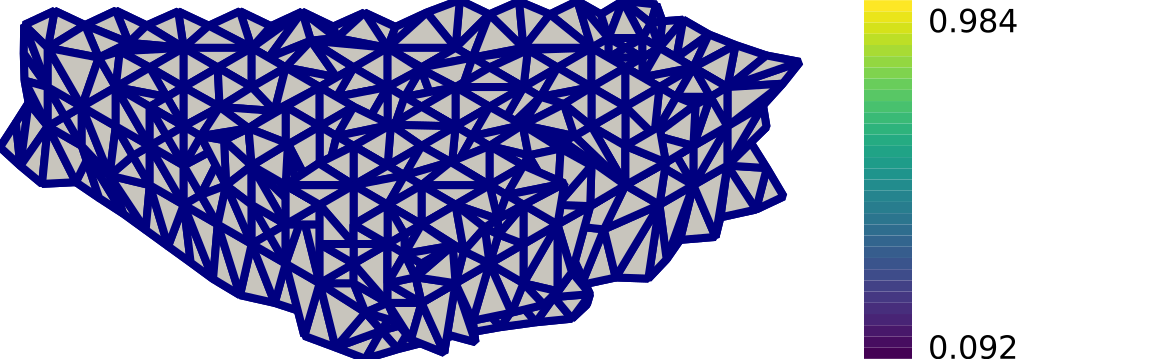
The bundled bracket coloured by element quality — the same figure tools/gen_doc_images.py regenerates.
Point data colours a face by the mean of its corner values, cell data by its owning cell's value — for a volume mesh, tracked through the extracted skin's parent-cell provenance, so a per-cell material or metric lands on the right facet. Multi-component arrays reduce to a component or to their magnitude; vmin/vmax set the range (default: the drawn faces' finite range), and non-finite values take nan_color. From the command line:
meshioplusplus convert mesh.vtu figure.svg --color-by temperature --colorbar
Colouring is available from Python, from C++ directly, and from both CLIs; the flat C/Fortran/WebAssembly bindings reach these writers through the shared registry and always emit the default styling.
Surface extraction
meshioplusplus.extract_surface is the general form of skin extraction: it picks the dimension automatically (a volume mesh → boundary faces, a 2D surface mesh → boundary edges) and can record each facet's parent cell id (record_parent_ids=True). See the surface extraction docs (doc/extract_surface.md).
surf = meshioplusplus.extract_surface(vol)                  # faces (or edges for a 2D mesh)
edges = meshioplusplus.extract_surface(sheet, record_parent_ids=True)
Mesh quality
meshioplusplus.compute_quality scores every cell on a set of geometric quality metrics (area/volume, scaled Jacobian, aspect ratio, skewness, interior/dihedral angles, warpage) and flags inverted/degenerate cells; attach_quality writes them back as cell_data. See doc/mesh_quality.md.
report = meshioplusplus.compute_quality(mesh)
print(report["num_inverted"], "inverted cells")
annotated = meshioplusplus.attach_quality(mesh)   # metrics as cell_data
Reordering / renumbering
meshioplusplus.reorder renumbers nodes and elements to reduce sparse-matrix bandwidth (Reverse Cuthill–McKee) or improve cache locality (Morton / Hilbert space-filling curves). It is a pure permutation — geometry and all data preserved — and returns the applied node/cell permutations so external arrays can be remapped. compute_bandwidth measures the before/after connectivity bandwidth. See doc/reorder.md.
out = meshioplusplus.reorder(mesh, method="rcm")            # "morton" / "hilbert" too
out, node_perm, cell_perms = meshioplusplus.reorder(mesh, return_permutation=True)
print(meshioplusplus.compute_bandwidth(mesh), "->", meshioplusplus.compute_bandwidth(out))
Comparison (diff)
meshioplusplus.diff compares two meshes and reports whether they are equivalent within a tolerance (abs_err <= atol + rtol*|expected|), with a structured breakdown (points, cells, data, named sets) and an overall verdict (identical / equal within tolerance / different); meshes_equal is the boolean wrapper for test suites. An optional unordered=True mode matches nodes by spatial proximity, so a shuffled node order still compares equal. See doc/diff.md.
assert meshioplusplus.meshes_equal(a, b, atol=1e-8)         # ideal in a regression test
report = meshioplusplus.diff(a, b, unordered=True)          # tolerant to shuffled node order
print(report["verdict"])
The meshioplusplus diff a.vtu b.vtu CLI verb sets a nonzero exit code when meshes differ, for direct use in CI / Makefiles.
Merge / combine
meshioplusplus.merge combines two or more meshes into one: it concatenates points (offsetting connectivity so indices stay valid), merges cell blocks by type, concatenates data (per a configurable data_policy), and tags each cell's origin. With weld=True it fuses coincident nodes across inputs within atol using a spatial hash (never O(N²)) — the standard way to stitch adjacent blocks into a watertight mesh. Overlapping set / field-data names are namespaced by source id. See doc/merge.md.
combined = meshioplusplus.merge([a, b, c])                 # concatenate
welded = meshioplusplus.merge([left, right], weld=True, atol=1e-8)  # fuse the shared interface
Editing (transform / clean / crop / split) and statistics
A bundle of dependency-free mesh-editing utilities:
meshioplusplus.transform— apply an affine transform (translate / scale / rotate / 4×4 matrix / unit-scale) to the points; connectivity and data are carried through. Seedoc/transform.md.meshioplusplus.clean— weld coincident points (spatial hash), drop degenerate and duplicate cells, and remove orphaned points, in one toggleable pass. Seedoc/clean.md.meshioplusplus.crop— extract the part of a mesh inside a bounding box or half-space, pruning unused points (mode="all"/"any"). Seedoc/crop.md.meshioplusplus.split— partition a mesh into several by cell type, connected component (flood-fill), region (cell_sets/ integer tag), or one piece per named Cell region (by="regions", cross-binding, not a partition — overlapping regions overlap). Seedoc/split.md.meshioplusplus regions(CLI) /read_metadata(...)["regions"]lists a mesh's regions cheaply, without a full read where possible.meshioplusplus.compute_stats— geometric statistics (bounding box, centroid, per-type counts, area, signed/unsigned volume, inverted cells) — the geometric complement toinfo. Seedoc/stats.md.
out = meshioplusplus.transform(mesh, rotate=("z", 90))
out = meshioplusplus.clean(mesh, weld=True, atol=1e-8)
sub = meshioplusplus.crop(mesh, bbox=[0, 0, 0, 1, 1, 1])
pieces = meshioplusplus.split(mesh, by="type")             # {"triangle": ..., ...}
s = meshioplusplus.compute_stats(mesh)                     # dict of measures
Cell conversion (linearize / simplexify / elevate)
meshioplusplus.convert_cells converts a mesh's element representation — which cell types it is built from — while leaving the object it describes intact. See doc/convert_cells.md.
mode="linearize"— every higher-order cell becomes its linear base (tetra10→tetra,hexahedron27→hexahedron), keeping the corner connectivity verbatim and pruning the nodes that become unreferenced.mode="simplexify"— every cell is decomposed into simplices of the same topological dimension (quad→ 2triangle,hexahedron→ 6tetra,wedge→ 3,pyramid→ 2, an n-gon into an (n−2)-triangle fan). No points are added, each parent'scell_datais replicated to its children, and every emitted simplex is positively oriented with volume conserved.mode="elevate"— every linear cell is promoted to its serendipity quadratic counterpart (triangle→triangle6,hexahedron→hexahedron20), adding one node per unique edge at the edge midpoint withpoint_dataset to the endpoint mean.
linear = meshioplusplus.convert_cells(mesh, mode="linearize")
tets = meshioplusplus.convert_cells(mesh, mode="simplexify")   # hexes -> tetra
quadratic = meshioplusplus.convert_cells(mesh, mode="elevate")
Each mode is idempotent on cells it does not apply to, so it is safe on a mixed-order mesh, and output is byte-identical across mesh backends and thread counts.
Polyhedral refinement (subdivide)
meshioplusplus.subdivide splits every eligible 3D cell into one polyhedral child per face, connected to a new interior point. refine and decimate both raise by name on a polyhedron, pointing at convert_cells(mode="simplexify") — both are built on fixed same-type subdivision templates, and an arbitrary polyhedron has none. subdivide needs no per-type table at all: tabulated types (reduced to corners for a quadratic variant) and existing polyhedron blocks are handled uniformly, so the same code covers every 3D cell type the mesh already supports. Automatically conforming (no closure, no hanging nodes), unlike refine. See doc/subdivide.md.
out = meshioplusplus.subdivide(mesh, record_parent_ids=True)
Polyhedral coarsening (agglomerate)
meshioplusplus.agglomerate merges groups of cells into single larger polyhedral cells — the many-to-one counterpart to subdivide. decimate raises by name on a polyhedron, pointing at convert_cells(mode="simplexify") — its fixed-template QEM edge collapse has no analogue for merging arbitrary polyhedral cells. agglomerate is a genuinely different algorithm: greedy seed-and-grow over the mesh's shared-face dual, absorbing face-adjacent neighbours by accumulated shared-face area until a target group size; each group emits one polyhedron whose faces are exactly its external boundary, conserving volume exactly. Non-volume blocks pass through unchanged; points are never pruned or renumbered (clean(mesh, remove_orphans=True) is the follow-up for a minimal point set). See doc/agglomerate.md.
coarse = meshioplusplus.agglomerate(mesh, target_group_size=8)
Refinement
meshioplusplus.refine subdivides cells into congruent children of the same cell type, increasing a mesh's resolution: line → 2, triangle → 4, quad → 4, tetra → 8, wedge → 8, hexahedron → 8, with levels=n applying the templates n times. Given a selection — a cell list, a region name, or a cell_data threshold — it refines only those cells and resolves the resulting hanging nodes, so the output is still conforming. See doc/refine.md.
New nodes sit at the midpoints of the parent's edges, quad faces and (hexahedron only) body, and carry the mean of that entity's corner values for every point_data array — so a linear field is interpolated exactly. Mid-edge and quad-face-centre nodes are shared between every cell touching the entity, so the refined mesh has no hanging nodes; each parent's cell_data row is replicated to its children.
record_hierarchy=True attaches two persistent cell_data arrays, refine:cell_id/refine:parent_id: a stable identity that survives across separate refine calls — a link between two meshes, not a tree inside one, resolved by a multigrid caller against the sequence of meshes it keeps.
fine = meshioplusplus.refine(mesh)                      # one level
finer = meshioplusplus.refine(mesh, levels=2)           # 64x the cells in 3D
tagged = meshioplusplus.refine(mesh, record_parent_ids=True)

# adaptive: refine the worst cells and close up conformingly around them
graded = meshioplusplus.refine(
    meshioplusplus.attach_quality(mesh),
    where="quality:scaled_jacobian < 0.3",
    record_levels=True,                                 # colour by refine:level
)

# multigrid: keep the coarse mesh, resolve the fine mesh's parent ids against it
fine = meshioplusplus.refine(coarse, cells=[4, 8], record_hierarchy=True)
Children inherit the parent's orientation (zero newly-inverted cells for a well-oriented input), and volume is conserved — exactly for tetra always, and for wedge/hexahedron when the parent is affine. Higher-order cells, pyramid, and ragged blocks have no same-type subdivision and raise by name.
Green-element undo
meshioplusplus.undo_green(coarse, fine) restores refine's transitional ("green") cells back to their original parent — the standard rule for selective refinement: before a new pass touches a region a prior pass already closed up, restore the transitional cell to its parent and re-split from scratch, rather than refining the transitional children directly (which degrades element quality without bound over repeated passes). It is a two-mesh operation, like interpolate: coarse is the mesh a prior refine(coarse, ..., record_hierarchy=True, record_levels=True) call was run on, fine is that call's output. Since refine's point map is always the identity, a green parent's exact connectivity and cell_data are already sitting, byte-for-byte, in coarse — so this is a lookup and substitution, not a reconstruction. See doc/undo_green.md.
fine = meshioplusplus.refine(coarse, cells=[4, 8], record_hierarchy=True, record_levels=True)
# ... later, decide to refine a different region ...
undone = meshioplusplus.undo_green(coarse, fine)
redone = meshioplusplus.refine(undone, cells=[12, 19], record_hierarchy=True, record_levels=True)
Decimation
meshioplusplus.decimate is refine's inverse: it reduces a surface mesh's face count by greedy quadric-error-metric (Garland–Heckbert) edge collapse, preserving shape, boundaries and features. Exactly one stopping criterion is given — ratio (fraction of faces to keep), target_faces, or max_error — and the output is all-triangle (quad/polygon blocks are triangulated first, block structure kept 1:1). See doc/decimate.md.
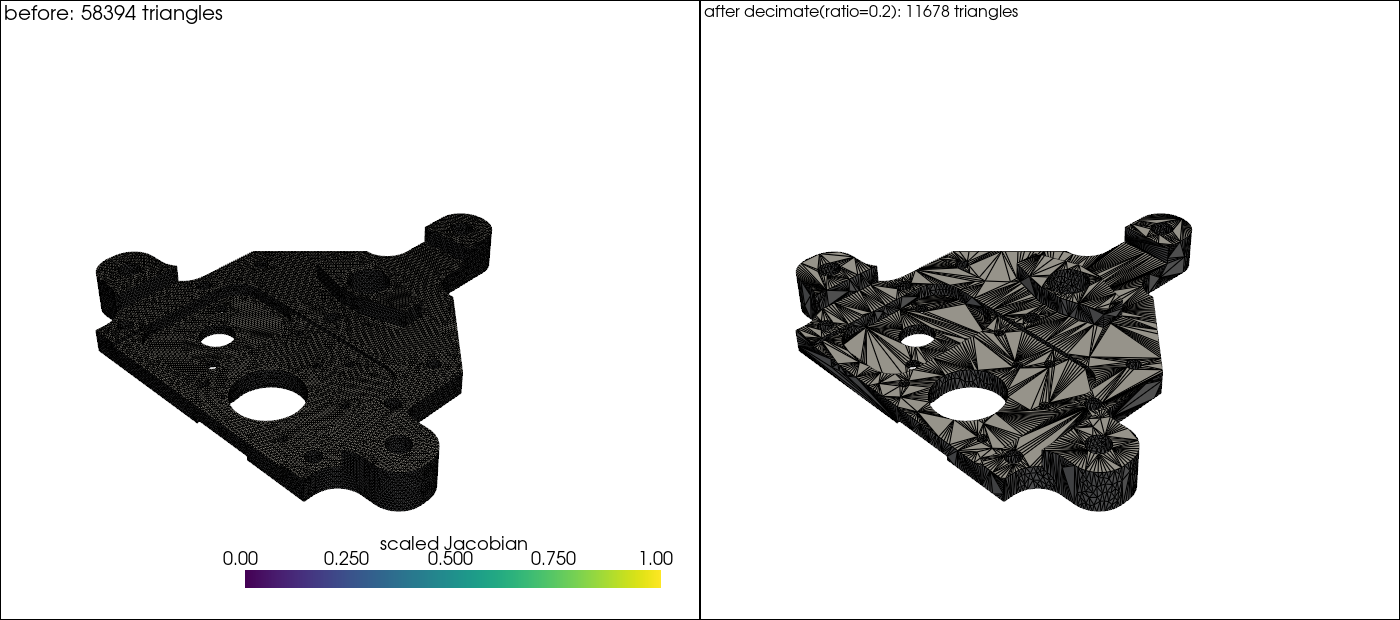
coarse = meshioplusplus.decimate(mesh, ratio=0.25)            # keep 25% of the faces
coarse = meshioplusplus.decimate(mesh, target_faces=5000)     # absolute face budget
coarse, report = meshioplusplus.decimate(mesh, max_error=1e-6, return_report=True)
Boundary vertices (once-used-edge test) and feature vertices (face normals differing by more than feature_angle, default 30°) are pinned by default, so an open patch keeps its outline exactly and a cube keeps its corners; the link condition and a normal-flip guard reject any collapse that would change topology, create a non-manifold edge, or fold the surface. Float point_data blends along the collapsed edge; integer arrays keep the survivor's value. Volume meshes raise by name — run extract_surface first, then decimate the skin.
Volume decimation
meshioplusplus.decimate_volume is decimate's volume-mesh sibling — a separate operation, not a mode on it — reducing a tetrahedral mesh's cell count by greedy quadric-error-metric tet-edge collapse. Unlike decimate, boundary vertices participate by default (preserve_boundary=False): every vertex accumulates a quadric from its incident boundary-triangle planes only, so a purely interior vertex's quadric is exactly zero and interior-only edges are scored by squared length instead, always ranking behind boundary-touching collapses. See doc/decimate_volume.md.
coarse = meshioplusplus.decimate_volume(mesh, ratio=0.25)             # keep 25% of the tets
coarse = meshioplusplus.decimate_volume(mesh, target_cells=5000)      # absolute tet budget
coarse, report = meshioplusplus.decimate_volume(mesh, max_error=1e-6, return_report=True)
Validity is guarded by an exact vertex-link set-equality condition, a duplicate-tet check, and a tet-inversion guard, plus — for boundary-touching collapses — decimate's own ring/shared-face link condition and normal-flip check reused over the mesh's own outer skin. Tet-only: any non-tetra 3D block raises by name pointing at convert_cells(mode="simplexify").
Partitioning
meshioplusplus.partition decomposes a mesh into exactly N balanced pieces for domain decomposition — the count-driven complement to the criterion-driven split. See doc/partition.md.
- SFC (the default fallback, always available, dependency-free): cells are cut into contiguous ranges along a Hilbert space-filling curve of their centroids — equal-weight part sizes differ by at most one cell,
weights=<cell_data>balances a per-cell cost instead, and the assignment is deterministic and byte-identical across mesh backends and thread counts. - KaHIP (the optional quality path): the shared-face dual graph goes through KaHIP's serial
kaffpa(), which actively minimizes the edge cut. Configureimbalance(default 3%),mode(fast/eco/strong, defaulteco— eco/strong carry the quality) andseed. KaHIP is MIT-licensed like meshio++ itself, so enabling it changes nothing about licensing; it is bring-your-own (-DMESHIOPLUSPLUS_WITH_KAHIP=ON+KAHIP_ROOT, Conanwith_kahip, vcpkg featurekahip— next to the HDF5/zstd-style optional deps), links only the serial interface (no MPI), andpip install meshioplusplus[kahip]gives pure-Python installs the same quality path via the MITkahipwheel. Requesting it where absent fails by name — never a silent downgrade.
pieces = meshioplusplus.partition(mesh, 4)                    # list of 4 meshes
labels = meshioplusplus.partition_labels(mesh, 4)             # per-block Int64 part ids
quality = meshioplusplus.partition(mesh, 16, method="kahip", mode="strong")
Pieces keep the input's block structure 1:1, so they recombine into the input: every cell lands in exactly one piece. ghost_layers=N instead grows each piece by N shared-node layers of its neighbours' cells (an MPI-style halo), tagged partition:ghost.
Surface remeshing (ACVD clustering)
meshioplusplus.remesh replaces a surface mesh's own triangulation with a new, near-uniformly-sized, well-shaped one at a caller-chosen vertex count, by approximated centroidal Voronoi diagram (ACVD) clustering — the one resolution-changing operation that does not inherit the input's element shapes, so it can raise quality at every target count rather than only remove elements. See doc/remesh.md.
out = meshioplusplus.remesh(mesh, num_clusters=5000)
out = meshioplusplus.remesh(mesh, num_clusters=5000, metric="quadric")       # preserves sharp edges/corners
out = meshioplusplus.remesh(mesh, num_clusters=5000, metric="anisotropic", max_anisotropy=4.0)
metric="isotropic" (default) is fast and rounds sharp features; "quadric" (Garland-Heckbert error) pins clusters onto edges/corners instead; "anisotropic" shapes clusters with a local curvature tensor, elongating elements along low-curvature directions. The output has entirely new points and connectivity — no point/cell map — so point_data/cell_data/named regions are dropped and field_data carries through; transfer a field onto the result with interpolate/conservative_interpolate.
Volumetric remeshing (isosurface stuffing)
meshioplusplus.remesh_volume is remesh's volumetric sibling — the tet-mesh counterpart decimate_volume needed but could not itself provide, since QEM edge collapse can only remove elements. It retetrahedralizes a volume mesh (or a closed surface, unlike remesh) at a caller-chosen resolution by isosurface stuffing over a body-centered cubic (BCC) lattice, generating an entirely new mesh rather than working on the input's own cells. See doc/remesh_volume.md.
out = meshioplusplus.remesh_volume(mesh, cell_size=0.5)
out = meshioplusplus.remesh_volume(mesh, resolution=(64, 64, 64))
out, report = meshioplusplus.remesh_volume(mesh, cell_size=0.5, return_report=True)
print(report["num_tets"], report["num_non_manifold_edges"])
Every uncut lattice tet has a dihedral angle from a small, mesh-size-independent fixed set. warp_fraction (default 0.35) moves lattice vertices near the surface onto it, trading a small, measured chance of non-manifold boundary edges (reported in num_non_manifold_edges) for substantially better boundary tet quality; 0 disables warping and gives an exactly watertight but lower-quality boundary. Implemented from the published description of Labelle & Shewchuk's isosurface stuffing (SIGGRAPH 2007) only — no predicate library needed, unlike literal Delaunay/CVD tetrahedralization.
ODT remeshing (relocate + flip connectivity)
meshioplusplus.optimize_volume raises a tetrahedral mesh's worst element quality by ODT remeshing — relocating vertices AND changing connectivity. It is the genuine "ODT remeshing" and the third member of a trio whose other two each do half the job: smooth(method="odt") moves points on fixed connectivity, remesh_volume discards the input's tets for a fresh lattice mesh. It alternates the ODT vertex relocation with quality-improving topological flips (2-3 and 3-2), predicate-free — a flip is applied only when a pure signed-volume test finds the local configuration convex and the minimum scaled Jacobian strictly improves (no in-sphere/Delaunay predicate). See doc/optimize_volume.md.
out = meshioplusplus.optimize_volume(mesh)                       # a tetrahedral mesh
out, report = meshioplusplus.optimize_volume(mesh, return_report=True)
print(report["num_flips"], report["min_quality_before"], report["min_quality_after"])
The flips touch only interior faces/edges, so the boundary surface is preserved exactly (watertight in ⇒ watertight out); the point set is invariant, so point_data/field_data and named Point regions carry through while cell_data/Cell/Side regions are dropped. Tet-only, and (like remesh_volume) C++-core only.
Smoothing
meshioplusplus.smooth relaxes point coordinates to improve element shape, leaving topology and every data value alone: only the points move. See doc/smooth.md.
Three methods. Laplacian (x <- x + lambda*L(x), the edge-neighbour centroid displacement) smooths strongly per pass but shrinks — over 40 iterations on a jittered 8×8 quad grid it contracts the bounding box by 57%. Taubin (the default) follows each +lambda pass with a larger-magnitude -mu pass that deliberately un-shrinks, leaving the same grid 3.6% smaller. ODT (optimal-Delaunay-triangulation smoothing, tet-only) instead moves each free interior vertex to the closed-form volume-weighted average of its incident tets' circumcenters — the "ODT" half of the volumetric-remeshing roadmap item, closed as smoothing on existing connectivity rather than remeshing. Neighbours for Laplacian/Taubin are the nodes joined by an actual cell edge, not the element clique, so a structured hex block is a fixed point rather than being bevelled toward a sphere. Boundary nodes, feature nodes (incident boundary facet normals differing by more than feature_angle), an optional frozen mask, and the nodes of blocks whose edge topology is unknown are all pinned by default, and the inversion guard rejects any move that would turn a valid cell inverted.
relaxed = meshioplusplus.smooth(mesh)                          # 10 Taubin iterations
harder = meshioplusplus.smooth(mesh, iterations=40)            # shrink-free even so
lap = meshioplusplus.smooth(mesh, method="laplacian", lambda_=0.4)  # note the underscore
odt = meshioplusplus.smooth(tet_mesh, method="odt", iterations=10)  # tet-only, C++-core only
out, report = meshioplusplus.smooth(mesh, return_report=True)  # nodes moved, max displacement
lambda_ carries a trailing underscore because lambda is a Python keyword, and a negative value means "this method's own default" (0.5 Laplacian, 0.33 Taubin). Point and cell counts, connectivity, cell_data, field_data, point_data values and the points array's dtype all come through unchanged, and output is byte-identical across mesh backends and thread counts.
Field transfer (interpolation)
meshioplusplus.interpolate samples a source mesh's data arrays onto a target mesh — the first cross-mesh operation that transfers data (diff compares, merge concatenates). The result is a copy of the target, its own geometry/data/sets preserved exactly, with the requested source arrays sampled on: source point_data at the target's points, source cell_data by nearest source-cell centroid. method="nearest" (default) copies the nearest source point's value bit-for-bit; method="barycentric" simplexifies the source first and interpolates linearly — exact on a linear field — with default_value/extrapolate deciding what happens outside the source domain. Both search grids are bucket-grid spatial hashes (never O(N²)), and output is byte-identical across backends, thread counts and the C++/numpy boundary. See doc/interpolate.md.
coarse = meshioplusplus.read("solution.vtu")   # carries point_data "T"
fine = meshioplusplus.read("remeshed.vtu")
mapped = meshioplusplus.interpolate(coarse, fine, method="barycentric")
meshioplusplus.write("mapped.vtu", mapped)
meshioplusplus.conservative_interpolate is a separate, mass-preserving sibling: over the region the two meshes share, sum(target value * target measure) equals sum(source value * source measure), a property interpolate's pointwise sampling does not have. Both meshes are simplexified first (accepting ragged/polyhedron blocks for free), overlapping simplex pairs are measured with an exact geometric clip (Sutherland-Hodgman in 2D, a bounded tetrahedron-tetrahedron clip in 3D), and a target cell's value is the overlap-measure-weighted mean of every source cell it intersects. Unlike interpolate, an unset arrays transfers every source point_data and cell_data array. point_data is transferred by composition (point_data_to_cell_data → the same clip algorithm → cell_data_to_point_data), a layered approximation rather than exact nodal conservation. C++-core only, with no pure-Python fallback (the 3D clip's discrete branches could disagree near a degenerate overlap). See doc/conservative_interpolate.md.
Slicing / cross-sections
meshioplusplus.slice computes the planar cross-section of a mesh — the actual intersection of the mesh with a plane, one topological dimension below the cut cells: a 3D volume mesh yields a triangle/quad surface, a 2D surface mesh a line mesh. Unlike crop (plane mode), which keeps whole cells on one side, slice computes the intersection and lowers the dimension. It uses robust marching tetrahedra (the input is simplexified first, so each cell's cross-section is a well-defined convex primitive), deduping crossing points on shared edges into single nodes so the section is watertight, and winding every face consistently toward the +normal side. Each section cell inherits its parent's cell_data; record_parent_ids=True attaches slice:parent_cell, and point_data is interpolated at the cut. Output is byte-identical across backends, thread counts and the C++/numpy boundary. See doc/slice.md.
vol = meshioplusplus.read("part.vtu")                          # a tetra/hex/wedge mesh
section = meshioplusplus.slice(vol, origin=(0, 0, 0.5), normal=(0, 0, 1))
meshioplusplus.write("section.vtu", section)                  # a triangle/quad surface at z=0.5
(slice shadows the Python built-in only as a module attribute — meshioplusplus.slice is intended.)
Isosurfaces / contours
meshioplusplus.isosurface computes the level set of a scalar field — the locus where a point_data array equals a given isovalue, as a mesh one topological dimension below the cut cells: a 3D volume mesh yields a triangle/quad surface, a 2D surface mesh a line contour. It is the data-driven sibling of slice (which cuts where the distance to a plane is zero) and shares its marching-tetrahedra cutter, so contours are watertight in the same way. The field must be point_data — cell_data is piecewise constant and has no level set, so naming one raises and points at cell_data_to_point_data. Several isovalues land in one mesh, cut in ascending order and tagged per cell with a Float64 iso:value and an Int64 iso:index (the ordinal — the integer tag split(by="region", tag=…) needs). The contoured field reads back as exactly the isovalue on the cut points, faces are wound toward increasing field, and an out-of-range isovalue is an empty contour rather than an error. Output is byte-identical across backends, thread counts and the C++/numpy boundary. See doc/isosurface.md.
vol = meshioplusplus.read("part.vtu")                          # carrying point_data["T"]
shells = meshioplusplus.isosurface(vol, "T", [300.0, 350.0, 400.0])
meshioplusplus.write("shells.vtu", shells)                     # three tagged contour surfaces
Field derivatives (gradient / divergence / curl)
meshioplusplus.gradient differentiates a point_data field: its gradient, divergence or curl. meshio++ could already transform, transfer, summarize and contour a field — this is what lets it differentiate one, which is the missing input for contouring a derived quantity (|∇T|, vorticity) and for the gradient-based error indicators that drive the selective refine. Two methods: Green-Gauss (the default) applies the divergence theorem over the cell, fanning each face into triangles about its corner average, which is exact for a linear field on any cell — planar faces or not, because the fan surface is closed; least-squares fits over the cells sharing a node and falls back to Green-Gauss (counted, never silently wrong) on a degenerate neighbourhood. An nc-component input yields 3·nc gradient components laid out [component][derivative], so a scalar gives (n, 3) and a 3-vector (n, 9); divergence gives 1 and curl 3. Output is Float64, named <input>:gradient / :divergence / :curl, at either the cell (default) or point location. A cell_data input raises by name — a piecewise-constant field has no derivative — and cells that cannot be differentiated yield NaN and are counted rather than approximated. Geometry, regions and existing data pass through bit-identically; output is byte-identical across backends, thread counts and the C++/numpy boundary. See doc/gradient.md.
import numpy as np

vol = meshioplusplus.read("solution.vtu")                      # carrying point_data["T"]
g = meshioplusplus.gradient(vol, "T", location="point")        # point_data["T:gradient"], (n, 3)

grad = np.asarray(g.point_data["T:gradient"])
g.point_data["gradT"] = np.sqrt((grad**2).sum(axis=1))
shells = meshioplusplus.isosurface(g, "gradT", [2.0])          # contour where T changes fastest
These operations are exposed across every binding surface (Python, C API, Fortran, WASM) and as the CLI verbs meshioplusplus quality, meshioplusplus extract-surface, meshioplusplus reorder, meshioplusplus diff, meshioplusplus merge, meshioplusplus transform, meshioplusplus clean, meshioplusplus crop, meshioplusplus slice, meshioplusplus split, meshioplusplus stats, meshioplusplus convert-cells, meshioplusplus subdivide, meshioplusplus agglomerate, meshioplusplus refine, meshioplusplus undo-green, meshioplusplus partition, meshioplusplus remesh, meshioplusplus remesh-volume, meshioplusplus optimize-volume, meshioplusplus smooth, meshioplusplus interpolate, meshioplusplus conservative-interpolate, and meshioplusplus isosurface (plus meshioplusplus data gradient, meshioplusplus data hessian, meshioplusplus data estimate-error and meshioplusplus data integrate, mesh operations grouped under data because that is where a user looks for them).
Second derivatives (Hessian)
meshioplusplus.hessian computes the Hessian (second derivative) of a scalar point_data field — gradient's companion one order further, for curvature-based adaptive refinement. A composition of two gradient calls, not a new numerical kernel: the field is differentiated once (point location), then that (n, 3) gradient is differentiated again with the default gradient operator, producing (n, 9) — the flattened row-major 3x3 Hessian. method forwards to both internal passes. A field that is at most linear has an exactly zero Hessian everywhere — the one mesh-shape-independent guarantee; a genuinely quadratic field's composition is exact on a structured/symmetric mesh away from its own boundary and a good, standard, but genuinely approximate curvature estimate on an irregular mesh. Input must have exactly one component. A curvature-driven refinement indicator needs no new code: data_calc's norm(...) on the 9-component output is exactly its Frobenius norm, ready for refine's where selector. See doc/hessian.md.
h = meshioplusplus.hessian(vol, "T")                            # cell_data["T:hessian"], (n, 9)
curv = meshioplusplus.data_calc(h, "norm(`T:hessian`)", location="cell", output="curv")
adapted = meshioplusplus.refine(curv, where="curv > 3.0")       # refine where curvature is largest
Error estimation (Zienkiewicz-Zhu recovery + marking)
meshioplusplus.estimate_error estimates the per-cell recovered-gradient error of a point_data field, and can mark cells for refinement — the piece that closes the adaptive loop: gradient differentiates and selective refine's --where consumes any scalar cell_data predicate; this produces one, so estimate → mark → refine is three verbs and no new numerical code. It is a composition, not a new kernel: gradient (Green-Gauss, cell location) → the measure-weighted point↔cell averaging round trip recovers a smoothed gradient, and eta_K = sqrt(|measure| · sum((recovered − raw)²)) per cell is the standard ZZ indicator. marking turns it into a boolean error:marked array: "absolute" (threshold), "fraction" (top N by indicator), or "dorfler" (the smallest indicator-descending prefix covering a bulk fraction of the total — the usual AMR criterion). Cells that cannot be evaluated read NaN in the indicator and 0 (never NaN) in the marking array, counted and excluded from the global error. See doc/error.md.
out, report = meshioplusplus.estimate_error(
    vol, "T", marking="dorfler", marking_value=0.6, return_report=True,
)
print(report["global_error"], report["num_marked"])
adapted = meshioplusplus.refine(out, where="error:marked > 0.5")
Field integration (total / mean, per-region)
meshioplusplus.data_integrate computes a cell-measure-weighted total and mean of one or more cell_data arrays — gradient's integration counterpart (gradient differentiates a field, this integrates one), for a density field's total mass, a heat-flux field's total power, or an occupied volume. Every sum is weighted by |measure(cell)| (the cell's own length/area/volume); a cell whose measure is not computable, or a component whose value is non-finite, is excluded from that component's numerator and denominator — never given a fallback weight of 1, unlike cell_data_to_point_data's own measure weighting, since a silent unit-weight substitution would corrupt a physical total. Reported for the whole mesh and independently for every named Cell region — regions are not a partition, so a cell in two regions contributes fully to both. A point_data-only name raises by name, pointing at point_data_to_cell_data. The mesh is never modified; this is a read-only report, like data_info and compute_stats. See doc/field_integration.md.
report = meshioplusplus.data_integrate(mesh, arrays=["density"])
report[0]["domain"]["total_per_component"]   # sum(value * |measure|) -- total mass
report[0]["regions"]                         # the same, independently, per named Cell region
Data operations (rename / average / calc / condition / summarize)
A second bundle operates on the data arrays a mesh carries (point_data / cell_data / field_data) rather than on its geometry, which none of them ever modifies:
meshioplusplus.data_rename/data_drop/data_keep— rewrite which arrays a mesh carries and under what names; values, dtypes and shapes are copied verbatim. Seedoc/data_manage.md.meshioplusplus.point_data_to_cell_data/cell_data_to_point_data— move data between locations by averaging, optionally weighted by cell area/volume. Seedoc/data_average.md.meshioplusplus.data_calc— derive a new array from an elementwise expression (+ - * /, parentheses,abs/sqrt/min/max/norm) evaluated by a hand-written parser — no external parser library, no arbitrary-code path. Seedoc/data_calc.md.meshioplusplus.data_condition— clamp, normalize to a target range, or standardize to zero mean / unit standard deviation, per component or by row magnitude. Seedoc/data_condition.md.meshioplusplus.data_info— a read-only per-array summary (dtype, shape, components, min/max/mean, NaN/inf counts) — the data-side complement toinfoandcompute_stats. Seedoc/data_info.md.
out = meshioplusplus.data_calc(mesh, "norm(velocity)", location="point", output="speed")
out = meshioplusplus.point_data_to_cell_data(out, keys=["speed"], suffix="_c")
out = meshioplusplus.data_condition(out, "cell", ["speed_c"], mode="normalize")
out = meshioplusplus.data_rename(out, "point", "T", "temperature")
arrays = meshioplusplus.data_info(out)                     # list of per-array dicts
These are likewise exposed across every binding surface, and as the nine CLI verbs under the meshioplusplus data group (info, rename, drop, keep, to-cell, to-point, calc, clamp, normalize). See doc/data_operations.md. A second nested group, meshioplusplus dataset (add, list, split, tag, annotate), curates the hand-editable dataset manifests used for ML training collections (Python CLI only, like data export).
Time series
The XDMF format supports time series with a shared mesh. You can write times series data using meshio++ with
with meshioplusplus.xdmf.TimeSeriesWriter(filename) as writer:
    writer.write_points_cells(points, cells)
    for t in [0.0, 0.1, 0.21]:
        writer.write_data(t, point_data={"phi": data})
and read it with
with meshioplusplus.xdmf.TimeSeriesReader(filename) as reader:
    points, cells = reader.read_points_cells()
    for k in range(reader.num_steps):
        t, point_data, cell_data = reader.read_data(k)
Transient / multi-file datasets
Most formats cannot express time at all, so transient output usually arrives as
a set of files (out_0000.vtu … out_0500.vtu). meshio++ treats such a set as
one ordered dataset:
meshioplusplus convert 'out_*.vtu' series.xdmf         # fan-in (quote the glob!)
meshioplusplus convert series.xdmf 'step_{step}.vtu'   # fan-out
meshioplusplus pipeline transient.json                 # chain applied per step
for time, mesh in meshioplusplus.read_sequence("out_*.vtu"):  # lazy
    ...
meshioplusplus.write_sequence("series.xdmf",
                              meshioplusplus.read_sequence("out_*.vtu"))
Ordering is natural-numeric, so out_10.vtu follows out_9.vtu; each step's
time comes from an explicit list, the file, its filename or its index, and which
one applied is reported. Fan-in and fan-out stream — one mesh is alive at a
time, whatever the step count — and a multi-step input aimed at a single-step
output is an error naming {step}, never a silent write of step 0. Available
from Python, both CLIs, C, Fortran, Julia and R. See
doc/sequences.md.
Interactive viewer

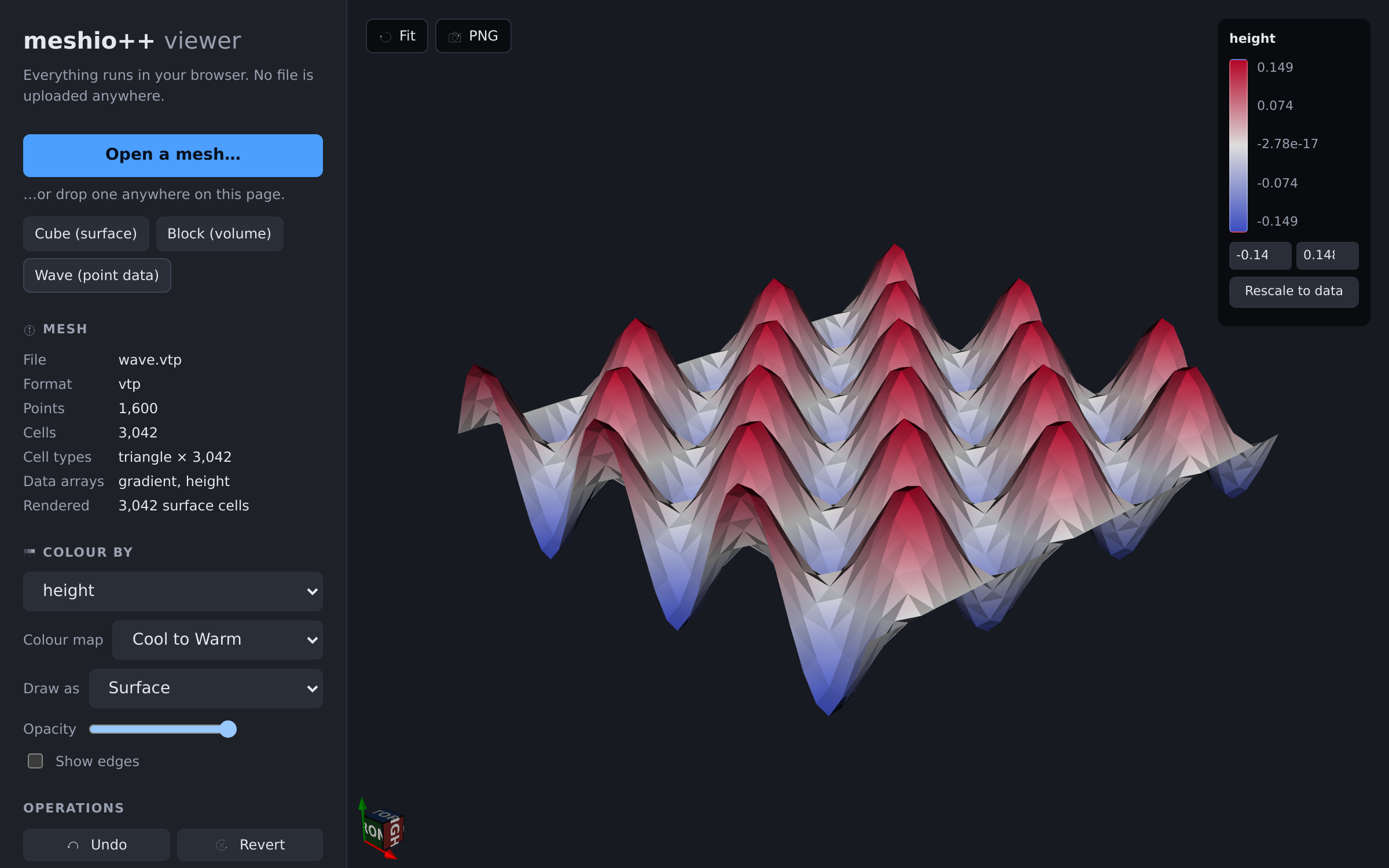
The browser viewer — reading, rendering and converting entirely client-side.
One call, two backends:
import meshioplusplus

mesh = meshioplusplus.read("part.msh")
meshioplusplus.view(mesh)                      # pick a backend automatically
meshioplusplus.view(mesh, backend="polyscope") # a native desktop window
meshioplusplus.view(mesh, backend="browser")   # vtk.js, in a browser or notebook
The desktop backend is Polyscope, an optional Python-only extra (pip install meshioplusplus[viewer]). It draws solids you can slice into, colours by any point or cell array, and renders headless screenshots for CI and docs:
meshioplusplus.screenshot(mesh, "part.png", color_by="temperature")
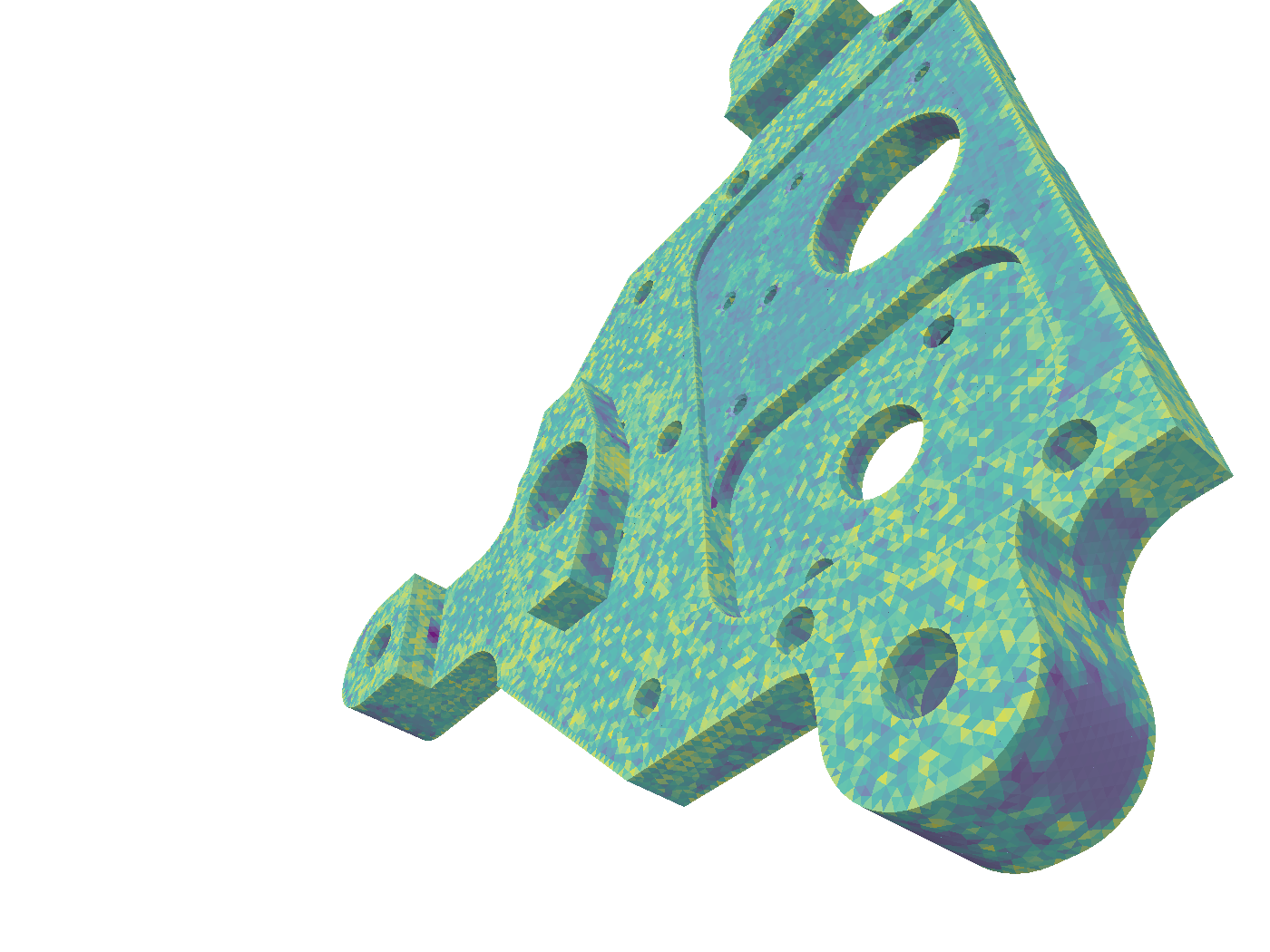
The bundled example.msh bracket coloured by element quality — this image is generated by screenshot() itself.
The browser backend needs nothing extra. The same app is hosted as a live demo: drag in any supported format, colour by point or cell data, and convert and download to another format — all client-side, with no server and no upload. Since it runs the WebAssembly build, every format meshio++ reads works there too.
A second page, the dataset manager, curates the dataset manifests used for ML training collections visually — directory picking with in-place manifest save (Chromium), per-entry previews with a time-series scrubber, and NaN/Inf scanning — against the same hand-editable JSON the CLI and Python API use:
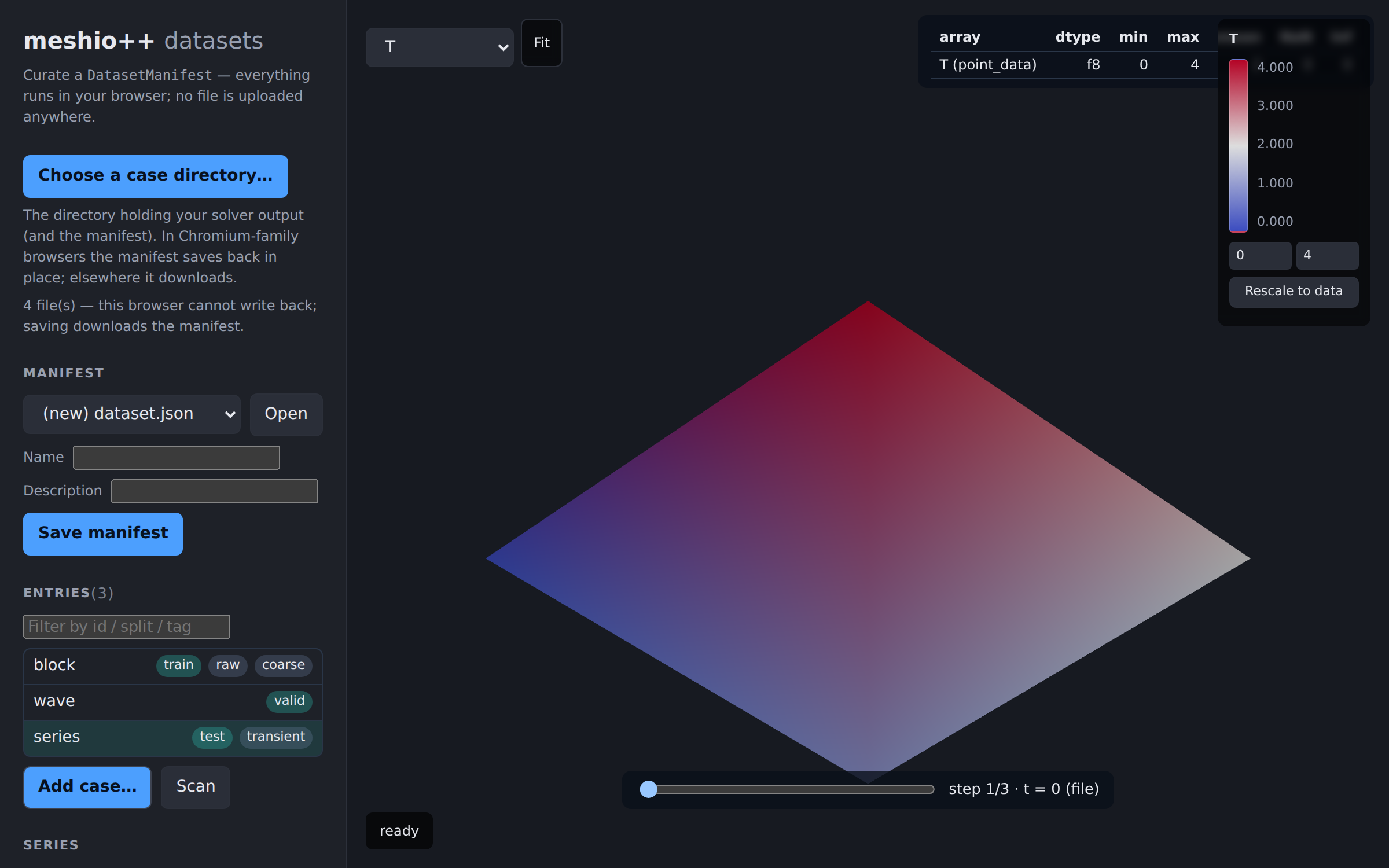
Splits, tags and groups on the left; a live preview and per-array summary on the right — all against the manifest JSON the CLI and Python API read and write.
From the command line:
meshioplusplus view part.msh
meshioplusplus screenshot part.msh part.png --size 1600 1200
See the viewer docs for how volume meshes are handled and what each backend can and cannot do.
Interoperability
Hand a mesh straight to the tools you reach for next — no file round-trip, and the numpy buffers are shared, not copied, wherever the target accepts them as they are:
import meshioplusplus

mesh = meshioplusplus.read("bracket.msh")

grid = meshioplusplus.to_pyvista(mesh)      # a pyvista.UnstructuredGrid
tm = meshioplusplus.to_trimesh(mesh)        # a trimesh.Trimesh (triangles only)
Both directions exist (from_pyvista, from_trimesh). Mixed-type meshes are the normal case, and named regions ride along as region:<name> mask arrays plus a metadata sidecar, so even a gmsh physical group's integer tag survives a PyVista round-trip. zero_copy_only=True turns any step that would copy into a named error instead of a silent one.
Data arrays also export to Apache Arrow and Parquet for the analytics stack, or straight to a pandas / polars frame with no Parquet detour:
df = meshioplusplus.to_pandas(mesh, location="cell")    # a pandas.DataFrame
pf = meshioplusplus.to_polars(mesh, location="point")   # a polars.DataFrame

meshioplusplus.write_parquet(mesh, "cells.parquet", location="cell")

import pandas
pandas.read_parquet("cells.parquet").head()
meshioplusplus data export bracket.msh cells.parquet --location cell
Multi-component arrays keep their shape wherever the target can hold it — Arrow fixed_size_list columns, polars pl.Array columns — while to_pandas (whose columns are one-dimensional) flattens them into suffixed columns v_0/v_1/v_2 with the grouping recorded in df.attrs. The mesh's counts, cell types and region names travel in the Arrow schema metadata / df.attrs. This is a data export, not a mesh format — it does not round-trip geometry and is deliberately not in the format registry.
PyVista, trimesh, pyarrow, pandas and polars are Python-only optional extras (pip install meshioplusplus[interop], or one at a time with [pyvista] / [trimesh] / [arrow] / [pandas] / [polars]). They are kept out of [all], which means "the optional dependencies the formats need". None of them reaches the C++/WebAssembly/C/Fortran core, which stays dependency-free.
Meshes also hand off to the GPU through the standard exchange protocols — DLPack as the primary export (which covers host arrays too), __cuda_array_interface__ consumed on the way back:
gpu = meshioplusplus.to_cupy(mesh)            # one host→device transfer per array
gpu.point_data["T"] *= 2.0                    # any CuPy / RAPIDS kernel
meshioplusplus.write("out.vtu", meshioplusplus.from_cupy(gpu))
The host→device move is always a bus transfer — what this removes is the file round-trip and every extra copy around it. to_dlpack(mesh) exports host arrays any DLPack consumer (PyTorch, JAX, Numba, …) adopts in place. There is deliberately no [gpu] extra: CuPy wheels are CUDA-version-specific, so install the one matching your toolkit (e.g. pip install cupy-cuda13x for CUDA 13.x, cupy-cuda12x for 12.x).
And for machine-learning pipelines, meshes become graphs, feature matrices, datasets and framework tensors directly:
ei = meshioplusplus.edge_index(mesh)                  # (2, E) int64 — PyG/DGL layout
fm = meshioplusplus.feature_matrix(mesh, "point")     # (N, F) float64 + recorded columns
meshioplusplus.write_dataset("out_*.vtu", "dataset/") # mesh_id-keyed partitioned Parquet
t = meshioplusplus.to_torch(mesh)                     # torch tensors, adopted zero-copy
feature_matrix's column order is a stated, versioned contract recorded in the returned schema, so training and inference cannot silently disagree; write_dataset streams a glob / directory / transient series into hive-partitioned Parquet (or chunked zarr/hdf5 groups, [zarr]/h5py) with a strict shared schema and a JSON manifest; to_torch/to_jax adopt the DLPack payload per framework (no [torch]/[jax] extra, deliberately — the CuPy precedent). See the ML docs.
A collection of solution outputs is catalogued by a hand-editable dataset manifest (DatasetManifest — sources, train/valid/test splits, tags, groups, notes; curated in Python, by the meshioplusplus dataset CLI group, over MCP, or with a text editor, all against the same JSON), and the PhysicsNeMo adapter (meshioplusplus.physicsnemo) trains straight off it: graph_sample builds the MeshGraphNet tensor set per mesh, field_stats/edge_stats stream normalization stats in PhysicsNeMo's own convention, make_dataset yields a PyTorch Geometric dataset and make_reader a Gen-2 Reader — with a worked, GPU-executed end-to-end example in example/physicsnemo/.
See the interoperability docs for the full mapping tables, the zero-copy contract, and the Open3D/DOLFINx design sketch, and the GPU docs for the device handoff.
MCP server
Every operation in this README is also exposed to AI agents as a tool over the Model Context Protocol — reading/writing all the formats, conversion, and the full mesh- and data-operation suite:
pip install "meshioplusplus[mcp]"     # the mcp SDK needs Python >= 3.10
claude mcp add meshioplusplus -- meshioplusplus-mcp
Then ask the agent to convert, inspect, slice, partition, … and it drives the 45 tools itself. Tools are stateless and file-path based (optionally sandboxed with --root DIR), and every report is strict JSON. See the MCP docs for the tool table and client setup.
ParaView plugin
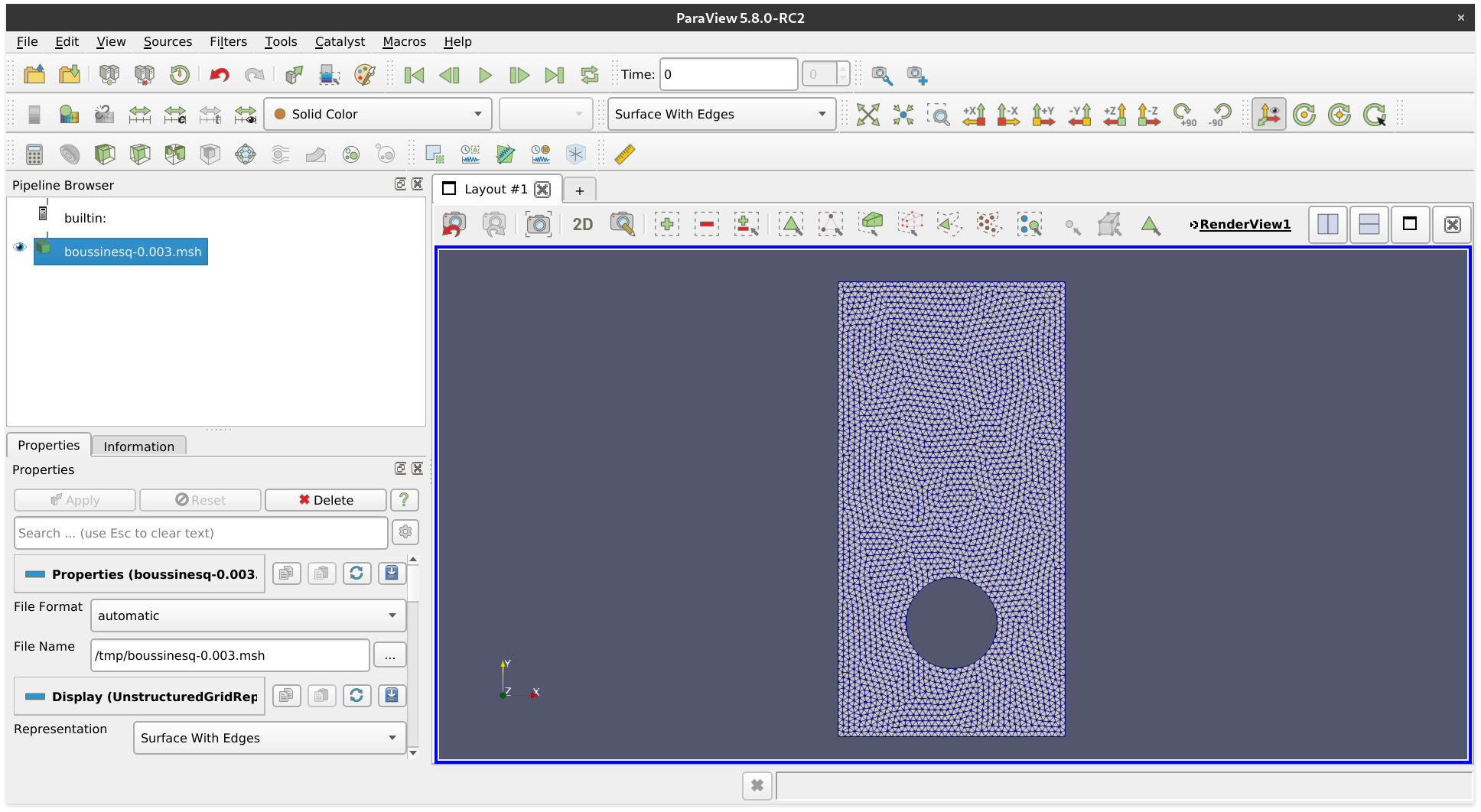 *A Gmsh file opened with ParaView.*
If you have downloaded a binary version of ParaView, you may proceed as follows.
- Install meshio++ for the Python major version that ParaView uses (check
pvpython --version) - Open ParaView
- Find the file
paraview-meshioplusplus-plugin.pyof your meshio++ installation (on Linux:~/.local/share/paraview-5.9/plugins/) and load it under Tools / Manage Plugins / Load New - Optional: Activate Auto Load
You can now open all meshio++-supported files in ParaView.
Benchmarks
How much does the C++ core help? The benchmark/ folder times read/write conversions against the original pure-Python meshio on the formats both support (same in-memory mesh, same machine). The headline input is the bundled example.msh — a real Gmsh bracket (~52k nodes, ~293k cells).
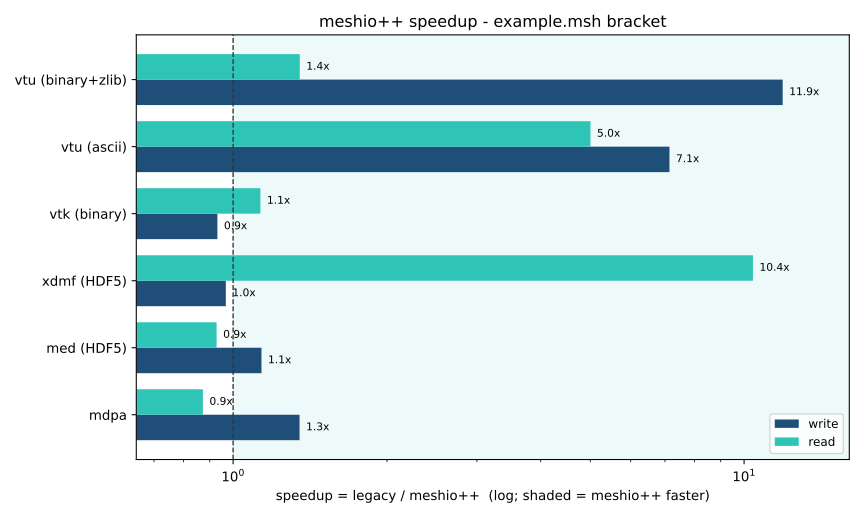
meshio++'s biggest wins are the parallel and text paths: VTU binary+zlib ~16× write (the zlib blocks run across cores via an OpenMP backend with dynamic scheduling — hybrid P+E-core CPUs load-balance too), VTU ASCII ~7× write / ~5× read, and mixed-topology XDMF read ~10×. The binary and HDF5 formats that used to be slower — VTK/Gmsh binary, UGRID, and MED — are now at or above parity after an optimisation pass (bulk-buffered binary I/O, single-instruction bswap endianness conversion, a real parallel backend, an Eigen-backed MED transpose, zero-copy cell reconstruction that moves the connectivity buffer straight into the mesh, and uninitialised reader buffers + thread-parallel block copies so nothing is written twice); binary reads now match or beat numpy's fromfile — Gmsh ~1.7×, single-type VTK ~1.45×, and even mixed-topology VTK ~1.1×. Output stays byte-identical throughout.
The speedup is per-element: text/parallel formats climb out of the small-mesh regime and plateau (large meshes realise the full speedup):
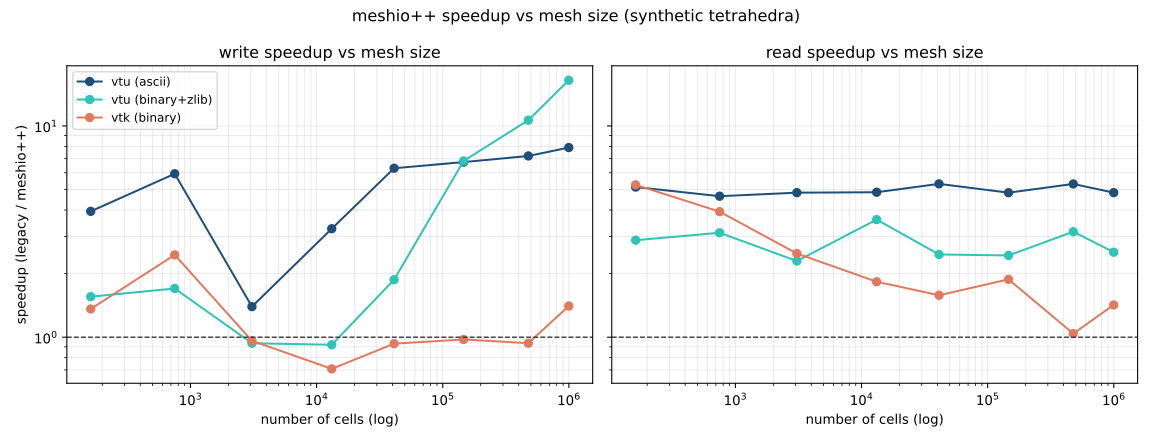
Full methodology and a reproducible notebook are on the Benchmarks doc page (source: benchmark/01_benchmark.ipynb).
Reading only what you need
import meshioplusplus

mesh = meshioplusplus.read("big.vtu", points_only=True)   # geometry, no data arrays
mesh = meshioplusplus.read("big.vtu", arrays=["u", "p"])  # only these arrays
meta = meshioplusplus.read_metadata("big.vtu")            # counts/names, no heavy arrays

mesh = meshioplusplus.read("run.exo", time_step=-1)       # the last step of a time series
meta["time_values"]                                       # how many steps there are
VTU, VTP, XDMF and Gmsh skip the unwanted array bodies outright; other formats are read in full and filtered, and meta["fell_back_to_full_read"] says which happened. time_step picks one step of a multi-step file (0 = the first, negative counts from the end); out of range is an error naming the available count rather than a silent fallback to step 0. Currently honoured by Exodus. A lenient option downgrades "this reader cannot represent construct X" errors to a warning plus a skip (currently MDPA's Table/Geometries/Mesh/Constraints blocks) — not "ignore all errors": a malformed file still fails. Large files can also be memory-mapped (automatic above 16 MiB), which roughly halves peak memory during a read. See selective reads and memory-mapped reading.
VTK XML output can additionally use lz4 (ParaView-readable) or zstd (a meshio++ extension) instead of zlib, when built with -DMESHIOPLUSPLUS_WITH_LZ4=ON / -DMESHIOPLUSPLUS_WITH_ZSTD=ON. zlib remains the default. See compression codecs.
Installation
meshio++ is available from the Python Package Index, so simply run
pip install meshioplusplus
to install.
Additional dependencies (netcdf4, h5py) are required for some of the output formats and can be pulled in by
pip install meshioplusplus[all]
For JavaScript / browser use, the C++ core also ships as a WebAssembly npm package covering every format above — including the HDF5- and netCDF-backed ones (CGNS, H5M, HMF, MED, Exodus), as of v8.0.0:
npm install @meshioplusplus/wasm
See the WebAssembly / JavaScript doc page for usage and the format-support table.
meshio++ is also on Spack, upstream in spack/spack-packages — no checkout of this repo required:
spack install py-meshioplusplus +hdf5 +netcdf +zlib
See Installation → Spack for the standalone C API package and the full variant list.
C++ API
The full C++ core installs as a normal CMake package — the real Mesh, the format registry, every mesh/data operation, and the header-only Kratos bridge, none of which fit through a C ABI:
cmake -S . -B build -DMESHIOPLUSPLUS_BUILD_PYTHON=OFF -DMESHIOPLUSPLUS_INSTALL_CPP=ON
cmake --build build && cmake --install build --prefix /opt/meshioplusplus
find_package(meshioplusplus 10.20.0 EXACT CONFIG REQUIRED COMPONENTS CXX)
target_link_libraries(my_solver PRIVATE meshioplusplus::core)
EXACT is the conservative pin: the C++ API makes no ABI promise (Mesh,
ModelPart and GeometricalEntity are header-defined types whose layout moves
with the headers), so library and consumer must be built from compatible
headers. The finer pin is MESHIOPLUSPLUS_ABI_VERSION, which moves only when a
change really would break an already-compiled consumer — so a release that
cannot affect you costs no rebuild. Either way a mismatch now fails at link
time rather than corrupting memory, and the C API is the stable one — pin
find_package(meshioplusplus 10 … COMPONENTS C) there. See
ABI compatibility.
#include "meshioplusplus/registry.hpp"
#include "meshioplusplus/operations/partition.hpp"

auto mesh  = meshioplusplus::registry_read("bracket.msh", "", {});
auto parts = meshioplusplus::partition(mesh, {.mNParts = 8});
All three mesh backends install side by side (meshioplusplus::core_meshio, ::core_native, ::core_kratos), so one prefix serves consumers that disagree about the backend; each carries its own backend macro, making a mismatch a compile or link error rather than silent UB. Kratos consumers get the whole ModelPart surface: application entity names such as SmallDisplacementElement3D4N are preserved end to end (file → Mesh → ModelPart → file), material data crosses as Properties key/value pairs, and nested SubModelParts round-trip as parent/child region names. meshio++ itself is serial — there is no MPI anywhere in the API; partition(mesh, {nparts, ghost_layers}) produces the shared-node halo an MPI assembly needs and each rank takes its own piece. See the C++ API doc page.
C / Fortran API
For HPC codes written in C or Fortran, the C++ core also builds as an installable shared library (libmeshioplusplus, pure-C99 header, pkg-config + find_package support) with a modern OO Fortran 2008 module on top:
./build/configure.sh --fortran --tests --build     # --c-api for the C API alone
cmake --install build/cpp-release --prefix /opt/meshioplusplus
mio_mesh* m = mio_read("in.msh", NULL);
printf("%lld points\n", (long long)mio_mesh_num_points(m));
mio_write("out.vtu", m, NULL);
mio_mesh_free(m);
use meshioplusplus
type(mio_mesh) :: m
call m%read("in.msh")
call m%write("out.vtu")
call m%free()
The C API is also packaged for Conan (root conanfile.py) and vcpkg (overlay port under packages/vcpkg/meshioplusplus/), both driving the same install/find_package path, plus Spack (upstream in spack/spack-packages, no checkout needed):
conan create . -o meshioplusplus/*:with_hdf5=True
vcpkg install meshioplusplus --overlay-ports=ports
spack install meshioplusplus +fortran +hdf5
Full mesh access (build meshes from raw arrays, zero-copy readback) is covered on the C API and Fortran doc pages.
Julia / R bindings
The same installed C library also carries bindings for Julia and R, the two remaining languages of the scientific-computing audience. Both are layered on libmeshioplusplus exactly as the Fortran module is — no new C++, and the core stays untouched:
import MeshioPlusPlus as mio
m = mio.read("bracket.msh")
mio.write(mio.extract_surface(m), "surface.vtu")
library(meshioplusplus)
m <- mio_read("bracket.msh")
mio_write(mio_extract_surface(m), "surface.vtu")
Julia and R are both column-major, so — as in Fortran — points shaped (dim, n) and connectivity (nodes_per_cell, n) are the same memory as the C API's row-major shapes, and nothing is ever transposed. Node indices are 1-based, with the shift applied inside the copying accessors only; Julia additionally exposes genuine zero-copy borrows (points_ptr, connectivity_ptr) whose validity window is enforced rather than merely documented. R is copy-only — R vectors are R-managed, so a borrow cannot survive into R — and says so plainly instead of implying parity.
[!IMPORTANT] The Julia binding is not MIT.
bindings/julia/is released under the GNU General Public License, version 3 (GPL-3.0) — a copyleft license, not a permission-required one: anyone may use, modify or sell it commercially with no permission needed, but distributing it or a modified version of it must be under GPL-3.0 too, with source available; purely private use carries no obligation. Everything else in this repository, including the C API it calls and the R binding, remains MIT.
See the Julia and R doc pages.
Single-header C++
The whole C++ core is also amalgamated into one self-contained, STB-style header — src/single_include/meshioplusplus/meshioplusplus.hpp — with pugixml bundled and no external dependencies by default. Drop it in, no CMake or linking required:
// in exactly ONE .cpp:
#define MESHIOPLUSPLUS_IMPLEMENTATION
#include "meshioplusplus/meshioplusplus.hpp"
// elsewhere: just #include it (declarations only)
g++ -std=c++20 -I src/single_include main.cpp
It is generated by ./tools/amalgamate.sh and kept in sync by CI. See the single-header doc page (optional HDF5/netCDF/zlib formats via MESHIOPLUSPLUS_HAS_* macros).
example/cpp/ is the C++ counterpart of example/python/: the same tour of meshio++, called directly against this single header instead of the Python bindings, on the xeus-cpp Jupyter kernel — no PyVista either, renders go through meshio++'s own SVG writer. example/julia/ and example/r/ are the same tour again, called through the Julia and R bindings on their own Jupyter kernels (IJulia / IRkernel) — since those flat-ABI bindings can't drive the SVG writer's data-driven colouring either, quality/field renders are small charts instead of colour.
C++ mesh backends
Standalone C++ builds (no Python) can swap the in-memory mesh structure at compile time via MESHIOPLUSPLUS_MESH_BACKEND — every format works identically under each backend:
- MESHIO (default; the Python extension and PyPI wheels always use it) — mirrors the Python
meshio.Mesh; - NATIVE — the fastest pure-C++ structure (canonical Float64/Int64 storage, cell-type enum, CSR ragged blocks); the WebAssembly build uses it;
- KRATOS — a Kratos Multiphysics-style
ModelPart(Nodes/Elements/Conditions/SubModelParts) plus a header-only templated bridge that populates a realKratos::ModelPartwith no Kratos build dependency.
./build/configure.sh --mesh-backend NATIVE --tests --build
All three also install side by side from a single prefix (MESHIOPLUSPLUS_INSTALL_CPP=ON), as meshioplusplus::core_meshio / ::core_native / ::core_kratos — see the C++ API page. See the C++ mesh backends doc page.
Testing
To run the meshio++ unit tests, check out this repository, install it with the test extras, and type
pytest tests/python/
License
meshio++ is published under the MIT license, with one exception: the Julia binding in bindings/julia/ is released under the GNU General Public License, version 3 (GPL-3.0). GPL-3.0 is copyleft, not permission-required: anyone may use, modify or sell it commercially without asking, but distributing it (or a modified version) must be under GPL-3.0 too, with source available; purely private/internal use carries no obligation at all. Nothing else is affected: the C++ core, the C API that binding calls, and the R binding are all MIT.
Acknowledgements
meshio++ is a fork of meshio by Nico Schlömer and its contributors (MIT). meshio is where the Mesh data model, the cell-type naming, and the great majority of the format readers and writers come from; this fork adds a C++20 core, an operations layer, and the C/Fortran/WebAssembly bindings on top of that foundation. The original copyright is retained in LICENSE.
Some code and test fixtures also come from Simvia's meshlane fork of meshio (MIT), credited per-change in CITATION.cff and CHANGELOG.md.
The C++ core is dependency-free by design. Everything below is either optional, bundled, or confined to one binding or tool.
Runtime dependencies (Python)
| Project | Used for | License |
|---|---|---|
| NumPy | the array type the whole data model is built on | BSD-3-Clause |
| Rich | CLI output formatting | MIT |
Optional dependencies
| Project | Extra | Used for | License |
|---|---|---|---|
| Polyscope | [viewer] |
the desktop viewer and screenshot() |
MIT |
| PyVista | [pyvista] / [interop] |
to_pyvista() / from_pyvista() |
BSD-3-Clause |
| trimesh | [trimesh] / [interop] |
to_trimesh() / from_trimesh() |
MIT |
| pyarrow | [arrow] / [interop] |
the Arrow/Parquet data export | Apache-2.0 |
| pandas | [pandas] / [interop] |
to_pandas() |
BSD-3-Clause |
| polars | [polars] / [interop] |
to_polars() |
MIT |
| zarr | [zarr] |
the write_dataset(format="zarr") chunked-dataset backend |
MIT |
| CuPy | — (wheels are CUDA-version-specific, e.g. cupy-cuda13x — see the GPU docs) |
to_cupy() / from_cupy() |
MIT |
| MCP Python SDK | [mcp] |
the meshioplusplus-mcp server exposing every operation to AI agents |
MIT |
| h5py | [all] |
the Python fallback for CGNS, H5M, MED, XDMF | BSD-3-Clause |
| netCDF4 | [all] |
the Python fallback for Exodus | MIT |
| KaHIP | [kahip] / CMake |
the quality graph-partitioning backend | MIT |
| zstandard, lz4 | [codecs] |
the Python fallback for the optional VTK block codecs | BSD-3-Clause / BSD-2-Clause |
Bundled and build-time
| Project | Used for | License |
|---|---|---|
| pugixml | XML parsing in the C++ core (vendored in src/cpp/third_party/) |
MIT |
| Eigen | the MED Fortran↔C transpose (git submodule, optional) | MPL-2.0 |
| pybind11 | the Python bindings | BSD-3-Clause |
| scikit-build-core | the CMake-driven build backend | Apache-2.0 |
| Emscripten | the WebAssembly build | MIT / NCSA |
| GoogleTest | the C++ test suite | BSD-3-Clause |
| zlib, Zstandard, LZ4 | optional compression codecs | zlib / BSD-3-Clause / BSD-2-Clause |
| HDF5, netCDF | optional native paths for HDF5/netCDF-backed formats | BSD-3-Clause / MIT-like |
Browser viewer (isolated under src/viewer/)
| Project | Used for | License |
|---|---|---|
| vtk.js | all rendering, colour maps and the scalar bar | BSD-3-Clause |
| Vite | the app build | MIT |
| vite-plugin-singlefile | the self-contained wheel-bundled build | MIT |
| Playwright | the end-to-end tests and the documentation screenshots | Apache-2.0 |
Also
Kratos Multiphysics (BSD-3-Clause) is the source of the skin-detection algorithm, the EnSight writer logic, the KaHIP partitioning approach and the FindKaHIP.cmake module, all these 3 implementation are from the original author of this project as well. Also thanks to its ModelPart design informs the KRATOS mesh backend. VTK and Verdict (both BSD-3-Clause) define the mesh-quality formulas. The documentation is built with VitePress (MIT) and Doxygen (GPL-2.0, used as a tool only). The logo renders the Stanford Bunny ("Stanford Bunny — Digitized!" by MakerBot, CC-BY).
Thank you to all of them.
1 maintainer

Download files
Download the file for your platform. If you're not sure which to choose, learn more about installing packages.
Source Distribution
Built Distributions
Filter files by name, interpreter, ABI, and platform.
If you're not sure about the file name format, learn more about wheel file names.
Copy a direct link to the current filters
File details
Details for the file meshioplusplus-10.20.0.tar.gz.
File metadata
- Download URL: meshioplusplus-10.20.0.tar.gz
- Upload date:
- Size: 27.8 MB
- Tags: Source
- Uploaded using Trusted Publishing? Yes
- Uploaded via:
twine/7.0.0 CPython/3.13.14
File hashes
| Algorithm | Hash digest | |
|---|---|---|
| SHA256 |
0aa8896d338cac5a822cc7f902bc468a2e0a2d0812fe1af6e1a4d30d21dd1457
|
|
| MD5 |
40dd98f58a38f157e2660acaa27af76f
|
|
| BLAKE2b-256 |
dda1f941be8811dce2c889c9cc132137462456ffdfc5fdd3219cbbb3b7063266
|
Provenance
The following attestation bundles were made for meshioplusplus-10.20.0.tar.gz:
Publisher:
wheels.yml on loumalouomega/meshioplusplus
-
Statement:
-
Statement type:
https://in-toto.io/Statement/v1 -
Predicate type:
https://docs.pypi.org/attestations/publish/v1 -
Subject name:
meshioplusplus-10.20.0.tar.gz -
Subject digest:
0aa8896d338cac5a822cc7f902bc468a2e0a2d0812fe1af6e1a4d30d21dd1457 - Sigstore transparency entry: 2602425236
- Sigstore integration time:
-
Permalink:
loumalouomega/meshioplusplus@771a1f8bda73c63e3ddfa6267eabe6a870cc6762 -
Branch / Tag:
refs/tags/v10.20.0 - Owner: https://github.com/loumalouomega
-
Access:
public
-
Token Issuer:
https://token.actions.githubusercontent.com -
Runner Environment:
github-hosted -
Publication workflow:
wheels.yml@771a1f8bda73c63e3ddfa6267eabe6a870cc6762 -
Trigger Event:
push
-
Statement type:
File details
Details for the file meshioplusplus-10.20.0-cp312-cp312-win_amd64.whl.
File metadata
- Download URL: meshioplusplus-10.20.0-cp312-cp312-win_amd64.whl
- Upload date:
- Size: 3.3 MB
- Tags: CPython 3.12, Windows x86-64
- Uploaded using Trusted Publishing? Yes
- Uploaded via:
twine/7.0.0 CPython/3.13.14
File hashes
| Algorithm | Hash digest | |
|---|---|---|
| SHA256 |
35d5bcc47dd0b7cbd2e60864b439ce4c8d12a5c7d003c7b065f2b1989dcffa5e
|
|
| MD5 |
824b16b11fbf2f839552b3ab232a5ce4
|
|
| BLAKE2b-256 |
0ea33023efd7d82fc2bd6612331c08c408c898a5d6a6f0748af1a41e9c2d4b1d
|
Provenance
The following attestation bundles were made for meshioplusplus-10.20.0-cp312-cp312-win_amd64.whl:
Publisher:
wheels.yml on loumalouomega/meshioplusplus
-
Statement:
-
Statement type:
https://in-toto.io/Statement/v1 -
Predicate type:
https://docs.pypi.org/attestations/publish/v1 -
Subject name:
meshioplusplus-10.20.0-cp312-cp312-win_amd64.whl -
Subject digest:
35d5bcc47dd0b7cbd2e60864b439ce4c8d12a5c7d003c7b065f2b1989dcffa5e - Sigstore transparency entry: 2602430961
- Sigstore integration time:
-
Permalink:
loumalouomega/meshioplusplus@771a1f8bda73c63e3ddfa6267eabe6a870cc6762 -
Branch / Tag:
refs/tags/v10.20.0 - Owner: https://github.com/loumalouomega
-
Access:
public
-
Token Issuer:
https://token.actions.githubusercontent.com -
Runner Environment:
github-hosted -
Publication workflow:
wheels.yml@771a1f8bda73c63e3ddfa6267eabe6a870cc6762 -
Trigger Event:
push
-
Statement type:
File details
Details for the file meshioplusplus-10.20.0-cp312-cp312-manylinux_2_34_x86_64.whl.
File metadata
- Download URL: meshioplusplus-10.20.0-cp312-cp312-manylinux_2_34_x86_64.whl
- Upload date:
- Size: 5.1 MB
- Tags: CPython 3.12, manylinux: glibc 2.34+ x86-64
- Uploaded using Trusted Publishing? Yes
- Uploaded via:
twine/7.0.0 CPython/3.13.14
File hashes
| Algorithm | Hash digest | |
|---|---|---|
| SHA256 |
1e8d24f246ce691f0b82d0734bb31fbd01b21624864363c5377e2d10b9eadb93
|
|
| MD5 |
e7ed528a577a9bc58a27bdf210fb2ba9
|
|
| BLAKE2b-256 |
4ad309aad121a83a3ea87879008c769abbf6c591ab87bee97fe03c811adcbf8b
|
Provenance
The following attestation bundles were made for meshioplusplus-10.20.0-cp312-cp312-manylinux_2_34_x86_64.whl:
Publisher:
wheels.yml on loumalouomega/meshioplusplus
-
Statement:
-
Statement type:
https://in-toto.io/Statement/v1 -
Predicate type:
https://docs.pypi.org/attestations/publish/v1 -
Subject name:
meshioplusplus-10.20.0-cp312-cp312-manylinux_2_34_x86_64.whl -
Subject digest:
1e8d24f246ce691f0b82d0734bb31fbd01b21624864363c5377e2d10b9eadb93 - Sigstore transparency entry: 2602434219
- Sigstore integration time:
-
Permalink:
loumalouomega/meshioplusplus@771a1f8bda73c63e3ddfa6267eabe6a870cc6762 -
Branch / Tag:
refs/tags/v10.20.0 - Owner: https://github.com/loumalouomega
-
Access:
public
-
Token Issuer:
https://token.actions.githubusercontent.com -
Runner Environment:
github-hosted -
Publication workflow:
wheels.yml@771a1f8bda73c63e3ddfa6267eabe6a870cc6762 -
Trigger Event:
push
-
Statement type:
File details
Details for the file meshioplusplus-10.20.0-cp312-cp312-manylinux_2_34_aarch64.whl.
File metadata
- Download URL: meshioplusplus-10.20.0-cp312-cp312-manylinux_2_34_aarch64.whl
- Upload date:
- Size: 4.6 MB
- Tags: CPython 3.12, manylinux: glibc 2.34+ ARM64
- Uploaded using Trusted Publishing? Yes
- Uploaded via:
twine/7.0.0 CPython/3.13.14
File hashes
| Algorithm | Hash digest | |
|---|---|---|
| SHA256 |
cc4e9a927732fef9fcbc0a5b358d01f351fe8c003450166813b708d5fde75a76
|
|
| MD5 |
1bd2097803335c45f4dfb5d20203019c
|
|
| BLAKE2b-256 |
82248fdc5389d20ebee88a22c4d8e518d261700d9fac7efc0108fb079c37c834
|
Provenance
The following attestation bundles were made for meshioplusplus-10.20.0-cp312-cp312-manylinux_2_34_aarch64.whl:
Publisher:
wheels.yml on loumalouomega/meshioplusplus
-
Statement:
-
Statement type:
https://in-toto.io/Statement/v1 -
Predicate type:
https://docs.pypi.org/attestations/publish/v1 -
Subject name:
meshioplusplus-10.20.0-cp312-cp312-manylinux_2_34_aarch64.whl -
Subject digest:
cc4e9a927732fef9fcbc0a5b358d01f351fe8c003450166813b708d5fde75a76 - Sigstore transparency entry: 2602431359
- Sigstore integration time:
-
Permalink:
loumalouomega/meshioplusplus@771a1f8bda73c63e3ddfa6267eabe6a870cc6762 -
Branch / Tag:
refs/tags/v10.20.0 - Owner: https://github.com/loumalouomega
-
Access:
public
-
Token Issuer:
https://token.actions.githubusercontent.com -
Runner Environment:
github-hosted -
Publication workflow:
wheels.yml@771a1f8bda73c63e3ddfa6267eabe6a870cc6762 -
Trigger Event:
push
-
Statement type:
File details
Details for the file meshioplusplus-10.20.0-cp312-cp312-macosx_13_0_x86_64.whl.
File metadata
- Download URL: meshioplusplus-10.20.0-cp312-cp312-macosx_13_0_x86_64.whl
- Upload date:
- Size: 3.4 MB
- Tags: CPython 3.12, macOS 13.0+ x86-64
- Uploaded using Trusted Publishing? Yes
- Uploaded via:
twine/7.0.0 CPython/3.13.14
File hashes
| Algorithm | Hash digest | |
|---|---|---|
| SHA256 |
7230605f584fbe5996a018488a8c1ebf55fec0ed3f03dcb9bef858e17eaf6ae0
|
|
| MD5 |
0642cea90481c604bd643c10c8997734
|
|
| BLAKE2b-256 |
8338dc1b8092e7f109c145da4017a279ae07feb1c09a8e99e1e3f82a7e5608e6
|
Provenance
The following attestation bundles were made for meshioplusplus-10.20.0-cp312-cp312-macosx_13_0_x86_64.whl:
Publisher:
wheels.yml on loumalouomega/meshioplusplus
-
Statement:
-
Statement type:
https://in-toto.io/Statement/v1 -
Predicate type:
https://docs.pypi.org/attestations/publish/v1 -
Subject name:
meshioplusplus-10.20.0-cp312-cp312-macosx_13_0_x86_64.whl -
Subject digest:
7230605f584fbe5996a018488a8c1ebf55fec0ed3f03dcb9bef858e17eaf6ae0 - Sigstore transparency entry: 2602427472
- Sigstore integration time:
-
Permalink:
loumalouomega/meshioplusplus@771a1f8bda73c63e3ddfa6267eabe6a870cc6762 -
Branch / Tag:
refs/tags/v10.20.0 - Owner: https://github.com/loumalouomega
-
Access:
public
-
Token Issuer:
https://token.actions.githubusercontent.com -
Runner Environment:
github-hosted -
Publication workflow:
wheels.yml@771a1f8bda73c63e3ddfa6267eabe6a870cc6762 -
Trigger Event:
push
-
Statement type:
File details
Details for the file meshioplusplus-10.20.0-cp312-cp312-macosx_13_0_arm64.whl.
File metadata
- Download URL: meshioplusplus-10.20.0-cp312-cp312-macosx_13_0_arm64.whl
- Upload date:
- Size: 3.2 MB
- Tags: CPython 3.12, macOS 13.0+ ARM64
- Uploaded using Trusted Publishing? Yes
- Uploaded via:
twine/7.0.0 CPython/3.13.14
File hashes
| Algorithm | Hash digest | |
|---|---|---|
| SHA256 |
f8ff489386754dd8be149a8c7fb6b57f67717464fa1036de6bb7f52d882fcde4
|
|
| MD5 |
5c565bd10cb1ce1b86c5f0b90ab94352
|
|
| BLAKE2b-256 |
a4e8619d11ea45263b0f40ba053542db2ad09a7dd3a8663aeef96f325d0ce024
|
Provenance
The following attestation bundles were made for meshioplusplus-10.20.0-cp312-cp312-macosx_13_0_arm64.whl:
Publisher:
wheels.yml on loumalouomega/meshioplusplus
-
Statement:
-
Statement type:
https://in-toto.io/Statement/v1 -
Predicate type:
https://docs.pypi.org/attestations/publish/v1 -
Subject name:
meshioplusplus-10.20.0-cp312-cp312-macosx_13_0_arm64.whl -
Subject digest:
f8ff489386754dd8be149a8c7fb6b57f67717464fa1036de6bb7f52d882fcde4 - Sigstore transparency entry: 2602427668
- Sigstore integration time:
-
Permalink:
loumalouomega/meshioplusplus@771a1f8bda73c63e3ddfa6267eabe6a870cc6762 -
Branch / Tag:
refs/tags/v10.20.0 - Owner: https://github.com/loumalouomega
-
Access:
public
-
Token Issuer:
https://token.actions.githubusercontent.com -
Runner Environment:
github-hosted -
Publication workflow:
wheels.yml@771a1f8bda73c63e3ddfa6267eabe6a870cc6762 -
Trigger Event:
push
-
Statement type:
File details
Details for the file meshioplusplus-10.20.0-cp311-cp311-win_amd64.whl.
File metadata
- Download URL: meshioplusplus-10.20.0-cp311-cp311-win_amd64.whl
- Upload date:
- Size: 3.3 MB
- Tags: CPython 3.11, Windows x86-64
- Uploaded using Trusted Publishing? Yes
- Uploaded via:
twine/7.0.0 CPython/3.13.14
File hashes
| Algorithm | Hash digest | |
|---|---|---|
| SHA256 |
a7bd82b9bc1713b97d42f1109fc0d774391a6910fcc99c28c66a12840cf1e226
|
|
| MD5 |
922ef9f564d2e154689a2350d3f7e0e8
|
|
| BLAKE2b-256 |
fa72f16d01f586806ac18f91d837074055b2d182712d6e5ba42fd26572ef9d36
|
Provenance
The following attestation bundles were made for meshioplusplus-10.20.0-cp311-cp311-win_amd64.whl:
Publisher:
wheels.yml on loumalouomega/meshioplusplus
-
Statement:
-
Statement type:
https://in-toto.io/Statement/v1 -
Predicate type:
https://docs.pypi.org/attestations/publish/v1 -
Subject name:
meshioplusplus-10.20.0-cp311-cp311-win_amd64.whl -
Subject digest:
a7bd82b9bc1713b97d42f1109fc0d774391a6910fcc99c28c66a12840cf1e226 - Sigstore transparency entry: 2602432628
- Sigstore integration time:
-
Permalink:
loumalouomega/meshioplusplus@771a1f8bda73c63e3ddfa6267eabe6a870cc6762 -
Branch / Tag:
refs/tags/v10.20.0 - Owner: https://github.com/loumalouomega
-
Access:
public
-
Token Issuer:
https://token.actions.githubusercontent.com -
Runner Environment:
github-hosted -
Publication workflow:
wheels.yml@771a1f8bda73c63e3ddfa6267eabe6a870cc6762 -
Trigger Event:
push
-
Statement type:
File details
Details for the file meshioplusplus-10.20.0-cp311-cp311-manylinux_2_34_x86_64.whl.
File metadata
- Download URL: meshioplusplus-10.20.0-cp311-cp311-manylinux_2_34_x86_64.whl
- Upload date:
- Size: 5.1 MB
- Tags: CPython 3.11, manylinux: glibc 2.34+ x86-64
- Uploaded using Trusted Publishing? Yes
- Uploaded via:
twine/7.0.0 CPython/3.13.14
File hashes
| Algorithm | Hash digest | |
|---|---|---|
| SHA256 |
c1d28f5cf19e738b7fcfca42b2e887fb25a185f2dfa7cf2eb875702acf30cc87
|
|
| MD5 |
98dc191ac90edd2ade60db54fb707576
|
|
| BLAKE2b-256 |
90bf566e873f35f9d7cf8026089639145d18e35dea0a91bcc40c83049fe5ebe6
|
Provenance
The following attestation bundles were made for meshioplusplus-10.20.0-cp311-cp311-manylinux_2_34_x86_64.whl:
Publisher:
wheels.yml on loumalouomega/meshioplusplus
-
Statement:
-
Statement type:
https://in-toto.io/Statement/v1 -
Predicate type:
https://docs.pypi.org/attestations/publish/v1 -
Subject name:
meshioplusplus-10.20.0-cp311-cp311-manylinux_2_34_x86_64.whl -
Subject digest:
c1d28f5cf19e738b7fcfca42b2e887fb25a185f2dfa7cf2eb875702acf30cc87 - Sigstore transparency entry: 2602432053
- Sigstore integration time:
-
Permalink:
loumalouomega/meshioplusplus@771a1f8bda73c63e3ddfa6267eabe6a870cc6762 -
Branch / Tag:
refs/tags/v10.20.0 - Owner: https://github.com/loumalouomega
-
Access:
public
-
Token Issuer:
https://token.actions.githubusercontent.com -
Runner Environment:
github-hosted -
Publication workflow:
wheels.yml@771a1f8bda73c63e3ddfa6267eabe6a870cc6762 -
Trigger Event:
push
-
Statement type:
File details
Details for the file meshioplusplus-10.20.0-cp311-cp311-manylinux_2_34_aarch64.whl.
File metadata
- Download URL: meshioplusplus-10.20.0-cp311-cp311-manylinux_2_34_aarch64.whl
- Upload date:
- Size: 4.6 MB
- Tags: CPython 3.11, manylinux: glibc 2.34+ ARM64
- Uploaded using Trusted Publishing? Yes
- Uploaded via:
twine/7.0.0 CPython/3.13.14
File hashes
| Algorithm | Hash digest | |
|---|---|---|
| SHA256 |
00f134829643e38b2ca047817393d1c79241e4d60754d0d5e7462eee587becff
|
|
| MD5 |
edbcee709f9f858b52e58a43132900af
|
|
| BLAKE2b-256 |
c3b8d60915fb8bcac17cabbeb076bfda9bad2cabc4457ce3f7f406eeb15f42fb
|
Provenance
The following attestation bundles were made for meshioplusplus-10.20.0-cp311-cp311-manylinux_2_34_aarch64.whl:
Publisher:
wheels.yml on loumalouomega/meshioplusplus
-
Statement:
-
Statement type:
https://in-toto.io/Statement/v1 -
Predicate type:
https://docs.pypi.org/attestations/publish/v1 -
Subject name:
meshioplusplus-10.20.0-cp311-cp311-manylinux_2_34_aarch64.whl -
Subject digest:
00f134829643e38b2ca047817393d1c79241e4d60754d0d5e7462eee587becff - Sigstore transparency entry: 2602426057
- Sigstore integration time:
-
Permalink:
loumalouomega/meshioplusplus@771a1f8bda73c63e3ddfa6267eabe6a870cc6762 -
Branch / Tag:
refs/tags/v10.20.0 - Owner: https://github.com/loumalouomega
-
Access:
public
-
Token Issuer:
https://token.actions.githubusercontent.com -
Runner Environment:
github-hosted -
Publication workflow:
wheels.yml@771a1f8bda73c63e3ddfa6267eabe6a870cc6762 -
Trigger Event:
push
-
Statement type:
File details
Details for the file meshioplusplus-10.20.0-cp311-cp311-macosx_13_0_x86_64.whl.
File metadata
- Download URL: meshioplusplus-10.20.0-cp311-cp311-macosx_13_0_x86_64.whl
- Upload date:
- Size: 3.4 MB
- Tags: CPython 3.11, macOS 13.0+ x86-64
- Uploaded using Trusted Publishing? Yes
- Uploaded via:
twine/7.0.0 CPython/3.13.14
File hashes
| Algorithm | Hash digest | |
|---|---|---|
| SHA256 |
90b0b307ddd0c4dfab6b1ba155ac61f95be126db1b7276607bcea5737368a56b
|
|
| MD5 |
ae303f7361a3c7837bdc558edee16722
|
|
| BLAKE2b-256 |
bd7b8ec91347795f2c5f7c5a6212fba262ec2ac4cf08d28352d05cc8ecc19c4d
|
Provenance
The following attestation bundles were made for meshioplusplus-10.20.0-cp311-cp311-macosx_13_0_x86_64.whl:
Publisher:
wheels.yml on loumalouomega/meshioplusplus
-
Statement:
-
Statement type:
https://in-toto.io/Statement/v1 -
Predicate type:
https://docs.pypi.org/attestations/publish/v1 -
Subject name:
meshioplusplus-10.20.0-cp311-cp311-macosx_13_0_x86_64.whl -
Subject digest:
90b0b307ddd0c4dfab6b1ba155ac61f95be126db1b7276607bcea5737368a56b - Sigstore transparency entry: 2602431192
- Sigstore integration time:
-
Permalink:
loumalouomega/meshioplusplus@771a1f8bda73c63e3ddfa6267eabe6a870cc6762 -
Branch / Tag:
refs/tags/v10.20.0 - Owner: https://github.com/loumalouomega
-
Access:
public
-
Token Issuer:
https://token.actions.githubusercontent.com -
Runner Environment:
github-hosted -
Publication workflow:
wheels.yml@771a1f8bda73c63e3ddfa6267eabe6a870cc6762 -
Trigger Event:
push
-
Statement type:
File details
Details for the file meshioplusplus-10.20.0-cp311-cp311-macosx_13_0_arm64.whl.
File metadata
- Download URL: meshioplusplus-10.20.0-cp311-cp311-macosx_13_0_arm64.whl
- Upload date:
- Size: 3.2 MB
- Tags: CPython 3.11, macOS 13.0+ ARM64
- Uploaded using Trusted Publishing? Yes
- Uploaded via:
twine/7.0.0 CPython/3.13.14
File hashes
| Algorithm | Hash digest | |
|---|---|---|
| SHA256 |
58c271941b55af31385efee8c7fa52b8e0f37a365ad378de76eedc38ba74304d
|
|
| MD5 |
bb5aacb4b8765b206234b39067128245
|
|
| BLAKE2b-256 |
8c7164389916a1876cbff0160315c040d1d88dac3ee48051f4da422b3b9fb4e5
|
Provenance
The following attestation bundles were made for meshioplusplus-10.20.0-cp311-cp311-macosx_13_0_arm64.whl:
Publisher:
wheels.yml on loumalouomega/meshioplusplus
-
Statement:
-
Statement type:
https://in-toto.io/Statement/v1 -
Predicate type:
https://docs.pypi.org/attestations/publish/v1 -
Subject name:
meshioplusplus-10.20.0-cp311-cp311-macosx_13_0_arm64.whl -
Subject digest:
58c271941b55af31385efee8c7fa52b8e0f37a365ad378de76eedc38ba74304d - Sigstore transparency entry: 2602431767
- Sigstore integration time:
-
Permalink:
loumalouomega/meshioplusplus@771a1f8bda73c63e3ddfa6267eabe6a870cc6762 -
Branch / Tag:
refs/tags/v10.20.0 - Owner: https://github.com/loumalouomega
-
Access:
public
-
Token Issuer:
https://token.actions.githubusercontent.com -
Runner Environment:
github-hosted -
Publication workflow:
wheels.yml@771a1f8bda73c63e3ddfa6267eabe6a870cc6762 -
Trigger Event:
push
-
Statement type:
File details
Details for the file meshioplusplus-10.20.0-cp310-cp310-win_amd64.whl.
File metadata
- Download URL: meshioplusplus-10.20.0-cp310-cp310-win_amd64.whl
- Upload date:
- Size: 3.3 MB
- Tags: CPython 3.10, Windows x86-64
- Uploaded using Trusted Publishing? Yes
- Uploaded via:
twine/7.0.0 CPython/3.13.14
File hashes
| Algorithm | Hash digest | |
|---|---|---|
| SHA256 |
41c69ea61d0e531b1d588f00ea3856e6419a4556dc0d07141d5bc63f100a1b9b
|
|
| MD5 |
1eab1a46e898e437eb7902dab281ba7f
|
|
| BLAKE2b-256 |
aae2b71b5748581b0cd82fe53993ba6355c46015b729e191e8ba2b1fddc347f6
|
Provenance
The following attestation bundles were made for meshioplusplus-10.20.0-cp310-cp310-win_amd64.whl:
Publisher:
wheels.yml on loumalouomega/meshioplusplus
-
Statement:
-
Statement type:
https://in-toto.io/Statement/v1 -
Predicate type:
https://docs.pypi.org/attestations/publish/v1 -
Subject name:
meshioplusplus-10.20.0-cp310-cp310-win_amd64.whl -
Subject digest:
41c69ea61d0e531b1d588f00ea3856e6419a4556dc0d07141d5bc63f100a1b9b - Sigstore transparency entry: 2602426317
- Sigstore integration time:
-
Permalink:
loumalouomega/meshioplusplus@771a1f8bda73c63e3ddfa6267eabe6a870cc6762 -
Branch / Tag:
refs/tags/v10.20.0 - Owner: https://github.com/loumalouomega
-
Access:
public
-
Token Issuer:
https://token.actions.githubusercontent.com -
Runner Environment:
github-hosted -
Publication workflow:
wheels.yml@771a1f8bda73c63e3ddfa6267eabe6a870cc6762 -
Trigger Event:
push
-
Statement type:
File details
Details for the file meshioplusplus-10.20.0-cp310-cp310-manylinux_2_34_x86_64.whl.
File metadata
- Download URL: meshioplusplus-10.20.0-cp310-cp310-manylinux_2_34_x86_64.whl
- Upload date:
- Size: 5.1 MB
- Tags: CPython 3.10, manylinux: glibc 2.34+ x86-64
- Uploaded using Trusted Publishing? Yes
- Uploaded via:
twine/7.0.0 CPython/3.13.14
File hashes
| Algorithm | Hash digest | |
|---|---|---|
| SHA256 |
0c1ca3f0b73ab135bf7b42a55bd4615ebccdb3fa4e16ec530c2470a2a9af759d
|
|
| MD5 |
286d0e368f7bf4f1177e151394906b9d
|
|
| BLAKE2b-256 |
d9795f4b101549d71119d3042ea5c6bb58063a1c04997a927338c95ea59c9185
|
Provenance
The following attestation bundles were made for meshioplusplus-10.20.0-cp310-cp310-manylinux_2_34_x86_64.whl:
Publisher:
wheels.yml on loumalouomega/meshioplusplus
-
Statement:
-
Statement type:
https://in-toto.io/Statement/v1 -
Predicate type:
https://docs.pypi.org/attestations/publish/v1 -
Subject name:
meshioplusplus-10.20.0-cp310-cp310-manylinux_2_34_x86_64.whl -
Subject digest:
0c1ca3f0b73ab135bf7b42a55bd4615ebccdb3fa4e16ec530c2470a2a9af759d - Sigstore transparency entry: 2602430498
- Sigstore integration time:
-
Permalink:
loumalouomega/meshioplusplus@771a1f8bda73c63e3ddfa6267eabe6a870cc6762 -
Branch / Tag:
refs/tags/v10.20.0 - Owner: https://github.com/loumalouomega
-
Access:
public
-
Token Issuer:
https://token.actions.githubusercontent.com -
Runner Environment:
github-hosted -
Publication workflow:
wheels.yml@771a1f8bda73c63e3ddfa6267eabe6a870cc6762 -
Trigger Event:
push
-
Statement type:
File details
Details for the file meshioplusplus-10.20.0-cp310-cp310-manylinux_2_34_aarch64.whl.
File metadata
- Download URL: meshioplusplus-10.20.0-cp310-cp310-manylinux_2_34_aarch64.whl
- Upload date:
- Size: 4.6 MB
- Tags: CPython 3.10, manylinux: glibc 2.34+ ARM64
- Uploaded using Trusted Publishing? Yes
- Uploaded via:
twine/7.0.0 CPython/3.13.14
File hashes
| Algorithm | Hash digest | |
|---|---|---|
| SHA256 |
1ee9a183109671eb39431eaafb5f5ab0bd2b3c1d68ee6990e0e4b57dcc10b257
|
|
| MD5 |
c19787709d320453605143f6b73d9a4d
|
|
| BLAKE2b-256 |
2439d3ed1f853984bc8dd040412631fb186832b3e33ea060f843a072042445a5
|
Provenance
The following attestation bundles were made for meshioplusplus-10.20.0-cp310-cp310-manylinux_2_34_aarch64.whl:
Publisher:
wheels.yml on loumalouomega/meshioplusplus
-
Statement:
-
Statement type:
https://in-toto.io/Statement/v1 -
Predicate type:
https://docs.pypi.org/attestations/publish/v1 -
Subject name:
meshioplusplus-10.20.0-cp310-cp310-manylinux_2_34_aarch64.whl -
Subject digest:
1ee9a183109671eb39431eaafb5f5ab0bd2b3c1d68ee6990e0e4b57dcc10b257 - Sigstore transparency entry: 2602429746
- Sigstore integration time:
-
Permalink:
loumalouomega/meshioplusplus@771a1f8bda73c63e3ddfa6267eabe6a870cc6762 -
Branch / Tag:
refs/tags/v10.20.0 - Owner: https://github.com/loumalouomega
-
Access:
public
-
Token Issuer:
https://token.actions.githubusercontent.com -
Runner Environment:
github-hosted -
Publication workflow:
wheels.yml@771a1f8bda73c63e3ddfa6267eabe6a870cc6762 -
Trigger Event:
push
-
Statement type:
File details
Details for the file meshioplusplus-10.20.0-cp310-cp310-macosx_13_0_x86_64.whl.
File metadata
- Download URL: meshioplusplus-10.20.0-cp310-cp310-macosx_13_0_x86_64.whl
- Upload date:
- Size: 3.4 MB
- Tags: CPython 3.10, macOS 13.0+ x86-64
- Uploaded using Trusted Publishing? Yes
- Uploaded via:
twine/7.0.0 CPython/3.13.14
File hashes
| Algorithm | Hash digest | |
|---|---|---|
| SHA256 |
9d7f1ab2ecaba9b9cba55e4afa5cd14cabac833fdf27ea94e286e2192b901668
|
|
| MD5 |
3bb1d0ab1b33ae5ccde8057f6ad27853
|
|
| BLAKE2b-256 |
b776ebf5a5977871f98a220479f3c9331465f36593eeafcaa50a8f4890c25181
|
Provenance
The following attestation bundles were made for meshioplusplus-10.20.0-cp310-cp310-macosx_13_0_x86_64.whl:
Publisher:
wheels.yml on loumalouomega/meshioplusplus
-
Statement:
-
Statement type:
https://in-toto.io/Statement/v1 -
Predicate type:
https://docs.pypi.org/attestations/publish/v1 -
Subject name:
meshioplusplus-10.20.0-cp310-cp310-macosx_13_0_x86_64.whl -
Subject digest:
9d7f1ab2ecaba9b9cba55e4afa5cd14cabac833fdf27ea94e286e2192b901668 - Sigstore transparency entry: 2602426822
- Sigstore integration time:
-
Permalink:
loumalouomega/meshioplusplus@771a1f8bda73c63e3ddfa6267eabe6a870cc6762 -
Branch / Tag:
refs/tags/v10.20.0 - Owner: https://github.com/loumalouomega
-
Access:
public
-
Token Issuer:
https://token.actions.githubusercontent.com -
Runner Environment:
github-hosted -
Publication workflow:
wheels.yml@771a1f8bda73c63e3ddfa6267eabe6a870cc6762 -
Trigger Event:
push
-
Statement type:
File details
Details for the file meshioplusplus-10.20.0-cp310-cp310-macosx_13_0_arm64.whl.
File metadata
- Download URL: meshioplusplus-10.20.0-cp310-cp310-macosx_13_0_arm64.whl
- Upload date:
- Size: 3.2 MB
- Tags: CPython 3.10, macOS 13.0+ ARM64
- Uploaded using Trusted Publishing? Yes
- Uploaded via:
twine/7.0.0 CPython/3.13.14
File hashes
| Algorithm | Hash digest | |
|---|---|---|
| SHA256 |
b482a8473a807e643de73a5ce601ca1e777087484f983f0ec41558258eba281c
|
|
| MD5 |
8bc1f3e8af30345dbe4a60d67f9fe044
|
|
| BLAKE2b-256 |
78c1428d189d22c7f5e99caf0bf20c3a2f7e1d3d42ea41a43e6639e6071b3978
|
Provenance
The following attestation bundles were made for meshioplusplus-10.20.0-cp310-cp310-macosx_13_0_arm64.whl:
Publisher:
wheels.yml on loumalouomega/meshioplusplus
-
Statement:
-
Statement type:
https://in-toto.io/Statement/v1 -
Predicate type:
https://docs.pypi.org/attestations/publish/v1 -
Subject name:
meshioplusplus-10.20.0-cp310-cp310-macosx_13_0_arm64.whl -
Subject digest:
b482a8473a807e643de73a5ce601ca1e777087484f983f0ec41558258eba281c - Sigstore transparency entry: 2602426678
- Sigstore integration time:
-
Permalink:
loumalouomega/meshioplusplus@771a1f8bda73c63e3ddfa6267eabe6a870cc6762 -
Branch / Tag:
refs/tags/v10.20.0 - Owner: https://github.com/loumalouomega
-
Access:
public
-
Token Issuer:
https://token.actions.githubusercontent.com -
Runner Environment:
github-hosted -
Publication workflow:
wheels.yml@771a1f8bda73c63e3ddfa6267eabe6a870cc6762 -
Trigger Event:
push
-
Statement type:
File details
Details for the file meshioplusplus-10.20.0-cp39-cp39-win_amd64.whl.
File metadata
- Download URL: meshioplusplus-10.20.0-cp39-cp39-win_amd64.whl
- Upload date:
- Size: 3.3 MB
- Tags: CPython 3.9, Windows x86-64
- Uploaded using Trusted Publishing? Yes
- Uploaded via:
twine/7.0.0 CPython/3.13.14
File hashes
| Algorithm | Hash digest | |
|---|---|---|
| SHA256 |
aec27178881cc3b8743b43801fd20d5442695be0fd5d162fb683db6546db46ce
|
|
| MD5 |
c92bcd07d7dbd789bd49c97fd7d6e1f9
|
|
| BLAKE2b-256 |
4bc735ac471dfbd0ac962251965489d1e38a0b34377cc7750a3fdd2bb9d5c0d2
|
Provenance
The following attestation bundles were made for meshioplusplus-10.20.0-cp39-cp39-win_amd64.whl:
Publisher:
wheels.yml on loumalouomega/meshioplusplus
-
Statement:
-
Statement type:
https://in-toto.io/Statement/v1 -
Predicate type:
https://docs.pypi.org/attestations/publish/v1 -
Subject name:
meshioplusplus-10.20.0-cp39-cp39-win_amd64.whl -
Subject digest:
aec27178881cc3b8743b43801fd20d5442695be0fd5d162fb683db6546db46ce - Sigstore transparency entry: 2602428505
- Sigstore integration time:
-
Permalink:
loumalouomega/meshioplusplus@771a1f8bda73c63e3ddfa6267eabe6a870cc6762 -
Branch / Tag:
refs/tags/v10.20.0 - Owner: https://github.com/loumalouomega
-
Access:
public
-
Token Issuer:
https://token.actions.githubusercontent.com -
Runner Environment:
github-hosted -
Publication workflow:
wheels.yml@771a1f8bda73c63e3ddfa6267eabe6a870cc6762 -
Trigger Event:
push
-
Statement type:
File details
Details for the file meshioplusplus-10.20.0-cp39-cp39-manylinux_2_34_x86_64.whl.
File metadata
- Download URL: meshioplusplus-10.20.0-cp39-cp39-manylinux_2_34_x86_64.whl
- Upload date:
- Size: 5.1 MB
- Tags: CPython 3.9, manylinux: glibc 2.34+ x86-64
- Uploaded using Trusted Publishing? Yes
- Uploaded via:
twine/7.0.0 CPython/3.13.14
File hashes
| Algorithm | Hash digest | |
|---|---|---|
| SHA256 |
f091f6c481c8aae2d479aea562d0bdc058627a6560089c403e0578a7ebc94a92
|
|
| MD5 |
1613dfb36f59cb0bd0db369511ce7003
|
|
| BLAKE2b-256 |
1da57280cd75b2bfd3588c245f292ee25c771d2efa054ac3f8067c9715db1c78
|
Provenance
The following attestation bundles were made for meshioplusplus-10.20.0-cp39-cp39-manylinux_2_34_x86_64.whl:
Publisher:
wheels.yml on loumalouomega/meshioplusplus
-
Statement:
-
Statement type:
https://in-toto.io/Statement/v1 -
Predicate type:
https://docs.pypi.org/attestations/publish/v1 -
Subject name:
meshioplusplus-10.20.0-cp39-cp39-manylinux_2_34_x86_64.whl -
Subject digest:
f091f6c481c8aae2d479aea562d0bdc058627a6560089c403e0578a7ebc94a92 - Sigstore transparency entry: 2602425689
- Sigstore integration time:
-
Permalink:
loumalouomega/meshioplusplus@771a1f8bda73c63e3ddfa6267eabe6a870cc6762 -
Branch / Tag:
refs/tags/v10.20.0 - Owner: https://github.com/loumalouomega
-
Access:
public
-
Token Issuer:
https://token.actions.githubusercontent.com -
Runner Environment:
github-hosted -
Publication workflow:
wheels.yml@771a1f8bda73c63e3ddfa6267eabe6a870cc6762 -
Trigger Event:
push
-
Statement type:
File details
Details for the file meshioplusplus-10.20.0-cp39-cp39-manylinux_2_34_aarch64.whl.
File metadata
- Download URL: meshioplusplus-10.20.0-cp39-cp39-manylinux_2_34_aarch64.whl
- Upload date:
- Size: 4.6 MB
- Tags: CPython 3.9, manylinux: glibc 2.34+ ARM64
- Uploaded using Trusted Publishing? Yes
- Uploaded via:
twine/7.0.0 CPython/3.13.14
File hashes
| Algorithm | Hash digest | |
|---|---|---|
| SHA256 |
8fb390231de6111abe7a71d1edd32c45edbe2d61ff07d6bcd2cb36aa627a1543
|
|
| MD5 |
88436609fd657ef23b6b3d29f71136ce
|
|
| BLAKE2b-256 |
ad367130e281bc0a1a1106f08502ccdb1b9c546d766b6d08c67f275d5de6a967
|
Provenance
The following attestation bundles were made for meshioplusplus-10.20.0-cp39-cp39-manylinux_2_34_aarch64.whl:
Publisher:
wheels.yml on loumalouomega/meshioplusplus
-
Statement:
-
Statement type:
https://in-toto.io/Statement/v1 -
Predicate type:
https://docs.pypi.org/attestations/publish/v1 -
Subject name:
meshioplusplus-10.20.0-cp39-cp39-manylinux_2_34_aarch64.whl -
Subject digest:
8fb390231de6111abe7a71d1edd32c45edbe2d61ff07d6bcd2cb36aa627a1543 - Sigstore transparency entry: 2602433446
- Sigstore integration time:
-
Permalink:
loumalouomega/meshioplusplus@771a1f8bda73c63e3ddfa6267eabe6a870cc6762 -
Branch / Tag:
refs/tags/v10.20.0 - Owner: https://github.com/loumalouomega
-
Access:
public
-
Token Issuer:
https://token.actions.githubusercontent.com -
Runner Environment:
github-hosted -
Publication workflow:
wheels.yml@771a1f8bda73c63e3ddfa6267eabe6a870cc6762 -
Trigger Event:
push
-
Statement type:
File details
Details for the file meshioplusplus-10.20.0-cp39-cp39-macosx_13_0_x86_64.whl.
File metadata
- Download URL: meshioplusplus-10.20.0-cp39-cp39-macosx_13_0_x86_64.whl
- Upload date:
- Size: 3.4 MB
- Tags: CPython 3.9, macOS 13.0+ x86-64
- Uploaded using Trusted Publishing? Yes
- Uploaded via:
twine/7.0.0 CPython/3.13.14
File hashes
| Algorithm | Hash digest | |
|---|---|---|
| SHA256 |
1c3b7a24299bbe491f86f90c4cad2270217e7a5b0e8fcd2ffda7ba614981fcd5
|
|
| MD5 |
49cf0a075b0896292e2e29b2ce9700e5
|
|
| BLAKE2b-256 |
58bc8d95fb68d0ab0f53fd2034ed51d8e4c4afc13b784dbfc23eecdb62770e98
|
Provenance
The following attestation bundles were made for meshioplusplus-10.20.0-cp39-cp39-macosx_13_0_x86_64.whl:
Publisher:
wheels.yml on loumalouomega/meshioplusplus
-
Statement:
-
Statement type:
https://in-toto.io/Statement/v1 -
Predicate type:
https://docs.pypi.org/attestations/publish/v1 -
Subject name:
meshioplusplus-10.20.0-cp39-cp39-macosx_13_0_x86_64.whl -
Subject digest:
1c3b7a24299bbe491f86f90c4cad2270217e7a5b0e8fcd2ffda7ba614981fcd5 - Sigstore transparency entry: 2602432974
- Sigstore integration time:
-
Permalink:
loumalouomega/meshioplusplus@771a1f8bda73c63e3ddfa6267eabe6a870cc6762 -
Branch / Tag:
refs/tags/v10.20.0 - Owner: https://github.com/loumalouomega
-
Access:
public
-
Token Issuer:
https://token.actions.githubusercontent.com -
Runner Environment:
github-hosted -
Publication workflow:
wheels.yml@771a1f8bda73c63e3ddfa6267eabe6a870cc6762 -
Trigger Event:
push
-
Statement type:
File details
Details for the file meshioplusplus-10.20.0-cp39-cp39-macosx_13_0_arm64.whl.
File metadata
- Download URL: meshioplusplus-10.20.0-cp39-cp39-macosx_13_0_arm64.whl
- Upload date:
- Size: 3.2 MB
- Tags: CPython 3.9, macOS 13.0+ ARM64
- Uploaded using Trusted Publishing? Yes
- Uploaded via:
twine/7.0.0 CPython/3.13.14
File hashes
| Algorithm | Hash digest | |
|---|---|---|
| SHA256 |
0bdd1a7a4c643e9741a0bab57f911a120d4a70193655c3cd224826826a4745dc
|
|
| MD5 |
6ccf3a7eb68b2f9a2a1a3097f6295be8
|
|
| BLAKE2b-256 |
ea318884816a940077af92360a9d86fecd21b48bc795e4f859fbf2e8225485a1
|
Provenance
The following attestation bundles were made for meshioplusplus-10.20.0-cp39-cp39-macosx_13_0_arm64.whl:
Publisher:
wheels.yml on loumalouomega/meshioplusplus
-
Statement:
-
Statement type:
https://in-toto.io/Statement/v1 -
Predicate type:
https://docs.pypi.org/attestations/publish/v1 -
Subject name:
meshioplusplus-10.20.0-cp39-cp39-macosx_13_0_arm64.whl -
Subject digest:
0bdd1a7a4c643e9741a0bab57f911a120d4a70193655c3cd224826826a4745dc - Sigstore transparency entry: 2602429139
- Sigstore integration time:
-
Permalink:
loumalouomega/meshioplusplus@771a1f8bda73c63e3ddfa6267eabe6a870cc6762 -
Branch / Tag:
refs/tags/v10.20.0 - Owner: https://github.com/loumalouomega
-
Access:
public
-
Token Issuer:
https://token.actions.githubusercontent.com -
Runner Environment:
github-hosted -
Publication workflow:
wheels.yml@771a1f8bda73c63e3ddfa6267eabe6a870cc6762 -
Trigger Event:
push
-
Statement type:














