
🎁 wraps all package managers with a unifying CLI
Verified details
These details have been verified by PyPIProject links
GitHub Statistics
Maintainers

Project description









What is Meta Package Manager?
- provides the
mpmCLI, a wrapper around all package managers mpmis likeyt-dlp, but for package managers instead of videosmpmsolves XKCD #1654 - Universal Install Script
Quick start
Thanks to uv, you can run mpm on any platform in one command, without installation or venv:
$ uvx meta-package-manager
Features
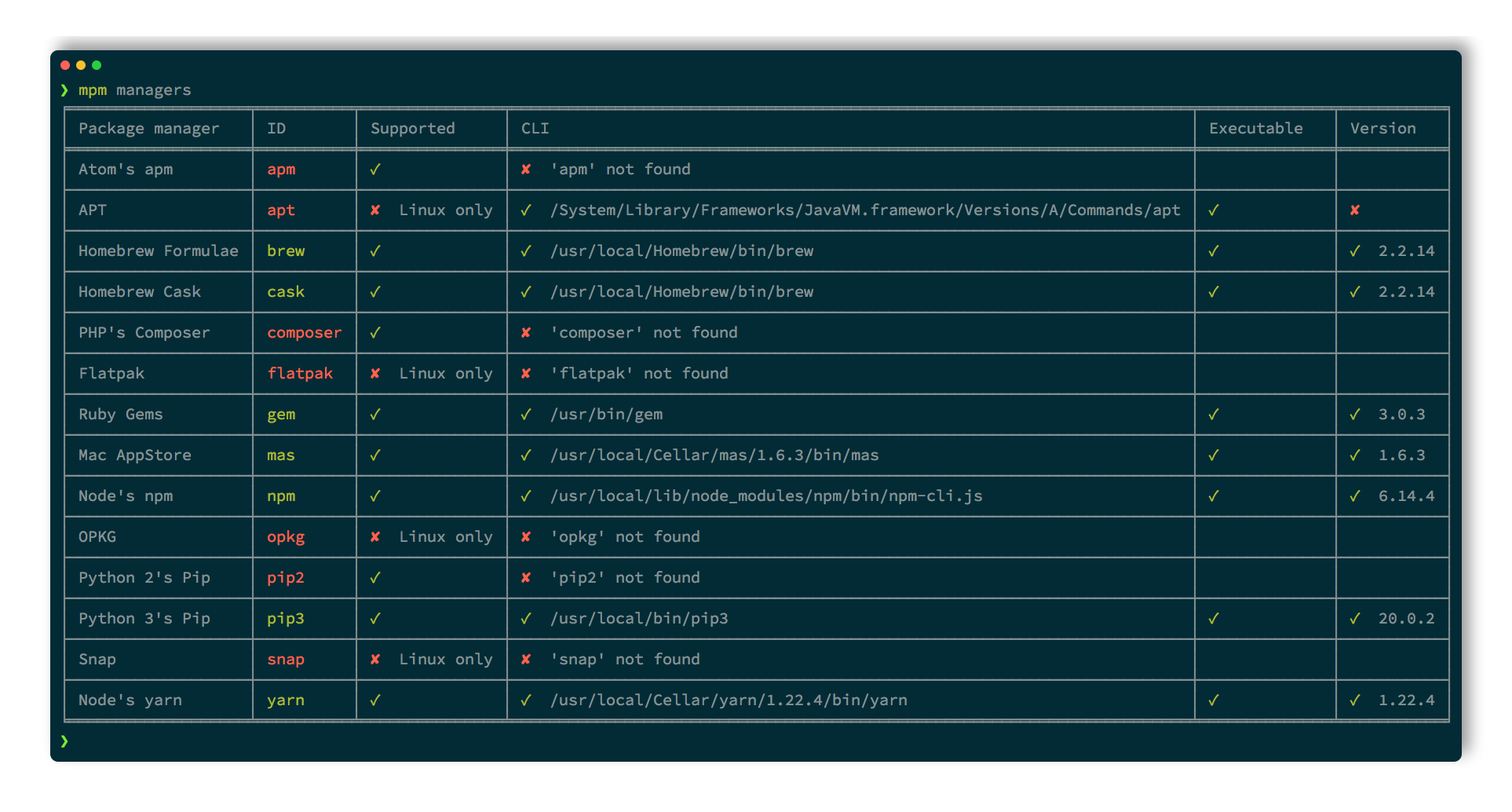
- Inventory and list all package managers available on the system.
- Supports macOS, Linux and Windows.
- Standalone executables for Linux, macOS and Windows.
- List installed packages.
- List duplicate installed packages.
- Search for packages.
- Install a package.
- Remove a package.
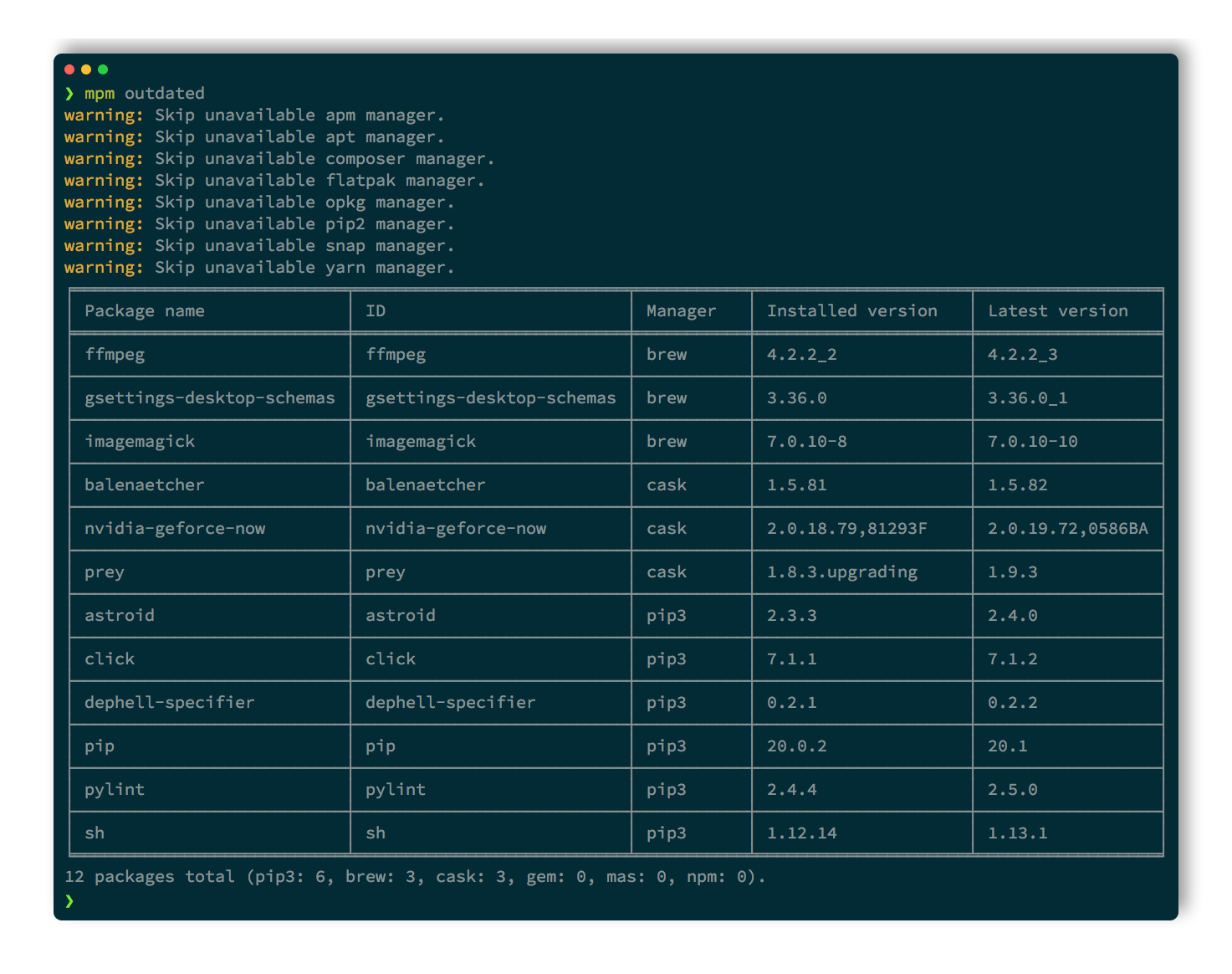
- List outdated packages.
- Sync local package infos.
- Upgrade all outdated packages.
- Mitigate supply-chain attacks with a release-age cooldown that refuses too-recent versions:
mpm --cooldown "7 days" upgrade --all. - Snapshot installed packages to a TOML manifest or a Brewfile.
- Restore/install list of packages from TOML files.
- Software Bill of Materials: export installed packages to SPDX and CycloneDX SBOM files.
- Pin-point commands to a subset of package managers (include/exclude selectors).
- Support plain, versioned and purl package specifiers.
- Export output to JSON or user-friendly tables.
- Shell auto-completion for Bash, Zsh and Fish.
- Provides a Xbar/SwiftBar plugin for friendly macOS integration.
- Because
mpmtry to wrap all other package managers, it became another pathological case of XKCD #927: Standards
Supported package managers
One CLI to rule them all:
---
config: {"sankey": {"showValues": false, "width": 800, "height": 400}}
---
sankey-beta

Meta Package Manager,apk,1
Meta Package Manager,apm,1
Meta Package Manager,apt,1
Meta Package Manager,apt-mint,1
Meta Package Manager,asdf,1
Meta Package Manager,brew,1
Meta Package Manager,cargo,1
Meta Package Manager,cask,1
Meta Package Manager,choco,1
Meta Package Manager,composer,1
Meta Package Manager,cpan,1
Meta Package Manager,deb-get,1
Meta Package Manager,dnf,1
Meta Package Manager,dnf5,1
Meta Package Manager,emerge,1
Meta Package Manager,eopkg,1
Meta Package Manager,flatpak,1
Meta Package Manager,fwupd,1
Meta Package Manager,gem,1
Meta Package Manager,guix,1
Meta Package Manager,macports,1
Meta Package Manager,mas,1
Meta Package Manager,mise,1
Meta Package Manager,nix,1
Meta Package Manager,npm,1
Meta Package Manager,opkg,1
Meta Package Manager,pacaur,1
Meta Package Manager,pacman,1
Meta Package Manager,pacstall,1
Meta Package Manager,paru,1
Meta Package Manager,pip,1
Meta Package Manager,pipx,1
Meta Package Manager,pkg,1
Meta Package Manager,pnpm,1
Meta Package Manager,ports,1
Meta Package Manager,pwsh-gallery,1
Meta Package Manager,scoop,1
Meta Package Manager,sdkman,1
Meta Package Manager,sfsu,1
Meta Package Manager,snap,1
Meta Package Manager,steamcmd,1
Meta Package Manager,stew,1
Meta Package Manager,topgrade,1
Meta Package Manager,uv,1
Meta Package Manager,uvx,1
Meta Package Manager,vscode,1
Meta Package Manager,vscodium,1
Meta Package Manager,winget,1
Meta Package Manager,xbps,1
Meta Package Manager,yarn,1
Meta Package Manager,yarn-berry,1
Meta Package Manager,yay,1
Meta Package Manager,yum,1
Meta Package Manager,zerobrew,1
Meta Package Manager,zypper,1
Metadata and operations
| Package manager | Version | Cooldown | BSD1 | Linux2 | macOS | Unix3 | Windows | installed |
outdated |
search |
install |
upgrade |
upgrade_all |
remove |
sync |
cleanup |
|---|---|---|---|---|---|---|---|---|---|---|---|---|---|---|---|---|
apk |
>=2.10.0 | 🐧 | ✓ | ✓ | ✓ | ✓ | ✓ | ✓ | ✓ | ✓ | ✓ | |||||
apm ⚠️ |
>=1.0.0 | 🅱️ | 🐧 | 🍎 | 🪟 | ✓ | ✓ | ✓ | ✓ | ✓ | ✓ | ✓ | ✓ | |||
apt |
>=1.0.0 | 🅱️ | 🐧 | ⨂ | ✓ | ✓ | ✓ | ✓ | ✓ | ✓ | ✓ | ✓ | ✓ | |||
apt-mint |
>=1.0.0 | 🅱️ | 🐧 | ⨂ | ✓ | ✓ | ✓ | ✓ | ✓ | ✓ | ✓ | ✓ | ✓ | |||
asdf |
>=0.16.0 | 🐧 | 🍎 | ✓ | ✓ | ✓ | ✓ | ✓ | ✓ | ✓ | ✓ | |||||
brew |
>=6.0.0 | 🐧 | 🍎 | ✓ | ✓ | ✓ | ✓ | ✓ | ✓ | ✓ | ✓ | ✓ | ||||
cargo |
>=1.0.0 | 🅱️ | 🐧 | 🍎 | ⨂ | 🪟 | ✓ | ✓ | ✓ | ✓ | ||||||
cask |
>=6.0.0 | 🍎 | ✓ | ✓ | ✓ | ✓ | ✓ | ✓ | ✓ | ✓ | ✓ | |||||
choco |
>=2.0.0 | 🪟 | ✓ | ✓ | ✓ | ✓ | ✓ | ✓ | ✓ | |||||||
composer |
>=1.4.0 | 🅱️ | 🐧 | 🍎 | ⨂ | 🪟 | ✓ | ✓ | ✓ | ✓ | ✓ | ✓ | ✓ | ✓ | ||
cpan |
>=1.64 | 🅱️ | 🐧 | 🍎 | ⨂ | 🪟 | ✓ | ✓ | ✓ | ✓ | ✓ | |||||
deb-get |
🐧 | ✓ | ✓ | ✓ | ✓ | ✓ | ✓ | ✓ | ✓ | ✓ | ||||||
dnf |
>=4.0.0 | 🅱️ | 🐧 | ⨂ | ✓ | ✓ | ✓ | ✓ | ✓ | ✓ | ✓ | ✓ | ✓ | |||
dnf5 |
>=5.0.0 | 🅱️ | 🐧 | ⨂ | ✓ | ✓ | ✓ | ✓ | ✓ | ✓ | ✓ | ✓ | ✓ | |||
emerge |
>=3.0.0 | 🅱️ | 🐧 | ⨂ | ✓ | ✓ | ✓ | ✓ | ✓ | ✓ | ✓ | ✓ | ✓ | |||
eopkg |
>=3.2.0 | 🐧 | ✓ | ✓ | ✓ | ✓ | ✓ | ✓ | ✓ | ✓ | ✓ | |||||
flatpak |
>=1.2.0 | 🅱️ | 🐧 | ⨂ | ✓ | ✓ | ✓ | ✓ | ✓ | ✓ | ✓ | ✓ | ||||
fwupd |
>=1.9.5 | 🐧 | ✓ | ✓ | ✓ | ✓ | ✓ | ✓ | ||||||||
gem |
>=2.5.0 | 🅱️ | 🐧 | 🍎 | ⨂ | 🪟 | ✓ | ✓ | ✓ | ✓ | ✓ | ✓ | ✓ | ✓ | ✓ | |
guix |
🐧 | ✓ | ✓ | ✓ | ✓ | ✓ | ✓ | ✓ | ✓ | ✓ | ||||||
macports |
>=2.0.0 | 🍎 | ✓ | ✓ | ✓ | ✓ | ✓ | ✓ | ✓ | ✓ | ✓ | |||||
mas |
>=7.0.0 | 🍎 | ✓ | ✓ | ✓ | ✓ | ✓ | ✓ | ✓ | |||||||
mise |
>=2025.5.10 | 🅱️ | 🐧 | 🍎 | ⨂ | 🪟 | ✓ | ✓ | ✓ | ✓ | ✓ | ✓ | ✓ | ✓ | ✓ | |
nix |
>=2.0.0 | 🐧 | 🍎 | ✓ | ✓ | ✓ | ✓ | ✓ | ✓ | ✓ | ✓ | ✓ | ||||
npm |
>=11.10.0 | ✓ | 🅱️ | 🐧 | 🍎 | ⨂ | 🪟 | ✓ | ✓ | ✓ | ✓ | ✓ | ✓ | ✓ | ✓ | |
opkg |
>=0.2.0 | 🅱️ | 🐧 | ⨂ | ✓ | ✓ | ✓ | ✓ | ✓ | ✓ | ✓ | ✓ | ||||
pacaur |
>=4.0.0 | 🅱️ | 🐧 | ⨂ | ✓ | ✓ | ✓ | ✓ | ✓ | ✓ | ✓ | ✓ | ✓ | |||
pacman |
>=5.0.0 | 🅱️ | 🐧 | ⨂ | ✓ | ✓ | ✓ | ✓ | ✓ | ✓ | ✓ | ✓ | ✓ | |||
pacstall |
>=6.0.0 | 🐧 | ✓ | ✓ | ✓ | ✓ | ✓ | ✓ | ✓ | ✓ | ||||||
paru |
>=1.9.3 | 🅱️ | 🐧 | ⨂ | ✓ | ✓ | ✓ | ✓ | ✓ | ✓ | ✓ | ✓ | ✓ | |||
pip |
>=26.1.0 | ✓ | 🅱️ | 🐧 | 🍎 | ⨂ | 🪟 | ✓ | ✓ | ✓ | ✓ | ✓ | ✓ | ✓ | ||
pipx |
>=1.0.0 | ✓ | 🅱️ | 🐧 | 🍎 | ⨂ | 🪟 | ✓ | ✓ | ✓ | ✓ | ✓ | ✓ | |||
pkg |
>=1.11 | ✓ | ✓ | ✓ | ✓ | ✓ | ✓ | ✓ | ✓ | ✓ | ||||||
pnpm |
>=11.0.0 | ✓ | 🅱️ | 🐧 | 🍎 | ⨂ | 🪟 | ✓ | ✓ | ✓ | ✓ | ✓ | ✓ | ✓ | ✓ | |
ports |
✓ | ✓ | ✓ | ✓ | ✓ | ✓ | ✓ | ✓ | ||||||||
pwsh-gallery |
>=7.4.0 | 🐧 | 🍎 | 🪟 | ✓ | ✓ | ✓ | ✓ | ✓ | ✓ | ✓ | |||||
scoop |
>=0.2.4 | 🪟 | ✓ | ✓ | ✓ | ✓ | ✓ | ✓ | ✓ | ✓ | ✓ | |||||
sdkman |
>=5.0.0 | 🐧 | 🍎 | ✓ | ✓ | ✓ | ✓ | ✓ | ✓ | ✓ | ✓ | |||||
sfsu |
>=1.16.0 | 🪟 | ✓ | ✓ | ✓ | ✓ | ✓ | ✓ | ✓ | ✓ | ✓ | |||||
snap |
>=2.0.0 | 🅱️ | 🐧 | ⨂ | ✓ | ✓ | ✓ | ✓ | ✓ | ✓ | ✓ | |||||
steamcmd |
🅱️ | 🐧 | 🍎 | ⨂ | 🪟 | ✓ | ||||||||||
stew |
>=0.3.0 | 🐧 | 🍎 | 🪟 | ✓ | ✓ | ✓ | ✓ | ✓ | |||||||
topgrade |
>=17.0.0 | 🅱️ | 🐧 | 🍎 | 🪟 | ✓ | ||||||||||
uv |
>=0.5.0 | ✓ | 🅱️ | 🐧 | 🍎 | ⨂ | 🪟 | ✓ | ✓ | ✓ | ✓ | ✓ | ✓ | ✓ | ||
uvx |
>=0.10.10 | ✓ | 🅱️ | 🐧 | 🍎 | ⨂ | 🪟 | ✓ | ✓ | ✓ | ✓ | ✓ | ✓ | |||
vscode |
>=1.60.0 | 🅱️ | 🐧 | 🍎 | ⨂ | 🪟 | ✓ | ✓ | ✓ | |||||||
vscodium |
>=1.60.0 | 🅱️ | 🐧 | 🍎 | ⨂ | 🪟 | ✓ | ✓ | ✓ | |||||||
winget |
>=1.28.190 | 🪟 | ✓ | ✓ | ✓ | ✓ | ✓ | ✓ | ✓ | ✓ | ||||||
xbps |
>=0.59 | 🐧 | ✓ | ✓ | ✓ | ✓ | ✓ | ✓ | ✓ | ✓ | ✓ | |||||
yarn |
>=1.20.0,<2.0.0 | 🅱️ | 🐧 | 🍎 | ⨂ | 🪟 | ✓ | ✓ | ✓ | ✓ | ✓ | ✓ | ✓ | ✓ | ||
yarn-berry |
>=2.0.0 | 🅱️ | 🐧 | 🍎 | ⨂ | 🪟 | ✓ | ✓ | ||||||||
yay |
>=11.0.0 | 🅱️ | 🐧 | ⨂ | ✓ | ✓ | ✓ | ✓ | ✓ | ✓ | ✓ | ✓ | ✓ | |||
yum |
>=4.0.0 | 🅱️ | 🐧 | ⨂ | ✓ | ✓ | ✓ | ✓ | ✓ | ✓ | ✓ | ✓ | ✓ | |||
zerobrew |
>=0.3.0 | 🐧 | 🍎 | ✓ | ✓ | ✓ | ✓ | ✓ | ✓ | |||||||
zypper |
>=1.14.0 | 🅱️ | 🐧 | ⨂ | ✓ | ✓ | ✓ | ✓ | ✓ | ✓ | ✓ | ✓ | ✓ |
[!NOTE] If your favorite manager is missing or does not support an operation, you can influence its implementation: open a ticket to document its output or read the contribution guide and submit a pull request.
You can help if you purchase business support 🤝 or sponsor the project 🫶.
Installation
All installation methods are available in the documentation. Below are the most popular ones:
macOS
mpm is part of the official Homebrew default tap, so you can install it with:
$ brew install meta-package-manager
Windows
mpm is available in the main repository of Scoop, so you just need to:
> scoop install main/meta-package-manager
Executables
Standalone binaries of mpm latest version are available as direct downloads for several platforms and architectures:
| Platform | arm64 |
x86_64 |
|---|---|---|
| Linux | Download mpm-linux-arm64.bin |
Download mpm-linux-x64.bin |
| macOS | Download mpm-macos-arm64.bin |
Download mpm-macos-x64.bin |
| Windows | Download mpm-windows-arm64.exe |
Download mpm-windows-x64.exe |
No need to install Python or uv. Useful for CI/CD pipelines running on minimal images, or old platforms where dependency management is painful.
Quickstart
List installed packages
List all packages installed on current system:
$ mpm installed
╭─────────────────────────────┬─────────────────────────────┬─────────┬────────────────────╮
│ Package name                │ ID                          │ Manager │ Installed version  │
├─────────────────────────────┼─────────────────────────────┼─────────┼────────────────────┤
│ github                      │ github                      │ apm     │ 0.36.9             │
│ update-package-dependencies │ update-package-dependencies │ apm     │ 0.13.1             │
│ rust                        │ rust                        │ brew    │ 1.55.0             │
│ x264                        │ x264                        │ brew    │ r3060              │
│ atom                        │ atom                        │ cask    │ 1.58.0             │
│ visual-studio-code          │ visual-studio-code          │ cask    │ 1.52.0             │
│ nokogiri                    │ nokogiri                    │ gem     │ x86_64-darwin      │
│ rake                        │ rake                        │ gem     │ 13.0.3             │
│ iMovie                      │ 408981434                   │ mas     │ 10.2.5             │
│ Telegram                    │ 747648890                   │ mas     │ 8.1                │
│ npm                         │ npm                         │ npm     │ 7.24.0             │
│ raven                       │ raven                       │ npm     │ 2.6.4              │
│ jupyterlab                  │ jupyterlab                  │ pip     │ 3.1.14             │
│ Sphinx                      │ Sphinx                      │ pip     │ 4.2.0              │
│ ms-python.python            │ ms-python.python            │ vscode  │ 2021.10.1317843341 │
│ ms-toolsai.jupyter          │ ms-toolsai.jupyter          │ vscode  │ 2021.9.1001312534  │
╰─────────────────────────────┴─────────────────────────────┴─────────┴────────────────────╯
16 packages total (brew: 2, pip: 2, apm: 2, gem: 2, cask: 2, mas: 2, vscode: 2, npm: 2, composer: 0).
Narrow the listing to packages whose ID or name matches a query by passing it as an argument. The match is fuzzy by default (case-insensitive and tokenized); add --exact to require a verbatim match on the package ID or name:
$ mpm installed sphinx
$ mpm installed --exact Sphinx
List outdated packages
List all packages installed for which an upgrade is available:
$ mpm outdated
╭──────────────┬─────────────┬─────────┬───────────────────┬────────────────╮
│ Package name │ ID          │ Manager │ Installed version │ Latest version │
├──────────────┼─────────────┼─────────┼───────────────────┼────────────────┤
│ curl         │ curl        │ brew    │ 7.79.1            │ 7.79.1_1       │
│ git          │ git         │ brew    │ 2.33.0            │ 2.33.0_1       │
│ openssl@1.1  │ openssl@1.1 │ brew    │ 1.1.1l            │ 1.1.1l_1       │
│ rake         │ rake        │ gem     │ 13.0.3            │ 13.0.6         │
│ Telegram     │ 747648890   │ mas     │ 8.1               │ 8.1.3          │
│ npm          │ npm@8.0.0   │ npm     │ 7.24.0            │ 8.0.0          │
│ pip          │ pip         │ pip     │ 21.2.4            │ 21.3           │
│ regex        │ regex       │ pip     │ 2021.9.30         │ 2021.10.8      │
╰──────────────┴─────────────┴─────────┴───────────────────┴────────────────╯
8 packages total (brew: 3, pip: 2, gem: 1, mas: 1, npm: 1, apm: 0, cask: 0, composer: 0).
The same query argument restricts the listing to outdated packages whose ID or name matches, again fuzzy by default and exact with --exact:
$ mpm outdated git
List managers
If you wonder why your package manager doesn't seems to be identified, you can list all those recognized by mpm with:
$ mpm --all-managers managers
╭────────────┬────────────────────┬────────────────┬──────────────────────────────┬────────────┬───────────╮
│ Manager ID │ Name               │ Supported      │ CLI                          │ Executable │ Version   │
├────────────┼────────────────────┼────────────────┼──────────────────────────────┼────────────┼───────────┤
│ apm        │ Atom apm           │ ✓              │ ✘ apm not found              │            │           │
│ apt        │ Debian apt         │ ✘ Linux only   │ ✓ /usr/bin/apt               │ ✓          │ ✘         │
│ apt-mint   │ Linux Mint apt     │ ✘ Linux only   │ ✓ /usr/bin/apt               │ ✓          │ ✘         │
│ brew       │ Homebrew Formulae  │ ✓              │ ✓ /opt/homebrew/bin/brew     │ ✓          │ ✓ 3.6.3   │
│ cargo      │ Rust cargo         │ ✓              │ ✓ /opt/homebrew/bin/cargo    │ ✓          │ ✓ 1.64.0  │
│ cask       │ Homebrew Cask      │ ✓              │ ✓ /opt/homebrew/bin/brew     │ ✓          │ ✓ 3.6.3   │
│ choco      │ Chocolatey         │ ✘ Windows only │ ✘ choco not found            │            │           │
│ composer   │ PHP Composer       │ ✓              │ ✓ /opt/homebrew/bin/composer │ ✓          │ ✓ 2.4.2   │
│ dnf        │ Fedora DNF         │ ✘ Linux only   │ ✘ dnf not found              │            │           │
│ emerge     │ Gentoo emerge      │ ✘ Linux only   │ ✘ emerge not found           │            │           │
│ flatpak    │ Flatpak            │ ✘ Linux only   │ ✘ flatpak not found          │            │           │
│ gem        │ RubyGems           │ ✓              │ ✓ /usr/bin/gem               │ ✓          │ ✓ 3.0.3.1 │
│ mas        │ Mac App Store      │ ✓              │ ✓ /opt/homebrew/bin/mas      │ ✓          │ ✓ 1.8.6   │
│ npm        │ Node npm           │ ✓              │ ✓ /opt/homebrew/bin/npm      │ ✓          │ ✓ 8.19.2  │
│ opkg       │ opkg               │ ✘ Linux only   │ ✘ opkg not found             │            │           │
│ pacman     │ Arch Linux pacman  │ ✘ Linux only   │ ✘ pacman not found           │            │           │
│ pacstall   │ Pacstall           │ ✘ Linux only   │ ✘ pacstall not found         │            │           │
│ paru       │ Arch Linux paru    │ ✘ Linux only   │ ✘ paru not found             │            │           │
│ pip        │ Python pip         │ ✓              │ ✓ ~/.pyenv/shims/python3     │ ✓          │ ✓ 22.2.2  │
│ pipx       │ Python pipx        │ ✓              │ ✓ /opt/homebrew/bin/pipx     │ ✓          │ ✓ 1.1.0   │
│ scoop      │ Scoop              │ ✘ Windows only │ ✘ scoop not found            │            │           │
│ sdkman     │ SDKMAN             │ ✓              │ ✘ sdkman-init.sh not found   │            │           │
│ snap       │ Snap               │ ✘ Linux only   │ ✘ snap not found             │            │           │
│ steamcmd   │ Valve SteamCMD     │ ✓              │ ✘ steamcmd not found         │            │           │
│ vscode     │ Visual Studio Code │ ✓              │ ✓ /opt/homebrew/bin/code     │ ✓          │ ✓ 1.71.2  │
│ yarn       │ Yarn Classic       │ ✓              │ ✓ /opt/homebrew/bin/yarn     │ ✓          │ ✓ 1.22.19 │
│ yarn-berry │ Yarn Berry         │ ✓              │ ✓ /opt/homebrew/bin/yarn     │ ✓          │ ✗ 1.22.19 │
│ yay        │ Arch Linux yay     │ ✘ Linux only   │ ✘ yay not found              │            │           │
│ yum        │ Fedora YUM         │ ✘ Linux only   │ ✘ yum not found              │            │           │
│ zypper     │ openSUSE Zypper    │ ✘ Linux only   │ ✘ zypper not found           │            │           │
╰────────────┴────────────────────┴────────────────┴──────────────────────────────┴────────────┴───────────╯
If your favorite manager is not supported yet, you can help! See the contribution guide.
Used in
Check these projects to get real-life examples of mpm usage:
Dotfiles - macOS dotfiles for Python developers, using
mpmto manage system packages.
Feel free to send a PR to add your project in this list if you are relying on mpm in any way.
Usage
Other subcommands and options are documented in:
- the detailed help screens
- the list of use-cases where you’ll find inspiration on how to leverage
mpmpower
-
BSD: DragonFly BSD, FreeBSD, MidnightBSD, NetBSD, OpenBSD, SunOS. ↩
-
Linux: Alpine Linux, ALT Linux, Amazon Linux, Android, Arch Linux, Buildroot, CachyOS, CentOS, CloudLinux OS, Debian, Exherbo Linux, Fedora, Generic Linux, Gentoo Linux, Guix System, IBM PowerKVM, Kali Linux, KVM for IBM z Systems, Linux Mint, Mageia, Mandriva Linux, Manjaro Linux, NixOS, Nobara, openSUSE, openSUSE Tumbleweed, OpenWrt, Oracle Linux, Parallels, Pidora, Raspbian, RedHat Enterprise Linux, Rocky Linux, Scientific Linux, Slackware, SUSE Linux Enterprise Server, Tuxedo OS, Ubuntu, Ultramarine, Void Linux, Windows Subsystem for Linux v1, Windows Subsystem for Linux v2, XenServer. ↩
-
Unix: Cygwin, GNU/Hurd, Haiku, IBM AIX, IBM i, illumos, Solaris. ↩
Project details
Verified details
These details have been verified by PyPIProject links
GitHub Statistics
Maintainers
Release history Release notifications | RSS feed


Download files
Download the file for your platform. If you're not sure which to choose, learn more about installing packages.
Source Distribution
Built Distribution
Filter files by name, interpreter, ABI, and platform.
If you're not sure about the file name format, learn more about wheel file names.
Copy a direct link to the current filters
File details
Details for the file meta_package_manager-7.0.1.tar.gz.
File metadata
- Download URL: meta_package_manager-7.0.1.tar.gz
- Upload date:
- Size: 241.3 kB
- Tags: Source
- Uploaded using Trusted Publishing? Yes
- Uploaded via: uv/0.11.25 {"installer":{"name":"uv","version":"0.11.25","subcommand":["publish"]},"python":null,"implementation":{"name":null,"version":null},"distro":{"name":"Ubuntu","version":"24.04","id":"noble","libc":null},"system":{"name":null,"release":null},"cpu":null,"openssl_version":null,"setuptools_version":null,"rustc_version":null,"ci":true}
File hashes
| Algorithm | Hash digest | |
|---|---|---|
| SHA256 |
4de3ba0d4da7de0bd29cc3a824c2e328d3098440a2391e78b29ee9c605629510
|
|
| MD5 |
1a0904c19966cc576eb058e3bafe7086
|
|
| BLAKE2b-256 |
888c3a64fc201514510d906e7a9a37fc8f2d935f62aa939e2f9caa324d820e4a
|
Provenance
The following attestation bundles were made for meta_package_manager-7.0.1.tar.gz:
Publisher:
release.yaml on kdeldycke/meta-package-manager
-
Statement:
-
Statement type:
https://in-toto.io/Statement/v1 -
Predicate type:
https://docs.pypi.org/attestations/publish/v1 -
Subject name:
meta_package_manager-7.0.1.tar.gz -
Subject digest:
4de3ba0d4da7de0bd29cc3a824c2e328d3098440a2391e78b29ee9c605629510 - Sigstore transparency entry: 1979904388
- Sigstore integration time:
-
Permalink:
kdeldycke/meta-package-manager@a8dcc9f8eac46f8a3de38978e00594d14100f11e -
Branch / Tag:
refs/heads/main - Owner: https://github.com/kdeldycke
-
Access:
public
-
Token Issuer:
https://token.actions.githubusercontent.com -
Runner Environment:
github-hosted -
Publication workflow:
release.yaml@a8dcc9f8eac46f8a3de38978e00594d14100f11e -
Trigger Event:
push
-
Statement type:
File details
Details for the file meta_package_manager-7.0.1-py3-none-any.whl.
File metadata
- Download URL: meta_package_manager-7.0.1-py3-none-any.whl
- Upload date:
- Size: 303.0 kB
- Tags: Python 3
- Uploaded using Trusted Publishing? Yes
- Uploaded via: uv/0.11.25 {"installer":{"name":"uv","version":"0.11.25","subcommand":["publish"]},"python":null,"implementation":{"name":null,"version":null},"distro":{"name":"Ubuntu","version":"24.04","id":"noble","libc":null},"system":{"name":null,"release":null},"cpu":null,"openssl_version":null,"setuptools_version":null,"rustc_version":null,"ci":true}
File hashes
| Algorithm | Hash digest | |
|---|---|---|
| SHA256 |
74bdfcd7b3ca12a6c5cb75250b57422fe83a2d2e9c005eeb6fe5e8ffbb683f56
|
|
| MD5 |
404de0f4050b68e9432e5d89394ae887
|
|
| BLAKE2b-256 |
f2ad9f288990e44f88b929d99bbdb0b53bd057e48d0557b932464058bf51219d
|
Provenance
The following attestation bundles were made for meta_package_manager-7.0.1-py3-none-any.whl:
Publisher:
release.yaml on kdeldycke/meta-package-manager
-
Statement:
-
Statement type:
https://in-toto.io/Statement/v1 -
Predicate type:
https://docs.pypi.org/attestations/publish/v1 -
Subject name:
meta_package_manager-7.0.1-py3-none-any.whl -
Subject digest:
74bdfcd7b3ca12a6c5cb75250b57422fe83a2d2e9c005eeb6fe5e8ffbb683f56 - Sigstore transparency entry: 1979904273
- Sigstore integration time:
-
Permalink:
kdeldycke/meta-package-manager@a8dcc9f8eac46f8a3de38978e00594d14100f11e -
Branch / Tag:
refs/heads/main - Owner: https://github.com/kdeldycke
-
Access:
public
-
Token Issuer:
https://token.actions.githubusercontent.com -
Runner Environment:
github-hosted -
Publication workflow:
release.yaml@a8dcc9f8eac46f8a3de38978e00594d14100f11e -
Trigger Event:
push
-
Statement type:






